
CloudCross5

- 全期間
- 2年
- 1年
- 6カ月
- 3カ月
- 1カ月

公式運用(収益額)
詳細統計(月別)
- 1月
- 2月
- 3月
- 4月
- 5月
- 6月
- 7月
- 8月
- 9月
- 10月
- 11月
- 12月
今月のカレンダーを表示
ストラテジーについて
Translating...
CloudCross5ロジック説明
// 本EAについて
GBPJPY1時間足(H1)のトレンドフォロー型スウィングトレードで、含み益がある時にポジションを積み増しするピラミッディング機能で取引を優位に展開します。※デフォルトオン。複数ポジションを建てます。 また複数の決済ロジックを装備し、複雑な相場環境に対応しています。
// このEAの特徴
一目均衡表をベースに改良したオリジナルインジケータを使い、トレンドフォローのスイングトレードで利益を伸ばします。 基本設定、週末決済、指定期間取引制限、TPSLオートサイジング機能、ピラミッティング等の機能で複雑に移り変わる相場環境に追従してきます。これらの機能はパラメータで変更可能となっています。
// ピラミッディングとは?
ポジションが含み損になっている時にポジションを積むナンピンとは逆に、エントリー後相場が順行してポジションが含み益になっている時にポジションを積んでいきます(最大ポジション数を指定できます)。含み損のポジションが増えていくよりも、含み益のポジションが増えていく様子は圧倒的にメンタルに良いですし、イベント前にプラスの利益で手動全決済などができる可能性が高くなります。 ※バックテストでは手動の決済等は入れていません。裁量判断の手動決済をすると本来のポテンシャルが引き出せない場合がありますので、ご認識いただき運用をお願いいたします。
// 安全運用
内部ロジックによる損切り(反対シグナルによる)他、ネガティブポジションクローズ機能や適切なストップロスを設定しますので、相場がネガティブな動きになった場合でも安心して運用できる設計になっています。
// 運用ロット
パラメータのロット変更により、資金に合わせた運用ができます。
// スプレッドフィルター
ご利用になる口座の特性に合わせてスプレッドフィルターを設定することが可能です。(デフォルトオフ)
// トレイリングストップ/トレイリングテイク機能
トレイリングストップ機能で利益の取り損ないを抑え、トレイリングテイク(独自機能)で損失を小さく抑えます。 ※本機能は決済モードになっていることが必要ですので、本機能のみで決済は掛かりませんのでご注意ください。 (決済モードについては後述の説明をご覧ください)
// エントリー方向制限
ロングのみ、ショートのみ、両方向の取引が選択できますので設定により両建て禁止口座でも使えます。(過去10年のバックテストにおいてはロングの方が圧倒的に有利です)
// 期間取引制限/曜日取引制限
パフォーマンスが低下する期間、取引をしない設定をすることができます(パラメータにて変更可。デフォルトは10年間での最適化済み)。また、曜日でも取引の許可と制限を指定できます。
// 新機能について(v12.1)
- TPSLオートサイジング機能 旧バージョンでは、指定した値の固定値でTPSLをセットしていましたが、移り変わる相場にマッチしない場合がある為、直近の値幅平均の何倍かという倍率のみ指定して、その時の相場に追従する仕様としました。
- ポジションオーバークローズ機能 ピラミッディング機能でポジションを積み増ししていき、指定のポジション数が上限に達した状態で次の始値でさらに含み益になった場合に決済をします。
- ネガティブポジションクローズ機能 複数ポジション保有状態で指定したポジション数が含み損になった場合に決済をします。最低保有ポジション数とネガティブポジション数を指定します。 ※本機能は、ロング/ショート各々最低保有ポジション数を最大ポジション数以下に指定する必要があります。
// バックテスト 2015.12.2~2025.12.2
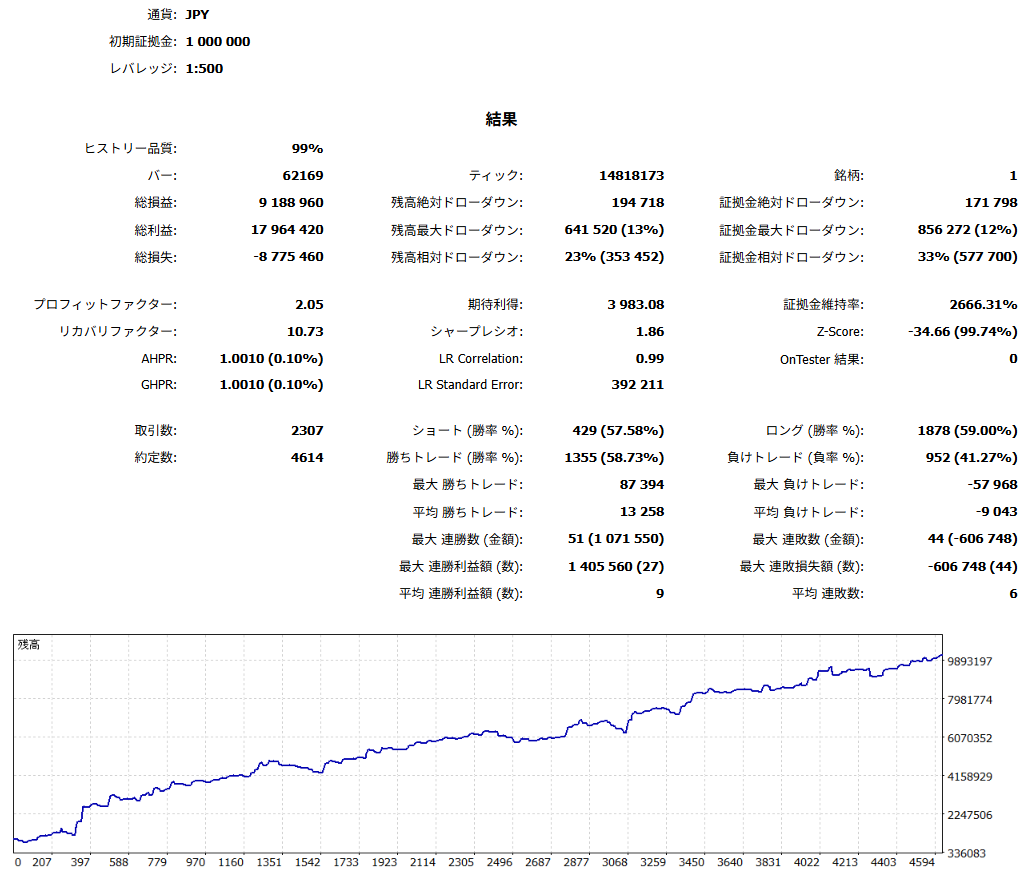
新機能で非常に安定した損益曲線となりました。
// 新表示システム
・Buy/Sellモード表示(Buy/Sellそれぞれの状態をモードとして表示します)
- エントリー非許可:エントリーが許可されていない場合にこの表示となります。
- 計測中:最初の始値まで計測中となります。
- 待機中:エントリー/決済モードのいずれにも該当しない状態。待機中モードであってもポジション保有中で全てが含み益となっている場合は始値でポジション積み増しのエントリーは実行します。(ピラミッディングオンの場合)
- エントリーモード:最大ポジション数未満であればエントリーします。
- 決済モード:メインロジックが決済条件を満たした場合に決済モードになります。なおかつTrailingStop、TrailingTakeの条件を満たした場合は、条件に従ってTPSLを再セットします。TrailingStop、TrailingTakeの条件を満たさない場合はそのまま成行決済します。
// TrailingStop、TrailingTakeの概要と稼働条件
本EAにおいてのTrailingStop、TrailingTake機能は、無条件で効かせた場合、成績の向上が見られなかった為メインの決済機能としては働かない仕様となっています。 メインロジックが決済モードに入ってからセットされる事で効果を発揮しますので、特性をご認識の上ご利用ください。
- 保有ポジションが決済モードに入る
- 各々含み益、含み損が指定値に達する→機能作動
・TrailingStop、TrailingTake値のご説明
TrailingStop:
始値で、含み益を指定値で割ったPips幅でSLを再セット
TPはエントリー時のまま
TrailingTake:
始値で、含み損を指定値で割ったPips幅でTPを再セット
SLはエントリー時のまま
// ご注意
損小利大のロジックで利益を伸ばしていく性質上、ダマシも受け入れます。ドローダウンが続くことがあり、トータルで勝つことを前提に設計されていますので、短期運用には向いていません。年単位での運用計画を立てる方向けのEAとなります。LOT管理によってはハイリスクになってしまいますので、ご自身で適切な運用をお願いします。
// ご不明点とお問い合わせ
ご不明点があれば、Gogojungleにログインした上でオンラインコミュニティに参加していただければ、そちらでお答えいたします。 https://www.gogojungle.co.jp/mypage/community/330
// 制作者
オサムシ@EA開発侍



●お支払い方法





裁量トレードと同じように、インジケーターを組み合わせて取引タイミングや決済タイミングを決めるもの、一定の価格(pips)間隔で買いや売りを繰り返すもの、相場のアノマリーや時間的特徴を利用した取引手法など、その種類は裁量トレードの手法と同じく豊富です。
簡単に分類すると、
・スキャルピング(数分~数時間以内で取引が完了するタイプ)、
・デイトレード(数時間~1日程度で取引が完了するタイプ)、
・スイング(1日以上~1週間程度の比較的長い期間をかけて取引を行うタイプ)
・ナンピン・マーチン(等間隔または不等間隔で複数のポジションを持ち、利益が出たら一括で決済をするタイプ。ロット数を段階的に上げていくものをマーチンゲールといいます。)
・アノマリーEA(仲値トレード、早朝スキャルピング)
などがあります。
ただし、自動売買は予めリスクを限定できる、予想できるということが大きな強みでもあります。
【リスク】
FX取引をする以上は取引リスクは自動売買にももちろん存在します。
・ロットサイズのリスク
勝率が高いからといってロットを無理に大きくすると、EAによってはまれに負けた時の損失Pipsが大きい場合があります。必ずSLのPipsや保有ポジション数を確認してから、適切なロットで運用しましょう。
・急激な相場変動リスク
指標発表や、突発的なニュースによって急激に相場が動くケースがあります。システムトレードはそのような予測できない相場の動きを想定していないため、事前に決済しておく、取引しないなどの判断が出来ません。対策としては指標発表やVIX(恐怖指数)でEAの停止を行うツールなどを使うことも可能です。
【メリット】
・24時間取引してくれる
システムトレードはあなたの代わりに取引できるチャンスがあれば、淡々とトレードを行ってくれます。トレードに時間を割けない方にとってはとても便利な武器になってくれるでしょう。
・感情にコントロールされることなく淡々とトレードしてくれる
裁量トレードで負けが続き、ロットを大きくしてみたり、逆に少ない利益ですぐに利確してしまうといった、人間にありがちなルールの自己都合化がありません。
・初心者でも始められる
FX取引を行うにはまず勉強から…といった必要がなく、誰が使っても同じ結果になるのがシステムトレードです。
【デメリット】
・取引頻度を自由に増やせない
システムトレードは予めプログラムされた条件通りに取引をするため、EAのタイプによっては月に何度かしか取引をしない場合もあります。
・相場に合う、合わないがある
EAの取引タイプによって、順張りに向いている時期、逆張りに向いている時期などがあるため、すべての期間において成績が一定になることは少ないです。去年は良かったが、今年はあまり成績が振るわないということもあるため、運用する時期なのかどうかをある程度裁量で判断する必要があります。
・MT4(MetaTrader4。MT4が使えるFX会社で口座開設をする必要があります)
・EA(自動売買用プログラム)
・EAを運用するのに必要な運用資金
・24時間稼働可能なPCまたはVPS(クラウドサーバー上に仮想PCを置き、そこでMT4を立ち上げておく)
また、口座にはデモ口座とリアル口座があり、デモ口座を申請すると仮想の資金でトレードを体験することができます。リアル口座を開設したあと、FX会社から割り振られた接続サーバーを選択し、パスワードを入力して口座にログインします。
FX会社に指定された方法で口座資金を入金すると、MT4口座に資金が反映されて取引ができるようになります。
まず、購入したEAファイルをGogoJungleのマイページからDLします。zip(圧縮)ファイルがDLされるので、右クリックで解凍して中の「◯◯◯(EA名称)_A19GAw09(任意の8英数字).ex4」というファイルを取り出します。
次に、MT4を立ち上げ、「ファイル」→「データフォルダを開く」→「MQL4」→「Experts」フォルダーの中に、ex4ファイルを入れます。MT4を一度閉じ、再起動したら、上部メニューの「ツール」→「オプション」の「エキスパートアドバイザー」の「自動売買を許可する」、「DLLの使用を許可する」にチェックを入れてOKを押して閉じます。
EAの正しい運用に必要な通貨ペアと時間足がEA販売ページに書いてあるので、それを参照して正しい通貨ペアの時間足のチャートを開きます(例:USDJPY5M ドル円5分足)。
メニューのナビゲーター内、「エキスパートアドバイザ」に先ほど入れたEAファイル名があるので、クリックして選択し、そのままドラッグ&ドロップでチャート内にEAを載せます。EA名ダブルクリックでも、選択されているチャートに載せることができます。
チャート上の左上に、「Authentification Success」と出れば認証成功です。 EAの運用には、24時間PCを立ち上げて置く必要がありますので、自動スリープ機能を解除するか、VPS上にMT4を置いてEAを運用ください。
認証されている口座以外で利用したい場合は、登録口座をリセットする必要があります。
口座のリセット方法は、Web認証が登録されているMT4を閉じている状態で、
GogoJungleのマイページ>利用する>デジタルコンテンツ>該当のEA>登録番号の「リセット」ボタンを押すと、登録口座が解除されます。
口座がリセットされている状態で、他のMT4口座でEAを利用すると、新たに口座が登録されます。
また、口座のリセットは無制限に行っていただけます。
→ EAが動かない時にチェックする項目
1ロット=10万通貨
0.1ロット=1万通貨
0.01ロット=1000通貨
となります。
ドル円であれば1ロット=10万ドルを保有することになります。
ロット保有にかかる証拠金はFX会社の定めるレバレッジによって決まります。
レバレッジ25倍であれば、1万通貨のドル円を保有するのに必要な証拠金は 10000*109(※1ドル109円レート時)÷25 = 43,600円 となります。
・リスクリターン率:期間中損益の合計÷最大ドローダウン
・最大ドローダウン:運用期間中の最大含み損
・最大ポジション数:そのEAが理論上同時に持ちうる最大のポジション数です
・TP(Take Profit):EAの設定上の利確Pips(または指定された金額など)
・SL(Stop Loss):EAの設定上の最大損失pips(または指定された金額など)
・トレーリングストップ:決済を指定のPipsで行うのではなく、一定の利益が出たら決済SLを一定の間隔で引き上げて(利益の方向へ)行く、利益を最大化する決済方法です。
・リスクリワード率(ペイオフレシオ):平均利益÷平均損失
・両建て:買いと売りを同時に保有すること(一部のFX会社では両建て不可のタイプもあります)
人気商品
特定商取引法に基づく表示
株式会社ゴゴジャン
早川忍
〒113-0033
東京都文京区本郷3-6-6 本郷OGIビル6F
お問い合わせページよりお願い致します。
03-5844-6090
月曜日~金曜日
10:00~19:00
セミナーのリアルタイム動画配信サービス・動画配信サービス、対面式セミナー、電子書籍、ソフトウェア、シグナル配信、セミナーのビデオ
※セミナーのリアルタイム動画配信サービスとは、セミナー実施時に即時弊社サーバーより配信するサービスです。
※セミナーの動画配信サービスとは、保存されたセミナー動画を弊社サーバーより配信するサービスです。
※セミナーのビデオとは、保存されたセミナー動画をお客様のPCにダウンロードするサービスです。
各商品の販売価格は、商品ページにて税込価格で表示しております。
オンライン上でのダウンロード、または配信
https://www.gogojungle.co.jp/
原則として弊社によるお客様のご入金完了後即ご提供いたします。
銀行振り込みご利用の場合は、商品代金(税込表示)に加えて振り込み手数料がかかります。
ホームページ上の専用申込フォームよりご注文ください。
銀行振込 / クレジットカード決済/ Web口座振替/ コンビニ決済
ファミリーマートでのお支払い方法
デイリーヤマザキ・ヤマザキデイリーストアーでのお支払い方法
お申込み日から2日以上経つ場合、お申込をキャンセルさせていただきます。予めご了承ください。
1.セミナーのリアルタイム動画配信サービス、動画配信サービスは配信実施24時間前以降のキャンセルはお受けいたしておりません。ご返金対応ができませんので十分ご注意ください。
2.対面式セミナーは、開催の3営業日前以降のキャンセルおよびご返金はお受けいたしておりません。
3.電子書籍、ソフトウェア、ビデオは、著作権保護の観点からお客様のダウンロード実施、または購読開始以降はキャンセルできません。ご返金対応ができません。予めご了承ください。
お客様のご都合によるご返金は、銀行振込・コンビニ決済・Web口座振替の場合振込手数料がすべてお客様負担となります。
カード決済ご利用の場合手数料は生じません。あらかじめご了承ください。
当ページに記載する「発送方法、ご提供方法」「発送時期、 ご提供時期」「代金以外の必要料金」「注文方法」「お支払い方法・期限」
「商品注文後のキャンセル」「返金にかかる費用」の各項目はGogoJungleで販売する全ての商品に適用されますが、商品毎にご案内がある場合は、
商品毎に記載いたします。
GogoJungleが販売者である場合は、商品ページにGogoJungleの「特定商取引に関する法律」に基づく表記を行ないます。
出品者が販売者であり、且つ出品者が「事業者」である場合は、出品者の「特定商取引に関する法律」に基づく表記を行ないます。
出品者が「事業者」に該当するかは出品者の判断によります。ただし、 経済産業省 特定商取引法の通達の改正について
「インターネット・オークションにおける「販売業者」に係るガイドライン」
https://www.caa.go.jp/policies/policy/consumer_transaction/amendment/2016/pdf/amendment_171206_0001.pdf
を鑑み「事業者」であることが明らかな出品者については、「事業者」として扱い開示請求があった場合は迅速に対応します。
