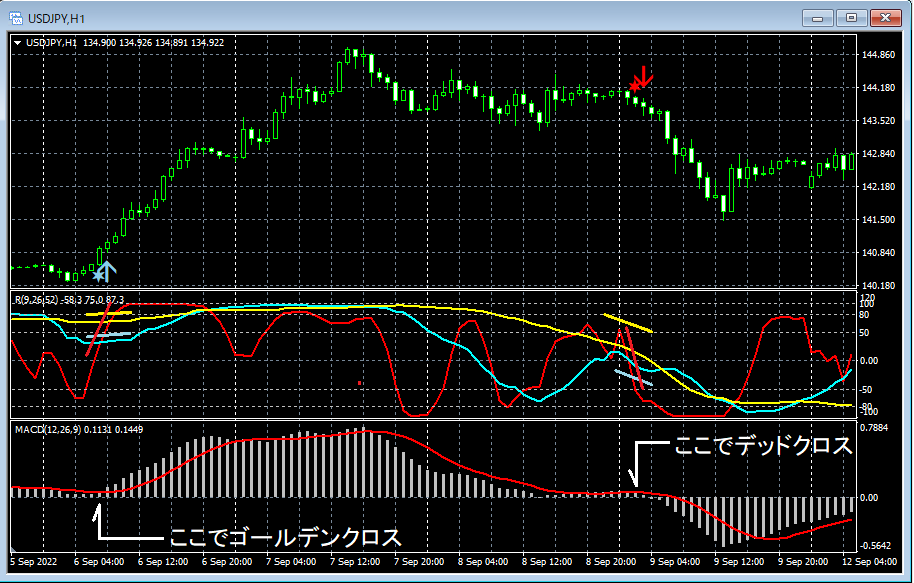

Release of "mBDSR RCI Filter Version"!!
Addendum
※In December 19, 2019, we upgraded further and added a feature that notifies sign occurrences via push notifications in addition to the alert functions (email, sound, dialog).
(End of addendum)
Due to requests from mBDSR users“The mBDSR RCI Filter Version” has been released.
※This indicator is included with the indicators listed below.
An indicator that shines when used in combination with the RCI【BODSOR・mBDSR】
https://www.gogojungle.co.jp/tools/indicators/11836
※If you have already purchased the above indicators, re-download to obtain the“mBDSR RCI Filter Version” included in the download file.
File name
Two RCI filtered: mBDSR_2RCI_VAP_XXXXXXXX.ex4
One RCI filtered: mBDSR_1RCI_VAP_XXXXXXXX.ex4
※This is an indicator without repaint.
mBDSR was developed to improve the accuracy of buy-on-dips and sell-on-pulls using three RCI lines (RCI9, RCI26, RCI52).
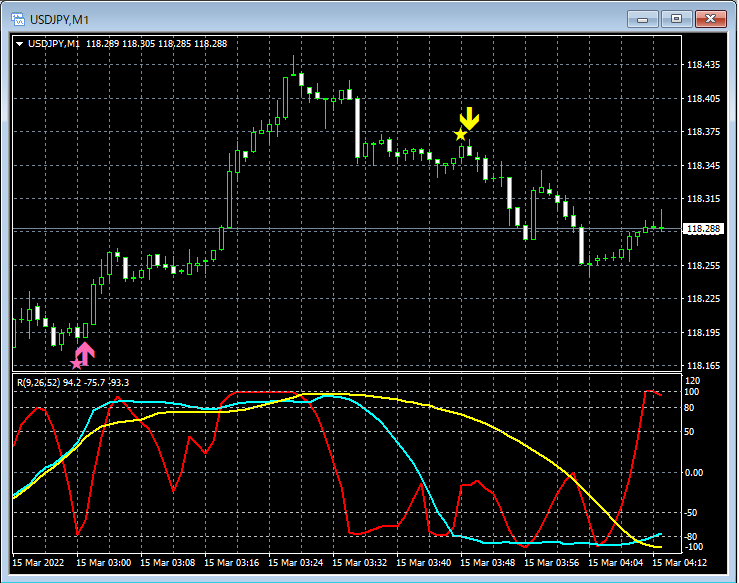
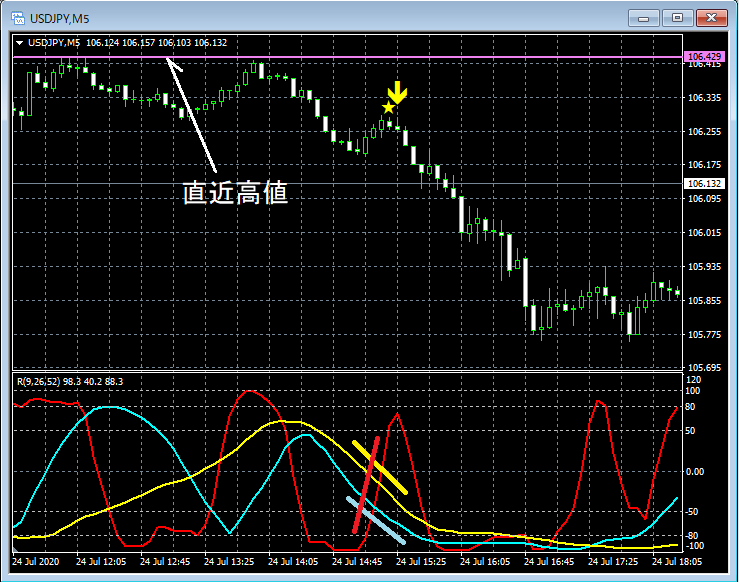
The figure below shows an example of a pullback sell signal with the combination of “RCI Three Lines + mBDSR.”
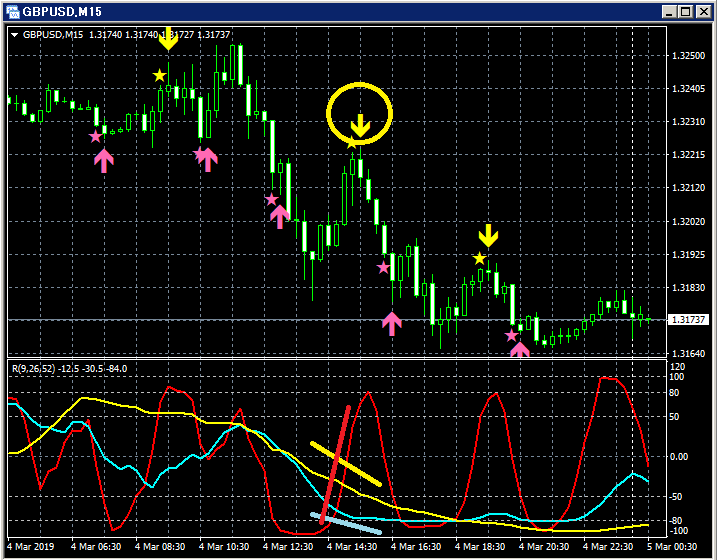
Among the RCI three lines, only RCI9 is clearly rising.
If RCI9 reverses and declines, all three RCIs may align to decline.
In other words, the price could drop strongly.
In such a situation, the mBDSR pullback sell signal (yellow arrow circled) is illuminated.
In the above example, immediately after the pullback sell signal lights up, five bearish candles occur in succession. Also, the pullback sell signal is confirmed at the candle that confirms the reversal of the rising RCI9 three bars before the lowest candle.
In other words, you can catch the re-downturn timing very well without waiting for the reversal of RCI9 to be confirmed.
mBDSR was developed to improve the accuracy of buy-on-dips and pullbacks using three RCI lines, but it has not typically used filters since it can be used in various ways when combined with other indicators, not just RCI.
In fact, we have received comments from users as follows:
“It appears at nearly the top and bottom with quite high probability. Not limited to RCI; by cross-checking with BB, MA, or other individual criteria, you can avoid fakeouts.”
On the other hand, another user wrote the following:
“If there were a signal that also determines the angle of RCI26 and 52, it would be the best indicator.”
“I wonder if the long-term orientation of RCI could be used as a filter. When the long-term of RCI is downward, a sell signal appears. A buy signal does not.”
Therefore, we created an arrow indicator that enters timing with mBDSR without going against the direction of either two RCIs or one RCI, called“mBDSR RCI Filter Version.”.
The following is the explanation of“mBDSR RCI Filter Version.”.
This is an arrow indicator that uses mBDSR to time entries without going against the direction of two or one RCIs.
By setting the period of the two or one RCI that serves as the filter, it will display only the mBDSR signals that do not oppose the direction of that RCI.
mBDSR_2RCI_VAP_XXXXXXXX.ex4 : Two RCIs act as filters
mBDSR_1RCI_VAP_XXXXXXXX.ex4 : One RCI acts as a filter
※In the figure below, RCIs are shown for convenience, but note that this indicator does not include an indicator that displays the three RCI lines; please be aware.
mBDSR Signals (No Filter)
Top:
No RCI filter
mBDSR signal
Bottom:
RCI Three Lines (RCI9, RCI26, RCI52)
Since no filter is used, all mBDSR signals are displayed.
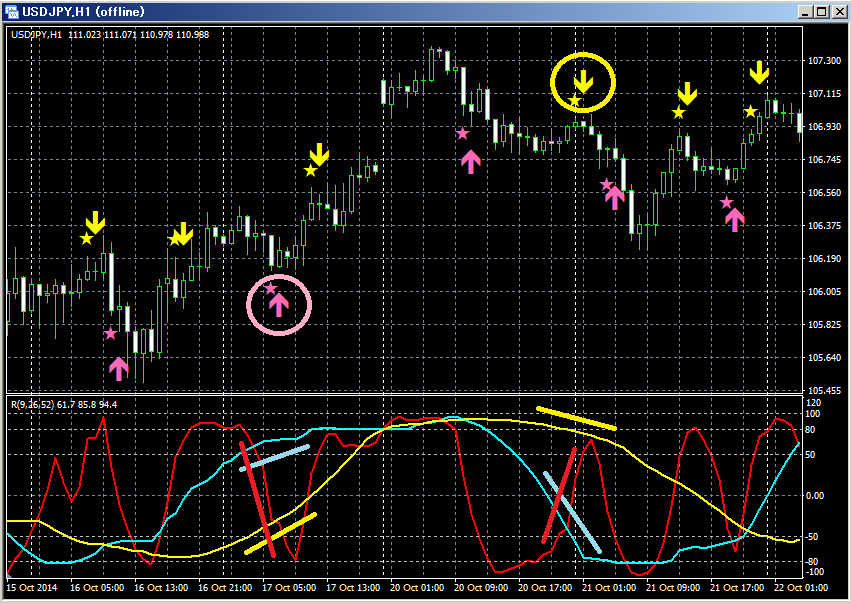
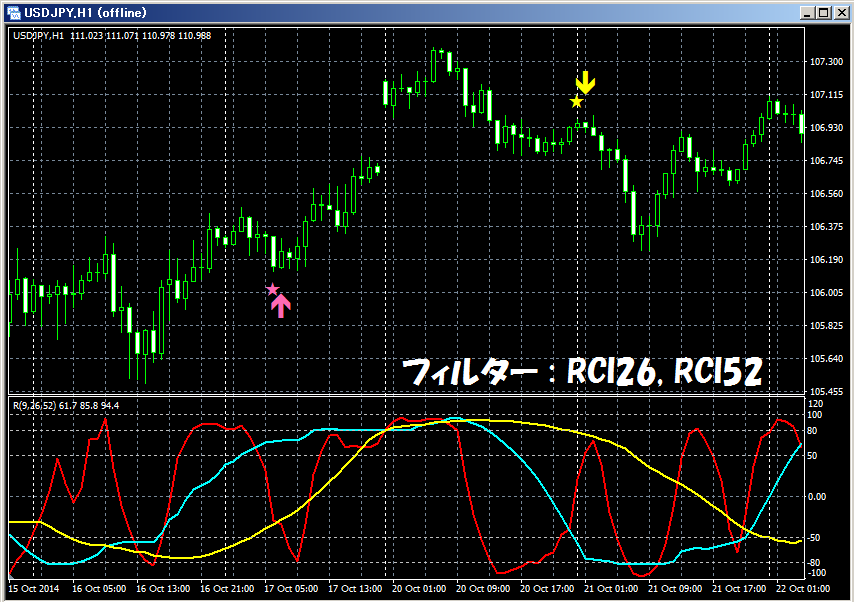
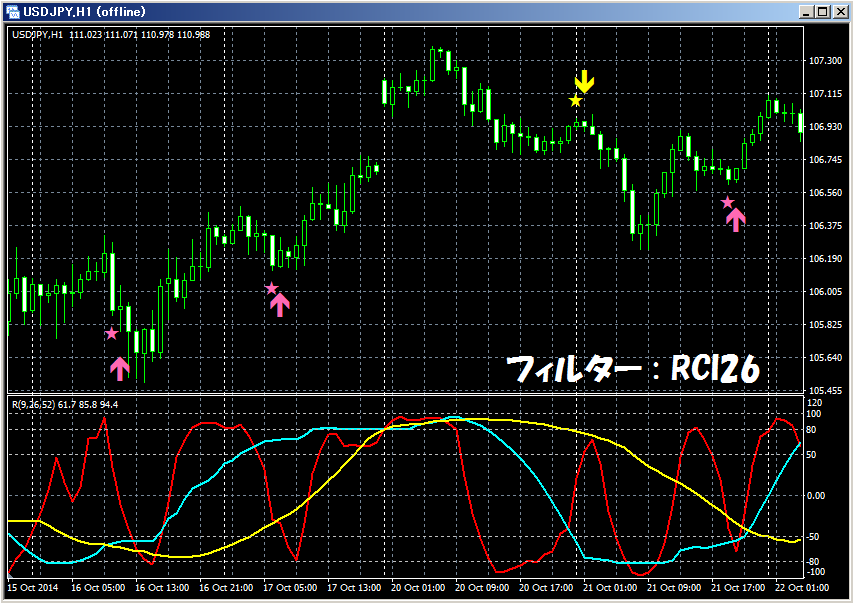
mBDSR Signals (Filter: RCI26 and RCI52)
Top:
First filter:RCI26
Second filter:RCI52
mBDSR signal selected by the two RCIs above
(mBDSR signal that does not oppose the directions of the two RCIs)
Bottom:
RCI Three Lines (RCI9, RCI26, RCI52)
If both RCI26 and RCI52 are level or rising, only the upward signal of mBDSR is displayed; if both are level or falling, only the downward signal of mBDSR is displayed.
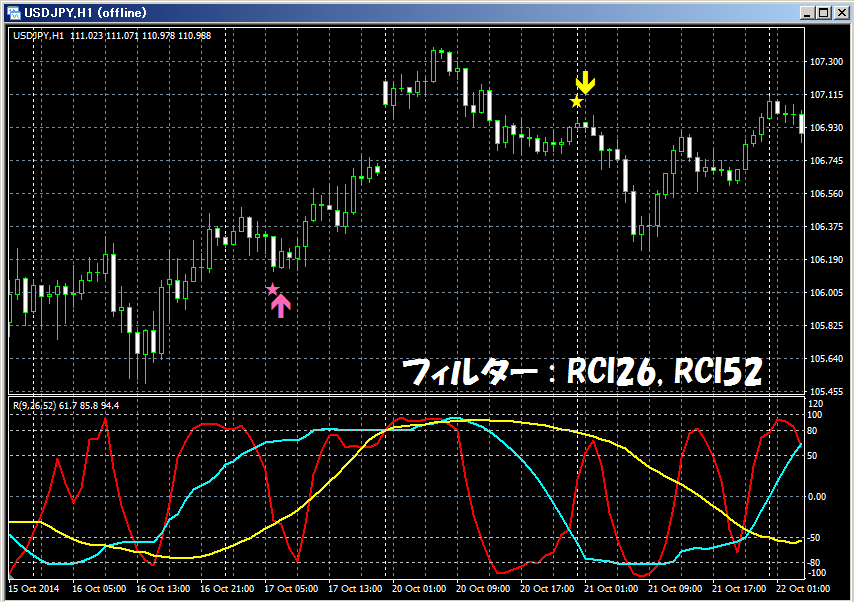
mBDSR Signals (Filter: RCI52)
Top:
Filter (one RCI only):RCI52
Signal of mBDSR selected by the above one RCI
(mBDSR signal that does not oppose the direction of the above RCI)
Bottom:
RCI Three Lines (RCI9, RCI26, RCI52)
If RCI52 is level or rising, only the upward signal of mBDSR is displayed; if RCI52 is level or falling, only the downward signal of mBDSR is displayed.

mBDSR Signals (Filter: RCI26)
Top:
Filter (one RCI only):RCI26
Signal of mBDSR selected by the above one RCI
(mBDSR signal that does not oppose the direction of the above RCI)
Bottom:
RCI Three Lines (RCI9, RCI26, RCI52)
If RCI26 is level or rising, only the upward signal of mBDSR is displayed; if RCI26 is level or falling, only the downward signal of mBDSR is displayed.
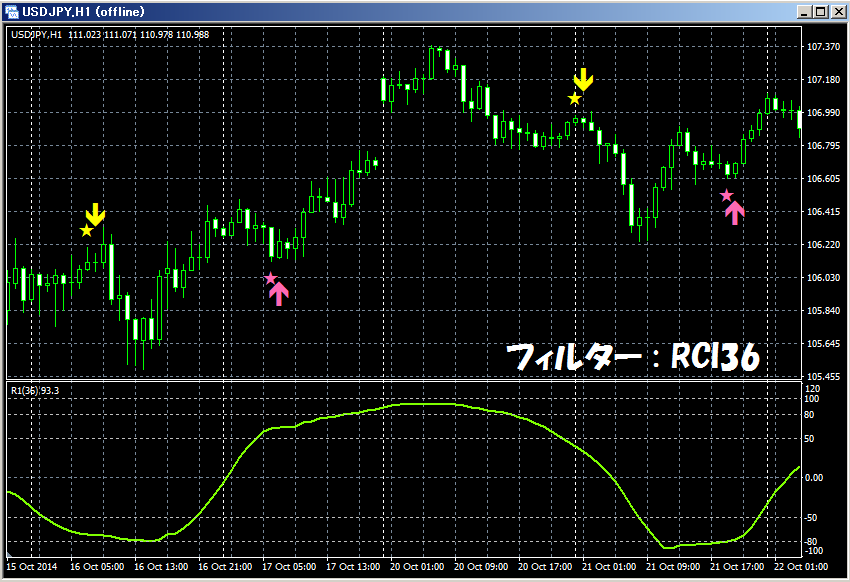
mBDSR Signals (Filter: RCI36)
Top:
Filter (one RCI only):RCI36
Signal of mBDSR selected by the above one RCI
(mBDSR signal that does not oppose the direction of the above one RCI)
Bottom:
RCI36
If RCI36 is level or rising, only the upward signal of mBDSR is displayed; if RCI36 is level or falling, only the downward signal of mBDSR is displayed.
The RCI you want to use as a filter may differ by user. Therefore, this indicator allows you to set the period of two RCIs or one RCI on the user side.
As shown in the figure below, you need to check “Allow DLL imports.”

mBDSR_2RCI_VAP_XXXXXXXX.ex4

mBDSR_1RCI_VAP_XXXXXXXX.ex4

Settings for star marks and arrows appearance
○ For mBDSR_2RCI_VAP_XXXXXXXX.ex4 using two RCIs as filters
RCIPeriod1: Period of the first RCI used as a filter
RCIPeriod2: Period of the second RCI used as a filter
○ For mBDSR_1RCI_VAP_XXXXXXXX.ex4 filtering only one RCI
RCIPeriod: Period of the RCI used as a filter
Settings for the display position of star marks and arrows
If the display position of stars or arrows is too close to candles or too far such that it sometimes goes off-screen, you can adjust the height of these marks using the values below. Larger values move the display farther from the candles.
Star marks (pink) → HotPinkStar
Arrows (pink) → HotPinkArrow
Star marks (yellow) → YellowStar
Arrows (yellow) → YellowArrow
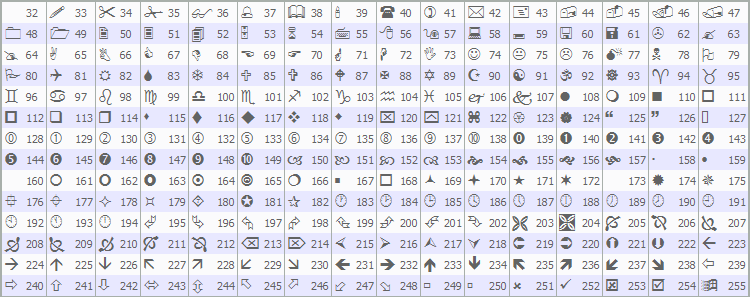
Also, by changing the values below, you can alter the shapes of the star marks and arrows.
(Default pink) Star mark → Arrowtype1
(Default pink) Arrow → Arrowtype2
(Default yellow) Star mark → Arrowtype3
(Default yellow) Arrow → Arrowtype4
Note that the star marks or arrows or symbols that can replace them and their corresponding numbers are shown in the table below.
Settings for alert functions
UseAlert:
If you want to notify sign occurrences with an alert dialog as shown below, select true; otherwise, select false.
UseMail:
If you want to notify sign occurrences via email, select true; otherwise, select false.
UseSound:
If you want to notify sign occurrences via alert sound, select true; otherwise, select false.
SoundFile:
Enter the filename of the sound to use for the alert.
UsePush:
If you want to notify sign occurrences via push notifications, select true; otherwise, select false.
An example of MT4 settings when using email for sign notifications
Tools → Options → E-mail
Image
※It seems MT4 must be restarted after changing these settings.


※This indicator is included with the indicators listed below.
Indicator that shines when combined with RCI【BODSOR・mBDSR】
https://www.gogojungle.co.jp/tools/indicators/11836
※It is not sold standalone, so please be aware.
※In the charts shown in this article, for convenience, circles, lines, and squares may be drawn, so please understand.