インデックス・セブン|日経225 & S&P500
販売実績 0 本
レビュー ★ 0.0
(0)
7つのロジックが協奏し、株価指数の長期上昇を分散して取る買い専用EA。スワップ系とは収益源が異なり、ポートフォリオの“もう一本”に。日経225・S&P500対応。
自動売買システム
MetaTrader 4
販売開始日
2026年7月27日
登録更新日
2026年6月26日
バージョン情報
1
マイプロフィール
しろやぎ- 全期間
- 2年
- 1年
- 6カ月
- 3カ月
- 1カ月
収益
:
297.00ドルプロフィットファクター
:
1.31リスクリターン率
?
:
0.54平均利益
:
99.00ドル平均損失
:
-61.00ドル口座残高
?
:
10,297.00ドル収益率(全期間) ?
:
23.52%勝率
:
44.83%
(13/29)
最大保有ポジション数
?
:
4最大ドローダウン
?
:
30.22%
(547.00ドル)
最大利益
:
337.00ドル最大損失
:
-189.00ドル推奨証拠金
?
:
1,261.00ドル含み収益
:
-294.00ドル初期額
?
:
10,000.00ドル通貨
:
ドル建て
運用可能会社
MT4採用会社でご利用いただけます

公式運用(収益額)
商品のデータ
商品のコミュニティ
詳細統計(月別)
2026
2025
2024
2023
2022
- 1月
- 2月
- 3月
- 4月
- 5月
- 6月
- 7月
- 8月
- 9月
- 10月
- 11月
- 12月
今月のカレンダーを表示
ストラテジーについて
Translating...
通貨ペア
[SPX500]
[JPN225]
取引スタイル
[スイングトレード]
[デイトレード]
最大ポジション数
7 その他: 5ロジックが各1ポジ=最大5。RSI併用時は6
最大ロット数
1 その他: 残高リスク%で自動算出(可変・上限100)
使用時間足
D1
最大ストップロス
0 その他: 固定SLなし/時間決済・最大DD約25%
テイクプロフィット
0 その他: 固定TPなし/一定バー数で時間決済
両建て
なし
出品タイプ
メタトレーダー自動売買システム
その他ファイルの使用
なし
特記事項
■株価指数(日経225 / S&P500)買い専用・7ロジック分散EA。
■ナンピン・マーチンゲールなし。各ポジションは一定バー数で時間決済し、含み損を持ち越しません。
■日足ベースのため取引はじっくり型(序盤は取引が少なく見えますが正常です)。
■弱気相場では長期MAの傾きで自動的に休みます。
■ロットは口座残高に対するリスク%で自動算出。デフォルトはデモ計測(100万円/レバ25倍)向けに最適化。実運用はパラメータ AutoRiskBySymbol を外し、ご自身の許容度でリスク%を調整してください。
INDEX SEVEN | 株価指数 7ロジック分散EA
インデックス・セブン
S&P500 メイン / 日経225対応 / 買い専用 / ナンピンなし
7つのロジックが協奏し、株価指数の長期上昇を分散して取る。
株価指数(S&P500・日経225)の長期上昇トレンドを、性質の違う7つのロジックで取りにいく買い専用EAです。 通常局面は5つのトレンド/反転ロジック、調整・暴落局面は2つのリバウンド(底拾い)ロジックが働き、 お使いの自動売買に1本加えるだけで、相関の低い収益エンジンが増えます。
特徴
- 7ロジックを並走。5本=トレンド/反転(強気相場)+ 2本=暴落リバウンド(底拾い)。1本が不調でも他が支える。
- 買い専用 × 弱気相場フィルター。上昇局面を取り、下落トレンドでは自動で休む。
- 暴落の底を拾う設計。急落時はリバウンド枠が底値圏で買い、反発を時間決済で回収。
- 収益源が独立。株価指数の値上がり益=通貨系・レンジ系EAと値動きが重なりにくく、組み合わせで分散。
- ナンピン・マーチンゲールなし。含み損を抱えて耐えない/全ポジション時間決済。
- 14年バックテスト+日米クロス検証済み。同じロジックが日米双方で機能=再現性。
バックテスト実績(S&P500・2012–2026)
| プロフィットファクター | 1.45 |
|---|---|
| 勝率 | 約61% |
| 最大ドローダウン(推奨設定) | 約20% |
| 想定リターン | 年率およそ8%(複利) |
| 検証期間 / 市場 | 14年 / S&P500(日経225対応) |
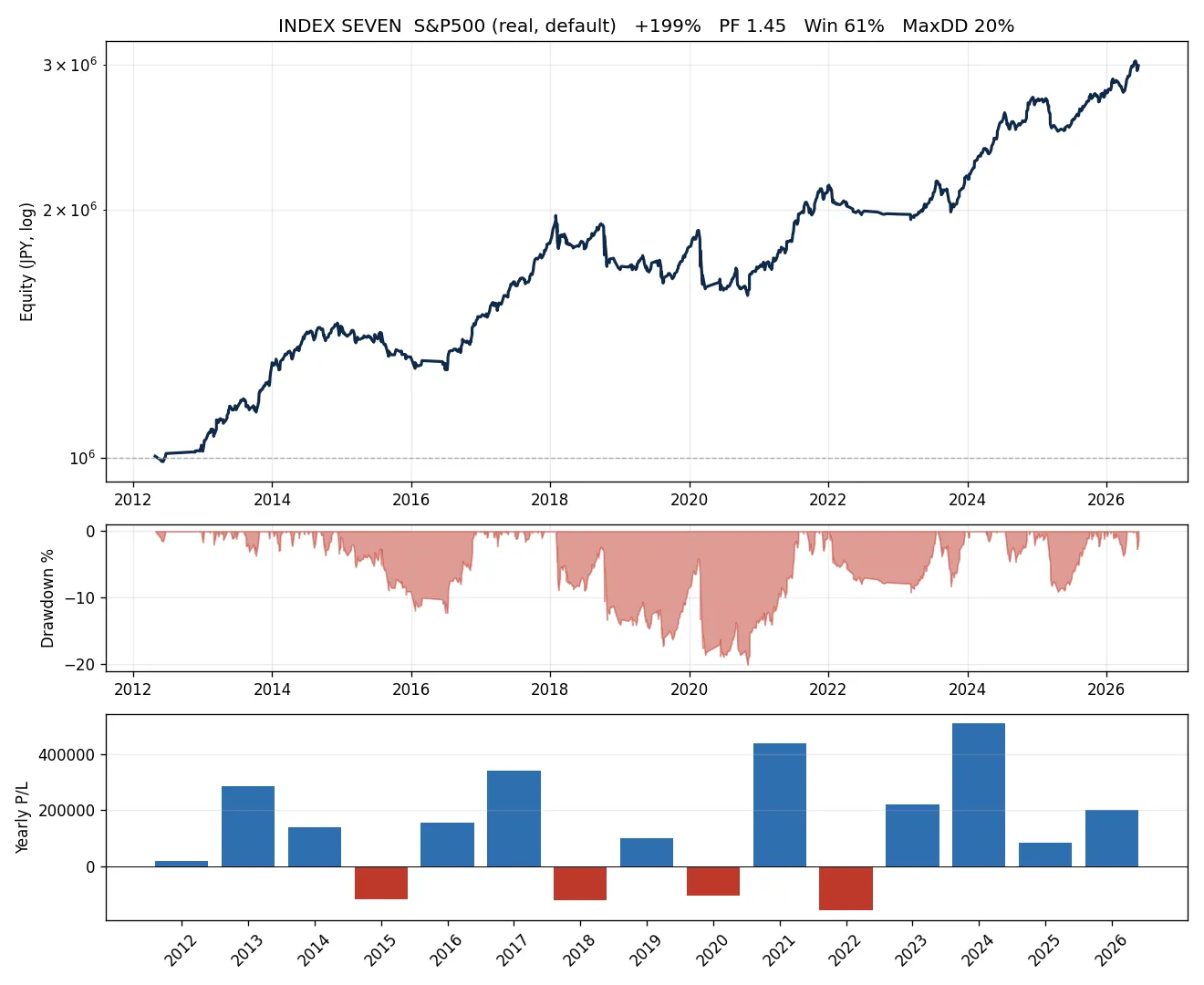
※数字は実機バックテスト(デフォルト・複利)に基づく正直な値。調整年(2015・2018・2020・2022相当)は小幅マイナスを含みます。フォワード実績は随時更新します。
7つのロジック(公開で安心)
- 市場:S&P500 / 日経225(株価指数CFD) 足:日足ベース 方向:買いのみ
- レジーム:長期移動平均が上向き=強気の時だけ通常エントリー、弱気転換で手仕舞い
- 通常5本:押し目買い/トレンド継続/ブレイクアウト/連続陰線/MAクロス
- リバウンド2本:ボリンジャー下限/移動平均からの深い乖離(暴落の底を拾う・レジーム無視)
- 決済:一定バー数で時間決済(含み損を持ち越さない)
なぜ“買い専用”なのか(検証済み)
売りロジックも9種類・最大396取引で徹底検証しましたが、株価指数の構造的な上昇によりいずれもプロフィットファクター1未満でした。 思考停止ではなく検証し尽くした上での“買い専用”です。
ポートフォリオの“もう一本”に
本EAの収益源は株価指数の値上がり益。スワップ系・通貨系EAとはエンジンが違うので、組み合わせると平常時のポートフォリオの波を分散できます。
※正直な注記:株価指数もキャリーもリスクオン資産のため、大規模なリスクオフ局面では同時に下落し得ます。本EAは暴落ヘッジではなく収益源の多様化としてご活用ください。
正直なリスク開示
- 万能ではありません。株価指数が長期下落する局面では利益は出ません。調整年はマイナスになり得ます(リバウンド枠で緩和しますがゼロにはなりません)。
- 最大ドローダウンは約20%。一時的に資金が2割程度減る期間を想定してください。
- 短期で大きく増やす商品ではありません。年率8%前後を、飛ばさず積み上げる設計です。
- 推奨証拠金を下回る運用や過大ロットは、一時的なドローダウンを致命傷に変えます。
推奨運用
- MT4/株価指数CFD対応ブローカー(例:楽天証券 楽天MT4CFD・OANDA証券 など)
- 銘柄:S&P500(主力)/日経225(分散用に併用可)
- 証拠金:最大ドローダウン(約20%)の3〜5倍以上を推奨
- リスクは口座残高に対する% で自動調整。実運用時はご自身の許容度に合わせて設定可(取扱説明書参照)
よくある質問
Q. 取引が少ない/動かない?
A. 日足ベースの“じっくり型”です。弱気相場フィルターが働くと下落局面では意図的に休みます(暴落時はリバウンド枠が底を拾います)。
Q. ナンピンはしますか?
A. しません。全ポジション時間決済、含み損の積み増しは行いません。
Q. デフォルトのまま使える?



フォワードテスト
バックテスト
¥29,800 (税込)
提供元 / 販売元:
販売サイト:
GogoJungle
●お支払い方法





FX自動売買について
FX自動売買(MT4EA)とは
FX自動売買とは、予め取引ルールと決済ルールを組み込んだ、プログラミングによる自動売買のことを言います。自動売買をする方法は色々ありますが、GogoJungleではMT4というトレードプラットフォーム上で稼働するExperts Adviors(以下EA)を取り扱っています。
FX自動売買の取引タイプ
MT4で使うEAには色々な取引タイプのEAがあります。
裁量トレードと同じように、インジケーターを組み合わせて取引タイミングや決済タイミングを決めるもの、一定の価格(pips)間隔で買いや売りを繰り返すもの、相場のアノマリーや時間的特徴を利用した取引手法など、その種類は裁量トレードの手法と同じく豊富です。
簡単に分類すると、
・スキャルピング(数分~数時間以内で取引が完了するタイプ)、
・デイトレード(数時間~1日程度で取引が完了するタイプ)、
・スイング(1日以上~1週間程度の比較的長い期間をかけて取引を行うタイプ)
・ナンピン・マーチン(等間隔または不等間隔で複数のポジションを持ち、利益が出たら一括で決済をするタイプ。ロット数を段階的に上げていくものをマーチンゲールといいます。)
・アノマリーEA(仲値トレード、早朝スキャルピング)
などがあります。
裁量トレードと同じように、インジケーターを組み合わせて取引タイミングや決済タイミングを決めるもの、一定の価格(pips)間隔で買いや売りを繰り返すもの、相場のアノマリーや時間的特徴を利用した取引手法など、その種類は裁量トレードの手法と同じく豊富です。
簡単に分類すると、
・スキャルピング(数分~数時間以内で取引が完了するタイプ)、
・デイトレード(数時間~1日程度で取引が完了するタイプ)、
・スイング(1日以上~1週間程度の比較的長い期間をかけて取引を行うタイプ)
・ナンピン・マーチン(等間隔または不等間隔で複数のポジションを持ち、利益が出たら一括で決済をするタイプ。ロット数を段階的に上げていくものをマーチンゲールといいます。)
・アノマリーEA(仲値トレード、早朝スキャルピング)
などがあります。
FX自動売買のリスクとメリット・デメリット
FXを行う以上、裁量トレードと同じように自動売買にもリスクは存在します。
ただし、自動売買は予めリスクを限定できる、予想できるということが大きな強みでもあります。
【リスク】
FX取引をする以上は取引リスクは自動売買にももちろん存在します。
・ロットサイズのリスク
勝率が高いからといってロットを無理に大きくすると、EAによってはまれに負けた時の損失Pipsが大きい場合があります。必ずSLのPipsや保有ポジション数を確認してから、適切なロットで運用しましょう。
・急激な相場変動リスク
指標発表や、突発的なニュースによって急激に相場が動くケースがあります。システムトレードはそのような予測できない相場の動きを想定していないため、事前に決済しておく、取引しないなどの判断が出来ません。対策としては指標発表やVIX(恐怖指数)でEAの停止を行うツールなどを使うことも可能です。
【メリット】
・24時間取引してくれる
システムトレードはあなたの代わりに取引できるチャンスがあれば、淡々とトレードを行ってくれます。トレードに時間を割けない方にとってはとても便利な武器になってくれるでしょう。
・感情にコントロールされることなく淡々とトレードしてくれる
裁量トレードで負けが続き、ロットを大きくしてみたり、逆に少ない利益ですぐに利確してしまうといった、人間にありがちなルールの自己都合化がありません。
・初心者でも始められる
FX取引を行うにはまず勉強から…といった必要がなく、誰が使っても同じ結果になるのがシステムトレードです。
【デメリット】
・取引頻度を自由に増やせない
システムトレードは予めプログラムされた条件通りに取引をするため、EAのタイプによっては月に何度かしか取引をしない場合もあります。
・相場に合う、合わないがある
EAの取引タイプによって、順張りに向いている時期、逆張りに向いている時期などがあるため、すべての期間において成績が一定になることは少ないです。去年は良かったが、今年はあまり成績が振るわないということもあるため、運用する時期なのかどうかをある程度裁量で判断する必要があります。
ただし、自動売買は予めリスクを限定できる、予想できるということが大きな強みでもあります。
【リスク】
FX取引をする以上は取引リスクは自動売買にももちろん存在します。
・ロットサイズのリスク
勝率が高いからといってロットを無理に大きくすると、EAによってはまれに負けた時の損失Pipsが大きい場合があります。必ずSLのPipsや保有ポジション数を確認してから、適切なロットで運用しましょう。
・急激な相場変動リスク
指標発表や、突発的なニュースによって急激に相場が動くケースがあります。システムトレードはそのような予測できない相場の動きを想定していないため、事前に決済しておく、取引しないなどの判断が出来ません。対策としては指標発表やVIX(恐怖指数)でEAの停止を行うツールなどを使うことも可能です。
【メリット】
・24時間取引してくれる
システムトレードはあなたの代わりに取引できるチャンスがあれば、淡々とトレードを行ってくれます。トレードに時間を割けない方にとってはとても便利な武器になってくれるでしょう。
・感情にコントロールされることなく淡々とトレードしてくれる
裁量トレードで負けが続き、ロットを大きくしてみたり、逆に少ない利益ですぐに利確してしまうといった、人間にありがちなルールの自己都合化がありません。
・初心者でも始められる
FX取引を行うにはまず勉強から…といった必要がなく、誰が使っても同じ結果になるのがシステムトレードです。
【デメリット】
・取引頻度を自由に増やせない
システムトレードは予めプログラムされた条件通りに取引をするため、EAのタイプによっては月に何度かしか取引をしない場合もあります。
・相場に合う、合わないがある
EAの取引タイプによって、順張りに向いている時期、逆張りに向いている時期などがあるため、すべての期間において成績が一定になることは少ないです。去年は良かったが、今年はあまり成績が振るわないということもあるため、運用する時期なのかどうかをある程度裁量で判断する必要があります。
自動売買運用に必要な設備と環境
MT4上で自動売買(EA)を運用するのに必要なものは以下の通りです。
・MT4(MetaTrader4。MT4が使えるFX会社で口座開設をする必要があります)
・EA(自動売買用プログラム)
・EAを運用するのに必要な運用資金
・24時間稼働可能なPCまたはVPS(クラウドサーバー上に仮想PCを置き、そこでMT4を立ち上げておく)
・MT4(MetaTrader4。MT4が使えるFX会社で口座開設をする必要があります)
・EA(自動売買用プログラム)
・EAを運用するのに必要な運用資金
・24時間稼働可能なPCまたはVPS(クラウドサーバー上に仮想PCを置き、そこでMT4を立ち上げておく)
MT4のインストール及び口座ログイン
MT4は、MT4が利用できるFX会社で口座開設すると、そのFX会社のMT4として利用できるようになります。MT4はパソコン上にインストールして使う、スタンドアロンタイプのソフトウェアですので、口座開設したFX会社のサイト上からプログラムファイルをダウンロードしてきてパソコンにインストールを行います。
また、口座にはデモ口座とリアル口座があり、デモ口座を申請すると仮想の資金でトレードを体験することができます。リアル口座を開設したあと、FX会社から割り振られた接続サーバーを選択し、パスワードを入力して口座にログインします。
FX会社に指定された方法で口座資金を入金すると、MT4口座に資金が反映されて取引ができるようになります。
また、口座にはデモ口座とリアル口座があり、デモ口座を申請すると仮想の資金でトレードを体験することができます。リアル口座を開設したあと、FX会社から割り振られた接続サーバーを選択し、パスワードを入力して口座にログインします。
FX会社に指定された方法で口座資金を入金すると、MT4口座に資金が反映されて取引ができるようになります。
MT4へのEAの設置方法
ここではGogoJungleでEAを購入した場合の設定方法について説明いたします。
まず、購入したEAファイルをGogoJungleのマイページからDLします。zip(圧縮)ファイルがDLされるので、右クリックで解凍して中の「◯◯◯(EA名称)_A19GAw09(任意の8英数字).ex4」というファイルを取り出します。
次に、MT4を立ち上げ、「ファイル」→「データフォルダを開く」→「MQL4」→「Experts」フォルダーの中に、ex4ファイルを入れます。MT4を一度閉じ、再起動したら、上部メニューの「ツール」→「オプション」の「エキスパートアドバイザー」の「自動売買を許可する」、「DLLの使用を許可する」にチェックを入れてOKを押して閉じます。
EAの正しい運用に必要な通貨ペアと時間足がEA販売ページに書いてあるので、それを参照して正しい通貨ペアの時間足のチャートを開きます(例:USDJPY5M ドル円5分足)。
メニューのナビゲーター内、「エキスパートアドバイザ」に先ほど入れたEAファイル名があるので、クリックして選択し、そのままドラッグ&ドロップでチャート内にEAを載せます。EA名ダブルクリックでも、選択されているチャートに載せることができます。
チャート上の左上に、「Authentification Success」と出れば認証成功です。 EAの運用には、24時間PCを立ち上げて置く必要がありますので、自動スリープ機能を解除するか、VPS上にMT4を置いてEAを運用ください。
まず、購入したEAファイルをGogoJungleのマイページからDLします。zip(圧縮)ファイルがDLされるので、右クリックで解凍して中の「◯◯◯(EA名称)_A19GAw09(任意の8英数字).ex4」というファイルを取り出します。
次に、MT4を立ち上げ、「ファイル」→「データフォルダを開く」→「MQL4」→「Experts」フォルダーの中に、ex4ファイルを入れます。MT4を一度閉じ、再起動したら、上部メニューの「ツール」→「オプション」の「エキスパートアドバイザー」の「自動売買を許可する」、「DLLの使用を許可する」にチェックを入れてOKを押して閉じます。
EAの正しい運用に必要な通貨ペアと時間足がEA販売ページに書いてあるので、それを参照して正しい通貨ペアの時間足のチャートを開きます(例:USDJPY5M ドル円5分足)。
メニューのナビゲーター内、「エキスパートアドバイザ」に先ほど入れたEAファイル名があるので、クリックして選択し、そのままドラッグ&ドロップでチャート内にEAを載せます。EA名ダブルクリックでも、選択されているチャートに載せることができます。
チャート上の左上に、「Authentification Success」と出れば認証成功です。 EAの運用には、24時間PCを立ち上げて置く必要がありますので、自動スリープ機能を解除するか、VPS上にMT4を置いてEAを運用ください。
利用する口座を変更したい場合
GogoJungleのEAは1EAにつき、1リアル口座、1デモ口座でご利用いただけます。
認証されている口座以外で利用したい場合は、登録口座をリセットする必要があります。
口座のリセット方法は、Web認証が登録されているMT4を閉じている状態で、
GogoJungleのマイページ>利用する>デジタルコンテンツ>該当のEA>登録番号の「リセット」ボタンを押すと、登録口座が解除されます。
口座がリセットされている状態で、他のMT4口座でEAを利用すると、新たに口座が登録されます。
また、口座のリセットは無制限に行っていただけます。
認証されている口座以外で利用したい場合は、登録口座をリセットする必要があります。
口座のリセット方法は、Web認証が登録されているMT4を閉じている状態で、
GogoJungleのマイページ>利用する>デジタルコンテンツ>該当のEA>登録番号の「リセット」ボタンを押すと、登録口座が解除されます。
口座がリセットされている状態で、他のMT4口座でEAを利用すると、新たに口座が登録されます。
また、口座のリセットは無制限に行っていただけます。
上手くいかない場合の対処法
Web認証でエラーがでる、GogoJungleのフォワード実績ページでは取引しているのに自分の口座では取引しない、といった場合は、様々な原因が考えられますのでより詳しくは以下をご参照ください。
→ EAが動かない時にチェックする項目
→ EAが動かない時にチェックする項目
取引ロットの大きさについて
FX取引でのロットの大きさは、通常、
1ロット=10万通貨
0.1ロット=1万通貨
0.01ロット=1000通貨
となります。
ドル円であれば1ロット=10万ドルを保有することになります。
ロット保有にかかる証拠金はFX会社の定めるレバレッジによって決まります。
レバレッジ25倍であれば、1万通貨のドル円を保有するのに必要な証拠金は 10000*109(※1ドル109円レート時)÷25 = 43,600円 となります。
1ロット=10万通貨
0.1ロット=1万通貨
0.01ロット=1000通貨
となります。
ドル円であれば1ロット=10万ドルを保有することになります。
ロット保有にかかる証拠金はFX会社の定めるレバレッジによって決まります。
レバレッジ25倍であれば、1万通貨のドル円を保有するのに必要な証拠金は 10000*109(※1ドル109円レート時)÷25 = 43,600円 となります。
システムトレード用語集
・プロフィットファクター:総利益÷総損失
・リスクリターン率:期間中損益の合計÷最大ドローダウン
・最大ドローダウン:運用期間中の最大含み損
・最大ポジション数:そのEAが理論上同時に持ちうる最大のポジション数です
・TP(Take Profit):EAの設定上の利確Pips(または指定された金額など)
・SL(Stop Loss):EAの設定上の最大損失pips(または指定された金額など)
・トレーリングストップ:決済を指定のPipsで行うのではなく、一定の利益が出たら決済SLを一定の間隔で引き上げて(利益の方向へ)行く、利益を最大化する決済方法です。
・リスクリワード率(ペイオフレシオ):平均利益÷平均損失
・両建て:買いと売りを同時に保有すること(一部のFX会社では両建て不可のタイプもあります)
・リスクリターン率:期間中損益の合計÷最大ドローダウン
・最大ドローダウン:運用期間中の最大含み損
・最大ポジション数:そのEAが理論上同時に持ちうる最大のポジション数です
・TP(Take Profit):EAの設定上の利確Pips(または指定された金額など)
・SL(Stop Loss):EAの設定上の最大損失pips(または指定された金額など)
・トレーリングストップ:決済を指定のPipsで行うのではなく、一定の利益が出たら決済SLを一定の間隔で引き上げて(利益の方向へ)行く、利益を最大化する決済方法です。
・リスクリワード率(ペイオフレシオ):平均利益÷平均損失
・両建て:買いと売りを同時に保有すること(一部のFX会社では両建て不可のタイプもあります)
人気商品
特定商取引法に基づく表示
会社名
株式会社ゴゴジャン
運営統括責任者
早川忍
郵便番号
〒113-0033
所在地
東京都文京区本郷3-6-6 本郷OGIビル6F
お問い合わせ
お問い合わせページよりお願い致します。
電話番号
03-5844-6090
営業日
月曜日~金曜日
営業時間
10:00~19:00
販売商品・サービス
セミナーのリアルタイム動画配信サービス・動画配信サービス、対面式セミナー、電子書籍、ソフトウェア、シグナル配信、セミナーのビデオ
※セミナーのリアルタイム動画配信サービスとは、セミナー実施時に即時弊社サーバーより配信するサービスです。
※セミナーの動画配信サービスとは、保存されたセミナー動画を弊社サーバーより配信するサービスです。
※セミナーのビデオとは、保存されたセミナー動画をお客様のPCにダウンロードするサービスです。
販売価格
各商品の販売価格は、商品ページにて税込価格で表示しております。
商品の発送方法、ご提供方法
オンライン上でのダウンロード、または配信
ホームページURL
https://www.gogojungle.co.jp/
商品の発送時期、 ご提供時期
原則として弊社によるお客様のご入金完了後即ご提供いたします。
商品代金以外の必要料金
銀行振り込みご利用の場合は、商品代金(税込表示)に加えて振り込み手数料がかかります。
ご注文方法
ホームページ上の専用申込フォームよりご注文ください。
お支払い方法
銀行振込 / クレジットカード決済/ Web口座振替/ コンビニ決済
ファミリーマートでのお支払い方法
デイリーヤマザキ・ヤマザキデイリーストアーでのお支払い方法
お支払い期限
お申込み日から2日以上経つ場合、お申込をキャンセルさせていただきます。予めご了承ください。
商品注文後のキャンセルについて
1.セミナーのリアルタイム動画配信サービス、動画配信サービスは配信実施24時間前以降のキャンセルはお受けいたしておりません。ご返金対応ができませんので十分ご注意ください。
2.対面式セミナーは、開催の3営業日前以降のキャンセルおよびご返金はお受けいたしておりません。
3.電子書籍、ソフトウェア、ビデオは、著作権保護の観点からお客様のダウンロード実施、または購読開始以降はキャンセルできません。ご返金対応ができません。予めご了承ください。
ご返金にかかる費用
お客様のご都合によるご返金は、銀行振込・コンビニ決済・Web口座振替の場合振込手数料がすべてお客様負担となります。
カード決済ご利用の場合手数料は生じません。あらかじめご了承ください。
注意点
当ページに記載する「発送方法、ご提供方法」「発送時期、 ご提供時期」「代金以外の必要料金」「注文方法」「お支払い方法・期限」
「商品注文後のキャンセル」「返金にかかる費用」の各項目はGogoJungleで販売する全ての商品に適用されますが、商品毎にご案内がある場合は、
商品毎に記載いたします。
GogoJungleが販売者である場合は、商品ページにGogoJungleの「特定商取引に関する法律」に基づく表記を行ないます。
出品者が販売者であり、且つ出品者が「事業者」である場合は、出品者の「特定商取引に関する法律」に基づく表記を行ないます。
出品者が「事業者」に該当するかは出品者の判断によります。ただし、 経済産業省 特定商取引法の通達の改正について
「インターネット・オークションにおける「販売業者」に係るガイドライン」
https://www.caa.go.jp/policies/policy/consumer_transaction/amendment/2016/pdf/amendment_171206_0001.pdf
を鑑み「事業者」であることが明らかな出品者については、「事業者」として扱い開示請求があった場合は迅速に対応します。
