コロコロコアラ

- ทุกช่วงเวลา
- 2 ปี
- 1 ปี
- 6 เดือน
- 3 เดือน
- 1 เดือน
Forward testing (Profit)
รายละเอียดสถิติ (รายเดือน)
- ม.ค.
- ก.พ.
- มี.ค.
- เม.ย.
- พ.ค.
- มิ.ย.
- ก.ค.
- ส.ค.
- ก.ย.
- ต.ค.
- พ.ย.
- ธ.ค.
ปฏิทินการเทรดของเดือนนี้
เกี่ยวกับกลยุทธ์
กำลังแปล...
本商品はリピート系のEAとなります。
世の中にはサービスとしてのリピート系システムがいくつか存在しますが、
実際利用してみて「もっとこんな機能あったらどうかな?」という思い等があったため、
実際に作成しました。
なお、近年リピート系で人気のAUドル/NZドルのペアに特化して作成しています。
■本EAは、以下の特徴を持っています。
●通貨ペア独特の回帰性に併せた買い/売りポジションの発注
利用者が買い/売りの選択をするのではなく、価格帯に併せた発注を行います。
推移する価格帯によっては買い/売りの両ポジションを保有する場合がありますので、
両建てNGのブローカーは注意してください。
●リスクモード搭載
リスクを3段階で選択できるようにしています。
・Lowリスクモード:指定ロットサイズでのポジション発注を行います。
・Middleリスクモード:想定価格帯から離れるほどロットサイズを上げて発注します。
・・・最大、指定ロットの3倍(指定ロット + 2×指定ロット)となります。
(複利利用時は複利ロット + 2×指定ロットとなり、ロットサイズが上がり過ぎないようになっています。)
・Highリスクモード:想定価格帯中央に近づくにつれロットサイズを上げて発注します。
・・・中央付近でもみ合う場合、利益が上がりますが、保持した状態で上振れ・下振れした場合に含みが大きくなります。
※なお、いずれのモードにおいても、想定価格帯から大きく乖離した状態ではポジションを新しく追加しないようになっています。
●早期撤退機能
保有ポジション数が増えた場合、TPに到達しない状態でも早めに決済できるようになっています。
※機能が有効となるポジション数はパラメータで設定可能です。また、無効にすることも可能です。
●最大ロット数/最大ロットサイズ/最大保有ポジション数制限機能
ブローカーの制約に追従できるよう、各種制限を設けることが可能です。 ●損切設定 合計損切額や単一ポジション損切pipsを定義し、ロスカットを回避することも可能です。
●スワップ損拡大時の調整
AUD/NZDはマイナススワップが大きいブローカーもあります。リピート系である以上長期保有する特性があるため、
スワップ損が拡大する場合もありますので、その扱いを決めることができます。
・なにもしない:スワップ損が大きくなっても手を加えません。
結果としてTP決済された際もスワップの兼ね合いで単一ポジションTP決済時マイナスになる場合があります。
・TP値シフト:スワップ損が設定TP値相当よりマイナスになる場合、TP値をより遠くへ変更します。
結果として単一ポジションTP決済でマイナスにはなりませんがTP値到達しにくくなるリスクが発生します。
・単ポジションClose:該当の状態になったポジションのみCloseし、複数ポジション決済処理に対し足を引っ張るという状態を回避します。
※その時の状態によりそれぞれ一長一短がありますので、各自で利用判断をお願いします。
パラメータ設定については以下の通りです。
<パラメーター名(初期値):説明>
・初期ロット非保持フラグ(false):trueにすることでポジションが全て捌けた状態で新たなポジションを持たなくなります。
・マジックNo.(2101001):固有IDです。同一口座で他EAを動作させる際は重複した番号とならないようにしてください。
・初期ロットサイズ(0.01):基準となるロットサイズです。
・オーダー可能最大スプレッド[pips](3.0):指定サイズより大きいスプレッド時は新たに発注しません。
・複利フラグ(false):複利モードにしたい場合はtrueにしてください。
・複利リスク(1.0):複利モードtrue時の複利係数です。10万円単位での複利計算となります。
※必ずバックテスト等で期待した複利状態であることを確認の上利用するようにしてください。
・リスクモード(Risk_Low):リスクを3段階で選択可能です。
・利確幅(18):利確幅を1pips単位で設定可能です。
・Swap損拡大時の扱い(何もしない):上で説明したスワップ損の扱いを選択できます。
・手仕舞い開始ロット数(4):記載ポジション数以上保有した際はTP値到達以外でもCloseロジック発動します。
※0を入力することで無効となり、すべてのポジションがTP値決済となります。
・最大ポジション保有数(25):指定数までポジションを持つ可能性があります。
・最大累計ロットサイズ(30.0):口座内ポジションの合計ロットサイズとなり、これ以上となる場合は新たにポジションを保有しません。
・最大単一ロットサイズ(5.0):1ポジション当たりの最大ロットサイズです。
・中央点補正~管理外閾値補正(0):ポジション保持に伴う判定ラインの調整値となります。
・単ポジションSL(0):0以外の数値を指定した場合はポジション毎にSL値を設定します。
・合計損切額(0):0以外の数値を指定した場合、含み損額が指定値以上となった際に全ポジション決済となります。
・アラート時メール送付フラグ(false):trueとすることでロジック内アラート発生時にメール送付します。
※メール送付については別途メール送付設定が必要となります。
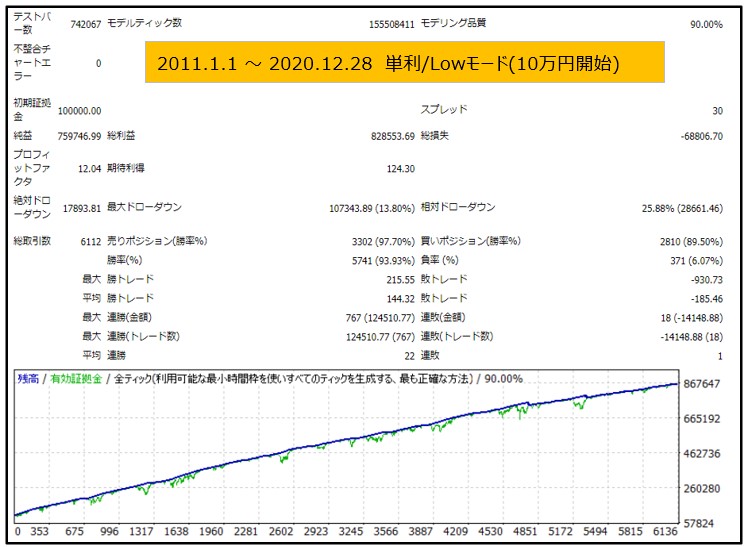
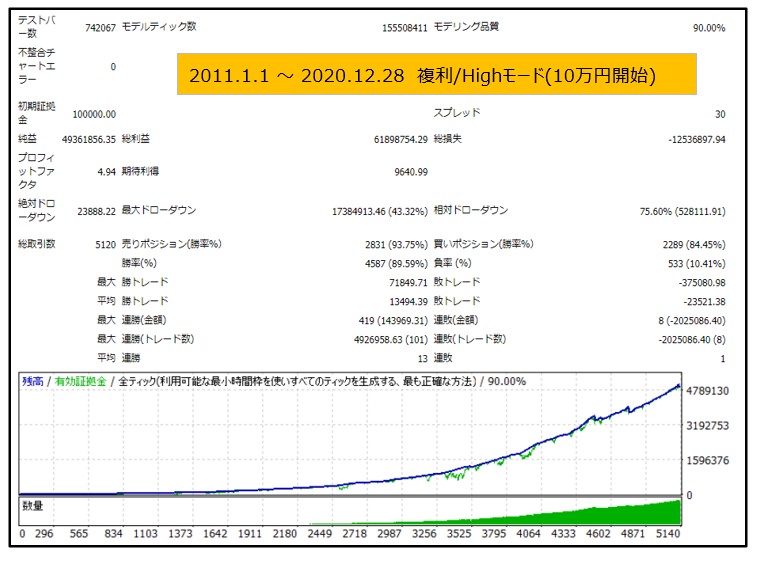
単利/Lowリスクでコツコツ増やすもよし、複利/Highリスクでがっつり増やすもよし、
様々な利用方法で楽しんでもらえたらと思います。
●วิธีชำระเงิน






●วิธีชำระเงิน
เช่นเดียวกับการซื้อขายตามดุลยพินิจ มีวิธีการซื้อขายหลายประเภท เช่น วิธีการซื้อขายที่รวมตัวบ่งชี้เพื่อกำหนดเวลาของการซื้อขายและการชำระบัญชี การซื้อและขายซ้ำในช่วงเวลาราคาคงที่ (pips) และวิธีการซื้อขายที่ใช้ความผิดปกติของตลาดและ ลักษณะเวลา มีหลายประเภทตามวิธีการซื้อขายที่ใช้ดุลยพินิจ
การจำแนกประเภทอย่างง่ายคือ
・Scalping (ประเภทของธุรกรรมที่เสร็จสิ้นภายในไม่กี่นาทีถึงไม่กี่ชั่วโมง),
・การซื้อขายรายวัน (ประเภทของธุรกรรมที่เสร็จสิ้นภายในไม่กี่ชั่วโมงถึงหนึ่งวัน)
・สวิง (ประเภทการซื้อขายในระยะเวลาค่อนข้างนานตั้งแต่หนึ่งวันขึ้นไปถึงประมาณหนึ่งสัปดาห์)
・Nampin Martin (ประเภทที่ถือครองหลายตำแหน่งในช่วงเวลาที่เท่ากันหรือไม่เท่ากัน และชำระทั้งหมดพร้อมกันเมื่อมีการทำกำไร ประเภทที่เพิ่มจำนวนล็อตในแต่ละขั้นเรียกว่า martingale)
・Anomaly EA (Mid-price trading, early morning scalping) และอื่น ๆ
อย่างไรก็ตาม ข้อได้เปรียบที่สำคัญของการซื้อขายอัตโนมัติคือความสามารถในการจำกัดและคาดการณ์ความเสี่ยงล่วงหน้า
[ความเสี่ยง]
พื้นฐานของการซื้อขายฟอเร็กซ์คือความเสี่ยงในการซื้อขายที่มีอยู่ในการซื้อขายอัตโนมัติเช่นกัน
・ความเสี่ยงขนาดล็อต
การเพิ่มขนาดล็อตโดยการบังคับเนื่องจากอัตราการชนะที่สูง ในบางกรณีที่เกิดขึ้นได้ยาก ขึ้นอยู่กับ EA อาจทำให้สูญเสีย Pips อย่างมากเมื่อเกิดการขาดทุน การตรวจสอบ SL Pips และจำนวนตำแหน่งที่ถืออยู่เป็นสิ่งสำคัญก่อนที่จะดำเนินการกับล็อตที่เหมาะสม
・ความเสี่ยงจากความผันผวนของตลาดอย่างรวดเร็ว
มีกรณีที่ราคาตลาดผันผวนอย่างรวดเร็วเนื่องจากการประกาศดัชนีหรือข่าวที่ไม่คาดฝัน การซื้อขายของระบบไม่ได้คำนึงถึงความเคลื่อนไหวของตลาดที่ไม่สามารถคาดเดาได้ ทำให้ไม่สามารถตัดสินใจได้ว่าจะชำระล่วงหน้าหรือละเว้นจากการซื้อขาย เพื่อเป็นมาตรการตอบโต้ การใช้เครื่องมือที่จะหยุด EA ตามการประกาศตัวบ่งชี้หรือ VIX (ดัชนีความกลัว) ก็เป็นไปได้เช่นกัน
[คุณประโยชน์]
・ให้บริการตลอด 24 ชั่วโมง
หากมีโอกาส ระบบการซื้อขายจะดำเนินการซื้อขายในนามของคุณอย่างสม่ำเสมอ มันพิสูจน์ได้ว่าเป็นเครื่องมือที่สะดวกอย่างยิ่งสำหรับผู้ที่ไม่สามารถจัดสรรเวลาในการซื้อขายได้
・ซื้อขายอย่างไม่เต็มใจโดยไม่ถูกครอบงำด้วยอารมณ์
ไม่มีการปรับเปลี่ยนกฎการให้บริการด้วยตนเอง ซึ่งเป็นแนวโน้มทั่วไปของมนุษย์ เช่น การเพิ่มขนาดล็อตหลังจากการขาดทุนติดต่อกันในการซื้อขายตามดุลยพินิจ หรือในทางกลับกัน การได้รับผลกำไรอย่างเร่งรีบโดยได้รับผลกำไรน้อยที่สุด
・สามารถเข้าถึงได้สำหรับผู้เริ่มต้น
หากต้องการมีส่วนร่วมในการซื้อขายฟอเร็กซ์ ไม่มีข้อกำหนดเบื้องต้นในการศึกษา ใครก็ตามที่ใช้ระบบการซื้อขายจะได้รับผลลัพธ์เดียวกัน
[ข้อเสีย]
・ไม่สามารถเพิ่มความถี่ในการซื้อขายได้ตามต้องการ
เนื่องจากระบบการซื้อขายดำเนินการตามเงื่อนไขที่ตั้งโปรแกรมไว้ล่วงหน้า ขึ้นอยู่กับประเภทของ EA ระบบจึงอาจดำเนินการซื้อขายเพียงไม่กี่ครั้งต่อเดือน
・ความเหมาะสมอาจแตกต่างกันไปตามสภาวะตลาด
ขึ้นอยู่กับประเภทการซื้อขายของ EA มีช่วงเวลาที่เหมาะสมกับการซื้อขายตามแนวโน้มมากกว่าและช่วงเวลาที่เหมาะกับการซื้อขายที่ขัดแย้งกันมากกว่า ทำให้ผลลัพธ์ที่สม่ำเสมอในทุกช่วงเวลาไม่น่าเป็นไปได้ แม้ว่าปีที่แล้วอาจมีผลลัพธ์ที่ดี แต่ผลการดำเนินงานในปีนี้อาจไม่มีแนวโน้มที่ดีนัก ซึ่งจำเป็นต้องใช้ดุลยพินิจในระดับหนึ่งในการพิจารณาว่าเป็นเวลาที่เหมาะสมในการดำเนินการหรือไม่
・MT4 (MetaTrader 4 จำเป็นต้องเปิดบัญชีกับบริษัท Forex ที่ให้บริการ MT4)
・EA (โปรแกรมสำหรับการซื้อขายอัตโนมัติ)
・เงินฝากปฏิบัติการที่จำเป็นสำหรับการใช้งาน EA
・พีซีที่สามารถทำงานได้ตลอด 24 ชั่วโมงหรือ VPS (Virtual Private Server) โดยที่พีซีเสมือนโฮสต์บนเซิร์ฟเวอร์คลาวด์เพื่อรัน MT4
นอกจากนี้ยังมีบัญชีทดลองและบัญชีจริง และเมื่อสมัครบัญชีทดลอง คุณจะได้สัมผัสกับการซื้อขายด้วยเงินเสมือนจริง หลังจากเปิดบัญชีจริงแล้ว ให้เลือกเซิร์ฟเวอร์การเชื่อมต่อที่กำหนดโดยโบรกเกอร์ ป้อนรหัสผ่านและเข้าสู่ระบบบัญชี
เมื่อคุณฝากเงินเข้าบัญชีของคุณโดยใช้วิธีการที่โบรกเกอร์กำหนด เงินจะปรากฏในบัญชี MT4 ของคุณและคุณจะสามารถซื้อขายได้
ขั้นแรก ดาวน์โหลดไฟล์ EA ที่ซื้อจากหน้าของฉันบน GogoJungle คุณจะดาวน์โหลดไฟล์ zip (บีบอัด) ดังนั้นให้คลิกขวาเพื่อแตกไฟล์และดึงไฟล์ชื่อ '◯◯◯ (ชื่อ EA)_A19GAw09 (ตัวอักษรและตัวเลข 8 ตัวใดก็ได้ ).ex4' จากด้านใน
จากนั้น เปิด MT4 และไปที่ 'File' → 'Open Data Folder' → 'MQL4' → โฟลเดอร์ 'Experts' และวางไฟล์ ex4 ไว้ข้างใน เมื่อเสร็จแล้ว ปิด MT4 และรีสตาร์ท จากนั้น ไปที่เมนูด้านบน ' เครื่องมือ' → 'ตัวเลือก' และภายใต้ 'ที่ปรึกษาผู้เชี่ยวชาญ' ตรวจสอบให้แน่ใจว่าได้เลือก 'อนุญาตการซื้อขายอัตโนมัติ' และ 'อนุญาตการนำเข้า DLL' แล้ว จากนั้นกด ตกลง เพื่อปิด
คู่สกุลเงินและกรอบเวลาที่จำเป็นสำหรับการดำเนินการที่ถูกต้องของ EA ระบุไว้ในหน้าการขายของ EA อ้างอิงข้อมูลนี้และเปิดแผนภูมิของกรอบเวลาคู่สกุลเงินที่ถูกต้อง (เช่น USDJPY5M สำหรับแผนภูมิ 5 นาที USDJPY).
ภายในแถบนำทางเมนู ใต้ 'Expert Advisors' คุณจะพบชื่อไฟล์ EA ที่คุณวางไว้ก่อนหน้านี้ คลิกเพื่อเลือก จากนั้นลากและวางลงในแผนภูมิโดยตรงเพื่อโหลด EA หรือคุณสามารถดับเบิลคลิกที่ EA ชื่อเพื่อโหลดลงในแผนภูมิที่เลือก
หาก 'Authentication Success' ปรากฏขึ้นที่ด้านซ้ายบนของแผนภูมิ แสดงว่าการรับรองความถูกต้องสำเร็จแล้ว ในการใช้งาน EA คุณต้องให้พีซีของคุณทำงานตลอด 24 ชั่วโมง ดังนั้น ให้ปิดการใช้งานฟังก์ชันสลีปอัตโนมัติหรือโฮสต์ MT4 บน VPS และใช้งาน EA
หากคุณต้องการใช้กับบัญชีอื่นที่ไม่ใช่บัญชีที่ผ่านการรับรองความถูกต้อง คุณจะต้องรีเซ็ตบัญชีที่ลงทะเบียน
หากต้องการรีเซ็ตบัญชี ให้ปิด MT4 ที่มีการลงทะเบียนการรับรองความถูกต้องของเว็บ จากนั้นไปที่หน้าของฉันบน GogoJungle > การใช้งาน > เนื้อหาดิจิทัล > EA ที่เกี่ยวข้อง > กดปุ่ม 'รีเซ็ต' เพื่อดูหมายเลขการลงทะเบียน และบัญชีที่ลงทะเบียนจะถูกปล่อย .
เมื่อบัญชีอยู่ในสถานะรีเซ็ต การใช้ EA กับบัญชี MT4 อื่นจะเป็นการลงทะเบียนบัญชีใหม่
นอกจากนี้คุณยังสามารถรีเซ็ตบัญชีได้ไม่จำกัดจำนวนครั้ง
→ รายการที่ต้องตรวจสอบเมื่อ EA ไม่ทำงาน
1 ล็อต = 100,000 สกุลเงิน
0.1 ล็อต = 10,000 สกุลเงิน
0.01 ล็อต = 1,000 สกุลเงิน
มันกลายเป็น.
ในสกุลเงินดอลลาร์เยน 1 ล็อต = 100,000 ดอลลาร์
มาร์จิ้นที่จำเป็นสำหรับการถือครองล็อตนั้นถูกกำหนดโดยเลเวอเรจที่กำหนดโดยบริษัท FX
หากเลเวอเรจเป็น 25 เท่า หลักประกันที่ต้องถือ 10,000 USD/JPY จะเท่ากับ 10,000*109 (*ในอัตรา 109 เยนต่อดอลลาร์) ÷ 25 = 43,600 เยน
・อัตราผลตอบแทนความเสี่ยง: กำไรและขาดทุนทั้งหมดในระหว่างงวด ÷ การเบิกเงินสูงสุด
・การเบิกถอนสูงสุด: การสูญเสียที่ยังไม่เกิดขึ้นสูงสุดในระหว่างระยะเวลาดำเนินการ
・จำนวนตำแหน่งสูงสุด: จำนวนตำแหน่งสูงสุดที่ EA สามารถถือได้ในทางทฤษฎีในเวลาเดียวกัน
・TP (Take Profit): กำไร Pips (หรือจำนวนที่ระบุ ฯลฯ) ในการตั้งค่า EA
・SL (Stop Loss): จุดขาดทุนสูงสุด (หรือจำนวนที่ระบุ ฯลฯ) ในการตั้งค่า EA
・Trailing stop: นี่คือวิธีการชำระเงินที่เพิ่มผลกำไรสูงสุดโดยการเพิ่ม SL การชำระเงินในช่วงเวลาปกติ (ในทิศทางของผลกำไร) เมื่อมีการทำกำไรจำนวนหนึ่ง แทนที่จะชำระเงินตาม pip ที่ระบุ
・อัตราส่วนผลตอบแทนความเสี่ยง (อัตราส่วนผลตอบแทน): กำไรเฉลี่ย − ขาดทุนเฉลี่ย
・ทั้งสองตำแหน่ง: ถือทั้งตำแหน่งซื้อและขายในเวลาเดียวกัน (โบรกเกอร์บางแห่งไม่อนุญาตให้ใช้ทั้งสองตำแหน่ง)
・MT4 Beginner's Guide
・การตรวจสอบผลงานการซื้อขายระบบ (Forward & Back Testing)
・การเลือก EA ครั้งแรก! วิธีคำนวณเงินทุนที่แนะนำ
・เปรียบเทียบบัญชี MT4 ด้วย Spread, Swap, และความสามารถในการจัดการคำสั่งซื้อขาย
・Web Authentication คืออะไร?
・ตรวจสอบข้อสรุปเมื่อ EA ไม่ทำงาน
