
Aws_System

- ทุกช่วงเวลา
- 2 ปี
- 1 ปี
- 6 เดือน
- 3 เดือน
- 1 เดือน
Forward testing (Profit)
รายละเอียดสถิติ (รายเดือน)
- ม.ค.
- ก.พ.
- มี.ค.
- เม.ย.
- พ.ค.
- มิ.ย.
- ก.ค.
- ส.ค.
- ก.ย.
- ต.ค.
- พ.ย.
- ธ.ค.
ปฏิทินการเทรดของเดือนนี้
เกี่ยวกับกลยุทธ์
กำลังแปล...
バックテストでの結果を用いたロジック分析
Awesome_System 2のバックテストは5年間( 2018.02.01 02:00 – 2023.12.29 23:55)のデータで実行しました。
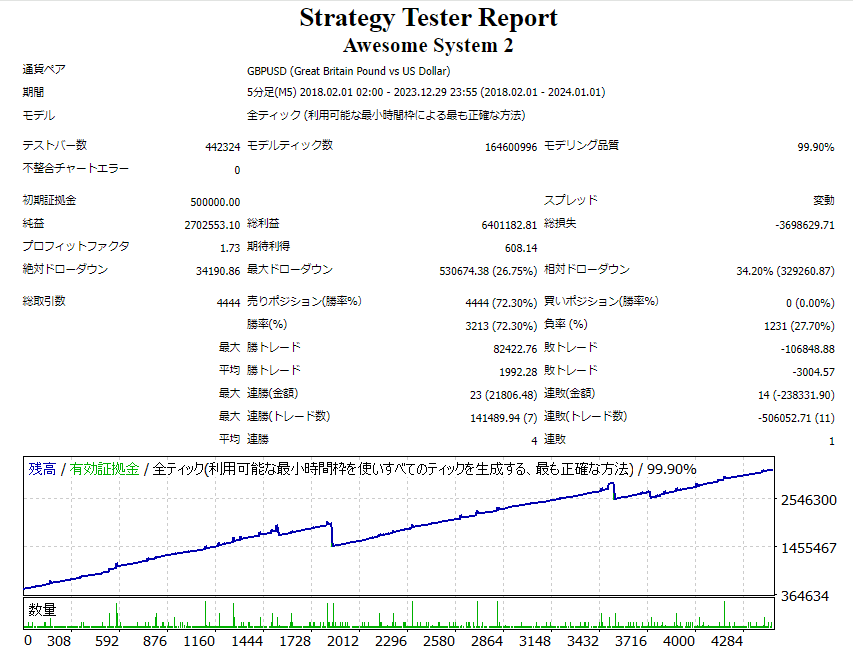
バックテストの設定は、
初期証拠金:50万円
スプレッド:変動
時間足:5分足
バックテストの結果を一部ピックアップすると、
純益:2,702,553.10円
PF:1.73
最大DD:530674.38円 (26.75%)
総取引数:4,444回
1取引毎の期待値:608.14円
このようになります。
ナンピンマーチンのEAとしてだけではなく、EAとして、またFXトレードとしても非常に優秀な成績を出しています。
今からこのバックテストの結果を元にロジックを分析します。
メインロジック
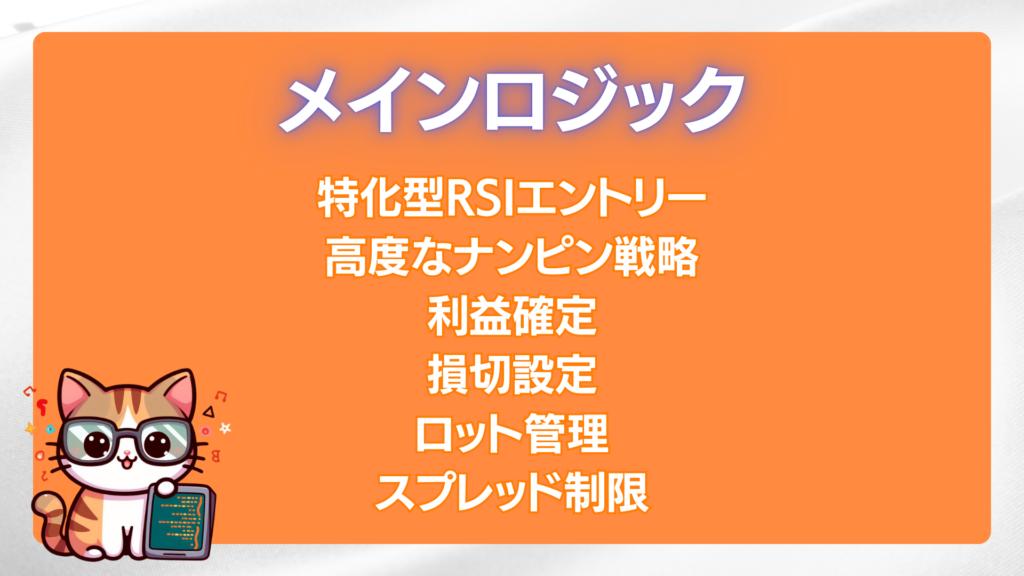
・特化型RSIエントリー
RSIを用いてエントリーするEAは珍しくないです。しかしこのEAでは、RSIを用いてSellポジションに特化してエントリーします。
トレンドに合わせてピンポイントでエントリーすることによって損失を生むリスクを減らします。
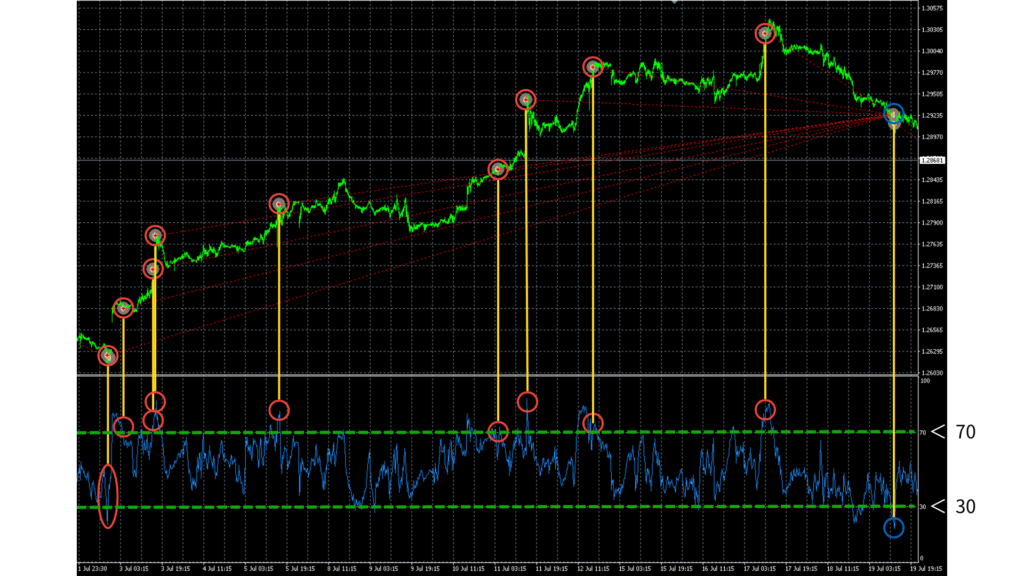
画像から、sellエントリーは〇のポジションでエントリーしているのがわかります。
「買いトレンド方向に大きく動いている」か「買われすぎのラインを大きく超えている」状態になったらエントリーしていると分析できます。
また、利確条件は〇でイグジットしているのがわかります。
売られすぎのラインを一番大きく超えたポジションでうまく利確しています。
初めの6つのポジションは損切のように見えますが、「全体の平均利益」の条件に達したためこのポジションで利確しました。
・高度なナンピン戦略
開発に一番注力したのが、ナンピン幅とナンピン回数の調整です。ナンピンマーチンはハイリスク&ハイリターンな取引手法で知られていますが、最大DDを抑えつつ、最大利益率を損なわれないように調整しました。これによりバックテスト5年間の利率を5倍以上にすることを実現しました。
・利益確定
ポジションごとのテイクプロフィットとして「25pips」、全体の平均利益としては「15pips」に達した場合に決済されます。
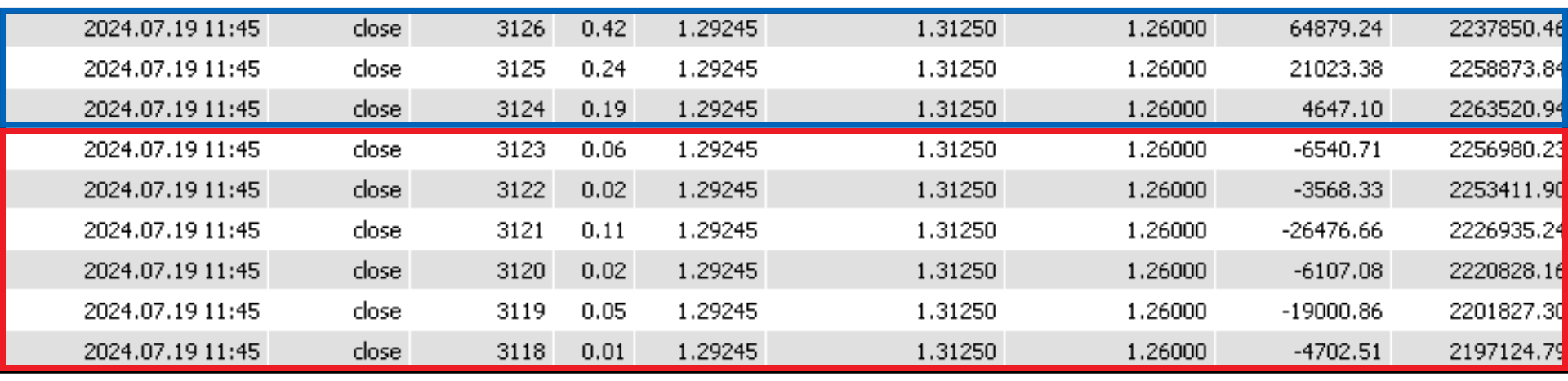
先程のRSIエントリーの解説で取り上げたポジションを数値化してみると、「6ポジションがマイナス」で「3ポジションがプラス」の収支になっています。
総損失額は「-66,396.15円」、総利益額は「90,549.72円」です。
結果的にロジックがうまく作用して、全体平均利益として「24,153.57円」の利益が出ています。
・損切設定
ストップロスを500pipsに設定しました。12回のナンピン回数に対して秀逸な調整をしました。

2020/7/17にsellエントリーした価格が1.25739
2020/7/30にストップロスした価格が1.30343
約500pipsでしっかりストップロスが入っていることがわかります。
<POINT>当時のポンド/米ドルの市場はポンド高のトレンドが形成され、長い上昇トレンドに見舞われてます。
・ロット管理
初期ロットは「0.01」から開始します。ナンピン時は、ロット数を変動させながらエントリーしていきます。
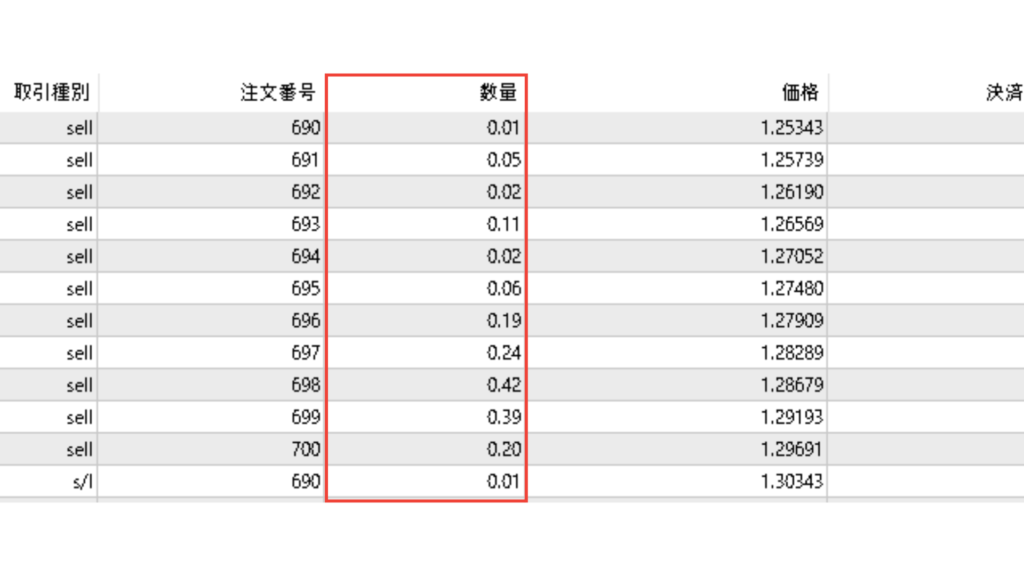
<POINT>これにより、価格が逆行した時のリワードがうまく調整されます。
・スプレッド制限
エントリー時のスプレッドの最大許容量を50pipsに設定することにより、ハイリスクなトレードになる確率を格段に引き下げます。
<POINT>50pipsを超えるスプレッドの場合はエントリーしないということです!
・Awesome_System 2 の戦略考察
「RSI」を使ってトレンドの好機を逃さずエントリーし、「ナンピン」により平均購入価格を下げながら「マーチン」により勝機を狙います。
ナンピンマーチンは、1つの取引での損失額が他の取引に比べ大きくなる傾向にありますが、適切な「損切設定」や「ロット管理」により抜かりのないリスク管理を実現しています。
パラメーター設定
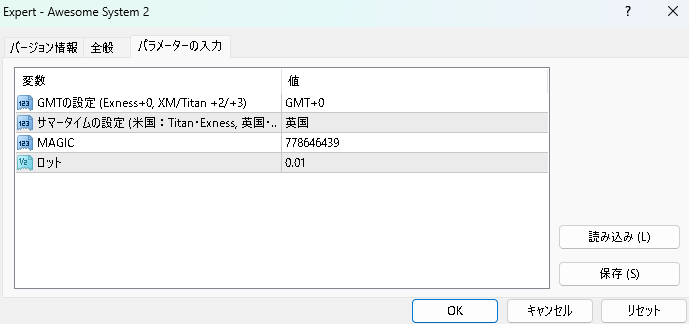
・GMTの設定(グリニッジの標準的な時間、英語: Greenwich Mean Time)
ご利用の各FXブローカーごとに設定してください。
FXブローカーの冬のサーバー時間と、グリニッジの標準時間の時差を設定しておきます。
例)Exnessはサーバー時間にグリニッジ標準時を採用しているため「GMT+0」となります。
・サマータイムの設定
「赤道から遠い国」や「大きい国」にはサマータイムと言う制度を導入していることがあり、季節による日照時間の長さによって時間をずらしています。
この制度による時差をなくすために、この設定が設けてあります。
・MAGIC(マジックナンバー)
他のEAとの重複はできません。
・ロット
0.01ロットにつき、50万円を推奨しています。これは最低金額であり「+50万円」程あれば、さらに口座破綻のリスクを回避できる可能性は増えます。
<POINT>バックテストでの最大DDが初期証拠金の50万円を上回るため、100万円あればさらに安心できるという分析ができます。
●วิธีชำระเงิน






●วิธีชำระเงิน
เช่นเดียวกับการซื้อขายตามดุลยพินิจ มีวิธีการซื้อขายหลายประเภท เช่น วิธีการซื้อขายที่รวมตัวบ่งชี้เพื่อกำหนดเวลาของการซื้อขายและการชำระบัญชี การซื้อและขายซ้ำในช่วงเวลาราคาคงที่ (pips) และวิธีการซื้อขายที่ใช้ความผิดปกติของตลาดและ ลักษณะเวลา มีหลายประเภทตามวิธีการซื้อขายที่ใช้ดุลยพินิจ
การจำแนกประเภทอย่างง่ายคือ
・Scalping (ประเภทของธุรกรรมที่เสร็จสิ้นภายในไม่กี่นาทีถึงไม่กี่ชั่วโมง),
・การซื้อขายรายวัน (ประเภทของธุรกรรมที่เสร็จสิ้นภายในไม่กี่ชั่วโมงถึงหนึ่งวัน)
・สวิง (ประเภทการซื้อขายในระยะเวลาค่อนข้างนานตั้งแต่หนึ่งวันขึ้นไปถึงประมาณหนึ่งสัปดาห์)
・Nampin Martin (ประเภทที่ถือครองหลายตำแหน่งในช่วงเวลาที่เท่ากันหรือไม่เท่ากัน และชำระทั้งหมดพร้อมกันเมื่อมีการทำกำไร ประเภทที่เพิ่มจำนวนล็อตในแต่ละขั้นเรียกว่า martingale)
・Anomaly EA (Mid-price trading, early morning scalping) และอื่น ๆ
อย่างไรก็ตาม ข้อได้เปรียบที่สำคัญของการซื้อขายอัตโนมัติคือความสามารถในการจำกัดและคาดการณ์ความเสี่ยงล่วงหน้า
[ความเสี่ยง]
พื้นฐานของการซื้อขายฟอเร็กซ์คือความเสี่ยงในการซื้อขายที่มีอยู่ในการซื้อขายอัตโนมัติเช่นกัน
・ความเสี่ยงขนาดล็อต
การเพิ่มขนาดล็อตโดยการบังคับเนื่องจากอัตราการชนะที่สูง ในบางกรณีที่เกิดขึ้นได้ยาก ขึ้นอยู่กับ EA อาจทำให้สูญเสีย Pips อย่างมากเมื่อเกิดการขาดทุน การตรวจสอบ SL Pips และจำนวนตำแหน่งที่ถืออยู่เป็นสิ่งสำคัญก่อนที่จะดำเนินการกับล็อตที่เหมาะสม
・ความเสี่ยงจากความผันผวนของตลาดอย่างรวดเร็ว
มีกรณีที่ราคาตลาดผันผวนอย่างรวดเร็วเนื่องจากการประกาศดัชนีหรือข่าวที่ไม่คาดฝัน การซื้อขายของระบบไม่ได้คำนึงถึงความเคลื่อนไหวของตลาดที่ไม่สามารถคาดเดาได้ ทำให้ไม่สามารถตัดสินใจได้ว่าจะชำระล่วงหน้าหรือละเว้นจากการซื้อขาย เพื่อเป็นมาตรการตอบโต้ การใช้เครื่องมือที่จะหยุด EA ตามการประกาศตัวบ่งชี้หรือ VIX (ดัชนีความกลัว) ก็เป็นไปได้เช่นกัน
[คุณประโยชน์]
・ให้บริการตลอด 24 ชั่วโมง
หากมีโอกาส ระบบการซื้อขายจะดำเนินการซื้อขายในนามของคุณอย่างสม่ำเสมอ มันพิสูจน์ได้ว่าเป็นเครื่องมือที่สะดวกอย่างยิ่งสำหรับผู้ที่ไม่สามารถจัดสรรเวลาในการซื้อขายได้
・ซื้อขายอย่างไม่เต็มใจโดยไม่ถูกครอบงำด้วยอารมณ์
ไม่มีการปรับเปลี่ยนกฎการให้บริการด้วยตนเอง ซึ่งเป็นแนวโน้มทั่วไปของมนุษย์ เช่น การเพิ่มขนาดล็อตหลังจากการขาดทุนติดต่อกันในการซื้อขายตามดุลยพินิจ หรือในทางกลับกัน การได้รับผลกำไรอย่างเร่งรีบโดยได้รับผลกำไรน้อยที่สุด
・สามารถเข้าถึงได้สำหรับผู้เริ่มต้น
หากต้องการมีส่วนร่วมในการซื้อขายฟอเร็กซ์ ไม่มีข้อกำหนดเบื้องต้นในการศึกษา ใครก็ตามที่ใช้ระบบการซื้อขายจะได้รับผลลัพธ์เดียวกัน
[ข้อเสีย]
・ไม่สามารถเพิ่มความถี่ในการซื้อขายได้ตามต้องการ
เนื่องจากระบบการซื้อขายดำเนินการตามเงื่อนไขที่ตั้งโปรแกรมไว้ล่วงหน้า ขึ้นอยู่กับประเภทของ EA ระบบจึงอาจดำเนินการซื้อขายเพียงไม่กี่ครั้งต่อเดือน
・ความเหมาะสมอาจแตกต่างกันไปตามสภาวะตลาด
ขึ้นอยู่กับประเภทการซื้อขายของ EA มีช่วงเวลาที่เหมาะสมกับการซื้อขายตามแนวโน้มมากกว่าและช่วงเวลาที่เหมาะกับการซื้อขายที่ขัดแย้งกันมากกว่า ทำให้ผลลัพธ์ที่สม่ำเสมอในทุกช่วงเวลาไม่น่าเป็นไปได้ แม้ว่าปีที่แล้วอาจมีผลลัพธ์ที่ดี แต่ผลการดำเนินงานในปีนี้อาจไม่มีแนวโน้มที่ดีนัก ซึ่งจำเป็นต้องใช้ดุลยพินิจในระดับหนึ่งในการพิจารณาว่าเป็นเวลาที่เหมาะสมในการดำเนินการหรือไม่
・MT4 (MetaTrader 4 จำเป็นต้องเปิดบัญชีกับบริษัท Forex ที่ให้บริการ MT4)
・EA (โปรแกรมสำหรับการซื้อขายอัตโนมัติ)
・เงินฝากปฏิบัติการที่จำเป็นสำหรับการใช้งาน EA
・พีซีที่สามารถทำงานได้ตลอด 24 ชั่วโมงหรือ VPS (Virtual Private Server) โดยที่พีซีเสมือนโฮสต์บนเซิร์ฟเวอร์คลาวด์เพื่อรัน MT4
นอกจากนี้ยังมีบัญชีทดลองและบัญชีจริง และเมื่อสมัครบัญชีทดลอง คุณจะได้สัมผัสกับการซื้อขายด้วยเงินเสมือนจริง หลังจากเปิดบัญชีจริงแล้ว ให้เลือกเซิร์ฟเวอร์การเชื่อมต่อที่กำหนดโดยโบรกเกอร์ ป้อนรหัสผ่านและเข้าสู่ระบบบัญชี
เมื่อคุณฝากเงินเข้าบัญชีของคุณโดยใช้วิธีการที่โบรกเกอร์กำหนด เงินจะปรากฏในบัญชี MT4 ของคุณและคุณจะสามารถซื้อขายได้
ขั้นแรก ดาวน์โหลดไฟล์ EA ที่ซื้อจากหน้าของฉันบน GogoJungle คุณจะดาวน์โหลดไฟล์ zip (บีบอัด) ดังนั้นให้คลิกขวาเพื่อแตกไฟล์และดึงไฟล์ชื่อ '◯◯◯ (ชื่อ EA)_A19GAw09 (ตัวอักษรและตัวเลข 8 ตัวใดก็ได้ ).ex4' จากด้านใน
จากนั้น เปิด MT4 และไปที่ 'File' → 'Open Data Folder' → 'MQL4' → โฟลเดอร์ 'Experts' และวางไฟล์ ex4 ไว้ข้างใน เมื่อเสร็จแล้ว ปิด MT4 และรีสตาร์ท จากนั้น ไปที่เมนูด้านบน ' เครื่องมือ' → 'ตัวเลือก' และภายใต้ 'ที่ปรึกษาผู้เชี่ยวชาญ' ตรวจสอบให้แน่ใจว่าได้เลือก 'อนุญาตการซื้อขายอัตโนมัติ' และ 'อนุญาตการนำเข้า DLL' แล้ว จากนั้นกด ตกลง เพื่อปิด
คู่สกุลเงินและกรอบเวลาที่จำเป็นสำหรับการดำเนินการที่ถูกต้องของ EA ระบุไว้ในหน้าการขายของ EA อ้างอิงข้อมูลนี้และเปิดแผนภูมิของกรอบเวลาคู่สกุลเงินที่ถูกต้อง (เช่น USDJPY5M สำหรับแผนภูมิ 5 นาที USDJPY).
ภายในแถบนำทางเมนู ใต้ 'Expert Advisors' คุณจะพบชื่อไฟล์ EA ที่คุณวางไว้ก่อนหน้านี้ คลิกเพื่อเลือก จากนั้นลากและวางลงในแผนภูมิโดยตรงเพื่อโหลด EA หรือคุณสามารถดับเบิลคลิกที่ EA ชื่อเพื่อโหลดลงในแผนภูมิที่เลือก
หาก 'Authentication Success' ปรากฏขึ้นที่ด้านซ้ายบนของแผนภูมิ แสดงว่าการรับรองความถูกต้องสำเร็จแล้ว ในการใช้งาน EA คุณต้องให้พีซีของคุณทำงานตลอด 24 ชั่วโมง ดังนั้น ให้ปิดการใช้งานฟังก์ชันสลีปอัตโนมัติหรือโฮสต์ MT4 บน VPS และใช้งาน EA
หากคุณต้องการใช้กับบัญชีอื่นที่ไม่ใช่บัญชีที่ผ่านการรับรองความถูกต้อง คุณจะต้องรีเซ็ตบัญชีที่ลงทะเบียน
หากต้องการรีเซ็ตบัญชี ให้ปิด MT4 ที่มีการลงทะเบียนการรับรองความถูกต้องของเว็บ จากนั้นไปที่หน้าของฉันบน GogoJungle > การใช้งาน > เนื้อหาดิจิทัล > EA ที่เกี่ยวข้อง > กดปุ่ม 'รีเซ็ต' เพื่อดูหมายเลขการลงทะเบียน และบัญชีที่ลงทะเบียนจะถูกปล่อย .
เมื่อบัญชีอยู่ในสถานะรีเซ็ต การใช้ EA กับบัญชี MT4 อื่นจะเป็นการลงทะเบียนบัญชีใหม่
นอกจากนี้คุณยังสามารถรีเซ็ตบัญชีได้ไม่จำกัดจำนวนครั้ง
→ รายการที่ต้องตรวจสอบเมื่อ EA ไม่ทำงาน
1 ล็อต = 100,000 สกุลเงิน
0.1 ล็อต = 10,000 สกุลเงิน
0.01 ล็อต = 1,000 สกุลเงิน
มันกลายเป็น.
ในสกุลเงินดอลลาร์เยน 1 ล็อต = 100,000 ดอลลาร์
มาร์จิ้นที่จำเป็นสำหรับการถือครองล็อตนั้นถูกกำหนดโดยเลเวอเรจที่กำหนดโดยบริษัท FX
หากเลเวอเรจเป็น 25 เท่า หลักประกันที่ต้องถือ 10,000 USD/JPY จะเท่ากับ 10,000*109 (*ในอัตรา 109 เยนต่อดอลลาร์) ÷ 25 = 43,600 เยน
・อัตราผลตอบแทนความเสี่ยง: กำไรและขาดทุนทั้งหมดในระหว่างงวด ÷ การเบิกเงินสูงสุด
・การเบิกถอนสูงสุด: การสูญเสียที่ยังไม่เกิดขึ้นสูงสุดในระหว่างระยะเวลาดำเนินการ
・จำนวนตำแหน่งสูงสุด: จำนวนตำแหน่งสูงสุดที่ EA สามารถถือได้ในทางทฤษฎีในเวลาเดียวกัน
・TP (Take Profit): กำไร Pips (หรือจำนวนที่ระบุ ฯลฯ) ในการตั้งค่า EA
・SL (Stop Loss): จุดขาดทุนสูงสุด (หรือจำนวนที่ระบุ ฯลฯ) ในการตั้งค่า EA
・Trailing stop: นี่คือวิธีการชำระเงินที่เพิ่มผลกำไรสูงสุดโดยการเพิ่ม SL การชำระเงินในช่วงเวลาปกติ (ในทิศทางของผลกำไร) เมื่อมีการทำกำไรจำนวนหนึ่ง แทนที่จะชำระเงินตาม pip ที่ระบุ
・อัตราส่วนผลตอบแทนความเสี่ยง (อัตราส่วนผลตอบแทน): กำไรเฉลี่ย − ขาดทุนเฉลี่ย
・ทั้งสองตำแหน่ง: ถือทั้งตำแหน่งซื้อและขายในเวลาเดียวกัน (โบรกเกอร์บางแห่งไม่อนุญาตให้ใช้ทั้งสองตำแหน่ง)
・MT4 Beginner's Guide
・การตรวจสอบผลงานการซื้อขายระบบ (Forward & Back Testing)
・การเลือก EA ครั้งแรก! วิธีคำนวณเงินทุนที่แนะนำ
・เปรียบเทียบบัญชี MT4 ด้วย Spread, Swap, และความสามารถในการจัดการคำสั่งซื้อขาย
・Web Authentication คืออะไร?
・ตรวจสอบข้อสรุปเมื่อ EA ไม่ทำงาน
