
【mBDSR (Product ID 11836) Purchase Gift】10 indicators: "mBDSR using 3 to 11 RCI as a filter" and "an indicator that displays 4 to 12 RCI"
0
【mBDSR (Product ID 11836) Purchase Bonus】 Ten indicators: "mBDSR filtered by 3 to 11 RCI" and "an indicator displaying 4 to 12 RCI"
https://www.gogojungle.co.jp/tools/indicators/46485
The conventional mBDSR RCI-filter version supported only when the number of RCIs used as a filter was 1 or 2, but this bonus indicator supports 3, 5, 7, 9, and 11 RCIs as the filter.
◆ Introduction (Indicators included in this product)
To use the indicators included in this bonus, you first need to rename the files.
For details, please refer to the help files contained in the download package.
mBDSR_RCI_special_offer_help20230924.txt
This bonus includes the following 10 indicators.
● Five indicators that display RCI
(1)【RCI4Lines_LimitedBars】
Indicator that displays 4 RCIs
(2)【RCI6Lines_LimitedBars】
Indicator that displays 6 RCIs
(3)【RCI8Lines_LimitedBars】
Indicator that displays 8 RCIs
(4)【RCI10Lines_LimitedBars】
Indicator that displays 10 RCIs
(5)【RCI12Lines_LimitedBars】
Indicator that displays 12 RCIs
● Five indicators that filter RCI as mBDSR (indicator)
(6)【mBDSR_3RCI_VAP】
mBDSR (indicator) filtered by 3 RCIs
(7)【mBDSR_5RCI_VAP】
mBDSR (indicator) filtered by 5 RCIs
(8)【mBDSR_7RCI_VAP】
mBDSR (indicator) filtered by 7 RCIs
(9)【mBDSR_9RCI_VAP】
mBDSR (indicator) filtered by 9 RCIs
(10)【mBDSR_11RCI_VAP】
mBDSR (indicator) filtered by 11 RCIs
There are various ways to use the indicators, but basically, first,
(1) and (6)
(2) and (7)
(3) and (8)
(4) and (9)
(5) and (10)
are intended to be used as pairs.
(6) to (10) RCIs used as filters in mBDSR—basic concepts are described in the following Investment Navigator+ article.
“mBDSR RCI Filter Version” Released!!
(1) to (10) indicators are best used by first reading the free PDF below.
Tips for using RCI [Free PDF]
The more RCIs you add, the more combinations you can configure. Don’t be constrained by the default settings; based on the free PDF and trial-and-error results, feel free to set the configuration to your preference.
Example displays of【RCI12Lines_LimitedBars】 and【mBDSR_11RCI_VAP】
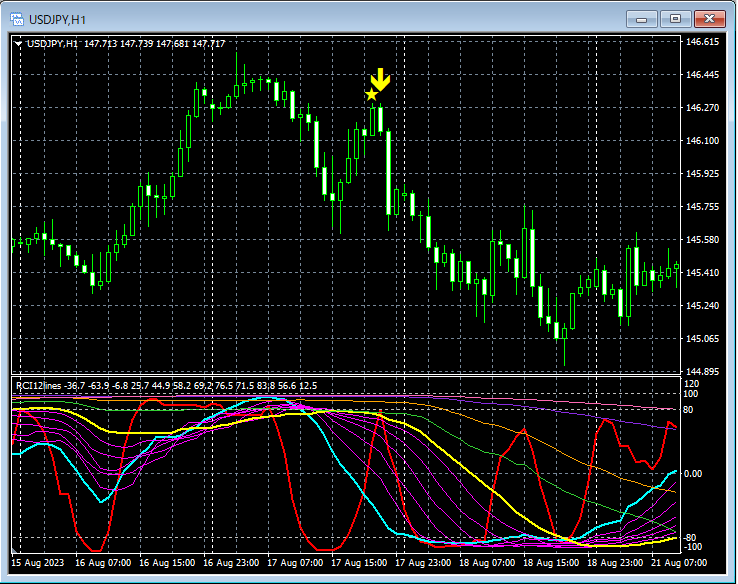
Main window: Sign of mBDSR (RCI11 filters)
Sub window: 12 RCIs
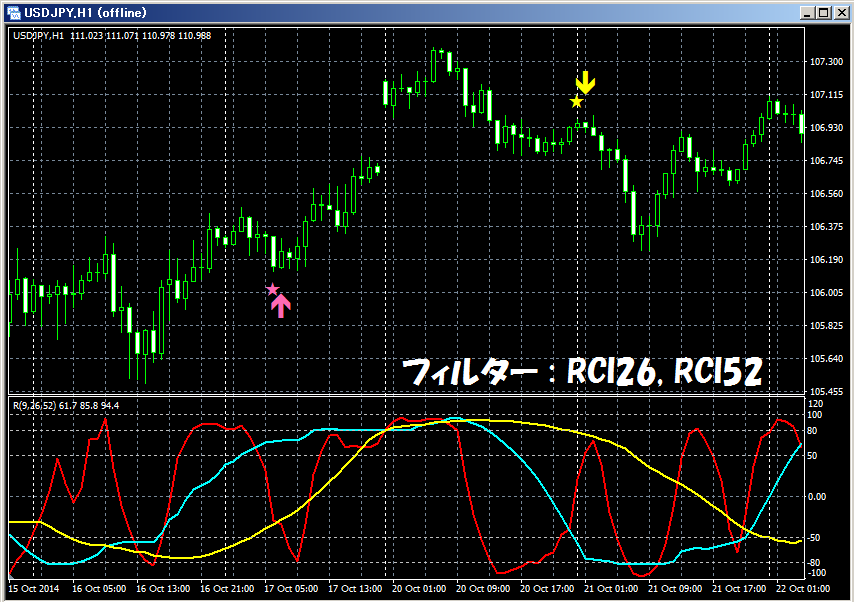
◆ Use cases on the 1-hour chart
Conventional two-RCI filter
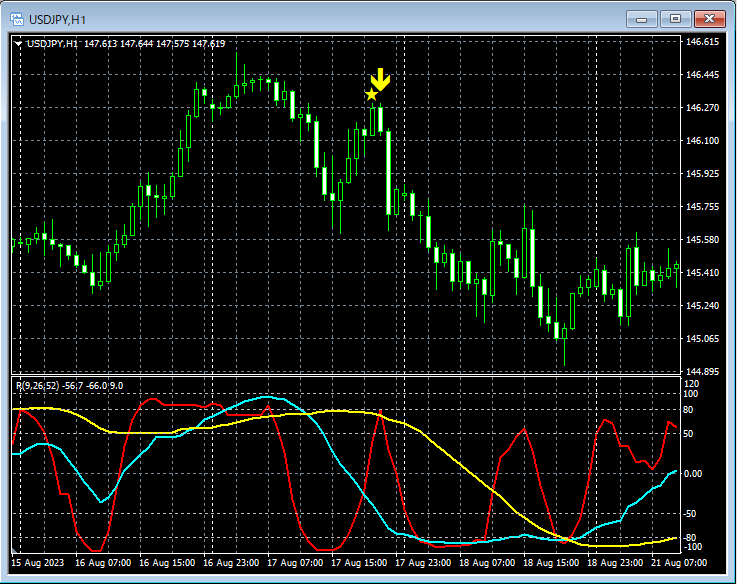
Main window: Sign of mBDSR (RCI2 filter: RCI26, RCI52)
Sub window: 3 RCIs
RCI3-RCI filter
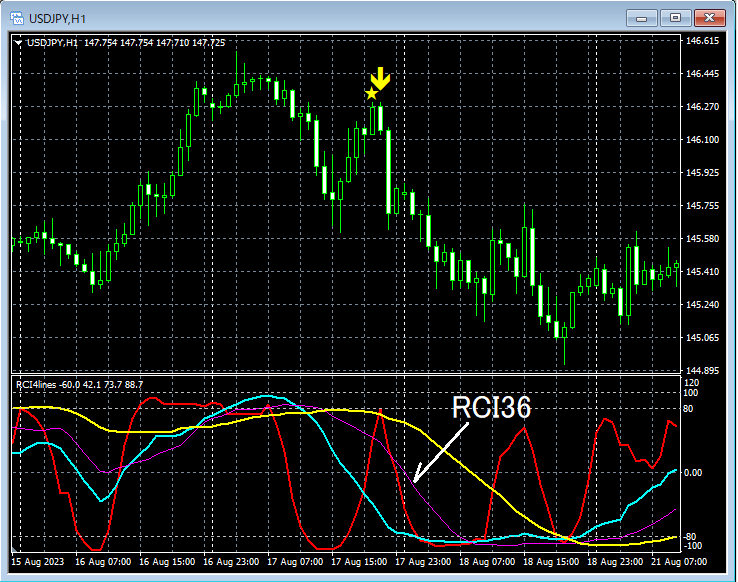
Main window: Sign of mBDSR (RCI3 filter: RCI26, RCI52,RCI36)
Sub window: 4 RCIs
1-hour chartApproximate RCI36 as a 4-hour short-term RCI9
RCI3-RCI filter
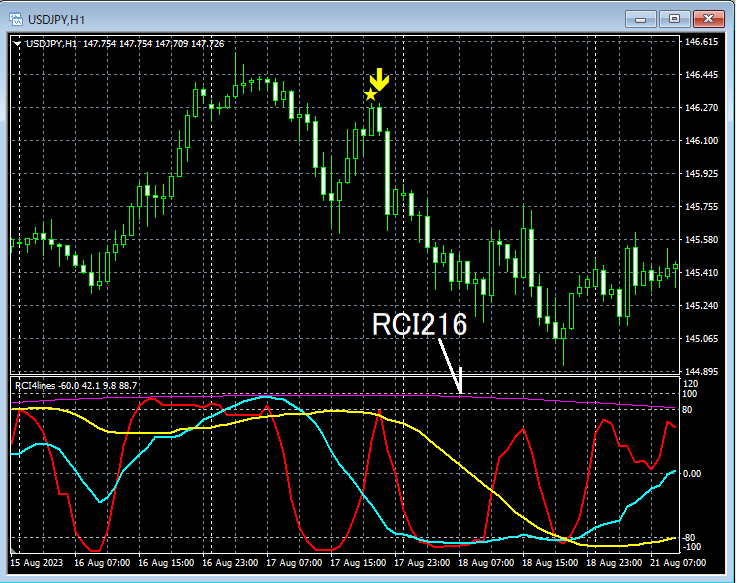
Main window: mBDSR (RCI3 filter: RCI26, RCI52,RCI216) sign
Sub window: 4 RCIs
1-hour chartRCI216 approximated as a daily short-term RCI9 may change how the chart looks.
RCI3-RCI filter
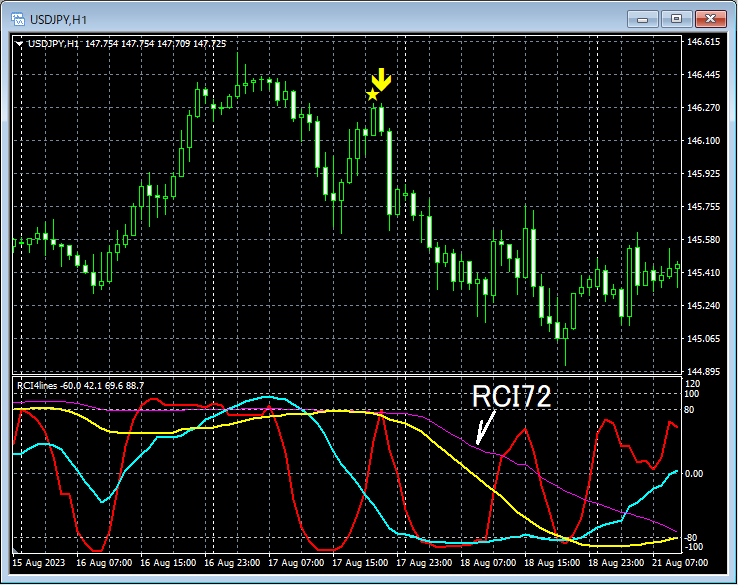
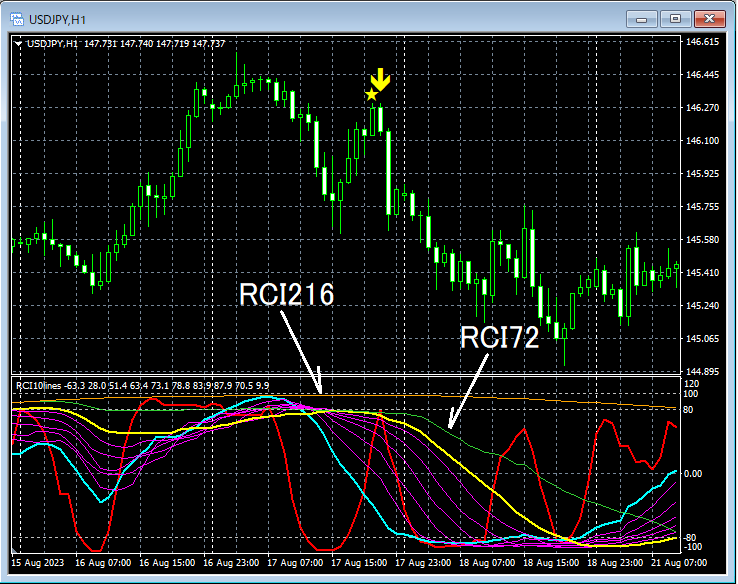
Main window: mBDSR (RCI3 filter: RCI26, RCI52,RCI72) sign
Sub window: 4 RCIs
1-hour chartRCI72 approximated as an 8-hour short-term RCI9 may change how the chart looks.
RCI7-RCI filter
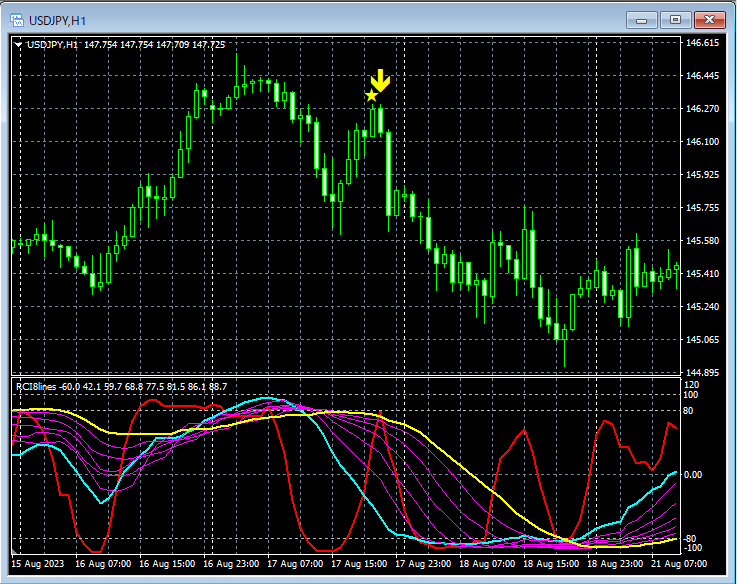
Main window: mBDSR (RCI7 filter: RCI26–RCI52) sign
Sub window: 8 RCIs
If all seven RCIs (mid-term RCI26, long-term RCI52, and the five in-between) align in the same direction, filtering only by mid-term RCI26 and long-term RCI52 may sometimes give a clearer market direction.
Also pay attention when increasing the number of RCIs used as filters.
RCI9-RCI filter
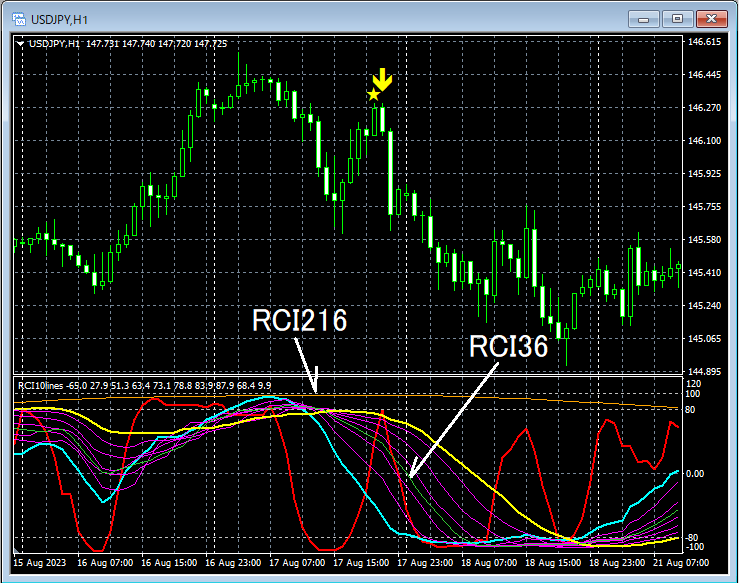
Main window: mBDSR (RCI9 filter: RCI26–RCI52,RCI36, RCI216) sign
Sub window: 10 RCIs
◆ Use on 15-minute chart
Conventional two-RCI filter
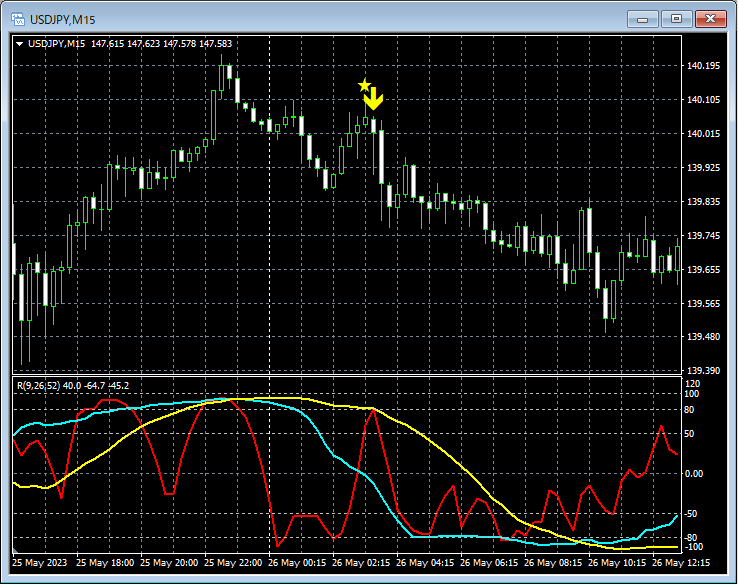
Main window: Sign of mBDSR (RCI2 filter: RCI26, RCI52)
Sub window: 3 RCIs
RCI3-RCI filter
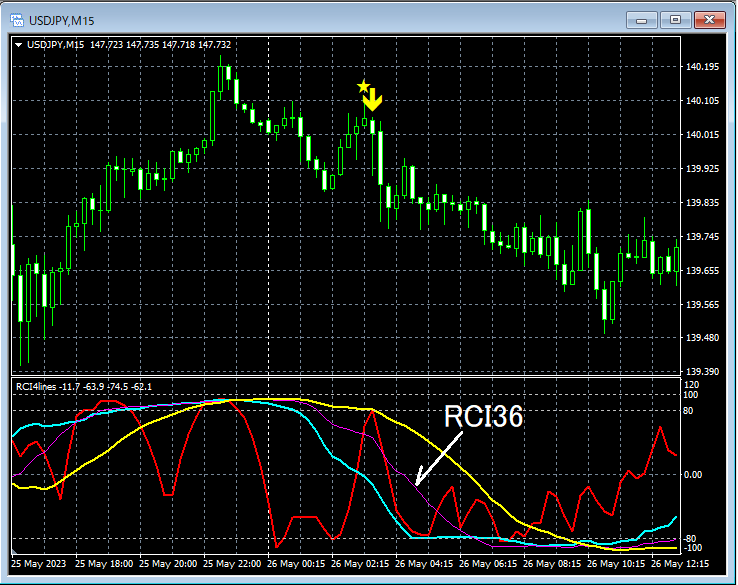
Main window: Sign of mBDSR (RCI3 filter: RCI26, RCI52,RCI36)
Sub window: 4 RCIs
15-minute chartRCI36 approximated as a 1-hour short-term RCI9 may change how the chart looks.
RCI3-RCI filter
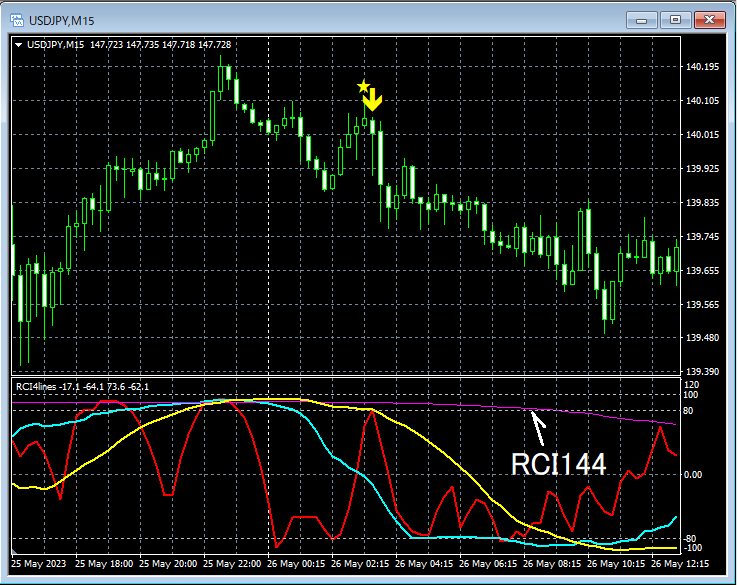
Main window: mBDSR (RCI3 filter: RCI26, RCI52,RCI144) sign
Sub window: 4 RCIs
15-minute chartRCI144 approximated as a 4-hour short-term RCI9 may change how the chart looks.
RCI7-RCI filter
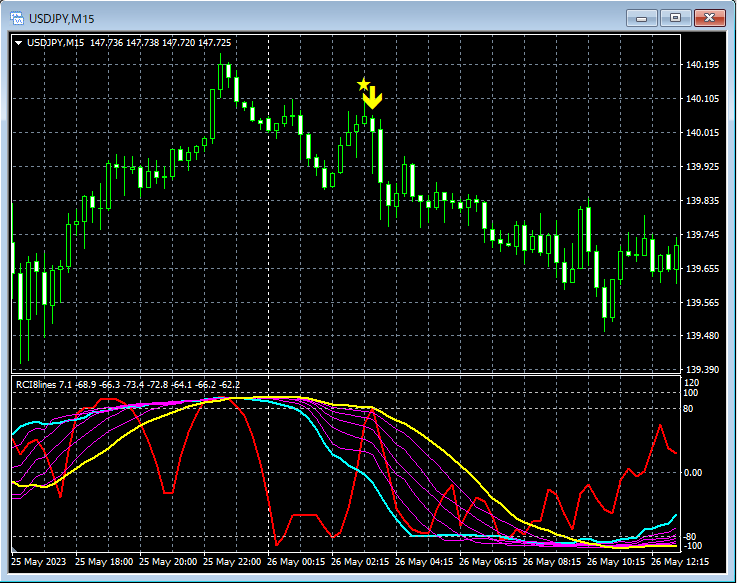
Main window: mBDSR (RCI7 filter: RCI26–RCI52) signSub window: 8 RCIs
If all seven RCIs (mid-term RCI26 and long-term RCI52 and the five RCIs in between) align in the same direction, filtering only by mid-term RCI26 and long-term RCI52 may sometimes give a clearer market direction.
Also pay attention when increasing the number of RCIs used as filters.
RCI9-RCI filter
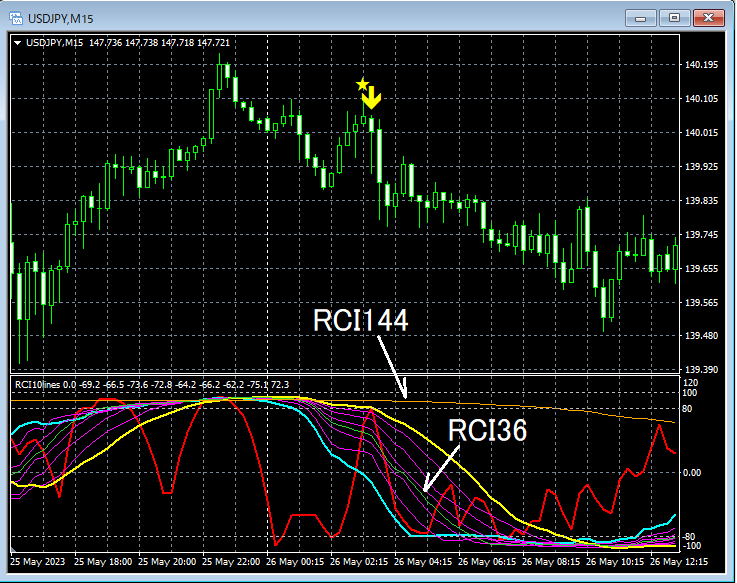
Main window: mBDSR (RCI9 filter: RCI26–RCI52,RCI36, RCI108) sign
Sub window: 10 RCIs
◆ 4 to 12 RCIs display indicator settings
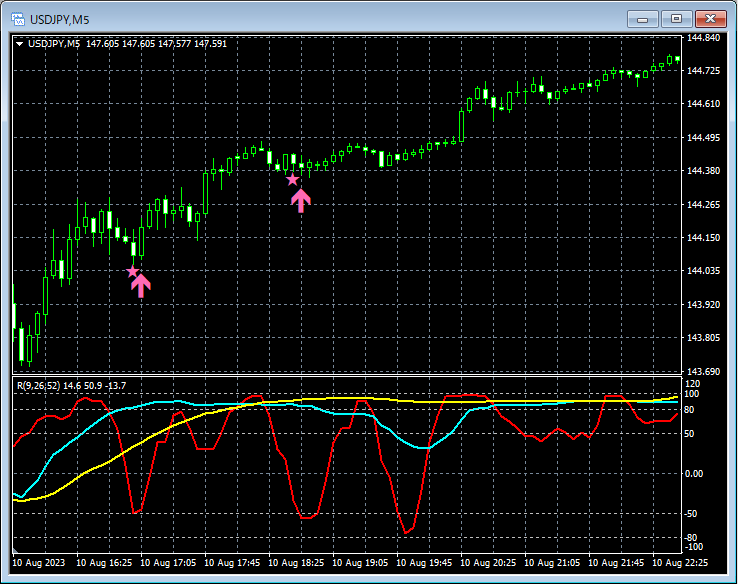
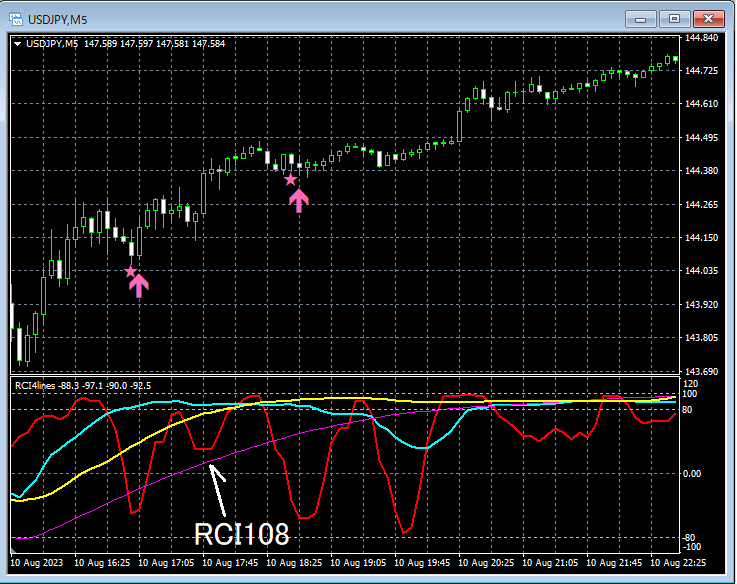
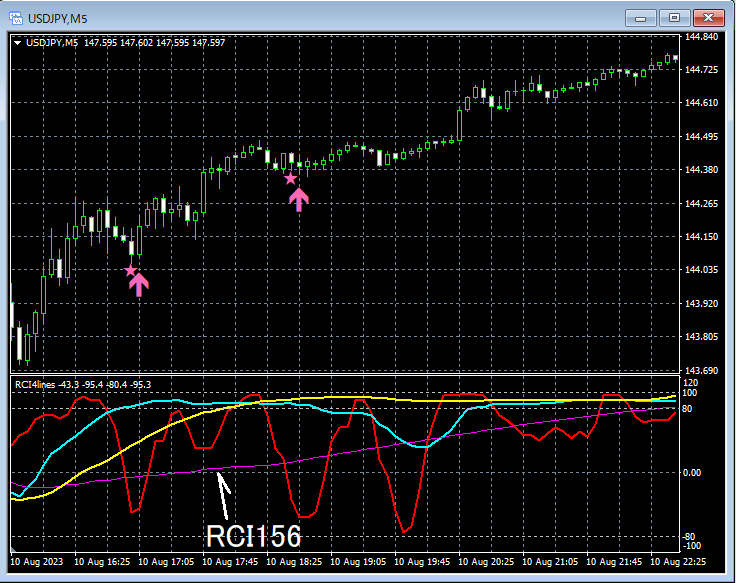
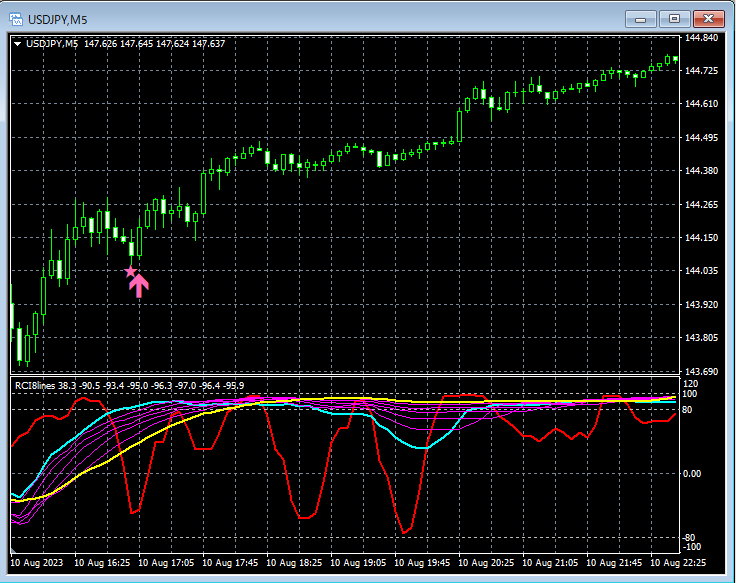
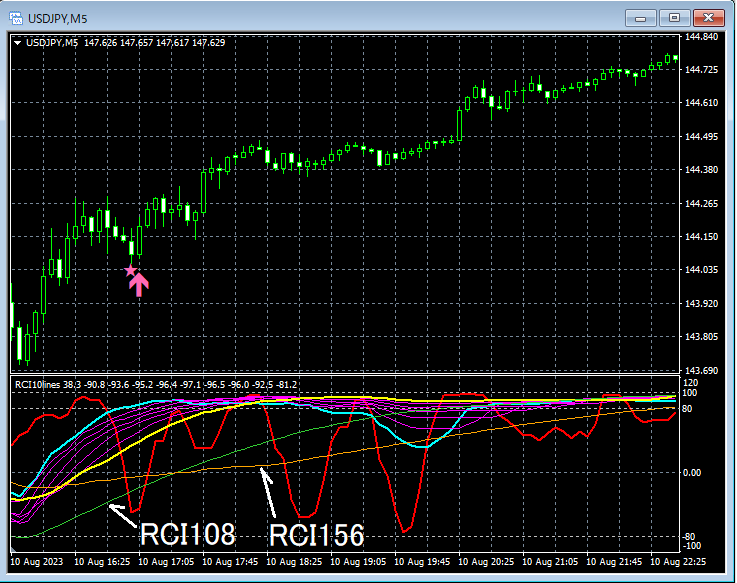
(1)【RCI4Lines_LimitedBars】
Indicator that displays 4 RCIs
(2)【RCI6Lines_LimitedBars】
Indicator that displays 6 RCIs
(3)【RCI8Lines_LimitedBars】
Indicator that displays 8 RCIs
(4)【RCI10Lines_LimitedBars】
Indicator that displays 10 RCIs
(5)【RCI12Lines_LimitedBars】
Indicator that displays 12 RCIs
The above five indicators differ only in the number of RCIs configured, so below we explain the representative case with the most RCIs configured
【RCI12Lines_LimitedBars】
as an example.
As shown below, you need to check "Allow DLL imports."
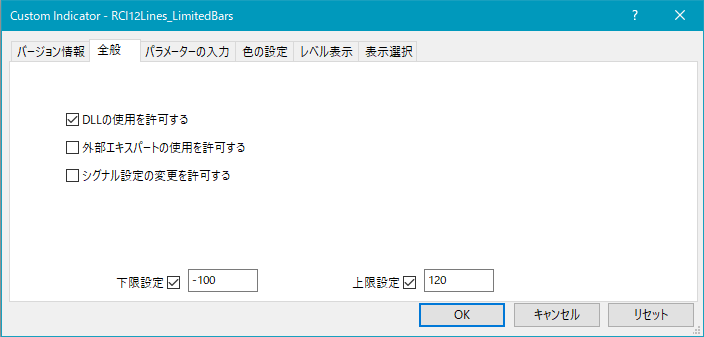
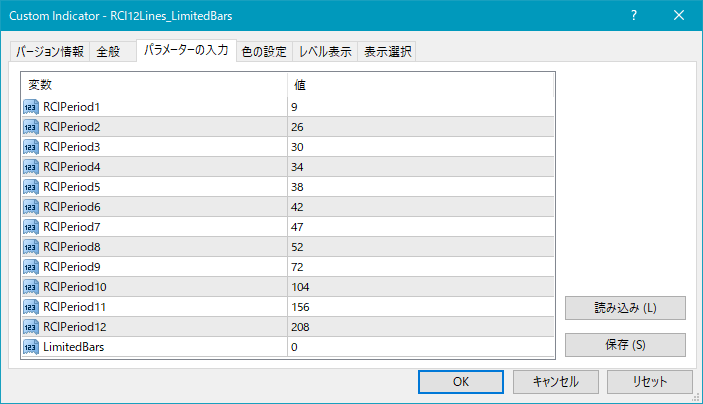
As shown above, you need to configure 12 RCIs.
Also, by setting the "LimitedBars" value, you can limit the number of candles (bars) that are calculated/displayed for RCI.
If set to "0", there is no limit. The default is "0".
If the indicator feels heavy, adjust this setting to limit the number of candles (bars) used for RCI calculation/display.
◆ Setting items for mBDSR filtering 3 to 11 RCIs
(1)【mBDSR_3RCI_VAP】
mBDSR (indicator) filtered by 3 RCIs
(2)【mBDSR_5RCI_VAP】
mBDSR (indicator) filtered by 5 RCIs
(3)【mBDSR_7RCI_VAP】
mBDSR (indicator) filtered by 7 RCIs
(4)【mBDSR_9RCI_VAP】
mBDSR (indicator) filtered by 9 RCIs
(5)【mBDSR_11RCI_VAP】
mBDSR (indicator) filtered by 11 RCIs
As above, the difference among these five indicators is only the number of RCIs configured; below we explain using the representative example with the most RCIs
【mBDSR_11RCI_VAP】
as an example.
As shown below, you need to check "Allow DLL imports."
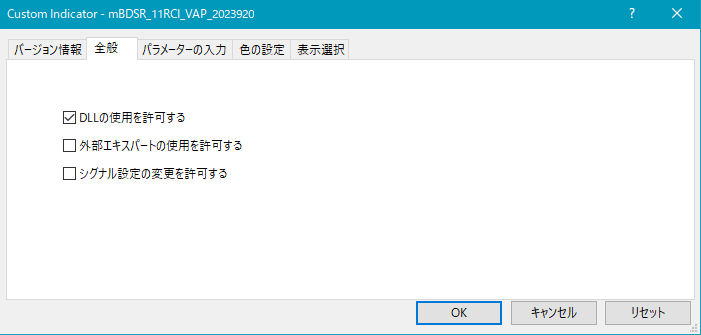
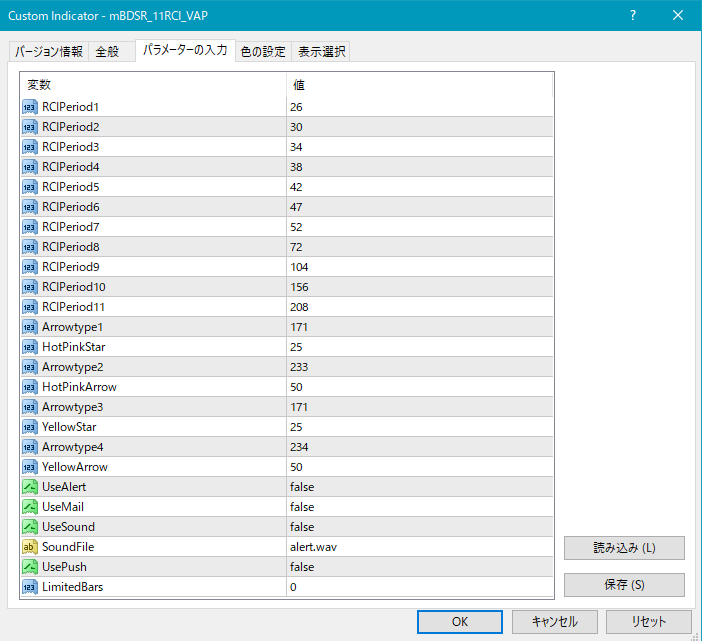
Settings for star marks and arrow appearance
RCIPeriod1: The period of the first RCI used as a filter
RCIPeriod2: The period of the second RCI used as a filter
RCIPeriod3: The period of the third RCI used as a filter
RCIPeriod4: The period of the fourth RCI used as a filter
RCIPeriod5: The period of the fifth RCI used as a filter
RCIPeriod6: The period of the sixth RCI used as a filter
RCIPeriod7: The period of the seventh RCI used as a filter
RCIPeriod8: The period of the eighth RCI used as a filter
RCIPeriod9: The period of the ninth RCI used as a filter
RCIPeriod10: The period of the tenth RCI used as a filter
RCIPeriod11: The period of the eleventh RCI used as a filter
If the display position of stars or arrows is too close to the candles or, conversely, too far and may go off-screen, you can adjust the height at which these marks are displayed with the following settings. The larger the value, the further from the candle the marks appear.
Star (pink) → HotPinkStar
Arrow (pink) → HotPinkArrow
Star (yellow) → YellowStar
Arrow (yellow) → YellowArrow
Also, by changing the values in the following items, you can change the shape of the star or arrow.
(Default pink) Star → Arrowtype1
(Default pink) Arrow → Arrowtype2
(Default yellow) Star → Arrowtype3
(Default yellow) Arrow → Arrowtype4
Additionally, the symbols that can be used as stars or arrows or as substitutes, and their corresponding numbers are shown in the table below.
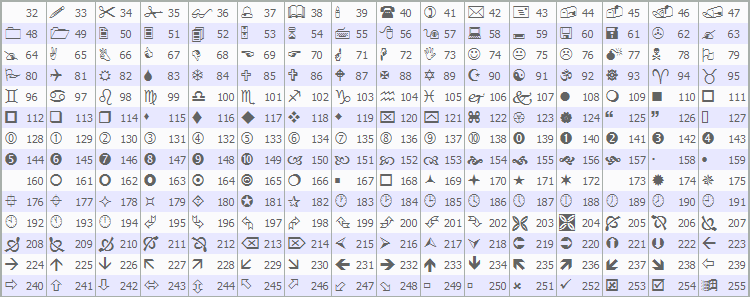
For details on changing stars and arrows, please see the following Investment Navigator+ article.
https://www.gogojungle.co.jp/finance/navi/359/19177
Settings related to alert functionality
UseAlert:
If you want to notify signal occurrence via an alert dialog like in the image below, select true; false otherwise.
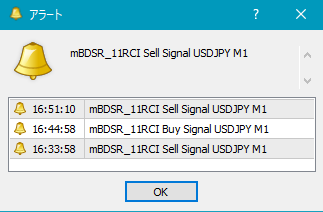
UseMail:
If you want to notify signal occurrence by email, select true; false otherwise.
UseSound:
If you want to notify signal occurrence by a sound alert, select true; false otherwise.
SoundFile:
Enter the filename of the sound to use for alerts.
UsePush:
If you want to notify signal occurrence by push notification, select true; false otherwise.
An example of MT4 settings when using email alerts
Tools → Options → Email
Image
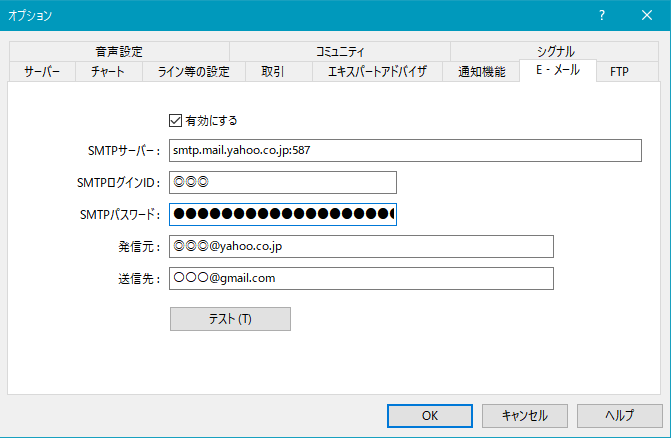
Note: It may be necessary to restart MT4 after setting.
Other
By setting the value of "LimitedBars," you can limit the number of candles (bars) calculated/displayed for RCI.
0 means no limit. The default is 0.
If the indicator feels heavy, adjust this setting to limit the number of candles used for RCI calculation/display.
◆ Blacksun indicators (一覧) list
=========================================
Blacksun Indicators (List) is here in the Investment Navigator+ articlePlease take a look.
https://www.gogojungle.co.jp/finance/navi/articles/33779
=========================================
× ![]()