

Share
Gonzo Nexus v4.01
Specialの単純な上位・下位版ではなく、別タイミングのXAUUSDエントリーを作るためのアクティブラインです。Nexus系のエントリー判断、低重複設計、決済・追跡管理、A/B/C/G NX表示、任意コントロールを備えます。
XAUUSD / GOLDMetaTrader 5 EAv4.01GogoJungle日本語商品ページ
Specialの単純な上位・下位版ではなく、別タイミングのXAUUSDエントリーを作るためのアクティブラインです。Nexus系のエントリー判断、低重複設計、決済・追跡管理、A/B/C/G NX表示、任意コントロールを備えます。
商品概要
| 項目 | 内容 |
|---|---|
| 対象 | XAUUSD / GOLD |
| プラットフォーム | MetaTrader 5 EA |
| バージョン | 4.01 |
| 基本ロット | 初期値は固定ロット0.01。検証後にリスク%ロットへ切替可能。 |
| リスク%ロット | 初期値 false。trueにするとリスク%に基づく自動ロット計算を使います。 |
| ピラミッディング | 任意機能。初期値 false。 |
| 公式ページ | GogoJungle Japanese product page |
Gonzo 3商品の位置づけ
| 商品 | 位置づけ | 向く運用 | 主な違い |
|---|---|---|---|
| Gonzo Special | フラッグシップ・ハイブリッド | 全自動+半裁量サポート | A/B/C/G、通知、広い視覚分析、任意ピラミッディング |
| Gonzo Nexus | アクティブ低重複ライン | Specialと異なるタイミングの分散・単体運用 | A/B/C/G NX、低重複設計、ピラミッディング初期 false |
| Gonzo Special Lite | 集中軽量モデル | シンプルな自動売買・低頻度運用 | Gonzo矢印中心、設定少なめ、金曜保護初期 true |
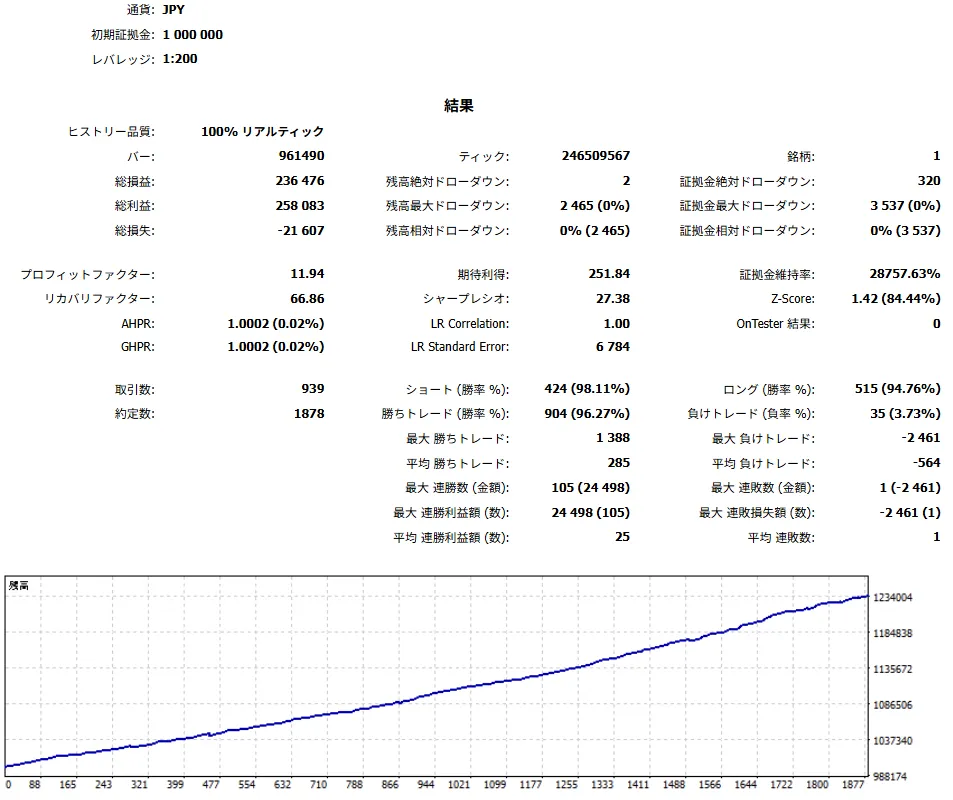
バックテスト概要
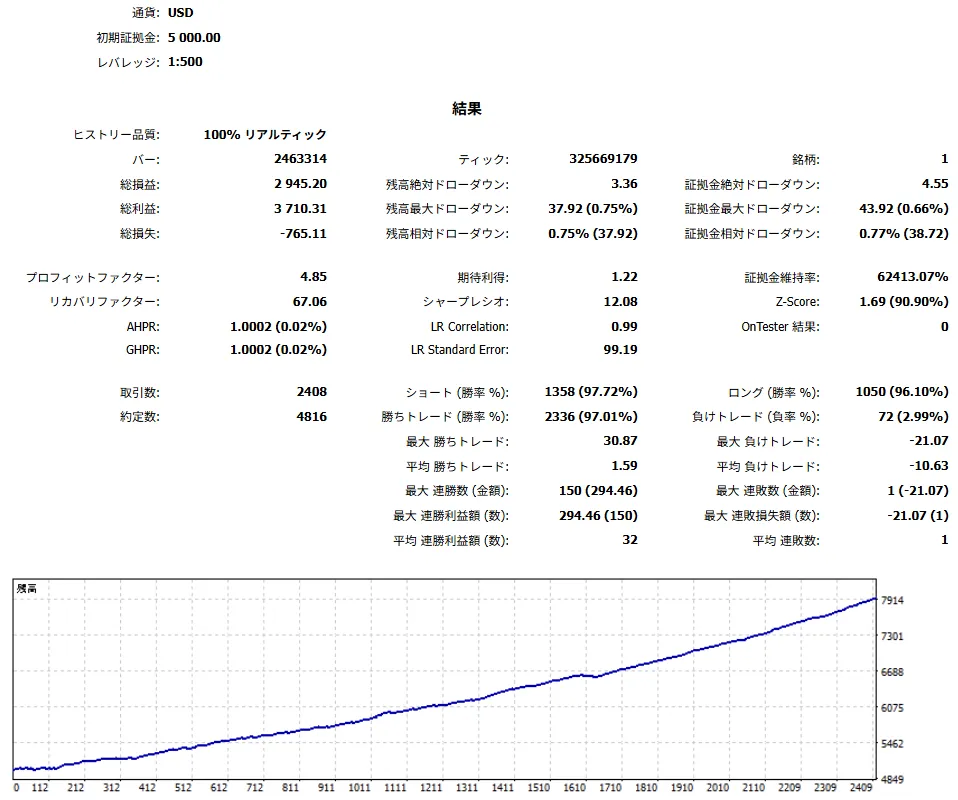
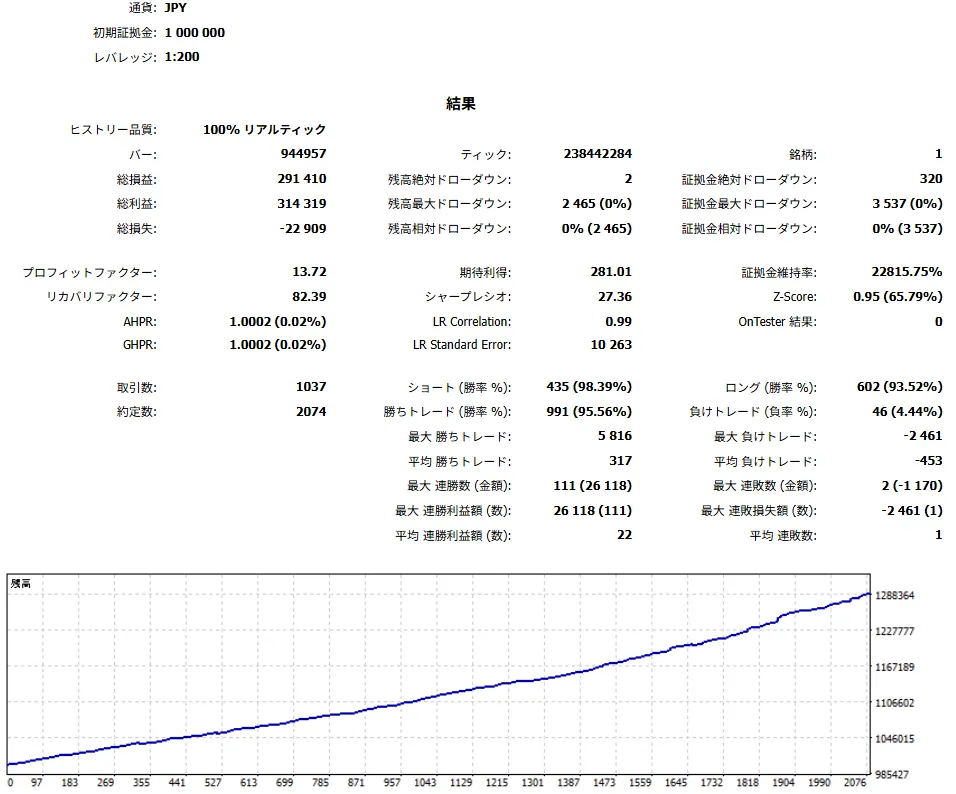
以下はヒストリカルバックテストの要約です。将来の利益、勝率、最大DD、損失回避を保証するものではありません。
| 期間 | 銘柄 | 時間足 | 取引数 | 勝率 | PF | RF | 純益 | 最大DD |
|---|---|---|---|---|---|---|---|---|
| 2019.01.01 - 2025.12.31 | XAUUSD | M1 | 4,641 | 93.34% | 2.09 | 56.24 | 3,924.17 USD | 0.99% |
| 2023.12.11 - 2026.05.29 | XAUUSD | M1 | 2,254 | 90.95% | 1.98 | 27.88 | 316,595 JPY | 1.00% |
日本語操作マニュアル
このマニュアルは、購入後にMT5上で見えるパネル、ボタン、MT5 settings項目だけを使って、実際の設定・運用手順を説明します。
1. 初回セットアップ
| 手順 | 内容 | 注意 |
|---|---|---|
| 1 | XAUUSD / GOLDのチャートにEAをセットします。MT5側の自動売買許可も確認します。 | ブローカーにより銘柄名の表記が異なる場合がありますが、公開説明ではXAUUSD / GOLDとして扱います。 |
| 2 | 固定ロット0.01、初期設定、PROC TF M15でデモまたはテスター確認を始めます。 | 初回からリスク%やロットを上げないでください。 |
| 3 | パネルのSpr、State、Blk、Auto、Dir、Sc、Thrを確認します。 | Sprが広い時は新規・決済・SL/TP・追跡結果が悪化しやすくなります。 |
| 4 | 複数商品・複数チャートではマジックナンバーを分けます。 | Close Allや自動決済の対象範囲を混ぜないためです。 |
2. 3つの時間足の役割
| 時間足 | 役割 |
|---|---|
| MT5上部の時間足 | チャートの見た目を切り替える時間足です。ローソク足の形や見やすさを確認するために使います。自動売買ロジックそのものを直接切り替えるものではありません。 |
| PROC TF | EA内の分析・描画・シグナル表示の基準です。パネル上で切り替えられ、設定画面の「分析基準TF」は起動時にパネルへ反映される初期値です。 |
| 内部ロジック時間足 | 売買ロジック本体が内部で参照する時間足です。ユーザーがパネルや設定画面から直接変更するものではありません。 |
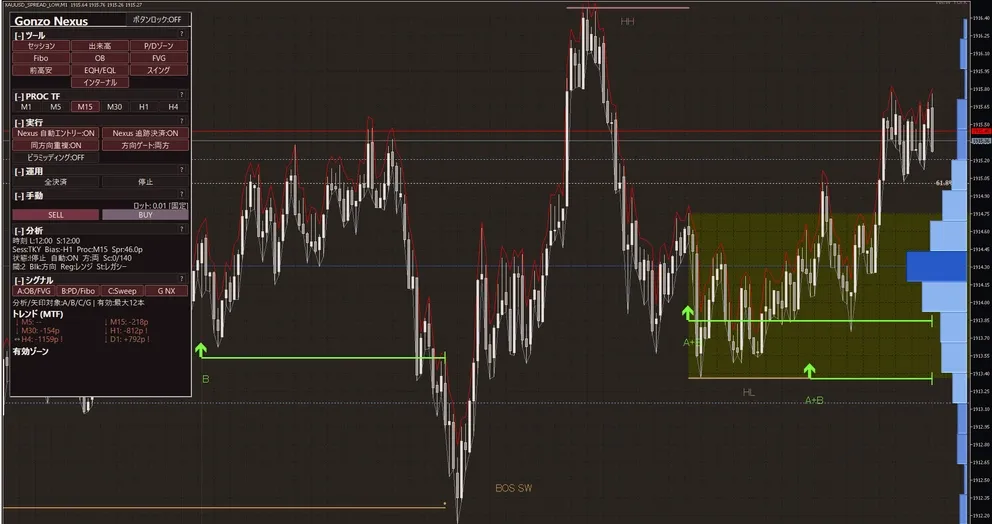
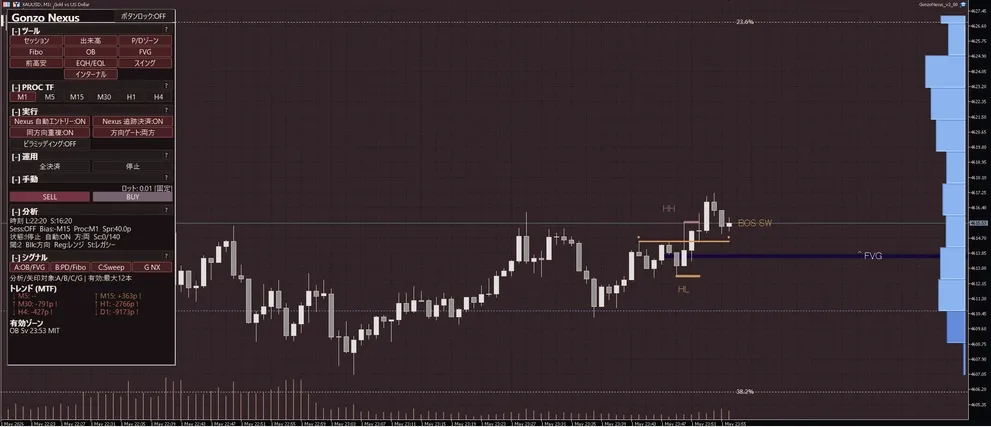
3. パネル表示・ボタンの読み方
| 表示箇所 / Panel area | ラベル / Visible label | 表示される値・状態 / Values or states | 操作した時の動き / Action | 注意点 / Caution |
|---|---|---|---|---|
| Header | 商品名、ロック、コンパクト/状態行 | 商品名、ボタンロック状態、RUN/停止系の状態を表示 | パネル移動・固定・状態確認 | ロック中は誤操作を避けやすい一方、配置変更はしにくくなります。 |
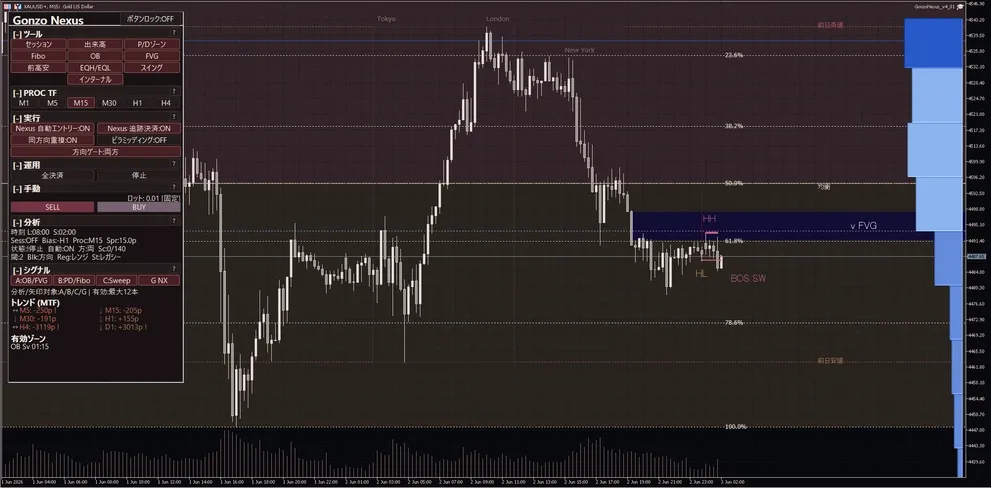
| TOOLS | Session / Volume / P/D / Fibo / OB / FVG / Prev H/L / EQH/EQL / Swing / Internal | セッション、出来高、P/Dゾーン、Fibo、OB、FVG、前高安、EQH/EQL、スイング、インターナル。Liteは表示できる項目だけを使い、フルSMCトグルとして扱わないでください。 | 表示ON/OFFを切り替え、待つ場所や構造を確認します。 | TOOLSは分析表示です。直接エントリー保証にはなりません。 |
| PROC TF | M1 / M5 / M15 / M30 / H1 / H4、PROC:M15など | 選択中の分析基準TFを表示 | 分析・描画・シグナル表示の基準を切り替えます。 | MT5上部の時間足や内部ロジック時間足とは別です。 |
| EXEC | Auto Entry、Auto Close/Tracking、Overlap、Direction、Pyramiding、Preset/Frequency/Aggregation | 各ボタンのON/OFFまたは選択値 | 新規自動エントリー、決済・追跡、方向、重複、追加の運用状態を切り替えます。 | Auto EntryとAuto Closeは別です。エントリー停止中でも決済管理を残す運用があります。 |
| OPS | Close All、Stop/KILL、Compact、Spacing、Reset、Manual rapid/interval | 確認待ち、実行中、停止中など | 全決済、緊急停止、表示整理、状態リセットを行います。 | Close Allはマジックナンバーと銘柄範囲を確認してから押してください。 |
| MANUAL | Lot、SELL、BUY、Manual SL/TP | ロット: 0.01 [FIX]、ロット: 0.01 [AUTO]など | パネルから手動BUY/SELLを行います。 | リスク%ロット利用時は表示ロットも変わります。手動SL/TP付帯の初期値は商品で異なります。 |
| ANALYTICS | Time、Session、Bias、Proc、Spr、State、Auto、Dir、Sc、Thr、Blk、Reg、St、Sig | Spr:xx.xp、State:READY/SETUP/BLOCKED、Sc:x/y、Thr:x、Blk:理由など | 現在の状態、スプレッド、方向、スコア、ブロック理由を確認します。 | Sprが広い時はエントリー、決済、SL/TP、追跡結果が悪化しやすいです。 |
| SIGNAL | A / B / C / GまたはGonzo矢印 | A/B/C/G表示、target line、残り有効時間、candidate/no/idleの状態表示を確認します。 | 通知や手動判断の補助として使います。 | シグナルは利益保証ではありません。方向、時間帯、スプレッド、Blkまで見てください。 |
パネル略語
| 略語 | 意味 |
|---|---|
| Spr | 現在スプレッド。xx.xpのようにpipsで表示され、狭スプレッド運用の確認に使います。 |
| State | READY / SETUP / BLOCKEDなど、現在の準備状態。 |
| Blk | 現在エントリーを止めている理由。方向、時間、スプレッド、スコア、リスク制御など。 |
| Sc | 現在スコア。x/yのように条件充足度を示します。 |
| Thr | 必要しきい値。Scが十分かを見る基準です。 |
| Reg | 市場レジームの文脈ラベル。保証ではなく状況把握です。 |
| St | 戦略・状態ラベル。文脈確認用です。 |
| Sig | シグナルの年齢や残り有効時間の目安。 |
4. A/B/C/Gシグナルの読み方
| シグナル | 意味 |
|---|---|
| A | 反応候補の価格帯を示すシグナルです。まず「どこで待つか」を決める土台として見ます。 |
| B | 補足シグナルです。価格帯が高すぎないか、安すぎないかを見る補強材です。主役ではなく補足として使います。 |
| C | 入るきっかけを見るシグナルです。A+Cは比較的見やすい組み合わせですが、それだけで売買を決める意味ではありません。 |
| G NX | Gonzo側の別系統の判定です。A/B/Cの代わりではなく、重なったときの後押しとして見ます。NexusではG NX表記になる場合があります。 |
| A+C | 「待つ場所」と「入るきっかけ」がそろった形として最初に観察しやすい組み合わせです。 |
| A+B+C | 場所、補足、きっかけが重なった見え方です。条件は多いですが利益保証ではありません。 |
| A+B+C+G | さらにG系の後押しも重なった形です。方向、時間帯、Spr、State、Blk、ロットを必ず合わせて見ます。 |
5. リスク%ロット計算仕様
リスク%ロットは「口座の何%をリスクにするか」から発注ロットを逆算するための機能です。初期運用では固定ロット0.01で確認し、慣れてから切り替えてください。
| 手順 | 仕様 |
|---|---|
| 1. 有効条件 | 「リスク%ロットを使う」がtrue、かつ「リスク%」が0より大きい場合に使います。falseの場合は「固定ロット」を使います。 |
| 2. 基準資金 | Special/Nexusでは「リスク計算基準」で残高または有効証拠金を選びます。 |
| 3. リスク金額 | リスク金額 = 基準資金 × リスク% ÷ 100。例: 残高10,000、リスク% 0.5なら50。初期値0.005は0.005%なので、残高10,000なら0.5相当です。 |
| 4. 1ロットあたりの想定損失 | EAが使う有効なSL距離・リスク基準距離と、XAUUSDの契約サイズ、ティック値、口座通貨換算から、1.00ロットでSL相当まで逆行した場合の概算損失を計算します。 |
| 5. ロット算出 | 発注ロット = リスク金額 ÷ 1.00ロットあたりの想定損失。最後にブローカーの最小ロット、最大ロット、ロット刻みに合わせて調整します。 |
| 6. 退避動作 | SL距離、通貨換算、ティック値などから計算できない場合は、固定ロットに退避します。 |
| 7. 適用範囲 | 自動エントリーとパネル手動BUY/SELLのロット表示・発注目安に関わります。手動SL/TP付帯がfalseの運用では、手動側のSL/TP確認を必ず行ってください。 |
| 8. 注意 | リスク%はロット調整の目安であり、損失上限の保証ではありません。スプレッド拡大、滑り、週末ギャップ、約定拒否、最小ロット制約により実損益は変わります。 |
6. SMC用語ミニ辞典
| 用語 | 説明 |
|---|---|
| OB | 反応候補になりやすい価格帯です。Aシグナルの土台として使われます。 |
| FVG | 値が飛んだ隙間のような価格帯です。埋めに来る動きを見る材料です。 |
| EQH/EQL | 同じような高値/安値です。流動性が溜まりやすい場所として見ます。 |
| Swing | 大きめの波に対する構造です。地合いを広めに見る時に使います。 |
| Internal | より細かい波の構造です。直近の細かい変化を見る時に使います。 |
| P/D zone | 現在価格が割高側か割安側かを見るゾーンです。Bシグナルの補足にも関わります。 |
| Fibo | 戻り率の目安です。P/Dゾーンと重ねて位置の妥当性を見る時に使います。 |
| Sessions | 東京/ロンドン/ニューヨークなどの時間帯です。動きやすい時間かの確認に使います。 |
| Volume | どの価格帯に出来高が集まっているかを見る補助表示です。 |
7. 半裁量・手動運用フロー
| 運用 | 手順 |
|---|---|
| 全自動ベースライン | 自動売買を許可=true、Nexus自動エントリー=true、Nexus自動決済・追跡=true、固定ロット0.01から開始。PROC TFはM15、狭スプレッドのXAUUSDで確認します。 |
| 観察のみ | EA売買を完全に止めたい場合は自動売買を許可=false。表示・通知を見ながら新規だけ止めたい場合はNexus自動エントリー=false、自動決済・追跡は目的に応じて維持します。 |
| シグナル監視+手動エントリー | A/B/C/G NX、TOOLS、ANALYTICS、Spr、State、Blkを確認し、方向・時間帯・スプレッド・ロットが許容できる時だけBUY/SELLを使います。 |
| 手動エントリー+EA管理 | Nexus自動エントリー=false、Nexus自動決済・追跡=true。Special/Nexusは手動BUY/SELL時のSL/TP付帯が初期値falseです。 手動ポジションのSL/TPと管理範囲を必ず確認します。 |
| パネル手動・ラピッド操作 | BUY/SELL、Close All、Stop/KILL、Compact、Resetを使います。長押し・連打系の操作は誤発注防止のためデモで挙動を確認してから使います。 |
| Close Allと緊急停止 | Close Allは現在の銘柄とマジックナンバー範囲を確認して実行します。緊急停止は新規や管理動作を止める目的で使い、既存ポジションの状態を必ず確認します。 |
| 重複・追加ポジション | ピラミッディングは任意機能で、初期値はfalseです。同方向重複や追加ポジションは合計リスクを増やします。 |
| 時間リスク制御 | Special/Nexusは週末リスク制御と日次ロールオーバー制御、Liteは日次ロールオーバー制御と金曜リスク制御を使います。どれも損失を防ぐ保証ではありません。 |
やってはいけないこと
- 同じXAUUSD口座で複数商品を同じマジックナンバーのまま動かさない。
- 表示だけの切替を、自動売買条件の変更や利益保証として扱わない。
- 自動決済・追跡をfalseにしたまま、EAが出口管理してくれると期待しない。
- M1/M5/M15/M30/H1/H4以外の特殊な秒足前提で説明しない。
- 取引が少ない期間の後に検証なしでロットを上げない。
- バックテスト結果を将来利益や損失回避の保証として扱わない。
8. 設定一覧
以下はMT5の設定画面に表示される項目だけを、表示順・グループ別に整理したものです。
| MT5の設定画面の項目名 / MT5 setting item | 初期値 / Initial value | 表示値・入力例 / Visible value or input example | 何を変えるか / What it controls | 変更する場面 / When to change | 注意点 / Caution |
|---|---|---|---|---|---|
| マジックナンバー / Magic number | 95042821 | 数値入力 / numeric input | このEAが管理するポジション・注文を識別します。 | 複数商品、複数チャート、手動ポジションと混同したくない時に変更します。 | 同じXAUUSDで複数EAを動かす場合は必ず分けてください。Close Allや自動決済の範囲にも関わります。 |
| 取引方向 / Trade direction | 両方 / Both | 両方 / Both、買いのみ / Buy only、売りのみ / Sell only | 自動エントリーの売買方向を両方・買いのみ・売りのみの考え方で制限します。 | 相場観や検証目的で一時的に方向を絞りたい時。 | 表示だけを変える機能ではありません。方向を絞ると該当しない方向の新規エントリーは出にくくなります。 |
| リスク%ロットを使う / Use risk-based lot | false | true / false | trueにするとリスク%ロット計算、falseにすると固定ロットを使います。 | 固定ロットで十分に動作確認した後、口座規模に応じてロットを自動調整したい時。 | リスク%は損失上限の保証ではありません。計算不能時や条件不一致時は固定ロットに退避します。 |
| リスク% / Risk percent | 0.005 | 数値入力 / numeric input | ロット計算で使う割合です。入力値は%として扱われ、1.0は1%、0.5は0.5%、初期値0.005は0.005%です。 | 資金量、許容DD、スプレッド環境を確認した後、段階的に調整します。 | 小数の意味を間違えないでください。0.01は1%ではなく0.01%です。最小ロット制約で想定より大きい発注になる場合があります。 |
| リスク計算基準 / Risk basis | 残高 / Balance | 残高 / Balance、有効証拠金 / Equity | リスク%の基準を残高または有効証拠金から選びます。 | 含み損益を反映したロットにしたい場合は有効証拠金、安定した基準にしたい場合は残高を選びます。 | 有効証拠金基準は含み損益でロットが上下します。複数EAでは合計リスクも確認してください。 |
| 固定ロット / Fixed lot | 0.01 | 数値入力 / numeric input | 固定ロット運用時の発注ロットです。リスク%計算が使えない時の退避値にもなります。 | 初回は0.01など最小に近い値でデモ・テスター確認します。 | ブローカーの最小ロット・最大ロット・刻みに合わせて調整されます。XAUUSDはロット差の影響が大きいため急に上げないでください。 |
| MT5の設定画面の項目名 / MT5 setting item | 初期値 / Initial value | 表示値・入力例 / Visible value or input example | 何を変えるか / What it controls | 変更する場面 / When to change | 注意点 / Caution |
|---|---|---|---|---|---|
| 自動売買を許可 / Allow auto trading | true | true / false | EA側の売買アクション全体のマスター許可です。 | チャートに載せたままEA売買を止めたい時はfalseにします。 | MT5側の自動売買許可も別途必要です。false時は監視・表示目的として扱ってください。 |
| Nexus自動エントリー / Nexus auto entry | true | true / false | Nexusの新規自動エントリーを許可します。既存ポジションの決済管理とは分けて考えます。 | シグナル監視や手動エントリー中心にしたい時はfalseにします。 | falseでも自動決済・追跡がtrueなら、管理対象ポジションの出口支援は残る場合があります。 |
| Nexus自動決済・追跡 / Nexus auto close and tracking | true | true / false | Nexusの自動決済、追跡、保有後の管理を許可します。 | 手動エントリー後もEA管理を使いたい時はtrueを維持します。 | falseにするとEA由来の決済・追跡・更新が止まりやすくなります。既存のブローカー側SL/TPがある場合は残りますが、利益保証ではありません。 |
| Nexus同方向重複を許可 / Allow same-direction overlap | true | true / false | 同じ方向のポジションを重ねる余地を許可します。 | 取引機会を増やしたい時に使いますが、初回は初期値のまま検証してください。 | 同方向に重なると証拠金・含み損・週末持ち越しリスクが増えます。複数商品併用時は特に注意してください。 |
| ピラミッディングを有効化 / Enable pyramiding | false | true / false | 含み益方向に追加するための任意機能です。逆行ナンピンの保証や損失回避機能ではありません。 | 十分に検証し、追加ポジションの合計リスクを把握できる場合だけtrueにします。 | 利益方向の追加でも反転時の損失は増えます。Nexusでは初期値false、Specialでもリリース設定一覧ではfalseです。 |
| MT5の設定画面の項目名 / MT5 setting item | 初期値 / Initial value | 表示値・入力例 / Visible value or input example | 何を変えるか / What it controls | 変更する場面 / When to change | 注意点 / Caution |
|---|---|---|---|---|---|
| 週末リスク制御を使う / Enable weekend risk control | false | true / false | 週末リスク制御のマスタースイッチです。 | 金曜後半から週末にかけて新規停止・利益決済・強制決済のいずれかを使いたい時にtrueにします。 | このマスターだけtrueにしても、下位機能がfalseのままでは実質的な保護動作はありません。 |
| 金曜の新規エントリー停止 / Stop new entries on Friday | false | true / false | 金曜の指定時刻以降と週末の新規エントリーを止めます。 | 週末持ち越しを減らしたい場合の最初の安全寄り設定です。 | 既存ポジションを閉じる設定ではありません。決済管理は別設定です。 |
| 新規停止開始時刻(時) / Entry stop start hour | 21 | 数値入力 / numeric input | 金曜の新規停止を開始する時刻を指定します。 | ブローカー時間、UTC、ロンドン時間のどれで判定するかを先に合わせます。 | 時刻基準を間違えると想定と違う時間に停止します。MT5サーバー時刻を確認してください。 |
| 新規停止開始時刻(分) / Entry stop start minute | 0 | 数値入力 / numeric input | 金曜の新規停止を開始する時刻を指定します。 | ブローカー時間、UTC、ロンドン時間のどれで判定するかを先に合わせます。 | 時刻基準を間違えると想定と違う時間に停止します。MT5サーバー時刻を確認してください。 |
| 週末前に利益ポジションを決済 / Close profitable positions before weekend | false | true / false | 週末前の対象時間帯に、利益がある管理対象ポジションの決済を試みます。 | 含み益ポジションを週末に持ち越したくない時。 | 最低利益は口座通貨ベースです。0.0はごく小さな利益でも対象になりやすく、スプレッド拡大時は約定結果がぶれます。 |
| 利益決済の最低利益 / Minimum profit for close | 0.0 | 数値入力 / numeric input | 利益決済の対象にする最低利益額です。pipsではなく口座通貨の金額です。 | 小さすぎる利益で閉じたくない場合に上げます。 | 0.0は積極的です。手数料・スワップ・スプレッドを考慮して設定してください。 |
| 週末前に全ポジションを強制決済 / Force close before weekend | false | true / false | 週末前の指定時刻以降に、管理対象ポジションの全決済を試みます。 | 週末持ち越しを避けたい強い設定として使います。 | 金曜終盤は流動性とスプレッドが悪化しやすく、決済価格が不利になる場合があります。 |
| 強制決済時刻(時) / Force close hour | 23 | 数値入力 / numeric input | 週末前の強制決済を開始する時刻です。 | 強制決済を使う場合に、ブローカーの取引終了前に余裕を持って設定します。 | 時間基準とサーバー時刻の確認が必須です。市場終了間際は約定・スプレッドに注意してください。 |
| 強制決済時刻(分) / Force close minute | 30 | 数値入力 / numeric input | 週末前の強制決済を開始する時刻です。 | 強制決済を使う場合に、ブローカーの取引終了前に余裕を持って設定します。 | 時間基準とサーバー時刻の確認が必須です。市場終了間際は約定・スプレッドに注意してください。 |
| 判定する時間基準 / Time basis | サーバー時間 / Server time | サーバー時間 / Server time、UTC、ロンドン時間 / London time | 時刻設定をサーバー時間、UTC、ロンドン時間のどれで解釈するかを選びます。 | ブローカーサーバー時刻と自分が意図する市場時刻を合わせたい時。 | 最も間違えやすい項目です。テストまたはデモで実際の停止時刻を確認してください。 |
| MT5の設定画面の項目名 / MT5 setting item | 初期値 / Initial value | 表示値・入力例 / Visible value or input example | 何を変えるか / What it controls | 変更する場面 / When to change | 注意点 / Caution |
|---|---|---|---|---|---|
| ロールオーバー制御を使う / Enable rollover control | false | true / false | 日次ロールオーバー制御のマスタースイッチです。 | 日次ロールオーバー前後の新規停止や利益決済を使いたい時にtrueにします。 | マスターだけtrueにしても、下位機能がfalseのままでは実質的な保護動作はありません。 |
| 判定する時間基準 / Time basis | サーバー時間 / Server time | サーバー時間 / Server time、UTC、ロンドン時間 / London time | 時刻設定をサーバー時間、UTC、ロンドン時間のどれで解釈するかを選びます。 | ブローカーサーバー時刻と自分が意図する市場時刻を合わせたい時。 | 最も間違えやすい項目です。テストまたはデモで実際の停止時刻を確認してください。 |
| ロールオーバー時刻(時) / Rollover hour | 0 | 数値入力 / numeric input | ブローカーのロールオーバー時刻を指定します。 | 利用ブローカーのスプレッド拡大時間に合わせて設定します。 | GOLDはロールオーバー前後でスプレッドが急に広がることがあります。実測して調整してください。 |
| ロールオーバー時刻(分) / Rollover minute | 0 | 数値入力 / numeric input | ブローカーのロールオーバー時刻を指定します。 | 利用ブローカーのスプレッド拡大時間に合わせて設定します。 | GOLDはロールオーバー前後でスプレッドが急に広がることがあります。実測して調整してください。 |
| 前後の新規エントリー停止 / Block entries around rollover | false | true / false | ロールオーバー時刻の前後に新規エントリーを止めます。 | 日次の薄商い・スプレッド拡大を避けたい時。 | 既存ポジションを閉じる設定ではありません。停止幅を広げすぎると機会も減ります。 |
| 何分前から停止 / Block minutes before | 10 | 数値入力 / numeric input | ロールオーバーの何分前から新規停止するかを決めます。 | 広がり始めが早いブローカーでは長めにします。 | 長くしすぎると取引機会が減ります。まず10〜20分程度で観察してください。 |
| 何分後まで停止 / Block minutes after | 10 | 数値入力 / numeric input | ロールオーバー後、何分間新規停止を続けるかを決めます。 | スプレッドが戻るのに時間がかかるブローカーで調整します。 | 短すぎると広いスプレッドで再開します。長すぎると機会を逃します。 |
| ロールオーバー前に利益決済 / Close profitable positions before rollover | false | true / false | ロールオーバー前に利益がある管理対象ポジションの決済を試みます。 | 日次ロールオーバーをまたいで含み益を残したくない時。 | 含み損ポジションを自動で救済する設定ではありません。 |
| 利益決済を始める分数 / Profit close minutes before | 10 | 数値入力 / numeric input | ロールオーバーの何分前から利益決済の判定を始めるかです。 | ロールオーバー直前を避け、少し早めに利益確定したい時。 | 早すぎると本来伸びるポジションを早く閉じる場合があります。 |
| 利益決済の最低利益 / Minimum profit for close | 0.0 | 数値入力 / numeric input | 利益決済の対象にする最低利益額です。pipsではなく口座通貨の金額です。 | 小さすぎる利益で閉じたくない場合に上げます。 | 0.0は積極的です。手数料・スワップ・スプレッドを考慮して設定してください。 |
| MT5の設定画面の項目名 / MT5 setting item | 初期値 / Initial value | 表示値・入力例 / Visible value or input example | 何を変えるか / What it controls | 変更する場面 / When to change | 注意点 / Caution |
|---|---|---|---|---|---|
| 分析基準TF / Analysis timeframe | M15 / 15-minute | M1 / M5 / M15 / M30 / H1 / H4 など | 分析・描画・シグナル表示の基準時間足です。初期値はM15です。 | 見え方を変えたい時にM1/M5/M15/M30/H1/H4などへ変更します。 | MT5上部のチャート時間足やEA内部の売買本体とは別物です。迷ううちはM15のまま使ってください。 |
| Aシグナルを表示 / Show A signals | true | true / false | Aシグナルの表示を切り替えます。反応候補の価格帯を見る土台です。 | 待つ場所を見たい時はtrue。表示を減らしたい時はfalse。 | 表示シグナルは判断補助です。A単独で売買を決めないでください。 |
| Bシグナルを表示 / Show B signals | true | true / false | Bシグナルの表示を切り替えます。価格位置の補強材料です。 | AやCの位置確認を補助したい時。 | Bは主役ではなく補助として扱ってください。 |
| Cシグナルを表示 / Show C signals | true | true / false | Cシグナルの表示を切り替えます。入るきっかけの観察に使います。 | A+Cのように場所ときっかけを合わせて観察したい時。 | C単独やA+Cだけで利益が約束されるわけではありません。 |
| G NXシグナルを表示 / Show G NX signals | true | true / false | Nexus側のGonzoファミリーシグナルを表示します。 | A/B/CにNexus側の後押しを重ねて見たい時。 | G NXはNexus向けの表示です。Specialの上位・下位差ではありません。 |
| MT5の設定画面の項目名 / MT5 setting item | 初期値 / Initial value | 表示値・入力例 / Visible value or input example | 何を変えるか / What it controls | 変更する場面 / When to change | 注意点 / Caution |
|---|---|---|---|---|---|
| 通知を使う / Enable notifications | false | true / false | 通知全体のマスタースイッチです。 | シグナル条件をスマホ・メール・音で確認したい時にtrueにします。 | 通知先や条件がtrueでも、この設定がfalseなら通知は出ません。MT5側の通知設定も必要です。 |
| 同一バーは1回だけ通知 / Notify once per bar | true | true / false | 同じローソク足内の重複通知を抑えます。 | 通知過多を避けたい場合はtrueを維持します。 | falseにすると同じバーで複数通知が出る場合があります。 |
| MT5の設定画面の項目名 / MT5 setting item | 初期値 / Initial value | 表示値・入力例 / Visible value or input example | 何を変えるか / What it controls | 変更する場面 / When to change | 注意点 / Caution |
|---|---|---|---|---|---|
| ポップアップ通知 / Popup notification | true | true / false | MT5上のポップアップ通知を使います。 | PC画面で確認したい時。 | 通知マスターがfalseなら出ません。 |
| スマホPush通知 / Mobile push notification | false | true / false | MT5スマホPush通知を使います。 | 外出中もシグナルを受けたい時。 | MT5のMetaQuotes ID設定が必要です。通知マスターがfalseなら出ません。 |
| メール通知 / Email notification | false | true / false | MT5メール通知を使います。 | メールで履歴を残したい時。 | MT5メール設定が必要です。通知マスターがfalseなら出ません。 |
| サウンド通知 / Sound notification | false | true / false | 音で通知します。 | 画面を見続けない時の補助として使います。 | サウンドファイル名が正しく、通知マスターがtrueである必要があります。 |
| 通知サウンドファイル / Notification sound file | alert.wav | テキスト入力 / text input | サウンド通知で再生するファイル名です。 | 好みの音へ変更したい時。 | MT5が参照できる音声ファイル名にしてください。 |
| MT5の設定画面の項目名 / MT5 setting item | 初期値 / Initial value | 表示値・入力例 / Visible value or input example | 何を変えるか / What it controls | 変更する場面 / When to change | 注意点 / Caution |
|---|---|---|---|---|---|
| A条件で通知 / Notify on A | false | true / false | Aの条件が表示上そろった時の通知を許可します。 | 必要な組み合わせだけtrueにし、通知過多を避けます。 | 通知は判断補助です。条件が多いほど厳しめに見えますが、利益を保証しません。 |
| B条件で通知 / Notify on B | false | true / false | Bの条件が表示上そろった時の通知を許可します。 | 必要な組み合わせだけtrueにし、通知過多を避けます。 | 通知は判断補助です。条件が多いほど厳しめに見えますが、利益を保証しません。 |
| C条件で通知 / Notify on C | false | true / false | Cの条件が表示上そろった時の通知を許可します。 | 必要な組み合わせだけtrueにし、通知過多を避けます。 | 通知は判断補助です。条件が多いほど厳しめに見えますが、利益を保証しません。 |
| G条件で通知 / Notify on G | false | true / false | Gの条件が表示上そろった時の通知を許可します。 | 必要な組み合わせだけtrueにし、通知過多を避けます。 | 通知は判断補助です。条件が多いほど厳しめに見えますが、利益を保証しません。 |
| MT5の設定画面の項目名 / MT5 setting item | 初期値 / Initial value | 表示値・入力例 / Visible value or input example | 何を変えるか / What it controls | 変更する場面 / When to change | 注意点 / Caution |
|---|---|---|---|---|---|
| A+B条件で通知 / Notify on A + B | false | true / false | A+Bの条件が表示上そろった時の通知を許可します。 | 必要な組み合わせだけtrueにし、通知過多を避けます。 | 通知は判断補助です。条件が多いほど厳しめに見えますが、利益を保証しません。 |
| A+C条件で通知 / Notify on A + C | false | true / false | A+Cの条件が表示上そろった時の通知を許可します。 | 必要な組み合わせだけtrueにし、通知過多を避けます。 | 通知は判断補助です。条件が多いほど厳しめに見えますが、利益を保証しません。 |
| A+G条件で通知 / Notify on A + G | false | true / false | A+Gの条件が表示上そろった時の通知を許可します。 | 必要な組み合わせだけtrueにし、通知過多を避けます。 | 通知は判断補助です。条件が多いほど厳しめに見えますが、利益を保証しません。 |
| B+C条件で通知 / Notify on B + C | false | true / false | B+Cの条件が表示上そろった時の通知を許可します。 | 必要な組み合わせだけtrueにし、通知過多を避けます。 | 通知は判断補助です。条件が多いほど厳しめに見えますが、利益を保証しません。 |
| B+G条件で通知 / Notify on B + G | false | true / false | B+Gの条件が表示上そろった時の通知を許可します。 | 必要な組み合わせだけtrueにし、通知過多を避けます。 | 通知は判断補助です。条件が多いほど厳しめに見えますが、利益を保証しません。 |
| C+G条件で通知 / Notify on C + G | false | true / false | C+Gの条件が表示上そろった時の通知を許可します。 | 必要な組み合わせだけtrueにし、通知過多を避けます。 | 通知は判断補助です。条件が多いほど厳しめに見えますが、利益を保証しません。 |
| MT5の設定画面の項目名 / MT5 setting item | 初期値 / Initial value | 表示値・入力例 / Visible value or input example | 何を変えるか / What it controls | 変更する場面 / When to change | 注意点 / Caution |
|---|---|---|---|---|---|
| A+B+C条件で通知 / Notify on A + B + C | false | true / false | A+B+Cの条件が表示上そろった時の通知を許可します。 | 必要な組み合わせだけtrueにし、通知過多を避けます。 | 通知は判断補助です。条件が多いほど厳しめに見えますが、利益を保証しません。 |
| A+B+G条件で通知 / Notify on A + B + G | false | true / false | A+B+Gの条件が表示上そろった時の通知を許可します。 | 必要な組み合わせだけtrueにし、通知過多を避けます。 | 通知は判断補助です。条件が多いほど厳しめに見えますが、利益を保証しません。 |
| A+C+G条件で通知 / Notify on A + C + G | false | true / false | A+C+Gの条件が表示上そろった時の通知を許可します。 | 必要な組み合わせだけtrueにし、通知過多を避けます。 | 通知は判断補助です。条件が多いほど厳しめに見えますが、利益を保証しません。 |
| B+C+G条件で通知 / Notify on B + C + G | false | true / false | B+C+Gの条件が表示上そろった時の通知を許可します。 | 必要な組み合わせだけtrueにし、通知過多を避けます。 | 通知は判断補助です。条件が多いほど厳しめに見えますが、利益を保証しません。 |
| A+B+C+G条件で通知 / Notify on A + B + C + G | false | true / false | A+B+C+Gの条件が表示上そろった時の通知を許可します。 | 必要な組み合わせだけtrueにし、通知過多を避けます。 | 通知は判断補助です。条件が多いほど厳しめに見えますが、利益を保証しません。 |
| MT5の設定画面の項目名 / MT5 setting item | 初期値 / Initial value | 表示値・入力例 / Visible value or input example | 何を変えるか / What it controls | 変更する場面 / When to change | 注意点 / Caution |
|---|---|---|---|---|---|
| セッション帯を表示 / Show session zones | true | true / false | 東京・ロンドン・ニューヨークなどの時間帯表示を切り替えます。 | 動きやすい時間帯を確認したい時。 | セッション表示は売買保証ではありません。ブローカー時間差にも注意してください。 |
| 出来高プロファイルを表示 / Show volume profile | true | true / false | 価格帯ごとの出来高の偏りを補助表示します。 | 滞留しやすい価格帯や抜けやすい帯を見たい時。 | 出来高表示は補助です。重い場合や見づらい場合はfalseにします。 |
| P/Dゾーンを表示 / Show premium/discount zones | true | true / false | 価格が割高側・割安側のどちらにいるかを見る補助表示です。 | Bシグナルや待ち位置の妥当性を見たい時。 | ゾーンだけで売買を決めないでください。 |
| Fiboを表示 / Show Fibonacci levels | true | true / false | 戻り率の目安を表示します。 | P/Dゾーンや反応候補と重ねて位置を確認したい時。 | Fibo単独で売買を決めないでください。 |
| 前高安を表示 / Show previous highs/lows | true | true / false | 前回高値・安値の目安を表示します。 | 流動性や反応候補を確認したい時。 | 近い水準ではスプレッドや急変動に注意してください。 |
| OBを表示 / Show order blocks | false | true / false | 反応候補になりやすい価格帯を表示します。 | Aシグナルや待ち位置の背景を見たい時。 | 初期値falseです。表示を増やすほどチャートは重く・見づらくなる場合があります。 |
| FVGを表示 / Show FVG | false | true / false | 値が飛んだ隙間のような価格帯を表示します。 | 埋めに来る動きや反応候補を見たい時。 | 初期値falseです。表示は補助であり売買保証ではありません。 |
| EQH/EQLを表示 / Show equal highs/lows | false | true / false | 同じような高値・安値を表示します。 | 流動性が溜まりやすい水準を見たい時。 | 初期値falseです。近辺では急変動やだましに注意してください。 |
| スイングを表示 / Show swing structure | false | true / false | 大きめの波の構造表示を切り替えます。 | 広めの地合いを確認したい時。 | 初期値falseです。短期判断とは分けて見てください。 |
| インターナルを表示 / Show internal structure | false | true / false | 細かい波の構造表示を切り替えます。 | 直近の細かい構造を確認したい時。 | 初期値falseです。表示を増やしすぎると判断が散らばります。 |
| 手動エントリー時にSL/TPを付帯 / Attach SL/TP to manual entries | false | true / false | パネルの手動BUY/SELLで入ったポジションにSL/TPを付けるかを決めます。 | 手動エントリーをEAの出口管理に近づけたい場合はtrueにします。Special/Nexusは初期値false、Liteは初期値trueです。 | falseの時は手動側でSL/TPを必ず確認してください。trueでも約定条件・スプレッド・ブローカー制約で想定どおりにならない場合があります。 |
| MT5の設定画面の項目名 / MT5 setting item | 初期値 / Initial value | 表示値・入力例 / Visible value or input example | 何を変えるか / What it controls | 変更する場面 / When to change | 注意点 / Caution |
|---|---|---|---|---|---|
| 表示言語 / Display language | 日本語 / Japanese | 日本語 / Japanese、英語 / English | パネルや表示文言の言語を切り替えます。 | 日本語・英語表示を切り替えたい時。 | 売買ロジックや成績には影響しません。 |
9. 時間リスク制御の実例
週末リスク制御の例
| シナリオ | 設定例 | 想定動作 | 注意点 |
|---|---|---|---|
| 金曜の新規だけ止める | 週末リスク制御を使う=true、金曜の新規エントリー停止=true、開始21:00、利益決済=false、強制決済=false | 金曜21:00以降と週末の新規エントリーを止めます。既存ポジションは通常管理のままです。 | 最初に試しやすい安全寄り設定です。含み損ポジションを閉じる設定ではありません。 |
| 含み益を週末に持ち越しにくくする | 週末リスク制御を使う=true、金曜の新規停止=true、週末前に利益ポジションを決済=true、最低利益は口座規模に合わせる | 指定時間帯に利益が最低額以上の管理対象ポジションの決済を試みます。 | 最低利益は口座通貨です。0.0は小さな利益でも閉じやすくなります。 |
| 週末持ち越しを極力避ける | 週末リスク制御を使う=true、金曜の新規停止=true、週末前に全ポジションを強制決済=true、強制決済時刻23:30 | 指定時刻以降に管理対象ポジションの全決済を試みます。 | 最も強い設定です。金曜終盤のスプレッドや流動性で不利な約定になる場合があります。 |
| 時刻基準を合わせる | 判定する時間基準をサーバー時間、UTC、ロンドン時間から選ぶ | 同じ時・分の設定が、選んだ時刻基準で解釈されます。 | MT5サーバー時刻と意図する市場時刻を必ず照合してください。 |
日次ロールオーバー制御の例
| シナリオ | 設定例 | 想定動作 | 注意点 |
|---|---|---|---|
| ロールオーバー前後の新規停止 | ロールオーバー制御を使う=true、前後の新規エントリー停止=true、ロールオーバー時刻をブローカーに合わせる、前10〜20分、後10〜20分 | 設定した前後時間は新規エントリーを止めます。 | 既存ポジションを閉じる設定ではありません。 |
| 利益ポジションだけ早めに閉じる | ロールオーバー制御を使う=true、ロールオーバー前に利益決済=true、利益決済を始める分数=10、最低利益を口座規模に合わせる | ロールオーバー前に利益が最低額以上の管理対象ポジションを閉じる候補にします。 | 最低利益は口座通貨です。0.0は積極的です。 |
| 広いロールオーバースプレッドに対応 | 前後の新規停止をtrue、前20〜30分、後20〜30分 | 広がりやすい時間帯の新規を避けます。 | 広げすぎると有効な取引も減ります。デモで調整してください。 |
| 時刻ずれを直す | 判定する時間基準をサーバー時間、UTC、ロンドン時間から実際のブローカー表示に合わせる | 意図した時刻にブロック/利益決済判定が入りやすくなります。 | 時刻基準の誤りが最も多い設定ミスです。 |
10. FAQ・トラブルシュート
| 質問 | 回答 |
|---|---|
| Q. リスク%を1%にしたい時は? | 「リスク%」は%入力です。1.0が1%、0.5が0.5%です。0.01は1%ではなく0.01%です。必ずデモまたはテスターで表示ロットを確認してください。 |
| Q. リスク%ロットなら損失は必ず設定%以内ですか? | いいえ。ロット計算の目安です。スプレッド拡大、滑り、窓開け、最小ロット、約定条件により実損益は変わります。 |
| Q. 取引が出ません。 | 自動売買を許可、Auto Entry、取引方向、Spr、State、Blk、週末/ロールオーバー/金曜制御、MT5側の自動売買許可を確認してください。 |
| Q. 手動で入ったポジションをEAに任せたい。 | Auto Entryをfalse、Auto Close/Trackingをtrueにする運用があります。ただし手動SL/TP付帯の初期値は商品で異なるため、必ずSL/TPとマジックナンバー範囲を確認してください。 |
| Q. 複数商品を同時に使える? | 可能ですが、同じXAUUSDで同じマジックナンバーを使わず、口座全体のロット、同方向重複、週末持ち越し、DD許容を合算して管理してください。 |
English product page
Not a simple upgrade or downgrade of Special. Nexus is a separate active XAUUSD EA designed to add different entry timing, low-overlap operation, risk/exit management, A/B/C/G NX signal display, and optional controls.
Product overview
| Item | Details |
|---|---|
| Target | XAUUSD / GOLD |
| Platform | MetaTrader 5 EA |
| Version | 4.01 |
| Starting lot | Start with fixed lot 0.01. Risk-based lot can be enabled after testing. |
| Risk-based lot | Initially false. When enabled, lot size is calculated from Risk percent, effective stop/risk distance, and broker volume rules. |
| Official page | GogoJungle English product page |
Position in the Gonzo lineup
| Product | Positioning | Best fit | Main difference |
|---|---|---|---|
| Gonzo Special | Flagship hybrid | Full-auto plus semi-discretionary support | A/B/C/G, notifications, broad visual analysis, optional pyramiding |
| Gonzo Nexus | Active low-overlap line | Standalone or diversification timing separate from Special | A/B/C/G NX, low-overlap design, pyramiding initially false |
| Gonzo Special Lite | Focused lightweight model | Simpler lower-frequency automatic trading | Gonzo arrows, fewer settings, Friday protection initially true |
Backtest overview
Historical backtest summary only. It does not guarantee future profit, win rate, drawdown, or loss avoidance.
| Period | Symbol | Timeframe | Trades | Win rate | PF | RF | Net profit | Max DD |
|---|---|---|---|---|---|---|---|---|
| 2019.01.01 - 2025.12.31 | XAUUSD | M1 | 4,641 | 93.34% | 2.09 | 56.24 | 3,924.17 USD | 0.99% |
| 2023.12.11 - 2026.05.29 | XAUUSD | M1 | 2,254 | 90.95% | 1.98 | 27.88 | 316,595 JPY | 1.00% |
English operation manual
This manual explains operation using only buyer-visible MT5 panel labels, buttons, and MT5 setting items.
1. First setup
| Step | Action | Caution |
|---|---|---|
| 1 | Attach the EA to an XAUUSD / GOLD chart and confirm MT5 platform auto-trading permission. | Broker symbol naming can differ, but public operation is described as XAUUSD / GOLD. |
| 2 | Start with fixed lot 0.01, default settings, and PROC TF M15 on demo or in the Strategy Tester. | Do not increase lot or enable risk-based sizing immediately. |
| 3 | Check panel Spr, State, Blk, Auto, Dir, Sc, and Thr. | Wide Spr can degrade entries, exits, SL/TP execution, and tracking. |
| 4 | Use separate magic numbers for multiple products or charts. | This prevents management scope from mixing across EAs. |
2. Three timeframe roles
| Timeframe | Role |
|---|---|
| MT5 chart timeframe | Changes the visible chart appearance and candles. It is for visual checking and does not directly switch the EA trading core. |
| PROC TF | The basis for EA analysis, drawing, and signal display. It can be changed on the panel, and the MT5 settings Analysis timeframe is the startup default. |
| Internal logic timeframe | The trading core references its own internal timeframe basis. It is not directly changed by the user from the panel or MT5 settings. |
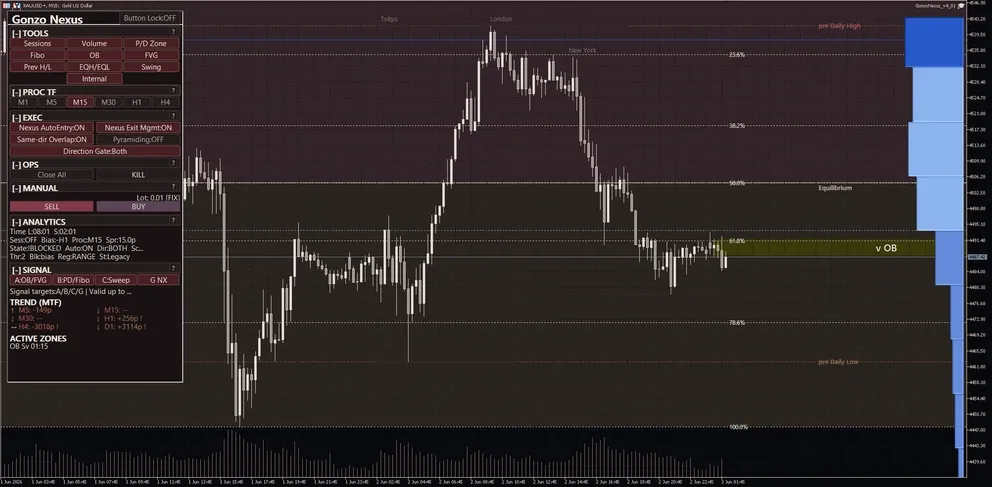
3. Panel labels and button behavior
| Panel area | Visible label | Values or states | Action | Caution |
|---|---|---|---|---|
| Header | Product name, lock, compact/status line | Product name, button lock state, and run/stop status | Check panel state and prevent accidental changes | When locked, accidental edits are reduced but layout changes are limited. |
| TOOLS | Session / Volume / P/D / Fibo / OB / FVG / Prev H/L / EQH/EQL / Swing / Internal | Sessions, Volume, P/D zone, Fibo, OB, FVG, Prev H/L, EQH/EQL, Swing, Internal. In Lite, use only the items actually visible and do not treat them as full Special/Nexus controls. | Toggle analysis overlays for waiting zones and structure context. | TOOLS are visual analysis aids, not entry guarantees. |
| PROC TF | M1 / M5 / M15 / M30 / H1 / H4, such as PROC:M15 | Selected analysis timeframe | Switches the analysis/drawing/signal-display basis. | Separate from the MT5 chart timeframe and the internal logic timeframe. |
| EXEC | Auto Entry, Auto Close/Tracking, Overlap, Direction, Pyramiding, Preset/Frequency/Aggregation | Panel ON/OFF states or selected values | Controls new entries, exits/tracking, direction, overlap, and optional add-on exposure. | Auto Entry and Auto Close are separate. You may stop entries while keeping exit management. |
| OPS | Close All, Stop/KILL, Compact, Spacing, Reset, Manual rapid/interval | Confirmation, running, or stopped states | Close positions, stop operation, compact the panel, or reset display/runtime states. | Confirm symbol and magic-number scope before using Close All. |
| MANUAL | Lot, SELL, BUY, Manual SL/TP | Lot: 0.01 [FIX], Lot: 0.01 [AUTO], etc. | Places panel manual BUY/SELL orders. | Risk-based lot changes the displayed lot. Manual SL/TP attachment default differs by product. |
| ANALYTICS | Time, Session, Bias, Proc, Spr, State, Auto, Dir, Sc, Thr, Blk, Reg, St, Sig | Spr:xx.xp, State:READY/SETUP/BLOCKED, Sc:x/y, Thr:x, Blk:reason, etc. | Check spread, readiness, direction, score, threshold, and blockers. | Wide Spr can degrade entries, exits, SL/TP execution, and tracking. |
| SIGNAL | A / B / C / G or Gonzo arrows | A/B/C/G display, target line, remaining validity, and candidate/no/idle chips. | Use for alerts and manual/semi-discretionary decision support. | Signals do not guarantee profit. Check direction, session, spread, and blockers. |
Panel abbreviations
| Abbreviation | Meaning |
|---|---|
| Spr | Current spread, shown in pips such as xx.xp. Use it to confirm narrow-spread operation. |
| State | Current readiness such as READY, SETUP, or BLOCKED. |
| Blk | Current blocker reason, such as direction, time, spread, score, or risk-control window. |
| Sc | Current score, often shown as x/y. |
| Thr | Required threshold used to judge whether score is sufficient. |
| Reg | Market-regime context label, not a guarantee. |
| St | Strategy/state label for context. |
| Sig | Signal age or remaining validity when displayed. |
4. Reading A/B/C/G signals
| Signal | Meaning |
|---|---|
| A | Candidate reaction-zone signal. Use it first to decide where to wait. |
| B | Supporting signal for checking whether the price area is too high or too low. Treat it as support, not the main trigger. |
| C | Timing signal. A+C is easy to observe because it combines waiting zone and timing, but it is not a standalone trade rule. |
| G NX | Gonzo-family confirmation layer. It does not replace A/B/C; treat it as additional support when it overlaps. Nexus may show this as G NX. |
| A+C | A readable combination of where to wait and when timing begins to align. |
| A+B+C | A stricter-looking overlap of zone, support, and timing. More overlap does not guarantee profit. |
| A+B+C+G | A further overlap including the Gonzo-family layer. Still check direction, session, Spr, State, Blk, and lot size. |
5. Risk-percent lot-sizing formula
Risk-based lot sizing calculates order volume from the percentage of account capital you choose to risk. Start with fixed lot 0.01, then enable risk-based sizing only after testing.
| Step | Specification |
|---|---|
| 1. Activation | Used when Use risk-based lot is true and Risk percent is greater than zero. When false, Fixed lot is used. |
| 2. Capital basis | Special/Nexus use the Risk basis setting to choose Balance or Equity. |
| 3. Risk money | Risk money = selected capital basis × Risk percent ÷ 100. Example: balance 10,000 and risk percent 0.5 gives 50. The default 0.005 means 0.005%, so 10,000 gives 0.5. |
| 4. Estimated loss per 1 lot | The EA estimates the account-currency loss for 1.00 lot using the effective SL or risk-basis distance, the XAUUSD contract/tick information, and currency conversion. |
| 5. Lot formula | Order lot = risk money ÷ estimated loss per 1.00 lot. The result is then adjusted to the broker minimum, maximum, and volume step. |
| 6. Fallback | If the required stop distance, tick value, or currency conversion cannot be calculated, the EA falls back to Fixed lot. |
| 7. Scope | This affects automatic entries and the lot shown/used by panel manual BUY/SELL. If manual SL/TP attachment is false, always confirm manual SL/TP yourself. |
| 8. Caution | Risk percent is a sizing guide, not a guaranteed loss cap. Wider spread, slippage, weekend gaps, execution rejection, and minimum-lot rules can make real results differ. |
6. SMC glossary
| Term | Explanation |
|---|---|
| OB | Potential reaction zone, often used as background for A signals. |
| FVG | Gap-like price area used to observe potential fill/reaction behavior. |
| EQH/EQL | Equal highs/lows, often watched as liquidity-prone levels. |
| Swing | Broader market-structure wave used for larger context. |
| Internal | Finer short-term structure used for recent context. |
| P/D zone | Premium/discount zone showing whether price is relatively high or low. |
| Fibo | Fibonacci reference for checking retracement context with P/D zones. |
| Sessions | Tokyo/London/New York style time zones used to confirm active sessions. |
| Volume | Volume profile or volume concentration by price area. |
7. Semi-discretionary and manual operation flow
| Workflow | Steps |
|---|---|
| Full-auto baseline | Allow auto trading=true, Nexus auto entry=true, Nexus auto close and tracking=true, fixed lot 0.01, PROC TF M15, and a narrow-spread XAUUSD chart. |
| Observation only | Set Allow auto trading=false when you want no EA trading. To monitor displays while stopping new entries only, set Nexus auto entry=false and keep auto close/tracking according to your plan. |
| Signal monitor + manual entry | Use A/B/C/G NX, TOOLS, ANALYTICS, Spr, State, and Blk. Press BUY/SELL only when direction, session, spread, and lot size are acceptable. |
| Manual entry + EA management | Set Nexus auto entry=false and Nexus auto close and tracking=true. Special/Nexus initially do not attach SL/TP to panel manual BUY/SELL entries. Always confirm SL/TP and management scope. |
| Panel/manual rapid operation | Use BUY/SELL, Close All, Stop/KILL, Compact, and Reset. Test any long-press or rapid style operation on demo first to avoid accidental orders. |
| Close All and emergency stop | Confirm symbol and magic-number scope before Close All. Use emergency stop to stop new or management actions, then confirm existing positions manually. |
| Overlap and add-on exposure | Pyramiding is optional and initially false. Same-direction overlap and add-on positions increase total exposure. |
| Time-risk controls | Special/Nexus use Weekend Risk Control and Daily Rollover Control. Lite uses Daily Rollover Control and Friday Risk Control. None of these guarantees loss prevention. |
What not to do
- Do not run multiple Gonzo products on the same XAUUSD account with the same magic number unless you intentionally want scopes to overlap.
- Do not treat display toggles as trading guarantees or automatic entry-rule changes.
- Do not turn off auto close/tracking and still expect EA exit management.
- Do not describe the system as relying on unsupported seconds timeframes.
- Do not increase lot size after a quiet period without testing.
- Do not treat backtest evidence as a guarantee of future profit or loss avoidance.
8. Settings reference
The list below uses only MT5 setting labels visible to the user, in release order and grouped for readability.
| MT5 setting item | Initial value | Visible value or input example | What it controls | When to change | Caution |
|---|---|---|---|---|---|
| マジックナンバー / Magic number | 95042821 | numeric input | Separates the positions and orders managed by this EA. | Change it when running multiple products or multiple charts. | Do not reuse the same number across multiple XAUUSD EAs unless you intentionally want management scopes to overlap. |
| 取引方向 / Trade direction | 両方 / Both | Both, Buy only, Sell only | Limits the auto-entry direction to both, buy-side only, or sell-side only. | Use it when you intentionally want to restrict direction for testing or market-bias reasons. | This is not only a display setting; restricting direction can block new entries in the excluded direction. |
| リスク%ロットを使う / Use risk-based lot | false | true / false | When true, the EA uses risk-based lot sizing; when false, it uses fixed lot. | Enable only after testing fixed-lot behavior and broker conditions. | Risk percent is not a guaranteed loss cap. If the calculation cannot be completed, the EA falls back to fixed lot. |
| リスク% / Risk percent | 0.005 | numeric input | Percentage used for risk-based lot sizing. The value is treated as a percent: 1.0 means 1%, 0.5 means 0.5%, and the default 0.005 means 0.005%. | Adjust gradually after checking account size, drawdown tolerance, and spread conditions. | Do not confuse percent input with decimal ratio. 0.01 means 0.01%, not 1%. Broker minimum lot may still make the effective risk larger than expected. |
| リスク計算基準 / Risk basis | 残高 / Balance | Balance, Equity | Selects whether risk percent is based on balance or equity. | Use equity if you want open P/L reflected; use balance for a steadier basis. | Equity-based sizing can change as floating P/L changes. Check account-wide exposure when running multiple EAs. |
| 固定ロット / Fixed lot | 0.01 | numeric input | Order lot used in fixed-lot mode and as the fallback when risk-based sizing cannot be calculated. | Start near the minimum such as 0.01 on demo or in the Strategy Tester. | The final order size is adjusted to broker minimum, maximum, and step. XAUUSD lot changes can be significant; do not increase abruptly. |
| MT5 setting item | Initial value | Visible value or input example | What it controls | When to change | Caution |
|---|---|---|---|---|---|
| 自動売買を許可 / Allow auto trading | true | true / false | Master permission for the EA trading actions. | Set false when you want the EA attached but not trading. | MT5 platform auto-trading permission is also required. When false, treat the EA mainly as a monitor/display tool. |
| Nexus自動エントリー / Nexus auto entry | true | true / false | Controls new automatic entries for Nexus. It is separate from exit/tracking management. | Set false for signal monitoring or manual-entry workflows. | Even when false, exit/tracking support may remain active if the auto close/tracking setting is true. |
| Nexus自動決済・追跡 / Nexus auto close and tracking | true | true / false | Controls Nexus exit management, tracking, and post-entry management. | Keep true when you want EA management after entry, including manual workflows. | When false, EA-originated exit/tracking updates are disabled. Existing broker-side SL/TP may remain, but this does not guarantee profit or protection. |
| Nexus同方向重複を許可 / Allow same-direction overlap | true | true / false | Allows multiple positions in the same direction when conditions permit. | Use only after testing if you want more opportunities. | Same-direction overlap increases exposure, margin use, floating drawdown, and weekend carry risk. |
| ピラミッディングを有効化 / Enable pyramiding | false | true / false | Optional scale-in/pyramiding for adding exposure when conditions permit. It is not an averaging-down or loss-avoidance guarantee. | Enable only after testing and understanding total exposure. | Additional positions can increase loss after reversal. Nexus is initially false; the release-visible Special table is also false. |
| MT5 setting item | Initial value | Visible value or input example | What it controls | When to change | Caution |
|---|---|---|---|---|---|
| 週末リスク制御を使う / Enable weekend risk control | false | true / false | Master switch for Weekend Risk Control. | Set true when using Friday entry blocking, profit close, or forced close before the weekend. | If this master is true but all child actions are false, there is effectively no protective action. |
| 金曜の新規エントリー停止 / Stop new entries on Friday | false | true / false | Blocks new entries from the configured Friday time and through the weekend. | Good first conservative weekend setting. | This does not close existing positions. Exit management is controlled separately. |
| 新規停止開始時刻(時) / Entry stop start hour | 21 | numeric input | Sets the Friday entry-block start time. | Set after confirming the selected time basis. | Wrong time basis is a common setup mistake. Compare it with MT5 server time. |
| 新規停止開始時刻(分) / Entry stop start minute | 0 | numeric input | Sets the Friday entry-block start time. | Set after confirming the selected time basis. | Wrong time basis is a common setup mistake. Compare it with MT5 server time. |
| 週末前に利益ポジションを決済 / Close profitable positions before weekend | false | true / false | Attempts to close managed profitable positions before the weekend. | Use when you do not want profitable positions carried into the weekend. | The minimum profit is account-currency profit. 0.0 can close very small profits, and widened spreads can affect execution. |
| 利益決済の最低利益 / Minimum profit for close | 0.0 | numeric input | Minimum account-currency profit required for profit-close actions. It is not pips. | Increase it if you do not want very small profits closed. | 0.0 is aggressive. Consider commissions, swaps, and spread. |
| 週末前に全ポジションを強制決済 / Force close before weekend | false | true / false | Attempts to close all managed positions before the weekend. | Use as a strong setting to avoid weekend carry. | Late-Friday liquidity and spread can be poor, so execution may be unfavorable. |
| 強制決済時刻(時) / Force close hour | 23 | numeric input | Sets the forced-close time before the weekend. | Set with enough buffer before the broker closes trading. | Check time basis and server time. Near market close, spread and execution risk can be high. |
| 強制決済時刻(分) / Force close minute | 30 | numeric input | Sets the forced-close time before the weekend. | Set with enough buffer before the broker closes trading. | Check time basis and server time. Near market close, spread and execution risk can be high. |
| 判定する時間基準 / Time basis | サーバー時間 / Server time | Server time, UTC, London time | Selects whether the configured time is interpreted as server time, UTC, or London time. | Use it to align broker/server time with the market time you intend. | This is a common setup error. Verify the actual blocked window on demo or in testing. |
| MT5 setting item | Initial value | Visible value or input example | What it controls | When to change | Caution |
|---|---|---|---|---|---|
| ロールオーバー制御を使う / Enable rollover control | false | true / false | Master switch for Daily Rollover Control. | Set true when using entry blocking or profit close around rollover. | If the master is true but child actions are false, there is effectively no protective action. |
| 判定する時間基準 / Time basis | サーバー時間 / Server time | Server time, UTC, London time | Selects whether the configured time is interpreted as server time, UTC, or London time. | Use it to align broker/server time with the market time you intend. | This is a common setup error. Verify the actual blocked window on demo or in testing. |
| ロールオーバー時刻(時) / Rollover hour | 0 | numeric input | Sets the broker rollover time. | Align it with the broker spread-widening window. | Gold spreads can widen sharply around rollover. Observe and adjust with real broker data. |
| ロールオーバー時刻(分) / Rollover minute | 0 | numeric input | Sets the broker rollover time. | Align it with the broker spread-widening window. | Gold spreads can widen sharply around rollover. Observe and adjust with real broker data. |
| 前後の新規エントリー停止 / Block entries around rollover | false | true / false | Blocks new entries before and after rollover. | Use to avoid the daily low-liquidity and spread-widening window. | This does not close existing positions. A too-wide window can skip valid trades. |
| 何分前から停止 / Block minutes before | 10 | numeric input | Sets how many minutes before rollover entry blocking starts. | Use a larger value if the broker spread widens early. | Too large a value reduces opportunities. Start around 10–20 minutes and observe. |
| 何分後まで停止 / Block minutes after | 10 | numeric input | Sets how many minutes after rollover entry blocking continues. | Adjust for brokers whose spread stays wide after rollover. | Too short may resume during wide spread; too long may skip valid trades. |
| ロールオーバー前に利益決済 / Close profitable positions before rollover | false | true / false | Attempts to close profitable managed positions before rollover. | Use when you do not want profitable positions to cross rollover. | This does not rescue losing positions automatically. |
| 利益決済を始める分数 / Profit close minutes before | 10 | numeric input | Sets how many minutes before rollover profit-close checks begin. | Use when you want to take profit before the rollover window. | Too early may close positions that could otherwise continue. |
| 利益決済の最低利益 / Minimum profit for close | 0.0 | numeric input | Minimum account-currency profit required for profit-close actions. It is not pips. | Increase it if you do not want very small profits closed. | 0.0 is aggressive. Consider commissions, swaps, and spread. |
| MT5 setting item | Initial value | Visible value or input example | What it controls | When to change | Caution |
|---|---|---|---|---|---|
| 分析基準TF / Analysis timeframe | M15 / 15-minute | M1 / M5 / M15 / M30 / H1 / H4 etc. | Analysis/display/signal timeframe. The initial value is M15. | Change to M1/M5/M15/M30/H1/H4 etc. when you want a different analysis view. | This is separate from the MT5 chart timeframe and the internal trading core. Keep M15 until you understand the difference. |
| Aシグナルを表示 / Show A signals | true | true / false | Shows or hides A signals, used as a candidate reaction zone reference. | Keep true when you want to see where to wait; set false to reduce overlays. | A is decision support, not a standalone trade trigger. |
| Bシグナルを表示 / Show B signals | true | true / false | Shows or hides B signals, a supporting price-location signal. | Use as a helper for checking A/C context. | B is a supporting signal, not the main decision by itself. |
| Cシグナルを表示 / Show C signals | true | true / false | Shows or hides C signals, used to observe entry timing. | Use when observing combinations such as A+C. | C alone or A+C does not promise profit. |
| G NXシグナルを表示 / Show G NX signals | true | true / false | Shows the Nexus-side Gonzo-family signal. | Use it as a supporting layer on top of A/B/C. | G NX is the Nexus-side signal surface, not an upgrade/downgrade label. |
| MT5 setting item | Initial value | Visible value or input example | What it controls | When to change | Caution |
|---|---|---|---|---|---|
| 通知を使う / Enable notifications | false | true / false | Master switch for notifications. | Set true when you want signal conditions sent to popup, push, email, or sound. | If false, channel/condition settings will not send alerts. MT5 terminal notification setup is also required. |
| 同一バーは1回だけ通知 / Notify once per bar | true | true / false | Suppresses repeated alerts on the same bar. | Keep true to avoid alert spam. | If false, multiple alerts can occur within the same bar. |
| MT5 setting item | Initial value | Visible value or input example | What it controls | When to change | Caution |
|---|---|---|---|---|---|
| ポップアップ通知 / Popup notification | true | true / false | Uses MT5 popup notifications. | Use when monitoring on the desktop terminal. | Requires the notification master to be true. |
| スマホPush通知 / Mobile push notification | false | true / false | Uses MT5 mobile push notifications. | Use when you want alerts away from the desktop. | Requires MT5 mobile notification setup and the notification master to be true. |
| メール通知 / Email notification | false | true / false | Uses MT5 email notifications. | Use when you want email records. | Requires MT5 email setup and the notification master to be true. |
| サウンド通知 / Sound notification | false | true / false | Plays a sound alert. | Use as an audio cue when not watching the chart constantly. | Requires a valid sound file and the notification master to be true. |
| 通知サウンドファイル / Notification sound file | alert.wav | text input | Sound file used for sound notifications. | Change it when you want a different alert sound. | Use a file name that MT5 can access. |
| MT5 setting item | Initial value | Visible value or input example | What it controls | When to change | Caution |
|---|---|---|---|---|---|
| A条件で通知 / Notify on A | false | true / false | Enables alerts when the A condition or combination is met on the display side. | Enable only the combinations you actually want to monitor. | Alerts are decision support. More conditions may look stricter, but they do not guarantee profit. |
| B条件で通知 / Notify on B | false | true / false | Enables alerts when the B condition or combination is met on the display side. | Enable only the combinations you actually want to monitor. | Alerts are decision support. More conditions may look stricter, but they do not guarantee profit. |
| C条件で通知 / Notify on C | false | true / false | Enables alerts when the C condition or combination is met on the display side. | Enable only the combinations you actually want to monitor. | Alerts are decision support. More conditions may look stricter, but they do not guarantee profit. |
| G条件で通知 / Notify on G | false | true / false | Enables alerts when the G condition or combination is met on the display side. | Enable only the combinations you actually want to monitor. | Alerts are decision support. More conditions may look stricter, but they do not guarantee profit. |
| MT5 setting item | Initial value | Visible value or input example | What it controls | When to change | Caution |
|---|---|---|---|---|---|
| A+B条件で通知 / Notify on A + B | false | true / false | Enables alerts when the A+B condition or combination is met on the display side. | Enable only the combinations you actually want to monitor. | Alerts are decision support. More conditions may look stricter, but they do not guarantee profit. |
| A+C条件で通知 / Notify on A + C | false | true / false | Enables alerts when the A+C condition or combination is met on the display side. | Enable only the combinations you actually want to monitor. | Alerts are decision support. More conditions may look stricter, but they do not guarantee profit. |
| A+G条件で通知 / Notify on A + G | false | true / false | Enables alerts when the A+G condition or combination is met on the display side. | Enable only the combinations you actually want to monitor. | Alerts are decision support. More conditions may look stricter, but they do not guarantee profit. |
| B+C条件で通知 / Notify on B + C | false | true / false | Enables alerts when the B+C condition or combination is met on the display side. | Enable only the combinations you actually want to monitor. | Alerts are decision support. More conditions may look stricter, but they do not guarantee profit. |
| B+G条件で通知 / Notify on B + G | false | true / false | Enables alerts when the B+G condition or combination is met on the display side. | Enable only the combinations you actually want to monitor. | Alerts are decision support. More conditions may look stricter, but they do not guarantee profit. |
| C+G条件で通知 / Notify on C + G | false | true / false | Enables alerts when the C+G condition or combination is met on the display side. | Enable only the combinations you actually want to monitor. | Alerts are decision support. More conditions may look stricter, but they do not guarantee profit. |
| MT5 setting item | Initial value | Visible value or input example | What it controls | When to change | Caution |
|---|---|---|---|---|---|
| A+B+C条件で通知 / Notify on A + B + C | false | true / false | Enables alerts when the A+B+C condition or combination is met on the display side. | Enable only the combinations you actually want to monitor. | Alerts are decision support. More conditions may look stricter, but they do not guarantee profit. |
| A+B+G条件で通知 / Notify on A + B + G | false | true / false | Enables alerts when the A+B+G condition or combination is met on the display side. | Enable only the combinations you actually want to monitor. | Alerts are decision support. More conditions may look stricter, but they do not guarantee profit. |
| A+C+G条件で通知 / Notify on A + C + G | false | true / false | Enables alerts when the A+C+G condition or combination is met on the display side. | Enable only the combinations you actually want to monitor. | Alerts are decision support. More conditions may look stricter, but they do not guarantee profit. |
| B+C+G条件で通知 / Notify on B + C + G | false | true / false | Enables alerts when the B+C+G condition or combination is met on the display side. | Enable only the combinations you actually want to monitor. | Alerts are decision support. More conditions may look stricter, but they do not guarantee profit. |
| A+B+C+G条件で通知 / Notify on A + B + C + G | false | true / false | Enables alerts when the A+B+C+G condition or combination is met on the display side. | Enable only the combinations you actually want to monitor. | Alerts are decision support. More conditions may look stricter, but they do not guarantee profit. |
| MT5 setting item | Initial value | Visible value or input example | What it controls | When to change | Caution |
|---|---|---|---|---|---|
| セッション帯を表示 / Show session zones | true | true / false | Shows or hides session zones such as Tokyo, London, and New York. | Use when checking active sessions. | Session display is not a trade guarantee. Be aware of broker time differences. |
| 出来高プロファイルを表示 / Show volume profile | true | true / false | Shows or hides volume profile support by price area. | Use when checking where activity is concentrated. | Volume display is only a visual aid. Set false if it is heavy or cluttered. |
| P/Dゾーンを表示 / Show premium/discount zones | true | true / false | Shows premium/discount zones to judge whether price is relatively high or low. | Use when checking B-signal or waiting-zone context. | Do not trade from this zone alone. |
| Fiboを表示 / Show Fibonacci levels | true | true / false | Shows Fibonacci reference levels. | Use together with premium/discount or reaction zones. | Do not use Fibonacci alone as a trade decision. |
| 前高安を表示 / Show previous highs/lows | true | true / false | Shows previous high/low references. | Use when checking liquidity and reaction levels. | Be careful around nearby levels because spread and volatility can change quickly. |
| OBを表示 / Show order blocks | false | true / false | Shows order block areas, potential reaction zones. | Use when you want background context for A signals or waiting zones. | Initially false. More overlays can make the chart heavier and harder to read. |
| FVGを表示 / Show FVG | false | true / false | Shows FVG areas, gap-like price zones. | Use when observing fill/reaction behavior. | Initially false. Display is only a visual aid, not a trade guarantee. |
| EQH/EQLを表示 / Show equal highs/lows | false | true / false | Shows equal highs/lows. | Use to identify liquidity-prone levels. | Initially false. Be cautious of fast moves and false breaks around these levels. |
| スイングを表示 / Show swing structure | false | true / false | Shows or hides swing structure. | Use for a broader market-structure view. | Initially false. Keep it separate from short-term triggers. |
| インターナルを表示 / Show internal structure | false | true / false | Shows or hides internal short-term structure. | Use for near-term structure context. | Initially false. Too many overlays can distract decisions. |
| 手動エントリー時にSL/TPを付帯 / Attach SL/TP to manual entries | false | true / false | Controls whether panel manual BUY/SELL entries receive SL/TP. | Set true if you want manual entries closer to the EA-managed workflow. Special/Nexus are initially false; Lite is initially true. | When false, confirm manual SL/TP yourself. Even when true, broker conditions, spread, and execution constraints can affect results. |
| MT5 setting item | Initial value | Visible value or input example | What it controls | When to change | Caution |
|---|---|---|---|---|---|
| 表示言語 / Display language | 日本語 / Japanese | Japanese, English | Switches panel/display language. | Use when you prefer Japanese or English display. | It does not change trading logic or performance. |
9. Time-risk control examples
Weekend Risk Control examples
| Scenario | Settings example | Expected behavior | Caution |
|---|---|---|---|
| Stop new Friday entries only | Enable weekend risk control=true; Stop new entries on Friday=true; start 21:00; profit close=false; forced close=false | New entries are blocked from Friday 21:00 and through the weekend. Existing positions remain normally managed. | Good first conservative setting. It does not close losing positions. |
| Avoid carrying winners over weekend | Enable weekend risk control=true; Friday entry stop=true; Close profitable positions before weekend=true; Minimum profit adjusted to account size | Managed positions with account-currency profit at or above the threshold can be closed in the configured window. | Minimum profit is account currency. 0.0 can close very small profits. |
| Avoid weekend carry as much as possible | Enable weekend risk control=true; Friday entry stop=true; Force close before weekend=true; Force close time 23:30 | Managed positions can be closed at or after the configured time. | Strongest setting. Late-Friday spread/liquidity can make execution unfavorable. |
| Align the time basis | Set Time basis to Server time, UTC, or London time | The hour/minute settings are interpreted using the selected time basis. | Compare MT5 server time with the intended market time before enabling. |
Daily Rollover Control examples
| Scenario | Settings example | Expected behavior | Caution |
|---|---|---|---|
| Pause entries around rollover | Enable rollover control=true; Block entries around rollover=true; set rollover time to broker rollover; before 10–20 minutes; after 10–20 minutes | New entries pause during the configured before/after window. | Existing positions are not closed by this setting alone. |
| Close winners before rollover | Enable rollover control=true; Close profitable positions before rollover=true; Profit close minutes before=10; Minimum profit adjusted to account size | Profitable managed positions can be closed before rollover if profit is above the account-currency threshold. | Threshold is account currency. 0.0 is aggressive. |
| Broker with wide rollover spread | Block entries around rollover=true; before 20–30 minutes; after 20–30 minutes | Avoids new entries during the wider spread window. | Too wide a window may skip valid trades. Adjust after demo observation. |
| Fix time-basis mismatch | Set Time basis to Server time, UTC, or London time based on broker display | Protection windows align with the intended clock. | Wrong time basis is the most common setup error. |
10. FAQ and troubleshooting
| Question | Answer |
|---|---|
| Q. What value means 1% risk? | Risk percent is entered as percent. 1.0 means 1%, 0.5 means 0.5%, and 0.01 means 0.01%, not 1%. Always check the displayed lot on demo or in the Strategy Tester. |
| Q. Does risk-based lot guarantee losses stay within that percent? | No. It is a lot-sizing guide. Spread widening, slippage, gaps, minimum-lot rules, and execution conditions can change real results. |
| Q. Why are there no trades? | Check Allow auto trading, Auto Entry, trade direction, Spr, State, Blk, weekend/rollover/Friday controls, and MT5 platform auto-trading permission. |
| Q. Can I let the EA manage a manual entry? | A common workflow is Auto Entry=false and Auto Close/Tracking=true. Manual SL/TP attachment differs by product, so confirm SL/TP and magic-number scope. |
| Q. Can I run multiple Gonzo products together? | Yes, but separate magic numbers and manage account-wide lot size, overlap, weekend carry, and drawdown tolerance. |
●Payment
For those using GogoJungle for the first time Easy 3 steps to use the product!
At GogoJungle, we provide services to enrich your investment life for our members. In addition, product purchases are limited to members. Why not register as a member now and make use of GogoJungle!