

MT4 通貨ペア&時間足 高速チェンジ

Product outline
Community(0)
MT4 通貨ペア&時間足 高速チェンジ Indicators/E-books
MT4 通貨ペア&時間足 高速チェンジ
通貨ペアと時間足をキーボード操作だけで高速に変更! キー操作でスクリーンショットも保存!
Sales Result:
21本
Reviews:
How to provide:
Indicator
Sales from:
10/30/2021
Last Updated:
08/07/2022
Version:
1.02
Web Authentication:
Enable
Available company:
Payment method:

Japan

フォロー 0 フォロワー 300
Sellerabc-FX
Seller's last login time:5/14/2026 22:38:09
Read more seller information

概要

通貨ペア時間足キーボード操作だけで高速に変更できるMT4インジケーターです。

トレンドが出ている通貨ペアと時間足を探すのに便利です。キー操作でチャートのスクリーンショットも保存できます。

通貨ペアは、気配値ウィンドウに表示されている通貨ペアをキー操作でサイクリックに変更できます。

時間足は、1分足から月足までをキー操作で変更できます。

組表示の通貨ペアを同期することができます。例えば、MTF分析で日足・4時間足・1時間足・15分足の4つのチャートを表示している時に、キー操作で全てのチャートの通貨ペアを同期して切り替えできます。

組表示の時間足を同期することができます。例えば、複数の通貨ペアのチャートを表示している時に、キー操作で全てのチャートの時間足を同期して切り替えできます。
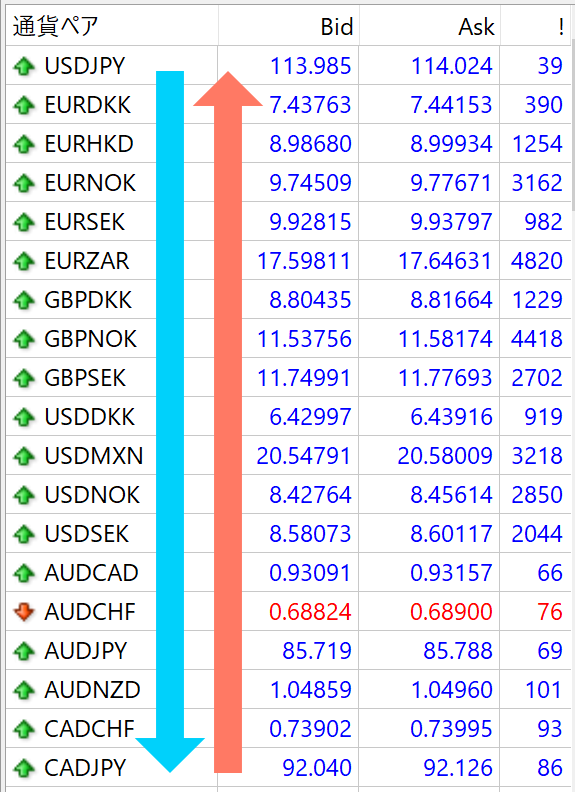
キー割り当て初期設定

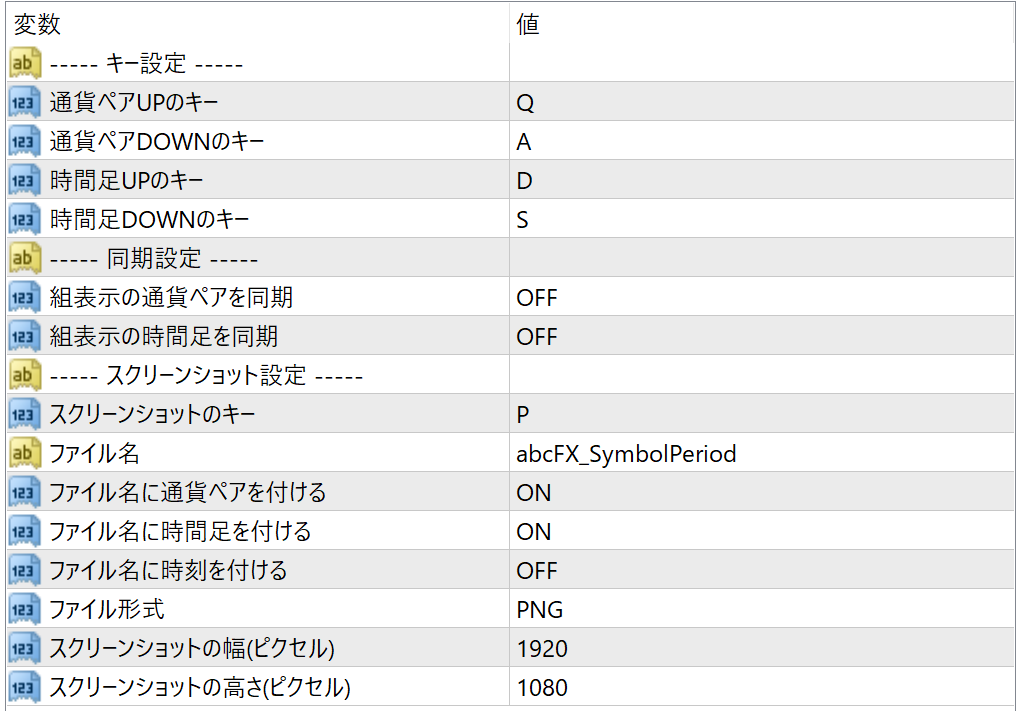
  • 通貨ペアUP:Q
  • 通貨ペアDOWN:A
  • 時間足UP:D
  • 時間足DOWN:S
  • スクリーンショット:P

スクリーンショット設定項目

  • ファイル名
  • ファイル名に通貨ペアを付ける
  • ファイル名に時間足を付ける
  • ファイル名に時刻を付ける
  • ファイル形式(PNG/BMP/GIF)
  • スクリーンショットの幅(ピクセル)
  • スクリーンショットの高さ(ピクセル)

スクリーンショットは、「¥MQL4¥Filesフォルダ」に保存されます。ファイル名を「Chart¥Screenshot」と設定すると「Filesフォルダ」内に「Chartフォルダ」を作成して、「Screenshotファイル名」で保存します。

パラメーター
インストール

  1. MT4を起動します。
  2. ファイルメニューから「データフォルダを開く」を選択します。
  3. 「MQL4」フォルダを開き、その中の「Indicators」フォルダを開きます。
  4. 「Indicators」フォルダの中にインジケーターファイルを保存します。
  5. MT4を再起動します。
  6. ナビゲーターウィンドウ内の「インディケータ」内からインジケーターを右クリックして、「チャートに表示」を選択します。
  7. 開いたダイアログの「全般」タブから「DLLの使用を許可する」をチェックして、「OK ボタン」でダ イアログを閉じます。
  8. チャート左上に「Authentification Success:by GogoJungle」と表示されれば、Web認証完了です。

FAQ

注意事項

  • 本インジケーターはMT4用です。
  • 本インジケーターはWeb認証が必要です。登録されたMT4口座以外では使用できません。
  • Web認証の登録口座は変更できます。
  • OSは「Windows 10」または「Windows 11」をご利用ください。
  • macOS、Linuxでの動作は対象外とさせていただきます。
  • インターネット接続環境が必要です。
  • 商品の特性上、返品、キャンセルはできません。

免責事項

本商品及びこちら販売ページの情報は信頼できると思われる各種データに基づいて作成していますが、その正確性、完全性を保証するものではありません。
本商品及びこちら販売ページで提供する情報を使って生じた不利益、損害に関し、当商品販売者及び情報提供元は、一切の責任を負いません。

変更履歴

■Ver 1.00 (2021年10月31日)
・リリース

■Ver 1.01 (2021年12月27日)
・パラメーターの初期値を一部変更
・組表示の通貨ペアを同期する機能を追加
・組表示の時間足を同期する機能を追加
<追加されたパラメーター>
・組表示の通貨ペアを同期
・組表示の時間足を同期

■Ver 1.02 (2022年8月7日)
・スクリーンショットをチャート左端から出力するように変更

¥1,980(Tax included)
?About 1-Click Order
Product outline
Community(0)
Best Seller Ranking
Recommended Products (Campaigns)

For those using GogoJungle for the first timeEasy 3 steps to use the product!

At GogoJungle, we provide services to enrich your investment life for our members. In addition, product purchases are limited to members. Why not register as a member now and make use of GogoJungle!

01
Enter user information and register as a member
02
Follow the instructions to make a purchase
03
Download from My Page
■ Important Matters and Risk Warnings Regarding Investment Products 【Financial Instruments Business Operator】
GogoJungle Inc.
Registration: Director-General of the Kanto Local Finance Bureau (Financial Instruments Business) No. 1960
【Member Association】
Japan Investment Advisers Association
【Fees and Expenses】
The use of software, e-books, investment advisory services, etc., provided on our platform involves purchase prices determined for each product.
Additionally, when conducting actual financial instrument transactions (such as FX or CFD trading), costs such as transaction fees and spreads (the difference between the sell and buy price) may be incurred through the connected brokerage firms.
【Margin and Risk of Loss】
Transactions such as FX (Foreign Exchange Margin Trading) and CFD (Contract for Difference) allow for trading in amounts exceeding the deposited margin.
Therefore, due to sudden fluctuations in target indices (currency, commodity prices, etc.), there is a risk of incurring losses that exceed the deposited margin (loss exceeding principal).
Furthermore, financial instrument transactions involve risks such as price fluctuations, which may result in losses falling below or exceeding the initial investment principal.
【Nature of Services and Trading Entity】
The Company operates a platform (marketplace) providing investment software and information; we do not engage in the buying, selling, mediation, brokerage, or agency of financial instruments on behalf of customers.
The services and information provided are intended as reference for investment decisions and do not guarantee future profits or specific results.
While some services include investment advice, they do not constitute a mandate or solicitation to trade specific financial instruments.
Final investment decisions and the execution of trades must be made at the customer’s own risk and discretion.