Product outline
Community(0)

MT4 プロフィット
今日の決済損益を表示!
Reviews:
Category:
How to provide:
Indicator
Sales from:
09/10/2021
Last Updated:
-
Version:
-
Web Authentication:
Enable
Available company:

Free
133 left
(67 users using)
Provider/Distributor:
Sales site:
GogoJungle

概要
「今日の決済損益」を表示するMT4インジケーターです。
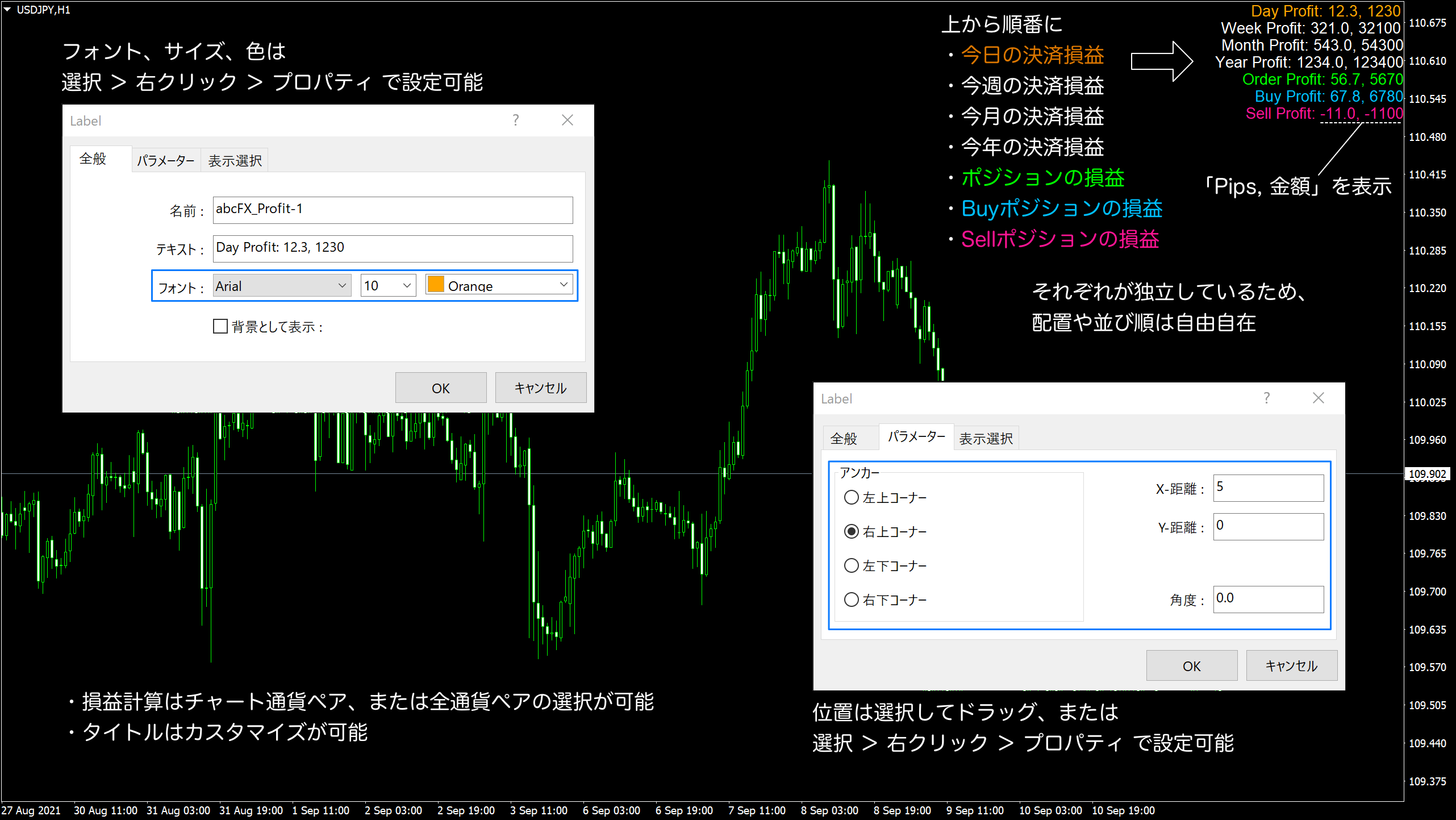
今日の損益「Pips, 金額」がリアルタイムに分かるようになります。損益はチャートの通貨ペア、または全通貨ペアを対象に計算できます。
今日の決済損益だけでも便利ですが、「Pro版」にアップグレードすると下記の損益も表示できるようになります。
- 今週の決済損益
- 今月の決済損益
- 今年の決済損益
- 全ポジションの損益
- Buyポジションの損益
- Sellポジションの損益
使用方法は下記になります。
- 本インジケーターは一つのチャートに複数適用できますので、「インジケーターID」を重複しないように設定してください
- 後から「インジケーターID」を変更した場合は、古い損益ラベルは「選択>右クリック>削除」してください
- 決済損益を表示するために「MT4の表示メニュー>ターミナル>口座履歴>右クリックで全履歴を選択」してください
- 「損益を表示」を「OFF」にすると非表示になります
- 「タイトル種別」を「カスタム」に設定すると「カスタムタイトル」で設定した文字列が表示されます
- 「全通貨ペアの損益」を「OFF」にするとチャート通貨ペアを対象に損益を計算します
- 「全通貨ペアの損益」を「ON」にすると全通貨ペアを対象に損益を計算します
- 時間の区切りはMT4時間になります
インストール
- MT4を起動します。
- ファイルメニューから「データフォルダを開く」を選択します。
- 「MQL4」フォルダを開き、その中の「Indicators」フォルダを開きます。
- 「Indicators」フォルダの中にインジケーターファイルを保存します。
- MT4を再起動します。
- ナビゲーターウィンドウ内の「インディケータ」内からインジケーターを右クリックして、「チャートに表示」を選択します。
- 開いたダイアログの「全般」タブから「DLLの使用を許可する」をチェックして、「OK ボタン」でダ イアログを閉じます。
- チャート左上に「Authentification Success:by GogoJungle」と表示されれば、Web認証完了です。
FAQ
- こちらから「よくあるご質問(FAQ)」のページをご覧ください。
- インジケーターの設置方法(Web認証あり)について
- Web認証について
- Web認証ができない
- ソフトウェア利用規約について
- Web認証、インストールやチャートへの表示につきましては、GogoJungleのサポートにお問い合わせをお願いします。
注意事項
- 本インジケーターはMT4用です。
- 本インジケーターはWeb認証が必要です。登録されたMT4口座以外では使用できません。
- Web認証の登録口座は変更できます。
- OSは「Windows 10」または「Windows 11」をご利用ください。
- macOS、Linuxでの動作は対象外とさせていただきます。
- インターネット接続環境が必要です。
- 商品の特性上、返品、キャンセルはできません。
免責事項
本商品及びこちら販売ページの情報は信頼できると思われる各種データに基づいて作成していますが、その正確性、完全性を保証するものではありません。
本商品及びこちら販売ページで提供する情報を使って生じた不利益、損害に関し、当商品販売者及び情報提供元は、一切の責任を負いません。
変更履歴
■Ver 1.00 (2021年9月11日)
・リリース
Free
133 left
(67 users using)
Provider/Distributor:
Sales site:
GogoJungle
Product outline
Community(0)
Best Seller Ranking
Recommended Products (Campaigns)
For those using GogoJungle for the first time Easy 3 steps to use the product!
At GogoJungle, we provide services to enrich your investment life for our members. In addition, product purchases are limited to members. Why not register as a member now and make use of GogoJungle!
01
Enter user information and register as a member
02
Follow the instructions to make a purchase
03
Download from My Page
