サブウィンドウにチャート表示、Subwindow Chart

Product outline
Community(0)
サブウィンドウにチャート表示、Subwindow Chart Indicators/E-books
サブウィンドウにチャート表示、Subwindow Chart
インジケーターごとサブウィンドウ化!

Sales Result:
480本
Reviews:
How to provide:
Indicator
Sales from:
05/10/2020
Last Updated:
-
Version:
-
Available company:

Japan

フォロー 0 フォロワー 256
SellerPeakyFx
Seller's last login time:4/14/2026 13:53:39
Read more seller information
サブウィンドウにチャートやテクニカル指標を表示するインジケーターです。 いろいろなインジケーターをチャートに表示したい。 でも一目均衡表やGMMAなどの重量級のテクニカル指標は、それだけで目立ってしまうのでなかなか他のインジケーターを追加しにくい・・・ こんな経験はありませんか? そんな時にサブウィンドウにチャートを表示して、2画面に分けて表示することができれば便利です。 Subwindow Chartを使えば、一発でできちゃいます!
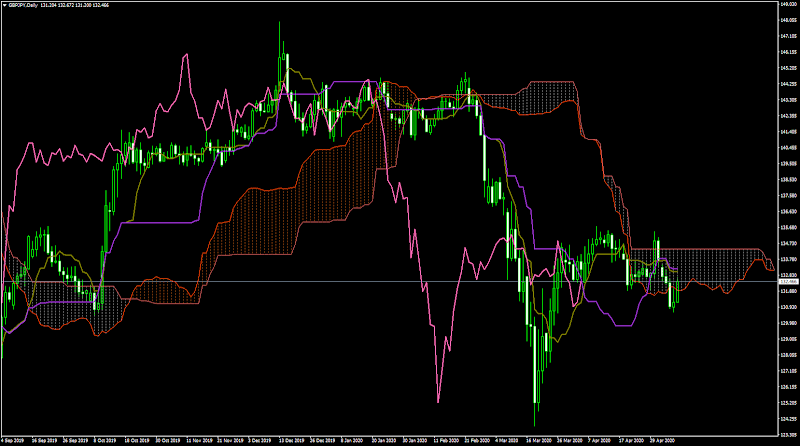
インジケーターごとサブウィンドウに移動!

使い方は単純明快、わずか3ステップです。

ステップ1.メインチャートにインジケーターをセット

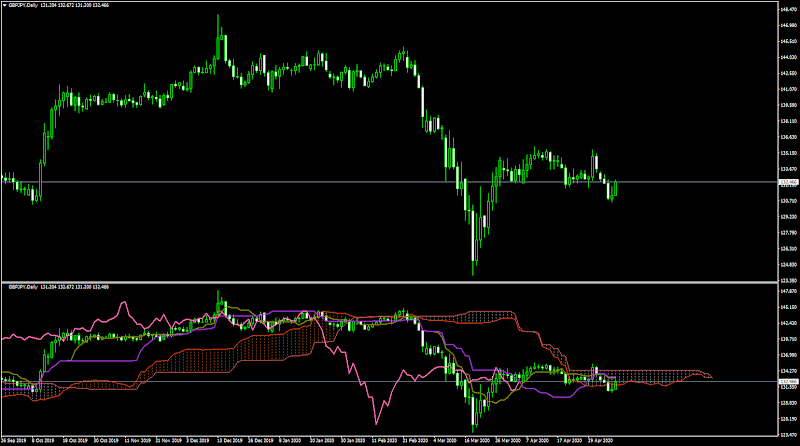
メインチャートにお好みのインジケーター(※)をセットします。 移動平均やボリンジャーバンドなどのMT4標準インジケーターに加えて、GMMAなどシンプルなインジケーターの多くに対応しています。 ※ 矢印・文字・ボタンなどが表示されるタイプのインジケーターには非対応です。 この例では一目均衡表をセットしています。

ステップ2.Subwindow Chartをセットすると、サブウィンドウ化

インジケーターをセットし終わったら、最後にSubwindow Chartをセットするとサブウィンドウ化されます。 このとき、メインウィンドウに表示されていたインジケーターはサブウィンドウに移動し、新たにできたメインウィンドウには何もインジケーターが載っていない状態となります。 <重要> この時点でメインウィンドウに何らかのオブジェクト(矢印・文字・ボタンなど)が残っていたら、そのインジケーターには非対応なのでチャートを閉じてください。

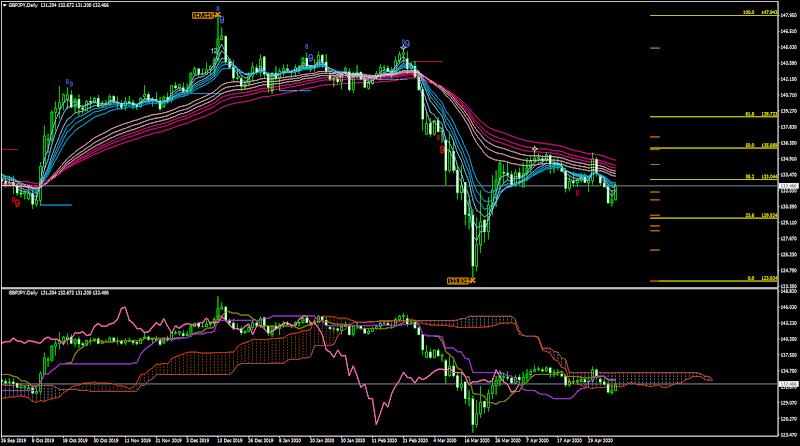
ステップ3.新たなメインチャートに好きなインジケーターをセット

メインチャートに好きなインジケーターをセットしたら完了です。 この時は矢印・文字・ボタンなどが表示されるタイプのインジケーターでもOKです。 この例ではGMMAとAutoFibo EXTD Sequentialをセットしています。

使用上の注意

このインジケーターは裏技的な方法でサブウィンドウ化を実現しているため、すべてのインジケーターに対応しているわけではありません。 矢印・文字・ボタンなどが表示されるタイプのインジケーターには非対応です。 手順2でサブウィンドウ化に失敗した場合は、必ずそのチャートを閉じてください。 非対応のインジケーターがセットされたチャートを残してMT4を終了してしまうと、MT4を起動できなくなってしまうことがあります。

もしもMT4が起動しなくなったら・・・

セットしていたインジケーターファイル(ex4ファイル)を、デスクトップなど別の場所に移動するとMT4を起動することができます。 失敗したチャートを閉じた後で、移動していたex4ファイルを元の場所に戻してください。 このような性質のインジケーターなので、ご利用は独力でトラブル解決できる方のみノークレーム・ノーサポートでお願いします。
Free
Product outline
Community(0)
Best Seller Ranking
Recommended Products (Campaigns)

For those using GogoJungle for the first timeEasy 3 steps to use the product!

At GogoJungle, we provide services to enrich your investment life for our members. In addition, product purchases are limited to members. Why not register as a member now and make use of GogoJungle!

01
Enter user information and register as a member
02
Follow the instructions to make a purchase
03
Download from My Page
■ Important Matters and Risk Warnings Regarding Investment Products 【Financial Instruments Business Operator】
GogoJungle Inc.
Registration: Director-General of the Kanto Local Finance Bureau (Financial Instruments Business) No. 1960
【Member Association】
Japan Investment Advisers Association
【Fees and Expenses】
The use of software, e-books, investment advisory services, etc., provided on our platform involves purchase prices determined for each product.
Additionally, when conducting actual financial instrument transactions (such as FX or CFD trading), costs such as transaction fees and spreads (the difference between the sell and buy price) may be incurred through the connected brokerage firms.
【Margin and Risk of Loss】
Transactions such as FX (Foreign Exchange Margin Trading) and CFD (Contract for Difference) allow for trading in amounts exceeding the deposited margin.
Therefore, due to sudden fluctuations in target indices (currency, commodity prices, etc.), there is a risk of incurring losses that exceed the deposited margin (loss exceeding principal).
Furthermore, financial instrument transactions involve risks such as price fluctuations, which may result in losses falling below or exceeding the initial investment principal.
【Nature of Services and Trading Entity】
The Company operates a platform (marketplace) providing investment software and information; we do not engage in the buying, selling, mediation, brokerage, or agency of financial instruments on behalf of customers.
The services and information provided are intended as reference for investment decisions and do not guarantee future profits or specific results.
While some services include investment advice, they do not constitute a mandate or solicitation to trade specific financial instruments.
Final investment decisions and the execution of trades must be made at the customer’s own risk and discretion.