
こちらの商品は現在販売しておりません。
商品概要
コミュニティ(0)
MultipleIndicatorValueMonitor
いろいろなインジケーターの各時間軸の値を一発で確認する
レビュー:


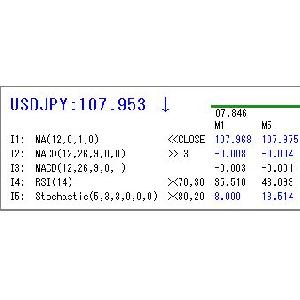
 左上の大きい文字がシンボルと価格です。
その右に、指定した時間足のローソク足を横(左が安値、右が高値)にして表示しています。
その下にインジケーター名とインジケーター値を
インジケーターの値と条件式の真偽により数値の色を変えて表示します。
基本設定
左上の大きい文字がシンボルと価格です。
その右に、指定した時間足のローソク足を横(左が安値、右が高値)にして表示しています。
その下にインジケーター名とインジケーター値を
インジケーターの値と条件式の真偽により数値の色を変えて表示します。
基本設定
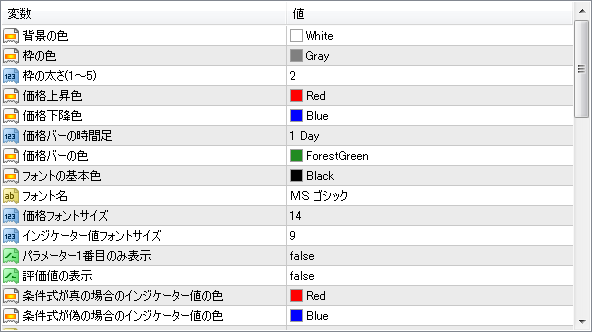 インジケーター設定
 ・インジケーターの指定
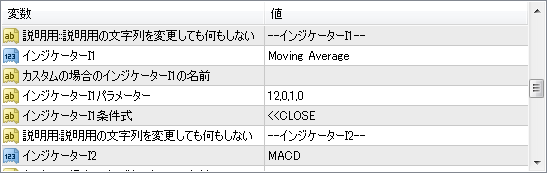
「インジケーターI1」で内部インジケーターを選択します。
内部以外のインジケーターを使用する場合は、一番下の「Custom」を選択して
「カスタムの場合のインジケーターI1の名前」でインジケーター名を入力して下さい。
MT4のナビゲーターウィンドウに表示されている名前です。
もし、「indicator」下のサブフォルダにある場合は、「サブフォルダ¥インジケーター名」と入力して下さい。
・パラメーターの入力
「インジケーターI1パラメーター」に必要な値を「,」で区切って入力します。
移動平均線「Moving Average」を例にするとパラメーター「12,0,1,0」は、
インジケーターを挿入するダイアログで指定するパラメーターと同じです。
・期間が「12」、表示移動が「0」
・インジケーターの指定
「インジケーターI1」で内部インジケーターを選択します。
内部以外のインジケーターを使用する場合は、一番下の「Custom」を選択して
「カスタムの場合のインジケーターI1の名前」でインジケーター名を入力して下さい。
MT4のナビゲーターウィンドウに表示されている名前です。
もし、「indicator」下のサブフォルダにある場合は、「サブフォルダ¥インジケーター名」と入力して下さい。
・パラメーターの入力
「インジケーターI1パラメーター」に必要な値を「,」で区切って入力します。
移動平均線「Moving Average」を例にするとパラメーター「12,0,1,0」は、
インジケーターを挿入するダイアログで指定するパラメーターと同じです。
・期間が「12」、表示移動が「0」
 ・移動平均の種別が「Exponential」(上から0~)
 ・適用価格が「Close」(上から0~)
 となります。
省略された値は、「0」になります。
この例の場合、パラメーターを「12,,1」としても同様です。
英語ですが、以下も参考になります。
https://docs.mql4.com/indicators
関数のパラメーターの symbol, timeframe より後ろを文字列で入力します。
・条件式の入力
「インジケーターI1条件式」に関係演算子、評価値を続けて入力します。
例:「>>CLOSE」終値より大きい
関係演算子
となります。
省略された値は、「0」になります。
この例の場合、パラメーターを「12,,1」としても同様です。
英語ですが、以下も参考になります。
https://docs.mql4.com/indicators
関数のパラメーターの symbol, timeframe より後ろを文字列で入力します。
・条件式の入力
「インジケーターI1条件式」に関係演算子、評価値を続けて入力します。
例:「>>CLOSE」終値より大きい
関係演算子
| == | 左辺(インジケーター値)が右辺(評価値)と等しい時、真。それ以外の時、偽 |
| != | 左辺(インジケーター値)が右辺(評価値)と等しくない時、真。それ以外の時、偽 |
| >> | 左辺(インジケーター値)が右辺(評価値)より大きい時、真。それ以外の時、偽 |
| >= | 左辺(インジケーター値)が右辺(評価値)以上時、真。それ以外の時、偽 |
| << | 左辺(インジケーター値)が右辺(評価値)より小さい時、真。それ以外の時、偽 |
| <= | 左辺(インジケーター値)が右辺(評価値)以下時、真。それ以外の時、偽 |
| >< | 左辺(インジケーター値)が右辺(評価値1,評価値2)の大きいほうより大きい時、真。小さいほうより小さい時、偽。 |
| 数値 | 数値 |
| 数値,数値 | 関係演算子が「><」の時のみ数値を2つ入力します |
| CLOSE | 終値 |
| I1~I5 | I1~I5インジケーター値 |
| PREBAR | 一つ前の足でのインジケーター値 |
| PRETICK | 一つティックでの足でのインジケーター値 |
商品概要
コミュニティ(0)
人気商品ランキング
おすすめ商品(キャンペーン商品)
GogoJungleを初めてご利用する方へ 商品のご利用まではかんたん3ステップ!
GogoJungleでは、会員様向けに、あなたの投資生活を豊かにするサービスをご用意しております。また、商品をご購入いただけるのは、会員様のみとなっております。今すぐ会員登録をして、GogoJungleを活用してみませんか!
01
ユーザー情報を入力し会員登録
02
案内に従い購入
03
マイページからダウンロード
