
ForexHYBRID

- Whole period
- 2 years
- 1 year
- 6 months
- 3 months
- 1 month
Profit
:
-6,611.00USDProfit Factor
:
0.89Rate of return risk
?
:
-0.36Average Profit
:
20.00USDAverage Loss
:
-54.00USDBalance
?
:
3,389.00USDRate of return (all periods)?
:
-0.28%Win Rate
:
70.22%
(2318/3301)
Maximum Position
?
:
71Maximum Drawdown
?
:
0.77%
(18,277.00USD)
Maximum Profit
:
952.00USDMaximum Loss
:
-2,328.00USDRecommended Margin
?
:
2,377,680.00USDUnrealized P/L
:
-12.00USDDeposit
?
:
10,000.00USDCurrency
:
USD- Account
Operable Brokers
Usable with MT4-adopting brokers.
※EA measurement is stopped
Forward testing (Profit)
Product Statistics
Product Comments
Monthly Statistics
2026
2025
2024
2023
2022
- Jan
- Feb
- Mar
- Apr
- May
- Jun
- Jul
- Aug
- Sep
- Oct
- Nov
- Dec
Calendar for Months
About EA's Strategy
Translating...
Currency Pairs
[EUR/USD]
Trading Style
[Swing Trading]
Maximum Number Position
9999
Maximum Lot
9999
Chart Time Frame
M5
Maximum Stop Loss
0
Take Profit
0
Straddle Trading
Yes
Application Type
Metatrader Auto Trading
Other File Usages
No


よく複数の通貨ペアを、あたかもそれがモノ凄いリスクヘッジになると
言いたげに組んでいるシステムやそのような裁量ルールを推奨していたり
ポートフォリオとして取り入れていたりしますが
多くはこじつけのために作られていると言っても過言ではありません。
確かに、例えば世界情勢の悪化が進めば比較的安全と言われている円が買われ、
連動して値動きする通貨もあります。
100%、必ず連動して動くのならそれでもいいと思いますが
“一般的にはAが上がったらBも上がる”という動きも
様々な要因によって当てはまらないケースも多発するために
大損するトレーダーが続出しているわけです。
『forexハイブリッド』では、そういう不確かな要素を採用せず
非常に高い流動性とボラリティリィがあり
絶え間ない値動き(トレンド傾向)が出来やすい通貨ペアとして
ユーロドルを採用しています。
このことによって、不確定要素が最も少なく
一貫した動きになりやすいため計算が成り立ちやすくなります。
つまり、FXで一番重要になる資金管理が最もしやすいのがユーロドルであり
きちんと技術を持っていればこれほど扱いやすい通貨はないのです。

FXで勝つためにナンピンを推奨している業者やシステム、
裁量トレードノウハウが氾濫しているのはご存知かと思いますが
数字を作るのではなくリアルに勝ち続けるためには
本来避けるべき投資戦略です。
そのため『forexハイブリッド』はナンピンしません。
投資で最も避けるべきなのは資金を一気に吹き飛ばしてしまうことです。
何度も言うように安定して勝ち続けなければ投資でもなければ
資産運用でもなくなってしまいます。
確かにナンピンすれば見た目の勝ちは増えるでしょうし
実際に勝率も上がるでしょう。
バックテストでの数字は魅力的になります。
結局、ナンピンは余程のトレード技術がない限り
いつか負けて大損する戦略でしかないのです。
どんなに優れたトレード技術を持っていたとしても
過去に例のない相場は必ずやってきます。
そのとき過去のデータを基にしてナンピンを仕掛けたらどうなるのか。
ナンピンせずに良い成績を出すことは
ハッキリ言うとかなり難しいと思いますので
そういう意味でも『forexハイブリッド』がいかに優れているか、
安心のリスクコントロールができているか
垣間見ていただくことができるのではないでしょうか。

基本のトレードスタンスはトレンド型となりますが
通常、トレンドフォローの場合、
上昇下降どちらかにトレンドサインが出たときエントリーし、
思い通りにトレンドに乗ったら「いくらで利食いしようかな~」、
トレンドの読みが外れたら「いくらまで損切を我慢しようかな…」
というのが多くのトレーダーが直面する状況かと思います。
しかし、forexハイブリッドは、
基本的に上昇トレンド下降トレンドに関係なくどちらでも利益を出せ、
また、あらかじめ“どのラインで決済するのか”ということも
すべて織り込み済みでトレードするので、
非常に限定されたリスクの中で安定したトレードを可能にしています。
なかなか文字では伝わりにくいので
チャート図を見ながら基本トレードパターンをご説明しましょう。
まず、forexハイブリッドではいきなりエントリーするようなことはせず
トレンド発生のサインを確認したら上昇と下降の両方に
「指値」を入れるロジックが採用されています。
次のチャート図をご覧ください。
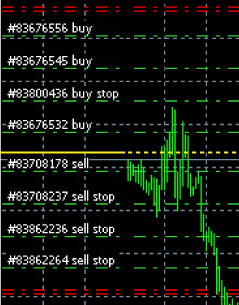 真ん中の黄色いラインが現時点(トレード開始)の相場で、
実線と点線の境界線が“今現在”です。
ここで上下どちらにもエントリーポイントとなる指値を入れます。
黄色いラインを中心にbuy(上昇)にもsell(下降)にも
ほぼ均等に4本ずつ緑のラインが入っていますがこれが指値のラインです。
また、上下一番外側に赤いラインが入っているのが
決済ラインとなっています。
つまり、この図の場合、決済ラインまでのあいだに
このパターンではsell/buyともに4本の指値ポイントが設定されていることが
おわかりいただけると思います。
forexハイブリッドが発動すると
このように指値と決済ラインをあらかじめ想定して
トレードが開始されます。
当たり前の話ですが、相場は生き物ですから、
常に上がったり下がったりします。
この図例でも、いったん下がったと思ったら反転して上昇し
そのあと一気にまた下がっていることがわかります。
無論、そんなことは境界線にいる“今現在”では
100%予測できません。
この、例にとっているケースではどうなるのかというと
先に「sell」の指値ラインを超えましたので
最初のsellでエントリーしポジションを持ちました。
その後、トレンドに乗って順調に下降し2段目の指値ラインを超えたため
更にsellの追加注文が入ります。
sellに2回エントリーしてポジションを持ち
buyにはまだノーエントリー(0回)の状態です。
このまま下降の決済ラインまでいけば3回目、4回目も追加エントリーが入り
計4つのポジションを決済して利益が確定します。
これはごく普通のことなので異論がある方はいないでしょう。
しかし、先ほども言いましたが相場は生き物ですから
そうそう思い通りにはなりません。
この例でも、2回目の指値で追加エントリーが入った直後、
反転して相場が上昇してしまいました。
sellポジションを持っているわけですから
このまま上昇し続けるあいだ何もしなければ負けトレードになります。
それでは単なる素人トレードですね。
思い通りにならない相場でも利益を出す。
それがファンドのトレード技術でありforexハイブリッドなのです。
図のように指値でsellポジションを持ったあと相場が反転して
逆にbuyの指値ラインに入ったら、buyのポジションも持ちます。
この時点でsell(2回)buy(1回)の両方、
つまり両建てのような状態となります。
ポジション数やどの指値ラインかなど様々な判断要素によって
細かいロット調整をおこなっていますので
本来は単純計算とはいきませんが
わかりやすく言えばsellの1回分とbuyの1回分が相殺されて
残ったsell1回分の含み益が出ている状態です。
仮にこのまま上昇が続いていたとしたらbuyの追加エントリーが入って
sell2回分の損はあるもののbuy4回分のポジションによって
利益確定となります。
実際はどうだったかというとbuyで1回ポジションを取りましたが
その後また下降に転じてsellの指値で追加エントリーされ
決済ラインを越えたためそのまま全てのポジションを決済。
buyのポジションは当然ながら損失となりましたが
sellポジションでそれを大きく上回る利益を出しているので
トータルでしっかりと利食いに成功しています。
さてここで疑問に思った方もいると思いますが
なぜ、そんな面倒なことをするのでしょうか?
こんな面倒なことをせず、
エントリーしたら下降の決済ライン(一番下の赤いライン)まで
何もしないで運を天に任せて眺めているほうが簡単ですよね?
しかしながら、たとえ面倒だとしても
エントリーや資金管理(ロット調整など)は
細かくおこなったほうが利食いにもリスクにも
対応しやすいことはご理解いただけるでしょう。
つまり、forexハイブリッドは投資ファンドが手堅く利益を出すスタイルを
きっちり踏襲していますので、一気の「大勝ち、大負け」ではなく
むしろアービトラージと言ってもいい徹底的なリスク管理こそ持ち味なのです。
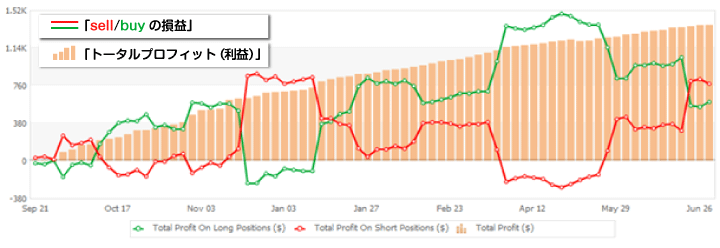
BuyとSellの損益それぞれで見ると、見事なリスクヘッジだとお分かりいただけると思います。
※Buyで損が出ている時、SellでSellの損以上にBuyの利益が出ている。
※Sellで損が出ている時、BuyでBuyの損以上にSellの利益が出ている。
真ん中の黄色いラインが現時点(トレード開始)の相場で、
実線と点線の境界線が“今現在”です。
ここで上下どちらにもエントリーポイントとなる指値を入れます。
黄色いラインを中心にbuy(上昇)にもsell(下降)にも
ほぼ均等に4本ずつ緑のラインが入っていますがこれが指値のラインです。
また、上下一番外側に赤いラインが入っているのが
決済ラインとなっています。
つまり、この図の場合、決済ラインまでのあいだに
このパターンではsell/buyともに4本の指値ポイントが設定されていることが
おわかりいただけると思います。
forexハイブリッドが発動すると
このように指値と決済ラインをあらかじめ想定して
トレードが開始されます。
当たり前の話ですが、相場は生き物ですから、
常に上がったり下がったりします。
この図例でも、いったん下がったと思ったら反転して上昇し
そのあと一気にまた下がっていることがわかります。
無論、そんなことは境界線にいる“今現在”では
100%予測できません。
この、例にとっているケースではどうなるのかというと
先に「sell」の指値ラインを超えましたので
最初のsellでエントリーしポジションを持ちました。
その後、トレンドに乗って順調に下降し2段目の指値ラインを超えたため
更にsellの追加注文が入ります。
sellに2回エントリーしてポジションを持ち
buyにはまだノーエントリー(0回)の状態です。
このまま下降の決済ラインまでいけば3回目、4回目も追加エントリーが入り
計4つのポジションを決済して利益が確定します。
これはごく普通のことなので異論がある方はいないでしょう。
しかし、先ほども言いましたが相場は生き物ですから
そうそう思い通りにはなりません。
この例でも、2回目の指値で追加エントリーが入った直後、
反転して相場が上昇してしまいました。
sellポジションを持っているわけですから
このまま上昇し続けるあいだ何もしなければ負けトレードになります。
それでは単なる素人トレードですね。
思い通りにならない相場でも利益を出す。
それがファンドのトレード技術でありforexハイブリッドなのです。
図のように指値でsellポジションを持ったあと相場が反転して
逆にbuyの指値ラインに入ったら、buyのポジションも持ちます。
この時点でsell(2回)buy(1回)の両方、
つまり両建てのような状態となります。
ポジション数やどの指値ラインかなど様々な判断要素によって
細かいロット調整をおこなっていますので
本来は単純計算とはいきませんが
わかりやすく言えばsellの1回分とbuyの1回分が相殺されて
残ったsell1回分の含み益が出ている状態です。
仮にこのまま上昇が続いていたとしたらbuyの追加エントリーが入って
sell2回分の損はあるもののbuy4回分のポジションによって
利益確定となります。
実際はどうだったかというとbuyで1回ポジションを取りましたが
その後また下降に転じてsellの指値で追加エントリーされ
決済ラインを越えたためそのまま全てのポジションを決済。
buyのポジションは当然ながら損失となりましたが
sellポジションでそれを大きく上回る利益を出しているので
トータルでしっかりと利食いに成功しています。
さてここで疑問に思った方もいると思いますが
なぜ、そんな面倒なことをするのでしょうか?
こんな面倒なことをせず、
エントリーしたら下降の決済ライン(一番下の赤いライン)まで
何もしないで運を天に任せて眺めているほうが簡単ですよね?
しかしながら、たとえ面倒だとしても
エントリーや資金管理(ロット調整など)は
細かくおこなったほうが利食いにもリスクにも
対応しやすいことはご理解いただけるでしょう。
つまり、forexハイブリッドは投資ファンドが手堅く利益を出すスタイルを
きっちり踏襲していますので、一気の「大勝ち、大負け」ではなく
むしろアービトラージと言ってもいい徹底的なリスク管理こそ持ち味なのです。
BuyとSellの損益それぞれで見ると、見事なリスクヘッジだとお分かりいただけると思います。
※Buyで損が出ている時、SellでSellの損以上にBuyの利益が出ている。
※Sellで損が出ている時、BuyでBuyの損以上にSellの利益が出ている。
真ん中の黄色いラインが現時点(トレード開始)の相場で、
実線と点線の境界線が“今現在”です。
ここで上下どちらにもエントリーポイントとなる指値を入れます。
黄色いラインを中心にbuy(上昇)にもsell(下降)にも
ほぼ均等に4本ずつ緑のラインが入っていますがこれが指値のラインです。
また、上下一番外側に赤いラインが入っているのが
決済ラインとなっています。
つまり、この図の場合、決済ラインまでのあいだに
このパターンではsell/buyともに4本の指値ポイントが設定されていることが
おわかりいただけると思います。
forexハイブリッドが発動すると
このように指値と決済ラインをあらかじめ想定して
トレードが開始されます。
当たり前の話ですが、相場は生き物ですから、
常に上がったり下がったりします。
この図例でも、いったん下がったと思ったら反転して上昇し
そのあと一気にまた下がっていることがわかります。
無論、そんなことは境界線にいる“今現在”では
100%予測できません。
この、例にとっているケースではどうなるのかというと
先に「sell」の指値ラインを超えましたので
最初のsellでエントリーしポジションを持ちました。
その後、トレンドに乗って順調に下降し2段目の指値ラインを超えたため
更にsellの追加注文が入ります。
sellに2回エントリーしてポジションを持ち
buyにはまだノーエントリー(0回)の状態です。
このまま下降の決済ラインまでいけば3回目、4回目も追加エントリーが入り
計4つのポジションを決済して利益が確定します。
これはごく普通のことなので異論がある方はいないでしょう。
しかし、先ほども言いましたが相場は生き物ですから
そうそう思い通りにはなりません。
この例でも、2回目の指値で追加エントリーが入った直後、
反転して相場が上昇してしまいました。
sellポジションを持っているわけですから
このまま上昇し続けるあいだ何もしなければ負けトレードになります。
それでは単なる素人トレードですね。
思い通りにならない相場でも利益を出す。
それがファンドのトレード技術でありforexハイブリッドなのです。
図のように指値でsellポジションを持ったあと相場が反転して
逆にbuyの指値ラインに入ったら、buyのポジションも持ちます。
この時点でsell(2回)buy(1回)の両方、
つまり両建てのような状態となります。
ポジション数やどの指値ラインかなど様々な判断要素によって
細かいロット調整をおこなっていますので
本来は単純計算とはいきませんが
わかりやすく言えばsellの1回分とbuyの1回分が相殺されて
残ったsell1回分の含み益が出ている状態です。
仮にこのまま上昇が続いていたとしたらbuyの追加エントリーが入って
sell2回分の損はあるもののbuy4回分のポジションによって
利益確定となります。
実際はどうだったかというとbuyで1回ポジションを取りましたが
その後また下降に転じてsellの指値で追加エントリーされ
決済ラインを越えたためそのまま全てのポジションを決済。
buyのポジションは当然ながら損失となりましたが
sellポジションでそれを大きく上回る利益を出しているので
トータルでしっかりと利食いに成功しています。
さてここで疑問に思った方もいると思いますが
なぜ、そんな面倒なことをするのでしょうか?
こんな面倒なことをせず、
エントリーしたら下降の決済ライン(一番下の赤いライン)まで
何もしないで運を天に任せて眺めているほうが簡単ですよね?
しかしながら、たとえ面倒だとしても
エントリーや資金管理(ロット調整など)は
細かくおこなったほうが利食いにもリスクにも
対応しやすいことはご理解いただけるでしょう。
つまり、forexハイブリッドは投資ファンドが手堅く利益を出すスタイルを
きっちり踏襲していますので、一気の「大勝ち、大負け」ではなく
むしろアービトラージと言ってもいい徹底的なリスク管理こそ持ち味なのです。
BuyとSellの損益それぞれで見ると、見事なリスクヘッジだとお分かりいただけると思います。
※Buyで損が出ている時、SellでSellの損以上にBuyの利益が出ている。
※Sellで損が出ている時、BuyでBuyの損以上にSellの利益が出ている。
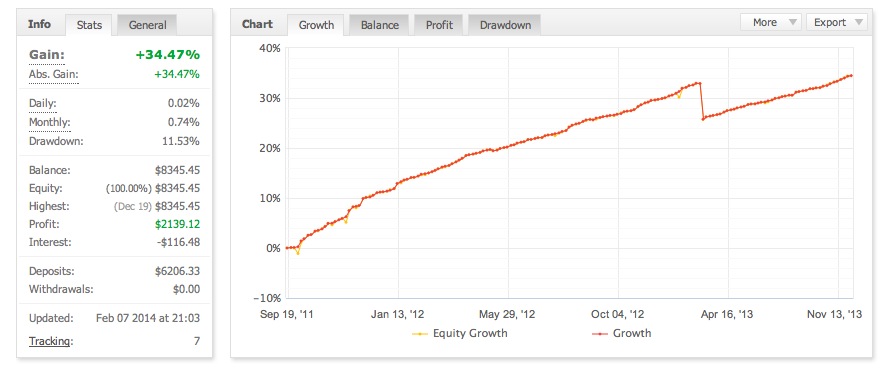
※過去実績によるグラフです。
→【過去実績はこちらをクリックしてご覧下さい。】
→【myfxbook実績はこちらをクリックしてご覧下さい。】

少額から自分の口座を使って運用でき
いつでも出金入金が可能なうえ
取引状況のチェックも裁量操作も自由自在で
有力ファンドのトレードを自分のもにできる
ということです。
→ 【バックテストはこちらをクリックしてご覧下さい。】
→【フォワードテストはこちらをクリックしてご覧下さい。】
【実績グラフ(フォワードテスト)について】
このロジックの特徴は、安定した利回りと、相殺した含み損にあります。
現在、ドローダウンが最大で23%ほどになっています。
しかし、Fx-onの仕組み上、片側(Buy、Sell)の最大含み損が表示されていて、
相殺したグラフ表示ではなく、実際の含み損益ではありません。
2014/11/21の収益+当日最大含み損益が-941となっていますが、
含みが、相殺され実際はほぼ無い状態でした。
myfxbookで実績を公開しておりますので、販売ページと合わせ、参考にしてください。
→【myfxbook実績はこちらをクリックしてご覧下さい。】
そして損益に注目してください。(損益で負けにくいのが特徴です。) 「詳細統計(月別)」の、「表示情報設定△」をクリック>「損益」選択 →【月別損益はこちらをクリックしてご覧下さい。】
【推奨金額】$6000以上 【推奨レバレッジ】200倍以上 【最小ロット数】0.01 ※推奨金額とは 推奨金額とは、過去バックテストにより$6000まであれば大きなドローダウンを起こさなかった金額です。
レバレッジ200倍、LOT0.01で行っています。 ※ロット、パラメータLOT0.01でも、0.02や1.00などとなることが有ります。
【資金バランス計算方法】 資金計算式:必要証拠金=6000*200*(ロット*100)/レバレッジ 計算例) $10000、レバレッジ500倍で運用する場合 必要証拠金=6000*200*(ロット*100)/レバレッジ 必要証拠金/(6000*200*100/レバレッジ)=ロット 10000/(6000*200*100/500)=0.04166666666666666666667 端数切り捨て、ロット0.04 ロット0.04に設定 6000*200*(0.04*100)/500=9600USD 差額400USDが余剰金 上記範囲内でも、レバレッジが高いと含みが大きくなりますので、ご注意ください。 また、レンジ相場には弱いです。レンジ相場時はポジションが大きくなっていきますので、資金バランスを考え、証拠金が足りなそうなときは、ディーラー判断でロスカットが行われる前に、ご自身で判断し決済を行ってください。
変更可能なパラメータ 1. MAGIC マジックナンバー(通常70000) 2. LOT 初期ロット数(通常0.01としてください。) 3. TURN ポジション全決済後の動作 FALSEにすると全決済した後にEAが停止しし、新たにポジションを持たなくなります。その場合は稼動時間内でも再度TRUEに設定するまでEAは稼動しません。
【その他注意事項】 何らかの理由で本EAの稼動を停止させた場合、または、手動でポジションをキャンセル、もしくはクローズした場合、必ず、MAGICナンバーを以前に使用していないものに変更するか、全て手仕舞い後本EAを稼働させてください。 上記処置をせず、ポジションがバランスよく配置されていない場合、追加ポジションが正常に追加されなくなります。以降しばらくその現象が続く可能性があります。 前回のポジションが、停止から再開までに変更ない場合(MT4を再起動する場合など)は、上記問題はありません。
そして損益に注目してください。(損益で負けにくいのが特徴です。) 「詳細統計(月別)」の、「表示情報設定△」をクリック>「損益」選択 →【月別損益はこちらをクリックしてご覧下さい。】
【推奨金額】$6000以上 【推奨レバレッジ】200倍以上 【最小ロット数】0.01 ※推奨金額とは 推奨金額とは、過去バックテストにより$6000まであれば大きなドローダウンを起こさなかった金額です。
レバレッジ200倍、LOT0.01で行っています。 ※ロット、パラメータLOT0.01でも、0.02や1.00などとなることが有ります。
【資金バランス計算方法】 資金計算式:必要証拠金=6000*200*(ロット*100)/レバレッジ 計算例) $10000、レバレッジ500倍で運用する場合 必要証拠金=6000*200*(ロット*100)/レバレッジ 必要証拠金/(6000*200*100/レバレッジ)=ロット 10000/(6000*200*100/500)=0.04166666666666666666667 端数切り捨て、ロット0.04 ロット0.04に設定 6000*200*(0.04*100)/500=9600USD 差額400USDが余剰金 上記範囲内でも、レバレッジが高いと含みが大きくなりますので、ご注意ください。 また、レンジ相場には弱いです。レンジ相場時はポジションが大きくなっていきますので、資金バランスを考え、証拠金が足りなそうなときは、ディーラー判断でロスカットが行われる前に、ご自身で判断し決済を行ってください。
変更可能なパラメータ 1. MAGIC マジックナンバー(通常70000) 2. LOT 初期ロット数(通常0.01としてください。) 3. TURN ポジション全決済後の動作 FALSEにすると全決済した後にEAが停止しし、新たにポジションを持たなくなります。その場合は稼動時間内でも再度TRUEに設定するまでEAは稼動しません。
【その他注意事項】 何らかの理由で本EAの稼動を停止させた場合、または、手動でポジションをキャンセル、もしくはクローズした場合、必ず、MAGICナンバーを以前に使用していないものに変更するか、全て手仕舞い後本EAを稼働させてください。 上記処置をせず、ポジションがバランスよく配置されていない場合、追加ポジションが正常に追加されなくなります。以降しばらくその現象が続く可能性があります。 前回のポジションが、停止から再開までに変更ない場合(MT4を再起動する場合など)は、上記問題はありません。
追記:
下記提携先にて、VPSのレンタルを行っています。
セットアップ代行無料キャンペーン中ですので、合わせてぜひお申し込みください。
提携先、販売元:
合同会社トラストインフォメーション
販売ページ
http://fx-hybrid.com/support/vps
Sales from
:
10/21/2014 10:41
Purchased: 81times
Price:¥29,800 (taxed)
Provider/Distributor
Sales site
GogoJungle
●Payment




Forward Test
Back Test
Sales from : 10/21/2014 10:41
Purchased: 81times
Price:¥29,800 (taxed)
Provider/Distributor
Sales site
GogoJungle
●Payment
About Forex Automated Trading
What is Forex Automated Trading (MT4 EA)?
Forex Automated Trading refers to trading that is automated through programming, incorporating predetermined trading and settlement rules. There are various methods to conduct automated trading, but at GogoJungle, we deal with Experts Advisors (hereinafter referred to as EA) that operate on a trading platform called MT4.
Trading Types of Forex Automated Trading
There are various types of EAs (Expert Advisors) for different trading types that can be used on MT4.
Just like discretionary trading, there are those that decide trading and settlement timings by combining indicators, those that repeatedly buy or sell at certain price (pips) intervals, and trading methods that utilize market anomalies or temporal features. The variety is as rich as the methods in discretionary trading.
To categorize simply,
・Scalping (Type where trades are completed within a few minutes to a few hours),
・Day Trading (Type where trades are completed within several hours to about a day),
・Swing Trading (Type where trades are conducted over a relatively long period of about 1 day to 1 week)
・Grid/Martingale Trading (Holding multiple positions at equal or unequal intervals and settling all once a profit is made. Those that gradually increase the lot number are called Martingale.)
・Anomaly EA (Mid-price trading, early morning scalping)
Just like discretionary trading, there are those that decide trading and settlement timings by combining indicators, those that repeatedly buy or sell at certain price (pips) intervals, and trading methods that utilize market anomalies or temporal features. The variety is as rich as the methods in discretionary trading.
To categorize simply,
・Scalping (Type where trades are completed within a few minutes to a few hours),
・Day Trading (Type where trades are completed within several hours to about a day),
・Swing Trading (Type where trades are conducted over a relatively long period of about 1 day to 1 week)
・Grid/Martingale Trading (Holding multiple positions at equal or unequal intervals and settling all once a profit is made. Those that gradually increase the lot number are called Martingale.)
・Anomaly EA (Mid-price trading, early morning scalping)
Risks, Advantages, and Disadvantages of Forex Automated Trading
When engaging in Forex, there are risks in automated trading just as there are in discretionary trading.
However, a substantial advantage of automated trading is its ability to limit and predict risks beforehand.
[Risk]
Inherent to forex trading are the trading risks that undeniably exist in automated trading as well.
・Lot Size Risk
Increasing the lot size forcibly due to a high winning rate can, in rare instances, depending on the EA, lead to substantial Pips loss when a loss occurs. It is crucial to verify the SL Pips and the number of positions held before operating with an appropriate lot.
・Rapid Market Fluctuation Risk
There are instances where market prices fluctuate rapidly due to index announcements or unforeseen news. System trading does not account for such unpredictable market movements, rendering it incapable of making decisions on whether to settle in advance or abstain from trading. As a countermeasure, utilizing tools that halt the EA based on indicator announcements or the VIX (fear index) is also possible.
[Benefits]
・Operates 24 hours a day
If there is an opportunity, system trading will execute trades on your behalf consistently. It proves to be an extremely convenient tool for those unable to allocate time to trading.
・Trades dispassionately without being swayed by emotions
There is an absence of self-serving rule modifications, a common human tendency, such as increasing the lot size after consecutive losses in discretionary trading or, conversely, hastily securing profits with minimal gains.
・Accessible for beginners
To engage in Forex trading, there is no prerequisite to study; anyone using system trading will achieve the same results.
[Disadvantages]
・Cannot increase trading frequency at will
Since system trading operates based on pre-programmed conditions, depending on the type of EA, it might only execute trades a few times a month.
・Suitability may vary with market conditions
Depending on the trading type of the EA, there are periods more suited to trend trading and periods more suited to contrarian trading, making consistent results across all periods unlikely. While the previous year might have yielded good results, this year's performance might not be as promising, necessitating some level of discretion in determining whether it is an opportune time to operate.
However, a substantial advantage of automated trading is its ability to limit and predict risks beforehand.
[Risk]
Inherent to forex trading are the trading risks that undeniably exist in automated trading as well.
・Lot Size Risk
Increasing the lot size forcibly due to a high winning rate can, in rare instances, depending on the EA, lead to substantial Pips loss when a loss occurs. It is crucial to verify the SL Pips and the number of positions held before operating with an appropriate lot.
・Rapid Market Fluctuation Risk
There are instances where market prices fluctuate rapidly due to index announcements or unforeseen news. System trading does not account for such unpredictable market movements, rendering it incapable of making decisions on whether to settle in advance or abstain from trading. As a countermeasure, utilizing tools that halt the EA based on indicator announcements or the VIX (fear index) is also possible.
[Benefits]
・Operates 24 hours a day
If there is an opportunity, system trading will execute trades on your behalf consistently. It proves to be an extremely convenient tool for those unable to allocate time to trading.
・Trades dispassionately without being swayed by emotions
There is an absence of self-serving rule modifications, a common human tendency, such as increasing the lot size after consecutive losses in discretionary trading or, conversely, hastily securing profits with minimal gains.
・Accessible for beginners
To engage in Forex trading, there is no prerequisite to study; anyone using system trading will achieve the same results.
[Disadvantages]
・Cannot increase trading frequency at will
Since system trading operates based on pre-programmed conditions, depending on the type of EA, it might only execute trades a few times a month.
・Suitability may vary with market conditions
Depending on the trading type of the EA, there are periods more suited to trend trading and periods more suited to contrarian trading, making consistent results across all periods unlikely. While the previous year might have yielded good results, this year's performance might not be as promising, necessitating some level of discretion in determining whether it is an opportune time to operate.
Equipment and Environment Needed for Automated Trading Operation
The requirements for operating automated trading (EA) on MT4 are as follows:
・MT4 (MetaTrader 4. An account needs to be opened with a Forex company that offers MT4.)
・EA (A program for automated trading)
・The operating deposit required to run the EA
・A PC that can run 24 hours or a VPS (Virtual Private Server), where a virtual PC is hosted on a cloud server to run MT4.
・MT4 (MetaTrader 4. An account needs to be opened with a Forex company that offers MT4.)
・EA (A program for automated trading)
・The operating deposit required to run the EA
・A PC that can run 24 hours or a VPS (Virtual Private Server), where a virtual PC is hosted on a cloud server to run MT4.
Installation of MT4 and Account Login
If you open an account with a forex broker that supports MT4, you can use MT4 as provided by that forex broker. MT4 is a stand-alone type of software that needs to be installed on your computer, so you download the program file from the website of the FX company where you opened the account and install it on your computer.
Additionally, there are both demo and real accounts available. You can experience trading with virtual money by applying for a demo account. After opening a real account, you select the connection server assigned by the Forex broker, enter the password, and log in to the account.
When you deposit money into your account using the method specified by the forex broker, the funds will be reflected in your MT4 account, and you can trade.
Additionally, there are both demo and real accounts available. You can experience trading with virtual money by applying for a demo account. After opening a real account, you select the connection server assigned by the Forex broker, enter the password, and log in to the account.
When you deposit money into your account using the method specified by the forex broker, the funds will be reflected in your MT4 account, and you can trade.
How to Install EA on MT4
To set up an EA when you purchase it through GogoJungle, follow the steps below:
Firstly, download the purchased EA file from your My Page on GogoJungle. You will download a zip (compressed) file, so right-click to extract it and retrieve the file named ‘◯◯◯ (EA name)_A19GAw09 (any 8 alphanumeric characters).ex4’ from inside.
Next, launch MT4 and navigate to ‘File’ → ‘Open Data Folder’ → ‘MQL4’ → ‘Experts’ folder, and place the ex4 file inside. Once done, close MT4 and restart it. Then, go to the upper menu ‘Tools’ → ‘Options’, and under ‘Expert Advisors’, ensure ‘Allow automated trading’ and ‘Allow DLL imports’ are checked, then press OK to close.
The necessary currency pair and time frame for the correct operation of the EA are specified on the EA sales page. Refer to this information and open the chart of the correct currency pair time frame (e.g., USDJPY5M for a USD/Yen 5-minute chart).
Within the menu navigator, under ‘Expert Advisors’, you will find the EA file name you placed earlier. Click to select it, then drag & drop it directly onto the chart to load the EA. Alternatively, you can double-click the EA name to load it onto the selected chart.
If ‘Authentication Success’ appears in the upper left of the chart, the authentication has been successful. To operate the EA, you need to keep your PC running 24 hours. Therefore, either disable the automatic sleep function or host MT4 on a VPS and operate the EA.
Firstly, download the purchased EA file from your My Page on GogoJungle. You will download a zip (compressed) file, so right-click to extract it and retrieve the file named ‘◯◯◯ (EA name)_A19GAw09 (any 8 alphanumeric characters).ex4’ from inside.
Next, launch MT4 and navigate to ‘File’ → ‘Open Data Folder’ → ‘MQL4’ → ‘Experts’ folder, and place the ex4 file inside. Once done, close MT4 and restart it. Then, go to the upper menu ‘Tools’ → ‘Options’, and under ‘Expert Advisors’, ensure ‘Allow automated trading’ and ‘Allow DLL imports’ are checked, then press OK to close.
The necessary currency pair and time frame for the correct operation of the EA are specified on the EA sales page. Refer to this information and open the chart of the correct currency pair time frame (e.g., USDJPY5M for a USD/Yen 5-minute chart).
Within the menu navigator, under ‘Expert Advisors’, you will find the EA file name you placed earlier. Click to select it, then drag & drop it directly onto the chart to load the EA. Alternatively, you can double-click the EA name to load it onto the selected chart.
If ‘Authentication Success’ appears in the upper left of the chart, the authentication has been successful. To operate the EA, you need to keep your PC running 24 hours. Therefore, either disable the automatic sleep function or host MT4 on a VPS and operate the EA.
In Case You Want to Change the Account in Use
EAs from GogoJungle can be used with one real account and one demo account per EA.
If you want to use it with an account other than the authenticated one, you need to reset the registered account.
To reset the account, close the MT4 where the Web authentication is registered, then go to My Page on GogoJungle > Use > Digital Contents > the relevant EA > press the ‘Reset’ button for the registration number, and the registered account will be released.
When the account is in a reset state, using the EA with another MT4 account will register a new account.
Also, you can reset the account an unlimited number of times.
If you want to use it with an account other than the authenticated one, you need to reset the registered account.
To reset the account, close the MT4 where the Web authentication is registered, then go to My Page on GogoJungle > Use > Digital Contents > the relevant EA > press the ‘Reset’ button for the registration number, and the registered account will be released.
When the account is in a reset state, using the EA with another MT4 account will register a new account.
Also, you can reset the account an unlimited number of times.
Solutions for Errors During Web Authentication or Non-Functional Account Trading
If you encounter an error with Web authentication, or if the EA is trading on GogoJungle's forward performance page but not on your own account, there could be various reasons. For more details, please refer to the following link:
→ Items to Check When EA is Not Operating
→ Items to Check When EA is Not Operating
About the Size of Trading Lots
In Forex trading, the size of a lot is usually:
1 lot = 100,000 currency units
0.1 lot = 10,000 currency units
0.01 lot = 1,000 currency units
For USD/JPY, 1 lot would mean holding 100,000 dollars.
The margin required to hold lots is determined by the leverage set by the Forex broker.
If the leverage is 25 times, the margin required to hold 10,000 currency units of USD/JPY would be:
10000*109 (※ at a rate of 109 yen per dollar) ÷ 25 = 43,600 yen.
1 lot = 100,000 currency units
0.1 lot = 10,000 currency units
0.01 lot = 1,000 currency units
For USD/JPY, 1 lot would mean holding 100,000 dollars.
The margin required to hold lots is determined by the leverage set by the Forex broker.
If the leverage is 25 times, the margin required to hold 10,000 currency units of USD/JPY would be:
10000*109 (※ at a rate of 109 yen per dollar) ÷ 25 = 43,600 yen.
Glossary of Automated Trading
・Profit Factor: Total Profit ÷ Total Loss
・Risk-Return Ratio: Total Profit and Loss during the period ÷ Maximum Drawdown
・Maximum Drawdown: The largest unrealized loss during the operation period
・Maximum Position Number: This is the maximum number of positions that the EA can theoretically hold at the same time
・TP (Take Profit): The set profit-taking Pips (or specified amount, etc.) in the EA's settings
・SL (Stop Loss): The set maximum loss pips (or specified amount, etc.) in the EA's settings
・Trailing Stop: Instead of settling at a specified Pips, once a certain profit is made, the settlement SL is raised at a certain interval (towards the profit), maximizing the profit. It is a method of settlement.
・Risk-Reward Ratio (Payoff Ratio): Average Profit ÷ Average Loss
・Hedging: Holding both buy and sell positions simultaneously (Some FX companies also have types where hedging is not allowed)
・Risk-Return Ratio: Total Profit and Loss during the period ÷ Maximum Drawdown
・Maximum Drawdown: The largest unrealized loss during the operation period
・Maximum Position Number: This is the maximum number of positions that the EA can theoretically hold at the same time
・TP (Take Profit): The set profit-taking Pips (or specified amount, etc.) in the EA's settings
・SL (Stop Loss): The set maximum loss pips (or specified amount, etc.) in the EA's settings
・Trailing Stop: Instead of settling at a specified Pips, once a certain profit is made, the settlement SL is raised at a certain interval (towards the profit), maximizing the profit. It is a method of settlement.
・Risk-Reward Ratio (Payoff Ratio): Average Profit ÷ Average Loss
・Hedging: Holding both buy and sell positions simultaneously (Some FX companies also have types where hedging is not allowed)
Useful related pages
・How to Install MT4 EA (Expert Advisor) and Indicators
・MT4 Beginner's Guide
・Understanding System Trading Performance (Forward and Backtesting)
・Choosing Your First EA! Calculating Recommended Margin for EAs
・Comparing MT4 Accounts Based on Spread, Swap, and Execution Speed
・What is Web Authentication?
・Checklist for When Your EA Isn't Working
・MT4 Beginner's Guide
・Understanding System Trading Performance (Forward and Backtesting)
・Choosing Your First EA! Calculating Recommended Margin for EAs
・Comparing MT4 Accounts Based on Spread, Swap, and Execution Speed
・What is Web Authentication?
・Checklist for When Your EA Isn't Working
