
This item is not currently on sale.
ナンピンの術 其の一 GBPUSD M5
- Whole period
- 2 years
- 1 year
- 6 months
- 3 months
- 1 month
Profit
:
-986,000JPYProfit Factor
:
0.81Rate of return risk
?
:
-0.68Average Profit
:
3,233JPYAverage Loss
:
-7,991JPYBalance
?
:
14,000JPYRate of return (all periods)?
:
-25.28%Win Rate
:
66.69%
(1205/1807)
Maximum Position
?
:
19Maximum Drawdown
?
:
33.45%
(1,446,140JPY)
Maximum Profit
:
41,465JPYMaximum Loss
:
-68,907JPYRecommended Margin
?
:
3,900,540JPYUnrealized P/L
:
0JPYDeposit
?
:
1,000,000JPYCurrency
:
JPY- Account
Operable Brokers
Usable with MT4-adopting brokers.
※EA measurement is stopped
Forward testing (Profit)
Product Statistics
Product Comments
Monthly Statistics
2026
2025
2024
2023
2022
- Jan
- Feb
- Mar
- Apr
- May
- Jun
- Jul
- Aug
- Sep
- Oct
- Nov
- Dec
Calendar for Months
About EA's Strategy
Translating...
Currency Pairs
[GBP/USD]
Trading Style
[Day Trading]
[Swing Trading]
Maximum Number Position
20
Maximum Lot
3.2
Chart Time Frame
M5
Maximum Stop Loss
0
Take Profit
20
Straddle Trading
No
Application Type
Metatrader Auto Trading
Other File Usages
No
バージョンアップのお知らせ Ver1.1
バージョンアップ内容は下記の通りです。
1.AutoExitモードを実装。利益を最大限に伸ばします。
AutoExitモード false 9年間 純益 $ 97,739 最大DD 11,521
AutoExitモード true 9年間 純益 $123,278 最大DD 59,471
2.通貨のサブ記号に対応しました。
FXTF等通貨にサブ記号(GBPUSD-cd 等)がついていても稼働ができるようになりました。
3.ストップロスを一番目のエントリーからのpips数に変更いたしました。
例 初期ロット 1.30000 SL 100pipsの場合、損切ポイントは1.29900
初期設定 ナンピン間隔 25pipsの場合、ポジション4個で損切となります
Ⅰ. 概要
・ナンピンの術 其の一はナンピン、マーチンゲールを使用した GBPUSD専用EAです。
・従来のナンピン系EAでは損切しない分含み損が増えてロスカットの危険があります。
だからこそ的確に1個目のポジションをエントリーする必要があります。
・このEAは移動平均線とストキャスを使用したロジックでトレンドフォローでエントリーします。
判断基準となる移動平均線はSMAやEMA等のMT4標準搭載しているものではなくカスタムとなります。
このカスタムはSMA等に比べて敏感に反応しますのでより的確に相場変動をとらえることが可能になります。
・また危険をできる限り減らす撤退モード、エマージェンシーシステムを実装しています。
・エントリー精度を追及した分エントリー回数が少なく他のナンピン系EAに比べて収益は少ないですが極力最大DDを減らせるように制作しました。
・あなたは適当なエントリーで後はナンピンでカバーさせるEAを使いたいですか?
・あなたはいつまでも最大DDの大きいナンピンEAを使い続けられますか?
Ⅱ. 特徴
1:新エントリーロジック
・MNK SYSTEM AUDJPYはMACDロジックを使用していましたが、ナンピンの術 其の一は特殊な移動平均線ロジックに変更になっています。
トレンドフォローに加えて騙し回避ロジックを追加することによりエントリー回数が増えたにもかかわらず
エントリー精度を上げロット数を上げてもナンピンEAでは驚異の低ドローダウンを実現しました。
ナンピン系EAでは多めの初期設定ロット0.5ロットとなっています。
投資金額によって初期ロットを調整してください。
2:可変ナンピン間隔 Ver2
ナンピンの術 その1(MNK SYSTEM AUDJPY)に実装しているver1ではナンピンポジション1個目からナンピン間隔を変動させましたが
ver2では設定数のポジションまでは固定間隔でそれ以上を相場環境に合わせた可変間隔に切り替わります。
相場が急変しそうな場面(週末、ゴールデンウイーク、夏季休暇、年末年始休暇等)にtureに変更いていただけますと相場が回復するまでナンピンエントリーが少なくなります。
ナンピン間隔フィルター、エマージェンシーモードの特徴は下記の通りです。
i ) ナンピン間隔フィルター:false、エマージェンシーモード:falseの場合
固定間隔でナンピンエントリー
長所:ポジション解消時間:短
短所:ナンピンポジション数:多、証拠金:多
ⅱ)ナンピン間隔フィルター:trueの場合
1個目から可変間隔でナンピンエントリー
長所:ナンピンポジション数:少、証拠金:少
短所:ポジション解消時間:長
ⅲ)ナンピン間隔フィルター:false、エマージェンシーモード:trueの場合
エマージェンシーモードまでは固定間隔、エマージェンシーモード発動後は可変間隔
ⅰとⅱのハイブリッドモードである程度の変動には固定間隔でナンピンしてそれを超える変動には可変間隔でエントリーします。
設定例 ナンピン間隔フィルター:fales、エマージェンシーモード:ture
ナンピン間隔 28pips ・EMポイント 5 ・ナンピンカウント12の場合
ナンピン4個まで28pips間隔でナンピン5個以上(初期ロットを含めると6個目以上)からは設定したナンピン間隔以上で
尚且つ相場状況に合わせた間隔でポジションを追加して12個までナンピンポジションを持ちます。
エントリー例 ナンピン間隔 設定値 28pipsの場合
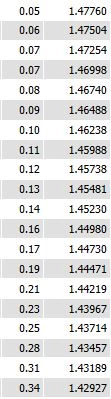 ポジション数とエントリー間隔は下記の通りです。 単位:pips
1
2 28.5
3 28.4
4 28.1
5 28.0
6 92.1
7 33.3
8 124.5
9 34.7
10 133.4
11 131.2
12 58.7
ポジション数6個目からナンピン間隔が変わっています。特に8番目、10番目、11番目のポジション間隔は100pips以上となっています。
このように相場変動時に自動で切り替わりますので余計なナンピンエントリーを繰り返してロスカットになる確率を低減します。
注意:
相場状況(暴騰、急落)によって変動するため必ず広がるということはありません。
ポジション数、証拠金不足には注意してください。
また可変間隔でのナンピンは固定ナンピンに比べて解消時間が長引く可能性がありますのでご理解の上お使いください。
3:撤退モード機能
撤退モード機能は1個のポジションのみでナンピンしていない場合に有効になります。
ナンピンポジションエントリー後は無効となります。
損切する可能性もありますのでご注意ください。
2種類の撤退モードを設けました。
ⅰ.撤退モード1
設定時間経過後、ポジション1個の状態で時間経過後決済します。
相場が動かないということはプライスアクションのインサイド、アウトサイドが混在し尚且つ変動幅が小さいことを意味します。
このような時はエネルギーを貯めている状況になり動き出すと一気に走り出す可能性があります。
そのような状況は危険と判断して決済します。
ⅱ.撤退モード2
ポジション1個の状態で長期足が反転した場合に決済します。
トレンドフォローでエントリーするEAとなっていますので最安値・高値でエントリーしてしまう可能性があります。
それを回避するために反転した際に決済します。
撤退モード2が発動した場合、再エントリーは24時間以上経過後となります。
長期足での転換となりますのですぐにエントリーしてしまうと損切を繰り返す可能性がありますので24時間以上としています。
※ご使用の場合はバックテストで十分検証の上お使いください。
どちらの撤退モードも必要と思われる際にtrueにしてお使いください。
常時trueにされますとレンジ相場では不用意に損切を繰り返す可能性がございますのでご注意ください。
3:週末決済、EA停止機能
週末決済機能を追加しました。
相場が急変しやすい週末にポジションを持ち越したくない場合はこの機能をtrueにしていただくと自動的に指定時間で保有ポジションを決済します。
さらにその後は月曜日の指定時間までEAを停止しますので新たなポジションを持たなくなります。
ご使用の際は損切となる可能性もございますので十分ご理解の上お使いください。
※ご使用の場合はバックテストで十分検証の上お使いください。
常時trueにされますと収益が上がらない可能性がございます。
長期休暇の前にEAを停止したい場合等に次のエントリー停止機能と併用すれば安全に停止できます。
4:エントリー停止機能
EAを停止したい場合でもポジション保有時に停止してしまいますとナンピン、決済等もできなくなります。
そのため現在保有のポジションを決済後に次のエントリーまでに手動でEAを止める必要があります。
しかし気が付かないうちに決済が終了して再度エントリーとなることが多くなかなかうまく停止できません。
そのため今までは最後のポジションは手動で決済する必要がありました。
この機能をtrueにすることによってすでに持っているポジションが決済された後に次のエントリーを停止しますので安全にEAを停止することが可能です。
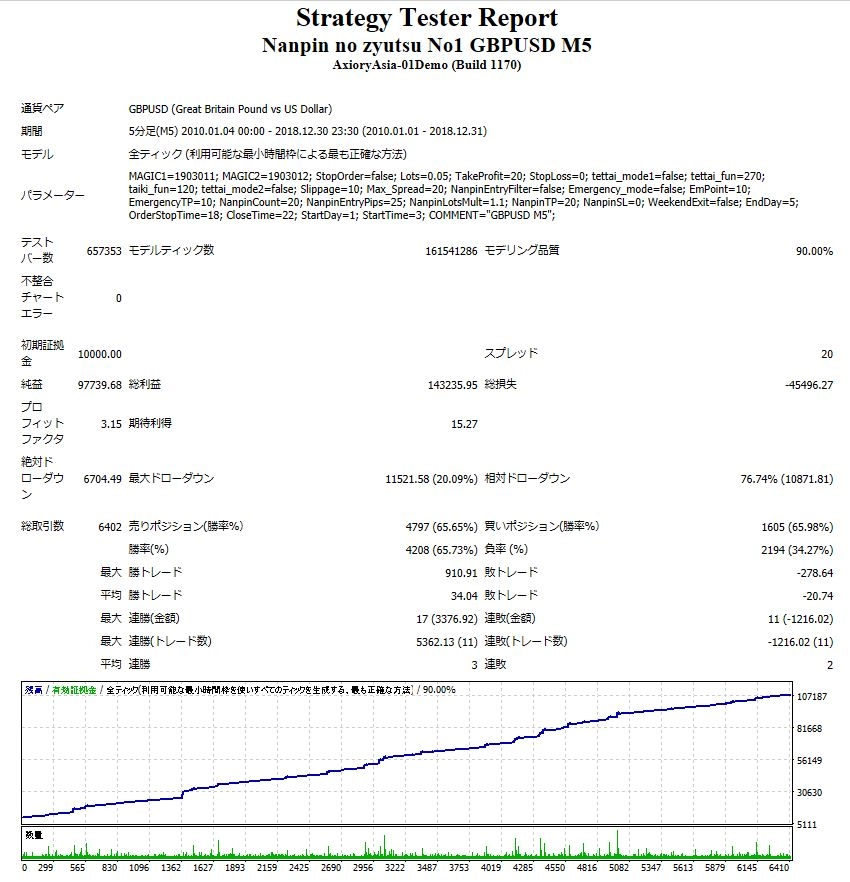
5. 2010年1月4日~2018年12月31日9年間のバックテスト結果です。
ナンピンマーチンゲールEAにしては最大DDが低くなっています。
純益 $97,739 最大DD $11,521
設定画面の初期値は2010年から2012年までの3年間のバックテストでのデータを元に残り5年間を稼働させる疑似フォワードテストを行っています。
2013年にこのEAをご購入いただいたとして6年間稼働させた場合の実績としても御覧ください。
ポジション数とエントリー間隔は下記の通りです。 単位:pips
1
2 28.5
3 28.4
4 28.1
5 28.0
6 92.1
7 33.3
8 124.5
9 34.7
10 133.4
11 131.2
12 58.7
ポジション数6個目からナンピン間隔が変わっています。特に8番目、10番目、11番目のポジション間隔は100pips以上となっています。
このように相場変動時に自動で切り替わりますので余計なナンピンエントリーを繰り返してロスカットになる確率を低減します。
注意:
相場状況(暴騰、急落)によって変動するため必ず広がるということはありません。
ポジション数、証拠金不足には注意してください。
また可変間隔でのナンピンは固定ナンピンに比べて解消時間が長引く可能性がありますのでご理解の上お使いください。
3:撤退モード機能
撤退モード機能は1個のポジションのみでナンピンしていない場合に有効になります。
ナンピンポジションエントリー後は無効となります。
損切する可能性もありますのでご注意ください。
2種類の撤退モードを設けました。
ⅰ.撤退モード1
設定時間経過後、ポジション1個の状態で時間経過後決済します。
相場が動かないということはプライスアクションのインサイド、アウトサイドが混在し尚且つ変動幅が小さいことを意味します。
このような時はエネルギーを貯めている状況になり動き出すと一気に走り出す可能性があります。
そのような状況は危険と判断して決済します。
ⅱ.撤退モード2
ポジション1個の状態で長期足が反転した場合に決済します。
トレンドフォローでエントリーするEAとなっていますので最安値・高値でエントリーしてしまう可能性があります。
それを回避するために反転した際に決済します。
撤退モード2が発動した場合、再エントリーは24時間以上経過後となります。
長期足での転換となりますのですぐにエントリーしてしまうと損切を繰り返す可能性がありますので24時間以上としています。
※ご使用の場合はバックテストで十分検証の上お使いください。
どちらの撤退モードも必要と思われる際にtrueにしてお使いください。
常時trueにされますとレンジ相場では不用意に損切を繰り返す可能性がございますのでご注意ください。
3:週末決済、EA停止機能
週末決済機能を追加しました。
相場が急変しやすい週末にポジションを持ち越したくない場合はこの機能をtrueにしていただくと自動的に指定時間で保有ポジションを決済します。
さらにその後は月曜日の指定時間までEAを停止しますので新たなポジションを持たなくなります。
ご使用の際は損切となる可能性もございますので十分ご理解の上お使いください。
※ご使用の場合はバックテストで十分検証の上お使いください。
常時trueにされますと収益が上がらない可能性がございます。
長期休暇の前にEAを停止したい場合等に次のエントリー停止機能と併用すれば安全に停止できます。
4:エントリー停止機能
EAを停止したい場合でもポジション保有時に停止してしまいますとナンピン、決済等もできなくなります。
そのため現在保有のポジションを決済後に次のエントリーまでに手動でEAを止める必要があります。
しかし気が付かないうちに決済が終了して再度エントリーとなることが多くなかなかうまく停止できません。
そのため今までは最後のポジションは手動で決済する必要がありました。
この機能をtrueにすることによってすでに持っているポジションが決済された後に次のエントリーを停止しますので安全にEAを停止することが可能です。
5. 2010年1月4日~2018年12月31日9年間のバックテスト結果です。
ナンピンマーチンゲールEAにしては最大DDが低くなっています。
純益 $97,739 最大DD $11,521
設定画面の初期値は2010年から2012年までの3年間のバックテストでのデータを元に残り5年間を稼働させる疑似フォワードテストを行っています。
2013年にこのEAをご購入いただいたとして6年間稼働させた場合の実績としても御覧ください。
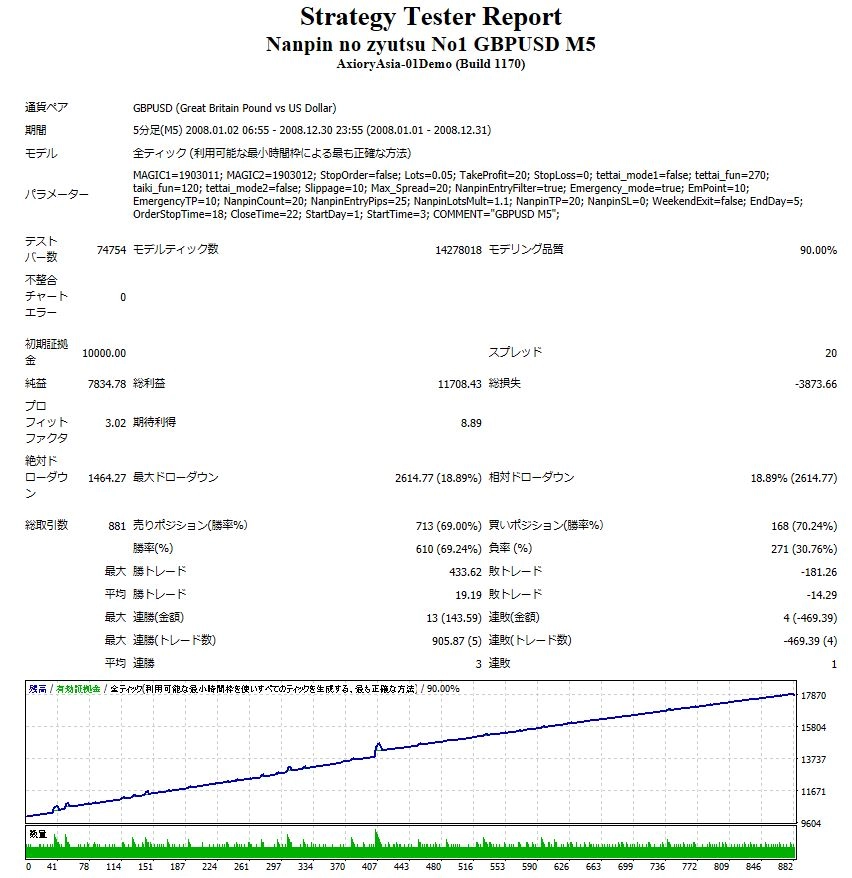
 ご質問いただきました2008年のバックテスト結果です。
NanpinEntryFilter、 Emergency_modo をON、OFF両方でテストを行っております。OFFですと純益が増えますが比例して最大DDも増えますので最大DDを少なくしたい場合はFilterをONでご使用ください。
初期設定 NanpinEntryFilter、 Emergency_modo OFFの状態で
純益 $17077 最大DD $17269となります。
ご質問いただきました2008年のバックテスト結果です。
NanpinEntryFilter、 Emergency_modo をON、OFF両方でテストを行っております。OFFですと純益が増えますが比例して最大DDも増えますので最大DDを少なくしたい場合はFilterをONでご使用ください。
初期設定 NanpinEntryFilter、 Emergency_modo OFFの状態で
純益 $17077 最大DD $17269となります。
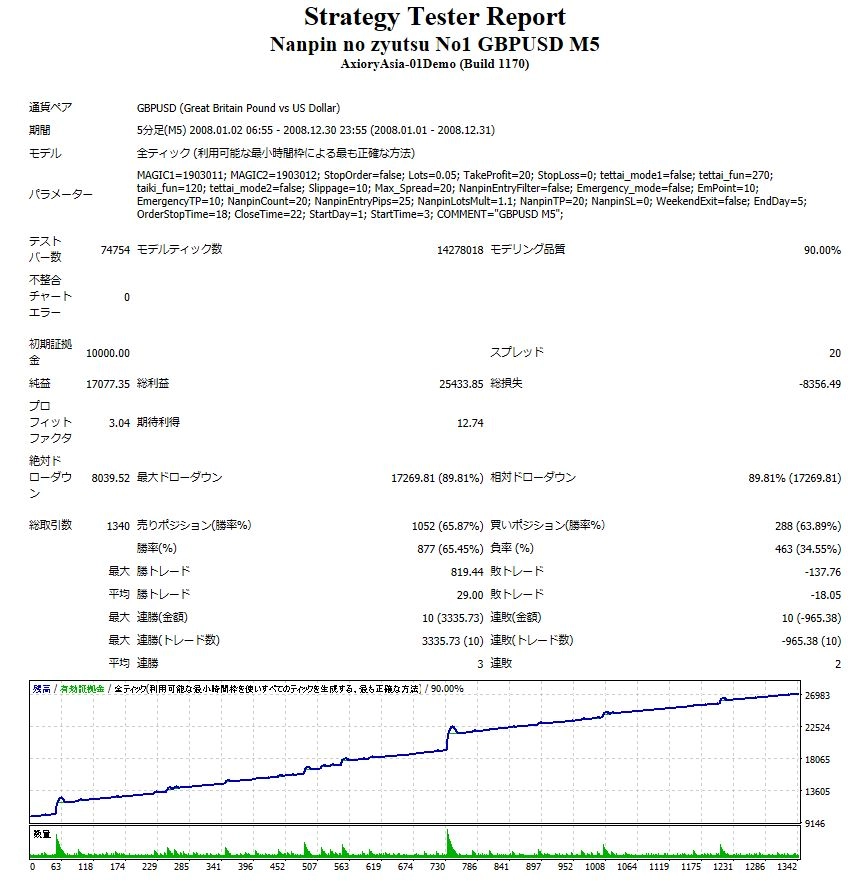 相場急変に対応するNanpinEntryFilter、Emergency_modo ONの状態では純益 $7834 最大DD 2614となります。
 6. 設定画面
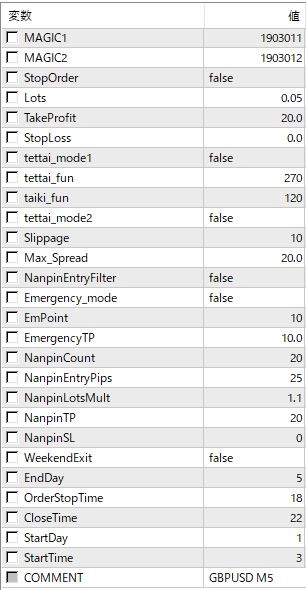 設定項目の詳細につきましては下記のからすてんぐブログで説明していますのでご参照ください。
https://karasutengufx.hatenablog.com/entry/Nanpin1_GBPUSD
7. ご注意点
・MT4で最小ロットが1,000通貨以下で使用できればどの業者でも使用可能です。
・週末決済機能をお使いになる場合はご使用されるMT4時間に合わせてお使いください。 損切の可能性もありますのでご理解の上Trueに変更してください。
・GBPUSD 5分足専用となっています。
他の通貨、時間足では稼働しませんので注意してください。
・バックテストを行い余裕のある資金でご使用ください。
・ロット数が大きくなりますので証拠金不足にご注意ください。
・ポジションを多く持ちますのでレバレッジの低い国内FX会社で稼働される場合はロスカットに注意してください。
設定項目の詳細につきましては下記のからすてんぐブログで説明していますのでご参照ください。
https://karasutengufx.hatenablog.com/entry/Nanpin1_GBPUSD
7. ご注意点
・MT4で最小ロットが1,000通貨以下で使用できればどの業者でも使用可能です。
・週末決済機能をお使いになる場合はご使用されるMT4時間に合わせてお使いください。 損切の可能性もありますのでご理解の上Trueに変更してください。
・GBPUSD 5分足専用となっています。
他の通貨、時間足では稼働しませんので注意してください。
・バックテストを行い余裕のある資金でご使用ください。
・ロット数が大きくなりますので証拠金不足にご注意ください。
・ポジションを多く持ちますのでレバレッジの低い国内FX会社で稼働される場合はロスカットに注意してください。
ポジション数とエントリー間隔は下記の通りです。 単位:pips
1
2 28.5
3 28.4
4 28.1
5 28.0
6 92.1
7 33.3
8 124.5
9 34.7
10 133.4
11 131.2
12 58.7
ポジション数6個目からナンピン間隔が変わっています。特に8番目、10番目、11番目のポジション間隔は100pips以上となっています。
このように相場変動時に自動で切り替わりますので余計なナンピンエントリーを繰り返してロスカットになる確率を低減します。
注意:
相場状況(暴騰、急落)によって変動するため必ず広がるということはありません。
ポジション数、証拠金不足には注意してください。
また可変間隔でのナンピンは固定ナンピンに比べて解消時間が長引く可能性がありますのでご理解の上お使いください。
3:撤退モード機能
撤退モード機能は1個のポジションのみでナンピンしていない場合に有効になります。
ナンピンポジションエントリー後は無効となります。
損切する可能性もありますのでご注意ください。
2種類の撤退モードを設けました。
ⅰ.撤退モード1
設定時間経過後、ポジション1個の状態で時間経過後決済します。
相場が動かないということはプライスアクションのインサイド、アウトサイドが混在し尚且つ変動幅が小さいことを意味します。
このような時はエネルギーを貯めている状況になり動き出すと一気に走り出す可能性があります。
そのような状況は危険と判断して決済します。
ⅱ.撤退モード2
ポジション1個の状態で長期足が反転した場合に決済します。
トレンドフォローでエントリーするEAとなっていますので最安値・高値でエントリーしてしまう可能性があります。
それを回避するために反転した際に決済します。
撤退モード2が発動した場合、再エントリーは24時間以上経過後となります。
長期足での転換となりますのですぐにエントリーしてしまうと損切を繰り返す可能性がありますので24時間以上としています。
※ご使用の場合はバックテストで十分検証の上お使いください。
どちらの撤退モードも必要と思われる際にtrueにしてお使いください。
常時trueにされますとレンジ相場では不用意に損切を繰り返す可能性がございますのでご注意ください。
3:週末決済、EA停止機能
週末決済機能を追加しました。
相場が急変しやすい週末にポジションを持ち越したくない場合はこの機能をtrueにしていただくと自動的に指定時間で保有ポジションを決済します。
さらにその後は月曜日の指定時間までEAを停止しますので新たなポジションを持たなくなります。
ご使用の際は損切となる可能性もございますので十分ご理解の上お使いください。
※ご使用の場合はバックテストで十分検証の上お使いください。
常時trueにされますと収益が上がらない可能性がございます。
長期休暇の前にEAを停止したい場合等に次のエントリー停止機能と併用すれば安全に停止できます。
4:エントリー停止機能
EAを停止したい場合でもポジション保有時に停止してしまいますとナンピン、決済等もできなくなります。
そのため現在保有のポジションを決済後に次のエントリーまでに手動でEAを止める必要があります。
しかし気が付かないうちに決済が終了して再度エントリーとなることが多くなかなかうまく停止できません。
そのため今までは最後のポジションは手動で決済する必要がありました。
この機能をtrueにすることによってすでに持っているポジションが決済された後に次のエントリーを停止しますので安全にEAを停止することが可能です。
5. 2010年1月4日~2018年12月31日9年間のバックテスト結果です。
ナンピンマーチンゲールEAにしては最大DDが低くなっています。
純益 $97,739 最大DD $11,521
設定画面の初期値は2010年から2012年までの3年間のバックテストでのデータを元に残り5年間を稼働させる疑似フォワードテストを行っています。
2013年にこのEAをご購入いただいたとして6年間稼働させた場合の実績としても御覧ください。
ご質問いただきました2008年のバックテスト結果です。
NanpinEntryFilter、 Emergency_modo をON、OFF両方でテストを行っております。OFFですと純益が増えますが比例して最大DDも増えますので最大DDを少なくしたい場合はFilterをONでご使用ください。
初期設定 NanpinEntryFilter、 Emergency_modo OFFの状態で
純益 $17077 最大DD $17269となります。
相場急変に対応するNanpinEntryFilter、Emergency_modo ONの状態では純益 $7834 最大DD 2614となります。
6. 設定画面
設定項目の詳細につきましては下記のからすてんぐブログで説明していますのでご参照ください。
https://karasutengufx.hatenablog.com/entry/Nanpin1_GBPUSD
7. ご注意点
・MT4で最小ロットが1,000通貨以下で使用できればどの業者でも使用可能です。
・週末決済機能をお使いになる場合はご使用されるMT4時間に合わせてお使いください。 損切の可能性もありますのでご理解の上Trueに変更してください。
・GBPUSD 5分足専用となっています。
他の通貨、時間足では稼働しませんので注意してください。
・バックテストを行い余裕のある資金でご使用ください。
・ロット数が大きくなりますので証拠金不足にご注意ください。
・ポジションを多く持ちますのでレバレッジの低い国内FX会社で稼働される場合はロスカットに注意してください。Sales from
:
03/21/2019 22:06
Purchased: 12times
Price:¥12,800 (taxed)
Provider/Distributor
Sales site
GogoJungle
●Payment




Forward Test
Back Test
Sales from : 03/21/2019 22:06
Purchased: 12times
Price:¥12,800 (taxed)
Provider/Distributor
Sales site
GogoJungle
●Payment
About Forex Automated Trading
What is Forex Automated Trading (MT4 EA)?
Forex Automated Trading refers to trading that is automated through programming, incorporating predetermined trading and settlement rules. There are various methods to conduct automated trading, but at GogoJungle, we deal with Experts Advisors (hereinafter referred to as EA) that operate on a trading platform called MT4.
Trading Types of Forex Automated Trading
There are various types of EAs (Expert Advisors) for different trading types that can be used on MT4.
Just like discretionary trading, there are those that decide trading and settlement timings by combining indicators, those that repeatedly buy or sell at certain price (pips) intervals, and trading methods that utilize market anomalies or temporal features. The variety is as rich as the methods in discretionary trading.
To categorize simply,
・Scalping (Type where trades are completed within a few minutes to a few hours),
・Day Trading (Type where trades are completed within several hours to about a day),
・Swing Trading (Type where trades are conducted over a relatively long period of about 1 day to 1 week)
・Grid/Martingale Trading (Holding multiple positions at equal or unequal intervals and settling all once a profit is made. Those that gradually increase the lot number are called Martingale.)
・Anomaly EA (Mid-price trading, early morning scalping)
Just like discretionary trading, there are those that decide trading and settlement timings by combining indicators, those that repeatedly buy or sell at certain price (pips) intervals, and trading methods that utilize market anomalies or temporal features. The variety is as rich as the methods in discretionary trading.
To categorize simply,
・Scalping (Type where trades are completed within a few minutes to a few hours),
・Day Trading (Type where trades are completed within several hours to about a day),
・Swing Trading (Type where trades are conducted over a relatively long period of about 1 day to 1 week)
・Grid/Martingale Trading (Holding multiple positions at equal or unequal intervals and settling all once a profit is made. Those that gradually increase the lot number are called Martingale.)
・Anomaly EA (Mid-price trading, early morning scalping)
Risks, Advantages, and Disadvantages of Forex Automated Trading
When engaging in Forex, there are risks in automated trading just as there are in discretionary trading.
However, a substantial advantage of automated trading is its ability to limit and predict risks beforehand.
[Risk]
Inherent to forex trading are the trading risks that undeniably exist in automated trading as well.
・Lot Size Risk
Increasing the lot size forcibly due to a high winning rate can, in rare instances, depending on the EA, lead to substantial Pips loss when a loss occurs. It is crucial to verify the SL Pips and the number of positions held before operating with an appropriate lot.
・Rapid Market Fluctuation Risk
There are instances where market prices fluctuate rapidly due to index announcements or unforeseen news. System trading does not account for such unpredictable market movements, rendering it incapable of making decisions on whether to settle in advance or abstain from trading. As a countermeasure, utilizing tools that halt the EA based on indicator announcements or the VIX (fear index) is also possible.
[Benefits]
・Operates 24 hours a day
If there is an opportunity, system trading will execute trades on your behalf consistently. It proves to be an extremely convenient tool for those unable to allocate time to trading.
・Trades dispassionately without being swayed by emotions
There is an absence of self-serving rule modifications, a common human tendency, such as increasing the lot size after consecutive losses in discretionary trading or, conversely, hastily securing profits with minimal gains.
・Accessible for beginners
To engage in Forex trading, there is no prerequisite to study; anyone using system trading will achieve the same results.
[Disadvantages]
・Cannot increase trading frequency at will
Since system trading operates based on pre-programmed conditions, depending on the type of EA, it might only execute trades a few times a month.
・Suitability may vary with market conditions
Depending on the trading type of the EA, there are periods more suited to trend trading and periods more suited to contrarian trading, making consistent results across all periods unlikely. While the previous year might have yielded good results, this year's performance might not be as promising, necessitating some level of discretion in determining whether it is an opportune time to operate.
However, a substantial advantage of automated trading is its ability to limit and predict risks beforehand.
[Risk]
Inherent to forex trading are the trading risks that undeniably exist in automated trading as well.
・Lot Size Risk
Increasing the lot size forcibly due to a high winning rate can, in rare instances, depending on the EA, lead to substantial Pips loss when a loss occurs. It is crucial to verify the SL Pips and the number of positions held before operating with an appropriate lot.
・Rapid Market Fluctuation Risk
There are instances where market prices fluctuate rapidly due to index announcements or unforeseen news. System trading does not account for such unpredictable market movements, rendering it incapable of making decisions on whether to settle in advance or abstain from trading. As a countermeasure, utilizing tools that halt the EA based on indicator announcements or the VIX (fear index) is also possible.
[Benefits]
・Operates 24 hours a day
If there is an opportunity, system trading will execute trades on your behalf consistently. It proves to be an extremely convenient tool for those unable to allocate time to trading.
・Trades dispassionately without being swayed by emotions
There is an absence of self-serving rule modifications, a common human tendency, such as increasing the lot size after consecutive losses in discretionary trading or, conversely, hastily securing profits with minimal gains.
・Accessible for beginners
To engage in Forex trading, there is no prerequisite to study; anyone using system trading will achieve the same results.
[Disadvantages]
・Cannot increase trading frequency at will
Since system trading operates based on pre-programmed conditions, depending on the type of EA, it might only execute trades a few times a month.
・Suitability may vary with market conditions
Depending on the trading type of the EA, there are periods more suited to trend trading and periods more suited to contrarian trading, making consistent results across all periods unlikely. While the previous year might have yielded good results, this year's performance might not be as promising, necessitating some level of discretion in determining whether it is an opportune time to operate.
Equipment and Environment Needed for Automated Trading Operation
The requirements for operating automated trading (EA) on MT4 are as follows:
・MT4 (MetaTrader 4. An account needs to be opened with a Forex company that offers MT4.)
・EA (A program for automated trading)
・The operating deposit required to run the EA
・A PC that can run 24 hours or a VPS (Virtual Private Server), where a virtual PC is hosted on a cloud server to run MT4.
・MT4 (MetaTrader 4. An account needs to be opened with a Forex company that offers MT4.)
・EA (A program for automated trading)
・The operating deposit required to run the EA
・A PC that can run 24 hours or a VPS (Virtual Private Server), where a virtual PC is hosted on a cloud server to run MT4.
Installation of MT4 and Account Login
If you open an account with a forex broker that supports MT4, you can use MT4 as provided by that forex broker. MT4 is a stand-alone type of software that needs to be installed on your computer, so you download the program file from the website of the FX company where you opened the account and install it on your computer.
Additionally, there are both demo and real accounts available. You can experience trading with virtual money by applying for a demo account. After opening a real account, you select the connection server assigned by the Forex broker, enter the password, and log in to the account.
When you deposit money into your account using the method specified by the forex broker, the funds will be reflected in your MT4 account, and you can trade.
Additionally, there are both demo and real accounts available. You can experience trading with virtual money by applying for a demo account. After opening a real account, you select the connection server assigned by the Forex broker, enter the password, and log in to the account.
When you deposit money into your account using the method specified by the forex broker, the funds will be reflected in your MT4 account, and you can trade.
How to Install EA on MT4
To set up an EA when you purchase it through GogoJungle, follow the steps below:
Firstly, download the purchased EA file from your My Page on GogoJungle. You will download a zip (compressed) file, so right-click to extract it and retrieve the file named ‘◯◯◯ (EA name)_A19GAw09 (any 8 alphanumeric characters).ex4’ from inside.
Next, launch MT4 and navigate to ‘File’ → ‘Open Data Folder’ → ‘MQL4’ → ‘Experts’ folder, and place the ex4 file inside. Once done, close MT4 and restart it. Then, go to the upper menu ‘Tools’ → ‘Options’, and under ‘Expert Advisors’, ensure ‘Allow automated trading’ and ‘Allow DLL imports’ are checked, then press OK to close.
The necessary currency pair and time frame for the correct operation of the EA are specified on the EA sales page. Refer to this information and open the chart of the correct currency pair time frame (e.g., USDJPY5M for a USD/Yen 5-minute chart).
Within the menu navigator, under ‘Expert Advisors’, you will find the EA file name you placed earlier. Click to select it, then drag & drop it directly onto the chart to load the EA. Alternatively, you can double-click the EA name to load it onto the selected chart.
If ‘Authentication Success’ appears in the upper left of the chart, the authentication has been successful. To operate the EA, you need to keep your PC running 24 hours. Therefore, either disable the automatic sleep function or host MT4 on a VPS and operate the EA.
Firstly, download the purchased EA file from your My Page on GogoJungle. You will download a zip (compressed) file, so right-click to extract it and retrieve the file named ‘◯◯◯ (EA name)_A19GAw09 (any 8 alphanumeric characters).ex4’ from inside.
Next, launch MT4 and navigate to ‘File’ → ‘Open Data Folder’ → ‘MQL4’ → ‘Experts’ folder, and place the ex4 file inside. Once done, close MT4 and restart it. Then, go to the upper menu ‘Tools’ → ‘Options’, and under ‘Expert Advisors’, ensure ‘Allow automated trading’ and ‘Allow DLL imports’ are checked, then press OK to close.
The necessary currency pair and time frame for the correct operation of the EA are specified on the EA sales page. Refer to this information and open the chart of the correct currency pair time frame (e.g., USDJPY5M for a USD/Yen 5-minute chart).
Within the menu navigator, under ‘Expert Advisors’, you will find the EA file name you placed earlier. Click to select it, then drag & drop it directly onto the chart to load the EA. Alternatively, you can double-click the EA name to load it onto the selected chart.
If ‘Authentication Success’ appears in the upper left of the chart, the authentication has been successful. To operate the EA, you need to keep your PC running 24 hours. Therefore, either disable the automatic sleep function or host MT4 on a VPS and operate the EA.
In Case You Want to Change the Account in Use
EAs from GogoJungle can be used with one real account and one demo account per EA.
If you want to use it with an account other than the authenticated one, you need to reset the registered account.
To reset the account, close the MT4 where the Web authentication is registered, then go to My Page on GogoJungle > Use > Digital Contents > the relevant EA > press the ‘Reset’ button for the registration number, and the registered account will be released.
When the account is in a reset state, using the EA with another MT4 account will register a new account.
Also, you can reset the account an unlimited number of times.
If you want to use it with an account other than the authenticated one, you need to reset the registered account.
To reset the account, close the MT4 where the Web authentication is registered, then go to My Page on GogoJungle > Use > Digital Contents > the relevant EA > press the ‘Reset’ button for the registration number, and the registered account will be released.
When the account is in a reset state, using the EA with another MT4 account will register a new account.
Also, you can reset the account an unlimited number of times.
Solutions for Errors During Web Authentication or Non-Functional Account Trading
If you encounter an error with Web authentication, or if the EA is trading on GogoJungle's forward performance page but not on your own account, there could be various reasons. For more details, please refer to the following link:
→ Items to Check When EA is Not Operating
→ Items to Check When EA is Not Operating
About the Size of Trading Lots
In Forex trading, the size of a lot is usually:
1 lot = 100,000 currency units
0.1 lot = 10,000 currency units
0.01 lot = 1,000 currency units
For USD/JPY, 1 lot would mean holding 100,000 dollars.
The margin required to hold lots is determined by the leverage set by the Forex broker.
If the leverage is 25 times, the margin required to hold 10,000 currency units of USD/JPY would be:
10000*109 (※ at a rate of 109 yen per dollar) ÷ 25 = 43,600 yen.
1 lot = 100,000 currency units
0.1 lot = 10,000 currency units
0.01 lot = 1,000 currency units
For USD/JPY, 1 lot would mean holding 100,000 dollars.
The margin required to hold lots is determined by the leverage set by the Forex broker.
If the leverage is 25 times, the margin required to hold 10,000 currency units of USD/JPY would be:
10000*109 (※ at a rate of 109 yen per dollar) ÷ 25 = 43,600 yen.
Glossary of Automated Trading
・Profit Factor: Total Profit ÷ Total Loss
・Risk-Return Ratio: Total Profit and Loss during the period ÷ Maximum Drawdown
・Maximum Drawdown: The largest unrealized loss during the operation period
・Maximum Position Number: This is the maximum number of positions that the EA can theoretically hold at the same time
・TP (Take Profit): The set profit-taking Pips (or specified amount, etc.) in the EA's settings
・SL (Stop Loss): The set maximum loss pips (or specified amount, etc.) in the EA's settings
・Trailing Stop: Instead of settling at a specified Pips, once a certain profit is made, the settlement SL is raised at a certain interval (towards the profit), maximizing the profit. It is a method of settlement.
・Risk-Reward Ratio (Payoff Ratio): Average Profit ÷ Average Loss
・Hedging: Holding both buy and sell positions simultaneously (Some FX companies also have types where hedging is not allowed)
・Risk-Return Ratio: Total Profit and Loss during the period ÷ Maximum Drawdown
・Maximum Drawdown: The largest unrealized loss during the operation period
・Maximum Position Number: This is the maximum number of positions that the EA can theoretically hold at the same time
・TP (Take Profit): The set profit-taking Pips (or specified amount, etc.) in the EA's settings
・SL (Stop Loss): The set maximum loss pips (or specified amount, etc.) in the EA's settings
・Trailing Stop: Instead of settling at a specified Pips, once a certain profit is made, the settlement SL is raised at a certain interval (towards the profit), maximizing the profit. It is a method of settlement.
・Risk-Reward Ratio (Payoff Ratio): Average Profit ÷ Average Loss
・Hedging: Holding both buy and sell positions simultaneously (Some FX companies also have types where hedging is not allowed)
Useful related pages
・How to Install MT4 EA (Expert Advisor) and Indicators
・MT4 Beginner's Guide
・Understanding System Trading Performance (Forward and Backtesting)
・Choosing Your First EA! Calculating Recommended Margin for EAs
・Comparing MT4 Accounts Based on Spread, Swap, and Execution Speed
・What is Web Authentication?
・Checklist for When Your EA Isn't Working
・MT4 Beginner's Guide
・Understanding System Trading Performance (Forward and Backtesting)
・Choosing Your First EA! Calculating Recommended Margin for EAs
・Comparing MT4 Accounts Based on Spread, Swap, and Execution Speed
・What is Web Authentication?
・Checklist for When Your EA Isn't Working
