Hedge Repeat EUR/GBP
- Whole period
- 2 years
- 1 year
- 6 months
- 3 months
- 1 month
About EA's Strategy
EUR/GBP, 15-minute chart (recommended) Averaging up and repeat + reverse pyramiding hedging EA. While increasing profits with fixed lot averaging and repeating orders, during adverse movements it mitigates losses with reverse pyramiding of hedge positions.
To curb the insolvency risk that is a pitfall of averaging EA, the following features are provided.
- Variable averaging width feature
- Fixed lot averaging + repeat orders
- Reverse pyramiding-type hedge positions
- Entry stop in high/low price ranges
- Entry stop during rapid market changes
- Configurable entry logic
- Division of averaging positions / bulk settlement
- Offsetting with hedge positions
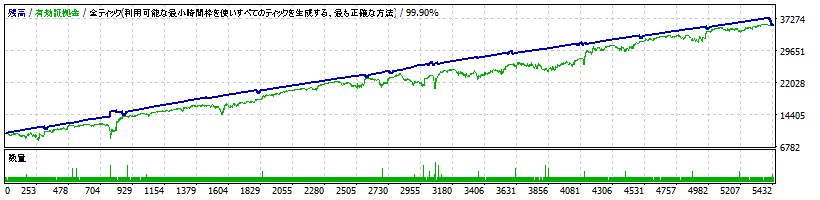
Backtest results from 2016 to 2026 (using Tick Data Suite)
■ Variable averaging width
It features a variable averaging width based on ATR. When ATR is large, widen the averaging width; when ATR is small, narrow it. In default settings, the averaging width is the ATR for 3 days multiplied by 0.3.
■ ATR Filter
If the set ATR value is exceeded, acquisition of new positions stops. In the default setting, on the 1-hour chart, period = 10, when the ATR is 0.003 or higher, no new positions are acquired.■ Post-fill temporary entry stop
After an entry is filled, new entries are stopped for a specified time (in minutes).
■ Selectable entry logic
Entry logic can use Bollinger Bands, RSI, and moving averages, and they can be used together. ●Bollinger Bands
Enabling BB by turning its usage to "true" makes it active. (Default is enabled) If the price breaks below the BB lower band (−2α), it buys; if it breaks above the BB upper band (+2α), it sells. BB period and standard deviation can be changed.
| BB usage | true | Enabling it makes it active. |
| BB period | 20 | Sets the Bollinger Bands period. |
| BB standard deviation | 2 | Sets the Bollinger Bands standard deviation. Default is 2α. |
● RSI
Using RSI by setting to "true" activates it. When RSI falls below the lower bound, it buys; when it rises above the upper bound, it sells. You can change the RSI period, upper and lower bounds.
| RSI usage | true | Turning it true enables it. |
| RSI upper bound | 70 | When RSI rises above 70, a sell entry occurs. |
| RSI lower bound | 30 | When RSI falls below 30, a buy entry occurs. |
● Moving Average
Using MA by setting to "true" activates it. If the short-term MA is above the long-term MA, a buy entry occurs; if the short-term MA is below the long-term MA, a sell entry occurs. If the short-term MA period is set to 0, the short-term MA value becomes the current price (Bid). You can change the MA timeframe and the moving average period (SMA).
| MA usage | true | Enabling it makes it active. |
| MA timeframe | 1 Hour | You can select the MA timeframe. |
| Short-term MA period (0 = Bid) | 0 | Set the short-term MA period. (0 makes it equal to Bid value) |
| Long-term MA period | 20 | Set the long-term MA period. |
■ Do not enter near highs/lows
In the high-price range for the specified period, new buy entries are stopped; in the low-price range, new sell entries are stopped.
| Pause trading near highs/lows | true | Enabling it makes it active. |
| High/low period (days) | 90 | Uses highs/lows for 90 days on daily chart. |
| Percentage from high/low | 10 | Stops entries within 10% from highs/lows. |
■High/Low breakout trading stop
If the high price of the set period breaks out, stops selling entries; if the low price breaks out, stops buying entries. (Only if previous day highs/lows are being updated, entries are stopped)■ Hedge feature■ Hedge feature
From the initial averaging position, when the price moves against it to a certain level, a hedge position is acquired. Each time the price moves against, a hedge position is acquired at fixed intervals. The lot size can be increased as hedge positions accumulate (pyramiding).
| Hedge feature | true | Enabling it makes it active. |
| Initial hedge lot | 0.01 | Initial hedge position lot size. |
| Hedge lot increase method | Lot multiplier method | You can choose between "lot multiplier method" or "add-on lot method". |
| Lot multiplier (multiplier method) | 1.2 | Lot multiplier when multiplier method is selected. |
| Additional lot (adding method) | 0.02 | Additional lot size when adding method is selected. |
| Hedge interval (Pips) | 100 | Price range to acquire hedge positions (in Pips). |
| Number of take-profit positions from average entry price | 2 | When hedge positions reach the specified number, they are closed at average entry price plus take-profit width. |
| Profit width from average entry price (Pips) | 10 | Take-profit width from the average entry price for hedge positions (Pips). |
| Max hedge lot number (total) | 3.0 | Maximum hedge lot size (per side). |
| Hedge stop loss (Pips) | 500 | Set stop loss value for hedge positions (Pips). |
| Hedge TakeProfit value (Pips) | 500 | Set take-profit value for hedge positions (Pips). |
● Hedge lot increase method
The hedge lot increase method can be chosen as either "lot multiplier method" or "add-on lot method".
・Lot multiplier method As positions increase, multiply the lot size progressively (default is 1.2x) Example: 0.01 → 0.01 → 0.01 → 0.02 → 0.02 → 0.03 → 0.04 ・Add-on lot method As positions increase, increase the lot by a fixed percentage (default is 0.02) Example: 0.01 → 0.03 → 0.05 → 0.07 → 0.09 → 0.11 → 0.13
● Hedge positions take profit To prevent hedge positions from growing too large, when hedge positions return to the average entry price, they are closed for profit. By default, when there are two or more hedge positions and a profit of 10 pips from the average entry price exists, they are settled.
● Hedge position SL/TP settings It is possible to set stop loss and take profit values for hedge positions. However, if there are two or more positions (configurable), the stop loss value is automatically updated to a position 10 pips above the average entry price.
■ Division / bulk settlement of averaging positions
When regular averaging positions reach the maximum number of positions, averaging positions can be divided or settled in bulk.
| Division / bulk settlement feature | true | Enabling it makes it active. |
| Number of positions to divide | 1 | If division number is 1, settle in bulk; if 2 or more, it becomes the number of divisions. |
| Profit width from average entry price (pips) | 20 | Profit width from the average entry price when dividing or bulk settling. |
■ Position offsetting featureAiming to offset gains and losses between averaging buy positions and hedge sell positions so that their total P/L becomes even, all corresponding positions are settled. When the total P/L of averaging buy positions and hedge sell positions becomes even, all those positions are settled.