[For Beginners/Entry-Level] USDJPY TripleMode Goto-bi Fixing EA | About 26 Years of Backtesting – Just Choose the Mode

- Whole period
- 2 years
- 1 year
- 6 months
- 3 months
- 1 month
About EA's Strategy
【USDJPY TripleMode Overview】
■Easy for first-time automated trading, an EA for the Gotō day fixings.
■On Gotō days (5, 10, 15, 20, 25, 30) at 0:00 JST you buy, and settle at 9:55 in Tokyo fixings. That’s the only rule.
■Position is always 1 only. No grid averaging (nampin), no martingale at all.
■Just choose from “Stable,” “Normal,” or “Aggressive.” When you become more accustomed, you can also use the “Custom” mode where you set the values yourself.
■Backtest for about 26 years (June 2000–Sept 2026) shows profitability for all modes. Starting at any period, five mode periods were profitable within ten years.
■Automatically handles Japanese holidays, server time differences, and US daylight saving time. No need for manual time synchronization.
【Tips for Beginners / Introductory】
■Rules are easy to understand
No indicators used. The rule is simply “buy at 0:00 on Gotō day, settle at 9:55,” so you can understand clearly what the EA is doing at a glance.
■Just choose a mode
If you load the included presets, details like stop loss and lot size are automatically set according to the mode.
■No 1-position grid or martingale
Only one position at a time. Since each mode sets a stop loss, the risk per trade is easy to understand.
■About five trades per month
Trades occur only on Gotō days (average about 5 per month, Aggressive mode about 10.8). Settlements occur within the same day; positions are not carried over to the next week.
■Automatic Gotō day判定
Gotō days that fall on weekends, Japanese holidays, Jan 1–Jan 3, or Dec 31 are moved to the previous business day automatically. End-of-month days (31st, etc.) are not traded. Contains Japanese holidays from 2000–2040.
【3 Easy Steps to Get Started】
STEP1 Place the EA file in MT4’s “MQL4/Experts” folder and restart MT4.
STEP2 On the USDJPY chart (5-minute recommended), attach the EA, double-click the “Inputs” tab’s “Mode” to select from the dropdowns “Stable,” “Normal,” or “Aggressive” (default is Normal). The included presets will produce the same settings when you choose “Read.”
・TripleMode_stable.set(Stable)
・TripleMode_normal.set(Normal)
・TripleMode_aggressive.set(Aggressive)
STEP3 Allow automated trading. If you see “TripleMode v1.00” at the top left of the chart, along with the mode name and Japan time and the next Gotō day, you’re ready.
※Presets are set to “Auto lots per 1,000,000 JPY” and “Time difference auto-detection,” so you can use as is.
※It’s safe to test on a demo account first.
【How to Choose 3 Modes】
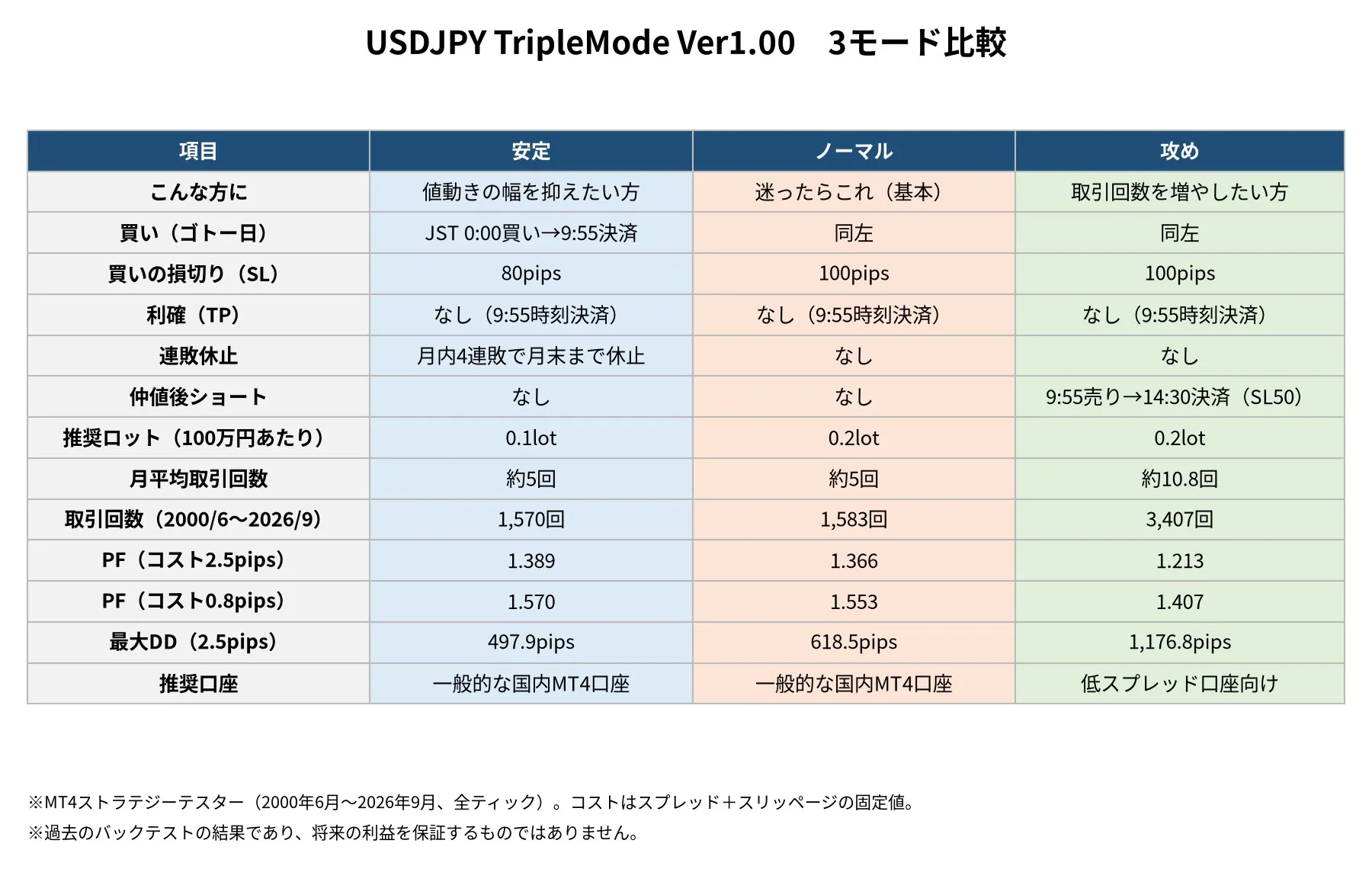
|Item|Stable|Normal|Aggressive|
|Who is this for|Want to limit price movement|If unsure, choose this (basic)|Want to increase number of trades|
|Buy stop loss|80 pips|100 pips|100 pips|
|Drawdown pause|4 straight losses in the month then pause until month end|None|None|
|After fixing price post-fix Short|None|None|9:55 sell → 14:30 close (stop loss 50 pips)|
|Mode default lot (per 1,000,000)|0.1 lot|0.2 lot|0.2 lot|
|Average monthly trades|About 5 trades|About 5 trades|About 10.8 trades|
|Recommended account type|Typical domestic MT4 account|Typical domestic MT4 account|Low-spread account|
【Logic Overview】
■Trading days
Gotō days (5, 10, 15, 20, 25, 30). If it falls on weekends or holidays, moved to the previous business day; month end is excluded.
■Buy (Common to all modes)
・Entry: Buy within the 30-minute registration window from 0:00 JST
・Settlement: Time-based settlement at 9:55 JST (no take-profit set)
・Stop loss: Stable 80 pips / Normal and Aggressive 100 pips
・On Mondays, since the market is closed at 0:00, buying is skipped.
■After-fix Short (Aggressive mode only)
・Sell at 9:55 → settle at 14:30, stop loss 50 pips
・If spread exceeds the cap, only short is skipped and it behaves like Normal on that day.
■Mechanisms for ease of use
・No entry in the same direction twice on the same day (judged by trading history even after restart).
・If the PC stops or connection breaks and settlement time passes, it settles immediately upon return.
・Enter only when the spread is below the cap during the registration window.
・Stable mode drawdown pause automatically resumes when the month changes.
【Backtest Results】
■Conditions
・MT4 Strategy Tester, All ticks, 5-minute chart
・Period: June 2000–Sept 2026 (about 26 years)
・Cost (spread + slippage) 2.5 pips (domestic standard) and 0.8 pips (low-spread account) – two scenarios
(2.5 pips uses the same values for all modes in custom mode)
■Results (Cost 2.5 pips)
|Mode|Trades|P.F. (Profit Factor)|Net P/L|Max DD|Profitable years|
|Stable|1,570 trades|1.389|+6,831.4 pips|497.9 pips|21/27 years|
|Normal|1,583 trades|1.366|+6,550.7 pips|618.5 pips|21/27 years|
|Aggressive|3,407 trades|1.213|+7,552.5 pips|1,176.8 pips|19/27 years|
■Results (PF with cost 0.8 pips)
Stable 1.570 / Normal 1.553 / Aggressive 1.407
■Drawdown curve (1 million starting, cost 2.5 pips)
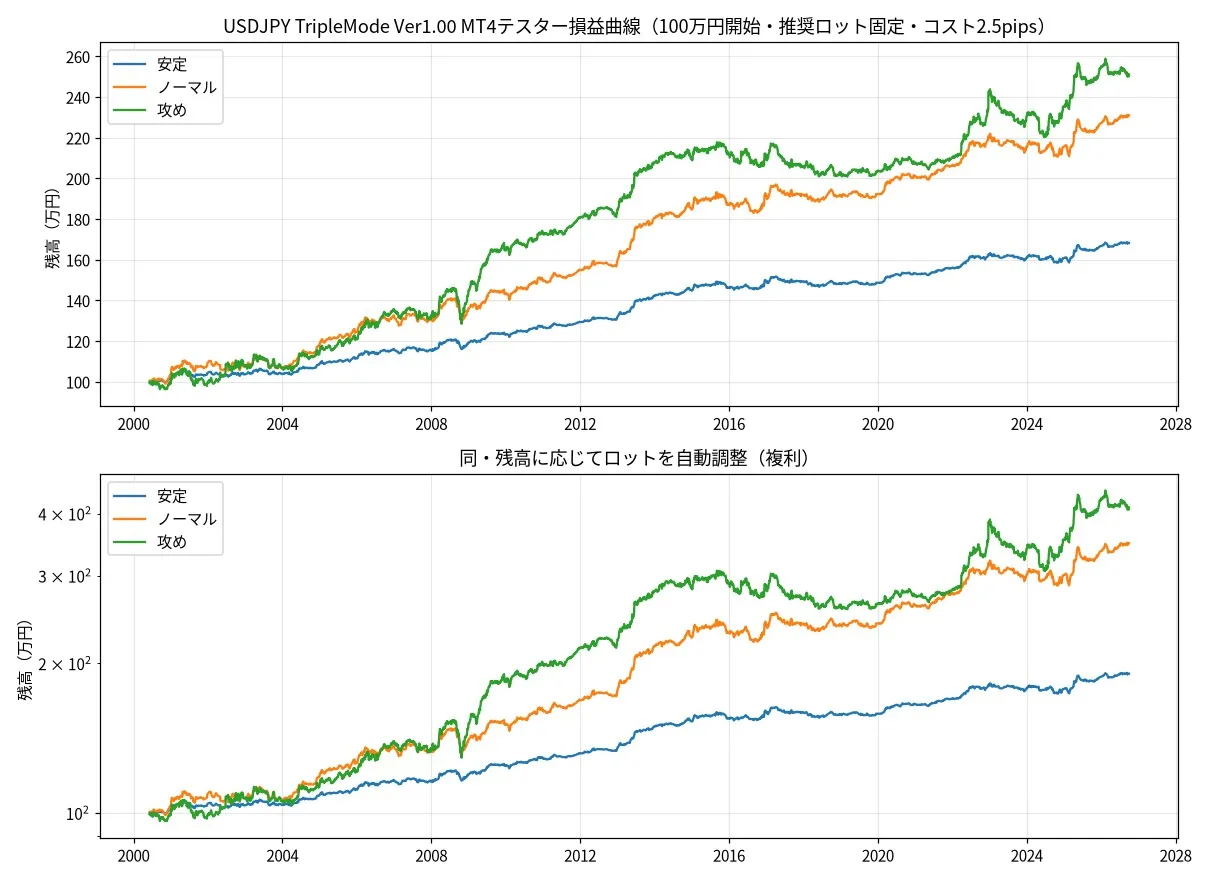
Top: mode default lot fixed, bottom: balance-adjusted
■Period-by-period growth (1 million starting, best/worst starting times)
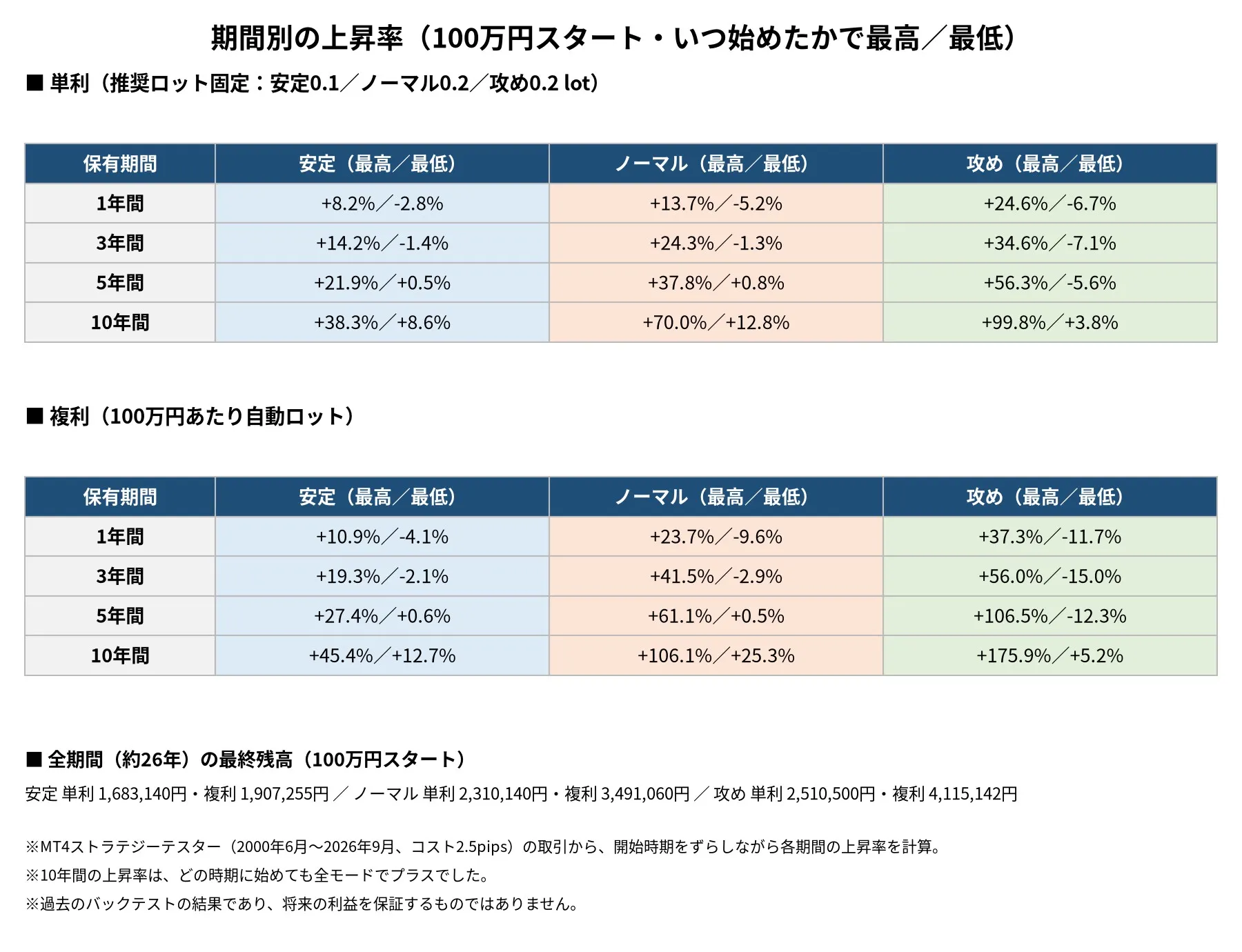
|Period|Stable|Normal|Aggressive|
|1 year (simple interest)|+8.2% / -2.8%|+13.7% / -5.2%|+24.6% / -6.7%|
|3 years (simple)|+14.2% / -1.4%|+24.3% / -1.3%|+34.6% / -7.1%|
|5 years (simple)|+21.9% / +0.5%|+37.8% / +0.8%|+56.3% / -5.6%|
|10 years (simple)|+38.3% / +8.6%|+70.0% / +12.8%|+99.8% / +3.8%|
|1 year (compound)|+10.9% / -4.1%|+23.7% / -9.6%|+37.3% / -11.7%|
|3 years (compound)|+19.3% / -2.1%|+41.5% / -2.9%|+56.0% / -15.0%|
|5 years (compound)|+27.4% / +0.6%|+61.1% / +0.5%|+106.5% / -12.3%|
|10 years (compound)|+45.4% / +12.7%|+106.1% / +25.3%|+175.9% / +5.2%|
The growth rate over ten years was positive for all modes regardless of start time.
Final balance after about 26 years (starting with 1,000,000): Stable simple 1,683,140 JPY; compound 1,907,255 JPY / Normal simple 2,310,140 JPY; compound 3,491,060 JPY / Aggressive simple 2,510,500 JPY; compound 4,115,142 JPY
【Recommended Environment】
■Currency pair: USDJPY only
■Timeframe: works on any timeframe (5-minute recommended)
■Platform: MetaTrader 4
■Accounts: supports auto-lot on yen and dollar accounts (for other currencies, fixed lot is used)
■Server time: Winter GMT+2 / Summer GMT+3 (US), always GMT+2, always GMT+0, Japan time (GMT+9) supported
■A 24-hour operating environment (e.g., VPS). Turn on automatic time synchronization in Windows (used for auto time offset detection).
【Recommended Margin & Lot Size】
■Initial setting is Normal mode with auto-lot per 1,000,000 JPY (0.2 lot) (same as the included Normal preset).
■Mode default lots (per 1,000,000): Stable 0.1 lot / Normal 0.2 lot / Aggressive 0.2 lot
■Choosing “Auto per 1,000,000” automatically adjusts lots according to account balance.
■Minimum margin guidance
Auto-lot is determined as Account Balance ÷ 1,000,000 × mode lot, rounded down to the broker’s lot unit (0.01 lot). A balance that yields 0.01 lot (1,000 units) is the minimum that can move according to the mode’s ratio.
|Item|Stable|Normal|Aggressive|
|Minimum margin (balance that yields 0.01 lot with auto-lot)|100,000 JPY|50,000 JPY|50,000 JPY|
|Recommended minimum to feel safe (minimum margin + past max DD × 2)|110,000 JPY|70,000 JPY|80,000 JPY|
|0.01 lot required margin (1 USD = 158 yen)|Approximately 6,320 yen|Approximately 6,320 yen|Approximately 6,320 yen|
|One stop loss amount (0.01 lot)|8,00 JPY (80 pips)|1,000 JPY (100 pips)|Buy 1,000 JPY / Sell 500 JPY|
|Past max DD (0.01 lot, cost 2.5 pips)|Approximately 4,980 JPY (497.9 pips)|Approximately 6,190 JPY (618.5 pips)|Approximately 11,770 JPY (1,176.8 pips)|
※Margin required is for domestic retail accounts (leverage 25x = 4% of transaction amount). It varies with exchange rates.
※If balance falls below minimum margin, the EA will continue trading with the broker’s minimum lot (0.01). In this case, lots may be larger than the mode ratio (a warning will appear in the log). “Recommended minimum to begin safely” is the amount rounded up to the nearest 10,000 so that a drop of up to two times the past max DD is unlikely to fall below the minimum margin.
※For accounts with a minimum trading unit of 10,000 units (0.1 lot), minimum margin is 10x (Stable 1,000,000 JPY; Normal/Aggressive 500,000 JPY). Recommended minimums are Stable 1,100,000 JPY; Normal 630,000 JPY; Aggressive 740,000 JPY. The brokers below can trade from 1,000 units (0.01 lot).
※This EA assumes accounts where 1 lot = 100,000 units of currency.
※During sudden moves or gaps, stop losses may be filled at prices worse than the set values. The figures in the table are based on backtests and do not guarantee future results.
【Recommended Brokers】
■This EA is intended for MT4 accounts at domestic FX brokers registered with the Financial Services Agency.
■Broker selection points
・EA can be used on MT4
・Near 0:00 JST and near 9:55 JST USDJPY spreads are tight (caps: Buy Stable 1.0 pips; Normal and Aggressive 2.0 pips; Aggressive Short 1.0 pips)
・Can trade from 1,000 units (0.01 lot)
・Server time synchronized to winter GMT+2 / summer GMT+3, etc., within EA support
■Recommended brokers (as of Oct 2026, per each company’s public information)
|Broker|USDJPY spread|Minimum trade unit|Server time|Mode compatibility|
|FXTF(FXTF MT4)|0.0 pips from 9:00–3:00 on business days (principle fixed; exceptions). For 10,000 units in the same direction, a separate cross-position fee charged (only at new entry)|1,000 units|Winter GMT+2 / Summer GMT+3|All modes|
|Gaitame Finest(MT4)|Variable (MT4 spread performance published on official site)|1,000 units|Winter GMT+2 / Summer GMT+3|All modes|
■ Brokers that can be used with conditions (check spreads around 0:00 and 9:55 on a demo account first)
|Broker|Notes|
|Rakuten Securities(Rakuten MT4)|USDJPY uses a variable spread, and official ads do not show the spread. If limits exceed 1.0 pips on Stable mode often, the number of trades decreases|
|Dukascopy Japan(MT4)|Fees per trade (round-trip) 30 JPY per 1,000,000 currency, separate from spreads. Not suitable for cost-sensitive Aggressive mode|
|FOREX EXCHANGE(My MT4)|Variable spread. Many days exceed 1.0 pips on Stable and Aggressive Short; reduces trades
|Avatrade Japan(MT4)|Variable spread. Server time shown as GMT; auto-detect time offset or manually set GMT offset 0 / US daylight time false
■ Brokers not recommended (as of Oct 2026)
|Broker|Reason|
|OANDA Securities|MT4 orders are stopped after Sep 25, 2026; planned termination on Nov 27
|FOREX.com (StoneX Securities)|MT4 account closure planned on Oct 17, 2026 (migrate to MT5)
|JFX|MT4 for analysis only ended Aug 2026. Orders cannot be placed from MetaTrader
|Philip Capital Securities|No MT4 offering (MT5 only). This EA is for MT4
|Overseas FX brokers|No registration as a financial instruments business in Japan; not protected for Japanese investors (trust protection, etc.). Lot size, server time, spreads, and margin/bonus rules vary by account type, causing misalignment with backtests. Not recommended for this EA
※Sservice details may change. Please check latest information from each broker before opening an account.
【Advanced Use (Settings Details)】
■Exporting/Importing configuration files (CSV)
Set InpCfgAction to “Write current settings at startup” to save current settings to MQL4/Files. On another chart or PC, you can recreate the same settings with “Read from file at startup.” The included config CSVs (TripleMode_stable/normal/aggressive.set.csv) can also be placed in MQL4/Files and read.
■Manual time offset adjustments
Set InpTZMode to “Manual” and configure InpServerGMTOffset (winter GMT offset) and InpUseUSDST (US daylight saving time).
Example: Winter GMT+2 / Summer GMT+3 broker → 2, true
※When backtesting in Strategy Tester, set to “Manual” (the tester cannot auto-detect time offset due to MT4 limitations).
■Add Holidays
Enter the holiday CSV filename into InpGTB_HolidayCSV and place it in MQL4/Files to add/remove holidays (sample included).
■Main parameters
In MT4’s parameter screen, you’ll see display names in Japanese rather than variable names. “Mode,” “How to decide lot,” “How to compute time offset,” and “Write/Read at startup” can be chosen from a dropdown by double-clicking.
|Display name (Variable name)|Initial value|Content|
|Mode (InpMode)|Normal|Dropdown: Stable / Normal / Aggressive / Custom|
|Lot decision method (InpLotMode)|Auto per 1,000,000|Dropdown: Fixed / Auto per 1,000,000|
|Fixed lot (InpLots)|0.01|Lot when fixed|
|Auto per 1,000,000 (InpLotsPer1M)|0|Auto per 1,000,000 when auto (0 = mode default)|
|Magic number (InpMagic)|20261005|Use a value that doesn’t overlap with other EAs|
|Slippage (InpSlippage)|30|Acceptable slippage (points; 30 = 3 pips if shown with 3 digits)|
|How to compute time offset (InpTZMode)|Auto|Dropdown: Auto / Manual|
|Manual: Winter server GMT offset (InpServerGMTOffset)|2|Value used when manual|
|Manual: Auto switch to US daylight time (+1 hour) (InpUseUSDST)|true|Value used when manual
|Additional holiday CSV (InpGTB_HolidayCSV)|empty|File name of additional holidays (place in MQL4/Files)|
|Startup write/read (InpCfgAction)|None|Dropdown: None / Write / Read|
|Name in Files folder (InpCfgFileName)|TripleMode.set.csv|Config CSV file name|
※Advanced parameters for Custom mode (InpGTB_~: entry/settlement time, stop loss/TP, spread cap, month-end exclusion, drawdown pause, presence/ timing of short, etc.) are only active when InpMode = Custom.
※The config CSV does not include lot, magic number, or slippage (these are set through the chart inputs).
【FAQs】
Q. I’m new to automated trading, can I use this?
A. It runs by loading the included presets and selecting a mode. See the three-step guide above.
Q. Where do I select the mode?
A. In the EA’s settings screen, the “Inputs” tab, double-click “Mode” to choose from a dropdown: Stable / Normal / Aggressive / Custom. The included presets can also be loaded to switch.
Q. Which mode should I choose?
A. If unsure, Normal is the default. If you want to limit price movement, choose Stable (stop loss 80 pips; pausing after four losses in a month). If you want more trades on a low-spread account, Aggressive is recommended.
Q. How many trades per month?
A. In historical tests, Stable and Normal averaged about 5 per month, Aggressive about 10.8. Since trades occur only on Gotō days, there are periods with no entries for several days.
Q. Can I use with small funds?
A. With auto-lot per 1,000,000, Stable starts at 100,000 JPY, Normal and Aggressive at 50,000 JPY, with 0.01 lot corresponding to mode ratios. A safe starting guideline is Stable 110,000 JPY, Normal 70,000 JPY, Aggressive 80,000 JPY. See “Recommended Margin & Lot Size.”
Q. Which brokers are supported?
A. It’s designed for domestic MT4 brokers. See the “Recommended Brokers” table.
Q. Why doesn’t it enter on Gotō Mondays?
A. Because the market is not open at 0:00 JST (buy registration is from 0:00:00 to 0:30:00). Aggressive short trades also occur on Mondays.
Q. It didn’t enter on a Gotō day.
A. Please check: 1) whether the chart’s top-left “Japan Time” matches your clock; 2) whether spread was under the cap; 3) whether that day is a holiday for automatic advancement or exclusion; 4) whether Stable mode had four losses in the month and paused;
Q. Will it carry positions over to the next week?
A. No. Buys settle at 9:55 the same day; Aggressive shorts settle at 14:30.
Q. Will it hedge (both sides) at the same time?
A. No. Position is always single.
Q. Can I use it on the same account as another EA?
A. Yes. Ensure the magic number (InpMagic) doesn’t overlap with other EAs.
Q. Can I use it on a dollar account?
A. Yes. When auto-lot per 1,000,000 is used, balance is converted to yen using the USDJPY rate to compute.
Q. Until when does it support Japanese holidays?
A. It includes holidays for 2000–2040. For spring and autumn equinox days after 2028, those are prediction values, not exact. If holidays change, add/remove via additional holiday CSV.
Q. The authentication message on the chart’s top-left isn’t visible.
A. The EA displays status at the chart’s top left, so the auth message may be overwritten. Check the Expert log for details.
【Update History】
■Ver1.00 (Initial release)
・Gotō day fixings with three modes (Stable / Normal / Aggressive) + Custom mode
・Auto-lot per 1,000,000 JPY (initial: Normal 0.2 lot)
・Stable mode pause after four consecutive losses in the month until month end
・Aggressive mode post-fix short (shorts with cap spread)
・Automatic server time offset detection and US daylight time support
・Holidays for Japan (2000–2040) built-in, support for added holidays CSV
・Export/Import of config CSV
※Future updates will be downloadable after GogoJungle approval.
【Note】
The figures shown are based on past backtests and do not guarantee future profits. The provision of this EA is not investment advice, and final investment decisions including operation and lot size are the user’s responsibility.