脱兎_GBPUSD

- Whole period
- 2 years
- 1 year
- 6 months
- 3 months
- 1 month
About EA's Strategy
Swift_GBPUSD Comprehensive Guide
■ Product Overview
This product is aGBPUSD (Pound-Dollar) 1-hour (H1) onlyhigh-precision FX automated trading system (EA) developed for the H1 timeframe.
By integrating two independent entry logics that follow the long-term trend (pullback buying / retracement selling / Bollinger Band rebound and return), it achieves stable profitability with low drawdown.
【Important】Prerequisites to correctly enable compound interest calculation
To ensure the compound interest function operates accurately, please perform the following steps before starting backtesting or live operation.
Right-click in MT4 quotes display and select "Show All".This will enable currency pair recognition and data synchronization within MT4, making precise lot calculation effective.
■ Main Features
- 20 Years of Long-Term Backtesting: Conducted tests covering harsh market environments from 2006 to 2025 to prove robustness.
- Risk Diversification with Multiple Logics: By monitoring two entry logics with different correlations in parallel, it reduces idle stagnation and forms a stable equity curve.
- Automated Compound Interest Calculation Based on Drawdown Tolerance: Not only for JPY accounts, but also automatically calculates optimal risk (% of lot) according to balances in various margin currencies.
- Equivalent Drawdown Exit and Internal Trailing Settlement: When unrealized profit reaches a certain level, raises the stop to the break-even price to prevent losses and enforce risk management.
- Fully Automatic Control & Easy Setup: Major parameters are automated internally, so just drop in the EA to run in an optimal state.
■ About Maximum Stop Loss and Take Profit
- Maximum Stop Loss (SL): No fixed SL value; automatically executes market orders based on internal calculations according to market conditions and volatility. (Estimated maximum loss width: about 30–40 pips)
- Maximum Take Profit (TP): No fixed TP value; fully executes at the moment the settlement condition is reached.
■ Details of 20-Year Backtesting Results
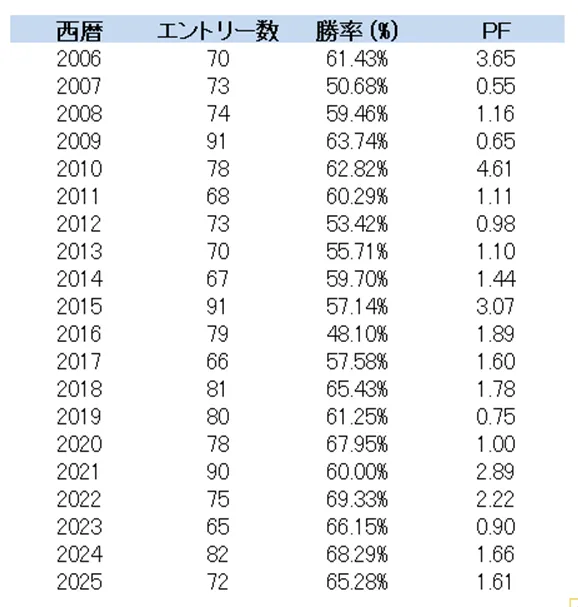
This system has undergone a 20-year long-term backtest from January 2006 to December 2025, covering historical price movements (including the Lehman Brothers collapse, COVID-19 crash, etc.).
There are years with temporary negative performance, butmost years achieved a positive return, resulting in a robust portfolio structure capable of long-term, stable wealth formation.
1. Basic System Information
- Supported currency pairs: GBPUSD (Pound-Dollar only)
- Recommended time frame: H1 (1-hour only)
- Limitations: If set on a currency pair other than GBPUSD or on a timeframe other than H1, safety measures will trigger and the system will automatically stop.
2. MT4 Installation Procedure
- Step 1: Launch MT4 and click File -> Open Data Folder.
- Step 2: Open the MQL4 folder, then the Experts folder.
- Step 3: Save the file DartRabbit_GBPUSD.ex4 into the Experts folder.
- Step 4: Restart MT4 or right-click in the Navigator window and select "Refresh".
- Step 5:Open the GBPUSD 1-hour (H1) chart.
- Step 6: Drag and drop "DartRabbit_GBPUSD" from the Navigator onto the chart.
- Step 7: In the Settings tab, check "Allow live trading" and "Allow DLL imports".
- Step 8: Ensure the "AutoTrading" button on the MT4 toolbar is green (ON).
3. External Parameter Settings (5 items)
This system has optimized logic built in, so user-modifiable items are limited to the following five settings.
- InpLots(Initial lot / Default: 0.1): Fixed lot size when the compound feature is off.
- InpUseMM(Compound feature ON/OFF / Default: true): Choose whether to use automatic compound calculation based on account balance.
- InpRiskPercent(Allowed risk percentage / Default: 2.0): Acceptable risk per trade.
- InpMaxSpread(Allowed maximum spread in pips / Default: 3.0): Maximum spread tolerated at entry.
- InpMagicNumber(Magic number / Default: 7043816): Unique identifier for its own orders.
4. Safety Regarding Reboot
This system features advanced reboot tolerance. Even if MT4 or PC reboots or crashes, it automatically restores the highest and lowest positions from historical chart data in real time, continuing management of trailing stops and break-even exits for peace of mind.