Bullet Time

Sales performance 0 Book
Review ★ 0.0
(0)
Expert Advisors
MetaTrader 4
Sales from
11/9/2026
Last Updated At
8/2/2026
Version
1.0
My Profile
Nigg Trading Style
- Whole period
- 2 years
- 1 year
- 6 months
- 3 months
- 1 month
Profit
:
23,163JPYProfit Factor
:
83.58Rate of return risk
?
:
0.1Average Profit
:
1,358JPYAverage Loss
:
-87JPYBalance
?
:
1,023,163JPYRate of return (all periods) ?
:
2.51%Win Rate
:
84.21%
(16/19)
Maximum Position
?
:
8Maximum Drawdown
?
:
25.53%
(241,382JPY)
Maximum Profit
:
2,580JPYMaximum Loss
:
-120JPYRecommended Margin
?
:
922,172JPYUnrealized P/L
:
-140,830JPYDeposit
?
:
1,000,000JPYCurrency
:
JPY- Account
Operable Brokers
Usable with MT4-adopting brokers.
About EA's Strategy
Currency Pairs
[AUD/JPY]
Trading Style
[Day Trading]
[Scalping]
[Swing Trading]
Maximum Number Position
50
Maximum Lot
1
Chart Time Frame
M15
Maximum Stop Loss
0
Take Profit
0
Straddle Trading
Yes
Application Type
Metatrader Auto Trading
Other File Usages
No
“Bullet Time” is an EA that captures market conditions and overheating from multiple timeframes, aiming for profit opportunities in both buying and selling directions.
By combining a logic that captures the medium-to-long-term trend, a logic that seeks rebounds from short-term overextensions, and a logic that targets reversals after sharp rallies, it selectively identifies entry opportunities according to market conditions.
This design is capable of handling various market situations through multiple timeframes, multiple logics, and flexible position management.
Please check the backtest results of this EA below.
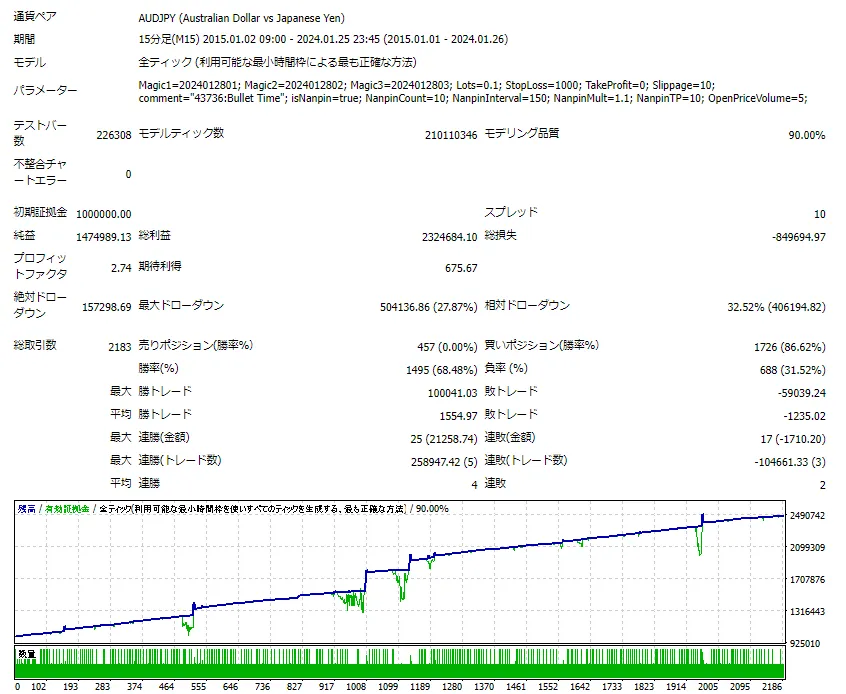
| Setting Item Name | Initial Value | Notes |
|---|---|---|
| Magic1 | 2026051001 | A number to identify orders of Logic 1. Please set a value that does not conflict with other EAs. |
| Magic2 | 2026051002 | A number to identify orders of Logic 2. Please set a value that does not conflict with other EAs. |
| Magic3 | 2026051003 | A number to identify orders of Logic 3. Please set a value that does not conflict with other EAs. |
| Lots | 0.1 | Lot size at the initial entry. |
| StopLoss | 1000 | Stop loss width set for the initial position. If set to 0, it will be disabled. |
| TakeProfit | 0 | Profit target width set for the initial position. If set to 0, it will be disabled. |
| Slippage | 10 | Price slippage tolerated at order time. |
| comment | 83592:Bullet Time |
Comment displayed in the order history. |
| ▼ Grid / Averaging (Nanpin) Settings | ||
| isNanpin | true | Enable/disable the Nanpin (averaging down) feature. true to enable, false to disable. |
| NanpinCount | 10 | Maximum number of additional orders by averaging down. |
| NanpinInterval | 150 | Price interval for placing additional averaging-down orders. |
| NanpinMult | 1.1 | Lot multiplier for additional averaging-down orders. |
| NanpinTP | 10 | Profit target for closing all positions during averaging-down. |
| ▼ GMT / DST Settings | ||
| Time GMT offset (in winter GMT+2 is 2) | 2 | GMT offset during broker's winter time. If winter time is GMT+2, set 2. |
| Use summer time (European DST) | true | Set to true if the broker uses summer time; false if not. |
| Summer time additional offset (usually +1) | 1 | GMT offset added during daylight saving time. Usually set to 1. |
EA Operation Recommendation
■ Please operate on a demo account for at least one month before using on a live account.
↳ Some brokers may cause unexpected behavior due to differences in spread, leverage, currency pairs, trading hours, etc.
■ Prepare ample margin.
↳ The main reason for “not entering live” is often insufficient margin. For peace of mind, we recommend having ample margin.
■ Operate with surplus funds.
↳ Recommend allocating an amount of your monthly income as the initial investment.
↳ The recommended margin for this EA is displayed at the top of the screen as data; if the Lot is reduced but that margin is not reached, please refrain from using it or consider starting with a low-account such as 1 lot = 1,000 currency units.
■ Please keep it basically hands-off.
↳ In the first few weeks, you can frequently check entry status for verification without issue, but
Once stability of operation is confirmed, we recommend leaving it mostly unattended and checking the status once a week or two.
↳ Frequent adjustments of Lot or other settings, or manual closures, may increase losses.