Derbies

- Whole period
- 2 years
- 1 year
- 6 months
- 3 months
- 1 month
Forward testing (Profit)
Monthly Statistics
- Jan
- Feb
- Mar
- Apr
- May
- Jun
- Jul
- Aug
- Sep
- Oct
- Nov
- Dec
Calendar for Months
About EA's Strategy
Translating...
Thank you for visiting.ありがとうございます。
「DERBIES」 is a martingale-type EA developed with AUDCAD as its main operation.
All parameters are released; there is no currency pair restriction. You can operate according to your own budget and objectives.
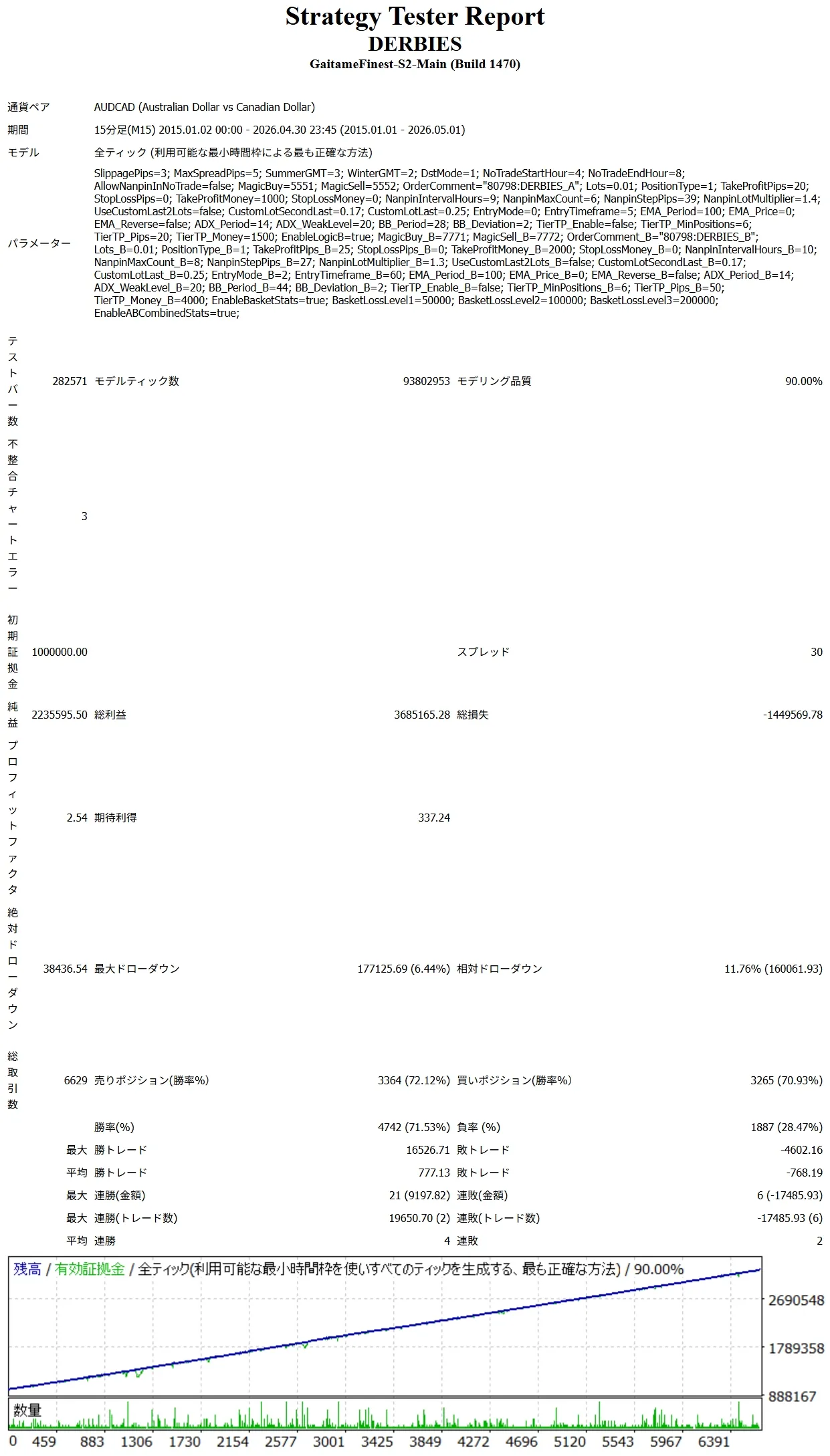
Currently,real account is in operation. It has not deviated significantly from the simulated drawdown and profit trends expected in backtests.
DERBIES is an EA intended for people like the following.
「Looking for an EA that lasts long, rather than large profits」
「No matter what EA you buy, it will eventually stop operating」
「Even with a martingale EA, I want to manage risk as much as possible」
「I want to adjust EA parameters to fit my own trading style」
DERBIES is equipped with various logics, but two stand out: the “Dual Logic System” and the “Drawdown Calculation Feature.”
We will explain each in detail.
What is the “Dual Logic System”?
A martingale EA can greatly increase profits with the right settings, but increasing risk raises the risk of ruin. Conversely, too low a risk often reduces potential profits.
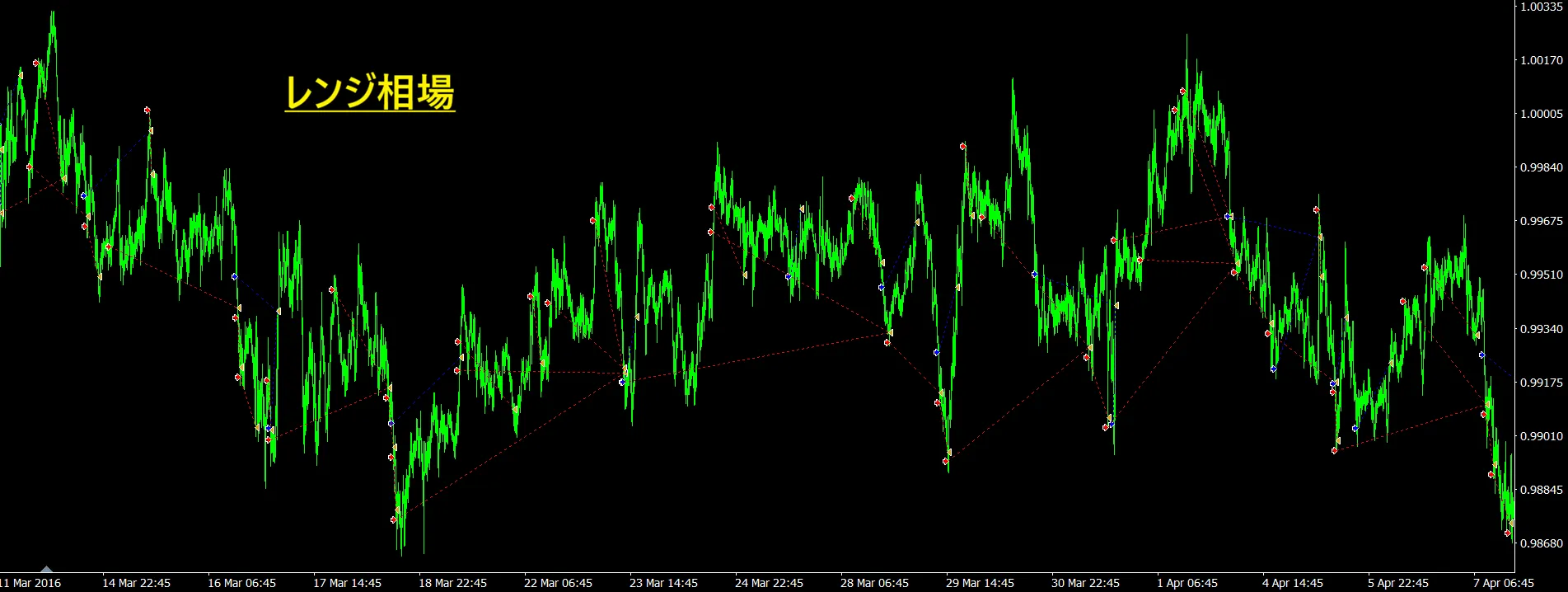
Therefore DERBIES adopts a “Dual Logic System” that carries the same logic in two parts. These are separated into “A system” and “B system,” and low-risk parameters selected through backtest optimization are assigned to A and B. This enables two low-risk trades to operate simultaneously.
In other words, instead of aggressively targeting high profits with high-risk settings, two low-risk-parameter systems operate in parallel to aim for stable operation by the sum of both. This is the basic concept of DERBIES and the origin of the EA name.
Typically, to run the same EA with different parameters you would need multiple EAs, but DERBIES completes this within a single EA.
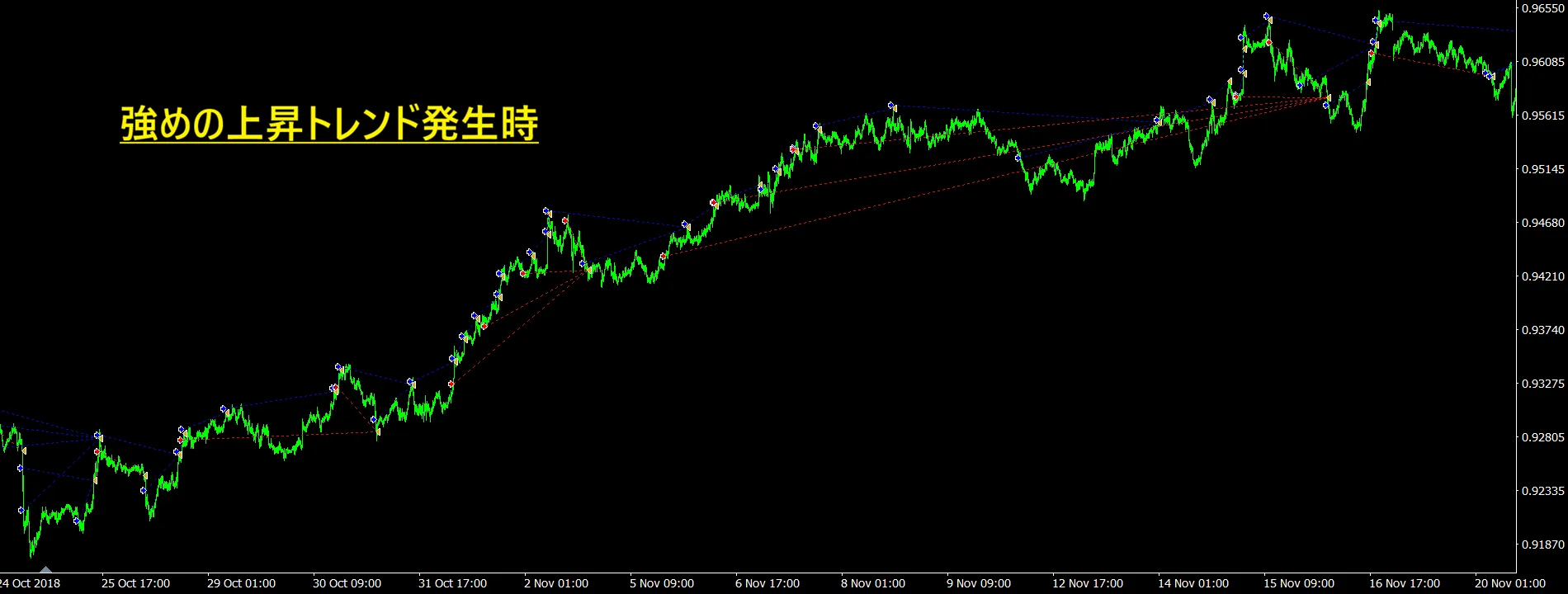
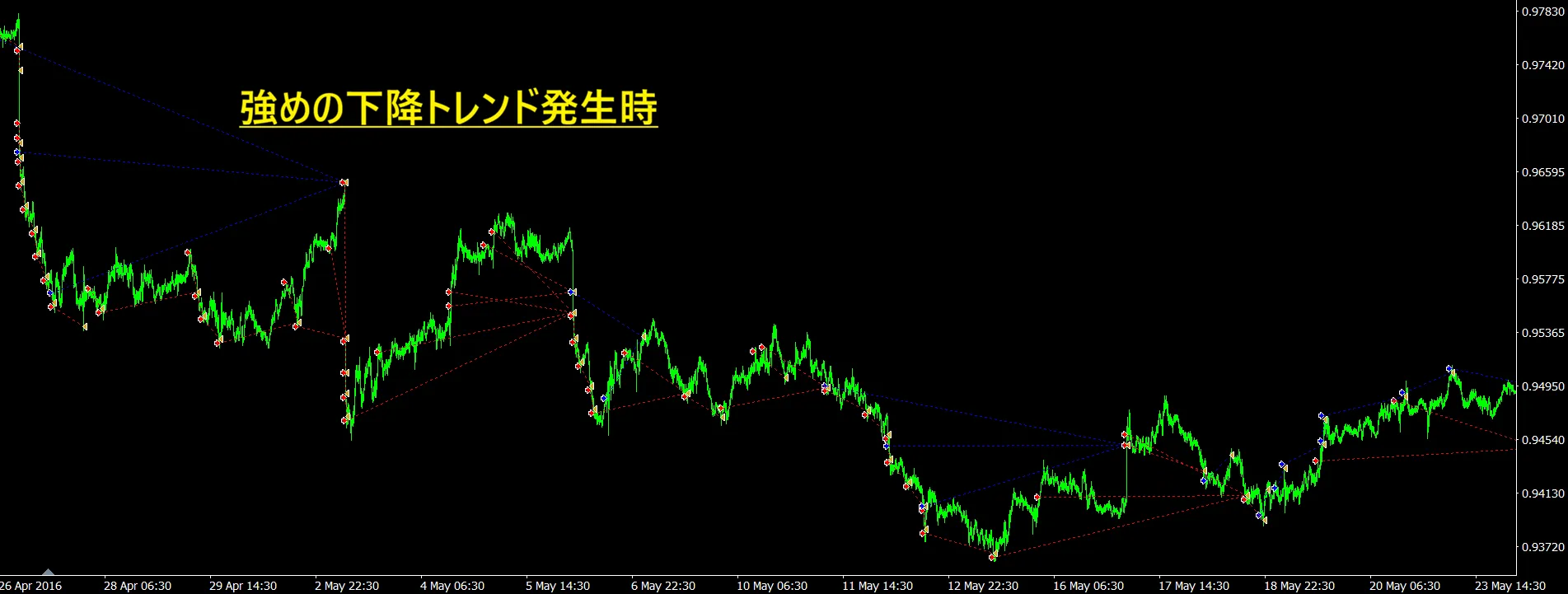
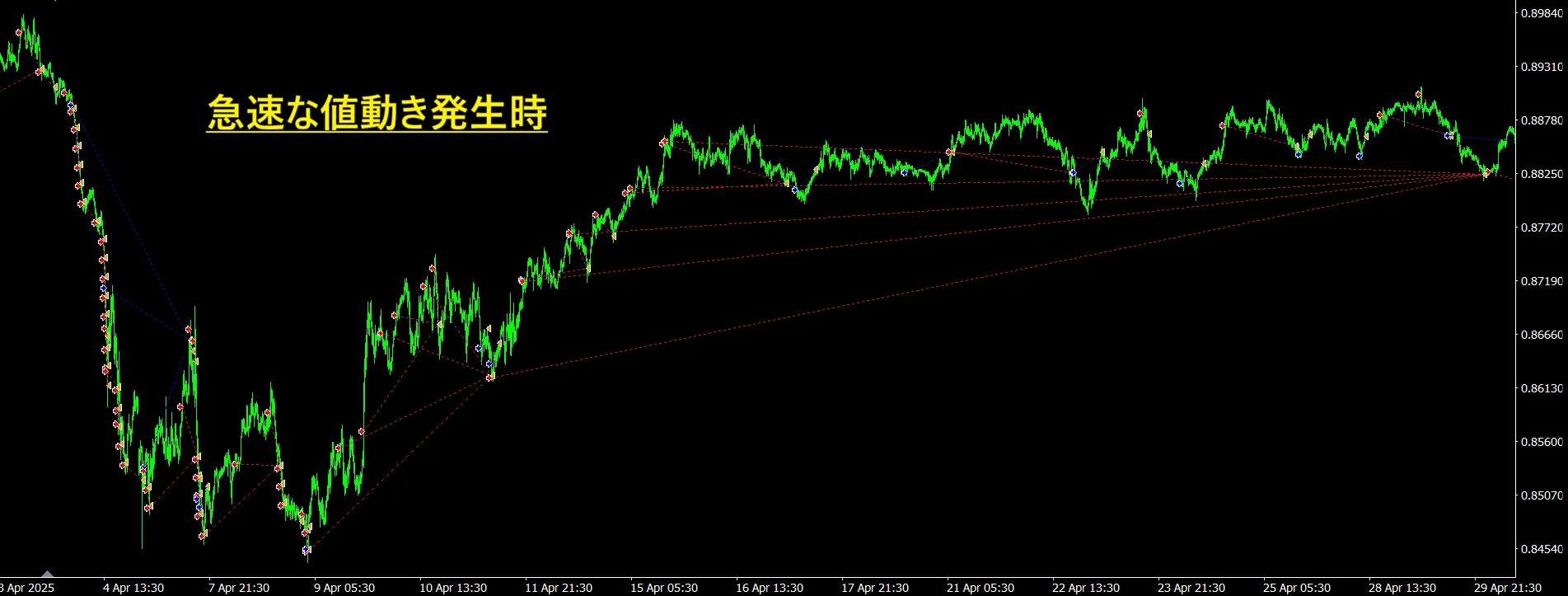
What is the “Drawdown Calculation Feature”?
For martingale EAs, it is crucial not only to know the maximum drawdown but also how much drawdown is currently present during operation. Even if backtest results show a rising equity curve, there are cases with large drawdowns along the way. In other words, judging an EA’s quality solely by maximum drawdown is risky.
Many martingale EAs show maximum drawdown in backtests, but few show drawdown in real time. You can check drawdown with Rock-Getter, but it is paid.
Therefore DERBIES includes a drawdown calculation feature to verify risk in real operation. At the end of a backtest, it outputs “how much drawdown is occurring” from the MT4 log. This makes risk management in real trading very clear.
Partial MT4 log
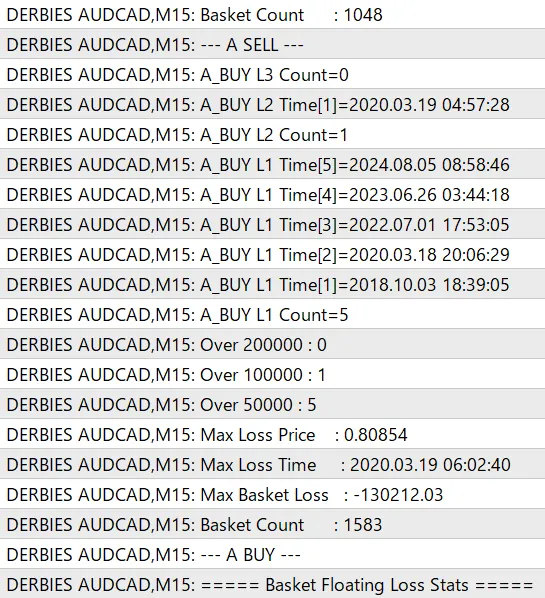
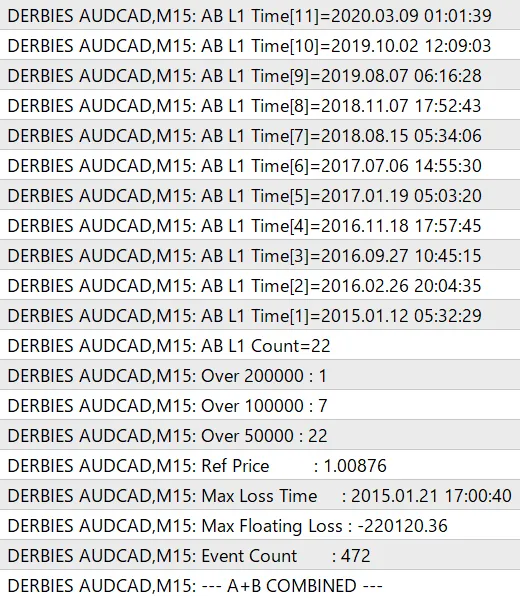
Also, drawdown calculation is performed per “basket.”
【What is a Basket?】
A basket counts everything from the initial position, including multiple martingale layers, as one. Multiple positions in the same direction are treated as one group. This is defined as a basket.
The drawdown calculation feature can check “how much drawdown has occurred” and “how many times the drawdown level has been reached” for each basket. Here’s a quick description of what actually outputs in MT4 logs.
・For each buy/sell basket of both A system and B system, output the maximum drawdown, the date/time when the maximum drawdown occurred, the price at the time, etc., to the log.
・Parameters include basket loss levels 1, 2, 3 (you can freely adjust to any amount). The number of times each basket loss level is reached is counted automatically.
For example, if you set Basket Loss Level 1 to 50,000 yen, Level 2 to 100,000 yen, Level 3 to 200,000 yen, you can confirm how many times each drawdown line was reached.
Furthermore, if you run A system and B system simultaneously, you can also confirm the “combined drawdown.” This allows you to understand not only drawdown for each logic but also drawdown when A and B are added together, approaching real trading risk management.
Also, DERBIES calculates take-profit and stop-loss at the basket level based on the average entry price and total profit of all positions in the same direction. Therefore, even if some positions are in the negative, if the basket as a whole meets the take-profit condition it will be settled together.
Example:
1st position: drawdown
2nd position: drawdown
3rd position: profit4th position: profit
Even in such a state, if the combined result of the 4 positions meets the take-profit condition, all positions in the basket are settled.
※Drawdown calculation is aggregated based on MT4 account currency P/L.
※For yen accounts, drawdown is shown in yen.
※Because pips value and price movement characteristics differ by currency pair, please adjust basket loss level values according to the operating currency pair and capital amount.
※Basket statistics and A/B combined drawdown statistics are mainly for backtesting analysis. In actual operation, to reduce processing load and log output, it is recommended to run with “false.”
All Parameter Details ※=A/B common parameters
・Allowed Slippage (pips)※
Specify slippage in pips that is acceptable for new entries, martingale actions, and EA trades. Lower values help suppress unfavorable fills, but depending on market conditions, orders may not go through.
・Allowed Spread (pips)※
Specify the maximum spread allowed for new entries and martingales. If the current spread exceeds this value, the EA will not trade. Used to suppress trading during times when spreads widen, such as early morning or during major news.
・夏GMT ※
・冬GMT ※
・DSTモード ※
・取引禁止の開始時刻 ※
日本時間で新規エントリーを停止する開始時刻を指定します。
例:4の場合は日本時間の4時から取引禁止時間に入ります。
・取引禁止の終了時刻 ※
新規エントリーを再開する時刻を日本時間で指定します。
例:8の場合は日本時間の8時から取引可能になります。
・禁止時間中のナンピン許可 ※
取引禁止時間中に既存ポジションへのナンピンを許可するかを指定します。
true:禁止時間中でもナンピンを行います。 false:禁止時間中はナンピンも行いません。
・買いマジックナンバー
買いポジションを識別するためのマジックナンバーです。他のEAや売りポジションと区別するために使用します。
・売りマジックナンバー
売りポジションを識別するためのマジックナンバーです。買いポジションとは別番号で管理されます。
・注文コメント
注文に付与するコメントです。取引履歴上でEAの注文を識別しやすくするために使用します。
・初回ロット 初回エントリー時のロット数を指定します。ナンピン時のロットはこのロットが基準となり、ロット倍率によって計算されます。
・売買方向
EAの売買方向を以下4つから選択します。
Stop:新規エントリーを停止します。 Long_Short:買い・売り両方を行います。 LongOnly:買いのみ行います。 ShortOnly:売りのみ行います。
・TP(pips)0=無効
平均建値から指定pips分、有利方向に動いた場合にバスケット全体を決済します。
例:20pipsに設定した場合、ナンピンした複数ポジションを含めた全体の平均価格から20pips利益が出た時点で決済します。
・SL(pips)0=無効
平均建値から指定pips分、不利方向に動いた場合にバスケット全体を決済します。
例:100pipsに設定した場合、ナンピンした複数ポジションを含めた全体の平均価格から100pips逆行した時点で決済します。
・TP(利益額)0=無効
保有中の同一方向ポジションの合計損益が指定金額以上になった場合、バスケット全体を決済します。スワップ・手数料も含めた損益で判定します。
・SL(損失額)0=無効(マイナスで使用)
保有中の同一方向ポジションの合計損益が指定金額以下になった場合、バスケット全体を損切りします。使用する場合はマイナス値で入力します。
例:-50,000円に指定する場合、「-50000」と入力
・ナンピン間隔(時間)
前回エントリーから次のナンピンを行うまでの最低経過時間を指定します。指定時間が経過していない場合、価格条件を満たしてもナンピンは行いません。
・最大ポジション数
同一方向で保有できる最大ポジション数を指定します。この数に達すると、それ以上のナンピンは行いません。
・ナンピン間隔(pips)
前回のエントリー価格から指定したpips逆行した場合に、次のナンピンを行います。
例:20pipsに設定した場合、前回のエントリー価格から20pips逆行すると次のナンピンを行います。
・ロット倍率
ナンピン時のロットを前回ロットに対して何倍にするかを指定します。
例:1.5の場合、前回ロットの1.5倍を基準にして次のロットを計算します。各ブローカーの最小ロット・ロット刻みに合わせて自動調整を行うため、倍率から算出した値と実際の発注ロットが異なる場合があります。
・ラスト2ロットをカスタムする
ナンピン最後の2ポジションのロット数を指定できます。ナンピン回数が増えていくと総ポジションが大きくなり、後半のポジションが原因で破綻に繋がるケースもあり得ます。それを防ぐ意味で付けていますが、抑えすぎるとナンピン効果も低くなります。
true:最後の2ポジションにカスタムロットを使用します。 false:通常のロット倍率で計算します。
・ラスト2番目のロット
最大ポジション数の1つ手前のポジションに使用する専用ロットを指定します。「ラスト2ロットをカスタムする」がtrueの場合にのみ有効になります。
・ラストのロット
最大ポジション数に到達する最後のポジションに使用する専用ロットを指定します。「ラスト2ロットをカスタムする」がtrueの場合にのみ有効になります。
・エントリーモード
新規エントリーの判定方法を以下3つから選択します。
Mode EMA:EMAを使用して判定します。 Mode ADX:ADXを使用して判定します。 Mode BB:ボリンジャーバンドを使用して判定します。
・エントリー判断足
エントリー判定に使用する時間足を指定します。
例:5の場合、5分足チャートでエントリー判断を行います。
・EMA期間
EMAの計算期間を指定します。数値が小さいほど短期的な値動きに反応しやすく、数値が大きいほど長期的な方向性を重視します。
・EMA適用価格
EMAの計算に使用する価格を以下から選択します。
終値、始値、高値、安値
・EMA判定反転
EMAによる売買判定を反転するかを指定します。
false:通常の判定を行います。 true:売買方向を反転します。
・ADX期間
ADXの計算期間を指定します。トレンドの強弱を判定するために使用します。
・ADXトレンド判定
ADXの値を用いてトレンドの強弱を判定します。ADXがこの値未満の場合のみ、トレンドが弱いと判断して新規エントリーを許可します。
・BB期間
ボリンジャーバンドの計算期間を指定します。数値が小さいほど短期的な値動きに反応しやすく、数値が大きいほどバンドが安定しやすくなります。
・BB偏差(σ)
ボリンジャーバンドの幅を決める偏差を指定します。数値が大きいほどバンド幅が広くなり、エントリー頻度は少なくなる傾向になります。
・段階TPを使用する
保有ポジション数が指定数以上になった場合に、通常とは別の利確条件の段階TPに切り替えるかを指定します。ナンピンが進んでポジション数が増えると、わずかな値動きでも損益が大きく動きます。その特性を活かし、効率よく利益増を狙うための機能です。
true:段階TPを使用します。 false:段階TPを使用しません。
・段階TP発動の総ポジション数
段階TPを有効にする保有ポジション数を指定します。同一方向のポジション数がこの値以上になると、通常TPではなく段階TPの条件で決済判定を行います。
・段階TP(pips)0=無効
段階TP発動時に使用するpips利確幅を指定します。
・段階TP(利益額)0=無効
段階TP発動時に使用する金額利確です。保有中の同一方向ポジションの合計損益が指定金額以上になった場合に決済します。
・B系統を有効化
B系統の稼働オンオフを設定します。
true:A系統とB系統の両方を稼働します。 false:A系統のみを稼働します。
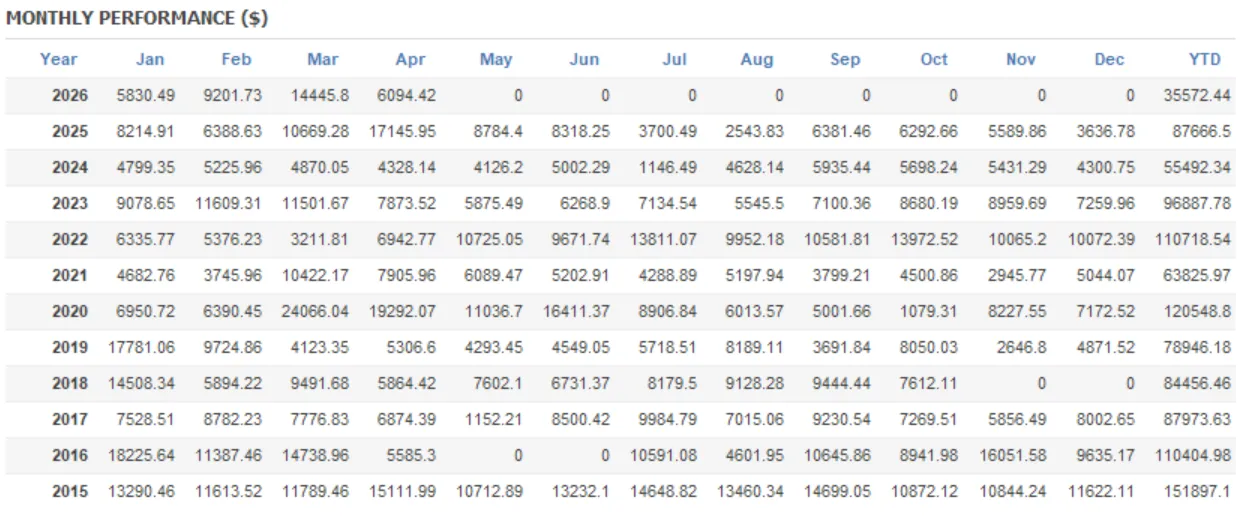
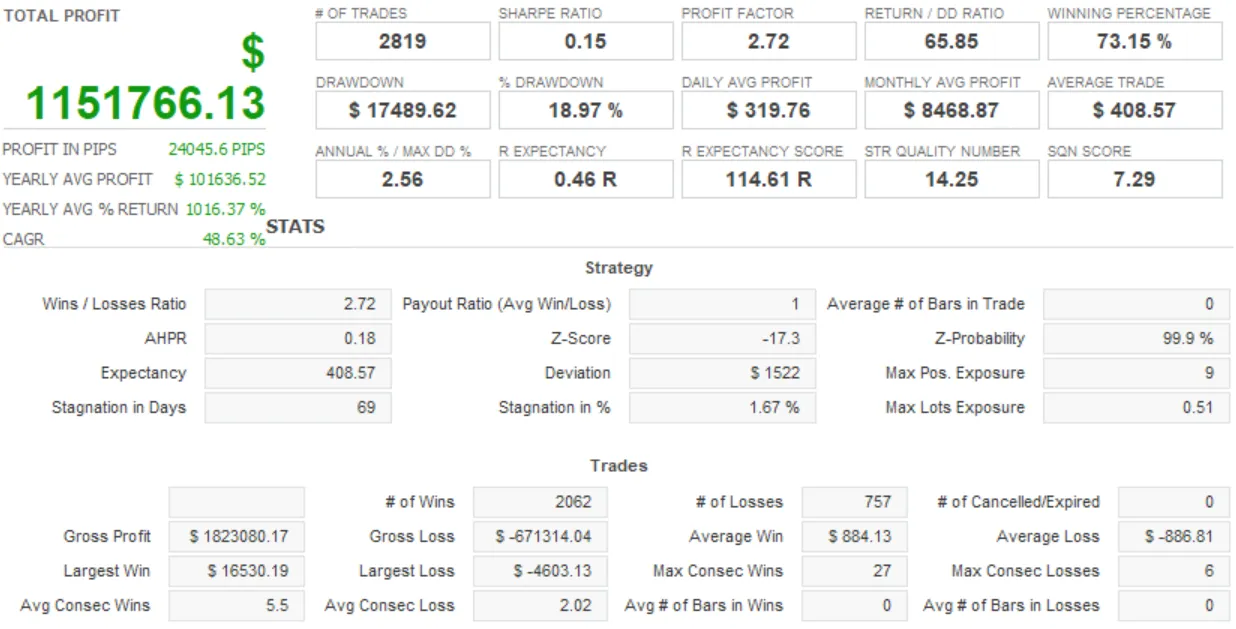
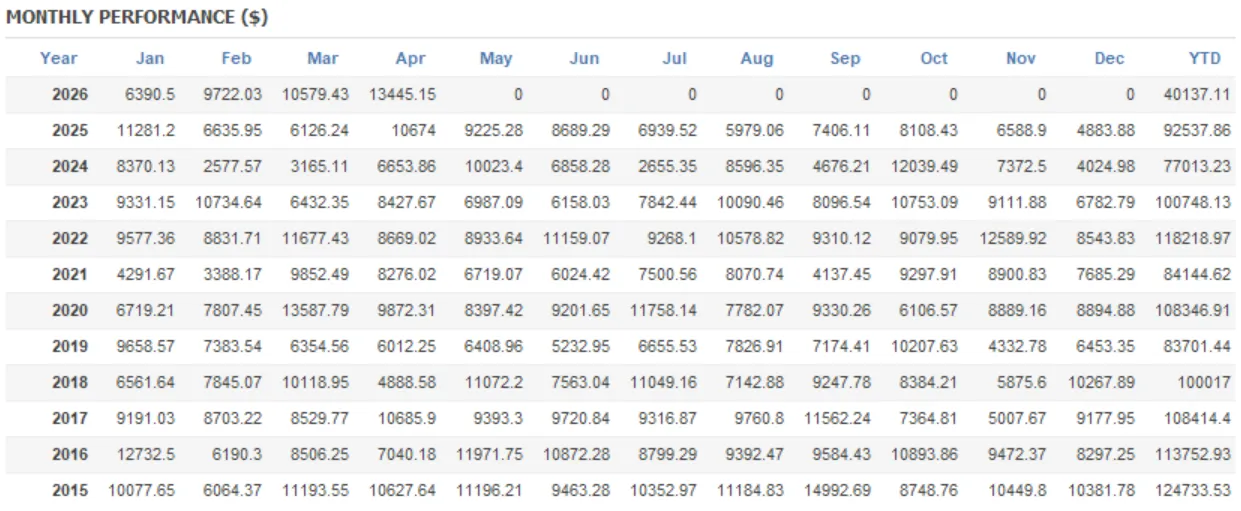
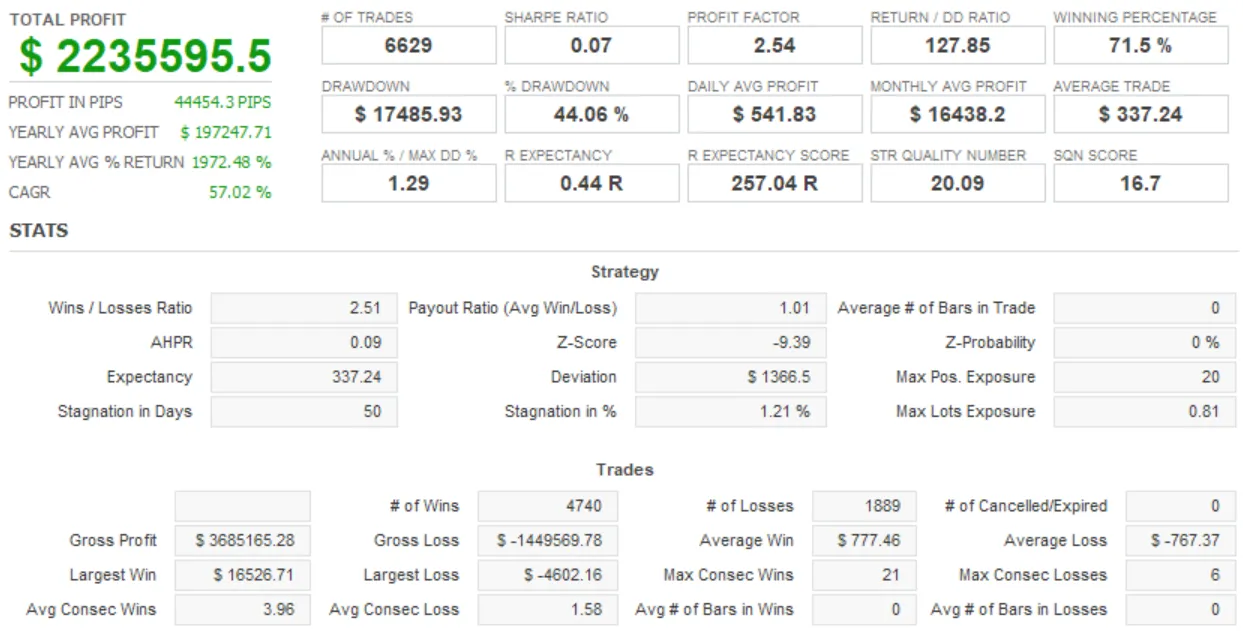
Important
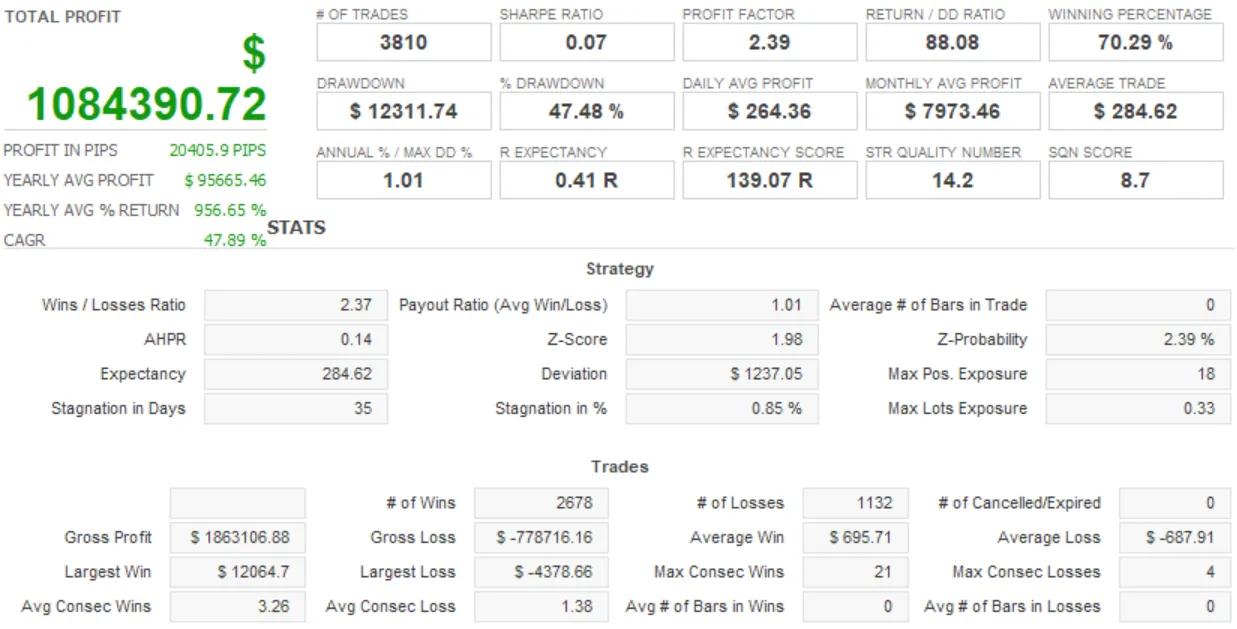
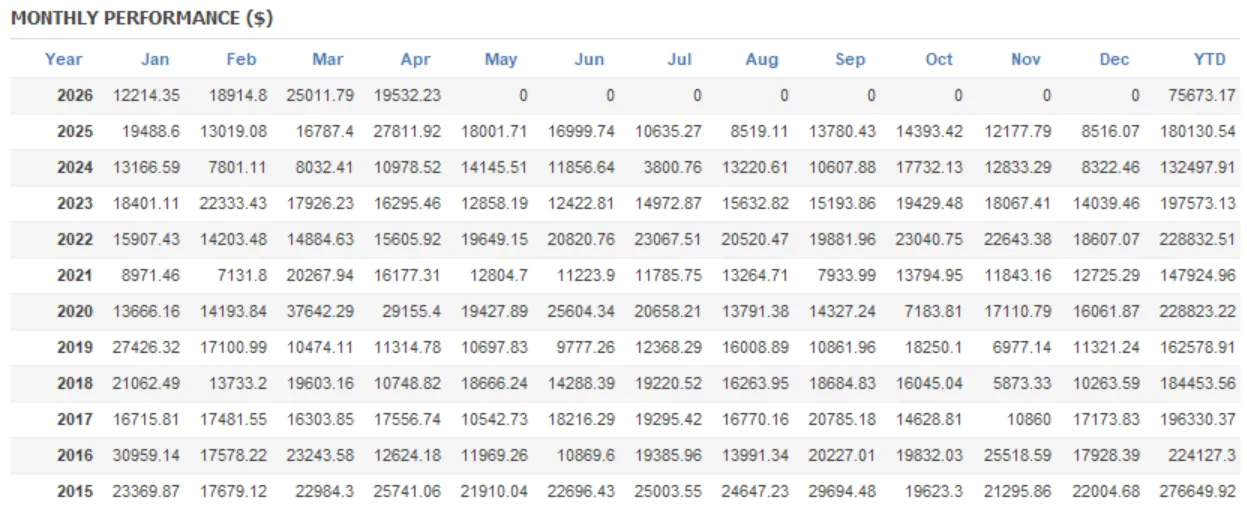
DERBIES is based on market data from the last roughly 10 years and adjusts parameters accordingly. Market conditions change year by year, and volatility and price action today differ greatly from over 20 years ago. Therefore, rather than trying to cover all historical market conditions, the design prioritizes recent market environments.
That said, it is also necessary to verify whether the EA logic works in longer-term market environments. Therefore, we present parameters selected from a long-term backtest from 2008.05.01 to 2026.05.01 and the backtest results. If you want long-term adaptability, please consider using this parameter set.
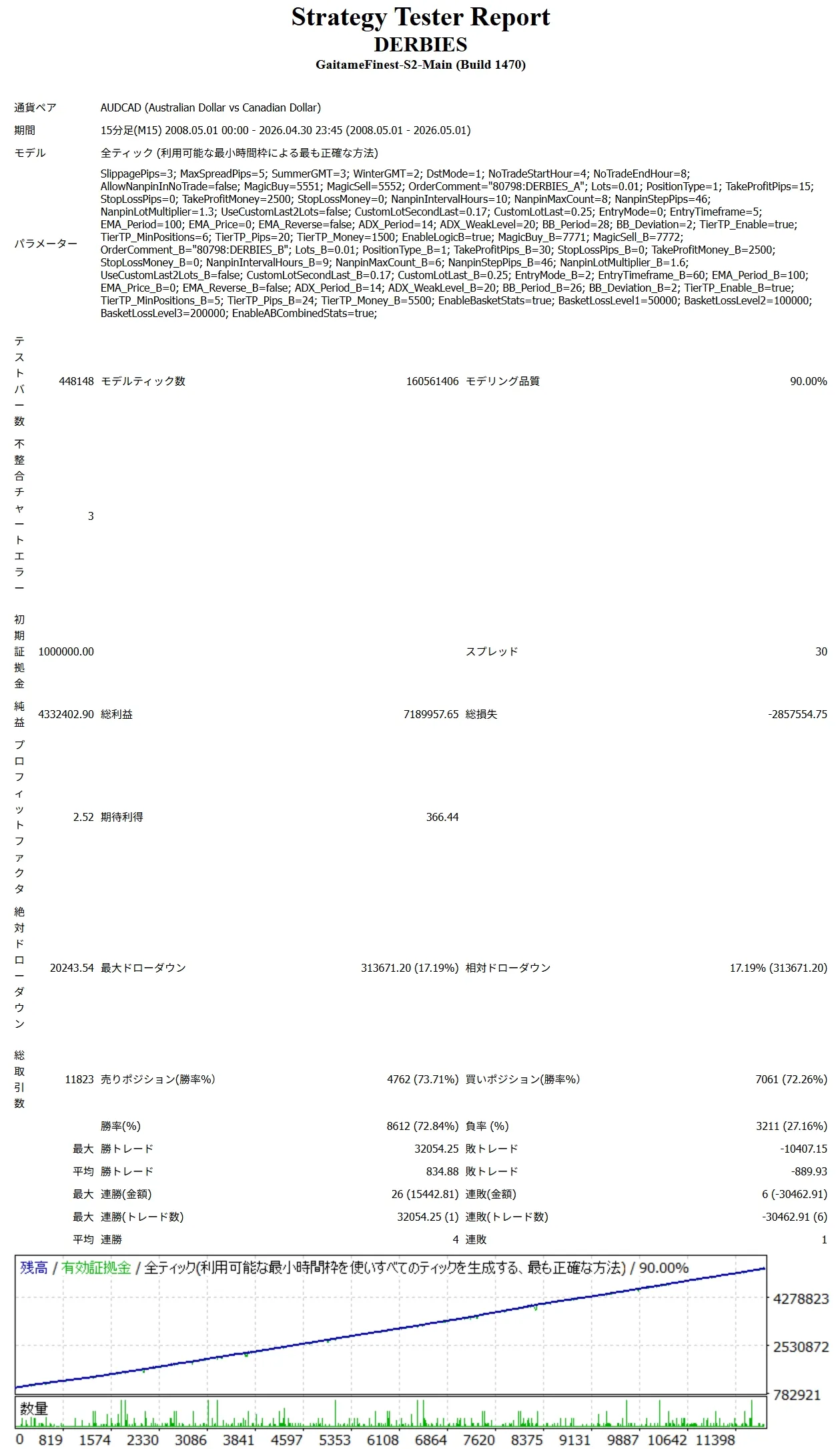
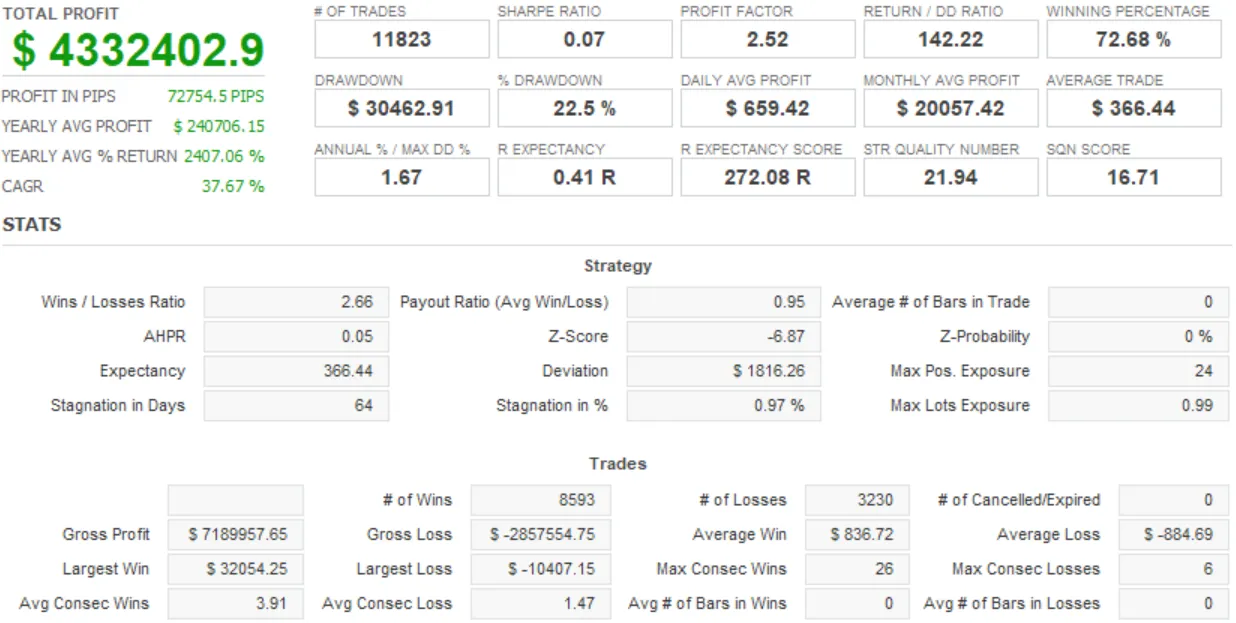
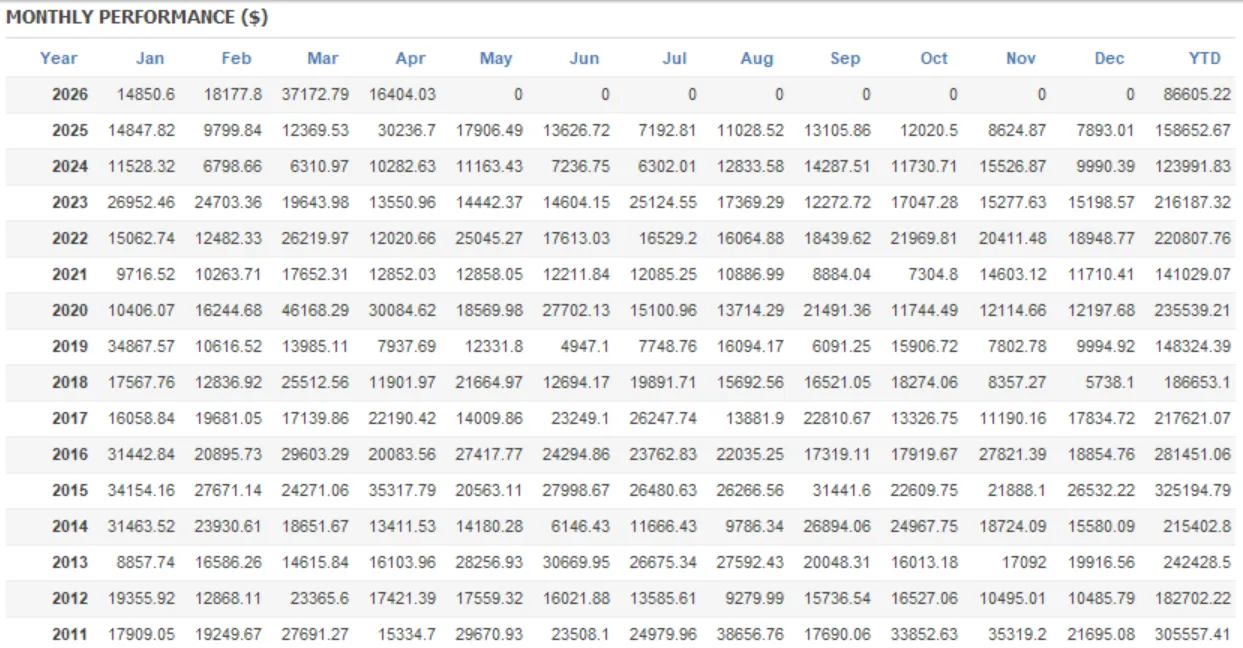

※EA purchasers will also receive this parameter SET file.
【Others / Notes】
※ Gold, Silver, Crude Oil, Stock Indices, and Cryptocurrencies are not supported. ※ Exotic currency pairs are not recommended due to wide spreads, swaps, and liquidity concerns. ※ If using outside AUDCAD, please verify in advance with backtests and a demo account. ※ This EA is a martingale EA and drawdown may increase depending on market conditions. Always operate with ample margin. ※ We operate on a swap-free account. Backtests were run at times with zero swap points for both buy and sell. ※ The amount parameters and drawdown calculation feature are based on account currency. For JPY accounts, drawdown is in yen; for USD accounts, in dollars. If you want to align settings with a USD account, set values by dividing by the USD/JPY rate. Example: 2,000 yen ÷ 160 yen = 12.5 dollars
DERBIES is not a “get-rich-quick EA.” It was developed as a martingale EA that can be used long-term while monitoring drawdown. In addition to the drawdown calculation feature, all parameters are released to allow optimization for your funds and trading style.
If you have any questions, please feel free to contact us even before purchase.
【Version update notice】Ver1.0: New release
Ver1.12: 2026/09/08
EA internal processing improvements ・Increased backtest speed by optimizing each process ・Improved drawdown calculation feature log output ・Fine-tuned some parameters ・Other minor fixes ・Product manual updated ※There is no impact on trading results due to this version update
Price: $125.92 (taxed)
¥19,800(taxed)
●Payment



Sales from : 08/12/2026 03:10
Price: $125.92 (taxed)
¥19,800(taxed)
●Payment
Just like discretionary trading, there are those that decide trading and settlement timings by combining indicators, those that repeatedly buy or sell at certain price (pips) intervals, and trading methods that utilize market anomalies or temporal features. The variety is as rich as the methods in discretionary trading.
To categorize simply,
・Scalping (Type where trades are completed within a few minutes to a few hours),
・Day Trading (Type where trades are completed within several hours to about a day),
・Swing Trading (Type where trades are conducted over a relatively long period of about 1 day to 1 week)
・Grid/Martingale Trading (Holding multiple positions at equal or unequal intervals and settling all once a profit is made. Those that gradually increase the lot number are called Martingale.)
・Anomaly EA (Mid-price trading, early morning scalping)
However, a substantial advantage of automated trading is its ability to limit and predict risks beforehand.
[Risk]
Inherent to forex trading are the trading risks that undeniably exist in automated trading as well.
・Lot Size Risk
Increasing the lot size forcibly due to a high winning rate can, in rare instances, depending on the EA, lead to substantial Pips loss when a loss occurs. It is crucial to verify the SL Pips and the number of positions held before operating with an appropriate lot.
・Rapid Market Fluctuation Risk
There are instances where market prices fluctuate rapidly due to index announcements or unforeseen news. System trading does not account for such unpredictable market movements, rendering it incapable of making decisions on whether to settle in advance or abstain from trading. As a countermeasure, utilizing tools that halt the EA based on indicator announcements or the VIX (fear index) is also possible.
[Benefits]
・Operates 24 hours a day
If there is an opportunity, system trading will execute trades on your behalf consistently. It proves to be an extremely convenient tool for those unable to allocate time to trading.
・Trades dispassionately without being swayed by emotions
There is an absence of self-serving rule modifications, a common human tendency, such as increasing the lot size after consecutive losses in discretionary trading or, conversely, hastily securing profits with minimal gains.
・Accessible for beginners
To engage in Forex trading, there is no prerequisite to study; anyone using system trading will achieve the same results.
[Disadvantages]
・Cannot increase trading frequency at will
Since system trading operates based on pre-programmed conditions, depending on the type of EA, it might only execute trades a few times a month.
・Suitability may vary with market conditions
Depending on the trading type of the EA, there are periods more suited to trend trading and periods more suited to contrarian trading, making consistent results across all periods unlikely. While the previous year might have yielded good results, this year's performance might not be as promising, necessitating some level of discretion in determining whether it is an opportune time to operate.
・MT4 (MetaTrader 4. An account needs to be opened with a Forex company that offers MT4.)
・EA (A program for automated trading)
・The operating deposit required to run the EA
・A PC that can run 24 hours or a VPS (Virtual Private Server), where a virtual PC is hosted on a cloud server to run MT4.
Additionally, there are both demo and real accounts available. You can experience trading with virtual money by applying for a demo account. After opening a real account, you select the connection server assigned by the Forex broker, enter the password, and log in to the account.
When you deposit money into your account using the method specified by the forex broker, the funds will be reflected in your MT4 account, and you can trade.
Firstly, download the purchased EA file from your My Page on GogoJungle. You will download a zip (compressed) file, so right-click to extract it and retrieve the file named ‘◯◯◯ (EA name)_A19GAw09 (any 8 alphanumeric characters).ex4’ from inside.
Next, launch MT4 and navigate to ‘File’ → ‘Open Data Folder’ → ‘MQL4’ → ‘Experts’ folder, and place the ex4 file inside. Once done, close MT4 and restart it. Then, go to the upper menu ‘Tools’ → ‘Options’, and under ‘Expert Advisors’, ensure ‘Allow automated trading’ and ‘Allow DLL imports’ are checked, then press OK to close.
The necessary currency pair and time frame for the correct operation of the EA are specified on the EA sales page. Refer to this information and open the chart of the correct currency pair time frame (e.g., USDJPY5M for a USD/Yen 5-minute chart).
Within the menu navigator, under ‘Expert Advisors’, you will find the EA file name you placed earlier. Click to select it, then drag & drop it directly onto the chart to load the EA. Alternatively, you can double-click the EA name to load it onto the selected chart.
If ‘Authentication Success’ appears in the upper left of the chart, the authentication has been successful. To operate the EA, you need to keep your PC running 24 hours. Therefore, either disable the automatic sleep function or host MT4 on a VPS and operate the EA.
If you want to use it with an account other than the authenticated one, you need to reset the registered account.
To reset the account, close the MT4 where the Web authentication is registered, then go to My Page on GogoJungle > Use > Digital Contents > the relevant EA > press the ‘Reset’ button for the registration number, and the registered account will be released.
When the account is in a reset state, using the EA with another MT4 account will register a new account.
Also, you can reset the account an unlimited number of times.
→ Items to Check When EA is Not Operating
1 lot = 100,000 currency units
0.1 lot = 10,000 currency units
0.01 lot = 1,000 currency units
For USD/JPY, 1 lot would mean holding 100,000 dollars.
The margin required to hold lots is determined by the leverage set by the Forex broker.
If the leverage is 25 times, the margin required to hold 10,000 currency units of USD/JPY would be:
10000*109 (※ at a rate of 109 yen per dollar) ÷ 25 = 43,600 yen.
・Risk-Return Ratio: Total Profit and Loss during the period ÷ Maximum Drawdown
・Maximum Drawdown: The largest unrealized loss during the operation period
・Maximum Position Number: This is the maximum number of positions that the EA can theoretically hold at the same time
・TP (Take Profit): The set profit-taking Pips (or specified amount, etc.) in the EA's settings
・SL (Stop Loss): The set maximum loss pips (or specified amount, etc.) in the EA's settings
・Trailing Stop: Instead of settling at a specified Pips, once a certain profit is made, the settlement SL is raised at a certain interval (towards the profit), maximizing the profit. It is a method of settlement.
・Risk-Reward Ratio (Payoff Ratio): Average Profit ÷ Average Loss
・Hedging: Holding both buy and sell positions simultaneously (Some FX companies also have types where hedging is not allowed)
・MT4 Beginner's Guide
・Understanding System Trading Performance (Forward and Backtesting)
・Choosing Your First EA! Calculating Recommended Margin for EAs
・Comparing MT4 Accounts Based on Spread, Swap, and Execution Speed
・What is Web Authentication?
・Checklist for When Your EA Isn't Working