NLFix_USDJPY_Ver1.2
- Whole period
- 2 years
- 1 year
- 6 months
- 3 months
- 1 month
Forward testing (Profit)
Monthly Statistics
- Jan
- Feb
- Mar
- Apr
- May
- Jun
- Jul
- Aug
- Sep
- Oct
- Nov
- Dec
Calendar for Months
About EA's Strategy
Translating...
NLFix_Gaitame_USDJPY_Ver1.2|News Resilience × Time Compression for a USDJPY-Only EA that Grows While Protecting
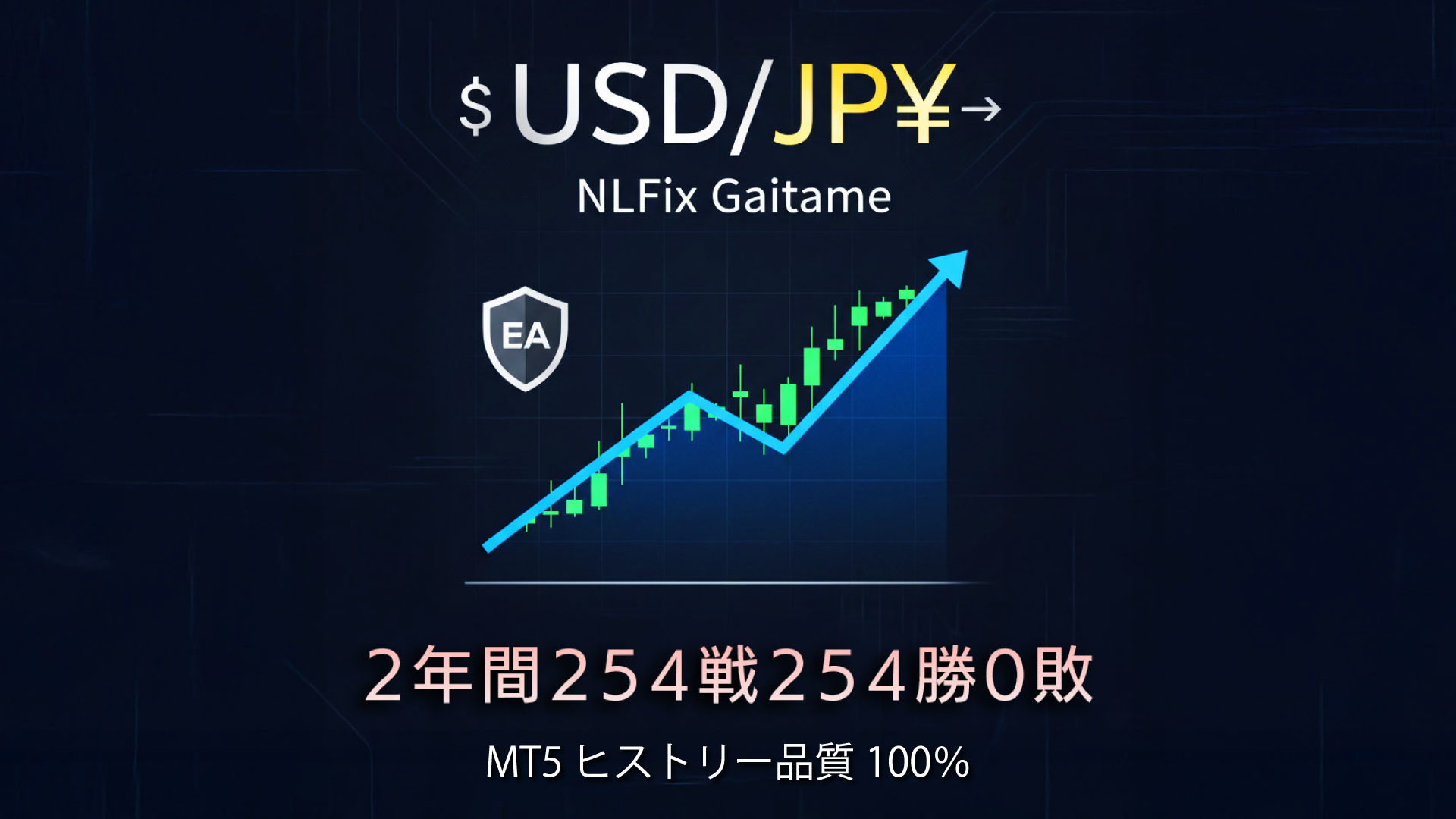
Two-year backtest results with 100% history quality using Forex Finest MT5 are shown below
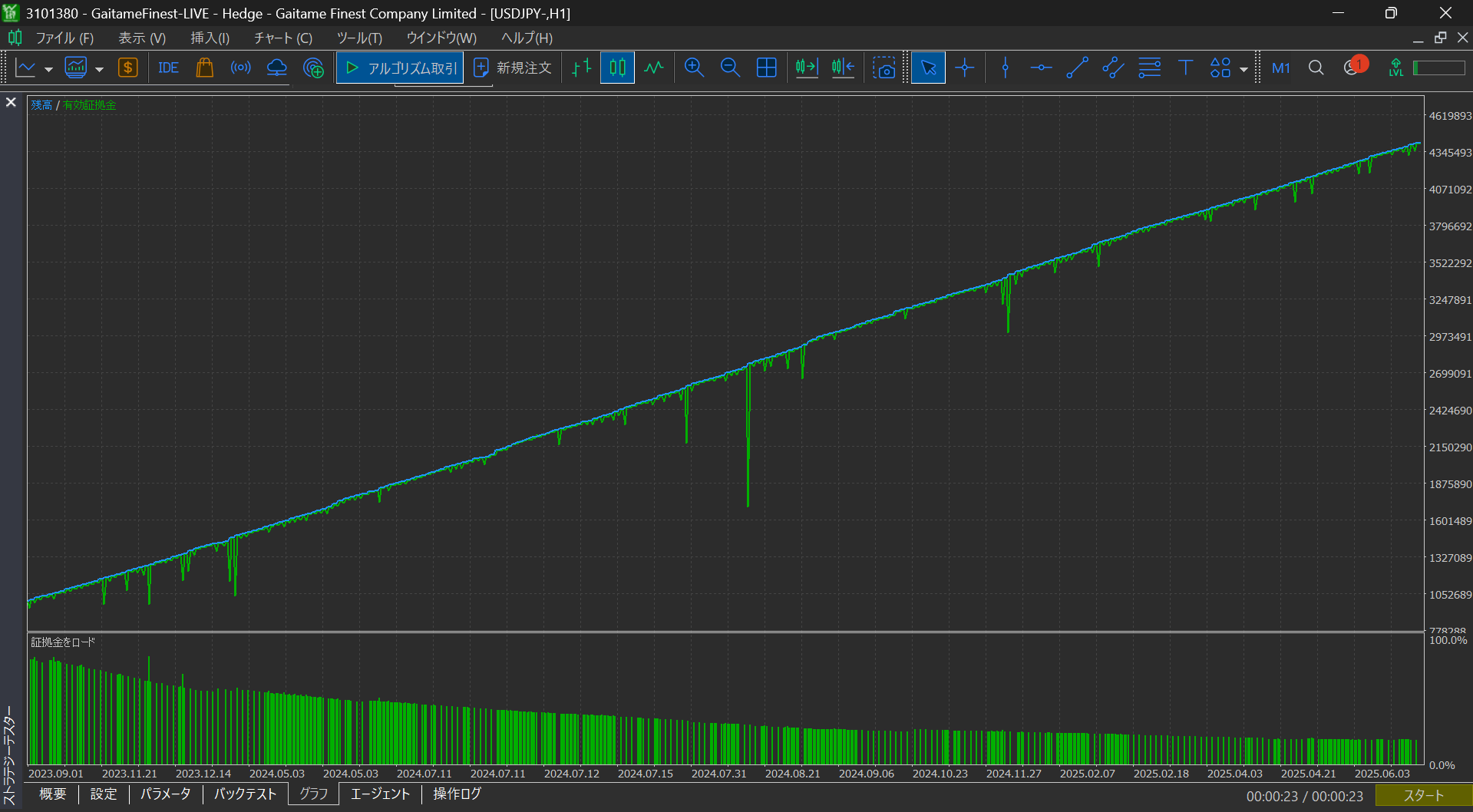
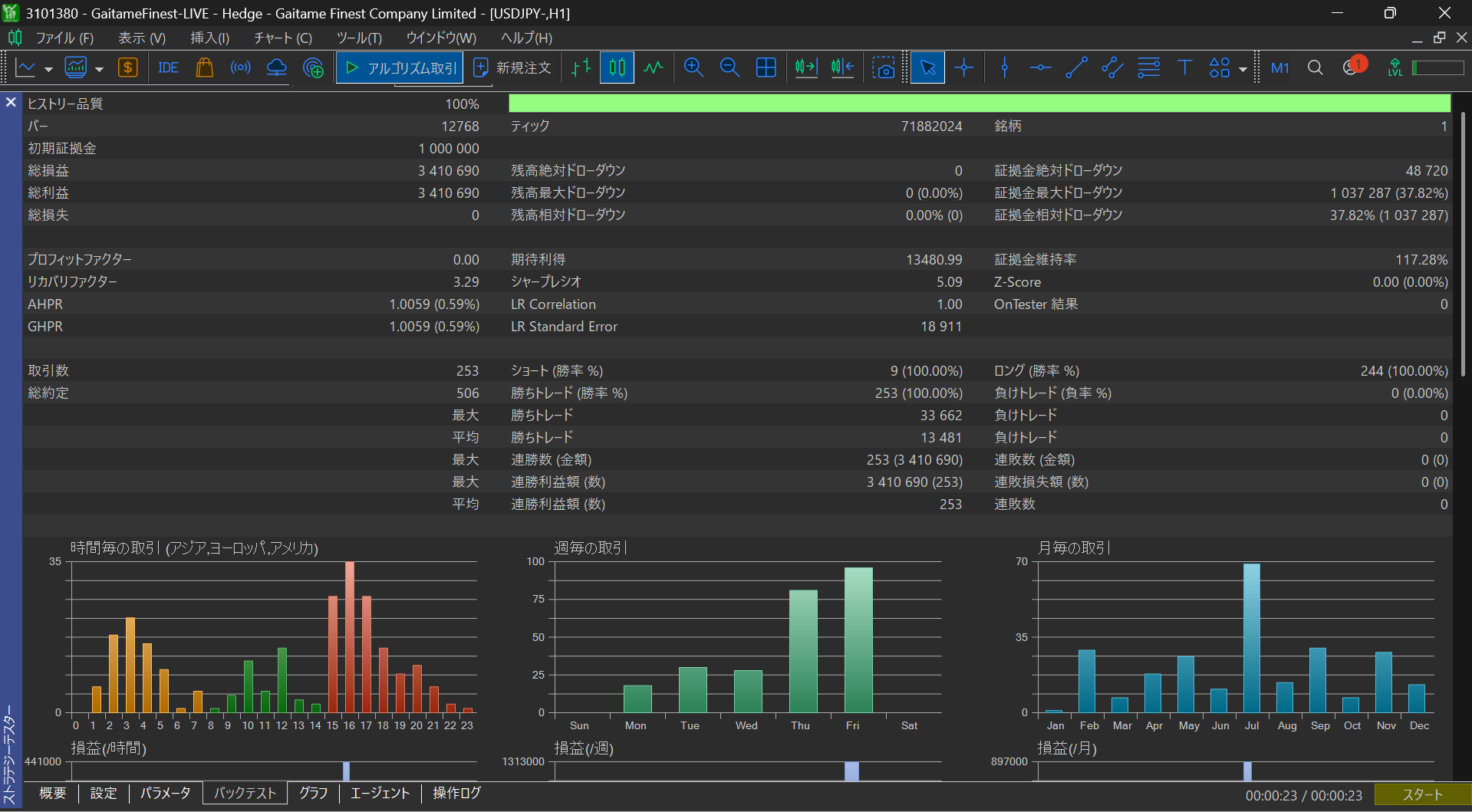
The figure above shows the backtest results using 100% history quality Forex Finest MT5 from September 1, 2023 to September 21, 2025
EA name: NLFix_Gaitame_USDJPY_Ver1.2
Initial margin: ¥1,000,000
PF:0.00(253 trades, 253 wins, 0 losses over 2 years)
RF:3.29
DD:37.82%
The main feature is News Lock Fix—a fixed-lot, single-position EA operating on simple interest.
And the automatic avoidance of important indicators around “News Lock,” plus the time-elapsed gradual narrowing of SL/TP width via “Time Compression Risk Management.”
While reducing exposure to sudden movements,ATR×Multiplierprovides a reasonable take-profit/stop-loss,BE(Break-Even)+Trailingkeeps profits. Entries arealigned via Short-term/Long-term MA×RSIto improve accuracy,Automatic Lot according to Risk%orFixed Lotcan be chosen. It also supports hedging (when broker allows) andscalping to day tradingfor agile operation.
Logic Overview
-
Trend × Momentum Fusion:Short-term MA and long-term MA advantages plus RSI thresholds help suppress excessive contrarian/ trend-following bias.
-
Exit Rationalization:
ATR×Multipliersets initial SL/TP →width is narrowed stepwise by Rate% as time passesto prevent large unrealized losses or delayed profit-taking. -
Profit Preservation:At a certain unrealized profit,BE activated、and thereafterTrailingis used to raise it.
-
Additional Entry (Optional):When the remaining distance to SL falls below a specified %multiply lot by a factorto press the advantageous position.
-
News Lock:Automatically avoids around the defined importance (★/★★/★★★) and the publication windowBefore/After. If needed,positions are automatically closed within the announcement window.
-
ATRMultiplier=76:SL/TP width=ATR×Multiplier(follows market volatility)
-
Fast/Slow MA=20 / 60,
RSI=73,
Overbought/Oversold=75/36,
TimeFrame=H1
-
RiskPercentage=1%:If Fixed Lot (Fix) is true, compounding is off, so default is simple interest.
-
BE:Break-Even
Activation=89pips / Confirm=56pips -
Trailing:
22Pips(Profit extension) -
Time Compression:
Interval=4080分(約68時間),Rate=70%(Each step reduces SL/TP width by ×0.7; new feature) -
News:
Importance=★★★,Before/After=60/60分,Close Within Window=ON (by default, no new entries 60 minutes before major indicators; if a position exists, forced close; new entries allowed 60 minutes after the indicator) -
Additional Entry:(Optional)
SlRatio%reaches,Lot×Multiplierwill be added (default false)
主なパラメータ(既定値と推奨目安)使いどころ
-
Wants to avoid the landmines of Employment Data and Key Officials’ StatementsUSDJPY trader
-
Conservatively manage risk while aiming to stack winsScalp to Day-trading operations
-
Automate stop/close before and after indicatorsto boost stability of automated operation
アピールポイント
-
ニュース耐性で大負けの芽を事前に遮断
-
時間圧縮+BE/TSで**“含み益を利益へ”を機械的に実行**
-
自動ロットで資金量に合わせた一貫リスク管理
-
両建て対応(ブローカー仕様に準拠)・最適化/バックテスト容易
※This EA does not guarantee future profits. We recommend parameter optimization and appropriate risk settings according to market conditions.

Why News is Dangerous (Market Microstructure)
-
Liquidity can thin out in an instant:Order book becomes sparse,spread widens・quotes may jump.
-
Price “jumps”:Ticks may be skipped、Stop/Limit orders fill at unexpected prices (slippage).gaps
-
Algo’s initial move:Fast algos rush in→fake breaksやwhipsawsになりやすい。
具体的な被害パターン
-
Spread widening例:USDJPYが平常0.2–0.4pips → 指標前後で2–10pips以上。成行/逆指値は即コスト増。
-
Slippage(slippage of) 10 pips on 1 lot (100k) USDJPY = about ¥10,000 of extra loss
-
Gap-fill execution価格が飛んで指値・逆指値が“飛び越え”、希望価格で約定しない。
-
Re-quotes/Order rejection最大許容スリッページを超えて注文エラー→入り直し時はさらに不利。
-
Forced stop-out急変で評価損が急拡大、証拠金維持率が急低下。
-
誤作動/過剰約定高波形のヒゲで連続約定→すぐ反転して損切りの連鎖。
-
相関崩れ普段の逆相関/正相関が壊れ、ヘッジが効かない。
-
ブローカー仕様変更「ニュース前はClose Only」「ストップレベル拡大」「証拠金率一時引上げ」等の一時ルールで戦略が崩れる。
よくある勘違い
-
「指標は大きく動く=儲かる」→方向とタイミングを外すと即死。
-
「SLがあるから大丈夫」→**ギャップでSLが“通過”**し、想定より大きく負ける。
-
「スキャルなら逃げ切れる」→約定遅延+広スプレッドでエッジが消える。
実務対策(裁量・EA共通)
-
取引停止ウィンドウ:重要度(★/★★/★★★)に応じて発表前後に停止(例:前60分/後60分)。
-
保有整理:発表跨ぎは建玉を軽く、もしくは全クローズ。(デフォルト全決済)
-
リスク%縮小:指標日はロット半減や最大損失上限を下げる。
-
逆指値の質:成行SL
-
ボラ連動:ATR連動SL/TP、トレーリングで過度な引っ張りを抑制。
-
カレンダー整合:タイムゾーン/夏時間ズレに注意(サーバー時刻基準で管理)。
-
ブローカー告知:指標日前の一時的ルール変更(証拠金率・最大数量等)を都度確認。
-
インフラ:低遅延VPS・安定回線で約定遅延や切断リスクを低減。
NLFix_Gaitame_USDJPY_Ver1.2で落とし穴完全回避!
-
Economic Indicator Filter:
EconomicFilter=true、重要度はEconomic3(★★★)EfStartTime/EfEndTimeを60–90分 -
Time Compression:
RiskReductionInterval=1740、RiskReductionRate=80でlong-term holding risk reduction。 -
BE/TS:
EnableBreakEven/EnableTrailingStop=trueでprofitization of unrealized gainsを自動化。 -
Additional Entry:
AddEntryはnews week OFF推奨。(Default OFF)
Economic news is more about execution quality risk than direction, and it is a event where losses can be dramatic. By embedding pre-stop, scaling down, and retreat rules into the system, you can automatically enforce “do not enter, let it run, exit quickly,” reducing drawdown frequency and depth at the same time.

Conclusion
MT5 has an official economic calendar API built in, while MT4 lacks an official API and relies on external sources, making implementation and maintenance difficult—this is the essence of the difference.── This is the core difference.
What’s different?
MT5 (easier)
Official API:
CalendarValueHistory / CalendarEventById / CalendarCountriesなどでimportance・currency・timeを直接取得Time alignment:server time with DSTを端末側で整合済み
Filtering:Importance(★/★★/★★★)、before/after windowなどをコードで即フィルタ
Maintainability:データ源がofficial・consistent formatなので壊れにくい
Why MT4 makes news avoidance difficult
No official API:WebRequest+external sitesや独自CSV/インジに依存
Configuration reliance:
WebRequestにはmanually register allowed URLsが必要、環境で失敗しがちFormats vary:JSON/HTML/CSV variations→パーサー実装・破損対応が必要
Time offset:server time, local, UTC, DSTの補正を自前実装
Reliability:rate limits・changes・downtimeで即死、保守コスト大
Practical Impact
Implementation time:MT5 requires only a few dozen lines, MT4 requires retrieval, parsing, and time-zone corrections
Stability:MT5 isrobust/MT4 isprone to break with external changes
Reproducibility:MT5 makes it easier toreproduce the same judgmentsin backtests and live trading
Notes: If doing this on MT4
Manual calendar stoppage for key events(EA flag)
When integrating external indicators/scripts, enforce URL permissions, DST corrections, and exception handling strictly・
As an alternative, use volatility indicators (e.g., ATR) for automatic stoppagein combination。
In short,MT5 is designed to connect directly to official data, making it simple and robust,MT4 requires aggregating external sources and is fragile, which is the crux of the difference.
Price: $251.61 (taxed)
¥39,800(taxed)
●Payment



Sales from : 10/06/2025 21:13
Price: $251.61 (taxed)
¥39,800(taxed)
●Payment
Just like discretionary trading, there are those that decide trading and settlement timings by combining indicators, those that repeatedly buy or sell at certain price (pips) intervals, and trading methods that utilize market anomalies or temporal features. The variety is as rich as the methods in discretionary trading.
To categorize simply,
・Scalping (Type where trades are completed within a few minutes to a few hours),
・Day Trading (Type where trades are completed within several hours to about a day),
・Swing Trading (Type where trades are conducted over a relatively long period of about 1 day to 1 week)
・Grid/Martingale Trading (Holding multiple positions at equal or unequal intervals and settling all once a profit is made. Those that gradually increase the lot number are called Martingale.)
・Anomaly EA (Mid-price trading, early morning scalping)
However, a substantial advantage of automated trading is its ability to limit and predict risks beforehand.
[Risk]
Inherent to forex trading are the trading risks that undeniably exist in automated trading as well.
・Lot Size Risk
Increasing the lot size forcibly due to a high winning rate can, in rare instances, depending on the EA, lead to substantial Pips loss when a loss occurs. It is crucial to verify the SL Pips and the number of positions held before operating with an appropriate lot.
・Rapid Market Fluctuation Risk
There are instances where market prices fluctuate rapidly due to index announcements or unforeseen news. System trading does not account for such unpredictable market movements, rendering it incapable of making decisions on whether to settle in advance or abstain from trading. As a countermeasure, utilizing tools that halt the EA based on indicator announcements or the VIX (fear index) is also possible.
[Benefits]
・Operates 24 hours a day
If there is an opportunity, system trading will execute trades on your behalf consistently. It proves to be an extremely convenient tool for those unable to allocate time to trading.
・Trades dispassionately without being swayed by emotions
There is an absence of self-serving rule modifications, a common human tendency, such as increasing the lot size after consecutive losses in discretionary trading or, conversely, hastily securing profits with minimal gains.
・Accessible for beginners
To engage in Forex trading, there is no prerequisite to study; anyone using system trading will achieve the same results.
[Disadvantages]
・Cannot increase trading frequency at will
Since system trading operates based on pre-programmed conditions, depending on the type of EA, it might only execute trades a few times a month.
・Suitability may vary with market conditions
Depending on the trading type of the EA, there are periods more suited to trend trading and periods more suited to contrarian trading, making consistent results across all periods unlikely. While the previous year might have yielded good results, this year's performance might not be as promising, necessitating some level of discretion in determining whether it is an opportune time to operate.
・MT4 (MetaTrader 4. An account needs to be opened with a Forex company that offers MT4.)
・EA (A program for automated trading)
・The operating deposit required to run the EA
・A PC that can run 24 hours or a VPS (Virtual Private Server), where a virtual PC is hosted on a cloud server to run MT4.
Additionally, there are both demo and real accounts available. You can experience trading with virtual money by applying for a demo account. After opening a real account, you select the connection server assigned by the Forex broker, enter the password, and log in to the account.
When you deposit money into your account using the method specified by the forex broker, the funds will be reflected in your MT4 account, and you can trade.
Firstly, download the purchased EA file from your My Page on GogoJungle. You will download a zip (compressed) file, so right-click to extract it and retrieve the file named ‘◯◯◯ (EA name)_A19GAw09 (any 8 alphanumeric characters).ex4’ from inside.
Next, launch MT4 and navigate to ‘File’ → ‘Open Data Folder’ → ‘MQL4’ → ‘Experts’ folder, and place the ex4 file inside. Once done, close MT4 and restart it. Then, go to the upper menu ‘Tools’ → ‘Options’, and under ‘Expert Advisors’, ensure ‘Allow automated trading’ and ‘Allow DLL imports’ are checked, then press OK to close.
The necessary currency pair and time frame for the correct operation of the EA are specified on the EA sales page. Refer to this information and open the chart of the correct currency pair time frame (e.g., USDJPY5M for a USD/Yen 5-minute chart).
Within the menu navigator, under ‘Expert Advisors’, you will find the EA file name you placed earlier. Click to select it, then drag & drop it directly onto the chart to load the EA. Alternatively, you can double-click the EA name to load it onto the selected chart.
If ‘Authentication Success’ appears in the upper left of the chart, the authentication has been successful. To operate the EA, you need to keep your PC running 24 hours. Therefore, either disable the automatic sleep function or host MT4 on a VPS and operate the EA.
If you want to use it with an account other than the authenticated one, you need to reset the registered account.
To reset the account, close the MT4 where the Web authentication is registered, then go to My Page on GogoJungle > Use > Digital Contents > the relevant EA > press the ‘Reset’ button for the registration number, and the registered account will be released.
When the account is in a reset state, using the EA with another MT4 account will register a new account.
Also, you can reset the account an unlimited number of times.
→ Items to Check When EA is Not Operating
1 lot = 100,000 currency units
0.1 lot = 10,000 currency units
0.01 lot = 1,000 currency units
For USD/JPY, 1 lot would mean holding 100,000 dollars.
The margin required to hold lots is determined by the leverage set by the Forex broker.
If the leverage is 25 times, the margin required to hold 10,000 currency units of USD/JPY would be:
10000*109 (※ at a rate of 109 yen per dollar) ÷ 25 = 43,600 yen.
・Risk-Return Ratio: Total Profit and Loss during the period ÷ Maximum Drawdown
・Maximum Drawdown: The largest unrealized loss during the operation period
・Maximum Position Number: This is the maximum number of positions that the EA can theoretically hold at the same time
・TP (Take Profit): The set profit-taking Pips (or specified amount, etc.) in the EA's settings
・SL (Stop Loss): The set maximum loss pips (or specified amount, etc.) in the EA's settings
・Trailing Stop: Instead of settling at a specified Pips, once a certain profit is made, the settlement SL is raised at a certain interval (towards the profit), maximizing the profit. It is a method of settlement.
・Risk-Reward Ratio (Payoff Ratio): Average Profit ÷ Average Loss
・Hedging: Holding both buy and sell positions simultaneously (Some FX companies also have types where hedging is not allowed)
・MT4 Beginner's Guide
・Understanding System Trading Performance (Forward and Backtesting)
・Choosing Your First EA! Calculating Recommended Margin for EAs
・Comparing MT4 Accounts Based on Spread, Swap, and Execution Speed
・What is Web Authentication?
・Checklist for When Your EA Isn't Working