BBHL band H1 for CJ

- Whole period
- 2 years
- 1 year
- 6 months
- 3 months
- 1 month
About EA's Strategy
This " BBHL band H1 for CJ is an EA for Canadian Dollar Yen (CADJPY) that uses the daily Bollinger Bands (BB) and the highest and lowest price lines of the last few days and dozens of days to trade using short-term ups and downs.
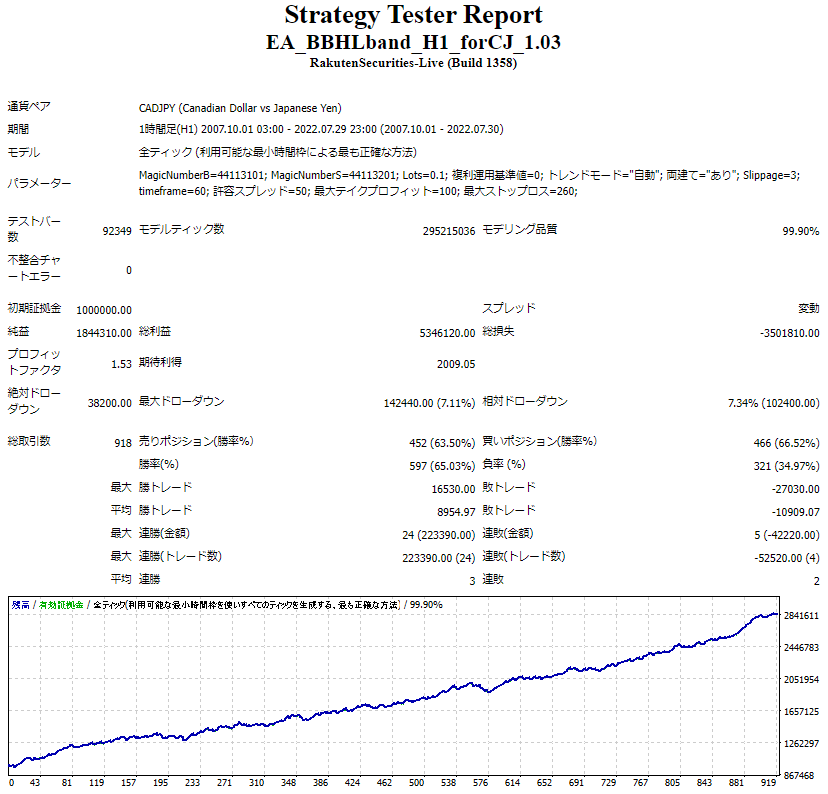
BBHL band H1 (Integrated Edition )", an integrated version of the BBHL band H1 series that also includes this EA (for the currency pairs AUDJPY, NZDJPY, CADJPY, GBPJPY, USDJPY, EURJPY, GBPUSD, EURUSD, EURGBP, AUDNZD, GBPCHF) AUDNZD, GBPCHF) is also available.EA is set up to judge whether the market price is settling within a certain price range (range trend) or whether a trend is occurring based on the BB and the highest and lowest price lines, and to determine whether a trend is occurring or not. If the market is stable, it is range-based (sell when the market is above the price range, buy when the market is below the price range). When an upward or downward trend is occurring, we trade on a trend-following basis (i.e., we follow the trend while aiming for a slight price return), aiming for short- or medium-term price movements up or down. By setting the stop-loss line with the lowest or highest price in the last few days or dozens of days in mind, we try to reduce stop-losses and improve profit and win rates. For entry timing, we use the logic of "BB break+ H1 for GJ" ( EA here ) to enter on short-term BB breaks to reduce unintentional entries and to enter only when expectations are high. Please refer to this article, " Key Points of BBHL band H1 Series Trade Logic," which explains the trade logic of this EA in a little more detail. # Fixed operation (no compounding operation) The following are the results of a test conducted from 01/01/2007 to 07/30/2022 on a 10,000 currency trade (1 position, but may be both positions). Profit factor is 1.53, win rate is 65.0%, and profit is about 1.84 million yen. (Re-measured using Dukascopy's Tick Data in Tick Data Suite (TDS)) *For more details, click here. <1/01/2007 - 07/30/2022
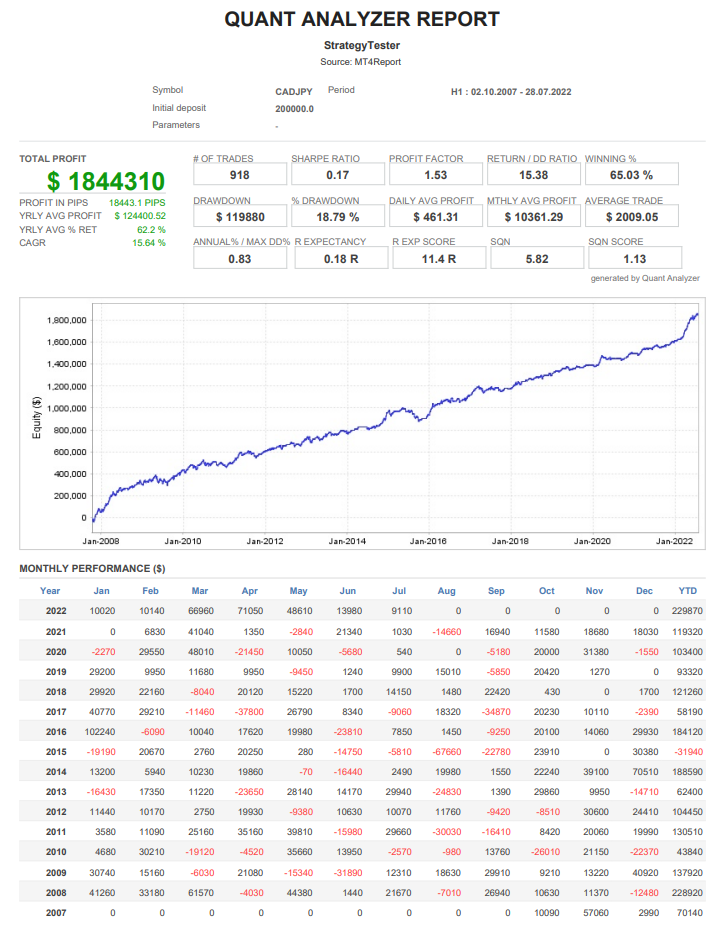
 QUANT ANALYZER REPORT :
The following is the QUANT ANALYZER REPORT.
(The figures are in US dollars ($), but the unit is yen.)
 #Compound interest operation available
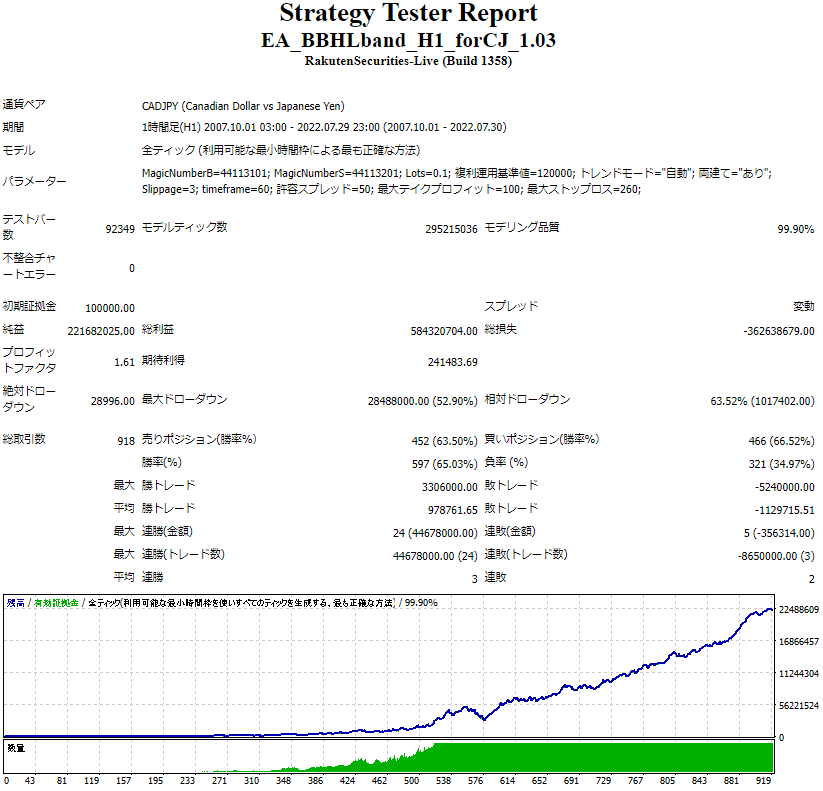
Using the compound operation mode (compound operation threshold = 120,000), simulation results show that if the operation starts in 2007/01 with 100,000 yen in margin, it will exceed 10 million yen in 2013/05, about 6.5 years later, and 100 million yen in 2018/05, about 11.5 years later.
*The detailsare uploaded here under "Back Test Result when Compound Interest Operation is Effective ".
Started with 100,000 yen in January 2007
Over 1,000,000 yen in October 2009
Over 10 million yen in May 2013
May 2018, over 100 million yen (*Compound interest operation is limited to about 25 million yen due to the upper limit of one position)
<January 1, 2007 - July 30, 2022
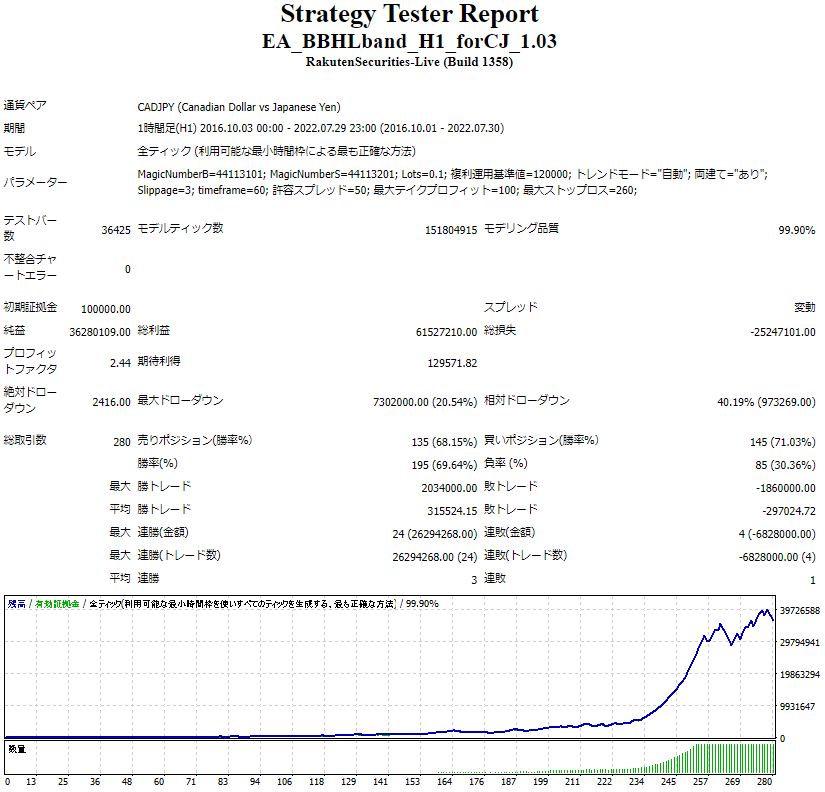
 Even if the operation starts on 01/01/2016, the simulated result will exceed 10 million yen by 2022/03, about 6.5 years later.
Started with 100,000 yen in 2016.01/01
October 2019.10, over 1 million yen
In 2022.03, over 10 million yen
<2016/01/01~2022/07/30
 !!!!! Caution !!!!!
When compounding, if you encounter a losing streak, you can lose all your money at once.
Be careful not to raise your threshold too high!
EA settings, etc.
This EA operates on an hourly basis.
Entry and close decisions are made using only data that has already been determined on the 1-hour time frame.
Since the entry is made based on the already determined conditions, the difference between the back test and the actual operation is minimized.
Please change only the following parameters as necessary.
| parameter | Contents |
|---|---|
| MagicNumberB | This is the magic number for a buy position. Basically, you don't need to change it, but if you want to use this EA for multiple trades in the same currency, please change it for each of them. |
| MagicNumberS | This is the magic number for the sell position. Basically, you do not need to change this number, but if you are going to run this EA in the same currency, please change it for each currency. |
| Lots | The number of lots to order. The default is 10,000 currency (0.1), please adjust according to your budget. |
| Compound interest operation threshold | Enter the base amount for compounding. To disable compounding (fix the number of lots to the Lots setting), set 0. The default value is 200,000 yen (=200,000). |
| Allowable Spread | Specify how far you will allow the spread to widen. If the spread widens beyond this value, the entry will be held back. |
| trend mode | Set "Automatic," "Long," or "Short." Long" will trade only buy trades, and "Short" will trade only sell trades. Automatic" will trade both buy and sell. |
| maximum stop loss | Set the maximum stop loss value (specified in pips), which is valid only when set to a value greater than 10 and less than or equal to 1000, and the range between the order value at the time of entry and the stop value is within the specified value. (However, since the Stop value is determined based on the Open value at the time of entry, the Stop value may be exceeded if entry is delayed.) The default value is 260 (=conventional operation). |
| Maximum Take Profit | Set the maximum take profit value (specified in pips), which is valid only when the value is greater than 10 and less than or equal to 1000, and the range of the settlement limit price from the order value at the time of entry is within the specified value. (However, since the settlement limit price is determined based on the open price at the time of entry, it may be exceeded if entry is delayed.) *The initial value is 100 (=conventional operation). |
Other SeSe items on display h ttps://www.gogojungle.co.jp/users/60058 Blog article " Introducing SeSe's EAs by category" Revision History == Ver1.03 == The parameter "Maximum Take Profit" was added, and the maximum take profit value (specified in pips) can be set. For details, please refer to the explanation of the parameter "Maximum Take Profit" above. Re-adjusted internal parameters (re-measured using Dukascopy's Tick Data and adjusted some parameters). == Ver1.02 == The parameter "Maximum Stop Loss" was added, and the maximum stop loss value (specified by pips value) can be set. For details, please refer to the explanation of the parameter "Maximum Stop Loss" above. Internal parameters were fine-tuned. == Ver1.01 == Settlement logic was added. Logic to change the stop loss when unrealized profit exceeds a certain level is added. Review of parameters Changed the initial value of the compound interest operation threshold from 120000 -> 200000. etc. == Ver1.00 == Newly created. ■Other Notes and Cautions When installing EA, please also install the included library file (OrderLib.ex4). Please place it in the following location in the MT4 data folder. . \MQL4\Libraries\OrderLib.ex4 Before using the EA, please display the 4-hour, daily, weekly, and monthly charts of the target currency pair. (This is because this EA uses chart information other than the hourly chart, so it is necessary to import such information.) Please note that the EA developer will not compensate for any losses incurred by the user, including those caused by the defects. (Of course, we will work quickly to solve the problem when it is discovered.) This product does not guarantee profits. There may be differences between back and forward tests and actual operations.