This item is not currently on sale.
【優待】PEACE(MT5用)(21737購入者様専用無料版)

Sales performance 359 Book
Review ★ 0.0
(0)
Expert Advisors
MetaTrader 5
Sales from
2/18/2021
Last Updated At
3/5/2024
Version
4.11
My Profile
FirstPips合同会社- Whole period
- 2 years
- 1 year
- 6 months
- 3 months
- 1 month
Profit
:
0JPYProfit Factor
:
0.00Rate of return risk
?
:
0Average Profit
:
0JPYAverage Loss
:
0JPYBalance
?
:
1,000,000JPYRate of return (all periods) ?
:
0%Win Rate
:
0%
(0/0)
Maximum Position
?
:
0Maximum Drawdown
?
:
0%
(0JPY)
Maximum Profit
:
0JPYMaximum Loss
:
0JPYRecommended Margin
?
:
0JPYUnrealized P/L
:
0JPYDeposit
?
:
1,000,000JPYCurrency
:
JPY- Account
Operable Brokers
Usable with MT5-adopting brokers.
Real Performance
※Displays results including swaps and fees
Forward testing (Profit)
Product Statistics
Product Comments
Monthly Statistics
2026
2025
2024
2023
2022
- Jan
- Feb
- Mar
- Apr
- May
- Jun
- Jul
- Aug
- Sep
- Oct
- Nov
- Dec
Calendar for Months
About EA's Strategy
Translating...
Currency Pairs
[AUD/CAD]
Trading Style
[Scalping]
[Day Trading]
[Swing Trading]
[Position Trading]
Maximum Number Position
11
Maximum Lot
10
Chart Time Frame
M15
Maximum Stop Loss
0
Take Profit
10
Straddle Trading
Yes
Application Type
Metatrader Auto Trading
Other File Usages
No
PEACE MT4 version free for purchasers only!
Version up information!
PEACE V3.0
Added BTC and Gold to the supported stocks.
(Short-term trading recommended due to large one-way price movements)
What is PEACE?
P・・・Personal
E・・・Exchange
A・・・A・・Automatic
C. Capital
E・・・Equalizer (Average method)
PEACE executes its investments using the purchase price averaging method (nan-pinning), which is used in various fixed-term mutual funds and insurance products.
It was designed to take advantage of the benefits of Forex to enable both inexperienced and experienced traders to make a real investment starting at 10,000 yen.
*When starting with a margin of 10,000 yen, please pay attention to leverage.
For those who have an image of FX as being dangerous because of the risk of additional payments in the event of a loss, or because it seems too difficult to handle, or because it has nothing to do with them, we have created the following "FX" system to help you. insurance investment productBy trying to reproduce in FX a method similar to the FX as one of the asset management optionsWe hope that you are aware that there is an option to
When considering EA as an investment, we believe that users can better improve the quality of their investment if they understand the characteristics, features, and risks of EA. In order to understand how assets increase, it is necessary to understand the entry and settlement logic, but PEACE has a simple logic that even inexperienced FX traders can easily understand. PEACE has a simple logic that even inexperienced traders can easily understand.
In addition, the parameters can be freely configured, allowing users to create their own unique Purchase Price Averaging MethodologyThis allows us to create a This allows the users to be even more convinced andQuality InvestmentWe believe that activities can be carried out.
PEACE offers a high degree of freedom with no restrictions on currency pairs, so you can make ultra-short-term investments and long-term investments targeting interest rates (swaps) on high-interest currencies. Broad range of investment strategiesThe product is capable of realizing the following
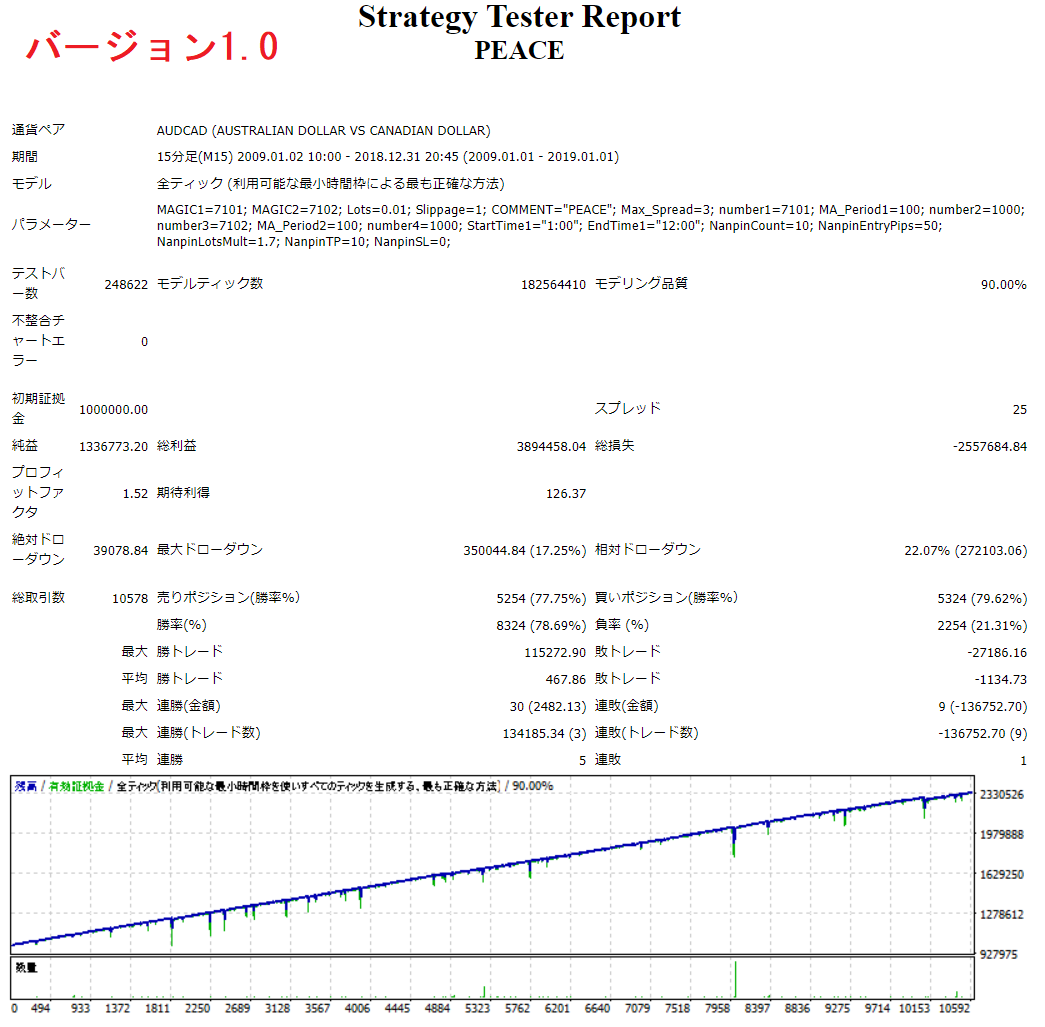
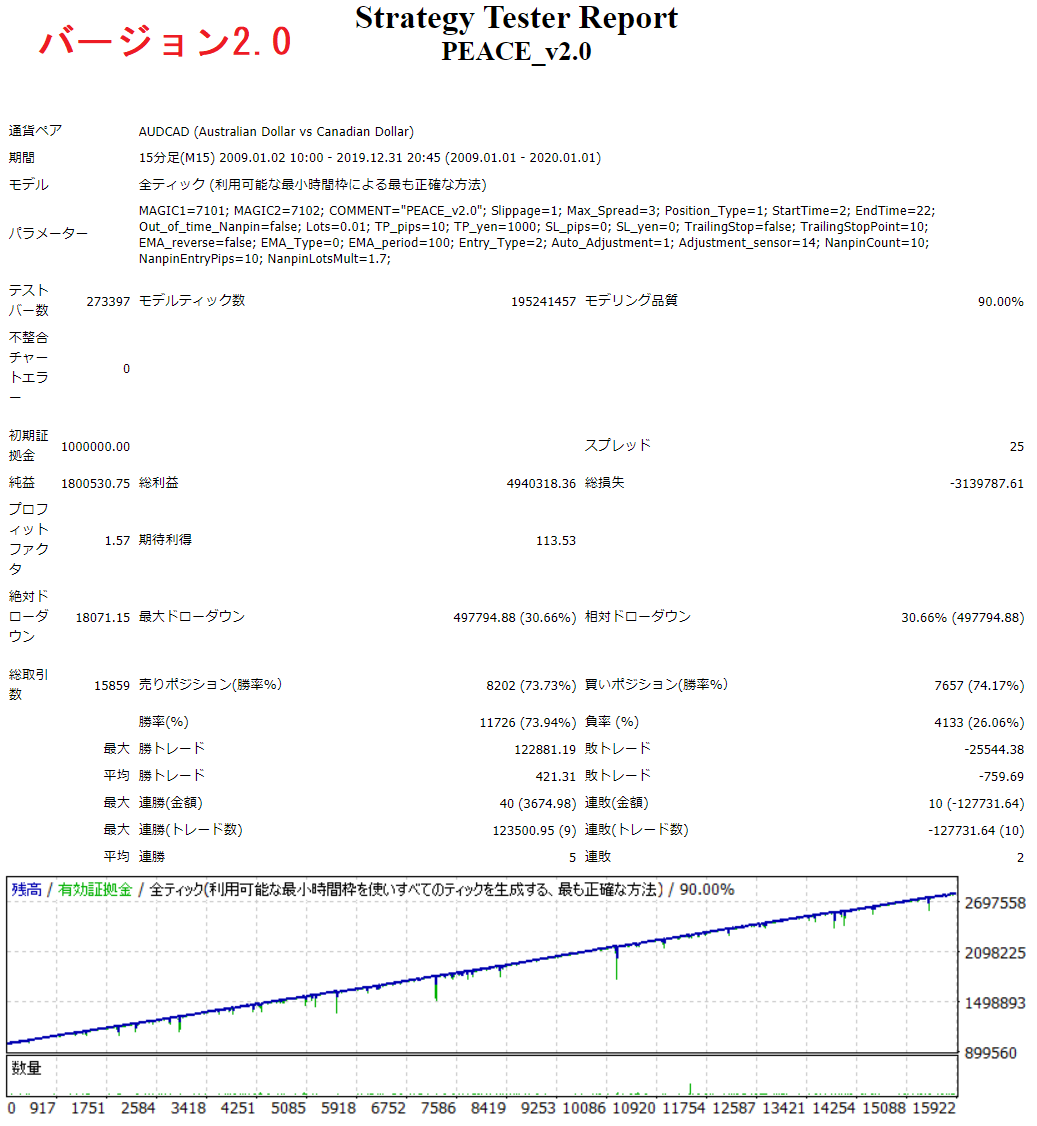
This PEACE is basically an automated trading software that aims for 1,000,000 yen to 1,100,000 yen, not an EA that aims for 100,000 yen to 1,000,000 yen.
Logic Introduction
PEACE is an EA whose main logic is to use a pick-and-pin strategy. We will introduce its logic using the initial settings (recommended currency pair AUDCAD/optimized settings based on verification using past charts for the period 2009.1.1.1-2020.1.1) as an example.
[Version 1
After setting up the EA, a new entry is executed in the direction of the trend using the exponential moving average (EMA). If the current value is above the 100 EMA, a buy entry is made; if the current value is below the 100 EMA, a sell entry is made. The trade is usually closed at +10 pips, but by repeating additional entries in the same direction at intervals of -50 pips at 1.7 times the initial lot size, it is possible to buy more when the price is low and sell more when the price is high. By buying more when it is low and selling more when it is high, the purchase price can be averaged, resulting in a higher profit margin.
In the case of the conventional method of settling with the total pips gained, the larger the quantity of pips held, the larger the price must be returned before settlement can be made, so the following is a simple way of settling with a specified amount of 1,000 yen (or dollars). By settling at the specified amount of 1,000 yen (or dollars) Shallow push." The logic is designed to allow you to close the hand while making a profit by
If you have installed version 2 or later EA, you can go back to version 1 by loading the version 1 set file.
[Version 2
After the EA is set up, entry is made using our original logic (a contrarian method using the ADX as an oscillator).
The settlement logic is the same as in version 1, but the number pin interval is unique. Auto-adjust function." The program is optimized and executed by the
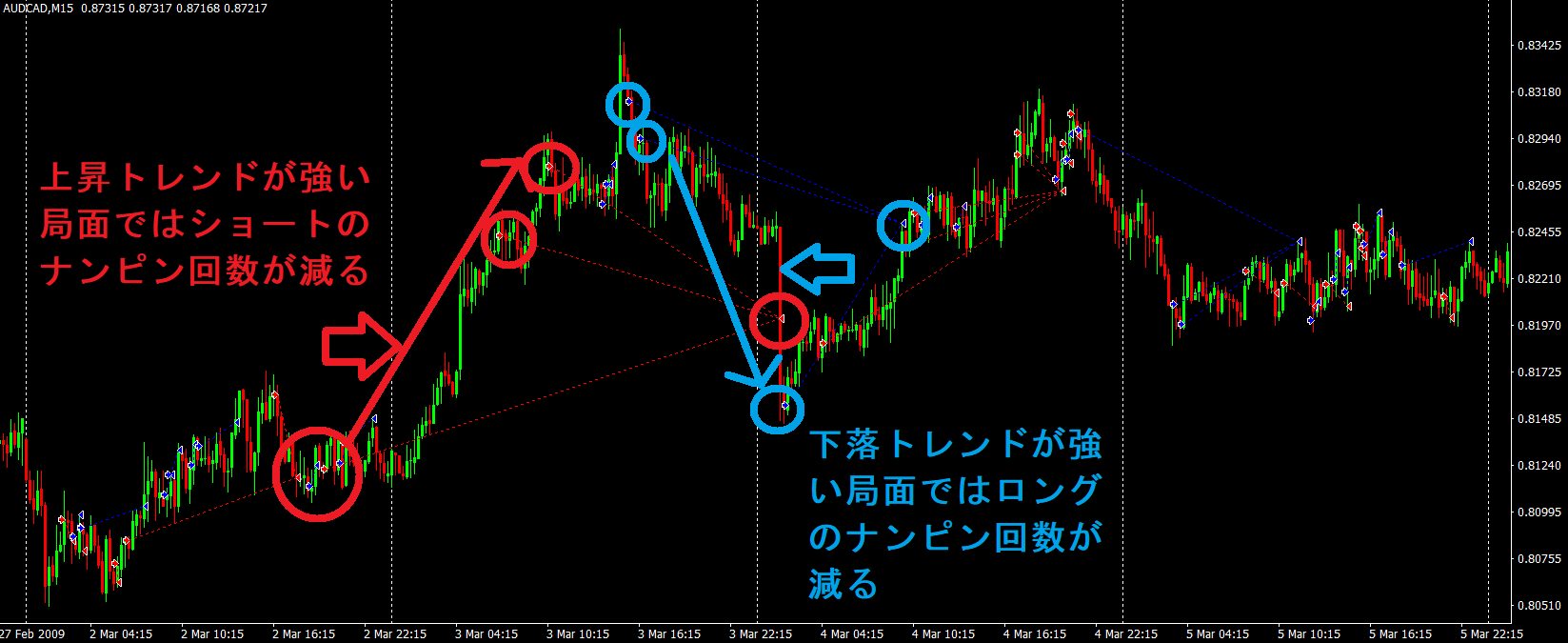
The auto-adjust function does not have a fixed range for the interval between two picks, but instead widens the interval when the trend is strong in the opposite direction of the position held, and executes picks when the trend is in a rebound phase. When the trend is strong in the opposite direction of the position held, the interval becomes wider, and when it is judged to be in a rebound phase, the system executes a counter move.
The sensitivity of the auto-adjust function can be easily optimized, so for currency pairs with large price movements, increasing the value reduces the sensitivity to judging a rebound phase. For currency pairs with large price movements, increasing the value will reduce the sensitivity of judging that the market is in a rebound phase and widen the interval for pick-and-pin.
[Version 3
Parameter Change (Nanpin Interval).
Additional supported issues:XAUUSD GOLD BTCUSD BTCJPY
The pips are calculated as follows
Gold: 0.1 usd → 1.0 pips
Bitcoin: 10 usd (1,000 jpy) → 1.0 pips
v3.1
Changed to 5 minutes
Since the PEACE logic is very simple, there is relatively little divergence between back and forward tests, making it easy to optimize the parameters.
We hope that you will use the settings that you are comfortable with.
Logic Explanation
Here we will explain the entry (new and additional) and settlement (normal and closing) logic of PEACE.
■Entry
(1) Decisions based on moving averages
The exponential moving average (hereinafter referred to as EMA) is used to make entries in accordance with the market trend. When the current value is above the EMA, it is considered to be in an uptrend, and when the current value is below the EMA, it is considered to be in a downtrend, and a new entry is made in the trend direction. If the parameter setting EMA_reverse is set to true, a short position is held when the price is above the EMA and a long position is held when the price is below the EMA.
(2) Decisions based on proprietary logic (select mode)
This method uses the ADX as an oscillator, and when the ADX line (the line indicating the strength of the trend) is not showing a trend, and the D+ or D- line is rising, it is judged as overbought or oversold, and a reverse entry is made. When the ADX line (which indicates the strength of the trend) does not indicate a trend, but the D+ or D- line rises, it is judged to be overbought or oversold, and a reverse entry is made.
(3) Available entry times
New entries are made within the entry time range set in the parameter settings. However, nanpin will be executed even outside of the specified time, but if Out Of Time Nanpin is set to false, nanpin will not be executed outside of the specified time.
(4) Judgment by the candlestick displayed
Only one new entry can be made within the displayed time leg.
(5) Spread filter, slippage filter
This function is to refrain from entry when there is a sudden spread fluctuation or slippage widening. When the spread is greater than the set value, no new or additional entries or settlements will be made.
(5) Additional Entries
Additional entries are made every specified interval (pips) within the specified number of times from the new entry, and in the specified multiplier quantity (lot.). *The interval will not be narrower than the specified width when using the Auto Adjust mode.
■Settlement Logic
Normal settlement by ①Take profit (TP_Pips)
When the specified number of pips is reached, the profit settlement will be made. For example, if you set 10 pips, the settlement will be made at +5,000 yen when holding 0.5 lot (50,000 currency).
(2) Normal settlement by stop loss (SL_Pips)
When the specified number of pips is reached, the stop-loss settlement is executed.
(iii) Settlement of hand by amount (TP_profit or SL_profit)
Settlement is made when the specified amount (unit of account currency, yen) is reached. By default, settlement is made when unrealized profit of 1,000 yen on one side is reached.
If you set the settlement logic value to 0, the settlement logic will not be applied. For example, if 0 is entered for TP_Pips, no profit will be taken in pips, but only in TP_profit.
Parameter settings (initial values in parentheses)
MAGIC 1 "7101"
This is the number for the EA to recognize the position when it runs. If you want to set up the same EA for the same currency pair, enter a different number. This is the magic number for a buy position.
MAGIC2 "7102"
Ibid. Here is the magic number for the sell position.
COMMENT "PEACE_v2.0
You can give it a name so that you know that this EA has operated it. This makes it easier to understand when you look at the history.
Slippage "1"
This is the slippage width (pips) allowed at the time of entry. If the slippage exceeds this value, the entry will not be made.
Max_Spread "5
The maximum spread (pips) allowed for entry. If this value is exceeded, no entry will be made.
Position_Type "Long_Short
STOP: No new entry will be made (used when you want to stop the EA from running). Long_Short: both buy and sell, Long: buy order only, Short: sell order only.
StartTime "2".
The start time to allow new entries, which is the time in MT4.
EndTime "22".
This is the time in MT4 at which new entries are allowed.
Out_of_time_Nanpin "false
Permission to take a napin position outside of the entry time limit; not allowed in case of false.
Lots "0.01"
The quantity of the first position to be held. We recommend 0.01 lot (1,000 currency) per 1,000,000 yen account balance for money management.
MM "false"
Compound interest feature ON (true) & OFF (false).
Base_Leverage "0.1
Leverage of the initial position. Example: Margin 1,000,000 yen, 0.01 lot with Base_Leverage 0.1
TP_pips "10
Set this to 0 to disable the profit margin setting.
TP_yen "1000
If the profit/loss of a position held exceeds this value, a hand settlement will be made. 0 will invalidate the settlement. For dollar-denominated accounts, it is in dollars.
SL_pips "0
The setting for the width of the stop-loss margin. 0 disables it.
SL_yen "0"
If the profit/loss of a position held becomes less than this value, it will be closed out. If the value is set to 0, it is invalid. To specify, enter "-10000" or the like. For dollar-denominated accounts, the value is in dollars.
TrailingStop "false".
Trailing stop allowed; not allowed if false.
TrailingStopPoint "10".
Valid when trailing stop is true. Width pips to execute trailing stop.
EMA_reverse "false
Whether to hold the position in the opposite direction of the EMA; in the case of true, the opposite is true.
EMA_Type "current
EMA time frame settings.
EMA_period "100
The number of EMAs to determine the trend. 0 means no EMAs are used.
Entry_Type "select".
The entry timing always allows you to always hold a position without timing it. select is a "contrarian strategy using the ADX as an oscillator".
Entry_period "20
Period used for ADX entry logic
Auto_Adjustment "true
Whether to use the auto adjust mode or not; if set to false, it will not be used and thus nanpin will be executed at the fixed width set in NanpinEntryPips. If set to true, the Nanpin interval will be adjusted automatically, but it will never be smaller than the width set in NanpinEntryPips.
Adjustment_sensor "14"
Sensitivity of the Auto Adjust mode. Basically, the larger the value, the wider the nanpin interval, and the smaller the value, the narrower.
Nanpin_interbal_hour "3"
Time to take the next position.
NanpinCount "10"
You can set the maximum number of times you want to do a number pin.
NanpinEntryPips "20
You can set the interval (pips) between additional positions; if Auto_Adjustment is set to use, it will be the minimum width of the nanpin interval.
NanpinLotsMult "1.7"
This is the setting for how many times the quantity of the previous position to take an additional position.
Below is a detailed analysis of the results. (To be updated as needed)
Back test results and configuration files for multiple currency pairs can be downloaded here. (for MT4)
https://www.gogojungle.co.jp/tools/ebooks/25118
Analysis results by QuantAnalizer (v2.1)
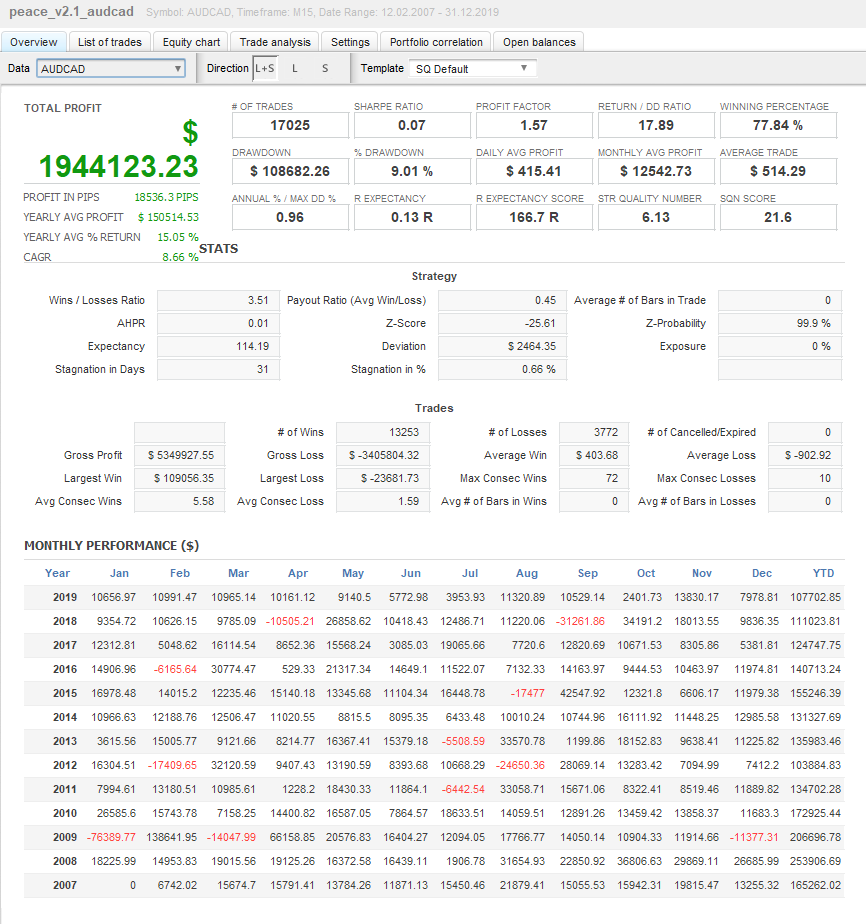
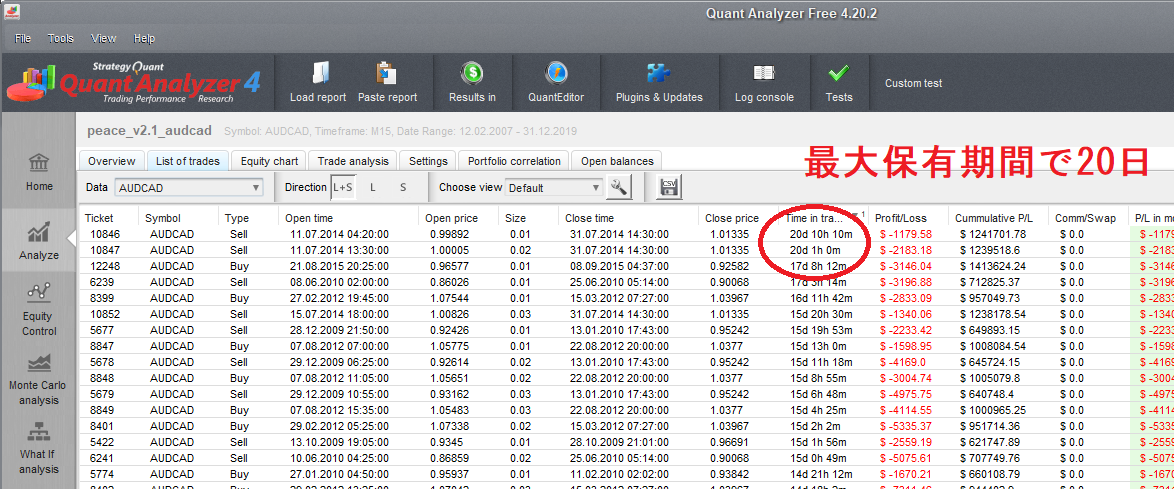
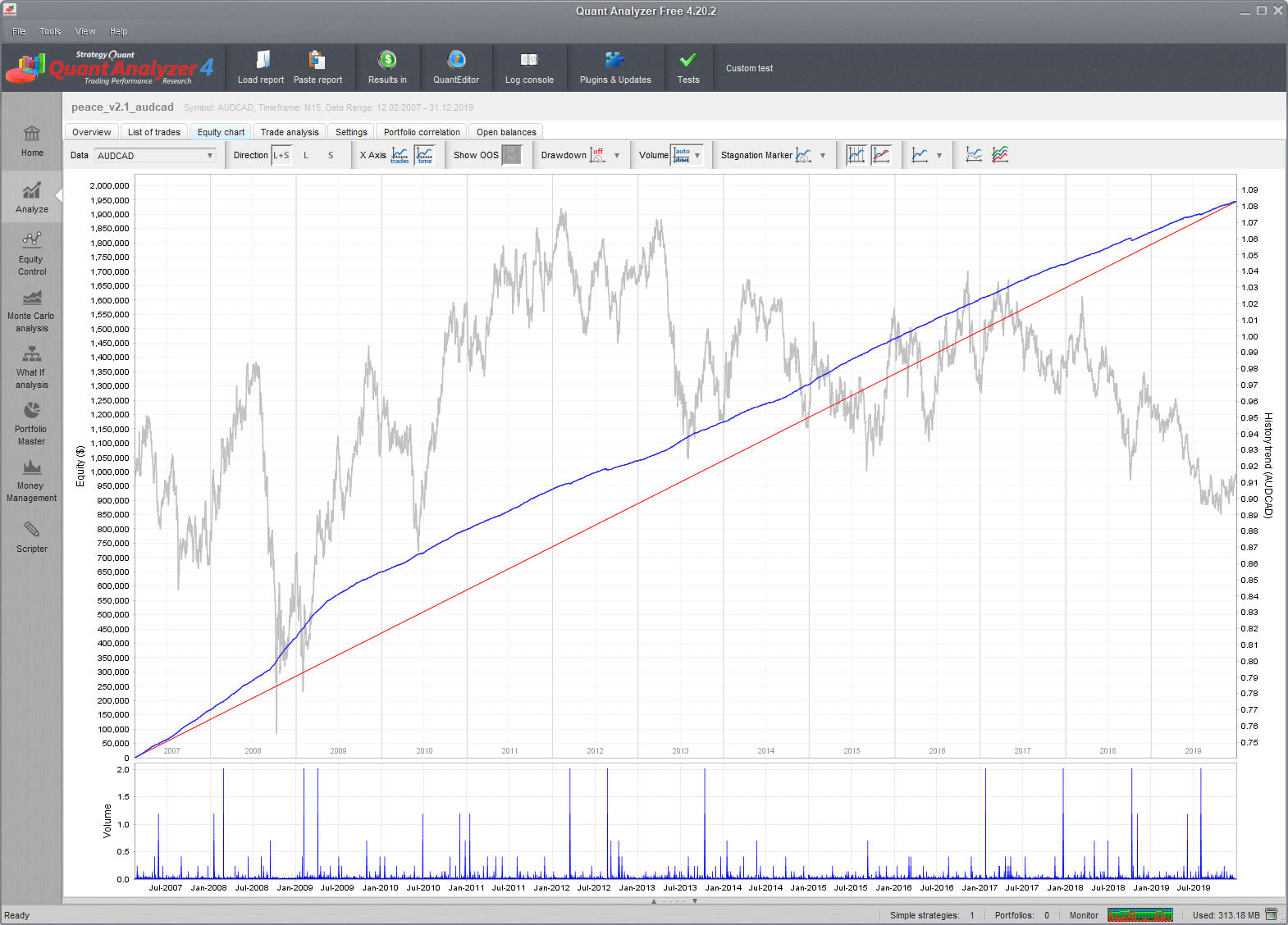
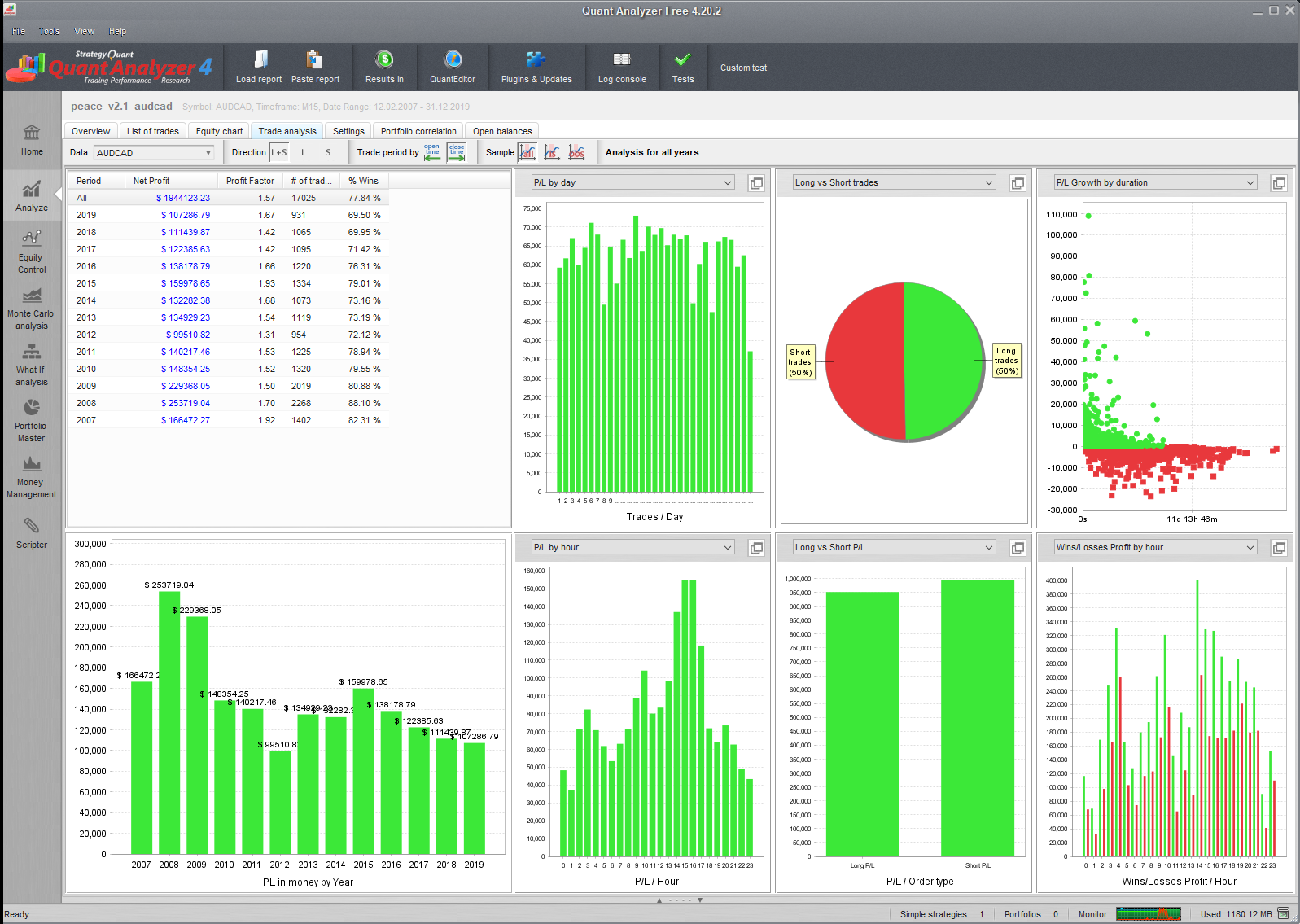
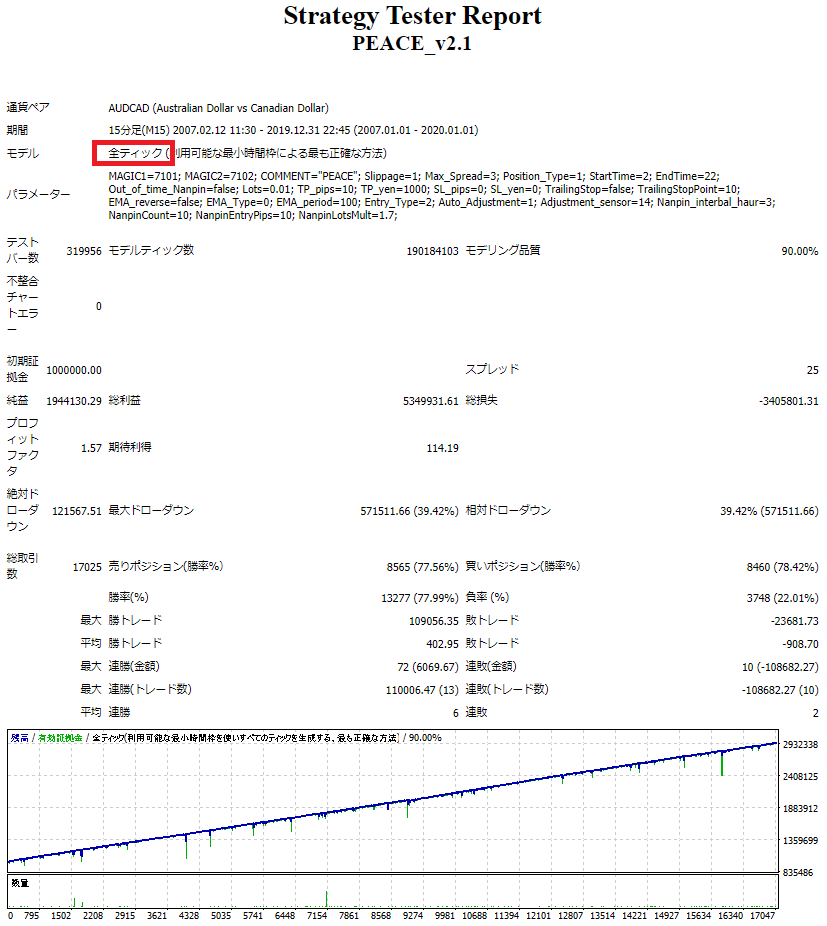
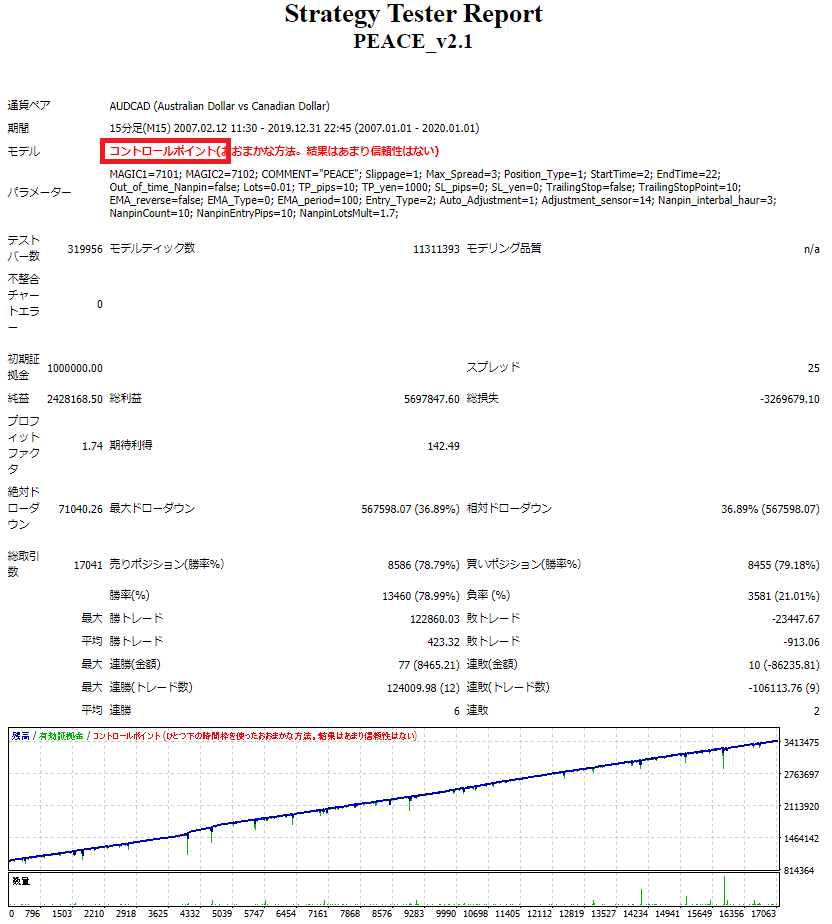
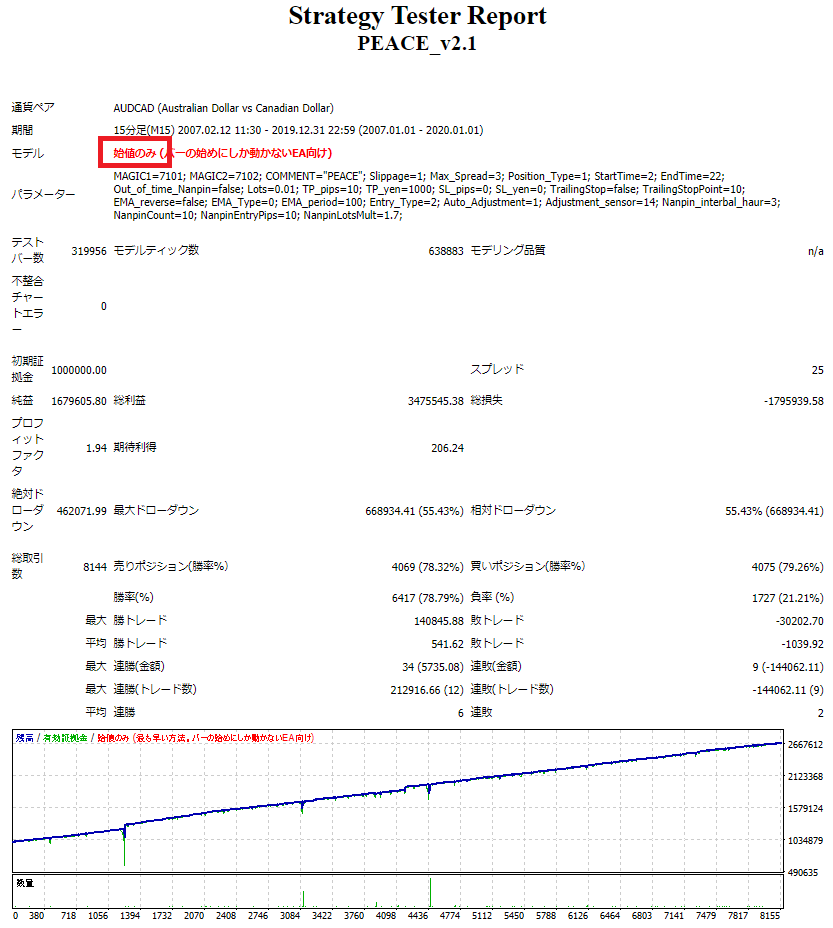
Changes by strategy tester model (v2.1)
Backtesting with opening prices is not suitable for verification due to its unreliability and requires verification at the control point at a minimum.
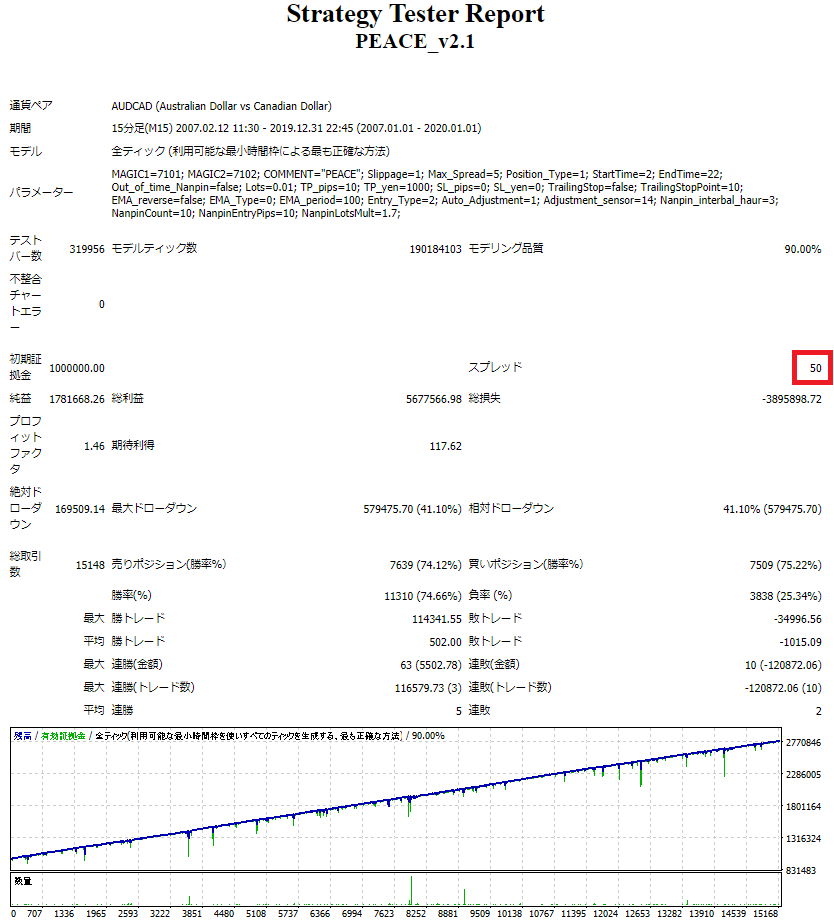
Check spread tolerance (v2.1)
Spread tolerance is adequate and can be used with a wide range of vendors.
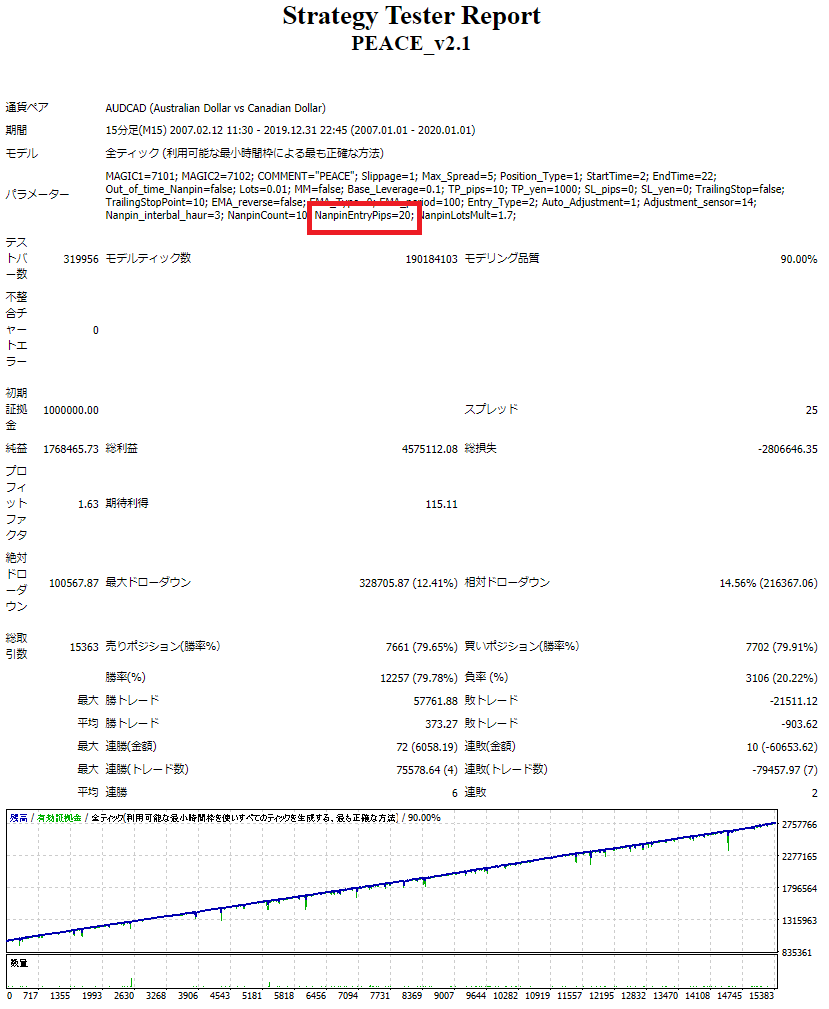
Changes due to parameter nanpin interval adjustment (v2.1)
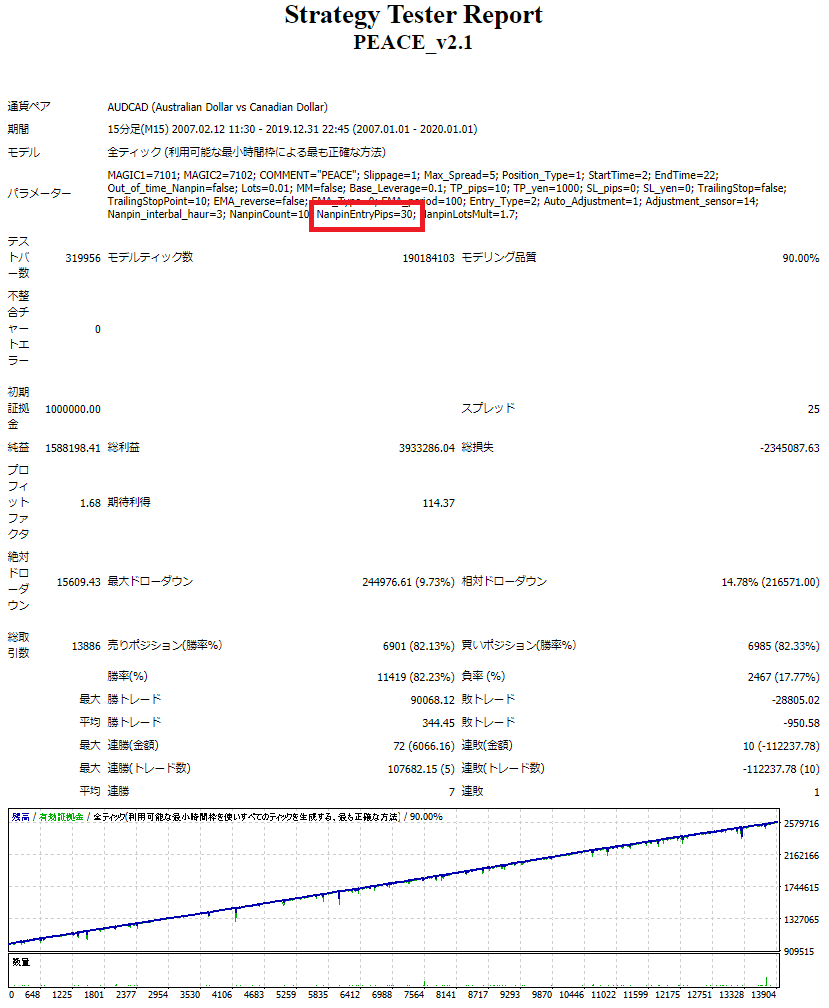
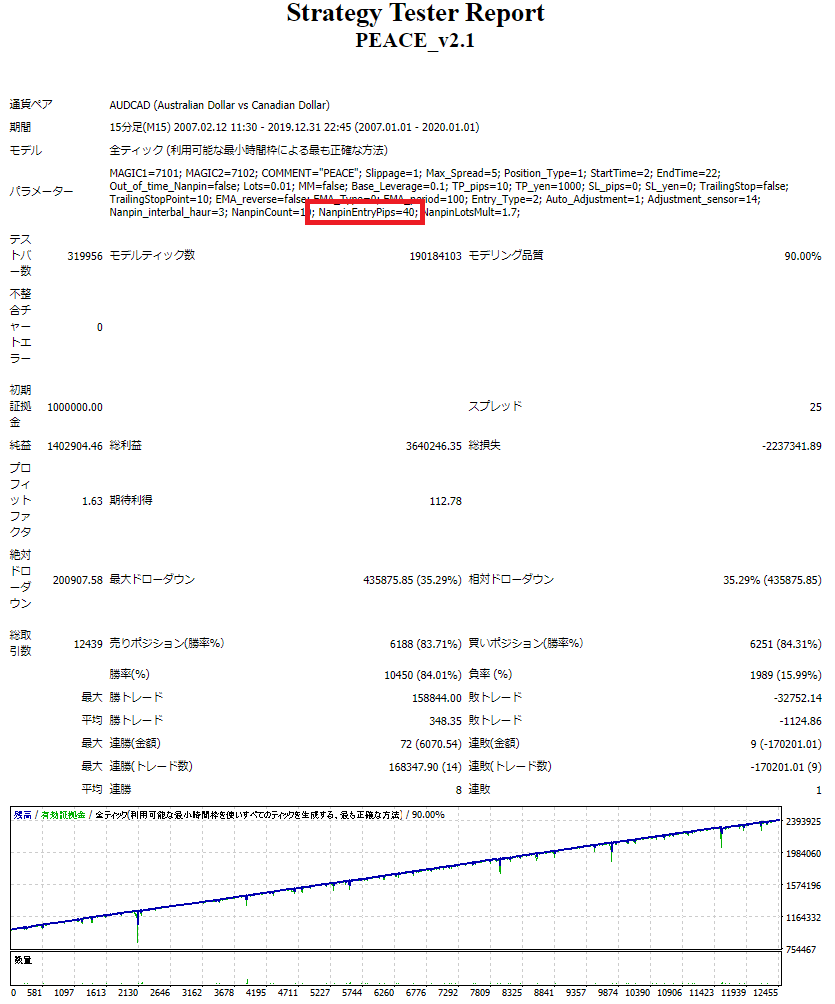
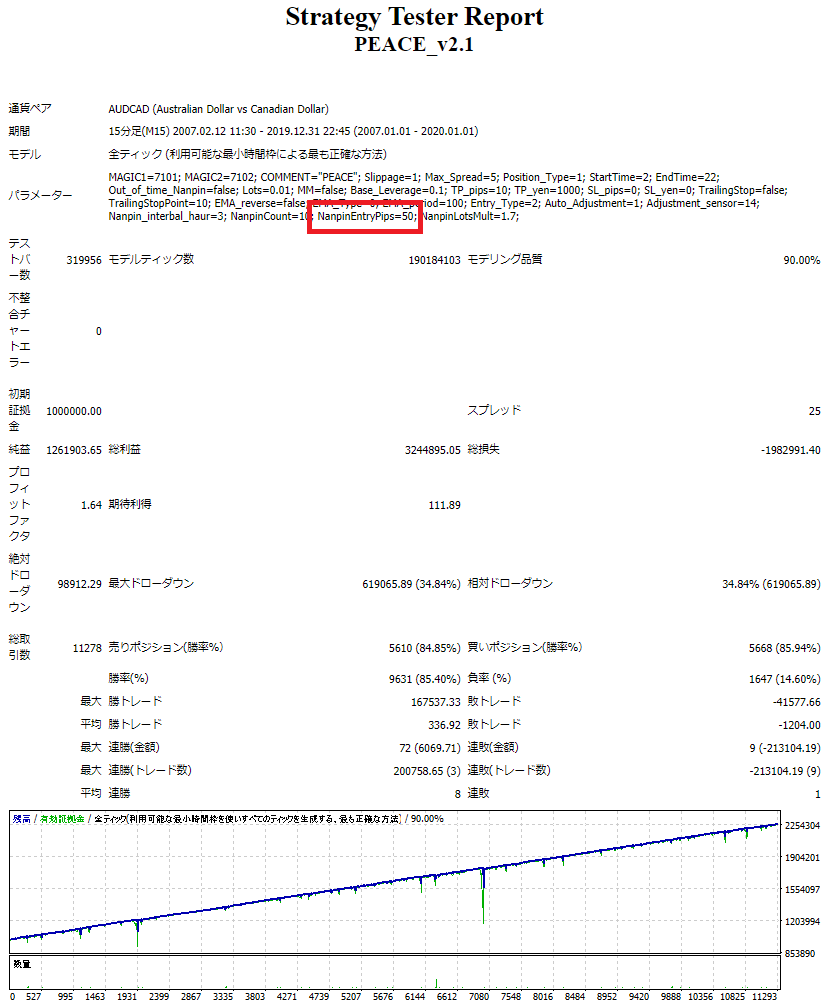
The 30 pips nanpin interval is considered suitable for operations with low drawdowns and risk avoidance. The profit-oriented setting is 10 pips, and the intermediate type is 20 pips. The 40+ pips interval is good for fixed-width pick-and-pin with low recovery.
Changes due to adjust sensor adjustment (v2.1)
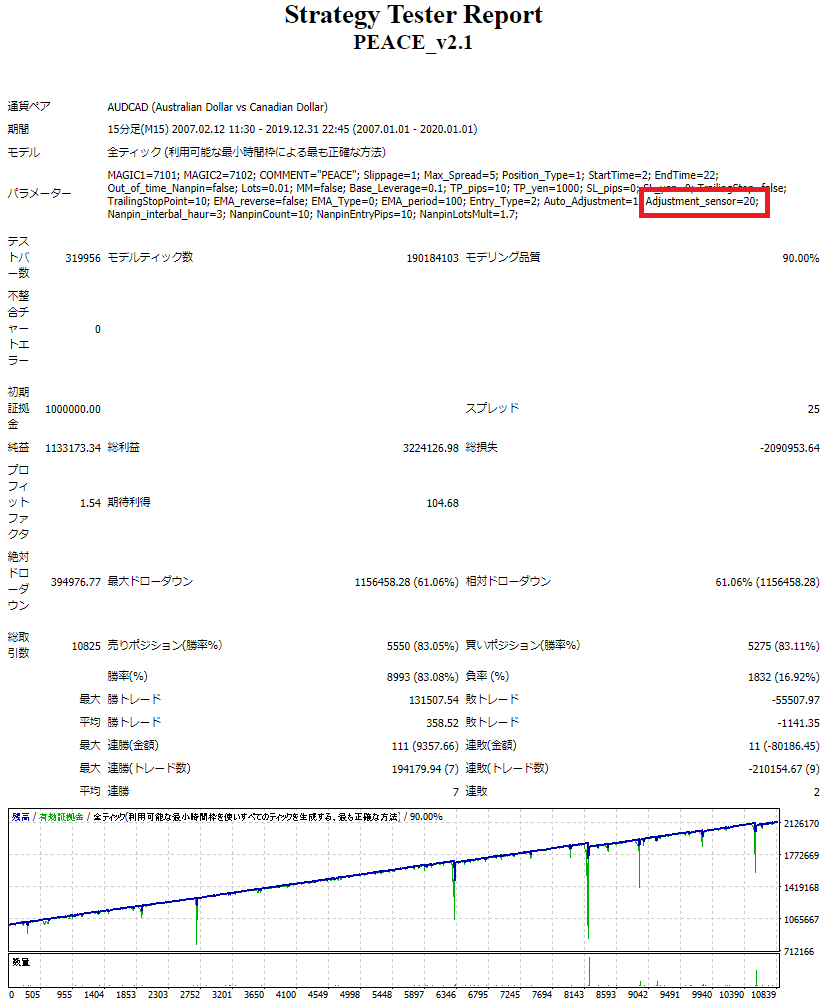
Default setting is "14". It can be used during optimization to perform curve fitting. Increasing the number increases the sensitivity and widens the interval between pick-and-pins, but be careful not to increase the number too much, as this will reduce the recovery power. In the AUDCAD back test, setting the number to 20 resulted in a decrease in recovery and an increase in drawdowns.
Sales from
:
02/18/2021 03:48
Purchased
:
359
times
Price: Free
Provider/Distributor:
Sales site:
GogoJungle
●Payment



Forward Test
Back Test
Sales from : 02/18/2021 03:48
Purchased
:
359
times
Price: Free
Provider/Distributor:
Sales site:
GogoJungle
●Payment
About Forex Automated Trading
What is Forex Automated Trading (MT4 EA)?
Forex Automated Trading refers to trading that is automated through programming, incorporating predetermined trading and settlement rules. There are various methods to conduct automated trading, but at GogoJungle, we deal with Experts Advisors (hereinafter referred to as EA) that operate on a trading platform called MT4.
Trading Types of Forex Automated Trading
There are various types of EAs (Expert Advisors) for different trading types that can be used on MT4.
Just like discretionary trading, there are those that decide trading and settlement timings by combining indicators, those that repeatedly buy or sell at certain price (pips) intervals, and trading methods that utilize market anomalies or temporal features. The variety is as rich as the methods in discretionary trading.
To categorize simply,
・Scalping (Type where trades are completed within a few minutes to a few hours),
・Day Trading (Type where trades are completed within several hours to about a day),
・Swing Trading (Type where trades are conducted over a relatively long period of about 1 day to 1 week)
・Grid/Martingale Trading (Holding multiple positions at equal or unequal intervals and settling all once a profit is made. Those that gradually increase the lot number are called Martingale.)
・Anomaly EA (Mid-price trading, early morning scalping)
Just like discretionary trading, there are those that decide trading and settlement timings by combining indicators, those that repeatedly buy or sell at certain price (pips) intervals, and trading methods that utilize market anomalies or temporal features. The variety is as rich as the methods in discretionary trading.
To categorize simply,
・Scalping (Type where trades are completed within a few minutes to a few hours),
・Day Trading (Type where trades are completed within several hours to about a day),
・Swing Trading (Type where trades are conducted over a relatively long period of about 1 day to 1 week)
・Grid/Martingale Trading (Holding multiple positions at equal or unequal intervals and settling all once a profit is made. Those that gradually increase the lot number are called Martingale.)
・Anomaly EA (Mid-price trading, early morning scalping)
Risks, Advantages, and Disadvantages of Forex Automated Trading
When engaging in Forex, there are risks in automated trading just as there are in discretionary trading.
However, a substantial advantage of automated trading is its ability to limit and predict risks beforehand.
[Risk]
Inherent to forex trading are the trading risks that undeniably exist in automated trading as well.
・Lot Size Risk
Increasing the lot size forcibly due to a high winning rate can, in rare instances, depending on the EA, lead to substantial Pips loss when a loss occurs. It is crucial to verify the SL Pips and the number of positions held before operating with an appropriate lot.
・Rapid Market Fluctuation Risk
There are instances where market prices fluctuate rapidly due to index announcements or unforeseen news. System trading does not account for such unpredictable market movements, rendering it incapable of making decisions on whether to settle in advance or abstain from trading. As a countermeasure, utilizing tools that halt the EA based on indicator announcements or the VIX (fear index) is also possible.
[Benefits]
・Operates 24 hours a day
If there is an opportunity, system trading will execute trades on your behalf consistently. It proves to be an extremely convenient tool for those unable to allocate time to trading.
・Trades dispassionately without being swayed by emotions
There is an absence of self-serving rule modifications, a common human tendency, such as increasing the lot size after consecutive losses in discretionary trading or, conversely, hastily securing profits with minimal gains.
・Accessible for beginners
To engage in Forex trading, there is no prerequisite to study; anyone using system trading will achieve the same results.
[Disadvantages]
・Cannot increase trading frequency at will
Since system trading operates based on pre-programmed conditions, depending on the type of EA, it might only execute trades a few times a month.
・Suitability may vary with market conditions
Depending on the trading type of the EA, there are periods more suited to trend trading and periods more suited to contrarian trading, making consistent results across all periods unlikely. While the previous year might have yielded good results, this year's performance might not be as promising, necessitating some level of discretion in determining whether it is an opportune time to operate.
However, a substantial advantage of automated trading is its ability to limit and predict risks beforehand.
[Risk]
Inherent to forex trading are the trading risks that undeniably exist in automated trading as well.
・Lot Size Risk
Increasing the lot size forcibly due to a high winning rate can, in rare instances, depending on the EA, lead to substantial Pips loss when a loss occurs. It is crucial to verify the SL Pips and the number of positions held before operating with an appropriate lot.
・Rapid Market Fluctuation Risk
There are instances where market prices fluctuate rapidly due to index announcements or unforeseen news. System trading does not account for such unpredictable market movements, rendering it incapable of making decisions on whether to settle in advance or abstain from trading. As a countermeasure, utilizing tools that halt the EA based on indicator announcements or the VIX (fear index) is also possible.
[Benefits]
・Operates 24 hours a day
If there is an opportunity, system trading will execute trades on your behalf consistently. It proves to be an extremely convenient tool for those unable to allocate time to trading.
・Trades dispassionately without being swayed by emotions
There is an absence of self-serving rule modifications, a common human tendency, such as increasing the lot size after consecutive losses in discretionary trading or, conversely, hastily securing profits with minimal gains.
・Accessible for beginners
To engage in Forex trading, there is no prerequisite to study; anyone using system trading will achieve the same results.
[Disadvantages]
・Cannot increase trading frequency at will
Since system trading operates based on pre-programmed conditions, depending on the type of EA, it might only execute trades a few times a month.
・Suitability may vary with market conditions
Depending on the trading type of the EA, there are periods more suited to trend trading and periods more suited to contrarian trading, making consistent results across all periods unlikely. While the previous year might have yielded good results, this year's performance might not be as promising, necessitating some level of discretion in determining whether it is an opportune time to operate.
Equipment and Environment Needed for Automated Trading Operation
The requirements for operating automated trading (EA) on MT4 are as follows:
・MT4 (MetaTrader 4. An account needs to be opened with a Forex company that offers MT4.)
・EA (A program for automated trading)
・The operating deposit required to run the EA
・A PC that can run 24 hours or a VPS (Virtual Private Server), where a virtual PC is hosted on a cloud server to run MT4.
・MT4 (MetaTrader 4. An account needs to be opened with a Forex company that offers MT4.)
・EA (A program for automated trading)
・The operating deposit required to run the EA
・A PC that can run 24 hours or a VPS (Virtual Private Server), where a virtual PC is hosted on a cloud server to run MT4.
Installation of MT4 and Account Login
If you open an account with a forex broker that supports MT4, you can use MT4 as provided by that forex broker. MT4 is a stand-alone type of software that needs to be installed on your computer, so you download the program file from the website of the FX company where you opened the account and install it on your computer.
Additionally, there are both demo and real accounts available. You can experience trading with virtual money by applying for a demo account. After opening a real account, you select the connection server assigned by the Forex broker, enter the password, and log in to the account.
When you deposit money into your account using the method specified by the forex broker, the funds will be reflected in your MT4 account, and you can trade.
Additionally, there are both demo and real accounts available. You can experience trading with virtual money by applying for a demo account. After opening a real account, you select the connection server assigned by the Forex broker, enter the password, and log in to the account.
When you deposit money into your account using the method specified by the forex broker, the funds will be reflected in your MT4 account, and you can trade.
How to Install EA on MT4
To set up an EA when you purchase it through GogoJungle, follow the steps below:
Firstly, download the purchased EA file from your My Page on GogoJungle. You will download a zip (compressed) file, so right-click to extract it and retrieve the file named ‘◯◯◯ (EA name)_A19GAw09 (any 8 alphanumeric characters).ex4’ from inside.
Next, launch MT4 and navigate to ‘File’ → ‘Open Data Folder’ → ‘MQL4’ → ‘Experts’ folder, and place the ex4 file inside. Once done, close MT4 and restart it. Then, go to the upper menu ‘Tools’ → ‘Options’, and under ‘Expert Advisors’, ensure ‘Allow automated trading’ and ‘Allow DLL imports’ are checked, then press OK to close.
The necessary currency pair and time frame for the correct operation of the EA are specified on the EA sales page. Refer to this information and open the chart of the correct currency pair time frame (e.g., USDJPY5M for a USD/Yen 5-minute chart).
Within the menu navigator, under ‘Expert Advisors’, you will find the EA file name you placed earlier. Click to select it, then drag & drop it directly onto the chart to load the EA. Alternatively, you can double-click the EA name to load it onto the selected chart.
If ‘Authentication Success’ appears in the upper left of the chart, the authentication has been successful. To operate the EA, you need to keep your PC running 24 hours. Therefore, either disable the automatic sleep function or host MT4 on a VPS and operate the EA.
Firstly, download the purchased EA file from your My Page on GogoJungle. You will download a zip (compressed) file, so right-click to extract it and retrieve the file named ‘◯◯◯ (EA name)_A19GAw09 (any 8 alphanumeric characters).ex4’ from inside.
Next, launch MT4 and navigate to ‘File’ → ‘Open Data Folder’ → ‘MQL4’ → ‘Experts’ folder, and place the ex4 file inside. Once done, close MT4 and restart it. Then, go to the upper menu ‘Tools’ → ‘Options’, and under ‘Expert Advisors’, ensure ‘Allow automated trading’ and ‘Allow DLL imports’ are checked, then press OK to close.
The necessary currency pair and time frame for the correct operation of the EA are specified on the EA sales page. Refer to this information and open the chart of the correct currency pair time frame (e.g., USDJPY5M for a USD/Yen 5-minute chart).
Within the menu navigator, under ‘Expert Advisors’, you will find the EA file name you placed earlier. Click to select it, then drag & drop it directly onto the chart to load the EA. Alternatively, you can double-click the EA name to load it onto the selected chart.
If ‘Authentication Success’ appears in the upper left of the chart, the authentication has been successful. To operate the EA, you need to keep your PC running 24 hours. Therefore, either disable the automatic sleep function or host MT4 on a VPS and operate the EA.
In Case You Want to Change the Account in Use
EAs from GogoJungle can be used with one real account and one demo account per EA.
If you want to use it with an account other than the authenticated one, you need to reset the registered account.
To reset the account, close the MT4 where the Web authentication is registered, then go to My Page on GogoJungle > Use > Digital Contents > the relevant EA > press the ‘Reset’ button for the registration number, and the registered account will be released.
When the account is in a reset state, using the EA with another MT4 account will register a new account.
Also, you can reset the account an unlimited number of times.
If you want to use it with an account other than the authenticated one, you need to reset the registered account.
To reset the account, close the MT4 where the Web authentication is registered, then go to My Page on GogoJungle > Use > Digital Contents > the relevant EA > press the ‘Reset’ button for the registration number, and the registered account will be released.
When the account is in a reset state, using the EA with another MT4 account will register a new account.
Also, you can reset the account an unlimited number of times.
Solutions for Errors During Web Authentication or Non-Functional Account Trading
If you encounter an error with Web authentication, or if the EA is trading on GogoJungle's forward performance page but not on your own account, there could be various reasons. For more details, please refer to the following link:
→ Items to Check When EA is Not Operating
→ Items to Check When EA is Not Operating
About the Size of Trading Lots
In Forex trading, the size of a lot is usually:
1 lot = 100,000 currency units
0.1 lot = 10,000 currency units
0.01 lot = 1,000 currency units
For USD/JPY, 1 lot would mean holding 100,000 dollars.
The margin required to hold lots is determined by the leverage set by the Forex broker.
If the leverage is 25 times, the margin required to hold 10,000 currency units of USD/JPY would be:
10000*109 (※ at a rate of 109 yen per dollar) ÷ 25 = 43,600 yen.
1 lot = 100,000 currency units
0.1 lot = 10,000 currency units
0.01 lot = 1,000 currency units
For USD/JPY, 1 lot would mean holding 100,000 dollars.
The margin required to hold lots is determined by the leverage set by the Forex broker.
If the leverage is 25 times, the margin required to hold 10,000 currency units of USD/JPY would be:
10000*109 (※ at a rate of 109 yen per dollar) ÷ 25 = 43,600 yen.
Glossary of Automated Trading
・Profit Factor: Total Profit ÷ Total Loss
・Risk-Return Ratio: Total Profit and Loss during the period ÷ Maximum Drawdown
・Maximum Drawdown: The largest unrealized loss during the operation period
・Maximum Position Number: This is the maximum number of positions that the EA can theoretically hold at the same time
・TP (Take Profit): The set profit-taking Pips (or specified amount, etc.) in the EA's settings
・SL (Stop Loss): The set maximum loss pips (or specified amount, etc.) in the EA's settings
・Trailing Stop: Instead of settling at a specified Pips, once a certain profit is made, the settlement SL is raised at a certain interval (towards the profit), maximizing the profit. It is a method of settlement.
・Risk-Reward Ratio (Payoff Ratio): Average Profit ÷ Average Loss
・Hedging: Holding both buy and sell positions simultaneously (Some FX companies also have types where hedging is not allowed)
・Risk-Return Ratio: Total Profit and Loss during the period ÷ Maximum Drawdown
・Maximum Drawdown: The largest unrealized loss during the operation period
・Maximum Position Number: This is the maximum number of positions that the EA can theoretically hold at the same time
・TP (Take Profit): The set profit-taking Pips (or specified amount, etc.) in the EA's settings
・SL (Stop Loss): The set maximum loss pips (or specified amount, etc.) in the EA's settings
・Trailing Stop: Instead of settling at a specified Pips, once a certain profit is made, the settlement SL is raised at a certain interval (towards the profit), maximizing the profit. It is a method of settlement.
・Risk-Reward Ratio (Payoff Ratio): Average Profit ÷ Average Loss
・Hedging: Holding both buy and sell positions simultaneously (Some FX companies also have types where hedging is not allowed)
Useful related pages
・How to Install MT4 EA (Expert Advisor) and Indicators
・MT4 Beginner's Guide
・Understanding System Trading Performance (Forward and Backtesting)
・Choosing Your First EA! Calculating Recommended Margin for EAs
・Comparing MT4 Accounts Based on Spread, Swap, and Execution Speed
・What is Web Authentication?
・Checklist for When Your EA Isn't Working
・MT4 Beginner's Guide
・Understanding System Trading Performance (Forward and Backtesting)
・Choosing Your First EA! Calculating Recommended Margin for EAs
・Comparing MT4 Accounts Based on Spread, Swap, and Execution Speed
・What is Web Authentication?
・Checklist for When Your EA Isn't Working