Financial business operator Kanto Finance Bureau Director (Financial) No.1960/Member Association Japan Investment Advisers Association Member Number 012-02324
The basic usage is to use the 1-minute dollar/yen chart.
Although the charts are mainly for the dollar-yen, some of them are also applicable to other currency pairs such as EUR/JPY, AUD/JPY, and cross-yen currencies, so you can find the stop-loss, take-profit, and time settings for each currency pair.
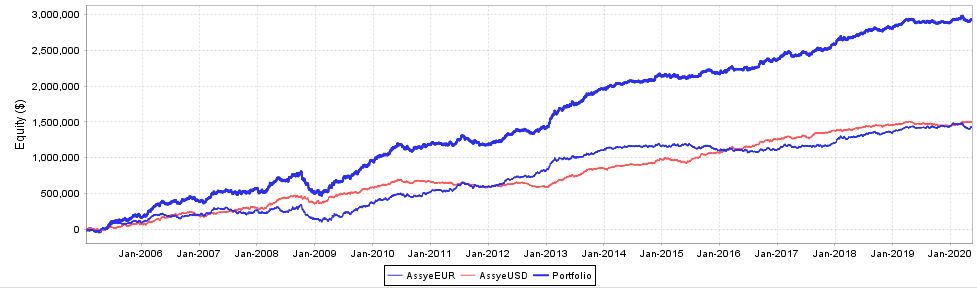
The performance will be measured in dollar-yen and euro-yen.
Two files are included, one for Dollar Yen and the other for Euro Yen.
(The logic is the same with only the initial parameter values changed.)
Reference Earnings graph backtest results for a portfolio with Dollar Yen and Euro Yen 2005.1.10-2020.5.15
(For Euroyen, Euroyen reference settings are used)
Spread Dollar Yen 0.8 PIPS Euro Yen 1.0 PIPS
Back Test Video
<Trigger
Using the Bollinger Bands as a trigger, the trader predicts the direction of the trend and enters the market when the trend is expected to push in the direction of his/her definition of the trend and reverse. The direction of the trend is filtered by the basic logic, and entry is made only when the basic logic and Bollinger Band indicators match.
<Trading
When a certain profit/loss value is reached, the market is closed. By default, the maximum stop loss is 55 PIPS for the buy side and 50 PIPS for the sell side.
Maximum Take Profit Buy 45 PIPS Sell 60 PIPS
By default, settlement is performed at a set time each day.
The take profit and stop loss values can be changed to your own desired values by setting parameters.
The win rate is about 50-60%.
Until the market turns toward this EA, there are times when you may feel a little stress because you may have to withdraw from the market early, but the idea is to be patient and secure a profit when the market turns toward this EA and eventually leave a margin profit.
The purpose of the trail is not to increase profits, but rather to reduce the stress of losing money when the market was profitable, and this system is better suited to fixing profits at the initial setting.
<Number of positions
In principle, the default number of positions is set to one, but it is possible to have multiple positions by setting the parameters.
The win rate does not change much even if you increase the number of positions, so it is recommended that you consider the risk, lower the lot size, and increase the number of positions. However, since compound interest can be set, I personally would not use a single position and increase or decrease the lot size automatically. However, since it is possible to compound interest by using the settings, I personally think it is easier and safer to have a single position and have the lot size increase or decrease automatically.
<EA Development Concept
I received a hint of the logic from an acquaintance of mine, Mr. Assche, a pastry chef, and tried to make it into an EA.
The idea behind the EA was not to aim for large profits, but to create something simple and stable over a long period of time, using the same technical techniques that everyone has been using for a long time. I thought that this was the secret to creating a system that would work over a long period of time.
Although there are periods of poor performance in back-testing, the investment style is to accept both good times and bad times in order to achieve long-term performance, and to accumulate marginal gains as a result.
We also wanted to add the fun of customizing the system to suit each person's investment style.
The default settings are safe, but by changing the parameters, you may discover something new. I created such an EA.
As a feature, the win rate is not so high with the default settings, but it aims to leave a stable marginal profit over a long period of time by repeating a step-by-step process.
It is recommended that you consider the number of lots (Monymanagement value in the case of compound interest) so that you can operate for a certain long period of time even if the immediate results are poor.
There are many ways to think about trading, but this EA does not have a good win rate, nor does it have a good profit factor. If it were evaluated there, it would be rated low.
However, the good thing about this EA is the number of trades.
The concept is to earn money by the number of trades.
No matter how high the accuracy is, how high the win rate is, or how high the PF is, if the number of trades is low, you cannot make money at face value.
Therefore, the winning rate is low, so the lot setting should be small and the number of trades should be large so that the funds can be gradually increased. If you can understand such a concept, we recommend this method.
On the other hand, it is not suitable for those who are too preoccupied with the win rate or the immediate ups and downs of the market to stop trading.
<Main features
Spread filter (setting value can be changed)
Compound interest setting (can be turned off)
Trade time settings (2 types)
Trade day setting
Monday-Thursday close at a specified time
Weekend closing time for entry only
Weekend forced close function (may not be executed due to broker's reasons)
Description of main parameters
Max_Position Maximum number of buy positions. The default value of 1 is recommended.
Magic_Number Magic number. Default value 20190922 Please change to any number to avoid duplicate operations such as multiple operations in the same account (e.g., two currency pairs of USD/JPY and EUR/JPY).
Slippage Allowable slippage. Default value is 10. Change it as necessary. Depending on the broker (for slippery brokers), this may affect the weekend settlement function, in which case it may be safer to set a larger value.
You can customize the TrailSet setting for the start of the trail. The default setting is 200, and since 1 PIPS = 10, the trail will start when the profit is 20 PIPS or more.
Reference value for use with Euro/Yen: 240
NomalLots Initial value is 0.1. Please check with your FX company as lot numbers are handled differently depending on the FX company. Please check with your FX company.
-For reference - OANDA Japan, which we use for real trading, 0.1 = 10,000 currency.
Monymanagement Compound Interest Setting Default 0.0 Please set it to 0.0 if you want to use fixed lots. The above NomalLots fixed lot setting will be applied.
The appropriate setting value will vary depending on your FX company's server.
For OANDA Tokyo servers, 0.5 is recommended.
Please back-test on the actual server you will be trading on and adjust the settings while confirming that the appropriate number of lots is set.
MaxSpread Initial value 50 (5 PIPS) If the spread is wider than the specified value, no entry will be made. Can be changed.
1 PIPS = 10.
Set the end time of trading on weekends. Default 22:00
Set the time for weekend forced close. Default value 22:30 *It will not work if the time is set later than the above WeekEndTime.
Please confirm that the setting may be cleared when MT4 is restarted.
Please check the settings before the end of the weekend trading session if you do not want to carry over trades from the weekend.
If you do not want to carry over trades from the weekend, please check before the close of trading on the weekend to be sure.
Please check the setting as it may be cleared when MT4 is restarted.
If you change the setting to another time, please remove the 3 minutes after the set time from the trading time setting.
(The 3-minute period is for the program to retry when execution fails, so if entry conditions are met during that time, the program will repeat entry and close immediately.)
Band_Period The period setting for Bollinger Bands. The default value of 100 is recommended.
Band_Timeframe The timeframe (minutes) used for Bollinger Bands. The default value of 1 is recommended.
Buy_Stoplos Stop-loss setting for buy trades. The default value of around 55 is recommended, and when a profit of around 20 PIPS has been made, the stop-loss value is gradually raised to ensure a minimum profit.
Reference value for Euro/Yen: 45
Buy_Target Buy trade profit-take setting. We recommend an initial value of around 45. The trade may be closed before the set value is reached due to an increase in the reverse stop loss value.
Reference value when using for EUR/JPY 55
Sell_Stoplos Sell trade stop loss setting. When a profit of about 20 PIPS has been made, the stop loss value will be gradually lowered to ensure a minimum profit.
Reference value when used for Euro/Yen: 45
Sell_Target Sell trade profit cutoff setting. A default value of around 60 is recommended. The trade may be closed before the set value is reached due to the reduction of the reverse stop loss value.
Reference value when used for EUR/JPY 70
StartTime1 Trade start time Default value 07:00
EndTime1 Trade end time Default value 14:59 (However, open positions will not be closed. It is time to stop entry.)
StartTime2 Trade start time Default value 15:04
EndTime2 Trade end time Initial value 03:00 (However, the open position will not be closed. It will be the time to stop entry.)
Check_week_mon~fri If you trade from Monday to Friday, set this to true. Initial value true
*About the trade date and time setting items
The time is not Japan time, but the time of your broker's server. This is the time shown in the quote. The default trade time is set to the time of good backtesting in the case of winter time: GMT+2 and summer time: GMT+3.
The trade results are also tested on Euroyen.