TurtleMagic_GY_15m_scal

Sales performance 67 Book
Review ★ 3.0
(3)
Expert Advisors
MetaTrader 4
Sales from
8/4/2019
Last Updated At
10/22/2019
Version
05
My Profile
Turtle123 Trading Style
- Whole period
- 2 years
- 1 year
- 6 months
- 3 months
- 1 month
Profit
:
-219,501JPYProfit Factor
:
0.93Rate of return risk
?
:
-0.62Average Profit
:
1,454JPYAverage Loss
:
-1,496JPYBalance
?
:
780,499JPYRate of return (all periods) ?
:
-23.01%Win Rate
:
49.01%
(2122/4330)
Maximum Position
?
:
3Maximum Drawdown
?
:
35.31%
(351,672JPY)
Maximum Profit
:
13,330JPYMaximum Loss
:
-6,920JPYRecommended Margin
?
:
953,867JPYUnrealized P/L
:
0JPYDeposit
?
:
1,000,000JPYCurrency
:
JPY- Account
Operable Brokers
Usable with MT4-adopting brokers.
About EA's Strategy
Currency Pairs
[GBP/JPY]
Trading Style
[Scalping]
Maximum Number Position
1
Maximum Lot
100
Chart Time Frame
M15
Maximum Stop Loss
15
Take Profit
15
Straddle Trading
No
Application Type
Metatrader Auto Trading
Other File Usages
No
◆GAAP EA Overview ○Use the 15-minute leg of GBP/JPY. The EA uses 15-minute GBP/JPY leg. The EA is designed to be profitable with a small loss and a win rate of more than 50%. The number of trades is increased to accumulate profit steadily. EA features ■Entry point: Wait for the return of the market after a sudden large move in the rate, and aim to reverse the direction of the market. The gain and loss ratio is 1:1. 15 pips of gain is set to 15 pips of loss. The trailing stop function is added to maintain a small profit/loss ratio. If the win rate is more than 50%, you can recover one loss at a time, and you can operate the system without stress even if you increase the number of lots. Trailing Stop Function After entry, the trailing stop function is initiated when the market moves 15 pips as expected. Although it is a small trailing stop function, it is designed to extend profits as much as possible when there is momentum in the rate movement. ■Back Test Results High profits of over 3,000 pips have been recorded in a 10-year back test with the GBPJPY currency pair. 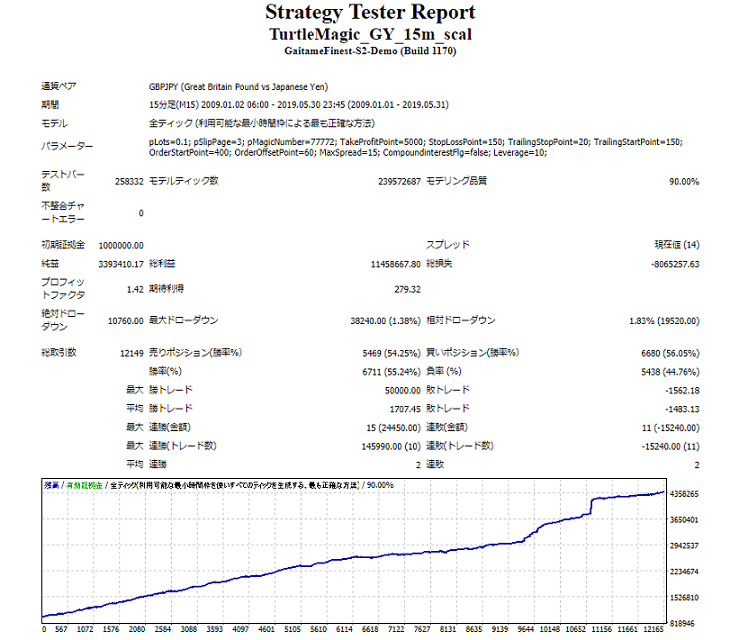 Compounding function can be set to compound by surplus margin by setting parameters. Back-tested with leverage = 10 with the compounding function turned on.
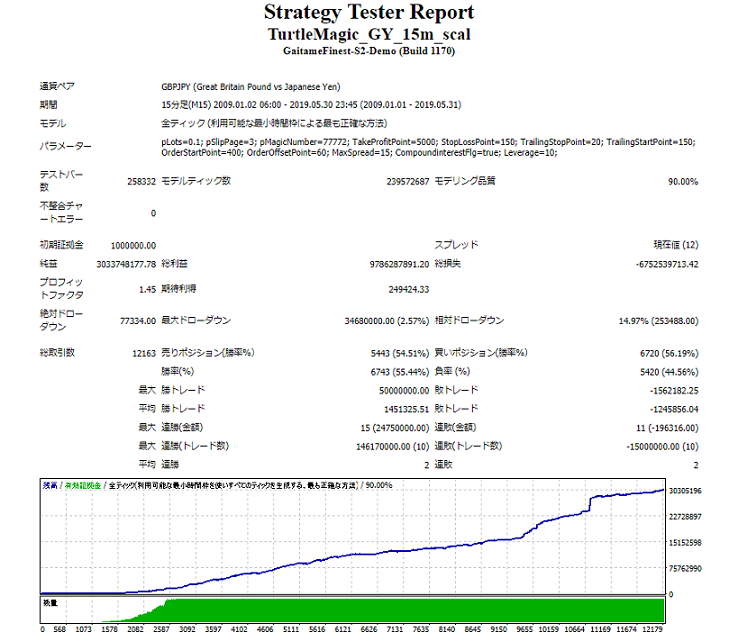 The following is a description of the parameters, which can be used with the default settings. The following parameters can be used with the default settings: ●pLots Number of lots ( default=0.1 ) ●pSlipPage Maximum number of pips for slip page ( default=3 ) ●pMagicNumber Magic number ( default=777772 + last 2 digits are automatically added based on the currency pair ) ●TakeProfitPoint Maximum take-profit point ( default=5000 ) TakeProfitPoint Maximum profit point (default=5000) ●StopLossPoint Stop Loss Point ( default=150 ) ●TrailingStopPoint Trailing Stop Point ( default=20 ) ●TrailingStartPoint Trailing Stop Start Point ( Default=150 ) ●OrderStartPoint Order StartPoint (the number of points when the rate moves in the set time frame to prepare an order) ( Default=400 ) ●OrderOffsetPoint The offset point between the start of the order preparation position and the actual placement of the order ( Default=60 ) ●MaxSpreadPoint The maximum spread between the start of the order preparation position and the actual placement of the order ( Default=60 ) =60 ) ●MaxSpread Max spread point at which no order will be placed if the spread is higher than this ( Default = 15 ) ●CompoundinterestFlg Compound interest flag (True: use, False: do not use) ( Default = False ) Leverage in the case of compound interest ( Default=10 ) It is enabled when compound interest flag=True. ●Comment Allows you to enter a comment ( Default=TurtleMajic ) ●pNFWeek1 Trading filter1 Day of the week (1:Mon 2:Tue 3:Wed 4:Thu 5:Fri) (Default=0) ●pNFStartHour1 Trading filter1 Start time (server time 0-24) (Default=0) pNFEndHour1 Buy/Sell Filter 1 End Time (server time 0-24) (default=0) ●pNFWeek2 Buy/Sell Filter 2 Day of the week (1:Mon 2:Tue 3:Wed 4:Thu 5:Fri) (default=0) ●pNFStartHour2 Buy/Sell Filter 2 Start Time (server time 0-24) (default=0) (server time 0-24) (default=0) ●pNFEndHour2 buy/sell filter2 end time (server time 0-24) (default=0) ●pNFWeek3 buy/sell filter3 day of the week (1:Mon 2:Tue 3:Wed 4:Thu 5:Fri) (default=0) ●pNFStartHour3 buy/sell filter3 start time (server time 0-24) (default=0) ~(server time 0-24) (default = 0) ● pNFEndHour3 buy/sell filter3 end time (server time 0-24) (default = 0)
Compounding function can be set to compound by surplus margin by setting parameters. Back-tested with leverage = 10 with the compounding function turned on. The following is a description of the parameters, which can be used with the default settings. The following parameters can be used with the default settings: ●pLots Number of lots ( default=0.1 ) ●pSlipPage Maximum number of pips for slip page ( default=3 ) ●pMagicNumber Magic number ( default=777772 + last 2 digits are automatically added based on the currency pair ) ●TakeProfitPoint Maximum take-profit point ( default=5000 ) TakeProfitPoint Maximum profit point (default=5000) ●StopLossPoint Stop Loss Point ( default=150 ) ●TrailingStopPoint Trailing Stop Point ( default=20 ) ●TrailingStartPoint Trailing Stop Start Point ( Default=150 ) ●OrderStartPoint Order StartPoint (the number of points when the rate moves in the set time frame to prepare an order) ( Default=400 ) ●OrderOffsetPoint The offset point between the start of the order preparation position and the actual placement of the order ( Default=60 ) ●MaxSpreadPoint The maximum spread between the start of the order preparation position and the actual placement of the order ( Default=60 ) =60 ) ●MaxSpread Max spread point at which no order will be placed if the spread is higher than this ( Default = 15 ) ●CompoundinterestFlg Compound interest flag (True: use, False: do not use) ( Default = False ) Leverage in the case of compound interest ( Default=10 ) It is enabled when compound interest flag=True. ●Comment Allows you to enter a comment ( Default=TurtleMajic ) ●pNFWeek1 Trading filter1 Day of the week (1:Mon 2:Tue 3:Wed 4:Thu 5:Fri) (Default=0) ●pNFStartHour1 Trading filter1 Start time (server time 0-24) (Default=0) pNFEndHour1 Buy/Sell Filter 1 End Time (server time 0-24) (default=0) ●pNFWeek2 Buy/Sell Filter 2 Day of the week (1:Mon 2:Tue 3:Wed 4:Thu 5:Fri) (default=0) ●pNFStartHour2 Buy/Sell Filter 2 Start Time (server time 0-24) (default=0) (server time 0-24) (default=0) ●pNFEndHour2 buy/sell filter2 end time (server time 0-24) (default=0) ●pNFWeek3 buy/sell filter3 day of the week (1:Mon 2:Tue 3:Wed 4:Thu 5:Fri) (default=0) ●pNFStartHour3 buy/sell filter3 start time (server time 0-24) (default=0) ~(server time 0-24) (default = 0) ● pNFEndHour3 buy/sell filter3 end time (server time 0-24) (default = 0)