Keep_on_EURCAD

Sales performance 52 Book
Review ★ 2.3
(3)
Expert Advisors
MetaTrader 4
Sales from
4/4/2019
Last Updated At
7/1/2019
Version
1.2
My Profile
株式会社 ZEROS Trading Style
- Whole period
- 2 years
- 1 year
- 6 months
- 3 months
- 1 month
Profit
:
46,192JPYProfit Factor
:
1.02Rate of return risk
?
:
0.08Average Profit
:
4,539JPYAverage Loss
:
-8,425JPYBalance
?
:
1,046,192JPYRate of return (all periods) ?
:
1.77%Win Rate
:
65.42%
(1103/1686)
Maximum Position
?
:
2Maximum Drawdown
?
:
18.92%
(596,285JPY)
Maximum Profit
:
29,142JPYMaximum Loss
:
-53,000JPYRecommended Margin
?
:
2,602,640JPYUnrealized P/L
:
-6,769JPYDeposit
?
:
1,000,000JPYCurrency
:
JPY- Account
Operable Brokers
Usable with MT4-adopting brokers.
About EA's Strategy
Currency Pairs
[EUR/CAD]
Trading Style
[Scalping]
Maximum Number Position
2
Maximum Lot
50
Chart Time Frame
M5
Maximum Stop Loss
40
Take Profit
20
Straddle Trading
No
Application Type
Metatrader Auto Trading
Other File Usages
No

Updated 7/1/2019 Added parameters [Mode_1] and [Mode_2] and restored [E_Comment] (EA comment)!
Please refer to the following summary or the configuration manual for details on the parameters.
EA Features ]
The discrepancies between back-test and forward results are very small. Scalping EA for EURCAD M5. The EURCAD is a currency pair that is easy to make a range market in the morning (relatively high central tendency), so we believe that the price movement characteristics of this currency pair is also suitable for system trading. The theme of this EA is to realize stable and high profits by repeatedly making use of the characteristics of the price movements to buy and sell in a short period of time in a contrarian manner. Since it is not a major currency pair like USDJPY or EURUSD, the correlation of price movements is low, and I think it will be effective in constructing a portfolio with multiple EAs operating at the same time. Keep_On_EURCAD has a high win rate of over 70% in the back test data. It is a mentally friendly EA. The most important stop-loss setting in Forex is also safe with SL=40 pips in the back-test data (can be changed by parameters). (In addition, most of the stop-losses do not rely on SL. When the market moves in the opposite direction of the market's intent, additional positions are taken with the objective of reducing the average loss. (The maximum number of positions held is 2). The difference between the average winning pips and the average losing pips is very narrow, which allows the trader to maintain a good risk reward. The EA is mentally friendly as it is easy to recover one losing pips quickly. Trading is done at a relatively high frequency. It is interesting because the frequency is not as low as one position every few days. You can choose either fixed-lot or compound-lot operation, and it is a well-balanced EA that allows you to choose either stable operation or operation aiming for high profit.★★★Past Results for Real Accounts★★ Updated: 06.11.2019
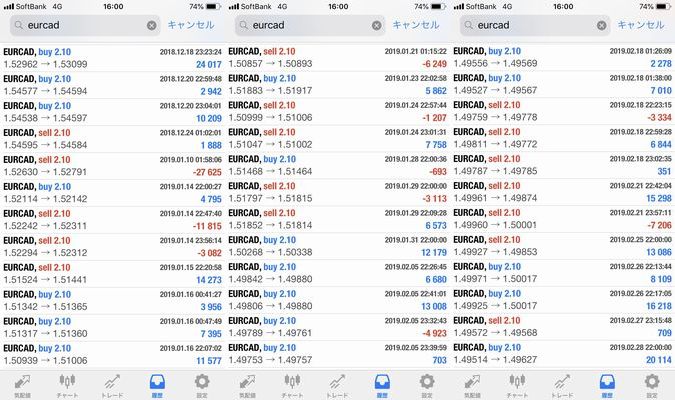
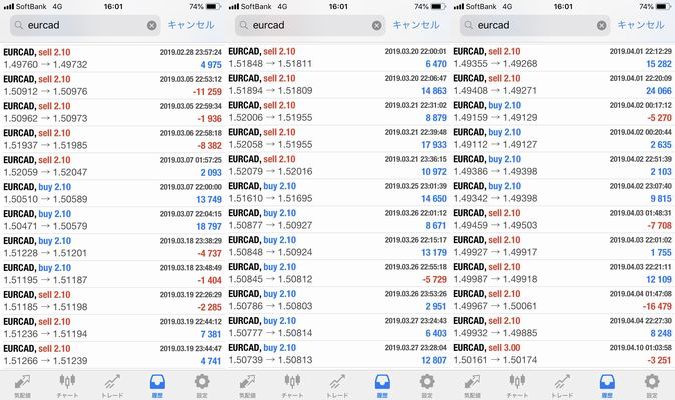
▲Transaction period: 2018.11.08 ~ 2019.06.11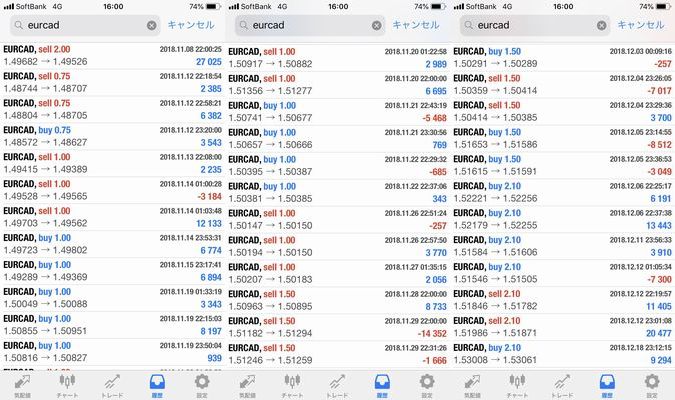
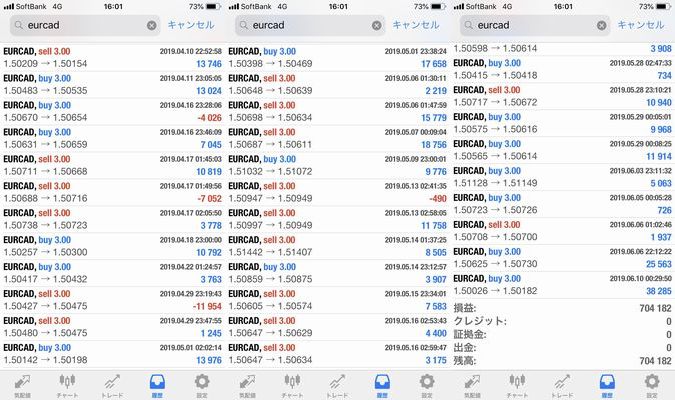
Profit amount◇ +704,182 yen Profit is being updated!
Maximum loss pips -16.1 pips
In the world of EAs in general, where it is said that the results of backtesting and real trading are far from each other As shown in the image above, this EA enables high profit, low drawdown, and high PF even in real accounts.Current real account results are now available! ★★★
Click here↓↓↓↓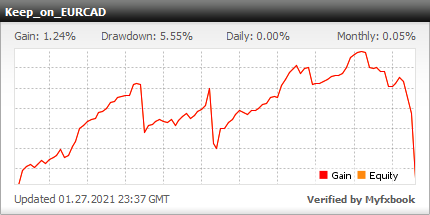
Actual transaction image]
As shown below, this is a short-term reverse trend trading in a morning range market (a market with a relatively high return to center). If the market goes in the opposite direction of our expectations, we quickly cut our losses to minimize the loss, and when the opportunity arises, we take profits and close out the position.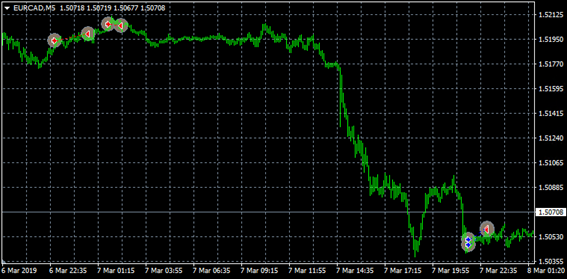
Parameter Description ]
MAGICnumber ⇒ The magic number of the EA. Be careful not to use the same value as other EAs. GMTOffset ⇒ The default setting is 2 for summer time and 1 for winter time. Depending on the setting, the trading style may change slightly. For example, setting the GMTOffset to 3 for summer time and 2 for winter time will lower the drawdown and increase the win rate. However, the profit margin will decrease, so it is difficult to say which setting is recommended. If you want to make stable trades in your portfolio, we recommend setting the summer time to 3 and the winter time to 2. If you want to leverage your trades overseas, we recommend 2 for summer time and 1 for winter time. Spread ⇒ If the spread is greater than the set value, do not place an order. Please note that the value shown is not in pips, but in EURCAD rate units. Example Spread = 0.00041 ⇒ 4.1 pips (default) Spread = 0.00004 ⇒ 0.4 pips Spread = 0.0041 = 41 pips The result will be as follows. Spread Colse Spread Colse = 0.0041 ⇒ 41 pips Example Spread Colse = 0.00041 ⇒ 4.1 pips (default) Spread Colse = 0.00004 ⇒ 0.4 pips Spread Colse = 0.0041 ⇒ 41 pips The result will be as follows. MM ⇒ true = compounding function ON , false = compounding function OFF LOT ⇒ This is the LOT setting to be applied when [MM = false]. This value sets the total LOT for the 2 largest positions held. If you want to enter with a lot size of [1.0] per position, set [LOT = 2.0], and you will enter with a lot size of [1.0] per position. Example If the parameter value is 【LOT = 2.0】, the first position will be entered at 1.0. The first position is 1.0L, the second position is 1.0L, and so on. The second position is entered with a lot of 1.0L. LOT = 1.0L ⇒ This is the compound interest multiplier setting that is applied when [MM = true] is selected. (Default = 20) Approximately, if you set the parameter leverage to 20, you will trade at around 0.6L for 1 million yen effective margin. The second position will be traded with a small amount (0.6L) against 1,000,000 yen effective margin. The second position is set to a slightly higher lot size (about 20%). Depending on the brokerage leverage, the lot may be set a little lower if there is not enough margin. Mode_1 ⇒ Mode_2: The past 8 hours of M5 candlesticks are traced back from the current price. If a single M5 candle moves more than 80 pips, the trade will not be executed on that day. In other words, if the volatility is high due to the previous day's indicator, this function avoids trading in rough market conditions on the next day. When [true] is selected, the above function is applied. If [false], the above function is not applied. Mode_2 ⇒ Mode_2: On Triple Swap Day, this function is used to avoid taking a negative swap position (not to trade). If true, the above function is applied. If [false], the above function is not applied. E_Comment ⇒ The name of the comment notation (default ⇒ AAA). (Default ⇒ AAA) TP ⇒ This is the TP setting of the position, which rarely goes up to TP and is often closed by the logic of the market. Please note that the value shown is not in pips, but in EURCAD rate units. Example TP = 0.002 ⇒ 20 pips (default) TP = 0.0002 = 2 pips TP = 0.021 = 21 pips (Default) TP = 0.021 = 21 pips SL ⇒ This is the SL setting of the position, which rarely goes all the way to the SL and is often closed out by the logic. The position is basically closed when a gain or loss is made in the logic. Example SL = 0.004 ⇒ 40 pips (default) SL = 0.0004 ⇒ 4 pips SL = 0.041 ⇒ 41 pips The position is basically broken off. Please set each item according to your own preference.Backtest ]
Fixed lot operation Period: 01.01.2009 - 03.01.2019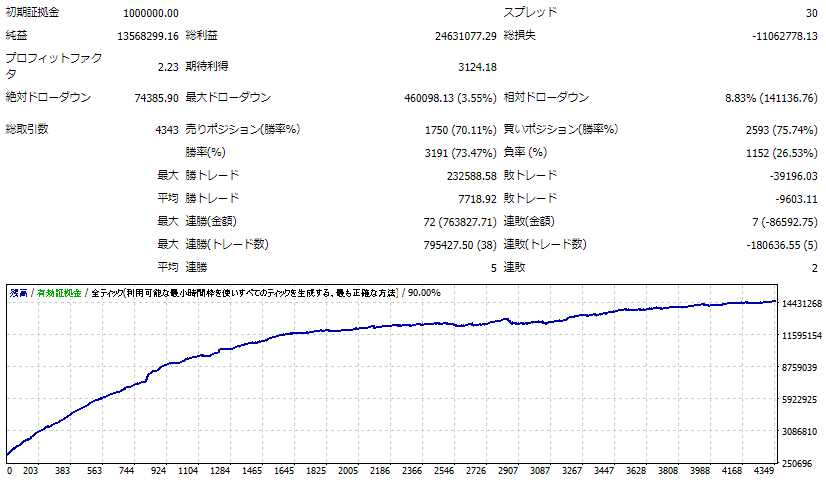 ▲Compound lot operation Period: 01.01.2009 - 06.06.2019
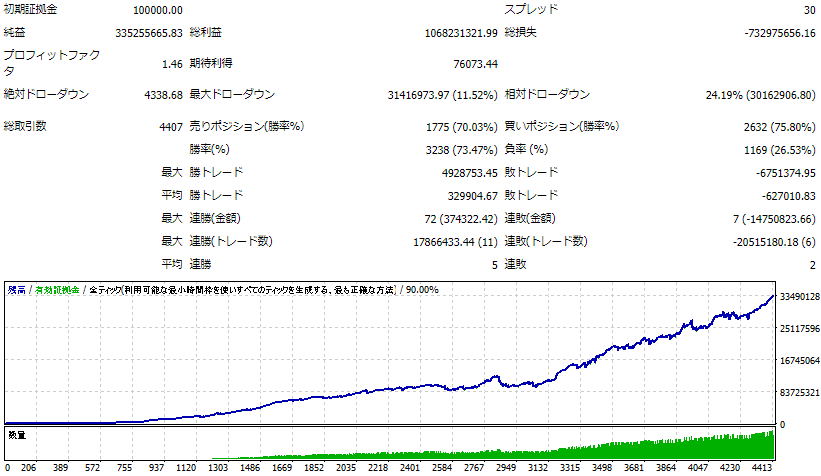 The back-test data below is based on compound lot operations.
The above is the product description.
We hope 【Keep_on_EURCAD】 can help you in your future investment life.