Hunting_HD

Sales performance 0 Book
Review ★ 0.0
(0)
Expert Advisors
MetaTrader 4
Sales from
12/5/2018
Last Updated At
4/5/2022
Version
1.0
My Profile
検シロウ Trading Style
- Whole period
- 2 years
- 1 year
- 6 months
- 3 months
- 1 month
Profit
:
178,160JPYProfit Factor
:
1.13Rate of return risk
?
:
0.94Average Profit
:
3,519JPYAverage Loss
:
-5,041JPYBalance
?
:
1,178,160JPYRate of return (all periods) ?
:
22.34%Win Rate
:
61.75%
(544/881)
Maximum Position
?
:
6Maximum Drawdown
?
:
18.05%
(189,095JPY)
Maximum Profit
:
20,878JPYMaximum Loss
:
-8,108JPYRecommended Margin
?
:
797,630JPYUnrealized P/L
:
0JPYDeposit
?
:
1,000,000JPYCurrency
:
JPY- Account
Operable Brokers
Usable with MT4-adopting brokers.
About EA's Strategy
Currency Pairs
[EUR/USD]
[USD/JPY]
[EUR/CHF]
Trading Style
[Swing Trading]
[Day Trading]
Maximum Number Position
2
Maximum Lot
0.1
Chart Time Frame
H1
Maximum Stop Loss
50
Take Profit
-
Straddle Trading
Yes
Application Type
Metatrader Auto Trading
Other File Usages
No
Besides EURUSD1H, Hunthing_HD also performs well on EURUSD30M and USDJPY30M.
Since it can operate on 3 timeframes of 2 currencies, you can build a portfolio with Hunthing_HD alone.
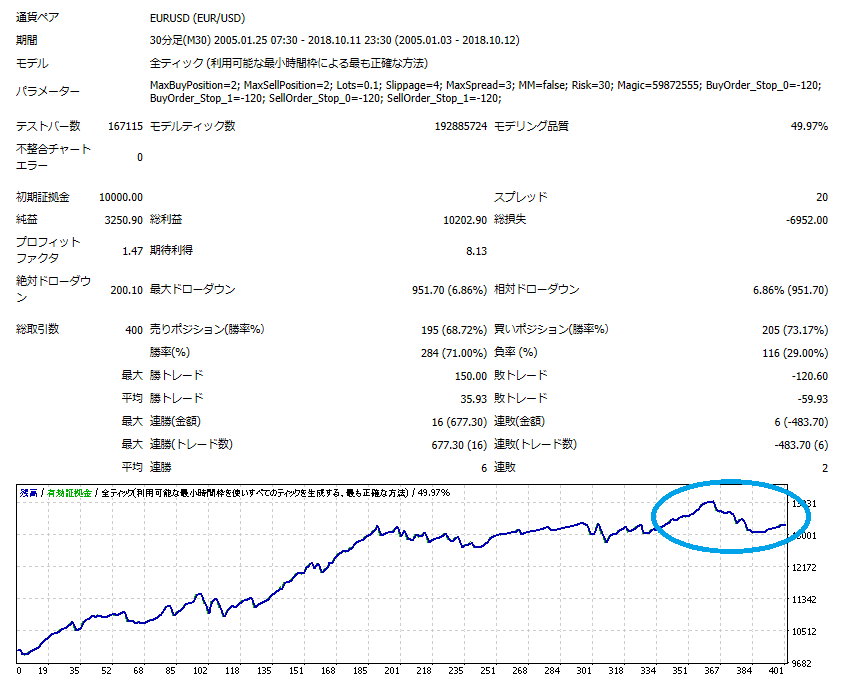
EURUSD30M has been in drawdown for 2017-2018 and the graph has recently turned up, so it is likely to rise in the future.
[EURUSD 30M 2005-2018/10 (2 pips spread)
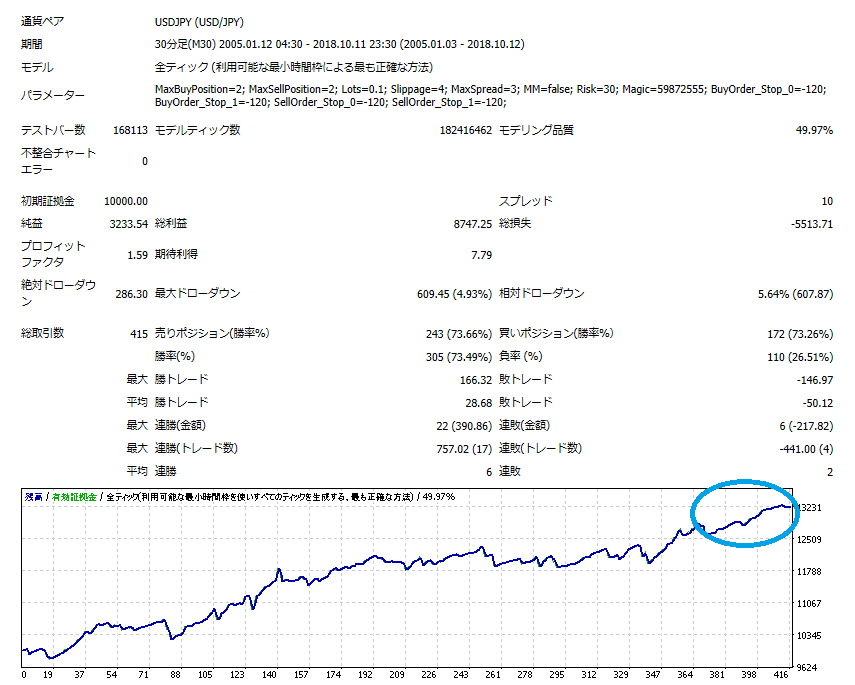
 USDJPY30M has been doing well from 2016-2018/10 and has a PF of about 2.0.
[USDJPY 2005-2018/10 (1 pips spread)
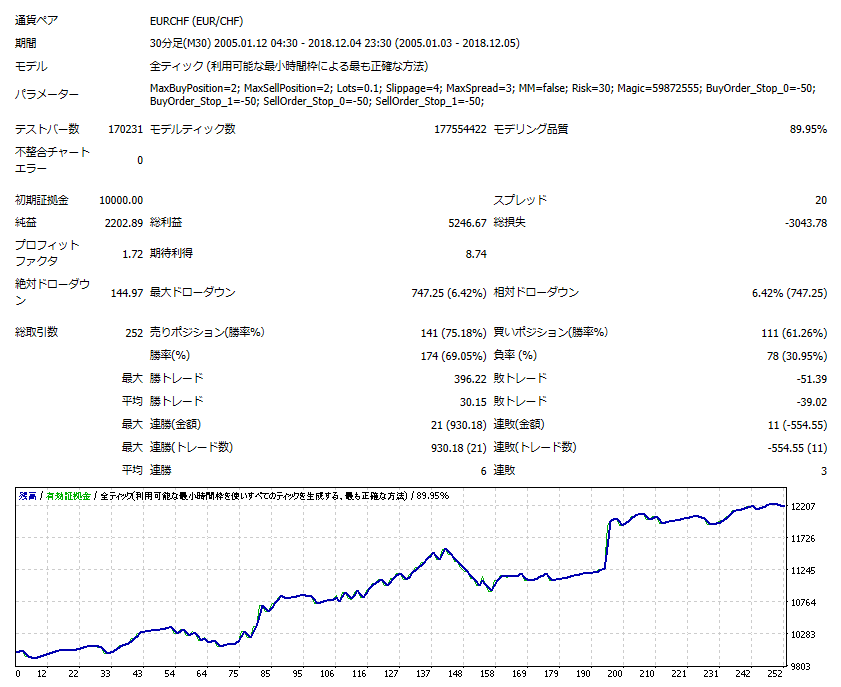
 EURCHF 30M 2005-2018/12 (2 pips spread, max stop loss 50)
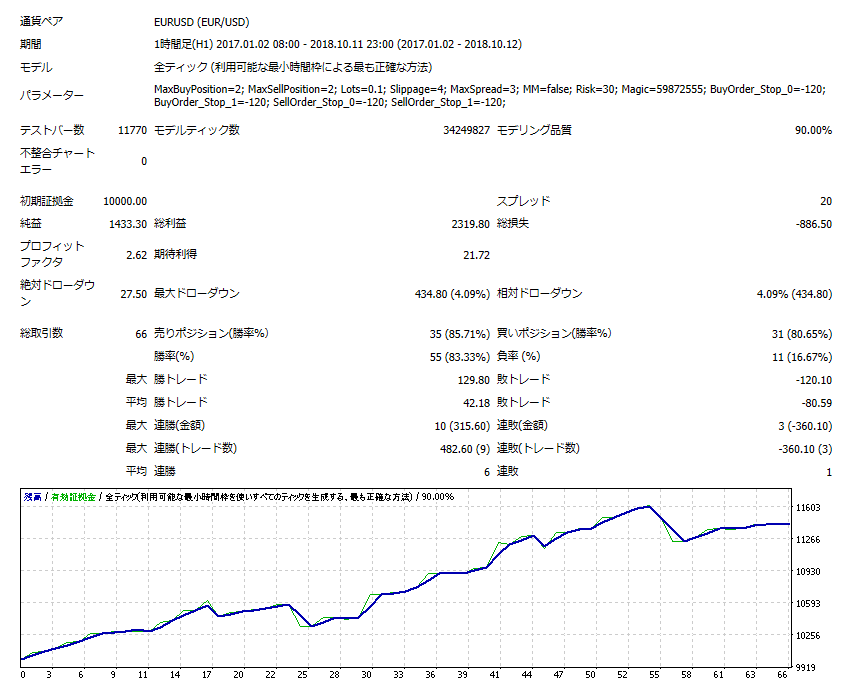
 [EURUSD 1H 2017-2018/10 (2 pips spread, max stop loss 120)
 [EURUSD 1H 2017-2018/10 (2 pips spread, max stop loss 50)
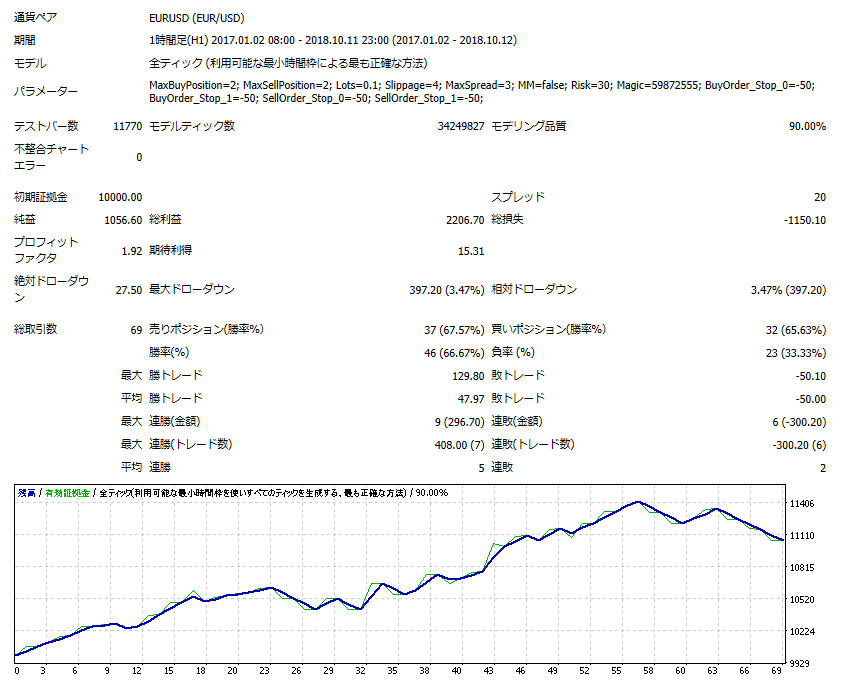 One EA can be set on 4 charts, so it will be a portfolio where one will cover for you while one is in drawdown.
AUDCAD 2011-2018/10 (2 pips spread, max stop loss 150)
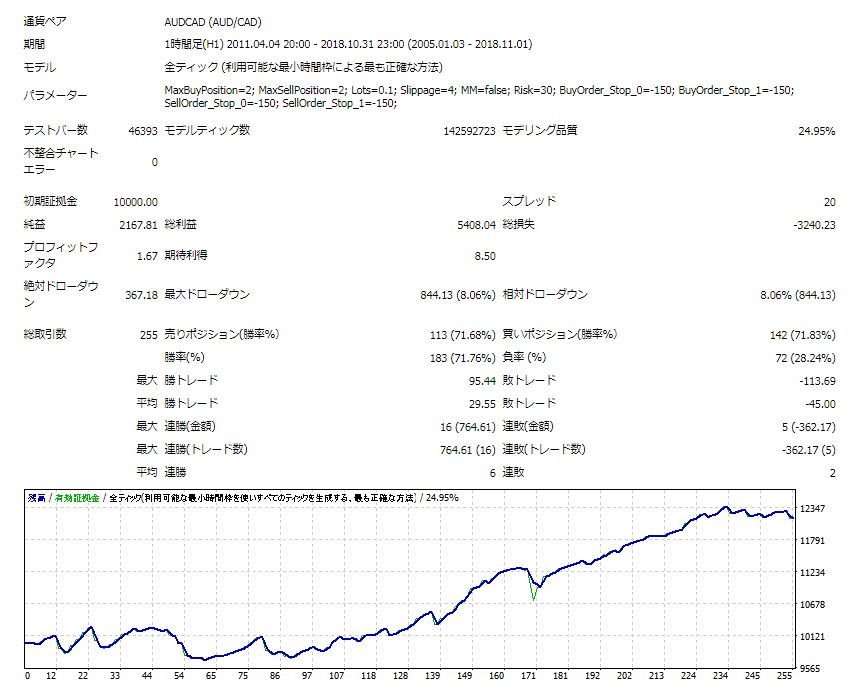
Please adjust the above settings.
If you do not know how to add an EA, please refer to the following.
⇒Add a new EAHow to add EA to MT4
USDJPY30M has been doing well from 2016-2018/10 and has a PF of about 2.0.
[USDJPY 2005-2018/10 (1 pips spread)
EURCHF 30M 2005-2018/12 (2 pips spread, max stop loss 50)
[EURUSD 1H 2017-2018/10 (2 pips spread, max stop loss 120)
[EURUSD 1H 2017-2018/10 (2 pips spread, max stop loss 50)
One EA can be set on 4 charts, so it will be a portfolio where one will cover for you while one is in drawdown.
AUDCAD 2011-2018/10 (2 pips spread, max stop loss 150)
| Parameters | You can change maximum slippage, maximum spread, maximum stop loss, etc. |
|---|---|
| MaxBuyPosition | You can change the maximum number of long positions. (The default value is 2.) |
| MaxSellPosition | You can change the maximum number of short positions. (The default value is 2.) |
| Lots | You can change the lot quantity. (The default value is 0.1.) |
| Slippage | You can change the maximum slippage. (The default value is 4.) |
| MaxSpred | You can change the maximum spread. (The default value is 3.) |
| MM | You can change ON/OFF for compounding. (true=ON, false=OFF) |
| Risk | You can change what percentage you are willing to risk in compounding. If you choose 30, you will enter with the maximum number of lots you can hold with 30% of your account assets. It is recommended that you back-test to see how many lots you are willing to risk before using this option. (The default value is 30.0.) |
| Magic | It will be a magic number. (Please use a different value from other EAs.) |
| BuyOrder_Stop_0 | You can change the maximum stop loss for long positions. (Default value is -50). |
| BuyOrder_Stop_1 | You can change the maximum stop loss for long positions. (Default value is -50). |
| SellOrder_Stop_0 | You can change the maximum stop loss for short positions. (Default value is -50). |
| SellOrder_Stop_1 | You can change the maximum stop loss for short positions. (Default value is -50). |