Beams FX W EURJPY M15

Sales performance 29 Book
Review ★ 0.0
(1)
Expert Advisors
MetaTrader 4
Sales from
11/16/2018
Last Updated At
1/6/2019
Version
2.0
My Profile
JAM Trading Style
- Whole period
- 2 years
- 1 year
- 6 months
- 3 months
- 1 month
Profit
:
-1,835JPYProfit Factor
:
1.03Rate of return risk
?
:
0Average Profit
:
3,153JPYAverage Loss
:
-9,647JPYBalance
?
:
998,165JPYRate of return (all periods) ?
:
-0.04%Win Rate
:
75.98%
(2356/3101)
Maximum Position
?
:
20Maximum Drawdown
?
:
27.52%
(1,501,900JPY)
Maximum Profit
:
15,740JPYMaximum Loss
:
-18,930JPYRecommended Margin
?
:
4,370,980JPYUnrealized P/L
:
-48,850JPYDeposit
?
:
1,000,000JPYCurrency
:
JPY- Account
Operable Brokers
Usable with MT4-adopting brokers.
About EA's Strategy
Currency Pairs
[EUR/JPY]
Trading Style
[Scalping]
[Day Trading]
Maximum Number Position
20
Maximum Lot
10
Chart Time Frame
M15
Maximum Stop Loss
180
Take Profit
20
Straddle Trading
Yes
Application Type
Metatrader Auto Trading
Other File Usages
No
The name has been changed from "Beams FX W EURJPY" to "Beams_FX_W_EURJPY_M15".
<Outline
This is a scalping and day trading of EUR/JPY aiming at slightly larger profits.
Please use a broker that allows both sides to be traded.
The maximum number of positions is set at 20 for Buy/Sell, but the actual number is around 10 for Buy/Sell.
In reality, it is around 10 positions for Buy/Sell.
The data is based on the long-term data of the Euro crisis caused by the insolvency of Greece and other countries, the UK's exit from the EU, and other problems that have continued.
We have optimized and tested the EA by focusing on the most recent data to match the recent market conditions.
<Parameters
Magic= 30101009 Magic number
Slippage = 4 Slippage
MaxSpread = 5 Spread
Lots = 0.1 Lots per position
MaxBuyPosition = 10 Maximum number of buy positions
MaxSellPosition = 10 Maximum number of positions to sell
MM = false Compound interest setting (true: compound interest, false: simple interest)
Risk = 1.0 Rate of interest for compounding (%)
The maximum lot that can be entered at the rate of interest on margin.
BuyTrailClose_pips_0 = 30 Start trailing pips for buying
BuyOrder_Stop_0 = -180 Stop loss pips for buying
SellTrailClose_pips_0 = 20 pips to start trailing a sell
SellOrder_Stop_0 = -180 sell stop loss pips
Setup for closing all positions (weekend position close setup)
All positions are closed on the specified day of the week and at the specified time, and no entry is made for the week thereafter.
Entry will be made on Monday of the following week.
If you wish to resume entry in the same week, please reset the settings.
Comment_01 = "-----All Positions Close Setting-----" Comment
Comment_02 = " Set MT4(Server) Week&Time " Comment
Week_Position_Close = false (true: close all positions false: do not close) false: do not close) * false is recommended
Close_Week_At_Server = 5 When Week_Position_Close = true, set the day of the week to close.
Set the day of the week for MT4 (server).
(1:Monday, 2:Tuesday, 3:Wednesday, 4:Thursday, 5:Friday, 6:Saturday)
The default is set for GMT+2 days of the week.
Please use this as is for GMT+2 (standard:winter)/+3 (summer) brokers.
Close_Time_At_Server = "19:00" Set the time to close when Week_Position_Close = true.
Set the MT4 (server) time.
Default is set to GMT+2 time (2:00 Japan time)
If your broker uses GMT+2(standard:winter)/+3(summer), please use it as it is.
<Reference
Comparison of Eastern European time (GMT+2/+3) and Japan time (GMT+9)
 <Note
If you are worried about the loss when you lose your stop loss due to a large number of positions, please reduce the lot size or decrease the number of positions.
If you are worried about losing money in case of a stop loss due to a large number of positions, please reduce the lot size or the number of positions.
We recommend that you reduce the number of positions.
The system is designed to start trailing and close at the average profit of the entire position.
If you change the number of positions, the settlement rate will be different from that of the forward test.
In addition, the positions will be held and closed at different timing and rates from those of the forward test, and the results will not be reconciled with the forward test.
Please note that the forward test cannot be compared with the forward test.
<Back Test> (about 5 years)
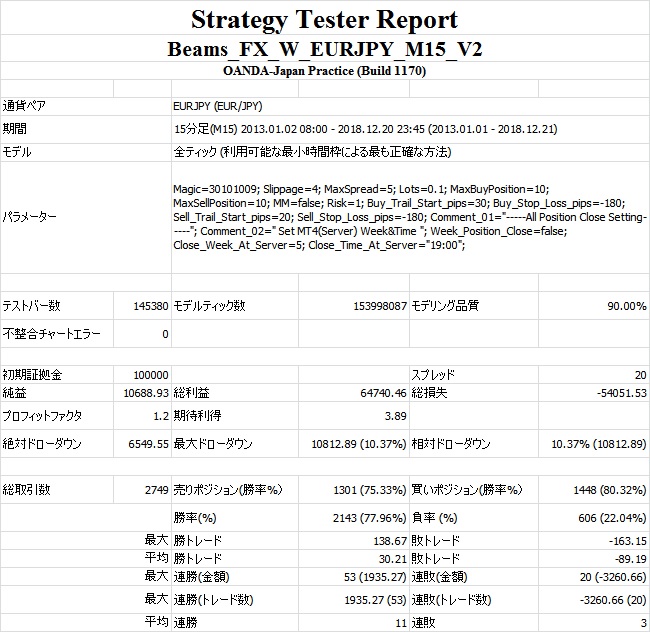
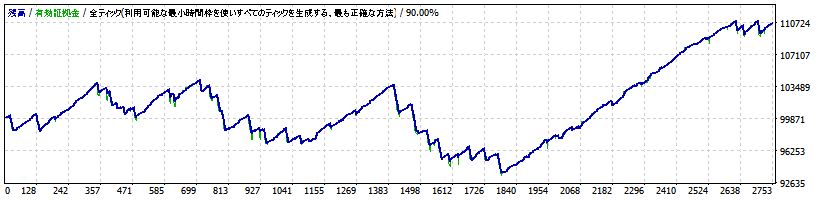 Backtesting over the past 10 years is not available due to poor results.
We believe that the most recent historical data is more suitable for recent market conditions than historical data for the past 10 years, due to the Euro crisis and other factors.
We have optimized and tested this EA, considering that the most recent historical data is more suitable for recent market conditions than historical data for the past 10 years.
<Please note
In the community, we have received a message from a member of the following group
I would like to see the results of a backtest conducted under conditions other than those shown on the website.
I would like to know how much margin is required for the operation.
In the case of compound interest, I would like to know what percentage of risk (interest rate) should be set and how much margin is required.
(Calculate backwards from leverage, effective margin balance, margin requirement, etc.)
However, we cannot accept such requests because the amount of work is not commensurate with the selling price of the EA.
However, we cannot accept such requests because the amount of work required is not commensurate with the selling price of the EA.
Please refer to the following page for margin calculations.
Please refer to the following page for the calculation of margins.
Please refer to the following page.FX Margin Simulator
***News***.
Click here to visit ☆JAM's blog.
JAM's EA Workshop
Click here for ☆JAM's profile page (list of exhibits).
JAM Profile Page
<Note
If you are worried about the loss when you lose your stop loss due to a large number of positions, please reduce the lot size or decrease the number of positions.
If you are worried about losing money in case of a stop loss due to a large number of positions, please reduce the lot size or the number of positions.
We recommend that you reduce the number of positions.
The system is designed to start trailing and close at the average profit of the entire position.
If you change the number of positions, the settlement rate will be different from that of the forward test.
In addition, the positions will be held and closed at different timing and rates from those of the forward test, and the results will not be reconciled with the forward test.
Please note that the forward test cannot be compared with the forward test.
<Back Test> (about 5 years)
Backtesting over the past 10 years is not available due to poor results.
We believe that the most recent historical data is more suitable for recent market conditions than historical data for the past 10 years, due to the Euro crisis and other factors.
We have optimized and tested this EA, considering that the most recent historical data is more suitable for recent market conditions than historical data for the past 10 years.
<Please note
In the community, we have received a message from a member of the following group
I would like to see the results of a backtest conducted under conditions other than those shown on the website.
I would like to know how much margin is required for the operation.
In the case of compound interest, I would like to know what percentage of risk (interest rate) should be set and how much margin is required.
(Calculate backwards from leverage, effective margin balance, margin requirement, etc.)
However, we cannot accept such requests because the amount of work is not commensurate with the selling price of the EA.
However, we cannot accept such requests because the amount of work required is not commensurate with the selling price of the EA.
Please refer to the following page for margin calculations.
Please refer to the following page for the calculation of margins.
Please refer to the following page.FX Margin Simulator
***News***.
Click here to visit ☆JAM's blog.
JAM's EA Workshop
Click here for ☆JAM's profile page (list of exhibits).
JAM Profile Page