Angel Heart USDJPY

Sales performance 633 Book
Review ★ 3.7
(13)
Expert Advisors
MetaTrader 4
Sales from
7/6/2017
Last Updated At
5/15/2019
Version
13
My Profile
エンジェル- Whole period
- 2 years
- 1 year
- 6 months
- 3 months
- 1 month
Profit
:
-495,197JPYProfit Factor
:
0.91Rate of return risk
?
:
-0.67Average Profit
:
1,427JPYAverage Loss
:
-3,333JPYBalance
?
:
504,803JPYRate of return (all periods) ?
:
-27.53%Win Rate
:
68.06%
(3348/4919)
Maximum Position
?
:
5Maximum Drawdown
?
:
36.47%
(742,166JPY)
Maximum Profit
:
3,530JPYMaximum Loss
:
-11,280JPYRecommended Margin
?
:
1,798,520JPYUnrealized P/L
:
0JPYDeposit
?
:
1,000,000JPYCurrency
:
JPY- Account
Operable Brokers
Usable with MT4-adopting brokers.
Real Performance
※Displays results including swaps and fees
Forward testing (Profit)
Product Statistics
Product Comments
Monthly Statistics
2026
2025
2024
2023
2022
- Jan
- Feb
- Mar
- Apr
- May
- Jun
- Jul
- Aug
- Sep
- Oct
- Nov
- Dec
Calendar for Months
About EA's Strategy
Translating...
Currency Pairs
[USD/JPY]
Trading Style
[Day Trading]
Maximum Number Position
3
Maximum Lot
50
Chart Time Frame
M15
Maximum Stop Loss
100
Take Profit
30
Straddle Trading
No
Application Type
Metatrader Auto Trading
Other File Usages
No
Developer's real account is being released! !
Click here ↓
☆ ★ Updated information and notices ★ ☆
Achievements An Angel Heart USDJPY will be free! It is a confident EA, so I hope you can try it here. FOREX.com × Angel Heart USDJPY Account Opening Campaign
 This EA is an EA with very little divergence between the official demo forward and the real result.
If discrepancies occur frequently, there may be environmental issues, etc. Please review the environment once more.
Please contact us in the community if there is a gap.
This EA is an EA with very little divergence between the official demo forward and the real result.
If discrepancies occur frequently, there may be environmental issues, etc. Please review the environment once more.
Please contact us in the community if there is a gap.
☆ ★ EA features ★ ☆
・ Use USDJPY 15 minutes foot.
・ We trade for the third wave based on the idea in Elliot wave theory.
-Since it is designed not to enter in the correction wave, it is hard to happen with this EA that there is a lot of trend follow type, and it loses when you adjust it.
• Minimize losses in withdrawal mode if you do not go as you expect.
・ The entry will be made after the candlestick has been decided, so it is difficult for the result to be far from the official forward.
・ It is an EA that is not easily affected by spreads. (Rarely affected)
So the backtest shows the results of spread 10, but with 10 it does not reach real trade results. (Comparison of the same period)
・ We are stuck to the loss cut logic thoroughly! There are multiple loss cutting logics and they are not EAs that rely on SL. ・ We set the set value with margin to avoid over optimization. The aim is to respond to future market changes. (The default setting is less than the setting that gives the best backtest results.) ・ Basically, only the number of lots is set, and other than that there is no problem in operation with the default, but for those who want to stick, several customized items are also prepared. (Can change the number of positions, change the withdrawal time, etc.) From the above features, Angel Heart USDJPY has very few lost months on a monthly basis, achieving long-term stable results!
☆ ★ What is Elliott wave theory ... ★ ☆
The market seems to move insanely, and in fact, according to the law, the same pattern is repeated over and over again, and the pattern is only because the popular psychology swirls, and as a result, the price movement of the stock price results in the creation of a law You
This is a theory presented by a person named Laful Nelson Elliot in the 19th century.
According to Elliott, the market moves in the pattern shown below.
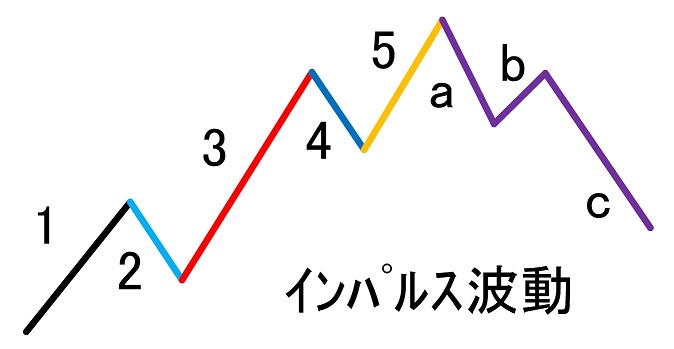
The part written in numbers is called the propulsive wave, and it becomes the movement in the trend direction.
The part written in the alphabet is called a correction wave, and it becomes a movement of a serious adjustment.
The pulsating wave and the correction wave are collectively called "impulse wave".
The following is the psychology of the promotion wave and the correction wave.
■ 1st wave
First raised. Usually, a few people start to raise it by noticing that "you are buying now" and starting buying. Actually there are various reasons (indicator announcement etc.), but the influence of buying such a pioneer is the first wave.
■ 2nd wave
When it comes here, the trader who won the first wave starts profit taking.
However, if it falls to a certain extent again, it becomes "expensive" and is bought.
Basically, the low price of the first wave does not interrupt.
■ Third wave
The third wave is the longest and strong wave.
It is time to get the most attention.
"I also want to buy! I also want to buy!" And will increase momentum and raise the price of the first wave over the high price.
■ 4th wave
Profit taking starts in the same way as the second wave.
■ 5th wave
Most of the general public buys here. The motive behind the general public to buy is "greed".
If you go up to here, good news comes out. As a result, a large number of people can not afford to buy.
This time is when it is the most expensive.
■ ac waves
Calm pro traders start profit-taking and short selling on timing with the rise of the 5th wave.
This causes the subsequent adjustment movements of the a, b and c patterns.
☆ ★ Trade for the third wave! ★ ☆
This EA targets the third wave based on the idea of Elliot wave theory.
I do not use a Bollinger band and ZIGZAG for the entry logic, and do not count up and down.
The concept is simple, and if there is a fluctuation of a certain size or more, it has become a very unique entry method that calculates the entry timing (time) from the degree of the momentum and enters.
From September 2017, the volatility was small for two months, and the magnitude of the first wave was not very large.
If the size of the first wave is small, the entry timing tends to be short, and there is a push or return between the second and third waves, and the results are in a ton state.
You can see that you can check the back test, but such a phenomenon happens regularly, and even in that case, the balance is running away in tons.
As with any EA, there are good and bad markets.
If you buy back-tested once, if you can confirm how to make an entry and make a profit, you can be convinced of the state of poor condition and be able to use it for a long time think.
There is an opinion that the bigger the 1 wave is, the bigger the return is with 2 waves, but the larger the first increase is, the later the entry timing tends to be. There is no such thing as eating.
Although the type of EA to enter with backstroke is often lost as soon as adjustment is made, this EA is designed to recognize divergence and not to enter with correction waves.
While there are some EAs that recommend a shutdown during employment statistics, this EA recognizes it as the first wave when the market changes significantly, so no entry will occur.
Therefore there is no need to stop operation.
It is okay if you leave the basics.
☆ ★ Withdrawal mode! Minimize the loss! ★ ☆
Loss cutting is important to survive in the market.
You can survive in the market and make a profit if you can get rid of it well.
Elliott Wave is a technique that works well with a high winning rate, but it does not always work.
It may also happen that the first wave was not actually the first wave and things may not go as expected.
In such a case, it is designed to be prepared for the next entry in the best place.
Specifically, there is an entry that triggers after a certain period of time.
After this entry is triggered, it will be in withdrawal mode and payment will be made in the most suitable place.
It is designed to have an entry for withdrawal mode within about 12 hours.
(It is not necessarily 12 hours.)
☆ ★ We did forward measurement firmly ★ ☆
It seems that some EAs that have recently been exhibited have been exhibited without performing forward measurement.
I believe that I only backtested and jumped while the price was low for EA without forward measurement, and I have had the experience of being in a store without being able to recover the EA fee in the end.
It is said that you should buy after looking at the forward results for 3 months, but ...
The price goes up while watching 3 months ...
And, aren't you worried?
This EA is not as long as three months, but it will be an exhibition after conducting a forward test.
I will post the results of the forward I did.
The result of a sharp rise and a sharp fall is the result of the initial version.
After that, I repeated trial and error and settled in the current version from 3/22.
The three months from the current version to the exhibition are continuing to rise.
Withdrawal mode works well and is suppressing DD.
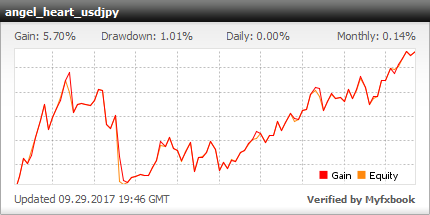
The above measurement has stopped at the end of July 2017, as you can perform forward measurement with fx-on.
Since there was a demand, a real account will be published.
Operating account: Forex Finest
(↓ Click to open MYFXBOOK.)
☆ ★ Spread resistance is high, and transactions on real accounts are stable! ★ ☆
More than a year has passed since its release, and its results have been stable, but this is not the result of demo trading alone. Angel Heart USDJPY is similar to spreads in real accounts in any account because it is not spread resistant nor severe entry logic. Compared with other EAs, it has been highly evaluated that there is very little deviation from the official forward.
And I got the following review.
***********************************
As you can see if you buy and back-test, the results of last year and the last year are not so good, they are about ton (after that, last year's earnings in Ver.up are up).
The results are outstanding if it matches the market environment this summer!
Because it is an EA, it is natural that there is a bad period, so if it is a bad period it may be a pretty good EA.
***********************************
With regard to the transition of results, although it changed from August, it has entered a poor period from September, but the results have been maintained at a ton.
This grade transition is the same as the past grade of backtesting, so it can be expected that the grade will follow the backtesting.
☆ ★ setting value ★ ☆
MAG MAGIC 1 to 7
It is a magic number.
Main Main_Lots (Default: 0.1)
It is the number of lots of basic entry.
If the value is larger than the parameter value of "MaxLots", the value of "MaxLots" will be obtained.
T Tettai_Lots (Default: 0.01)
This is the number of lots for the position entered in withdrawal mode.
We do not expect profits because it is an entry to show the entry of withdrawal mode.
Therefore, it is recommended to use the minimum lot.
Be aware of the broker's minimum lot number.
T Trail_Lots (Default: Deprecated from 0.01 Ver. 6)
It is the number of lots of position to enter when the trailing stop function is activated.
Since it is an entry to indicate that the trailing stop function has been activated, we do not expect profits.
Therefore, it is recommended to use the minimum lot.
Be aware of the broker's minimum lot number.
Stop StopLoss 1 (Default: 100)
Stop loss value for basic entry.
T TakeProfit 1 (Default: 30)
It is the take profit value of the basic entry.
It applies to each position regardless of the number of positions.
If you want to increase the TakeProfit2 and TakeProfit3 settings, it is better to set these values higher.
T TakeProfit 1 P (Default: 30)
Settlement is performed when the pips profit set here is generated. The default is 30.
(When one position is held, it does not include the withdrawal mode position.)
T TakeProfit 2 (Default: 40)
Settlement is performed when the pips profit set here is generated. The default is 40.
(If you have 2 positions, it does not include the withdrawal mode position.)
T TakeProfit 3 (Default: 50)
Settlement is performed when the pips profit set here is generated. The default is 50.
(If you have 3 positions, it does not include the withdrawal mode position.)
T TrailingStopMode (Default: true)
It is a parameter to set valid / invalid of trailing stop.
The default is enabled (true).
When false is selected, the trailing stop function is disabled.
T TrailingStopPoint (Default: 10)
This parameter is for setting the fixed width of the trailing stop.
It is the width for one position.
Therefore, in the case of three positions, the settlement will be made when the total of 30 pips of 10 pips × 3 positions decreases.
T TrailingStartPoint_1P (Default: 20)
When the position is 1 position, the trailing stop function is activated when the set value profit (pips) occurs.
T TrailingStartPoint_2P (Default: 30)
When the position is 2 positions, the trailing stop function is activated when the set value of profit (pips) occurs.
T TrailingStartPoint_3P (Default: 40)
When the position is 3 positions, the trailing stop function is activated when the set value of profit (pips) occurs.
S Slippage (Default: 50)
If there is a shift in the order of pips or more set up, we will cancel the order.
In an environment where latency (delay time) is large, slippage increases, so if the value here is too small, ordering and settlement will not be performed depending on the environment. (It also affects the weekend settlement function etc.)
If you want to make the value smaller, make sure that you understand the setting.
The initial value is 50 pips, which is a setting that hardly functions.
Max Max_Spread (Default: 50)
It is a spread filter.
If a spread greater than or equal to the set pips is open, the order will be postponed.
Not points but pips.
The initial value is 50 pips, which is a setting that hardly functions.
If you make this value too low, the broker will not place orders.
If you want to make the value smaller, make sure that you understand the setting.
T Tettai Sterlth (Default: false)
You can set whether or not an announcement position occurs when entering withdrawal mode.
As it is only the presence or absence of notice, selecting none (false) does not mean that you will not enter withdrawal mode. Notification position does not occur if you set "true". (Internally in withdrawal mode.)
By the way, you can cancel the withdrawal mode by turning off the position of the withdrawal mode. Therefore, if you set "TettaiSterlth" to "true", no announcement position will occur, so you can not cancel the withdrawal mode in the middle of the trade.
T TettaiTime (Default: 12)
You can freely set the time to enter withdrawal mode. The unit is (hours).
Enter 12 for 12 hours.
MM MM (default: false)
It becomes compound interest mode with true.
Ri Risk (Default: 5)
Compound interest lot adjustment is possible with the parameter of "Risk".
The formula is as follows.
Lots = Account balance × (Risk ÷ 100) ÷ BaseLots ÷ (sl ÷ 100)
BaseLots will be the broker's minimum currency unit.
For 1000 currency units, 100,000 will be entered.
The unit of "Risk" is%, which is the size of the maximum loss per position for the account balance.
For example, if the account balance is 500,000 yen and the Risk value is 5%, the maximum loss per position will be 25,000 yen.
If the minimum currency unit is 1000 and "StopLoss1" is set to 100 pips, the lot size will be 0.25.
Max MaxLots (Default: 1.0)
Please use it when using the compound interest function.
The set value will not be larger than the lot set here.
(Please note that it will be reflected even when not using compound interest.)
ExitExitTime (Default: 22: 50)
It is time to do a weekend settlement.
The day is fixed on Friday.
The time will be the broker's time.
※ Time will be the time displayed on MT4.
It seems that there is a difference in the available trading time for each broker, so please set it within the available trading time.
※ Attention Because there are times when it does not work well depending on the environment, please do manual settlement and automatic trading OFF when you do not want to carry over the weekend surely.
TTradeEnd (Default: 22:30)
It is weekend stop time.
The day is fixed on Friday.
After the set time on Friday, no transaction will occur even if the conditions are met.
If you do not want a weekend carryover position to occur, make this time before "ExitTime".
※ Time will be the time displayed on MT4.
If you do not want to carry over the weekend and want to settle on the weekend 15 minutes before employment statistics, you can set it as below The
GMT + 3 (winter time + 2)
ExitTime → 15:15 (Winter 16: 15)
TradeEnd → 15:00 (Winter 16:00)
Logic Logic_A (Default: true)
Logic Logic_B (Default: true)
Angel Heart USDJPY gets up to 3 positions. One is called the parent position, and the other two are called the child position, but you can select whether or not the child position should occur.
It is also possible to operate one position by setting both to false.
Logic Logic Exit
Initial value: True You can choose to enable or disable internal logic payment. When this is turned off, the payment logic when not in withdrawal mode is only TP payment or payment by trail.
COM COMMENT
Please use it to fill in and manage your favorite comments.
The default is EA name.
☆ Other notes ☆
・ Since Rakuten Securities has a different start time on Monday from other securities companies, Monday's trading results may change slightly.
・ Please be careful about the margin shortage. It does not operate normally without the margin which can acquire three positions.
(If there is a shortage of margin, we will settle all positions of Angel Heart USDJPY, which we consider to be abnormal, and hold them.)
・ We recommend brokers that adopt GMT + 3 (winter time + 2).
You can use it with other brokers, but be careful about weekend settlement time and weekend ban time settings.
☆ Revision history ☆
AnAngelHeart_USDJPY_M15 (First edition July 6, 2017-)
AnAngelHeart_USDJPY_M15_01 (August 24, 2017-)
-Improved the problem that can not be used in the same account with other EAs dealing with the same currency.
-Improved the problem that the display of USDJPY does not work with special brokers.
-Changed to a specification that does not have a weekend carryover position.
-Equipped with spread filter.
AnAngelHeart_USDJPY_M15_02 (from September 25, 2017)
・ Addition of compound interest function (only on account balance basis)
・ We made it possible to set the weekend transaction stop time freely.
・ The ingress time of withdrawal mode can be set freely.
・ I was able to decide the maximum lot number.
· Added payment logic.
・ Fix the problem (TakeProfit problem)
AnAngelHeart_USDJPY_M15_03 (from October 6, 2017)
-Added payment logic in withdrawal mode.
-The default value of the parameter has been changed.
AnAngelHeart_USDJPY_M15_04 (from October ** 2017)
・ Fixed problems (For FXTF, brokers with special display of USDJPY like OANDA Tokyo)
AnAngelHeart_USDJPY_M15_05 (from March 26, 2018)
-Addition of trailing stop function.
・ Change of parameter
AnAngelHeart_USDJPY_M15_06 (from June ** 2018)
・ The abolition of the notification position that occurred at the trailing stop.
・ Changeable to enable / disable the notification position generated at the time of withdrawal mode entry.
・ The number of positions can be changed. AnAngelHeart_USDJPY_M15_08A (August ** 2018-)
-The position of 0.01 acquired when the trailing stop occurred has been eliminated. AnAngelHeart_USDJPY_M15_10B (from October ** 2018)
-Implementation of withdrawal stealth mode. ・ It became possible to select internal logic settlement. AnAngelHeart_USDJPY_M15_11 (from October 31, 2018)
-Fixed bug in trailing stop function. AnAngelHeart_USDJPY_M15_11A (from November 2nd, 2018)
・ Change of comment.
Click here ↓
☆ ★ Updated information and notices ★ ☆
Achievements An Angel Heart USDJPY will be free! It is a confident EA, so I hope you can try it here. FOREX.com × Angel Heart USDJPY Account Opening Campaign
This EA is an EA with very little divergence between the official demo forward and the real result.
If discrepancies occur frequently, there may be environmental issues, etc. Please review the environment once more.
Please contact us in the community if there is a gap.
☆ ★ EA features ★ ☆
・ Use USDJPY 15 minutes foot.
・ We trade for the third wave based on the idea in Elliot wave theory.
-Since it is designed not to enter in the correction wave, it is hard to happen with this EA that there is a lot of trend follow type, and it loses when you adjust it.
• Minimize losses in withdrawal mode if you do not go as you expect.
・ The entry will be made after the candlestick has been decided, so it is difficult for the result to be far from the official forward.
・ It is an EA that is not easily affected by spreads. (Rarely affected)
So the backtest shows the results of spread 10, but with 10 it does not reach real trade results. (Comparison of the same period)
・ We are stuck to the loss cut logic thoroughly! There are multiple loss cutting logics and they are not EAs that rely on SL. ・ We set the set value with margin to avoid over optimization. The aim is to respond to future market changes. (The default setting is less than the setting that gives the best backtest results.) ・ Basically, only the number of lots is set, and other than that there is no problem in operation with the default, but for those who want to stick, several customized items are also prepared. (Can change the number of positions, change the withdrawal time, etc.) From the above features, Angel Heart USDJPY has very few lost months on a monthly basis, achieving long-term stable results!
☆ ★ What is Elliott wave theory ... ★ ☆
The market seems to move insanely, and in fact, according to the law, the same pattern is repeated over and over again, and the pattern is only because the popular psychology swirls, and as a result, the price movement of the stock price results in the creation of a law You
This is a theory presented by a person named Laful Nelson Elliot in the 19th century.
According to Elliott, the market moves in the pattern shown below.
The part written in numbers is called the propulsive wave, and it becomes the movement in the trend direction.
The part written in the alphabet is called a correction wave, and it becomes a movement of a serious adjustment.
The pulsating wave and the correction wave are collectively called "impulse wave".
The following is the psychology of the promotion wave and the correction wave.
■ 1st wave
First raised. Usually, a few people start to raise it by noticing that "you are buying now" and starting buying. Actually there are various reasons (indicator announcement etc.), but the influence of buying such a pioneer is the first wave.
■ 2nd wave
When it comes here, the trader who won the first wave starts profit taking.
However, if it falls to a certain extent again, it becomes "expensive" and is bought.
Basically, the low price of the first wave does not interrupt.
■ Third wave
The third wave is the longest and strong wave.
It is time to get the most attention.
"I also want to buy! I also want to buy!" And will increase momentum and raise the price of the first wave over the high price.
■ 4th wave
Profit taking starts in the same way as the second wave.
■ 5th wave
Most of the general public buys here. The motive behind the general public to buy is "greed".
If you go up to here, good news comes out. As a result, a large number of people can not afford to buy.
This time is when it is the most expensive.
■ ac waves
Calm pro traders start profit-taking and short selling on timing with the rise of the 5th wave.
This causes the subsequent adjustment movements of the a, b and c patterns.
☆ ★ Trade for the third wave! ★ ☆
This EA targets the third wave based on the idea of Elliot wave theory.
I do not use a Bollinger band and ZIGZAG for the entry logic, and do not count up and down.
The concept is simple, and if there is a fluctuation of a certain size or more, it has become a very unique entry method that calculates the entry timing (time) from the degree of the momentum and enters.
From September 2017, the volatility was small for two months, and the magnitude of the first wave was not very large.
If the size of the first wave is small, the entry timing tends to be short, and there is a push or return between the second and third waves, and the results are in a ton state.
You can see that you can check the back test, but such a phenomenon happens regularly, and even in that case, the balance is running away in tons.
As with any EA, there are good and bad markets.
If you buy back-tested once, if you can confirm how to make an entry and make a profit, you can be convinced of the state of poor condition and be able to use it for a long time think.
There is an opinion that the bigger the 1 wave is, the bigger the return is with 2 waves, but the larger the first increase is, the later the entry timing tends to be. There is no such thing as eating.
Although the type of EA to enter with backstroke is often lost as soon as adjustment is made, this EA is designed to recognize divergence and not to enter with correction waves.
While there are some EAs that recommend a shutdown during employment statistics, this EA recognizes it as the first wave when the market changes significantly, so no entry will occur.
Therefore there is no need to stop operation.
It is okay if you leave the basics.
☆ ★ Withdrawal mode! Minimize the loss! ★ ☆
Loss cutting is important to survive in the market.
You can survive in the market and make a profit if you can get rid of it well.
Elliott Wave is a technique that works well with a high winning rate, but it does not always work.
It may also happen that the first wave was not actually the first wave and things may not go as expected.
In such a case, it is designed to be prepared for the next entry in the best place.
Specifically, there is an entry that triggers after a certain period of time.
After this entry is triggered, it will be in withdrawal mode and payment will be made in the most suitable place.
It is designed to have an entry for withdrawal mode within about 12 hours.
(It is not necessarily 12 hours.)
☆ ★ We did forward measurement firmly ★ ☆
It seems that some EAs that have recently been exhibited have been exhibited without performing forward measurement.
I believe that I only backtested and jumped while the price was low for EA without forward measurement, and I have had the experience of being in a store without being able to recover the EA fee in the end.
It is said that you should buy after looking at the forward results for 3 months, but ...
The price goes up while watching 3 months ...
And, aren't you worried?
This EA is not as long as three months, but it will be an exhibition after conducting a forward test.
I will post the results of the forward I did.
The result of a sharp rise and a sharp fall is the result of the initial version.
After that, I repeated trial and error and settled in the current version from 3/22.
The three months from the current version to the exhibition are continuing to rise.
Withdrawal mode works well and is suppressing DD.
The above measurement has stopped at the end of July 2017, as you can perform forward measurement with fx-on.
Since there was a demand, a real account will be published.
Operating account: Forex Finest
(↓ Click to open MYFXBOOK.)
☆ ★ Spread resistance is high, and transactions on real accounts are stable! ★ ☆
More than a year has passed since its release, and its results have been stable, but this is not the result of demo trading alone. Angel Heart USDJPY is similar to spreads in real accounts in any account because it is not spread resistant nor severe entry logic. Compared with other EAs, it has been highly evaluated that there is very little deviation from the official forward.
And I got the following review.
***********************************
As you can see if you buy and back-test, the results of last year and the last year are not so good, they are about ton (after that, last year's earnings in Ver.up are up).
The results are outstanding if it matches the market environment this summer!
Because it is an EA, it is natural that there is a bad period, so if it is a bad period it may be a pretty good EA.
***********************************
With regard to the transition of results, although it changed from August, it has entered a poor period from September, but the results have been maintained at a ton.
This grade transition is the same as the past grade of backtesting, so it can be expected that the grade will follow the backtesting.
☆ ★ setting value ★ ☆
MAG MAGIC 1 to 7
It is a magic number.
Main Main_Lots (Default: 0.1)
It is the number of lots of basic entry.
If the value is larger than the parameter value of "MaxLots", the value of "MaxLots" will be obtained.
T Tettai_Lots (Default: 0.01)
This is the number of lots for the position entered in withdrawal mode.
We do not expect profits because it is an entry to show the entry of withdrawal mode.
Therefore, it is recommended to use the minimum lot.
Be aware of the broker's minimum lot number.
T Trail_Lots (Default: Deprecated from 0.01 Ver. 6)
It is the number of lots of position to enter when the trailing stop function is activated.
Since it is an entry to indicate that the trailing stop function has been activated, we do not expect profits.
Therefore, it is recommended to use the minimum lot.
Be aware of the broker's minimum lot number.
Stop StopLoss 1 (Default: 100)
Stop loss value for basic entry.
T TakeProfit 1 (Default: 30)
It is the take profit value of the basic entry.
It applies to each position regardless of the number of positions.
If you want to increase the TakeProfit2 and TakeProfit3 settings, it is better to set these values higher.
T TakeProfit 1 P (Default: 30)
Settlement is performed when the pips profit set here is generated. The default is 30.
(When one position is held, it does not include the withdrawal mode position.)
T TakeProfit 2 (Default: 40)
Settlement is performed when the pips profit set here is generated. The default is 40.
(If you have 2 positions, it does not include the withdrawal mode position.)
T TakeProfit 3 (Default: 50)
Settlement is performed when the pips profit set here is generated. The default is 50.
(If you have 3 positions, it does not include the withdrawal mode position.)
T TrailingStopMode (Default: true)
It is a parameter to set valid / invalid of trailing stop.
The default is enabled (true).
When false is selected, the trailing stop function is disabled.
T TrailingStopPoint (Default: 10)
This parameter is for setting the fixed width of the trailing stop.
It is the width for one position.
Therefore, in the case of three positions, the settlement will be made when the total of 30 pips of 10 pips × 3 positions decreases.
T TrailingStartPoint_1P (Default: 20)
When the position is 1 position, the trailing stop function is activated when the set value profit (pips) occurs.
T TrailingStartPoint_2P (Default: 30)
When the position is 2 positions, the trailing stop function is activated when the set value of profit (pips) occurs.
T TrailingStartPoint_3P (Default: 40)
When the position is 3 positions, the trailing stop function is activated when the set value of profit (pips) occurs.
S Slippage (Default: 50)
If there is a shift in the order of pips or more set up, we will cancel the order.
In an environment where latency (delay time) is large, slippage increases, so if the value here is too small, ordering and settlement will not be performed depending on the environment. (It also affects the weekend settlement function etc.)
If you want to make the value smaller, make sure that you understand the setting.
The initial value is 50 pips, which is a setting that hardly functions.
Max Max_Spread (Default: 50)
It is a spread filter.
If a spread greater than or equal to the set pips is open, the order will be postponed.
Not points but pips.
The initial value is 50 pips, which is a setting that hardly functions.
If you make this value too low, the broker will not place orders.
If you want to make the value smaller, make sure that you understand the setting.
T Tettai Sterlth (Default: false)
You can set whether or not an announcement position occurs when entering withdrawal mode.
As it is only the presence or absence of notice, selecting none (false) does not mean that you will not enter withdrawal mode. Notification position does not occur if you set "true". (Internally in withdrawal mode.)
By the way, you can cancel the withdrawal mode by turning off the position of the withdrawal mode. Therefore, if you set "TettaiSterlth" to "true", no announcement position will occur, so you can not cancel the withdrawal mode in the middle of the trade.
T TettaiTime (Default: 12)
You can freely set the time to enter withdrawal mode. The unit is (hours).
Enter 12 for 12 hours.
MM MM (default: false)
It becomes compound interest mode with true.
Ri Risk (Default: 5)
Compound interest lot adjustment is possible with the parameter of "Risk".
The formula is as follows.
Lots = Account balance × (Risk ÷ 100) ÷ BaseLots ÷ (sl ÷ 100)
BaseLots will be the broker's minimum currency unit.
For 1000 currency units, 100,000 will be entered.
The unit of "Risk" is%, which is the size of the maximum loss per position for the account balance.
For example, if the account balance is 500,000 yen and the Risk value is 5%, the maximum loss per position will be 25,000 yen.
If the minimum currency unit is 1000 and "StopLoss1" is set to 100 pips, the lot size will be 0.25.
Max MaxLots (Default: 1.0)
Please use it when using the compound interest function.
The set value will not be larger than the lot set here.
(Please note that it will be reflected even when not using compound interest.)
ExitExitTime (Default: 22: 50)
It is time to do a weekend settlement.
The day is fixed on Friday.
The time will be the broker's time.
※ Time will be the time displayed on MT4.
It seems that there is a difference in the available trading time for each broker, so please set it within the available trading time.
※ Attention Because there are times when it does not work well depending on the environment, please do manual settlement and automatic trading OFF when you do not want to carry over the weekend surely.
TTradeEnd (Default: 22:30)
It is weekend stop time.
The day is fixed on Friday.
After the set time on Friday, no transaction will occur even if the conditions are met.
If you do not want a weekend carryover position to occur, make this time before "ExitTime".
※ Time will be the time displayed on MT4.
If you do not want to carry over the weekend and want to settle on the weekend 15 minutes before employment statistics, you can set it as below The
GMT + 3 (winter time + 2)
ExitTime → 15:15 (Winter 16: 15)
TradeEnd → 15:00 (Winter 16:00)
Logic Logic_A (Default: true)
Logic Logic_B (Default: true)
Angel Heart USDJPY gets up to 3 positions. One is called the parent position, and the other two are called the child position, but you can select whether or not the child position should occur.
It is also possible to operate one position by setting both to false.
Logic Logic Exit
Initial value: True You can choose to enable or disable internal logic payment. When this is turned off, the payment logic when not in withdrawal mode is only TP payment or payment by trail.
COM COMMENT
Please use it to fill in and manage your favorite comments.
The default is EA name.
☆ Other notes ☆
・ Since Rakuten Securities has a different start time on Monday from other securities companies, Monday's trading results may change slightly.
・ Please be careful about the margin shortage. It does not operate normally without the margin which can acquire three positions.
(If there is a shortage of margin, we will settle all positions of Angel Heart USDJPY, which we consider to be abnormal, and hold them.)
・ We recommend brokers that adopt GMT + 3 (winter time + 2).
You can use it with other brokers, but be careful about weekend settlement time and weekend ban time settings.
☆ Revision history ☆
AnAngelHeart_USDJPY_M15 (First edition July 6, 2017-)
AnAngelHeart_USDJPY_M15_01 (August 24, 2017-)
-Improved the problem that can not be used in the same account with other EAs dealing with the same currency.
-Improved the problem that the display of USDJPY does not work with special brokers.
-Changed to a specification that does not have a weekend carryover position.
-Equipped with spread filter.
AnAngelHeart_USDJPY_M15_02 (from September 25, 2017)
・ Addition of compound interest function (only on account balance basis)
・ We made it possible to set the weekend transaction stop time freely.
・ The ingress time of withdrawal mode can be set freely.
・ I was able to decide the maximum lot number.
· Added payment logic.
・ Fix the problem (TakeProfit problem)
AnAngelHeart_USDJPY_M15_03 (from October 6, 2017)
-Added payment logic in withdrawal mode.
-The default value of the parameter has been changed.
AnAngelHeart_USDJPY_M15_04 (from October ** 2017)
・ Fixed problems (For FXTF, brokers with special display of USDJPY like OANDA Tokyo)
AnAngelHeart_USDJPY_M15_05 (from March 26, 2018)
-Addition of trailing stop function.
・ Change of parameter
AnAngelHeart_USDJPY_M15_06 (from June ** 2018)
・ The abolition of the notification position that occurred at the trailing stop.
・ Changeable to enable / disable the notification position generated at the time of withdrawal mode entry.
・ The number of positions can be changed. AnAngelHeart_USDJPY_M15_08A (August ** 2018-)
-The position of 0.01 acquired when the trailing stop occurred has been eliminated. AnAngelHeart_USDJPY_M15_10B (from October ** 2018)
-Implementation of withdrawal stealth mode. ・ It became possible to select internal logic settlement. AnAngelHeart_USDJPY_M15_11 (from October 31, 2018)
-Fixed bug in trailing stop function. AnAngelHeart_USDJPY_M15_11A (from November 2nd, 2018)
・ Change of comment.
Sales from
:
07/06/2017 02:56
Purchased
:
633
times
Price: $189.7 (taxed)
¥29,800(taxed)
Provider/Distributor:
Sales site:
GogoJungle
●Payment



Forward Test
Back Test
Sales from : 07/06/2017 02:56
Purchased
:
633
times
Price: $189.7 (taxed)
¥29,800(taxed)
Provider/Distributor:
Sales site:
GogoJungle
●Payment
About Forex Automated Trading
What is Forex Automated Trading (MT4 EA)?
Forex Automated Trading refers to trading that is automated through programming, incorporating predetermined trading and settlement rules. There are various methods to conduct automated trading, but at GogoJungle, we deal with Experts Advisors (hereinafter referred to as EA) that operate on a trading platform called MT4.
Trading Types of Forex Automated Trading
There are various types of EAs (Expert Advisors) for different trading types that can be used on MT4.
Just like discretionary trading, there are those that decide trading and settlement timings by combining indicators, those that repeatedly buy or sell at certain price (pips) intervals, and trading methods that utilize market anomalies or temporal features. The variety is as rich as the methods in discretionary trading.
To categorize simply,
・Scalping (Type where trades are completed within a few minutes to a few hours),
・Day Trading (Type where trades are completed within several hours to about a day),
・Swing Trading (Type where trades are conducted over a relatively long period of about 1 day to 1 week)
・Grid/Martingale Trading (Holding multiple positions at equal or unequal intervals and settling all once a profit is made. Those that gradually increase the lot number are called Martingale.)
・Anomaly EA (Mid-price trading, early morning scalping)
Just like discretionary trading, there are those that decide trading and settlement timings by combining indicators, those that repeatedly buy or sell at certain price (pips) intervals, and trading methods that utilize market anomalies or temporal features. The variety is as rich as the methods in discretionary trading.
To categorize simply,
・Scalping (Type where trades are completed within a few minutes to a few hours),
・Day Trading (Type where trades are completed within several hours to about a day),
・Swing Trading (Type where trades are conducted over a relatively long period of about 1 day to 1 week)
・Grid/Martingale Trading (Holding multiple positions at equal or unequal intervals and settling all once a profit is made. Those that gradually increase the lot number are called Martingale.)
・Anomaly EA (Mid-price trading, early morning scalping)
Risks, Advantages, and Disadvantages of Forex Automated Trading
When engaging in Forex, there are risks in automated trading just as there are in discretionary trading.
However, a substantial advantage of automated trading is its ability to limit and predict risks beforehand.
[Risk]
Inherent to forex trading are the trading risks that undeniably exist in automated trading as well.
・Lot Size Risk
Increasing the lot size forcibly due to a high winning rate can, in rare instances, depending on the EA, lead to substantial Pips loss when a loss occurs. It is crucial to verify the SL Pips and the number of positions held before operating with an appropriate lot.
・Rapid Market Fluctuation Risk
There are instances where market prices fluctuate rapidly due to index announcements or unforeseen news. System trading does not account for such unpredictable market movements, rendering it incapable of making decisions on whether to settle in advance or abstain from trading. As a countermeasure, utilizing tools that halt the EA based on indicator announcements or the VIX (fear index) is also possible.
[Benefits]
・Operates 24 hours a day
If there is an opportunity, system trading will execute trades on your behalf consistently. It proves to be an extremely convenient tool for those unable to allocate time to trading.
・Trades dispassionately without being swayed by emotions
There is an absence of self-serving rule modifications, a common human tendency, such as increasing the lot size after consecutive losses in discretionary trading or, conversely, hastily securing profits with minimal gains.
・Accessible for beginners
To engage in Forex trading, there is no prerequisite to study; anyone using system trading will achieve the same results.
[Disadvantages]
・Cannot increase trading frequency at will
Since system trading operates based on pre-programmed conditions, depending on the type of EA, it might only execute trades a few times a month.
・Suitability may vary with market conditions
Depending on the trading type of the EA, there are periods more suited to trend trading and periods more suited to contrarian trading, making consistent results across all periods unlikely. While the previous year might have yielded good results, this year's performance might not be as promising, necessitating some level of discretion in determining whether it is an opportune time to operate.
However, a substantial advantage of automated trading is its ability to limit and predict risks beforehand.
[Risk]
Inherent to forex trading are the trading risks that undeniably exist in automated trading as well.
・Lot Size Risk
Increasing the lot size forcibly due to a high winning rate can, in rare instances, depending on the EA, lead to substantial Pips loss when a loss occurs. It is crucial to verify the SL Pips and the number of positions held before operating with an appropriate lot.
・Rapid Market Fluctuation Risk
There are instances where market prices fluctuate rapidly due to index announcements or unforeseen news. System trading does not account for such unpredictable market movements, rendering it incapable of making decisions on whether to settle in advance or abstain from trading. As a countermeasure, utilizing tools that halt the EA based on indicator announcements or the VIX (fear index) is also possible.
[Benefits]
・Operates 24 hours a day
If there is an opportunity, system trading will execute trades on your behalf consistently. It proves to be an extremely convenient tool for those unable to allocate time to trading.
・Trades dispassionately without being swayed by emotions
There is an absence of self-serving rule modifications, a common human tendency, such as increasing the lot size after consecutive losses in discretionary trading or, conversely, hastily securing profits with minimal gains.
・Accessible for beginners
To engage in Forex trading, there is no prerequisite to study; anyone using system trading will achieve the same results.
[Disadvantages]
・Cannot increase trading frequency at will
Since system trading operates based on pre-programmed conditions, depending on the type of EA, it might only execute trades a few times a month.
・Suitability may vary with market conditions
Depending on the trading type of the EA, there are periods more suited to trend trading and periods more suited to contrarian trading, making consistent results across all periods unlikely. While the previous year might have yielded good results, this year's performance might not be as promising, necessitating some level of discretion in determining whether it is an opportune time to operate.
Equipment and Environment Needed for Automated Trading Operation
The requirements for operating automated trading (EA) on MT4 are as follows:
・MT4 (MetaTrader 4. An account needs to be opened with a Forex company that offers MT4.)
・EA (A program for automated trading)
・The operating deposit required to run the EA
・A PC that can run 24 hours or a VPS (Virtual Private Server), where a virtual PC is hosted on a cloud server to run MT4.
・MT4 (MetaTrader 4. An account needs to be opened with a Forex company that offers MT4.)
・EA (A program for automated trading)
・The operating deposit required to run the EA
・A PC that can run 24 hours or a VPS (Virtual Private Server), where a virtual PC is hosted on a cloud server to run MT4.
Installation of MT4 and Account Login
If you open an account with a forex broker that supports MT4, you can use MT4 as provided by that forex broker. MT4 is a stand-alone type of software that needs to be installed on your computer, so you download the program file from the website of the FX company where you opened the account and install it on your computer.
Additionally, there are both demo and real accounts available. You can experience trading with virtual money by applying for a demo account. After opening a real account, you select the connection server assigned by the Forex broker, enter the password, and log in to the account.
When you deposit money into your account using the method specified by the forex broker, the funds will be reflected in your MT4 account, and you can trade.
Additionally, there are both demo and real accounts available. You can experience trading with virtual money by applying for a demo account. After opening a real account, you select the connection server assigned by the Forex broker, enter the password, and log in to the account.
When you deposit money into your account using the method specified by the forex broker, the funds will be reflected in your MT4 account, and you can trade.
How to Install EA on MT4
To set up an EA when you purchase it through GogoJungle, follow the steps below:
Firstly, download the purchased EA file from your My Page on GogoJungle. You will download a zip (compressed) file, so right-click to extract it and retrieve the file named ‘◯◯◯ (EA name)_A19GAw09 (any 8 alphanumeric characters).ex4’ from inside.
Next, launch MT4 and navigate to ‘File’ → ‘Open Data Folder’ → ‘MQL4’ → ‘Experts’ folder, and place the ex4 file inside. Once done, close MT4 and restart it. Then, go to the upper menu ‘Tools’ → ‘Options’, and under ‘Expert Advisors’, ensure ‘Allow automated trading’ and ‘Allow DLL imports’ are checked, then press OK to close.
The necessary currency pair and time frame for the correct operation of the EA are specified on the EA sales page. Refer to this information and open the chart of the correct currency pair time frame (e.g., USDJPY5M for a USD/Yen 5-minute chart).
Within the menu navigator, under ‘Expert Advisors’, you will find the EA file name you placed earlier. Click to select it, then drag & drop it directly onto the chart to load the EA. Alternatively, you can double-click the EA name to load it onto the selected chart.
If ‘Authentication Success’ appears in the upper left of the chart, the authentication has been successful. To operate the EA, you need to keep your PC running 24 hours. Therefore, either disable the automatic sleep function or host MT4 on a VPS and operate the EA.
Firstly, download the purchased EA file from your My Page on GogoJungle. You will download a zip (compressed) file, so right-click to extract it and retrieve the file named ‘◯◯◯ (EA name)_A19GAw09 (any 8 alphanumeric characters).ex4’ from inside.
Next, launch MT4 and navigate to ‘File’ → ‘Open Data Folder’ → ‘MQL4’ → ‘Experts’ folder, and place the ex4 file inside. Once done, close MT4 and restart it. Then, go to the upper menu ‘Tools’ → ‘Options’, and under ‘Expert Advisors’, ensure ‘Allow automated trading’ and ‘Allow DLL imports’ are checked, then press OK to close.
The necessary currency pair and time frame for the correct operation of the EA are specified on the EA sales page. Refer to this information and open the chart of the correct currency pair time frame (e.g., USDJPY5M for a USD/Yen 5-minute chart).
Within the menu navigator, under ‘Expert Advisors’, you will find the EA file name you placed earlier. Click to select it, then drag & drop it directly onto the chart to load the EA. Alternatively, you can double-click the EA name to load it onto the selected chart.
If ‘Authentication Success’ appears in the upper left of the chart, the authentication has been successful. To operate the EA, you need to keep your PC running 24 hours. Therefore, either disable the automatic sleep function or host MT4 on a VPS and operate the EA.
In Case You Want to Change the Account in Use
EAs from GogoJungle can be used with one real account and one demo account per EA.
If you want to use it with an account other than the authenticated one, you need to reset the registered account.
To reset the account, close the MT4 where the Web authentication is registered, then go to My Page on GogoJungle > Use > Digital Contents > the relevant EA > press the ‘Reset’ button for the registration number, and the registered account will be released.
When the account is in a reset state, using the EA with another MT4 account will register a new account.
Also, you can reset the account an unlimited number of times.
If you want to use it with an account other than the authenticated one, you need to reset the registered account.
To reset the account, close the MT4 where the Web authentication is registered, then go to My Page on GogoJungle > Use > Digital Contents > the relevant EA > press the ‘Reset’ button for the registration number, and the registered account will be released.
When the account is in a reset state, using the EA with another MT4 account will register a new account.
Also, you can reset the account an unlimited number of times.
Solutions for Errors During Web Authentication or Non-Functional Account Trading
If you encounter an error with Web authentication, or if the EA is trading on GogoJungle's forward performance page but not on your own account, there could be various reasons. For more details, please refer to the following link:
→ Items to Check When EA is Not Operating
→ Items to Check When EA is Not Operating
About the Size of Trading Lots
In Forex trading, the size of a lot is usually:
1 lot = 100,000 currency units
0.1 lot = 10,000 currency units
0.01 lot = 1,000 currency units
For USD/JPY, 1 lot would mean holding 100,000 dollars.
The margin required to hold lots is determined by the leverage set by the Forex broker.
If the leverage is 25 times, the margin required to hold 10,000 currency units of USD/JPY would be:
10000*109 (※ at a rate of 109 yen per dollar) ÷ 25 = 43,600 yen.
1 lot = 100,000 currency units
0.1 lot = 10,000 currency units
0.01 lot = 1,000 currency units
For USD/JPY, 1 lot would mean holding 100,000 dollars.
The margin required to hold lots is determined by the leverage set by the Forex broker.
If the leverage is 25 times, the margin required to hold 10,000 currency units of USD/JPY would be:
10000*109 (※ at a rate of 109 yen per dollar) ÷ 25 = 43,600 yen.
Glossary of Automated Trading
・Profit Factor: Total Profit ÷ Total Loss
・Risk-Return Ratio: Total Profit and Loss during the period ÷ Maximum Drawdown
・Maximum Drawdown: The largest unrealized loss during the operation period
・Maximum Position Number: This is the maximum number of positions that the EA can theoretically hold at the same time
・TP (Take Profit): The set profit-taking Pips (or specified amount, etc.) in the EA's settings
・SL (Stop Loss): The set maximum loss pips (or specified amount, etc.) in the EA's settings
・Trailing Stop: Instead of settling at a specified Pips, once a certain profit is made, the settlement SL is raised at a certain interval (towards the profit), maximizing the profit. It is a method of settlement.
・Risk-Reward Ratio (Payoff Ratio): Average Profit ÷ Average Loss
・Hedging: Holding both buy and sell positions simultaneously (Some FX companies also have types where hedging is not allowed)
・Risk-Return Ratio: Total Profit and Loss during the period ÷ Maximum Drawdown
・Maximum Drawdown: The largest unrealized loss during the operation period
・Maximum Position Number: This is the maximum number of positions that the EA can theoretically hold at the same time
・TP (Take Profit): The set profit-taking Pips (or specified amount, etc.) in the EA's settings
・SL (Stop Loss): The set maximum loss pips (or specified amount, etc.) in the EA's settings
・Trailing Stop: Instead of settling at a specified Pips, once a certain profit is made, the settlement SL is raised at a certain interval (towards the profit), maximizing the profit. It is a method of settlement.
・Risk-Reward Ratio (Payoff Ratio): Average Profit ÷ Average Loss
・Hedging: Holding both buy and sell positions simultaneously (Some FX companies also have types where hedging is not allowed)
Useful related pages
・How to Install MT4 EA (Expert Advisor) and Indicators
・MT4 Beginner's Guide
・Understanding System Trading Performance (Forward and Backtesting)
・Choosing Your First EA! Calculating Recommended Margin for EAs
・Comparing MT4 Accounts Based on Spread, Swap, and Execution Speed
・What is Web Authentication?
・Checklist for When Your EA Isn't Working
・MT4 Beginner's Guide
・Understanding System Trading Performance (Forward and Backtesting)
・Choosing Your First EA! Calculating Recommended Margin for EAs
・Comparing MT4 Accounts Based on Spread, Swap, and Execution Speed
・What is Web Authentication?
・Checklist for When Your EA Isn't Working