
Introduction to Useful Features of the Line Assistant Tool (Part 2)
In the recent upgrade (Version 3.0), we started supporting not only trendlines but all objects.
For example, easy style changes for horizontal lines, vertical lines, Fibonacci lines, shapes, and easy copying to other charts are now possible.
The product page is here, so please refer to the product page for specific features.
Additionally, as a highlight feature this time, we added a style palette to make style changes easier.
What is the Style Palette?
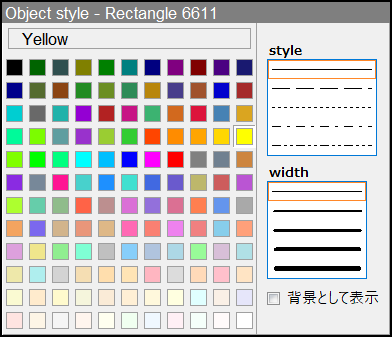
In short,"After selecting trendlines or shapes by double-clicking to put them in selection, right-click to open Properties, and set the object's color, style, and width on the General tab"This workflow is shortened, and the changed values are applied directly to the object.
Seeing is believing—please watch the following video.
As shown in this video, when you click an object and choose “Custom” from the menu that appears, the Style Palette is displayed.
From this palette, simply selecting color, style, and width allows you to directly change properties.
This tool is packed with other convenient features, and we also offer a trial version, so we would be grateful if you could try it out.
Limited version 3.00
× ![]()