Let's create a semi-discretionary EA and a settlement EA
Introduction
We are Gogojan Co., Ltd., the operators of GogoJungle / Skijan.
This time, for those who understand the basics of using EA Maker, we will introduce the steps to actually create semi-discretionary EAs and settlement EAs.
If you are new to EA Maker, please check the past articles from the links below.
・Basics of EA Maker and how to use
・Thorough explanation of trading conditions
・Learn about options
・Create a simple EA using a Golden Cross
・Try MACD
・Try averaging down and pyramiding
・Create an EA using a custom indicator
Table of Contents
・What are semi-discretionary EAs and settlement EAs?
・How to create semi-discretionary EAs and settlement EAs
・All-settlement settings
・About magic numbers
・Setting profit/loss conditions
・Conclusion
What are Semi-Discretionary EAs and Settlement EAs?
A semi-discretionary EA is an EA used to assist discretionary trading.
Normally, an EA automates from entry to settlement, but a semi-discretionary EA settles positions that were entered through discretionary trades.
For this reason, they are called “Settlement EAs” or “Semi-Discretionary EAs.”
By using such EAs, you can realize automated take-profit by setting “Close all positions when the total profit of all positions exceeds 50,000 yen,” and automated stop-loss by “Close all positions when the total loss of all positions exceeds 50,000 yen.”
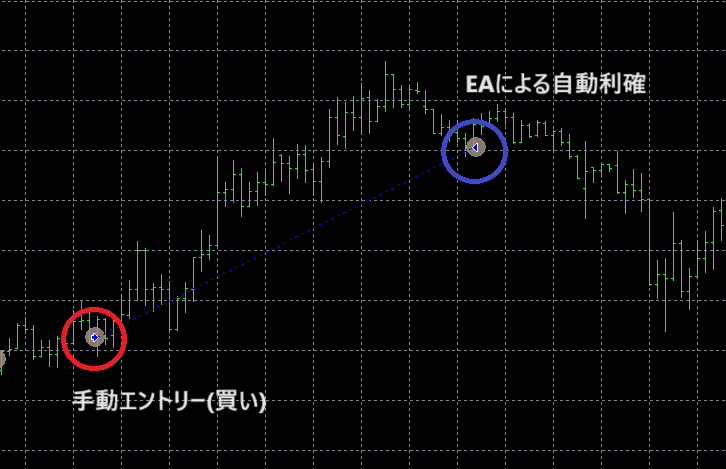
From the simple conditional settlements described above, you can incorporate trailing stops and more complex conditions, combining with discretionary trading to adopt a variety of settlement methods.
How to Create Semi-Discretionary EAs and Settlement EAs
Let’s create a semi-discretionary EA that automatically takes profit when the total profit of all positions exceeds 50,000 yen, and automatically stops loss when the total loss of all positions exceeds 50,000 yen.
To settle manually-entered positions, you need to use the “All-Settlement” option and the “Profit/Loss Conditions.”
Each one determines what to settle and what to compare profit/loss against using the magic number, and the comparison criteria can be based on the amount of profit/loss or the number of pips.
All-Settlement Settings
First, let’s check the All-Settlement option.
From Options -> All-Settlement, check the checkbox.
For the magic number, enter “1.”
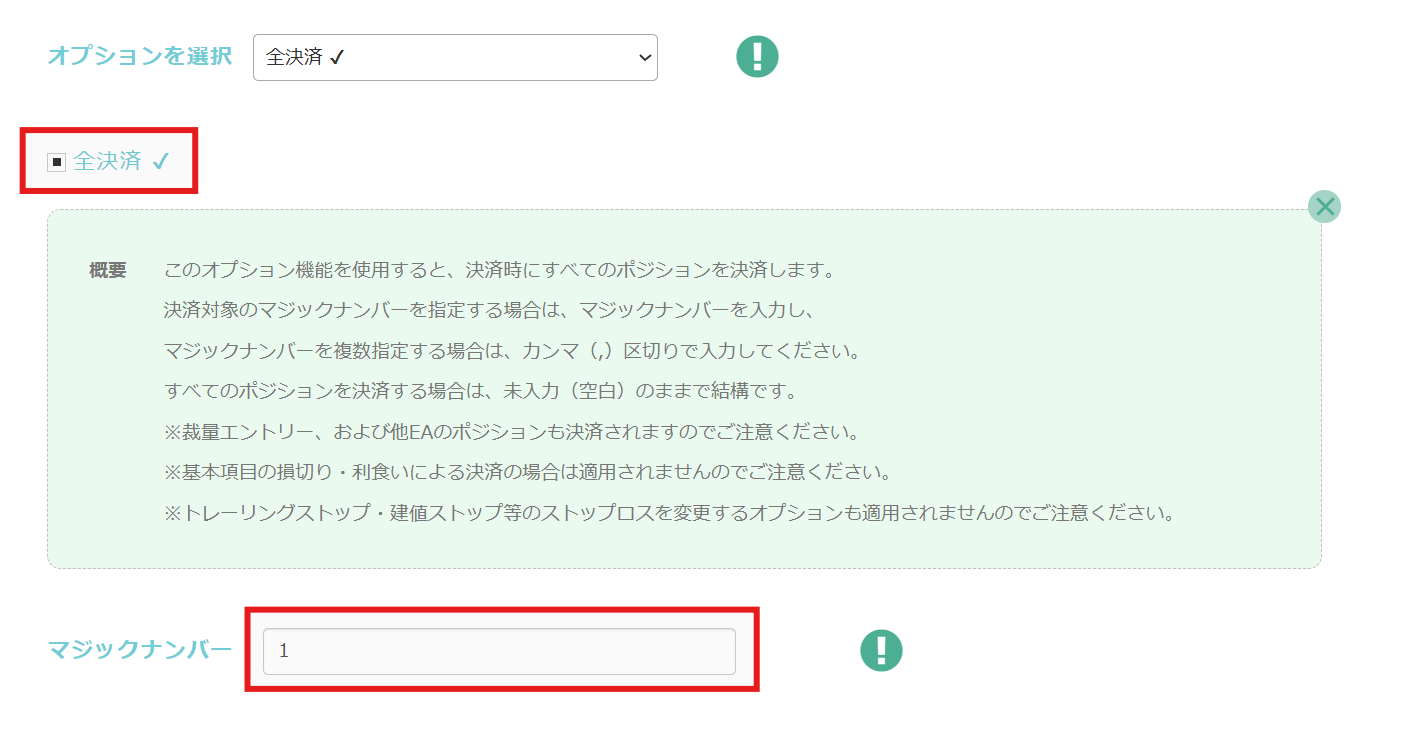
With this setting, when any one of the positions is settled by this EA’s settlement logic, all positions with the magic number assigned to “Position 1” will automatically be settled.
About Magic Numbers
A magic number is a number used to identify which EA or logic executed an order in MT4.Usually, each EA has its own unique magic number, which is used to distinguish entries.
One thing to note:
In the All-Settlement option’s magic number field, specify not the actual magic number, but the value corresponding to “Position 〇.”
In EA Maker,
Magic number for “Position 1” = 1
Magic number for “Position 2” = 2
Magic number for “Position 3” = 3
Setting Profit/Loss Conditions
Next, we’ll set the profit and loss conditions.
Set the conditions as shown below.
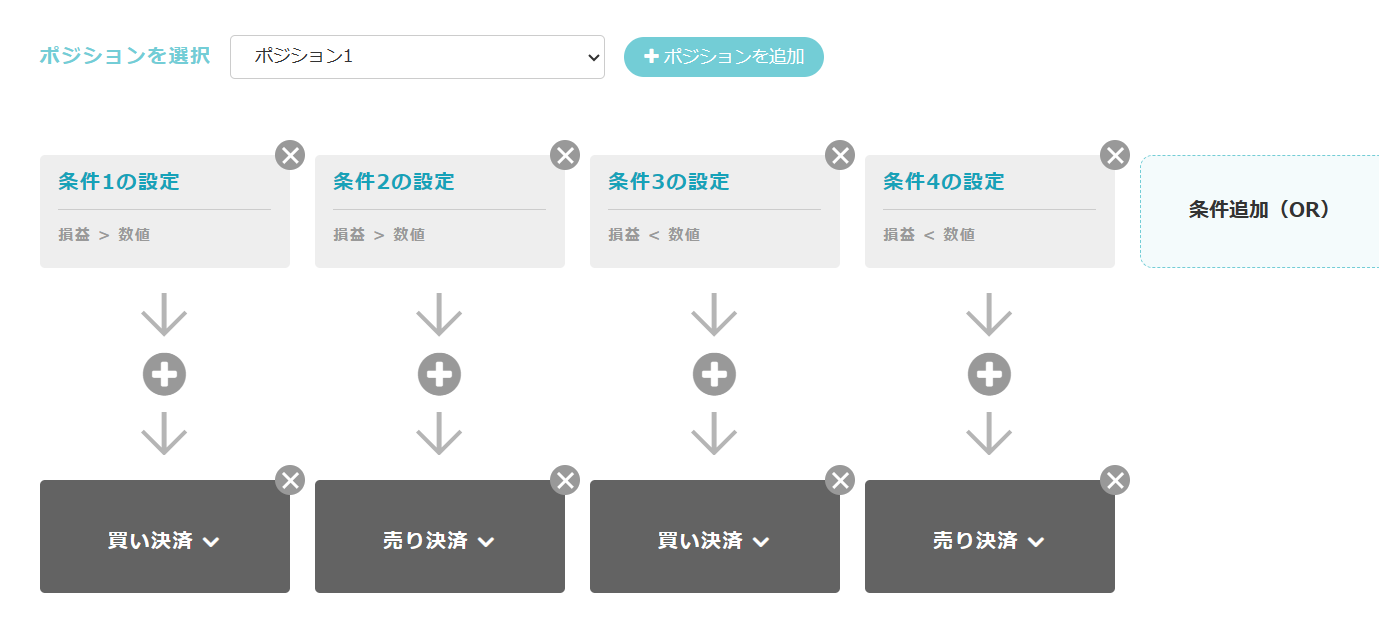
Condition 1, Condition 2
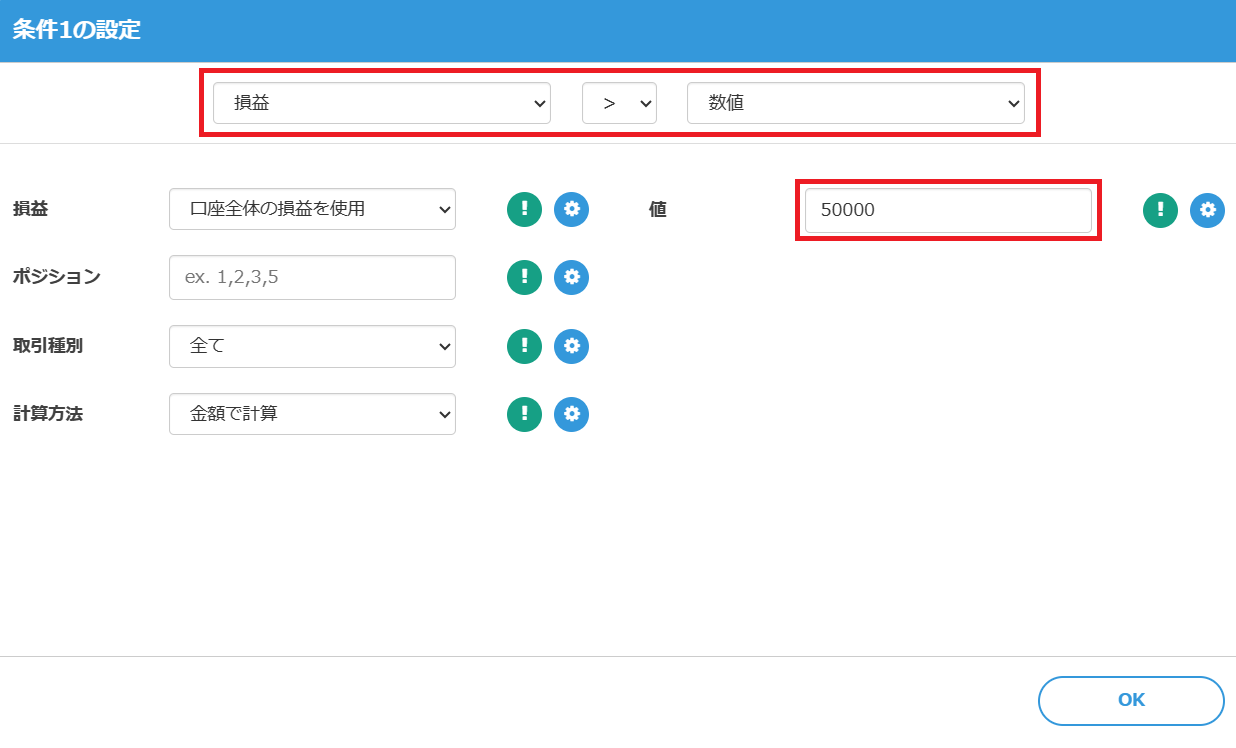
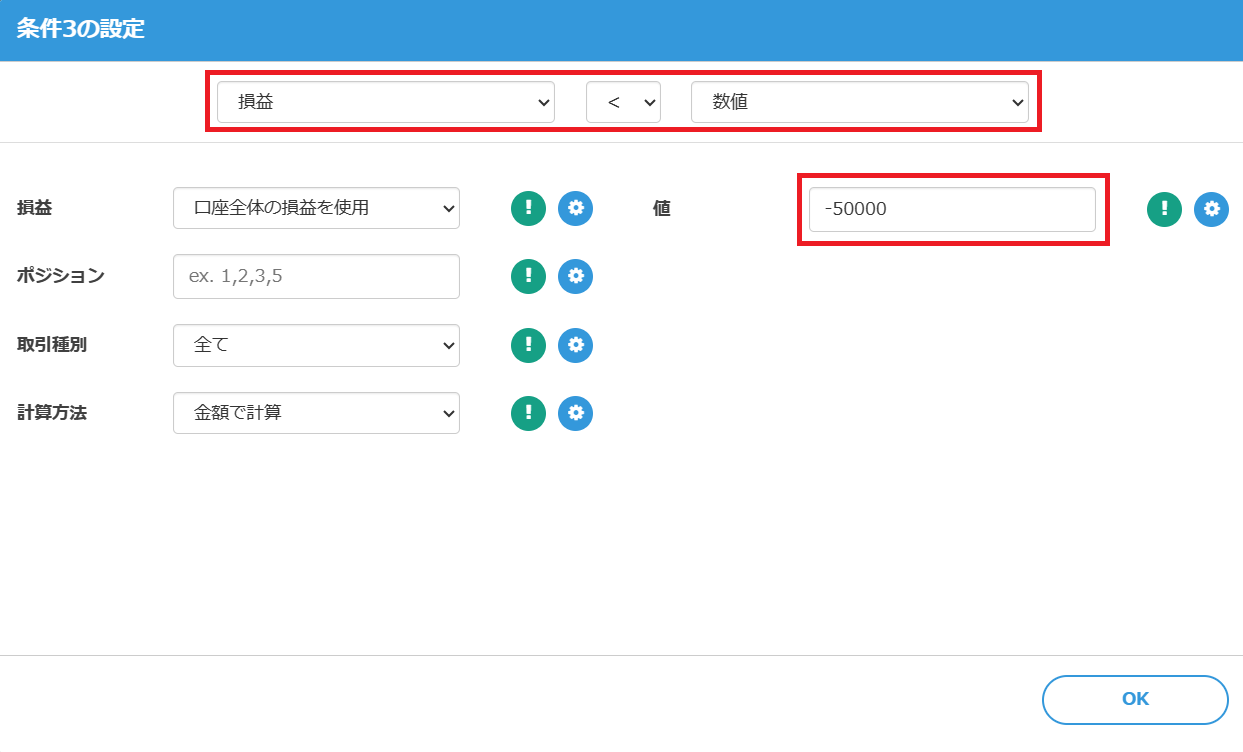
※ Note: In the profit/loss conditions, “Position” refers not to the magic number but to the EA Maker’s positions such as Position 1, Position 2, etc.
By setting the items used for calculating profit/loss to not only “account total P/L” but also “specific position P/L,” configuring trade types and calculation methods, and adding AND conditions, you can perform settlements under more complex criteria.
Settings in MT4
When placing this created EA on MT4, you need to modify the parameters shown when applying the EA to the chart.
The value of the magic number in discretionary trading is “0,” so when applying the EA, operating with the magic number set to “0” will allow you to manage manually entered positions.
From “Parameter Input,” each of “Magic1, Magic2” corresponds to EA Maker’s “Position 1, Position 2.”
In this case, since only “Position 1” is configured, change “Magic1” to “0.”
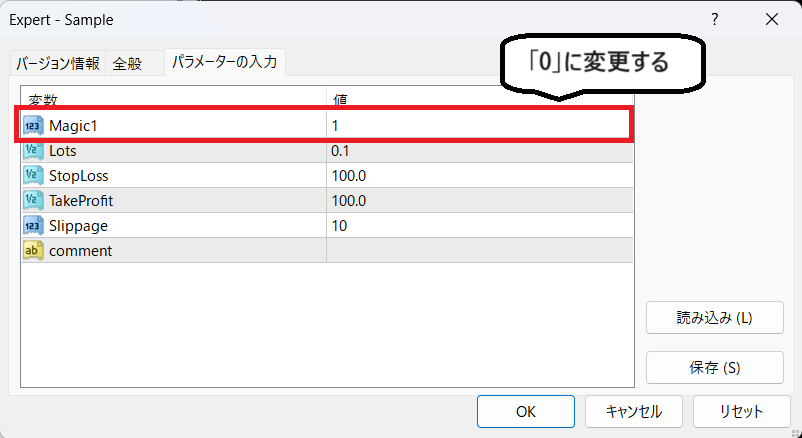
With these settings, the EA’s magic number is recognized as “0,” so trailing stops, pyramiding, and other option features can be reflected within discretionary trading.
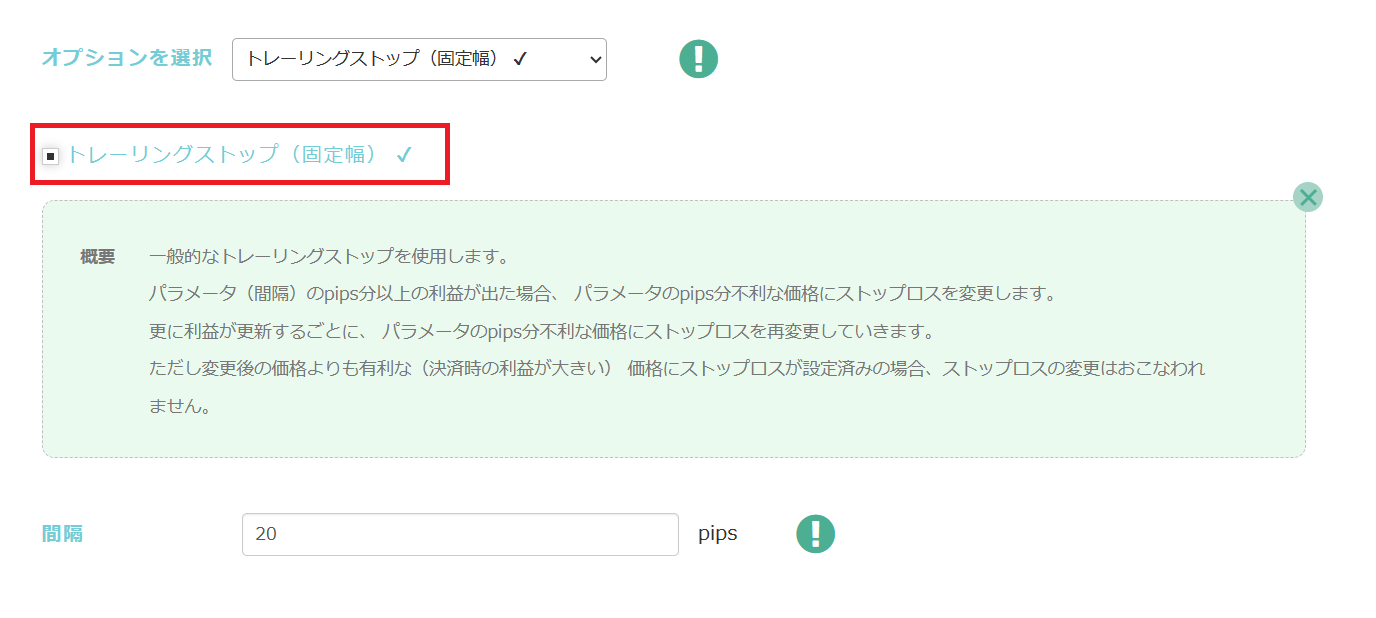
To reflect options into discretion, simply check the boxes as before.
(Example of setting a trailing stop)
Conclusion
That concludes how to create settlement EAs and semi-discretionary EAs.
EAs created with EA Maker may not operate exactly as intended due to various reasons such as combinations of conditions or errors in condition specification.
Please verify operation with backtesting and a demo account before starting on a real account.
We appreciate your continued use of EA Maker.
Questions? Head to LABO!
 | GogoJungle LABO A Q&A service focused on investment programming, including automated trading and indicators. In the EA Maker category, we accept questions and consultations related to EA Maker. |
Purchase Here!
 | “EA Maker” compatible with MT4/MT5 No-code, anyone can easily develop EAs, with fully automatic or semi-automatic trading to make your trading a little easier! |