

MT5を使用したSuper Recovery などのバックテストの方法について初心者向けに解説します。
Good morning everyone.
Recently, a Super Recovery user asked, "The backtest isn’t going well..."
Since words alone are hard to explain, I’ll write an article here.
The figure below shows the current MT5 main chart screen with Super Recovery installed.
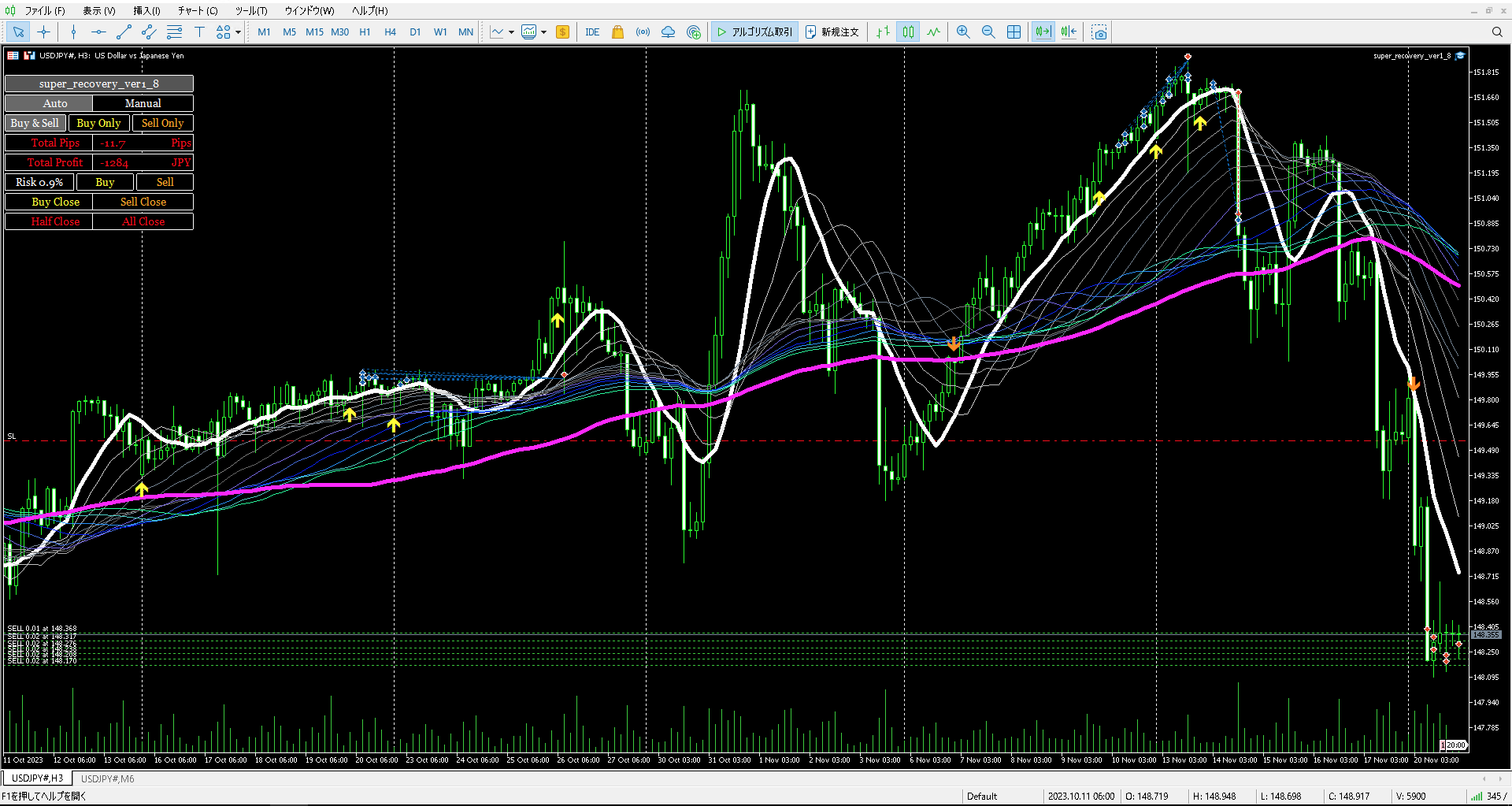
As a side note, Super Recovery has taken a short position on the dollar-yen for the first time in a while.
We’d like to see it redeem itself from the humiliation of the previous 117 pips stop loss.
Now, the main topic.
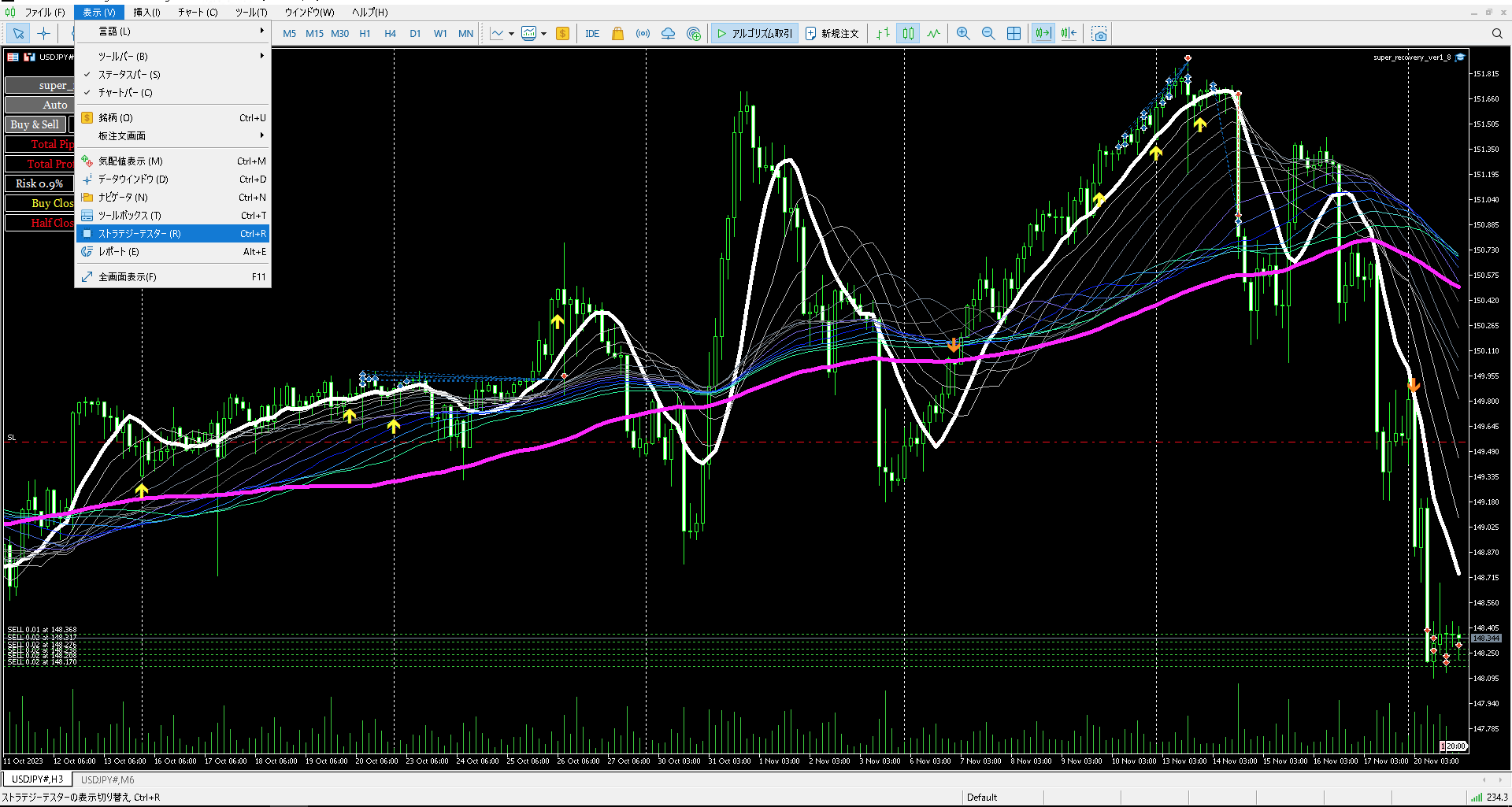
In this screen, the backtest Strategy Tester tab does not appear, so select “View” → “Strategy Tester” at the top.
Then the backtest Strategy Tester tab will be displayed.
And most importantly, beforehand, confirm that the EA to be backtested is installed.
Likewise, select the “View” → “Navigator” on the top figure to display the Navigator box.
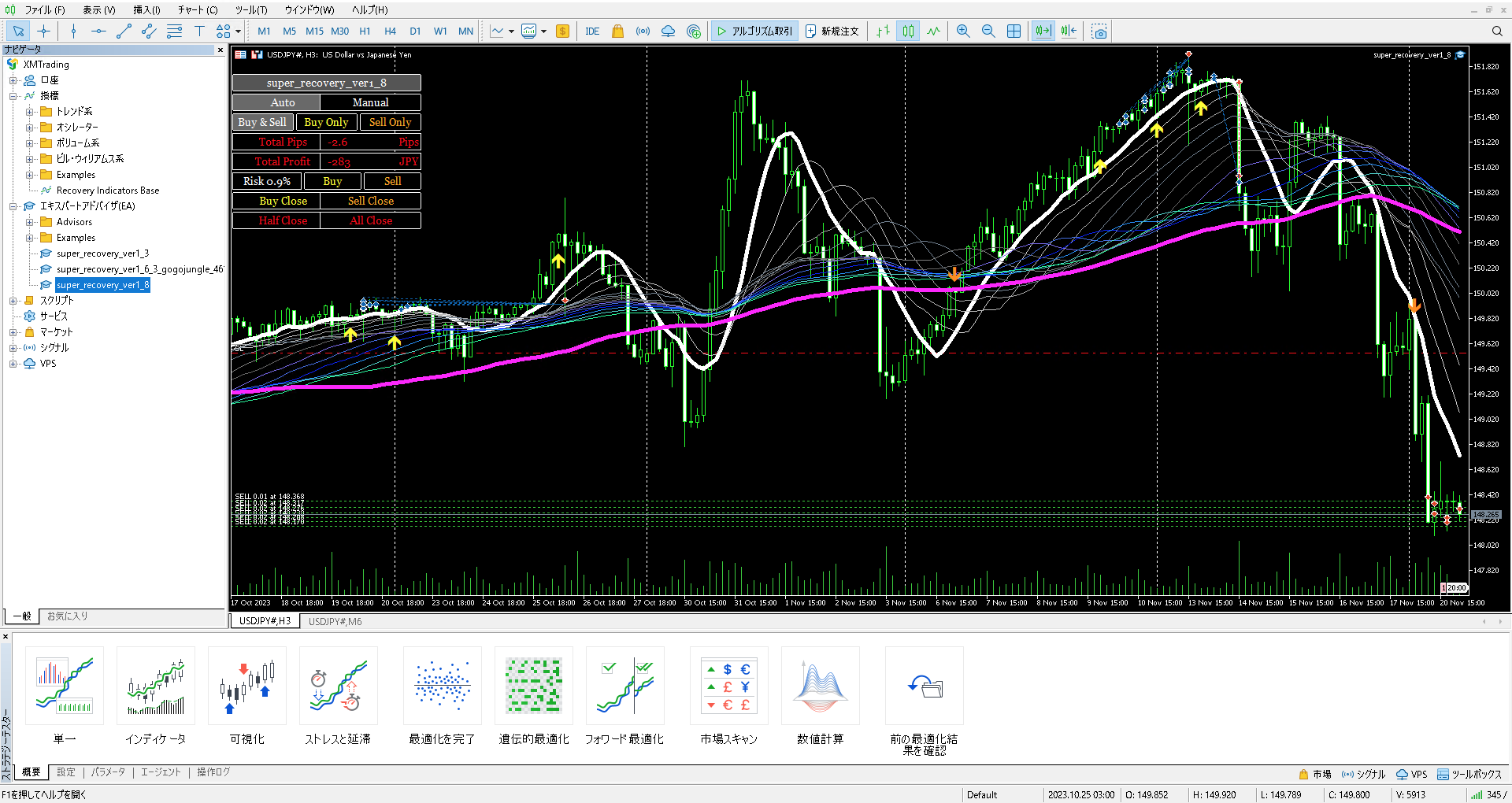
As shown above, you can see in the Navigator window that Super Recovery1_8 is already installed.
If it’s installed but not displayed, close MT5 and restart after installation.
Next, click the “Single” tab displayed at the bottom of the figure to select the desired EA.
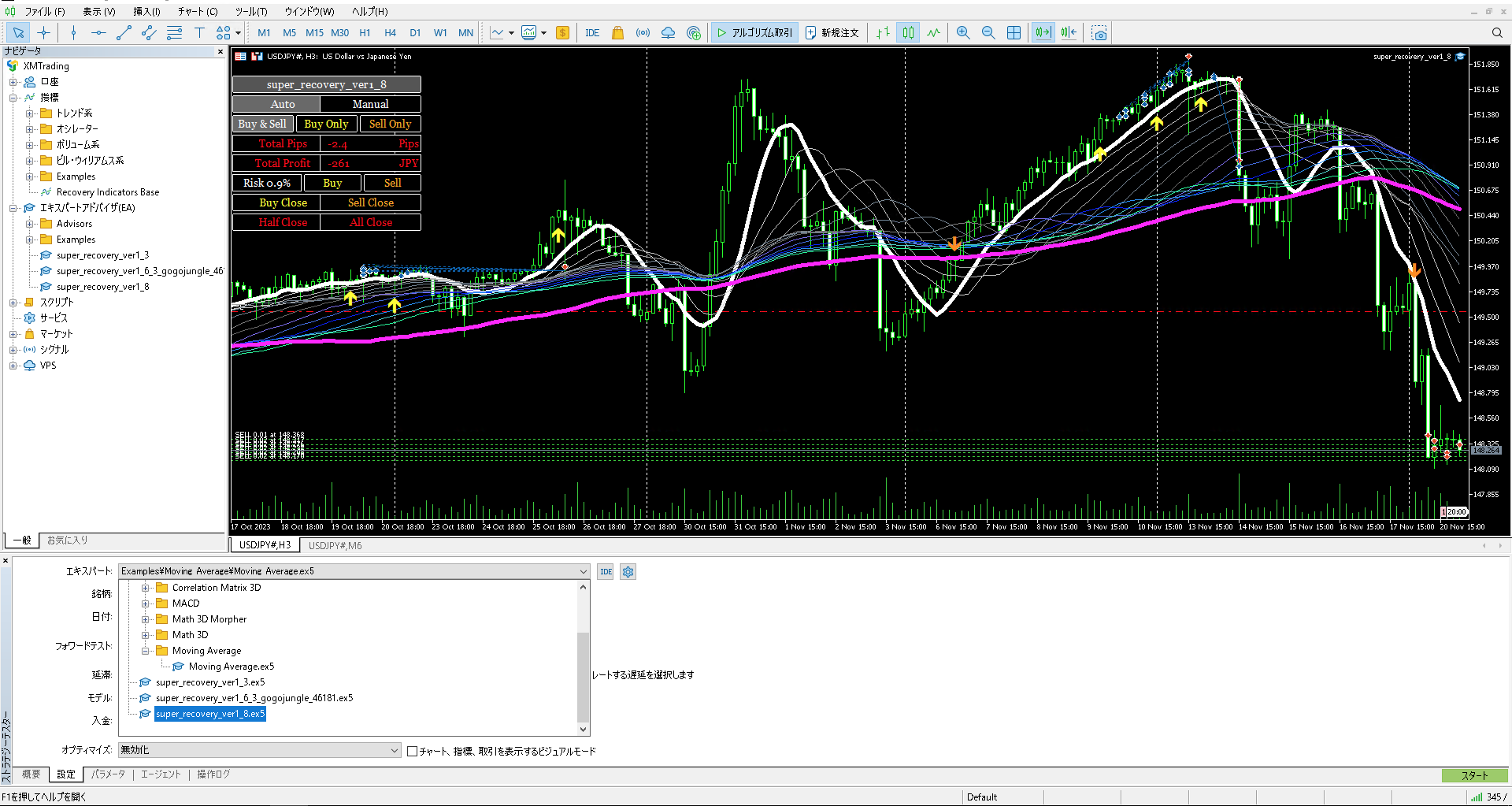
After selecting the desired Super Recovery, double-click it.
If the desired EA name is not displayed here, restart MT5 or re-store the EA in the designated folder and restart MT5.
Next, select the currency pair.
Depending on the broker account type, the pairs may not appear unless you display them; if so, display the desired pair and select again.
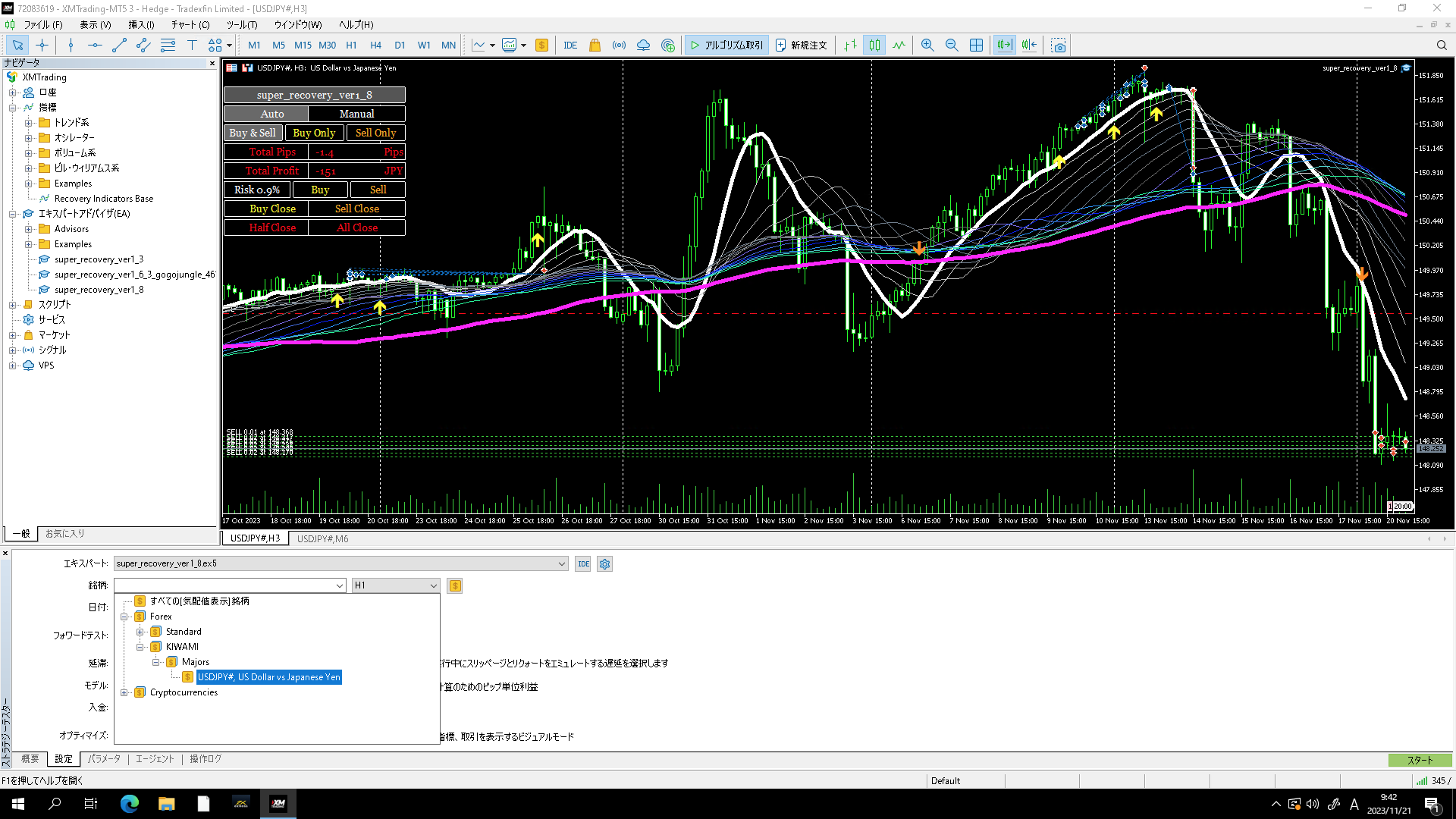
In the above image, the up-top tab “View” → “Symbols” was used to pre-display the desired pairs; if the target pair is not found here, as shown below, double-click the desired pair from “View” → “Symbols” to make it selectable.
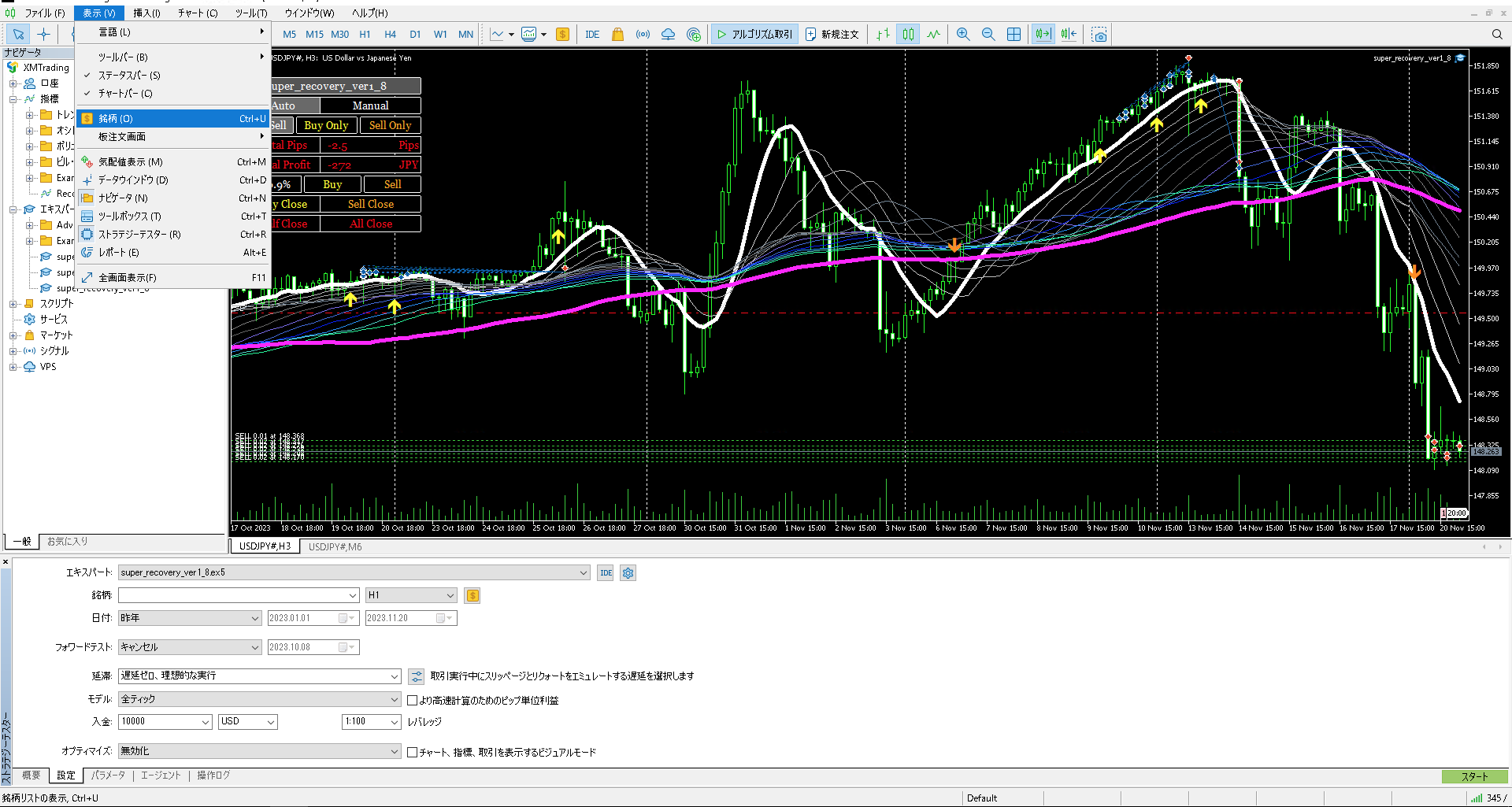
With the above steps, you can select the pair for backtesting.
A note: depending on the broker’s account type, you must choose the same instrument as the account type you are logged into MT5 with.
Next, select “Date” → “Specified period.”
Please see the image below.
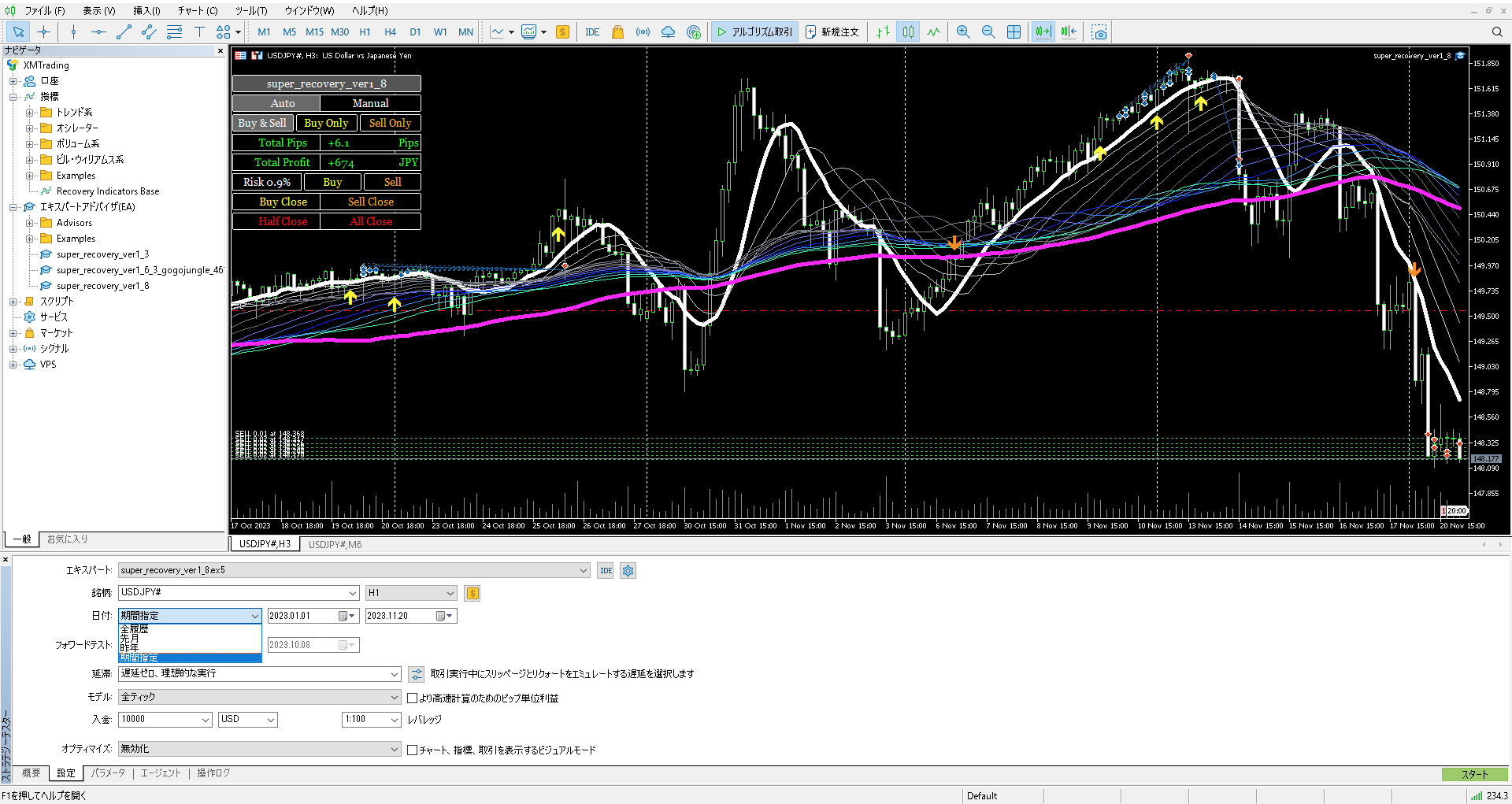
Click “Date” to open a drop-down menu; choose the bottom item “Specified period.”
Then click the adjacent calendar and select “January 1, 2022” → “Today.”
Now I will explain the settings all at once.
Please see the image below.
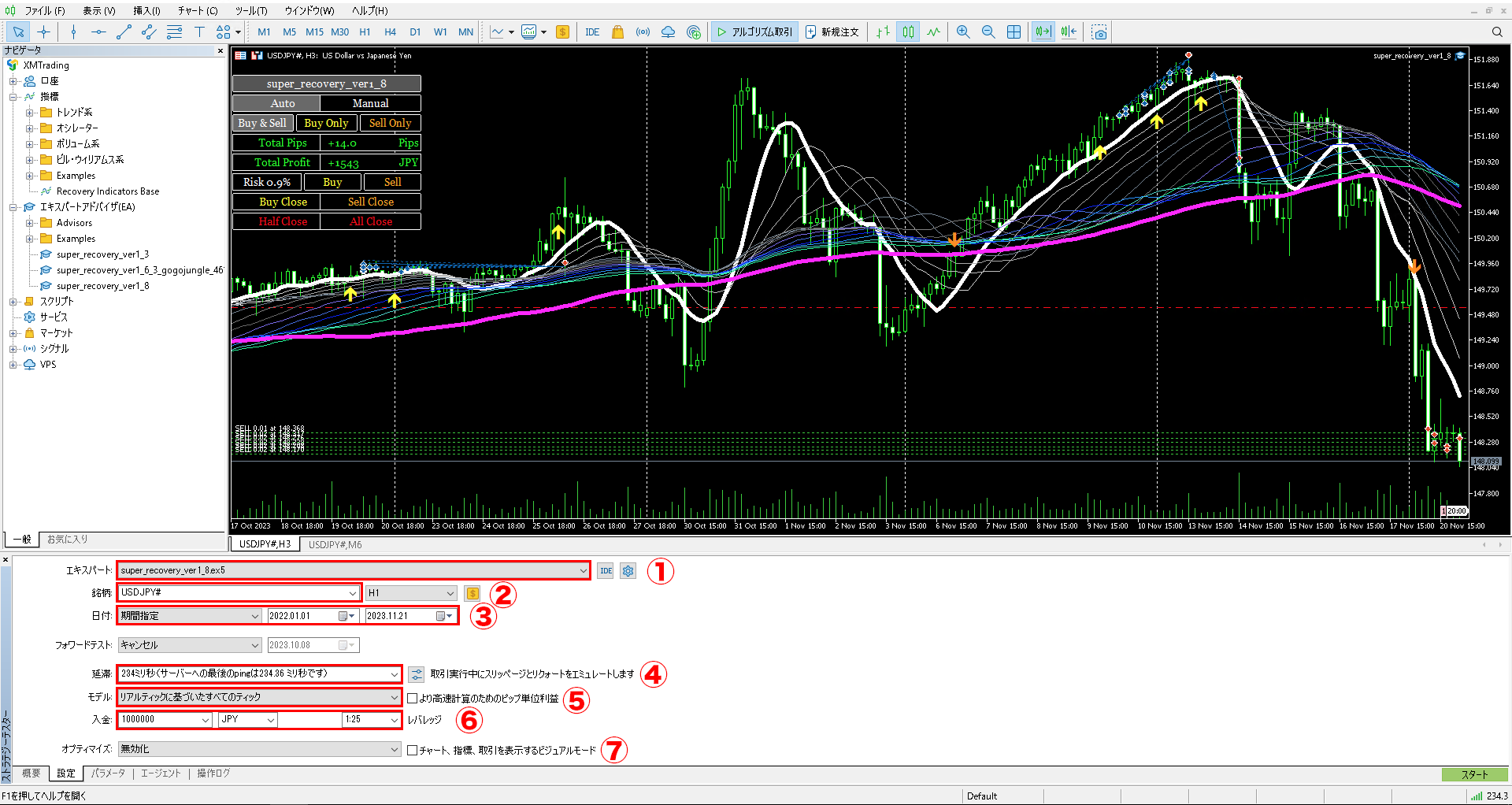
Let me review a little in reverse.
- First, confirm that the EA name to backtest is correctly selected.
- Then confirm that the desired currency pair is correctly selected. It is important to choose a pair that matches the broker and account type you are logged into in MT5. You can leave the left-side time frame as the default 1-hour for testing. The higher timeframe is used to define the trend, while the lower time frame for entries is 6 minutes, which is fine.
- Specified period → 2022-01-01 → Today is correctly selected. The tech-volume increased from 2022, so we test in this period (since Super Recovery’s logic uses 3-hour uptrends with pyramiding, results outside this period are not likely). For details, please read this article.https://www.gogojungle.co.jp/finance/navi/articles/59551
- El latency means the communication delay that occurs when data is transmitted between servers; in an ideal no-latency state, it would be more favorable than reality, so you should select the most recent latency of the broker you are testing. Different brokers/servers have different latencies.
- In this field, you should select every tick that the broker actually recorded in real trading. This is the most stringent backtest criterion. If you check the checkbox next to this field, calculations are faster but will be in Pips, which makes converting to correct money amounts cumbersome, so do not check it.
- In this field, you input amounts; since the currency field defaults to “USD,” manually enter “JPY.” The dropdown does not show JPY, so delete the default USD and type JPY. Leverage should be set to 25x if testing a domestic individual account. You can change the number by entering it manually.
- This is checked when you want to verify real trading conditions. Note that enabling visuals can slow down the process significantly depending on PC specs, and you may not be able to perform other tasks; normally do not check this. Also, from the left dropdown, you can choose “Disabled” → “Genetic Algorithms (Fast)” and specify ranges for parameters to enable optimization testing. I will write another article about this item someday.
Then press the “Start” button at the bottom right.
After a while, the backtest results will be displayed.
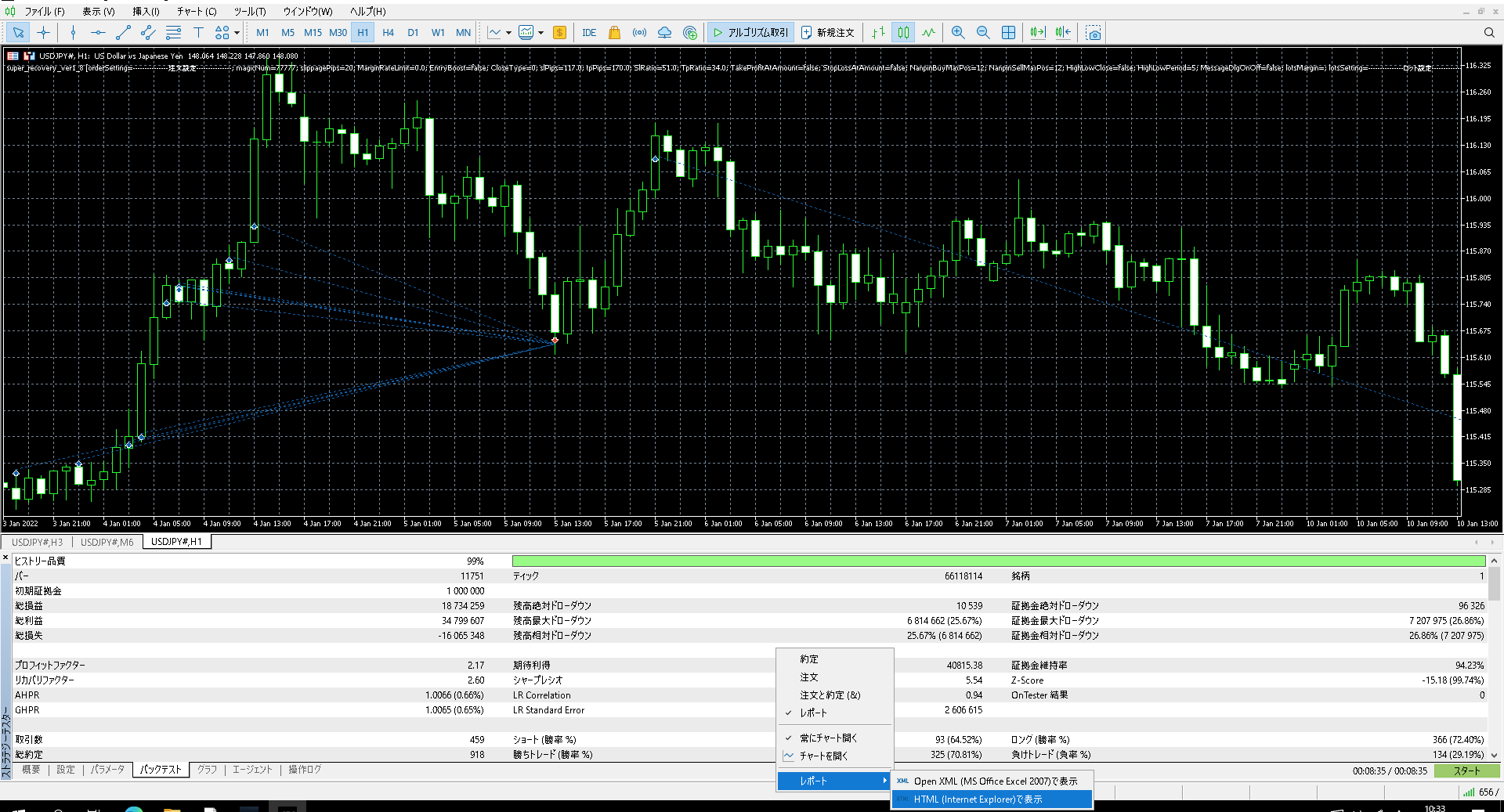
If you select the “Backtest” tab at the bottom of Strategy Tester, you’ll see test results like in the above image.
If you want to save the detailed backtest history, right-click the blank area of this screen (or left-click on Mac with VPS) to open a pop-up as shown above, then select HTML on the right panel to output the backtest record to a specified location.
You can view the details in your PC’s browser in advance.
In this case, it was displayed in Microsoft Edge.
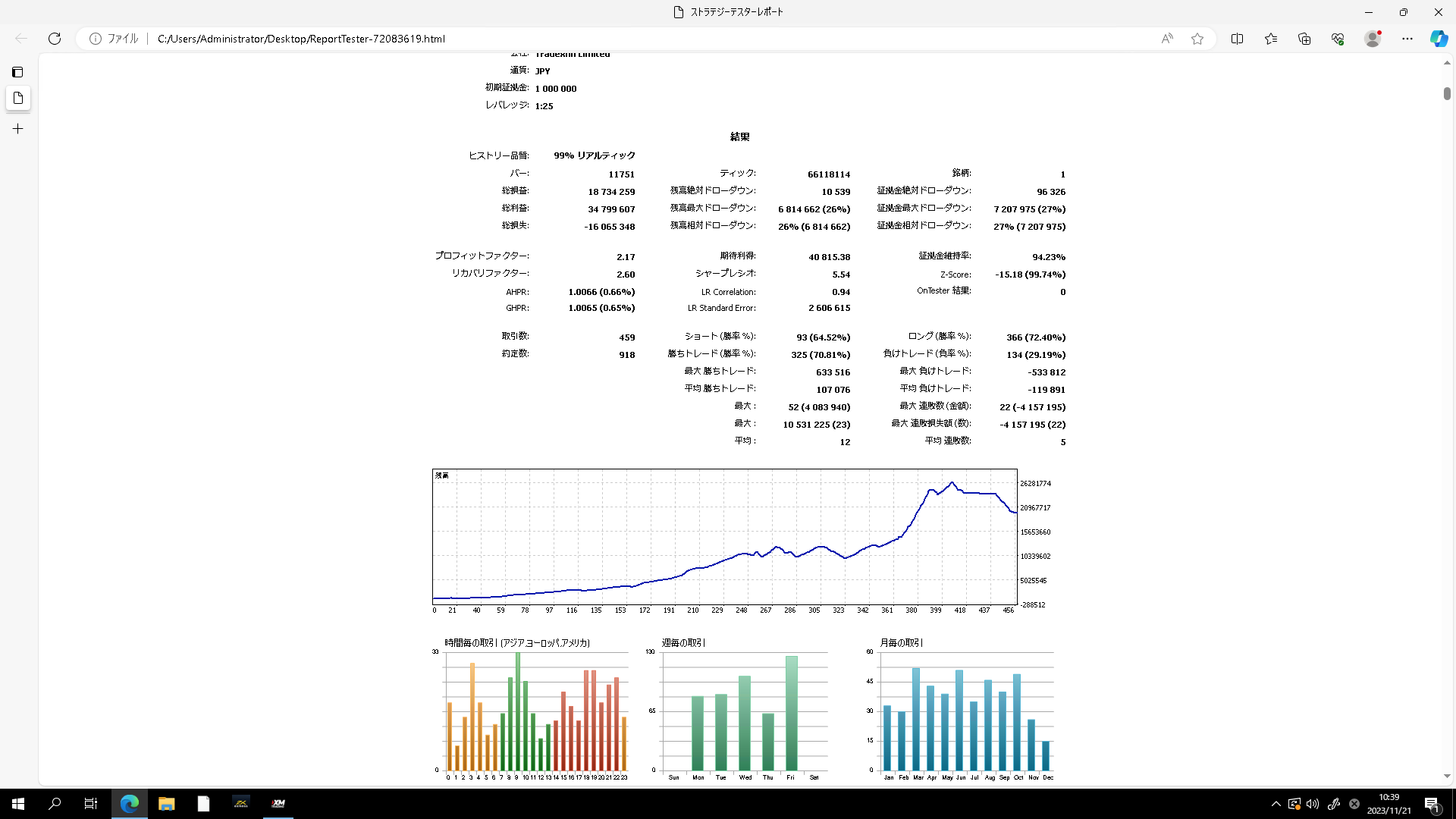
From January 1, 2022 to today (November 21, 2023), a backtest of about two years turned 1 million into 18 million.
That concludes the basic operation method for backtesting using MT5.
Once optimization testing becomes possible, you can compute optimal parameters for various EAs with your broker and currency pairs.
This requires quite a high-spec PC, and you may not be able to perform other tasks during testing.
I am currently developing a scalping EA and performing optimization testing, but my PC is unusable for about a week to 10 days.
That’s how enormous the calculations and processing speed/throughput requirements are, so touching it can cause freezing for a while; I leave it alone.
That was a rough outline of the backtesting method.
The internal parameters should automatically load the default settings, so you should be able to test without making any changes.
From here, I would like to introduce a new work.
The currently in-development scalping EA is not designed to seek huge profits like Super Recovery, but uses a fixed lot size of 0.01 with tick-based logic, so the time frame does not matter.
It trades automatically on both 1-minute and daily charts.
I basically do not favor averaging down or martingale, so these logics are not included at all.
Whereas the previous Super Recovery incorporated averaging down, martingale, and pyramiding, the new scalping EA uses only pyramiding as its logic.
I name the method Scalping + Pyramiding = Scapira.
This Scapira method increases the number of trades considerably compared to the previous version, so it tends to hold positions continuously.
Since it uses hedging, the supported accounts are hedging accounts only.
It takes a position as soon as installed, so it will automatically trade anytime, anywhere.
Basically it enters at 0.01 lots, with no upper limit on position size. (Depending on optimization results, I might add a stop loss!)
Currently, there is no stop loss (depending on optimization results, I might add one!).
This type of logic is not something many people have seen, but it is the exact opposite of the flawed gold-type EAs that are common in the market, which I think is easier to understand.
In other words, it is the opposite of a logic that collapses under big new trends, so it is a logic that can earn heavily under major price moves.
During ranges or price actions with no clear direction, it hedges with hedging positions and waits for a trend to emerge.
In discretionary trading, handling after hedging is difficult, so it’s better to leave that to the EA.
I am a hybrid trader who does both discretionary trading and EA, but I trade with Recovery indicator for discretion.
However, for research, I have tested many free gold-type EAs distributed by IBs in real money, and if left to run completely unattended, any EA will eventually fail 100% at some point.
Such exploding-profit gold-type EAs often incorporate averaging down and martingale in many logics, making them able to endure drawdowns continuously.
A little thinking reveals that the biggest enemy of such logics is extreme, long-lasting directional trends that occur at key indicator releases.
In such price action, averaging down with insufficient pullback and inability to take profits leads to expansion of positions and eventual failure.
So what is the opposite?
What if you could do the opposite?
Seeing the abundance of real-money EAs that ruin accounts on YouTube and other platforms, I devised this scalping EA.
The constant appearance of exploding-profit EAs that inevitably fail, and many people using them and either making money or getting ruined, concerns me, and I wonder if this is right.
There are questions like that.
There are many gold-type EAs claiming 100% monthly returns or more, but if you’re lucky and they don’t fail in the first few months, your initial investment may double or triple; yet many unlucky people fail in the first month, which worries me.
In just a few years, so many exploding-profit EAs have become popular, but it’s strange that a contrary logic hasn’t appeared.
Things always go through a process of evolution: thesis, antithesis, synthesis.
If today the “thesis” is exploding-profit EAs, it’s not unlikely that a contrary “antithesis” would emerge.
With that in mind, the scalping EA under development is named “Wave Rider Kinjiro.”
I created a logo like this.
The origin comes from the idea that in major indicator releases or crises, big price moves = a big wave that even a dog can ride, so the EA has a simple logic.

It may take 1–2 months to complete the “Wave Rider Kinjiro” EA, so please wait a little longer.
By the way, I’d like you to pair it with Super Recovery’s swing trading, so I will sell it to current Super Recovery users at 90% off for 10,000 yen.
The official price is 110,000 yen.
Here is the current progress of optimization testing.
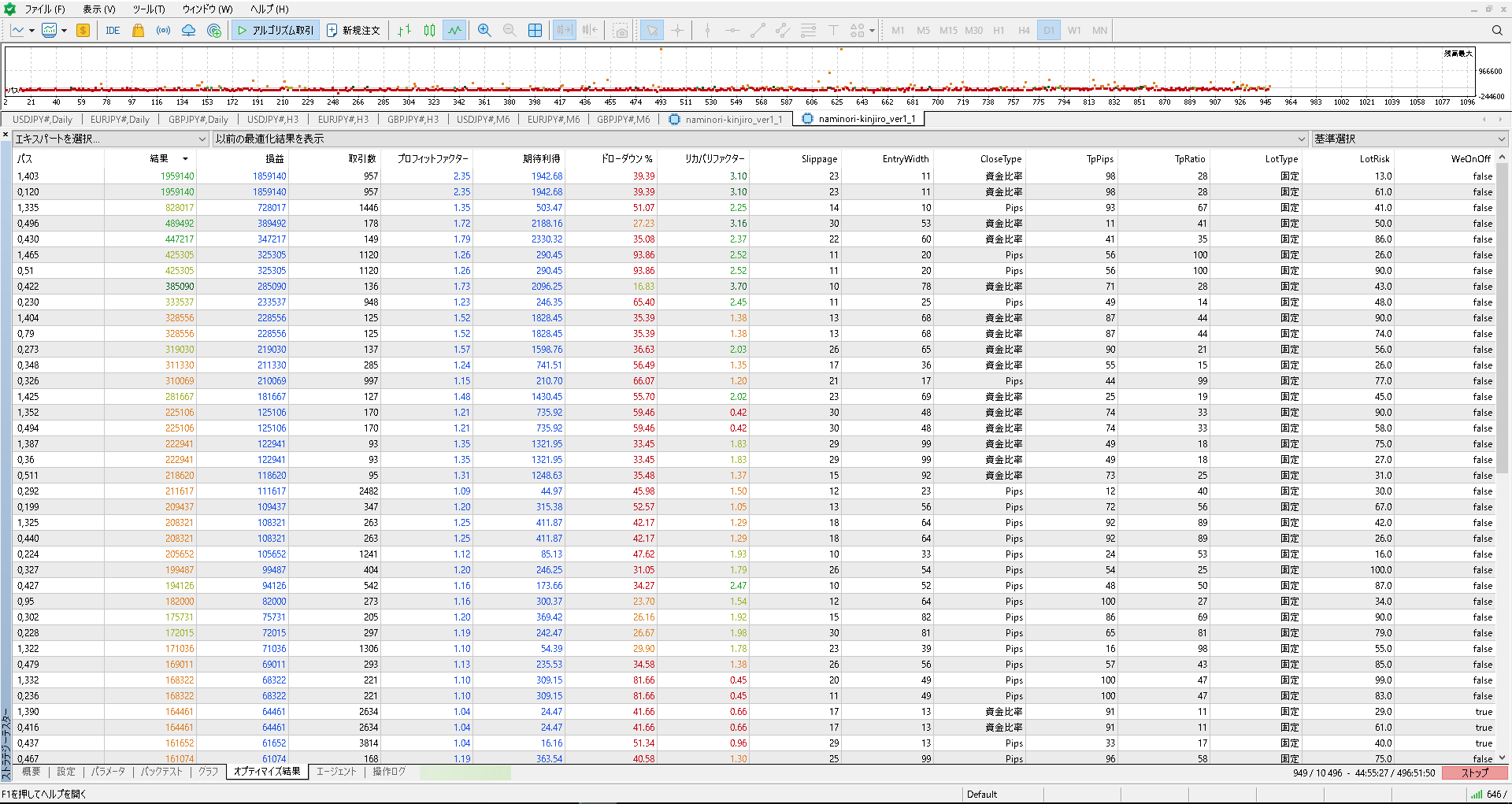
It is about 2 million yen over two years.
Start capital is 100,000 yen, and the backtest is from January 1, 2022 to November 21, 2023.
With a fixed lot of 0.01, to earn 2,000,000 yen with 1,000 currency units, you need 2,000 times the base amount: 2,000,000 ÷ 1,000 = 2,000x.
If the annual average is 1,000x, then 0.01 lots would yield 1,000,000 yen, while 0.1 lots would yield about 10,000,000 yen in annual profit.
The drawdown is relatively large at 36%, so adding a stop loss could reduce the DD.
This optimization test is run on a VPS, so I cannot run multiple EAs simultaneously.
I am also running optimization tests on my home PC at the same time.
Increasing the number of items and refining test items would require enormous calculations.
This EA has relatively few items, but will still occupy your PC for about a week.
Development has just begun, so I’m not sure how far I’ll improve it, but a portfolio consisting of the daily-earning scalping “Wave Rider Kinjiro” and the big-earning swing type “Super Recovery Recovery” could be the strongest.
In any case, the common concept is that it earns big when large trends occur.
Geopolitical risks are rising, while US interest rate pauses, domestic rate hikes, and war risks fuel speculation; currencies are entering a period of large volatility.
Earlier, the popular exploding-profit gold-type EAs on YouTube and X crash in such sharp, large trends.
Conversely, by building a different logic, you may be able to wait for large trends with less risk.
Well then.