

The evolution of Super Recovery EA does not stop! The ultimate hybrid system is complete! Whether using automated entry or fully discretionary trading, the automatic exit function remains active.
Evolution of Super Recovery shows no signs of stopping!!
In the video commentary, we touch briefly on the new scalping-type EA, but while Super Recovery is a swing trade, the EA currently under development is a scalping type with a contrasting logic.
While inheriting the greatest strength of Super Recovery, it also features a logic that dispels its biggest weakness—the large stop-loss portion.
Moreover, it’s not just a simple scalping approach; with significant price movements such as indicators, it may become a scalping strategy that can earn substantially.
Well, we can’t say for sure until tests are done, so there’s a bit of uncertainty until then.
It looks like completion will take about two months, so it might start to be active from next year!?
If you want more details, please watch the video.
What changed in this Super Recovery version update 1_8?
It has become an EA that can also be switched to discretionary trading.
You can enter by discretionary judgment, while exit is handled by the EA. It’s a common approach, but we’ve improved it so that this toggle button can be done on the main chart with a single click.
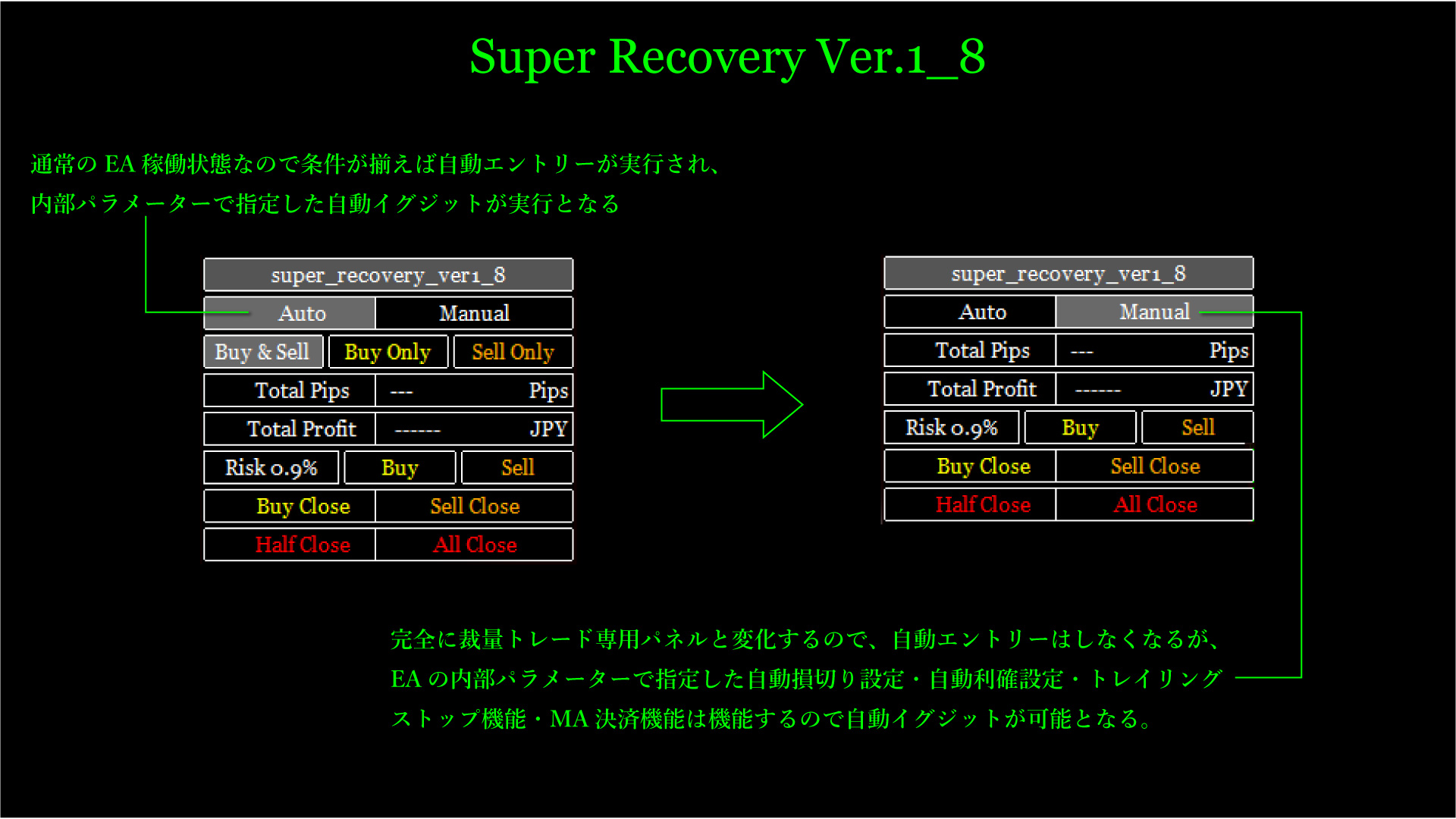
As shown above, the new version equips a fully passive Auto function button and a Manual function button for when you want to stop automatic entries.
This allows trading in four major patterns.
- With Auto selection, a normal fully passive EA performs non-discretionary entries and non-discretionary exits.
- With Auto selection, you can also perform automatic entries and manual exits based on discretionary judgment.
- With Manual selection for manual entries, you can use internal parameters to specify automatic stop-loss and take-profit settings, trailing stop functionality, and MA-based settlement, enabling automatic exits by the EA.
- With Manual selection for manual entries and manual exits, you can easily operate from the panel, allowing partial or full position closes, or closing only sell positions or only buy positions.
In short, with these four feature enhancements and additions, you can customize more closely to your trading style.
Additionally, manual entries using the panel and a confirmation screen that appears when manually exiting have been improved to be hidden.
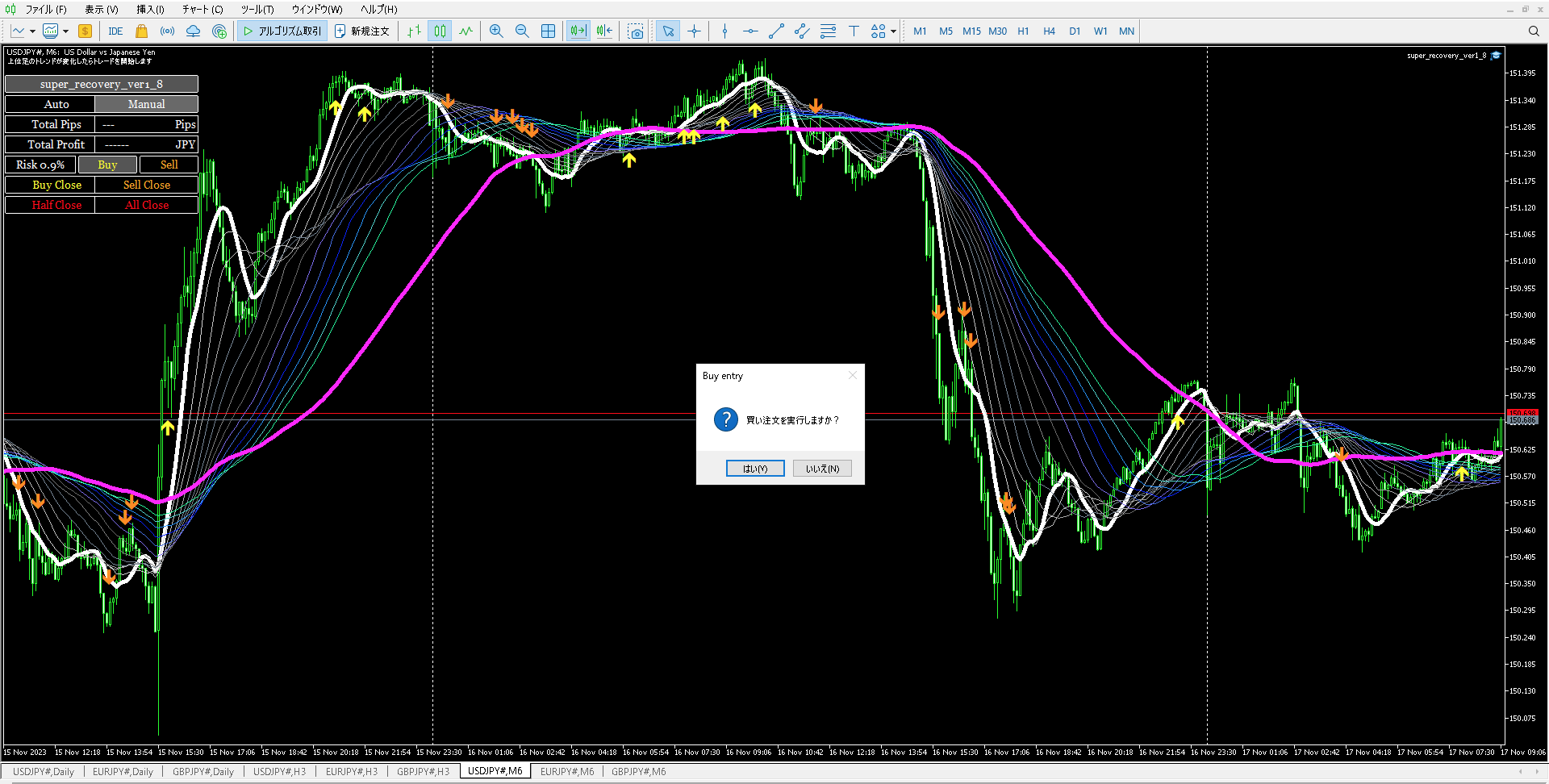
As shown above, pressing the buy button from the panel will trigger a confirmation screen, but you can remove this confirmation screen.
If you set the internal parameter "Show confirmation screen" to true, it will be displayed; if set to false, pressing the buy button will immediately acquire a fast buy position.
This confirmation screen does not appear when half or full settlement of the panel, or settlement of only buy positions or only sell positions is performed, so you can promptly settle everything with one click when you want to close all at once.
Please look at the figure below.
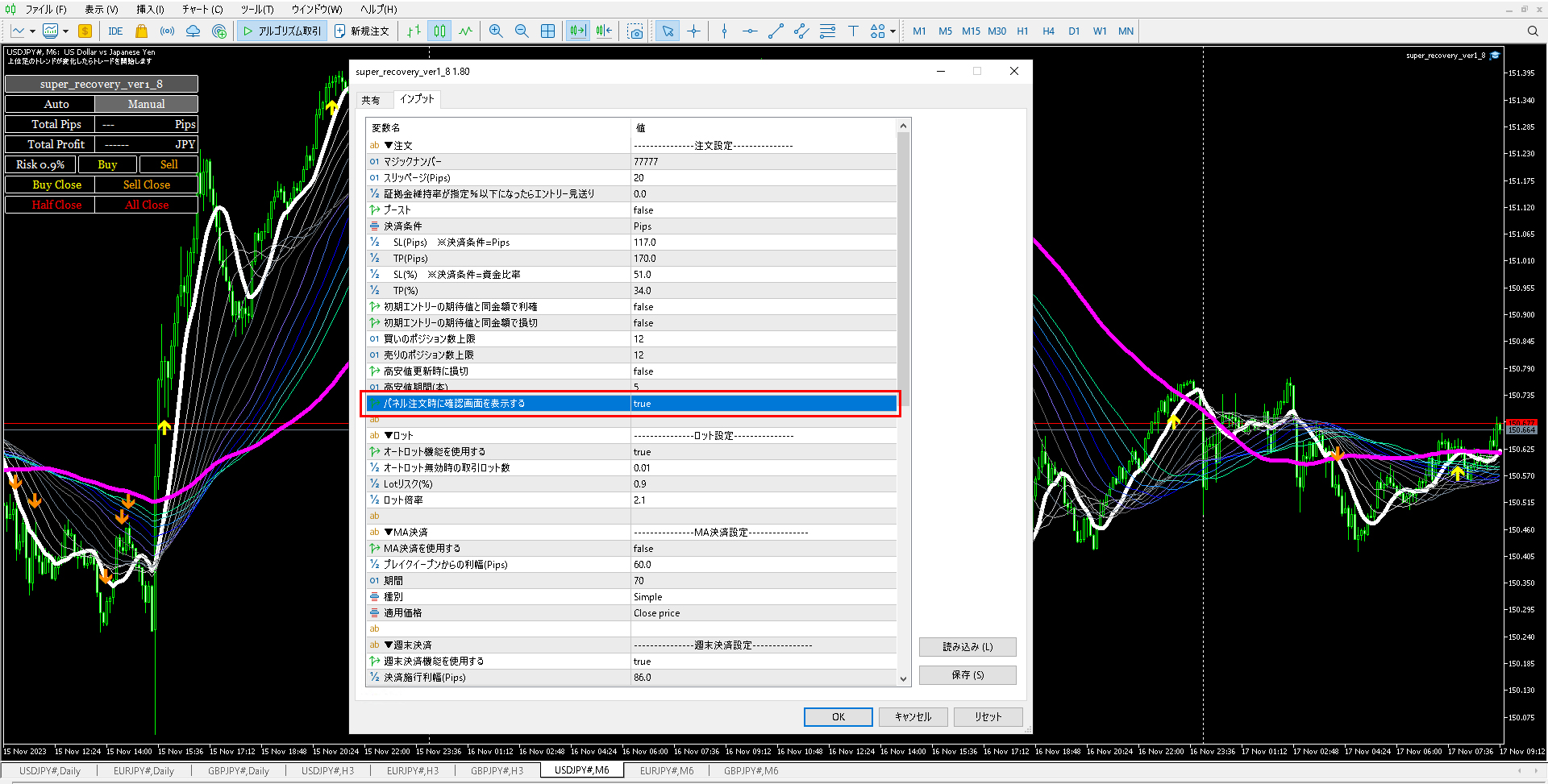
The above features are additions in this new version.
If you do not trade discretionary, this may not be relevant, but for those who do discretionary trading, quickly entering and performing bulk settlement of multiple positions is convenient.
Also, during sharp declines in indicators, you can hide the confirmation screen at the moment you feel “danger!” and perform all-close with a single click, which is convenient.
Normally, if you just close the panel tab, there is no risk of mistakenly entering or exiting, so please rest assured.
If you still worry about pressing the wrong button, we recommend turning the confirmation screen on.
Lastly, I’d like to talk about an important feature I forgot to mention in the video.
For example, suppose you manually enter from the panel.
If the manually entered position is an initial position, it will automatically be placed at the default settings specified in the internal parameters: a stop-loss of 117 pips and a take-profit of 170 pips.
If you trade purely on discretion, it’s good to set your preferred stop-loss and take-profit values in the internal parameters.
That automatically placed line becomes the first line, but from there, no matter where you manually enter, when the initial stop-loss or take-profit line is touched, all positions in the same direction will be closed simultaneously.
In other words, even if you hold multiple positions, only the first one or two SL/TP lines are displayed; the second and subsequent manual-entry positions do not have SL/TP lines placed.
No matter how many positions you hold, there is only one SL and one TP line for each direction at a time.
What happens if you manually move those SL/TP lines?
As with the initial settings, when any of the positions in the same direction touch that line, all such positions will be settled at the same time.
In a hedged position (both short and long), there are four lines: the initial SL/TP line for the short position and the SL/TP line automatically placed when you first enter the long position, totaling four lines.
Movements of all positions in the same direction will be settled when each line is touched.
If you want to settle all hedged positions at once, press the All Close button on the panel.
This feature is also added in this version update.
In summary, the panel features of Super Recovery are extremely convenient for discretionary traders, and at the same time, highly useful for EA-only traders who prefer full automation.
I am confident that this will become an indispensable tool for my hybrid trader—an EA & discretionary trader.
And the scalping EA currently under development is eagerly anticipated to potentially fill the losses of Super Recovery with ease.
It is not yet completed, so I cannot boast too much, but please look forward to it.
Also, for current Super Recovery users, we are offering a special price of 10,000 yen, with more than 90% discount.
The regular selling price is planned to be 110,000 yen.
We will publish progress on the scalping EA again once it takes a more concrete shape.
Wishing you all a nice weekend!