【Campaign Overview】
This is a campaign that lets you trial MT4-based FX automated trading (EA) for 2,980 yen per month.
Usage period is one month (30 days) from the purchase date.
Automatic renewal is not provided.
【Campaign Eligibility】
Those who have not previously purchased FX system-trading products (MT4 EAs) from GogoJungle
【Campaign Period】
March 26, 2021 (Fri) – April 25, 2021 (Sun) 23:59
【Eligible EAs for the Campaign】
Carefully selected EAs that trade frequently each month with short holding times and strong performance!
|

Regular version: 20,000 yen

|

Regular version: 28,000 yen

|

 Regular version: 14,800 yen Regular version: 14,800 yen
|

 Regular version: 15,000 yen Regular version: 15,000 yen
|

 Regular version: 12,800 yen Regular version: 12,800 yen
|
※For options, see the latter half of this page for details.
What is FX automated trading?
It is a fully automated trading program that runs on the MT4 trading platform.
The automated trading program is called Expert Advisor, commonly abbreviated as EA.
How automated trading runs
MT4 is a PC software that you install.
Place the EA for automated trading into MT4's Expert Advisors folder, enable AutoTrading in MT4's menu, open a chart, and drag-and-drop the EA file onto the chart to start operation.
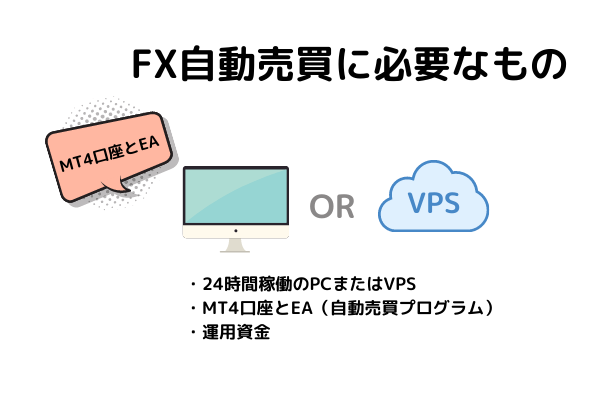
Automated trading will trade for you 24 hours a day.
EA is a tool that buys and sells according to a predefined program. Even when you are working or sleeping, if MT4 is running 24 hours, it will trade automatically.
However, it will not trade when MT4 is not running, so you must keep it running 24 hours.
Running on a local PC 24 hours is possible, but considering electricity costs and the risk of power outages, using a VPS (cloud server) is common.
Trading rules for automated trading vary widely
Just as discretionary trading has many methods, EA trading rules vary widely.
You can choose an EA for contrarian trading in range markets, trend-following in trending markets, and also scalping or day trading, according to your preference.
Understanding each EA's trading conditions and settlement terms will help you operate with less stress.
List of FX brokers that support MT4



There are also others such as Rakuten MT4.
Spreads on currency pairs vary by broker, so please choose a broker that provides favorable spreads for EA trading.
Detailed introduction of the campaign 1-month version EA
This time, the 1-month version EA chosen is, "a scalping EA suited for short-term trading with short holding times, high trade frequency, or tight stop losses.".
The number of positions varies from 1 to 6. For EAs with fewer positions, you can increase profits by using larger lots even if the monthly average pips are small. Conversely, EAs with many positions tend to have larger unrealized losses and maximum drawdown, so it is common to operate with smaller lots.
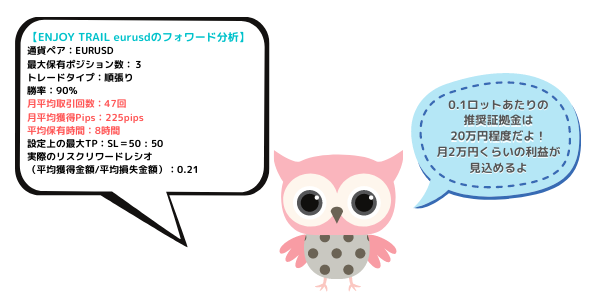
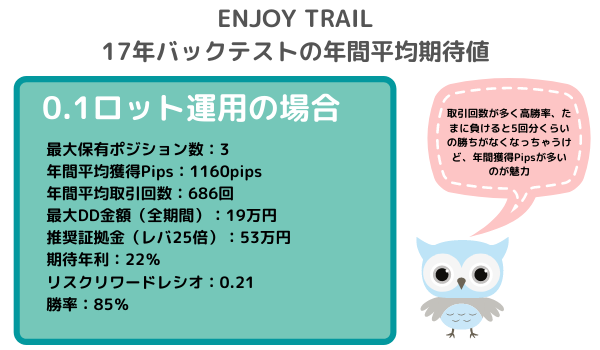
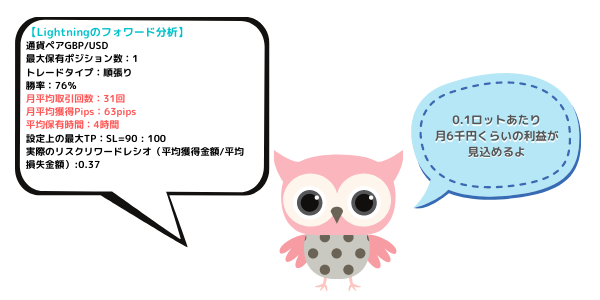
Two types of expectations are shown for forward performance and long-term backtests. Please use these as references for margin and returns when operating.
※The average gained pips and maximum drawdown in forward results are data from the forward period only.
Judging trend direction using moving average slopes on higher timeframes and the state of the stochastic oscillator, we enter on a trend-following basis.
Because forward tests are set in a compounding mode, the required margin is reduced.
Even purchasing the 1-month version + Regular version at 20% OFF totals 18,980 yen!
If you also buy a VPS, you save a total of 1,990 yen! (VPS saves every month)
\Purchase the 1-month version here/
ENJOY TRAIL eurusd【1-month version】
This is a scalping strategy that trades almost every day with one position. There are market conditions it excels in and conditions where it does not.
Overall, it is unlikely to be negative across a year.
Even purchasing the 1-month version + Regular version 20% OFF totals 25,380 yen!
If you buy a VPS together, you save 3,590 yen! (VPS saves monthly)
\Purchase the 1-month version EA here/
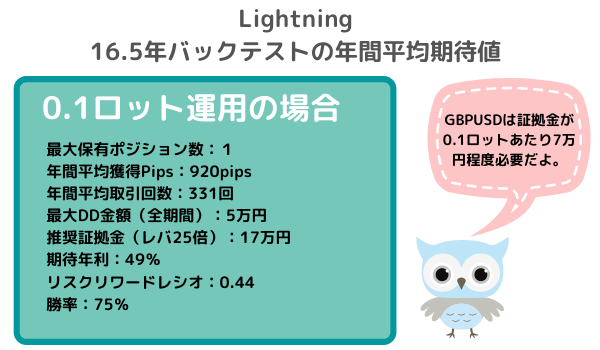
Lightning 1-month version
This is an EA that balances take-profit (TP) and stop-loss (SL) with one position, and if win-rate is above 50%, profits remain.
Because the number of trades is fewer and the average monthly pips are fewer, running with larger lots makes it easier to secure profits.
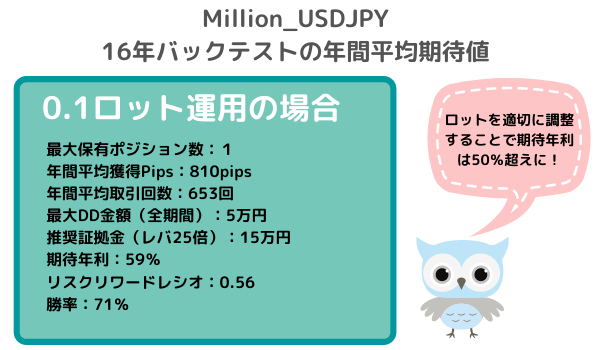
In the long term, fewer positions and smaller max drawdown lead to a higher expected annual return.
Even purchasing the 1-month version + Regular version 20% OFF totals 14,820 yen! Great for those who want to try.
If you buy a VPS too, you save 950 yen! (VPS saves monthly)
\Purchase the 1-month version here/
Nine indicators are used as entry filters, and by combining them you can build a market-adapted investment strategy with high customization.
Even purchasing the 1-month version + Regular version 20% OFF totals 14,980 yen! Great for those who want to try.
If you buy a VPS together, you save 990 yen! (VPS saves monthly)
\Purchase the 1-month version here/
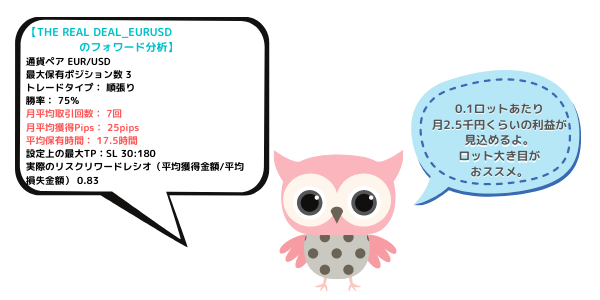
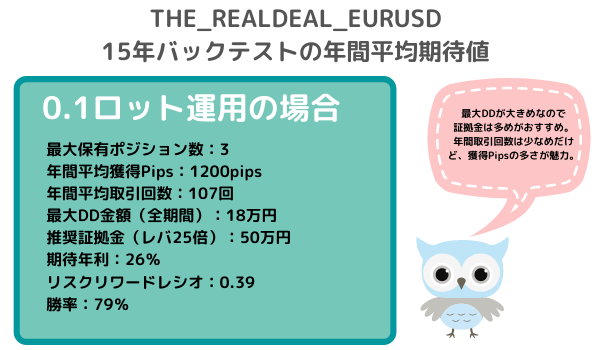
THE REAL DEAL_EURUSD 1-month version

.png#1617010538630)
The maximum loss is very tight at 35 pips, but it has a high win rate of 80% as a short-term contrarian EA.
Even if contrarian trading is not your strong suit, such a tight SL may be reassuring.
Even purchasing the 1-month version + Regular version 20% OFF totals 13,220 yen! Great for those who want to try.
If you buy a VPS together, you save 550 yen! (VPS saves monthly)
\Purchase the 1-month version here/
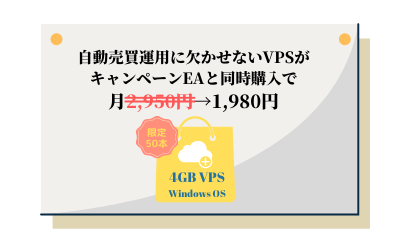
VPS is a great deal when bought with campaign EA at the same time!
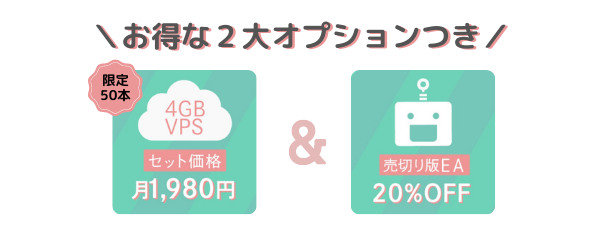
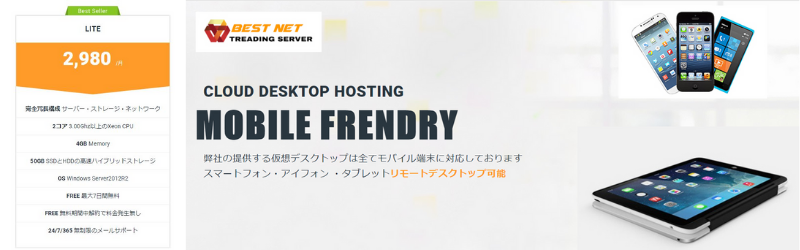
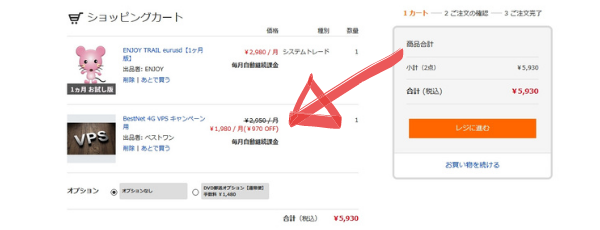
Option 1 of the campaign is a set that lets you start VPS, which is essential for automated trading, at an incredible price of 1,980 yen per month. Unless you cancel, you cancontinue paying 1,980 yen at purchase.
Bestnet’s VPS runs Windows OS, so you can use a private server in an interface you’re familiar with, just like your usual PC.
Connecting to the VPS is as simple as double-clicking the RDP file!
If you access the VPS from a smartphone, you can check the automated trading performance anytime, anywhere.
To apply the VPS campaign price, you must purchase the VPS product together with one of the campaign-targeted products.
Please confirm that the cart discount is applied before completing your purchase.
\Purchase VPS here/
Additionally, the regular version of the campaign EA is 20% OFF
Option 2 of the campaign is a discount on the regular version.
If you purchase the 1-month version EA, you can buy the corresponding perpetual EA at 20% OFF.
The purchase window is one month after the campaign ends, so if you try the trial and want to continue, please take advantage of the discounted period.
Notes at purchase
The 1-month version EA’s usage period is controlled by Web authentication, so it is registered in the system as an auto-renewal product.
It will show as auto-renewal at purchase, but in reality the usage period ends after one month and no automatic charges are made, so please rest assured.
【FAQ】
Q: Can I continue using the 1-month version EA in the future?
A: In this campaign, automatic renewal is not available. Usage ends after one month. If you want to continue using the same EA, please purchase the buyout version.
Q: I’m using VPS for the first time, is it easy?
A: If you usually use a PC, you can use it without issues. Connecting to the VPS is as simple as clicking the RDP file in the application. The VPS runs Windows OS, so you can use MT4 in the same environment as your usual PC.
Q: How do I cancel the VPS?
A: The VPS is a monthly auto-renewal. If you wish to cancel, please cancel the monthly usage from your GogoJungle My Page.
Q: Can I run multiple EAs on one MT4?
A: Yes, it’s possible. Please ensure that each EA’s magic number does not overlap, and prepare sufficient margin for running multiple EAs.
Q: The EA authentication seems to be erroring.
A: Please refer to the Web authentication error codes list and take action.
Q: The EA doesn’t seem to trade. Authentication succeeded. Could there be other causes?
A: There can be various causes, such as PC issues or MT4 connection problems. Please refer to related pages to identify the cause.
Q: Where should I contact if I have questions about EA operation?
A: Please contact GogoJungle’s chat support or Web inquiry.
Q: How is the recommended margin calculated?
A: The recommended margin calculation used by GogoJungle is Required margin + (Maximum drawdown × 2).
This means: Required margin equals Lot size × number of positions.
The amount of margin depends on the broker’s leverage, currency pairs traded, and lot size.
The required margin will vary based on broker leverage, currency pairs traded, and lot size.
【Related Videos】
How to install the EA
VPS setup method (for Onamae.com VPS)




.png#1617072782665)

.png#1617079085664)



.png#1617092155809)