

BILLION ASSIST シリーズ:Multi EA Guardian

Product outline
Community(0)
BILLION ASSIST シリーズ:Multi EA Guardian Indicators/E-books
BILLION ASSIST シリーズ:Multi EA Guardian
見守り×一時停止の二刀流。止めている間もEA自身の決済は動く、EAごとに選べるMT5ツール
Sales Result 0 items
Reviews ★ 0.0 (0)
Category:
How to provide:
Indicator
Sales from:
11/06/2026
Last Updated:
11/06/2026
Version:
1.04
Web Authentication:
Enable
Available company:
Seller Sammy
Seller's last login time: 11/7/2026 09:01:07
Read more seller information
¥6,980 (taxed)
Provider/Distributor:
Sales site:
GogoJungle

●Payment

Mastercard Visa JCB Bank FamilyMart D2 D1
BILLION ASSIST シリーズ|MetaTrader 5 専用ツール
Multi EA Guardian(V1.04)
あなたのEAたちに、24時間の見張り番を。
見守りパネル × 一時停止の二刀流|止めている間もEA自身の決済は動く|EAごとに選べる
BILLION ASSIST シリーズ / Multi EA Guardian のロゴ
6つ
停止のきっかけ
(指標・祝日・年末年始ほか)
EAごと
止める・止めないを
ボタン1つで選択
スマホ通知
停止・決済を
MT5のプッシュ通知で
全EA対応
会社・種類を問わず
マジックナンバーで見分け
見守りパネル × 一時停止の二刀流

EAの成績を見守るパネルと、危ない時間に新しい売買を止める機能。2つの役割を1つでこなす"二刀流"ツールです。

同じ口座で動いている複数のEAを1枚のパネルにまとめ、EAごとの保有数・含み損益・今日/今月/合計の損益・DDをひと目で確認。さらに、経済指標の発表・祝日・年末年始などの時間には、選んだEAの新しい売買だけを自動で一時停止します。
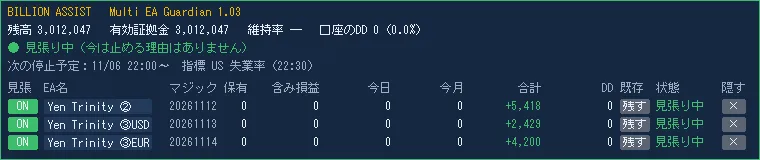
Multi EA Guardian のパネル(見張り中)

パネル(見張り中)。EAの一覧は取引履歴から自動で作られ、名前はパネルで付けられます

いちばんの違い:止めている間も、EA自身の決済はふだんどおり動く

MT5の「アルゴリズム取引」ボタンを切り替えて止める方式では、すべてのEAが注文を出せなくなるため、EAが自分で行う決済(決まった時刻での決済・条件を満たしたときの決済など)も止まってしまいます。

Multi EA Guardian はEAを止めません。止めている間に新しく持ったポジションだけをすぐ決済するので、持っているポジションの決済はEAの予定どおりに行われます。

自動売買ボタンを
切り替える方式
Multi EA Guardian
止めるEA全部が一斉に止まるEAごとに選べる
止めている間のEA自身の決済止まるふだんどおり動く
EAごとの損益の一覧なしあり

※ 方式ごとの一般的な特徴で、個々の商品の機能とは異なる場合があります。注文に付けた損切り・利益確定(SL/TP)は証券会社のサーバーで動くため、どちらの方式でも止まりません。

6つの停止のきっかけ
きっかけ内容(初期値)
① 経済指標MT5内蔵の経済指標カレンダーを自動で読み込み、重要度「高」の発表の前後で停止(米国・日本・ユーロ圏・英国、前後30分)。予定の手入力は不要
② 祝日選んだ国の祝日に停止(日本・米国)
③ 年末年始決めた期間に停止(12/24〜1/3)
④ 時間帯毎日決まった時間に停止(2つまで。早朝のスプレッドが広い時間など)
⑤ 口座のDD上限有効証拠金が最高値から決めた%下がったら停止(手動で解除するまで)
⑥ 証拠金維持率維持率が決めた%を下回ったら停止(300%)
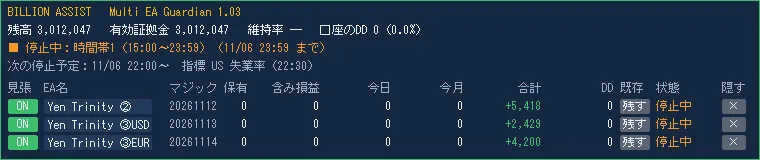
Multi EA Guardian のパネル(停止中)

停止中のパネル。止めている理由と終わる時刻(日本時間)が表示され、一覧の「状態」が「停止中」になります

安心して任せられる理由
1.運用中のポジションをこわさない
止める前から持っているポジションは、初期値ではそのまま残します。EAごとに「止める時間に決済」を選ぶこともできます。手動の売買は初期値で対象外です。
2.暴走しない安全設計
止めている間に同じEAが何度も入り直したら、3回目で決済をやめてスマホに通知(回数は変更可。1回にもできます)。決済の繰り返しでコストがかさむのを防ぎます。
3.EAの成績の記録がずれない
Guardian が決済した取引にも元のEAのマジックナンバーを付けるので、各EAの損益表示や取引の記録はそのまま正しく集計されます。
4.日本時間・スマホ通知・再起動にも対応
時刻はすべて日本時間で表示(夏時間も自動)。停止の始まり・終わり・決済をスマホに通知。MT5を再起動しても設定と状態を引き継ぎます。
推奨環境・仕様
対応MetaTrader 5(ヘッジング口座を推奨)
使い方ほかのEAが入っていないチャート1枚に入れるだけ(銘柄・時間足は自由)
対象のEA同じ口座で動くすべてのEA(他社のEAも可)
DLL止める仕組みには使いません(GogoJungle の購入者認証のためだけに使用。MT5の「ツール」→「オプション」→「エキスパートアドバイザ」と、Guardian を入れるときの両方で「DLLの使用を許可する」にチェックが必要です)
動作確認OANDA証券(日本)のMT5デモ口座
付属取扱説明書・仕様書(PDF・15ページ)
よくあるご質問

Q. ほかのEAの設定を変える必要はありますか?

A. いいえ。ほかのEAはそのまま動かしておき、Multi EA Guardian を別のチャートに入れるだけです。

Q. 経済指標の予定は自分で入力するのですか?

A. いいえ。MT5が自動で受け取る経済指標カレンダーを10分ごとに読み込みます。手での入力や、外部サイトの登録は不要です。

Q. 指標で稼ぐEAは止めたくないのですが?

A. パネルでそのEAの「見張り」をOFFにすれば、そのEAはいつもどおり売買します。

Q. パソコンはつけっぱなしにする必要がありますか?

A. MT5が動いている間だけ見張ります。24時間見張るには、EAを動かしているVPSのMT5に一緒に入れてください。

ご購入前に必ずお読みください
・本ツールは売買の判断をしません。損失を防ぐことや利益を保証するものではありません。
・ご購入後、GogoJungle のマイページで使う口座番号を登録し、MT5の「ツール」→「オプション」→「エキスパートアドバイザ」で「DLLの使用を許可する」にチェックを入れてください(購入者認証のため。同時に使えるのは1つの口座番号です)。
・止めている間に新しく持ったポジションはすぐ決済するため、1回ごとにスプレッド分の小さなコストがかかります。
・決済は成行です。値動きの速い時間にはスリッページが出ることがあります。
・MT5が動いていないとき、通信が切れているとき、「アルゴリズム取引」がOFFのときは決済できません。
・経済指標カレンダーはストラテジーテスターでは使えないため(MT5の仕様)、①経済指標・②祝日の動作はデモ口座でご確認ください。
・ネッティング口座(1銘柄1ポジション)では、止める前のポジションへの買い増しを見分けられません。ヘッジング口座での利用をおすすめします。

見守りと一時停止の二刀流。
あなたのEAたちに、24時間の見張り番を。

¥6,980 (taxed)
Provider/Distributor:
Sales site:
GogoJungle

●Payment

Mastercard Visa JCB Bank FamilyMart D2 D1
Product outline
Community(0)
Best Seller Ranking

For those using GogoJungle for the first time Easy 3 steps to use the product!

At GogoJungle, we provide services to enrich your investment life for our members. In addition, product purchases are limited to members. Why not register as a member now and make use of GogoJungle!

01
Enter user information and register as a member
02
Follow the instructions to make a purchase
03
Download from My Page
■ Important Matters and Risk Warnings Regarding Investment Products 【Financial Instruments Business Operator】
GogoJungle Inc.
Registration: Director-General of the Kanto Local Finance Bureau (Financial Instruments Business) No. 1960
【Member Association】
Investment Trusts Association, Japan
【Fees and Expenses】
The use of software, e-books, investment advisory services, etc., provided on our platform involves purchase prices determined for each product.
Additionally, when conducting actual financial instrument transactions (such as FX or CFD trading), costs such as transaction fees and spreads (the difference between the sell and buy price) may be incurred through the connected brokerage firms.
【Margin and Risk of Loss】
Transactions such as FX (Foreign Exchange Margin Trading) and CFD (Contract for Difference) allow for trading in amounts exceeding the deposited margin.
Therefore, due to sudden fluctuations in target indices (currency, commodity prices, etc.), there is a risk of incurring losses that exceed the deposited margin (loss exceeding principal).
Furthermore, financial instrument transactions involve risks such as price fluctuations, which may result in losses falling below or exceeding the initial investment principal.
【Nature of Services and Trading Entity】
The Company operates a platform (marketplace) providing investment software and information; we do not engage in the buying, selling, mediation, brokerage, or agency of financial instruments on behalf of customers.
The services and information provided are intended as reference for investment decisions and do not guarantee future profits or specific results.
While some services include investment advice, they do not constitute a mandate or solicitation to trade specific financial instruments.
Final investment decisions and the execution of trades must be made at the customer’s own risk and discretion.