

01 この商品について
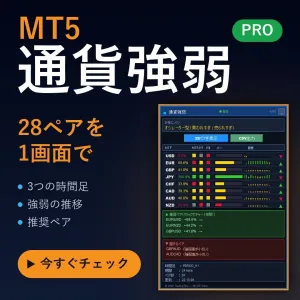
通貨強弱ダッシュボード PRO は、最大28の通貨ペアを読み取り、USD・EUR・GBP・JPY・CHF・CAD・AUD・NZD の主要8通貨それぞれについて 0〜100 の数値にまとめる MetaTrader 5 用インジケーターです。
チャートを何枚も開いて「どの通貨が強いのか」を目で追う代わりに、1枚のチャートに置いた1つのパネルを読むだけで、買われている通貨と売られている通貨が分かります。
表示言語は日本語と英語を切り替えられます(パラメータの一番上、Dashboard Language)。
無料公開の記事:通貨強弱で相場の方向は分かるのか
このインジケーターと同じ計算式で、28ペア・1年分のデータを実測しました。強さは方向を教えてくれるのか、どれくらい続くのかを、数字で確認できます。記事を読む(無料)
02 チャートに表示される内容
- 8通貨それぞれの強弱バーとパーセンテージ(強い順に並びます)
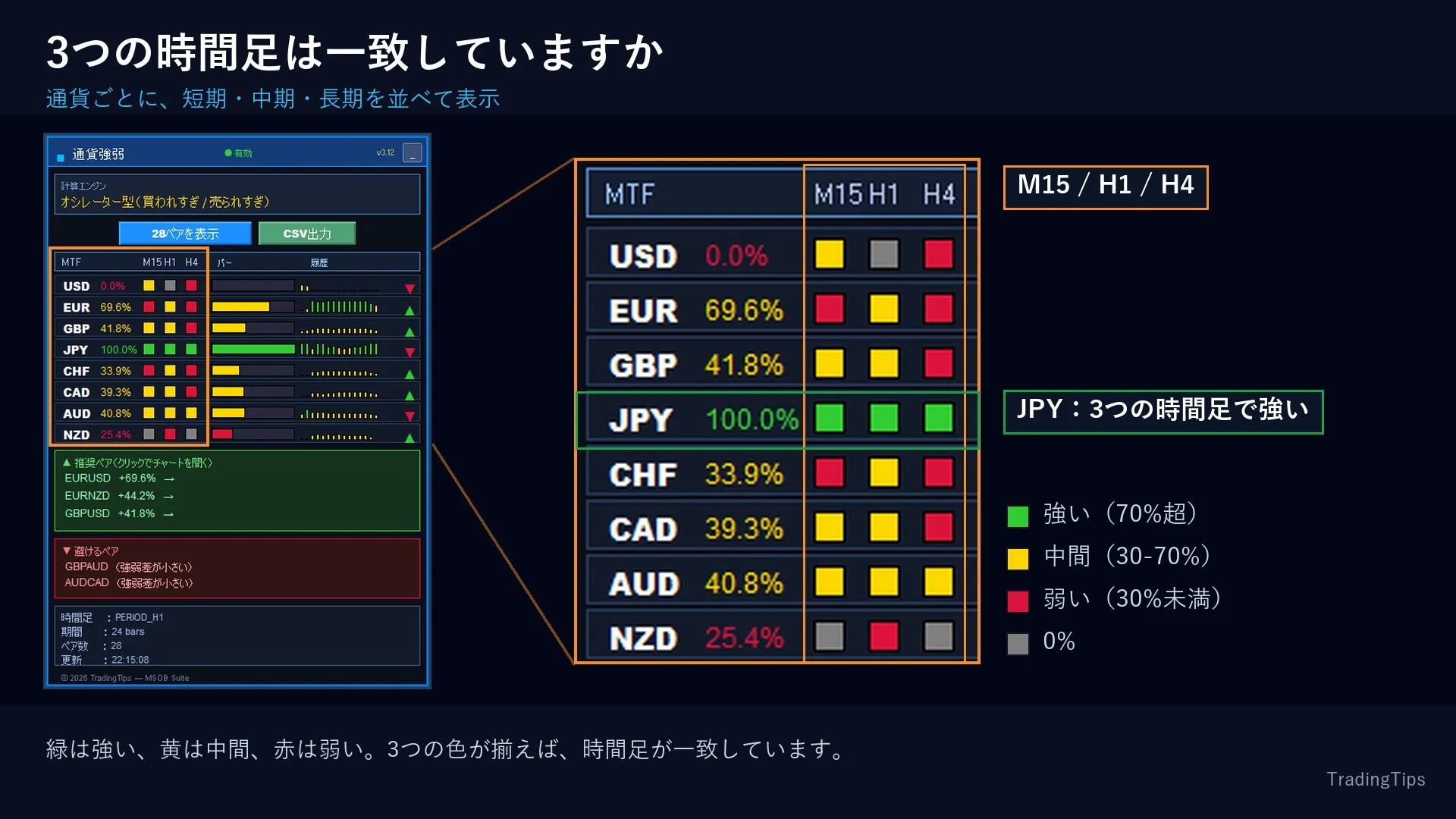
- マルチタイムフレーム マトリクス:通貨ごとに3つの時間足を並べて表示。短期が上位足と一致しているかどうかが一目で分かります。四角の色はその時間足での強さです(緑=強い 70%超、黄=中間 30-70%、赤=弱い 30%未満)
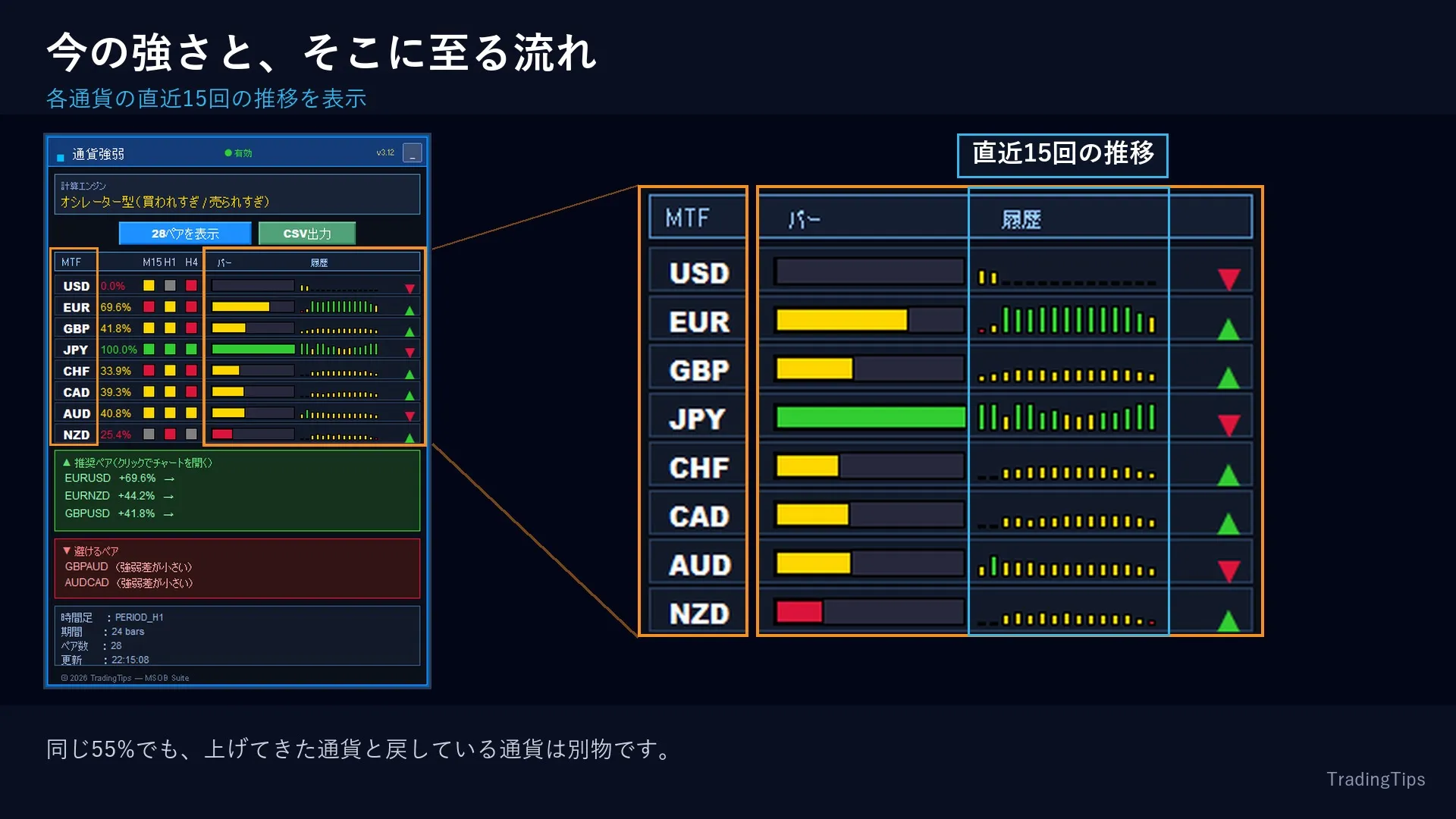
- 強弱の履歴:各行に直近15回の推移を表示。「強い通貨」と「強かったが戻している通貨」を取り違えません
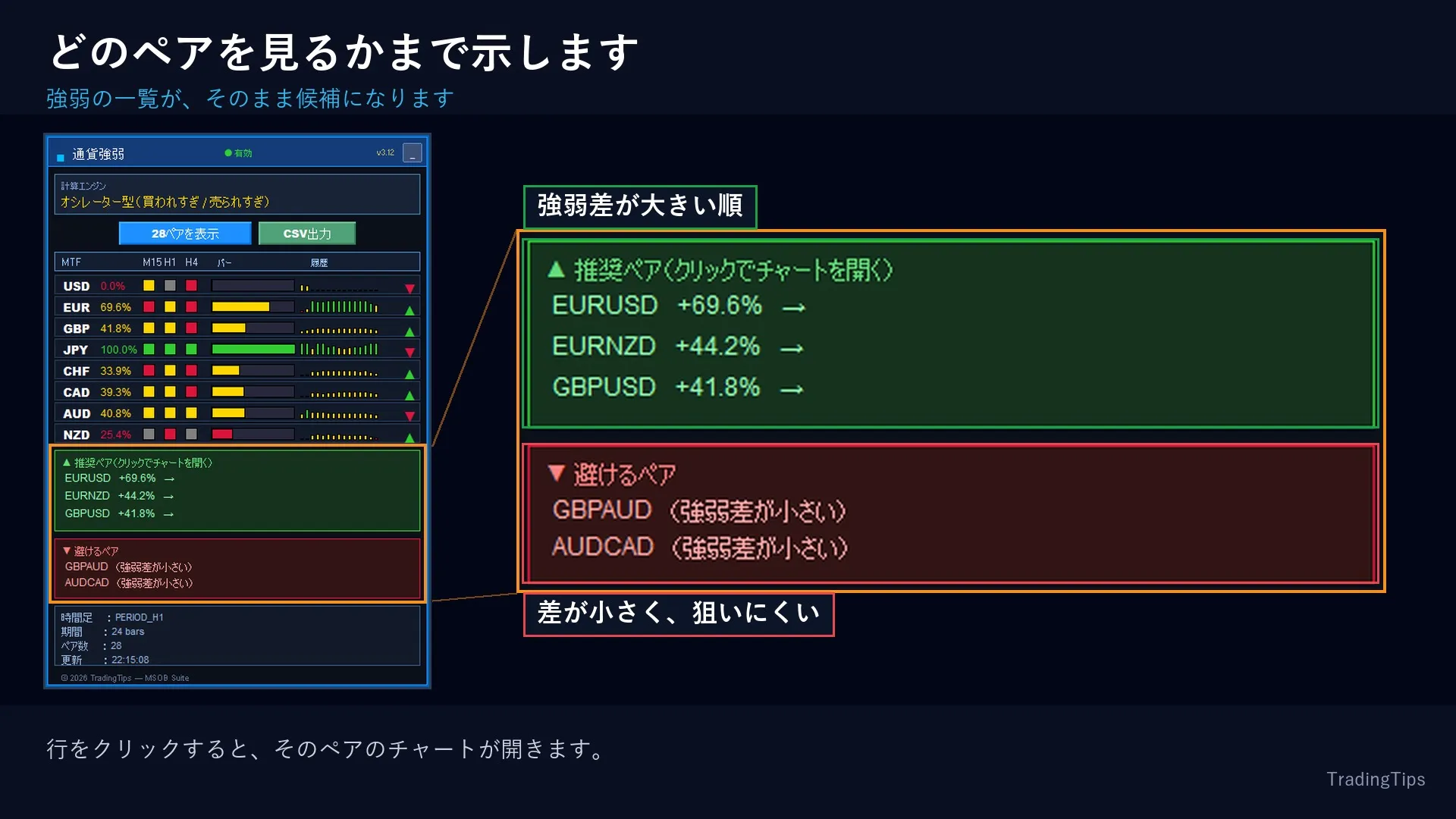
- 推奨ペア:強弱差が大きい順に並び、クリックするとそのチャートが開きます
- 避けるペア:2つの通貨が同じ方向に動いている組み合わせは、隠さず一覧に表示します
- 全28ペアパネル:ボタン1つで、すべての強弱差を一度に表示
- CSV出力:現在の数値をファイルに書き出します
- イベントごとに異なるアラート音(強い通貨/弱い通貨/推奨ペア)
03 3つの計算エンジン
計算方式はパラメータで選べます。現在どの方式で計算しているかは、パネル上部に常時表示されます。
- 価格変動方式:指定期間の変化率で測ります。素直で反応が早い方式です
- RSIモメンタム方式:正規化したRSIを使います。1本の大きな足に振り回されにくく、初期設定はこちらです
- 複合方式:上の2つを平均します
04 業者の銘柄名を自動で読み取ります
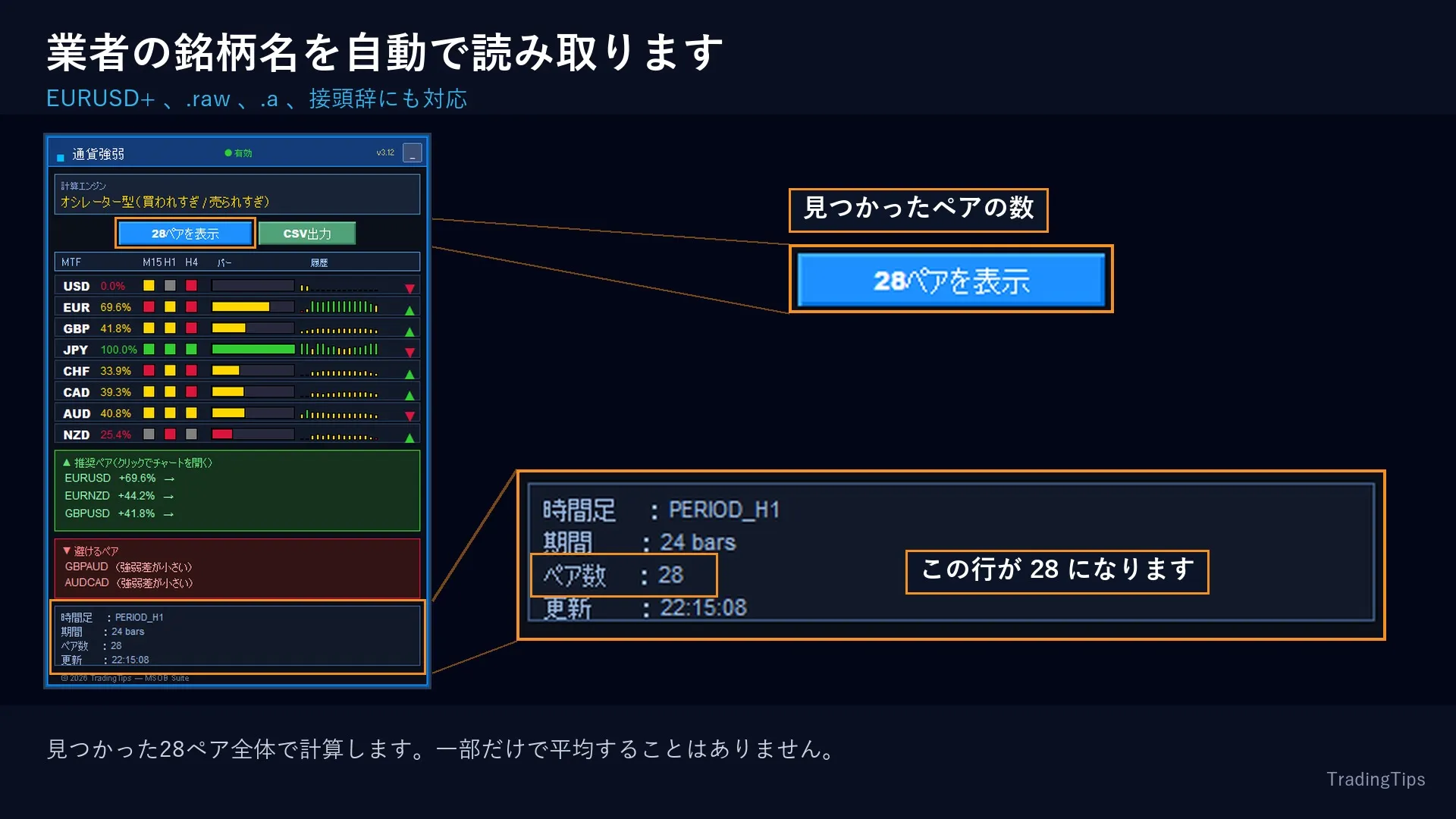
FX業者によって銘柄の書き方は異なります(EURUSD、EURUSD+、EURUSD.raw、mEURUSD など)。本インジケーターは、お使いのチャートの銘柄名から命名規則を読み取り、28ペアを解決します。
パネル下部の「ペア数」の行をご確認ください。主要通貨とクロス通貨を扱う業者であれば 28 と表示されます。業者が特殊な命名を使っている場合は、パラメータ「銘柄の接尾辞 / Symbol Suffix」に手入力できます。パネルは Windows の画面拡大率(125%・150%)にも追従します。
05 使い方
- どのチャートでも構いませんので、インジケーターを適用してください。チャートの銘柄ではなく市場全体を読み取ります
- パネル下部の「ペア数」が 28 になっていることを確認します
- 計算する時間足と期間を、ご自身の手法に合わせます(スキャルピングは M15、デイトレードは H1、スイングは H4 が目安です)
- 強い通貨と弱い通貨の差が大きい組み合わせを探し、3つの時間足の四角が一致しているかを確認します
- そのうえで、ご自身のチャートとルールで判断してください
06 導入手順
- MetaTrader 5 のメニュー「ファイル」から「データフォルダを開く」を選び、MQL5 → Indicators を開きます
- ダウンロードした .ex5 ファイルを Indicators フォルダに入れます。ファイル名の末尾の英数字はお客様専用の識別子です。ファイル名は変更しないでください
- ナビゲータで右クリックして「更新」を選び、任意のチャートにドラッグ&ドロップします
- パラメーター画面の「全般」タブで「DLL の使用を許可する」に必ずチェックを入れてください。ライセンス認証に使用します
- チャート左上に「Authentication success」と表示されれば完了です
1ライセンスにつき、MT5の口座番号1つでご利用いただけます(リアル口座・デモ口座のどちらでも可)。口座番号の変更はマイページから何度でも行えます。詳しい手順は、同梱の取扱説明書をご覧ください。
07 主なパラメータ
- 計算:計算方式、計算する時間足、計算期間、RSI期間、平滑化
- 時間足マトリクス:表示の有無、時間足1〜3
- パネル:表示位置、幅、文字サイズ、強・中・弱の色
- 業者の銘柄名:接尾辞、接頭辞(初期値は自動判別)
- 画面:表示倍率(0で画面から自動)
- ペア:推奨ペアの表示、推奨に必要な強弱差、避けるペアの表示
- アラート:有効/無効、条件別の通知、音の割り当て、スマホへのプッシュ通知
08 有効な相場と、苦手な相場
有効:特定の通貨に資金が集中し、方向がはっきりしている相場。強い通貨と弱い通貨の差が大きく開くため、組み合わせを絞り込みやすくなります。
苦手:全通貨が狭い範囲で動く小動きの相場。強弱差が縮まり、推奨ペアの一覧が空になったり、避けるペアばかりが並んだりします。これは不具合ではなく、「今は組み合わせを選ぶ材料が少ない」という表示です。
本インジケーターは相対的な強弱を測るものであり、値幅や売買のタイミングを示すものではありません。エントリー、損切り、ロット数の判断はご自身の手法で行ってください。
09 動作環境
- MetaTrader 5
- 主要通貨ペアとクロス通貨ペアを扱うFX業者であればご利用いただけます
- 価格データを読み取るだけで、注文は一切行いません
- 数値は計算対象の時間足の確定ごとに更新されます(H1なら1時間ごと)。これは仕様で、表示を安定させるためのものです
- ライセンス認証のため、インターネット接続と「DLL の使用を許可する」の設定が必要です
10 リスクについて
投資には損失のリスクがあります。本商品は相場を分析するためのツールであり、投資助言ではありません。売買の判断とその結果は、すべてご自身の責任となります。過去の値動きや指標の挙動は、将来の結果を保証するものではありません。必ずデモ口座で十分にご確認のうえ、ご利用ください。
●Payment





For those using GogoJungle for the first time Easy 3 steps to use the product!
At GogoJungle, we provide services to enrich your investment life for our members. In addition, product purchases are limited to members. Why not register as a member now and make use of GogoJungle!
