【MT4】過去検証ツール MoveChartToTime(複数時間足 同期インジケーター クリック1回で同期)

Product outline
Community(0)
【MT4】過去検証ツール MoveChartToTime(複数時間足 同期インジケーター クリック1回で同期) Indicators/E-books
【MT4】過去検証ツール MoveChartToTime(複数時間足 同期インジケーター クリック1回で同期)
クリック 1 回で、全時間足が同じ瞬間へ。過去検証のスクロール作業をゼロに。
Sales Result 0 items
Reviews ★ 0.0 (0)
Category:
How to provide:
Indicator
Sales from:
09/29/2026
Last Updated:
09/30/2026
Version:
1
Web Authentication:
Enable
Available company:

Follow 0 ❘ Followers 2
Seller いち
Seller's last login time: 10/1/2026 00:25:53
Read more seller information
¥1,980 (taxed)
5left
Next price: (Tax Inc.)
$undefined ¥2,980
Provider/Distributor:
Sales site:
GogoJungle

●Payment

Mastercard Visa JCB Bank FamilyMart D2 D1


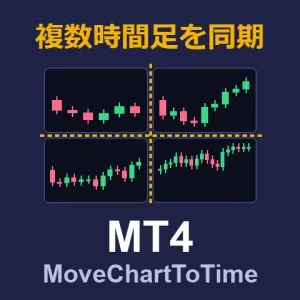
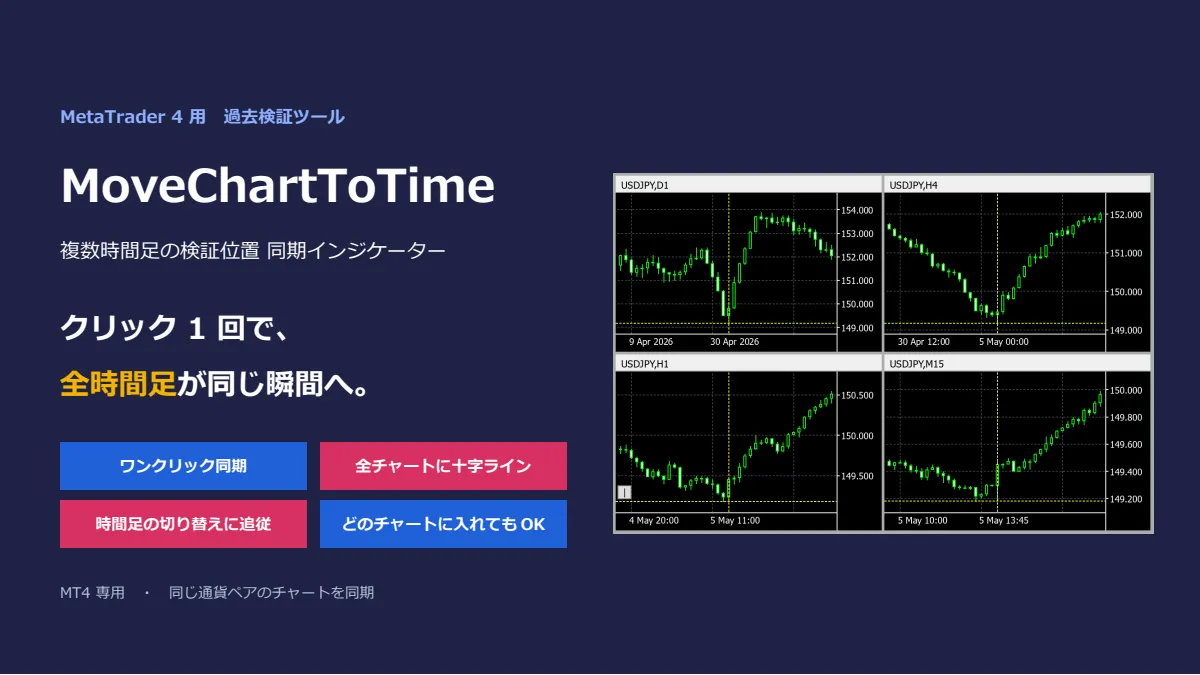
「その日足のブレイク、1 時間足と 15 分足では何が起きていた?」 その答えまで、クリック 1 回。 MoveChartToTime は、MT4 で開いている同じ通貨ペアのチャートを、 クリックした日時へ一斉に移動させる「過去検証ツール」です。 すべてのチャートに同じ十字ラインが引かれるので、 日足・4 時間足・1 時間足・15 分足で「同じ瞬間」をそのまま見比べられます。 ※本ツールはチャートの表示を補助するツールです。売買サインを出す機能や、自動で売買する機能はありません。


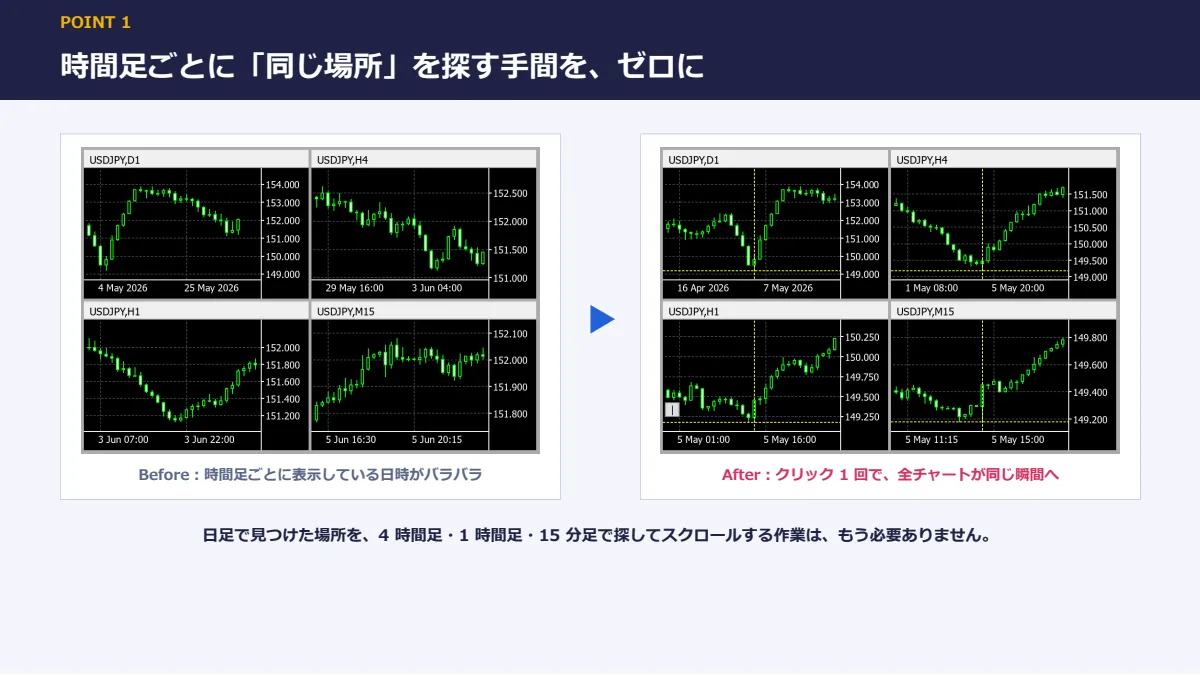
■ こんな経験はありませんか? ・日足で気になる場所を見つけたのに、1 時間足でその日を探すだけで 1 分かかる ・4 時間足・1 時間足・15 分足を開いたら、どのローソク足が同じ時間なのか分からなくなった ・スクロールしすぎて行き過ぎ、戻り、また行き過ぎる…… ・時間をかけて検証したのに、結局「なんとなく」しか分からなかった 過去検証が続かないのは、根気のせいではありません。 時間足をまたいで「同じ場所」を探す作業が、面倒すぎるだけです。

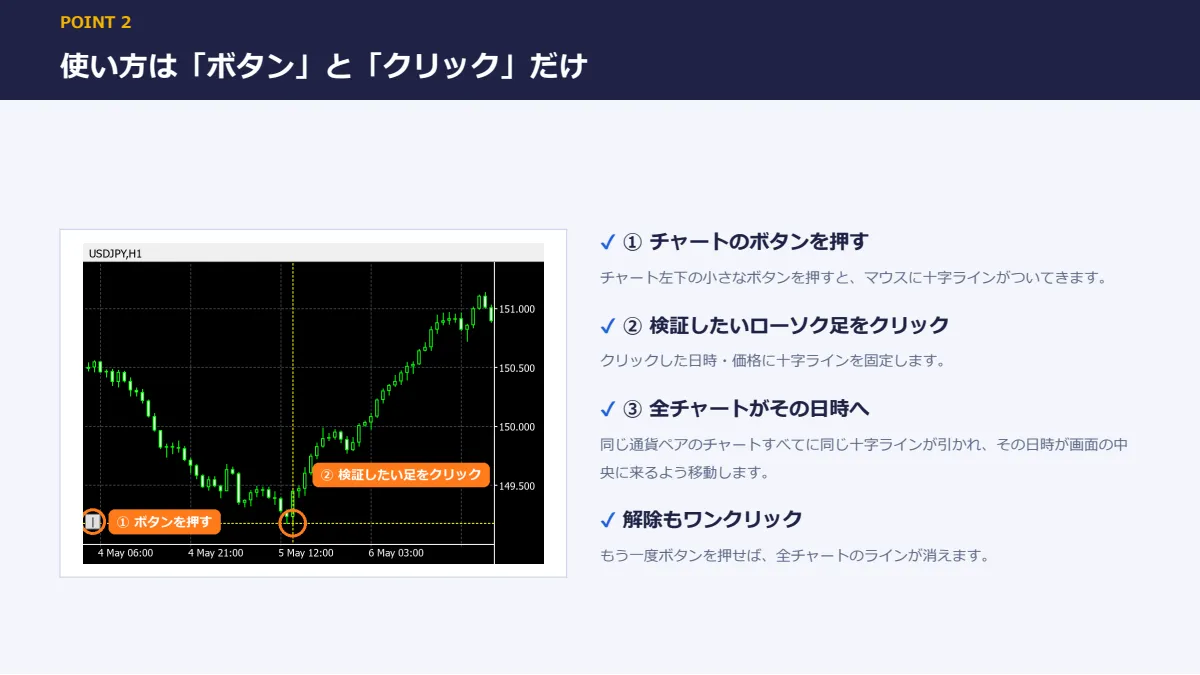
■ こんな方におすすめです ・マルチタイムフレーム分析(MTF)で手法を作っている、または磨きたい ・過去検証を習慣にしたいが、作業が面倒で続かない ・上位足の環境認識と、下位足のエントリーポイントを正確に対応させたい ・手法のルールを検証し、勝ちパターン・負けパターンを言葉にしたい ■ 使い方は「ボタン」と「クリック」だけ


1. チャート左下の小さなボタンを押す(マウスに十字ラインがついてきます) 2. 検証したいローソク足をクリック 3. 同じ通貨ペアのチャートすべてに同じ十字ラインが引かれ、その日時が画面の中央に来るよう移動 もう一度ボタンを押せば、全チャートのラインが消えて元に戻ります。

■ 主な機能

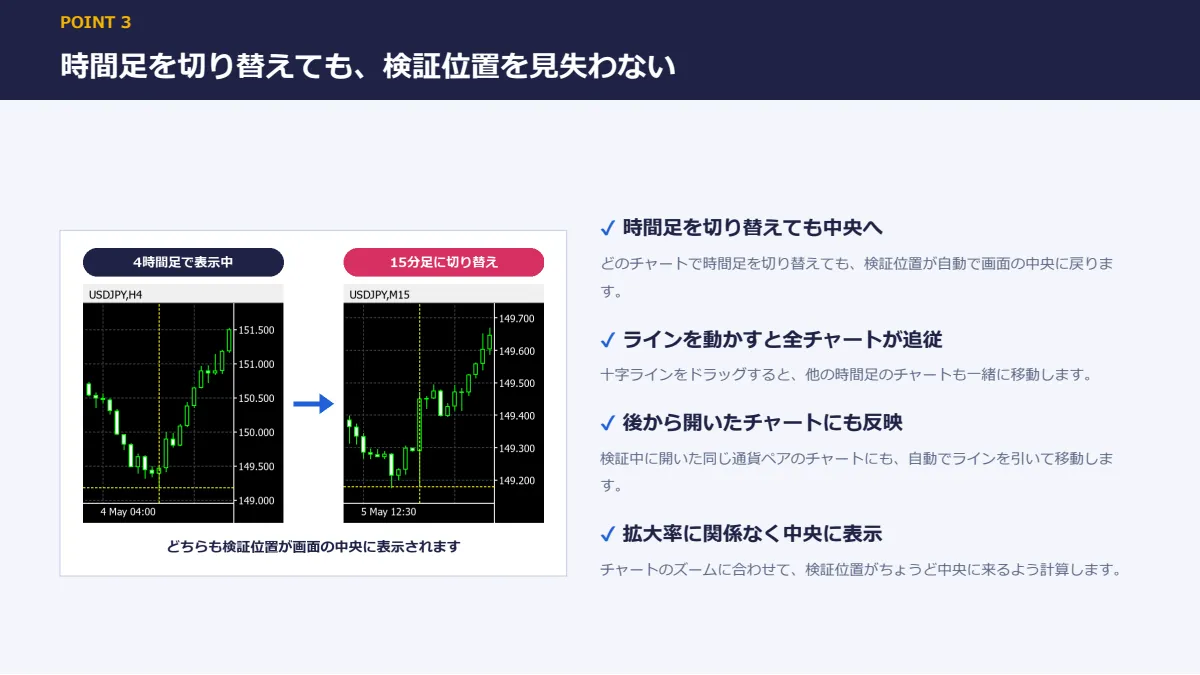
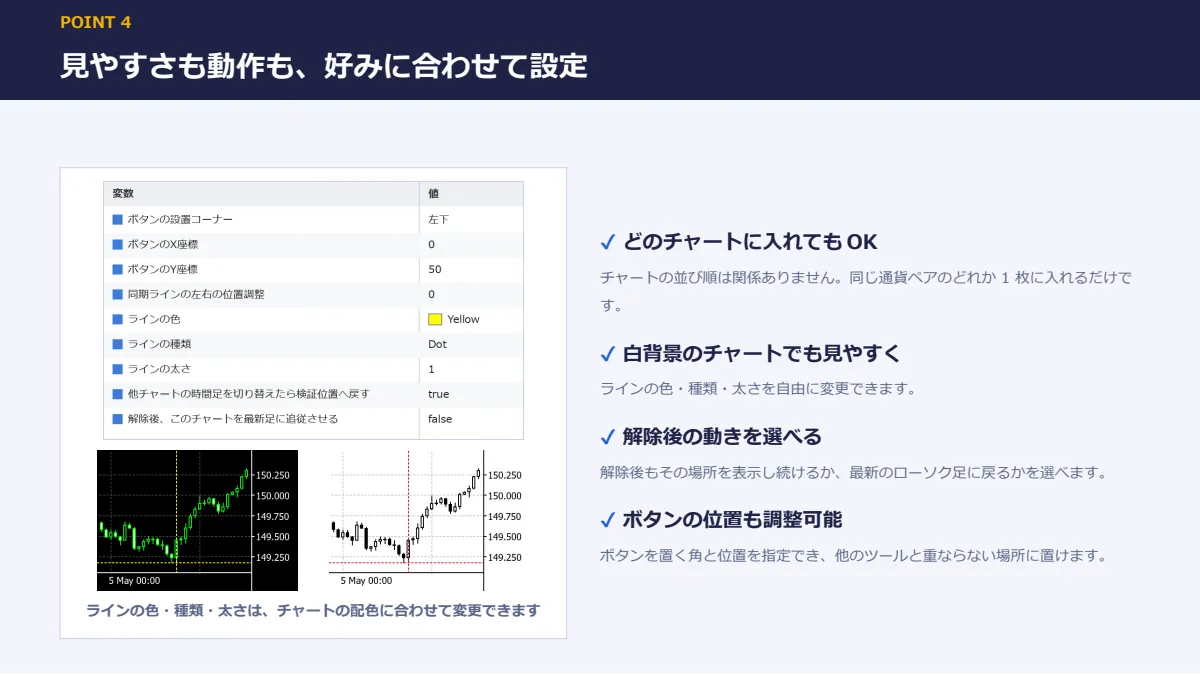
【ワンクリック同期】  クリックした日時へ、同じ通貨ペアのチャートをすべて移動します。 【全チャートに十字ライン】  すべてのチャートに、同じ日時・同じ価格の十字ラインを表示。  どの足が「その瞬間」なのか、時間足が違ってもひと目でわかります。 【時間足を切り替えても迷子にならない】  どのチャートで時間足を切り替えても、検証位置が自動で画面の中央に戻ります。  4 時間足から 15 分足へ、15 分足から 5 分足へと、そのまま掘り下げられます。 【ラインを動かすと全チャートが追従】  十字ラインをドラッグして動かすと、他の時間足のチャートも一緒に移動します。  水平線を動かしたときは、チャートを動かさずに価格のラインだけを合わせます。 【後から開いたチャートにも反映】  検証の途中で開いた同じ通貨ペアのチャートにも、自動でラインを引いて移動します。 【拡大率に関係なく中央に表示】  チャートのズームに合わせて、検証位置がちょうど中央に来るよう計算します。 【どのチャートに入れても OK】  チャートの並び順は関係ありません。同じ通貨ペアのどれか 1 枚に入れるだけです。 ■ 見やすさも動作も、好みに合わせて設定

・ラインの色・種類・太さ(白背景のチャートにも合わせられます) ・ボタンを置く角と位置 ・検証位置の左右の微調整 ・時間足を切り替えたチャートを検証位置へ戻すかどうか ・解除後、最新のローソク足に戻るか、その場所を表示し続けるか ■ 動作環境

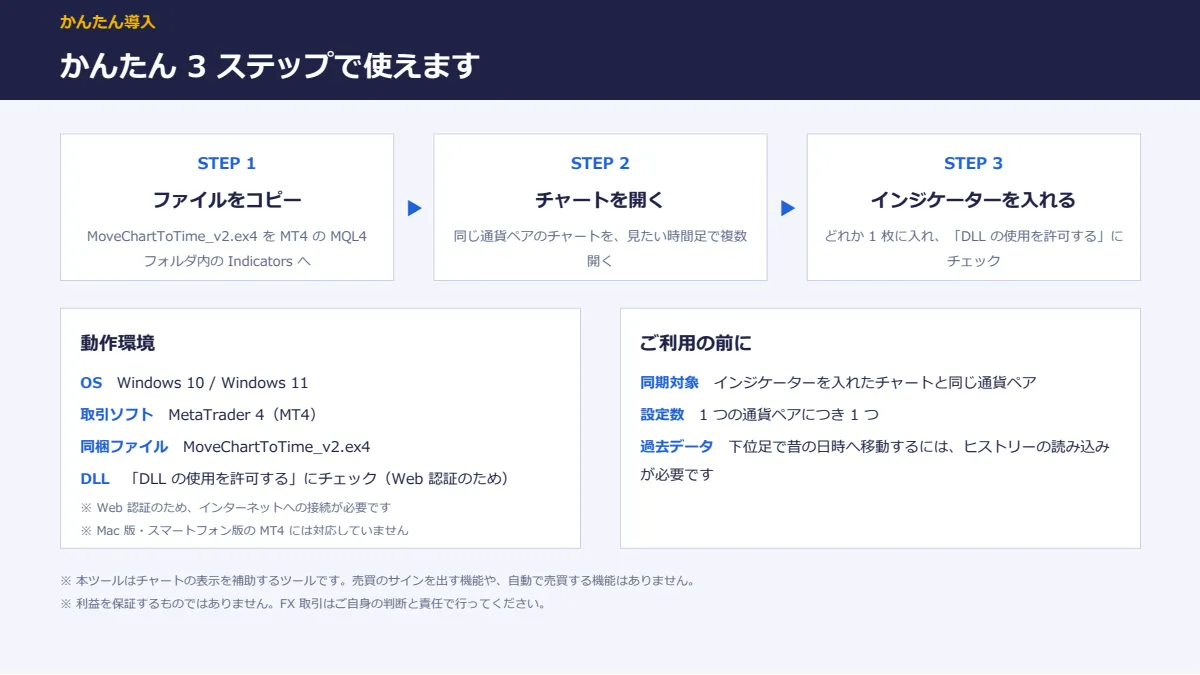
・OS:Windows 10 / Windows 11 ・取引ソフト:MetaTrader 4(MT4) ・インジケーターの設定で「DLL の使用を許可する」にチェックが必要です(Web 認証のため) ・インターネットに接続されている必要があります(Web 認証のため) ・Mac 版 MT4、スマートフォン版 MT4 には対応していません ・MT4 を提供している国内・海外の FX 会社で、通常ご利用いただけます

■ 同梱ファイル ・MoveChartToTime_v2.ex4(インジケーター本体) ■ ご利用までの流れ 1. MT4 の「ファイル」→「データフォルダを開く」から MQL4 フォルダ内の Indicators フォルダを開き、  MoveChartToTime_v2.ex4 をコピー 2. MT4 を再起動する(またはナビゲーターの「インジケーター」を右クリック →「更新」) 3. 同じ通貨ペアのチャートを、見たい時間足で複数開く(例:日足・4 時間足・1 時間足・15 分足) 4. そのうちどれか 1 枚に MoveChartToTime_v2 をドラッグ&ドロップ  → チャート左下にボタンが表示されれば準備完了です ■ ご注意 ・同期するのは、インジケーターを入れたチャートと同じ通貨ペアのチャートだけです。 ・1 つの通貨ペアにつき、インジケーターは 1 つだけ入れてください。 ・下位足(1 分足・5 分足など)でかなり昔の日時へ移動するには、その時間足の過去データが MT4 に読み込まれている必要があります。 ・売買サインを出す機能や、注文・決済を行う機能はありません。

¥1,980 (taxed)
5left
Next price: (Tax Inc.)
$undefined ¥2,980
Provider/Distributor:
Sales site:
GogoJungle

●Payment

Mastercard Visa JCB Bank FamilyMart D2 D1
Product outline
Community(0)
Best Seller Ranking

For those using GogoJungle for the first time Easy 3 steps to use the product!

At GogoJungle, we provide services to enrich your investment life for our members. In addition, product purchases are limited to members. Why not register as a member now and make use of GogoJungle!

01
Enter user information and register as a member
02
Follow the instructions to make a purchase
03
Download from My Page
■ Important Matters and Risk Warnings Regarding Investment Products 【Financial Instruments Business Operator】
GogoJungle Inc.
Registration: Director-General of the Kanto Local Finance Bureau (Financial Instruments Business) No. 1960
【Member Association】
Investment Trusts Association, Japan
【Fees and Expenses】
The use of software, e-books, investment advisory services, etc., provided on our platform involves purchase prices determined for each product.
Additionally, when conducting actual financial instrument transactions (such as FX or CFD trading), costs such as transaction fees and spreads (the difference between the sell and buy price) may be incurred through the connected brokerage firms.
【Margin and Risk of Loss】
Transactions such as FX (Foreign Exchange Margin Trading) and CFD (Contract for Difference) allow for trading in amounts exceeding the deposited margin.
Therefore, due to sudden fluctuations in target indices (currency, commodity prices, etc.), there is a risk of incurring losses that exceed the deposited margin (loss exceeding principal).
Furthermore, financial instrument transactions involve risks such as price fluctuations, which may result in losses falling below or exceeding the initial investment principal.
【Nature of Services and Trading Entity】
The Company operates a platform (marketplace) providing investment software and information; we do not engage in the buying, selling, mediation, brokerage, or agency of financial instruments on behalf of customers.
The services and information provided are intended as reference for investment decisions and do not guarantee future profits or specific results.
While some services include investment advice, they do not constitute a mandate or solicitation to trade specific financial instruments.
Final investment decisions and the execution of trades must be made at the customer’s own risk and discretion.