
【MT4用 超簡単オーダーEA】タイガークリックオーダーパネル(ポジションの半決済も可能。チャート上をクリックして予約注文とSL/TPも同時に設定。)

Product outline
Community(0)
【MT4用 超簡単オーダーEA】タイガークリックオーダーパネル(ポジションの半決済も可能。チャート上をクリックして予約注文とSL/TPも同時に設定。) Indicators/E-books
【MT4用 超簡単オーダーEA】タイガークリックオーダーパネル(ポジションの半決済も可能。チャート上をクリックして予約注文とSL/TPも同時に設定。)
チャートをクリックして注文予約と同時に設定したSL/TPも同時に設定。ポジションの半決済もチャートにライン指定できる
Sales Result 0 items
Reviews 0.0 (0)
How to provide:
Indicator
Sales from:
09/15/2026
Last Updated:
09/15/2026
Version:
1.01
Web Authentication:
Enable
Available company:

Follow 0 Followers 1
Seller's last login time: 9/16/2026 08:26:40
Read more seller information
¥1,500 (taxed)
5left
Next price: (Tax Inc.)
$undefined ¥3,500
Provider/Distributor:
Sales site:

Payment

Mastercard Visa JCB Bank FamilyMart D2 D1

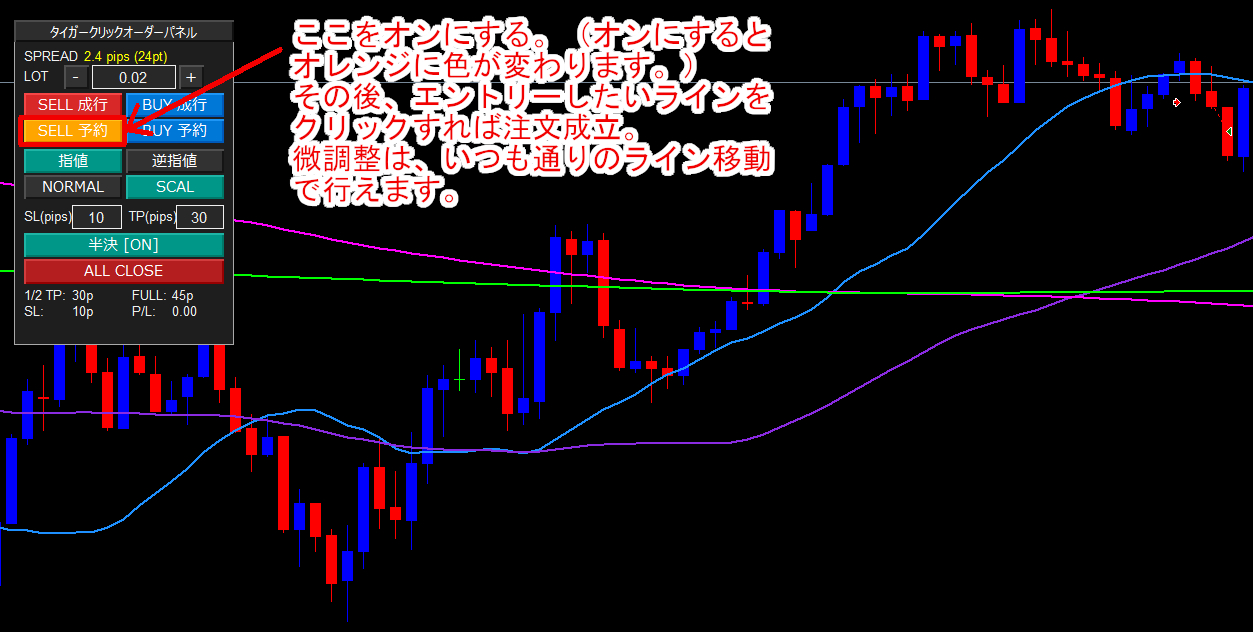
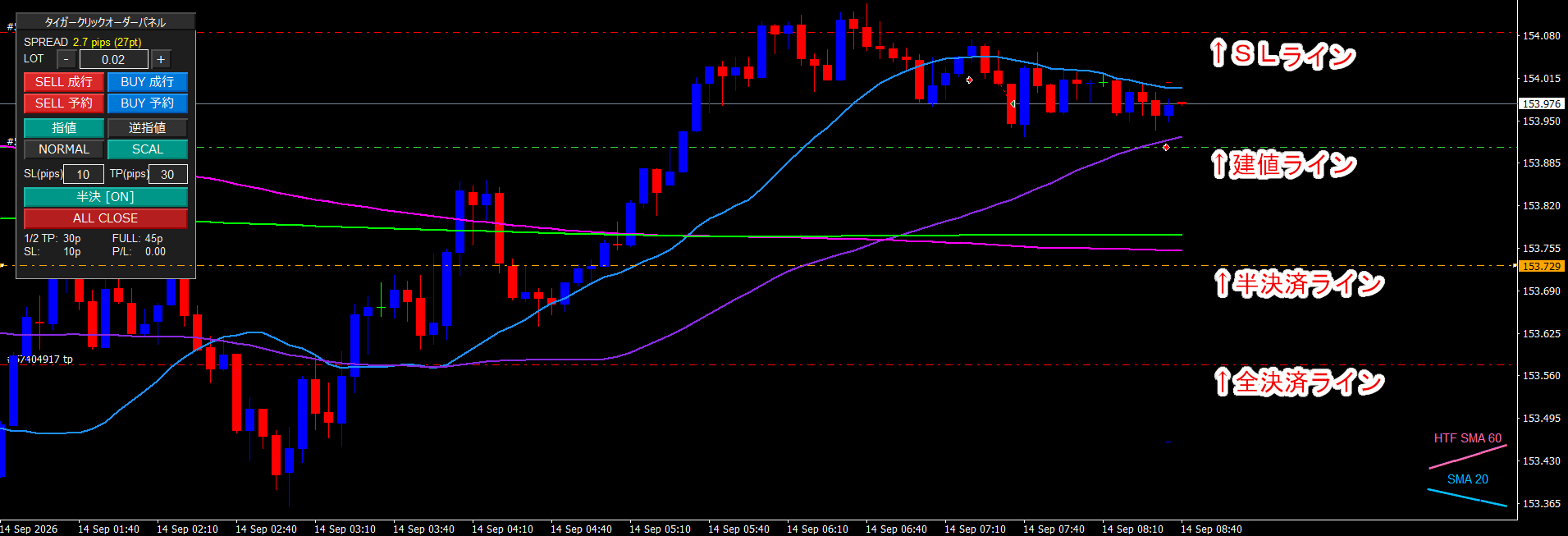
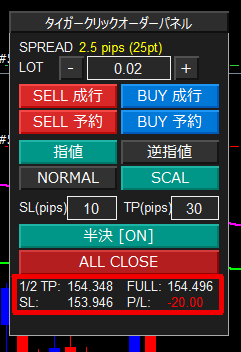
タイガークリックオーダーパネル(OrderPanel_EA) チャート上で直感的なエントリーから決済までを完結できる、MT4専用の多機能クリック発注・ポジション管理パネルです。 スピーディーなスキャルピングから、計画的なデイトレード・スイングトレードまで幅広くサポートします。 ◆ 主な特徴・機能一覧 〇 ワンクリック高速発注 ・成行注文(BUY / SELL)を瞬時に執行。 ・チャート上の任意のレートをクリックするだけで予約注文(指値・逆指値)が完了。 〇 2つのトレードモードをワンタップ切替 ・「NORMAL(通常)」と「SCAL(スキャルピング)」をボタン1つで切替。 ・それぞれに設定したSL / TP数値を一瞬で呼び出し可能。 〇 チャート連動・可動式の「半決済(1/2利確)ライン」 ・エントリーと同時にチャート上にオレンジ色の一点破線(1/2 TPライン)を自動生成。 ・チャート上でラインをマウスドラッグするだけで、直感的に利確目標レートを変更可能。 ・レート到達時に保有ロットの半分を自動利確し、残りのポジションのストップロス(SL)を建値へ自動移動。 〇 スプレッド&ポジション情報の常時モニター ・ロット欄の上に現在のリアルタイムスプレッド(pips / point)を表示。 ・パネル最下段に「1/2利確目標価格」「本利確価格」「SL価格」「現在損益(P/L)」をリアルタイム集計。 〇 複数チャート同期&クリーン設計 ・同一通貨ペアの別時間足チャートを開いていても、動かしたラインの位置が自動同期。 ・パネル(EA)をチャートから削除した際は、画面上のオブジェクトやラインを自動で綺麗に消去。 ━━━━━━━━━━━━━━━━━━━━━━━━━━━━━━ ◆ 各部操作マニュアル 1. タイトルバー(パネル移動) 最上段の「タイガークリックオーダーパネル」をクリックしてドラッグすることで、チャート上の見やすい位置へ自由に配置できます。 2. スプレッド表示&ロット調整 ・SPREAD:現在のスプレッドをリアルタイムで表示します。 ・LOT入力欄:「-」「+」ボタンで0.01刻みの調整ができるほか、中央の枠を直接クリックして数値を打ち替えることも可能です。 3. 発注操作 ・成行発注(SELL成行 / BUY成行): ボタンをクリックした瞬間に現在のレートで成行発注されます。 ・予約発注(SELL予約 / BUY予約): 1. 「指値」または「逆指値」のボタンを選択します。 2. 「BUY予約」または「SELL予約」ボタンを押すと、ボタンがオレンジ色に点灯して待機状態になります。 3. チャート上の発注したいレート付近をクリックするだけで、正確な予約注文が入ります。 4. モード切替とSL / TP数値 ・NORMAL / SCAL: 「NORMAL」:デイトレードなど通常の利幅を狙う設定。 「SCAL」:素早いトレード向けの狭い利幅設定。 ボタンを押すと、パラメーターであらかじめ指定した数値が下のSL / TP欄に即座に反映されます。 ・SL(pips) / TP(pips): 数値枠をクリックして直接書き換えることも可能です。 5. 可動式「半決済」機能と建値移動 ・半決 [ON] / [OFF]: ボタンをクリックして半決済機能の有効/無効を切り替えます(初期設定はOFF)。 ・機能有効時(ON)の動作: エントリー直後、チャート上にオレンジ色の一点破線(1/2 TPライン)が自動描画されます。 このラインはマウスで上下に自由にドラッグ移動できます。 レートがラインに到達すると、自動的にロットの半分が利確決済されます。 半決済が完了すると、残りのポジションのSLが自動でエントリー価格(建値)に移動し、負けのない状態(ノーリスク)を作ります。
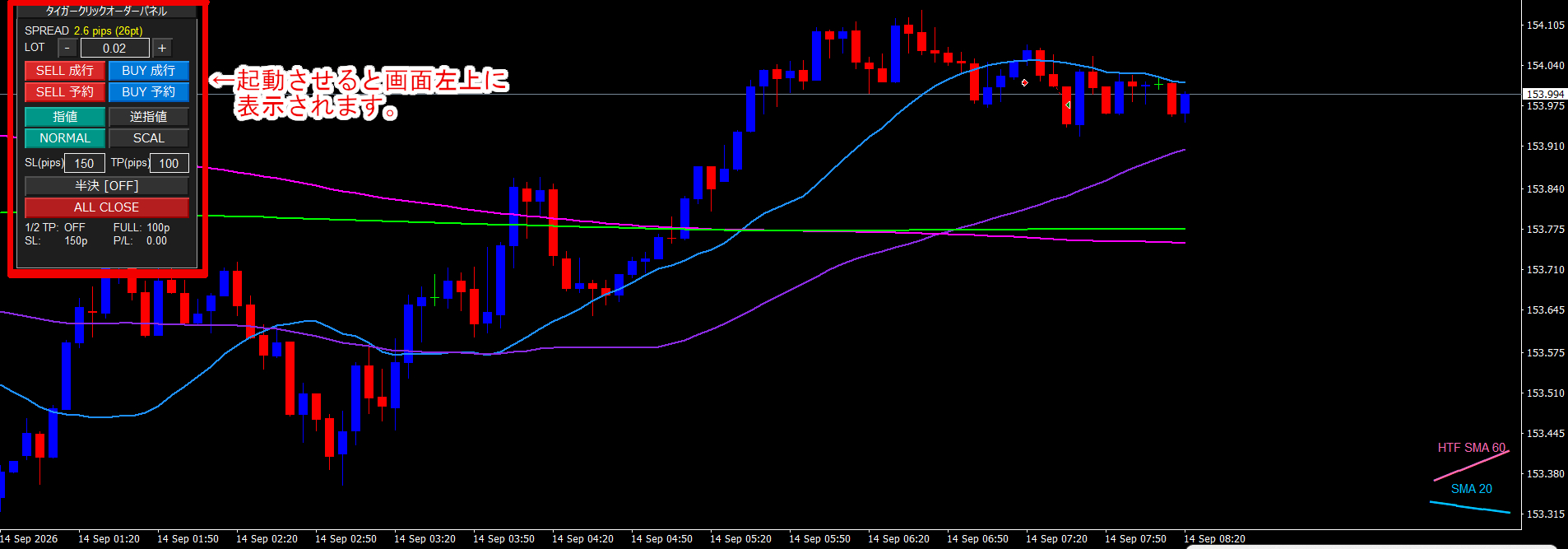
6. 一括全決済(ALL CLOSE) 「ALL CLOSE」ボタンを押すと、保有中の全ポジションの成行決済および未約定の予約注文の取り消しを一括で安全に行います。 7. 最下段ステータスモニター ・1/2 TP:現在設定されている半決済ラインの目標レート。 ・FULL:本利確(全決済TP)の目標レート。 ・SL:現在設定されているストップロスレート。 ・P/L:保有中の損益合計(プラス時は青、マイナス時は赤でリアルタイム更新)。 ※未保有時は、現在のパネル設定値に基づいたpips目安が表示されます。 ◆ パラメーター設定一覧 ・初期注文ロット数(初期値: 0.02) パネル起動時の初期ロット数です。 ・通常SL (pips)(初期値: 150) NORMALモード選択時の損切り幅です。 ・通常モード半決済 (pips)(初期値: 100) NORMALモード選択時の1/2利確目標幅です。 ・スキャルSL (pips)(初期値: 60) SCALモード選択時の損切り幅です。 ・スキャルモード半決済 (pips)(初期値: 40) SCALモード選択時の1/2利確目標幅です。 ・半決済時にSLを建値へ移動(初期値: true) 1/2利確成立時、自動でSLを建値に移動します。 ・通常モード時間決済 (分)(初期値: 0) NORMAL時の1分足本数による自動決済(0でオフ)。 ・スキャルモード時間決済 (分)(初期値: 0) SCAL時の1分足本数による自動決済(0でオフ)。 ・許容スリッページ (pips)(初期値: 3) 発注・決済時の最大許容スリッページです。 ・マジックナンバー(初期値: 88888) 本パネルで管理する専用の識別番号です。

¥1,500 (taxed)
5left
Next price: (Tax Inc.)
$undefined ¥3,500
Provider/Distributor:
Sales site:

Payment

Mastercard Visa JCB Bank FamilyMart D2 D1
Product outline
Community(0)
Best Seller Ranking
Recommended Products (Campaigns)

For those using GogoJungle for the first time Easy 3 steps to use the product!

At GogoJungle, we provide services to enrich your investment life for our members. In addition, product purchases are limited to members. Why not register as a member now and make use of GogoJungle!

01
Enter user information and register as a member
02
Follow the instructions to make a purchase
03
Download from My Page
■ Important Matters and Risk Warnings Regarding Investment Products 【Financial Instruments Business Operator】
GogoJungle Inc.
Registration: Director-General of the Kanto Local Finance Bureau (Financial Instruments Business) No. 1960
【Member Association】
Investment Trusts Association, Japan
【Fees and Expenses】
The use of software, e-books, investment advisory services, etc., provided on our platform involves purchase prices determined for each product.
Additionally, when conducting actual financial instrument transactions (such as FX or CFD trading), costs such as transaction fees and spreads (the difference between the sell and buy price) may be incurred through the connected brokerage firms.
【Margin and Risk of Loss】
Transactions such as FX (Foreign Exchange Margin Trading) and CFD (Contract for Difference) allow for trading in amounts exceeding the deposited margin.
Therefore, due to sudden fluctuations in target indices (currency, commodity prices, etc.), there is a risk of incurring losses that exceed the deposited margin (loss exceeding principal).
Furthermore, financial instrument transactions involve risks such as price fluctuations, which may result in losses falling below or exceeding the initial investment principal.
【Nature of Services and Trading Entity】
The Company operates a platform (marketplace) providing investment software and information; we do not engage in the buying, selling, mediation, brokerage, or agency of financial instruments on behalf of customers.
The services and information provided are intended as reference for investment decisions and do not guarantee future profits or specific results.
While some services include investment advice, they do not constitute a mandate or solicitation to trade specific financial instruments.
Final investment decisions and the execution of trades must be made at the customer’s own risk and discretion.