
バイナリーオプションシミュレータ

Product outline
Community(0)
バイナリーオプションシミュレータ Indicators/E-books
バイナリーオプションシミュレータ
30秒~10分までのバイナリーオプションを再現可能、資金を使わずに練習ができます。
Reviews:
Keywords:
Category:
How to provide:
Indicator
Sales from:
10/27/2015
Last Updated:
-
Version:
-

Japan

Follow 0 Followers 41
-
Read more seller information
ハイローオーストラリアのデモ口座のようにバイナリー
オプションのシミュレーションが可能!
BS


特徴1: 取引時間:30秒から10分まで対応

特徴2: 判定後、自動的に勝率を計算して表示します。

特徴3: スプレッドオンデマンド、オンデマンド対応 

特徴4: 資金100万円スタート、掛け金1000円(資金内で変更可能)

特徴5: ハイローオーストラリアの取引時間外でも使えます。

特徴6: オンタイマーで時間計測しているので時間が正確です。 
      ※ティック動作させるしくみだと時間が不正確
特徴7: 判定を音声(あたり・はずれ)で教えてくれます。

特徴8: 土日相場の止まっているときでも練習が可能となりました。(詳細は後述)

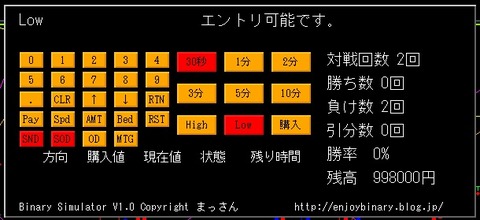
【各ボタンの説明】
①Pay:ペイアウト率の設定
②Spd:スプレッドの設定
③AMT:口座残高の設定
④Bed:掛け金の設定
⑤RST:リセットボタン
⑥SND:音声のON/OFF
⑦SOD:スプレッドオンデマンドモード
⑧OD :オンデマンドモード
⑨MTG:マーチンゲール法 掛け金が倍になります。

①~④の設定変更の確定はRTNで行います。
数値の設定はテンキーが使えます。

・連続エントリはできません。


最新のバージョンアップにより、土日の相場が止まっている
状態であってもバイナリーオプションの練習が可能となりましたので
お知らせ致します。

【やり方】
無料ツール「裁量トレード練習君(無料)」をダウンロードします。
インストールの仕方は練習君の取り扱い説明書を参照して下さい。

練習君(MT4)が立ち上がった状態で
「表示」⇒「ストラテジーテスター」でストラテジーテスターを表示させ、
期間:M1
通貨ペア:お好きな通貨ペア
モデル:全ティック
期間を指定:チェックを入れます。
開始日:お好きな日付
終了日:お好きな日付
ビジュアルモード:チェックを入れます。
ビジュアルモードの右にあるスライダーを一番左まで移動させ
1倍速に設定します。

「スタート」を押してEAのバックテストを開始します。

その後、「表示」⇒「ナビゲータ」から
BinarySimulator_Button3をチャートにドラッグします。

※必ずバックテストをスタートさせてからBinarySimulator_Button3を
チャートに入れて下さい。スタートさせると新しいチャートが生成されます。
※ティック動作していますので、動作がぎこちないですが
ご了承下さい。3分以上の取引なら許容範囲かと・・・。

それでは、バイナリーオプションの練習頑張って下さい。


著作権はまっさんにありますが、再配布可能としますので
ご自身のブログやメルマガ、WEBサイトなどでご紹介して
いただけるとありがたいです。


現在無料配布中!

¥1,000 (taxed)
Already 9 users using!
Provider/Distributor:
Sales site:
GogoJungle

Payment

Mastercard Visa JCB Bank FamilyMart D2 D1
Product outline
Community(0)
Best Seller Ranking
Recommended Products (Campaigns)

For those using GogoJungle for the first time Easy 3 steps to use the product!

At GogoJungle, we provide services to enrich your investment life for our members. In addition, product purchases are limited to members. Why not register as a member now and make use of GogoJungle!

01
Enter user information and register as a member
02
Follow the instructions to make a purchase
03
Download from My Page
■ Important Matters and Risk Warnings Regarding Investment Products 【Financial Instruments Business Operator】
GogoJungle Inc.
Registration: Director-General of the Kanto Local Finance Bureau (Financial Instruments Business) No. 1960
【Member Association】
Japan Investment Advisers Association
【Fees and Expenses】
The use of software, e-books, investment advisory services, etc., provided on our platform involves purchase prices determined for each product.
Additionally, when conducting actual financial instrument transactions (such as FX or CFD trading), costs such as transaction fees and spreads (the difference between the sell and buy price) may be incurred through the connected brokerage firms.
【Margin and Risk of Loss】
Transactions such as FX (Foreign Exchange Margin Trading) and CFD (Contract for Difference) allow for trading in amounts exceeding the deposited margin.
Therefore, due to sudden fluctuations in target indices (currency, commodity prices, etc.), there is a risk of incurring losses that exceed the deposited margin (loss exceeding principal).
Furthermore, financial instrument transactions involve risks such as price fluctuations, which may result in losses falling below or exceeding the initial investment principal.
【Nature of Services and Trading Entity】
The Company operates a platform (marketplace) providing investment software and information; we do not engage in the buying, selling, mediation, brokerage, or agency of financial instruments on behalf of customers.
The services and information provided are intended as reference for investment decisions and do not guarantee future profits or specific results.
While some services include investment advice, they do not constitute a mandate or solicitation to trade specific financial instruments.
Final investment decisions and the execution of trades must be made at the customer’s own risk and discretion.
