



損切り位置を決めるだけ。
トレードのたびに計算していませんか?
AECなら、損失額または損失率を設定して
SLラインを動かすだけ。
設定したリスクに合わせて、ロットを自動計算します。
AECの主要機能
✅ 損失額・損失率からロットを自動計算
✅ SL・TPを水平線で直接操作
✅ 成行・予約注文両方に対応
✅ ロット分割エントリー対応
✅ 曜日指定も可能な指定時間決済
✅ 利益ポジションのみ決済などの多様な決済方法
✅ ゴールド(XAUUSD)対応
✅ ビットコイン(BTC/XBT)対応
① リスク固定 × ロット自動計算
AECの中心となる機能が、 リスク固定ロット自動計算です。
「口座資金の何%か」
または
「1回の損失は何円までか」
あらかじめリスクを設定しておけば、 あとはチャート上のSLラインを損切りしたい位置へ移動するだけ。
SLまでの距離から、設定した損失額・損失率に合わせて ロットを自動計算します。
「SLはここ。」
↓
AECが距離を計算
↓
適正ロットを自動表示!
② SL・TPはチャート上で直接操作
BUY設定・SELL設定を押すと、 チャート上にSLラインと TPラインが表示されます。
ラインを掴んで、好きな価格へ移動するだけ。
- Lot
- 現在スプレッド
- 想定損失額
- SLまでのpoints
- 想定利益額
- TPまでのpoints
③ 成行注文もワンクリック
通常のBUY・SELL成行注文に対応。
発注直前にも現在価格・スプレッド・ロットを計算して注文します。
④ 予約注文もENTRYラインだけで操作
「予約買設定」「予約売設定」を押すと、 SL・TPに加えてENTRYラインが表示されます。
ENTRYラインをエントリーしたい価格へ移動するだけで予約価格を設定できます。
注文方式を自分で切り替える必要はありません。
AECがENTRYラインの位置から自動判定します。
⑤ ロット分割エントリー対応
計算したロットを、そのまま複数ポジションへ分割!
操作パネルの「分割数」を変更するだけで、 合計ロットを複数ポジションに分けて発注できます。
↓
0.02 + 0.02 + 0.02
0.03Lotを2分割
↓
0.01 + 0.02
均等に割り切れない場合も、 ブローカーのロット刻みに合わせて自動的に振り分けます。
もちろん、成行・予約注文の両方で使用可能です。
⑥ 日本時間で指定時間決済
「深夜までポジションを持ちたくない」
「決まった時間に手仕舞いしたい」
そんな場合のために、 時間指定自動決済機能を搭載しています。
時間は日本時間で設定できます。
⑦ 曜日も自由に選択
時間指定決済を実行する曜日は、 月曜日~日曜日まで個別にON/OFFできます。
■ 金 □ 土 □ 日
平日のみ、金曜日のみなど、 トレードスタイルに合わせて設定できます。
⑧ 決済するポジションも選べる
- 全通貨ペア・全ポジション
- 全通貨ペア・利益ポジションのみ
- 現在の通貨ペア・全ポジション
- 現在の通貨ペア・利益ポジションのみ
さらにAECのMagicNumberを持つポジションだけを対象にすることもできます。
⑨ GOLD対応
XAUUSD(ゴールド)での使用にも対応。
値幅の大きいゴールドでも、 SLまでの距離に合わせてロットを自動計算します。
「ゴールドのロット計算が面倒」 という方にもおすすめです。
⑩ Bitcoin対応
BTC / XBT銘柄の自動判定に対応。
BTCUSDなど、通常のFXとは値幅・契約サイズが大きく異なる銘柄にも対応できるよう設計しています。
BTC用のSL・TP初期距離も個別設定可能です。
使い方はシンプル
成行注文
① 損失額 or 損失率を設定
② BUY設定 / SELL設定
③ SLラインを移動
④ TPラインを移動
⑤ ロット・想定損益を確認
⑥ 注文
予約注文
① 損失額 or 損失率を設定
② 予約買設定 / 予約売設定
③ ENTRYラインを移動
④ SLラインを移動
⑤ TPラインを移動
⑥ ロット・想定損益を確認
⑦ 注文
こんなトレーダーにおすすめ
✔ 毎回のロット計算をなくしたい
✔ 1トレードの損失を一定にしたい
✔ 損切り位置からロットを決めたい
✔ 成行・指値・逆指値を使い分けている
✔ 複数ポジションに分割して入りたい
✔ ゴールドを裁量トレードしている
✔ ビットコインも取引する
✔ 指定時間になったら自動で手仕舞いたい
✔ 面倒な注文操作より相場分析に集中したい
実際の操作画面
AECはチャート上のパネル・ダイアログから直感的に操作できます。
メイン操作パネル
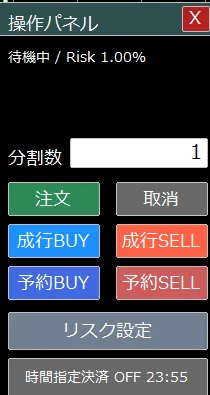
成行BUY / SELL、予約BUY / SELL、分割数、リスク設定、時間指定決済を ひとつのパネルから操作できます。
リスク設定ダイアログ
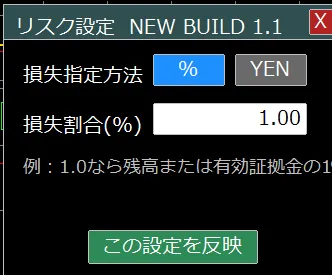
損失率(%)または損失額(円)を選択して設定。 難しいロット計算は必要ありません。
リアルタイムのロット・損益表示
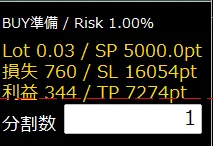
SL・TP・ENTRYラインを動かすと、 Lot・想定損失・想定利益・pointsをリアルタイムで再計算します。
時間指定決済ダイアログ
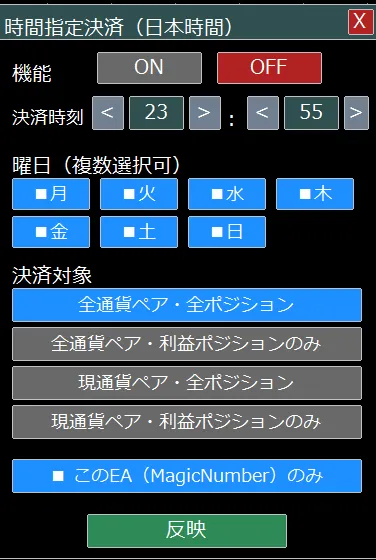
日本時間で決済時刻を設定。 曜日・決済対象・MagicNumber限定も選択できます。
エントリーする場所を決めるのは、あなたです。
AECが担当するのは、
その後の面倒な「計算」と「注文操作」。
SL / TP設定
成行・予約発注
分割エントリー
時間指定決済
分析はトレーダーに。
面倒な注文管理はAECに。
搭載機能一覧
- 専用操作パネル
- リスク設定ダイアログ
- 損失率(%)指定
- 損失額指定
- リスク固定ロット自動計算
- スプレッドを考慮したロット計算
- 成行・予約注文
- 予約注文種別自動判定
- ENTRY水平線
- 想定損失額表示
- 想定利益額表示
- SL / TP points表示
- 現在スプレッド表示
- ロット分割エントリー
- 割り切れないロットの自動振り分け
- 成行注文の分割対応
- 予約注文の分割対応
- 日本時間による指定時間決済
- 曜日指定
- 利益ポジションのみ決済
- 現在通貨ペアのみ決済
- MagicNumber限定決済
- ゴールド対応
- BTC / XBT対応
本商品は利益を保証するものではありません。 AECは売買判断を行う自動売買EAではなく、 裁量トレードにおける注文操作・リスク管理を補助するツールです。
スプレッド、スリッページ、約定状況、銘柄仕様、 ブローカーの取引条件等により、 表示される想定損益と実際の損益が異なる場合があります。
実運用前にデモ口座等で十分に動作をご確認ください。
●Payment





For those using GogoJungle for the first time Easy 3 steps to use the product!
At GogoJungle, we provide services to enrich your investment life for our members. In addition, product purchases are limited to members. Why not register as a member now and make use of GogoJungle!
