

MT5 CPU・メモリ負荷チェッカー
────────────────────
【はじめに】
本ツールは、Windowsで動作するMT5負荷チェック用ソフトです。
MT5のチャートに入れて使用するインジケーターではありません。
また、売買サインツールやEAでもありません。
MT5およびPCのCPU使用率・メモリ使用量を確認するための、動作負荷チェック用の補助ツールです。
────────────────────
MT5LoadMonitorは、MT5の動作負荷を確認するためのCPU・メモリ負荷チェックツールです。
MT5を複数起動している時、チャートを多く開いている時、インジケーターやEAを稼働している時、バックテストや最適化を行っている時に、
「どのMT5が重いのか」
「PC全体にどれくらい負荷がかかっているのか」
「メモリが増え続けていないか」
「あとどれくらいPCに余裕があるのか」
「バックテスト・最適化時にどれくらい負荷がかかっているのか」
を数値で確認できます。
────────────────────
【このようなお悩みはありませんか?】
・MT5の動きが遅い
・MT5がたまにフリーズする
・チャートの切り替えが重い
・複数のMT5を起動すると不安定になる
・EAやインジケーターを入れると重くなる
・バックテストや最適化中にPCが重くなる
・どのMT5が負荷の原因なのかわからない
・PCにあとどれくらい余裕があるのか知りたい
・MT5を増やしても大丈夫か確認したい
・長時間運用しているとだんだん重くなる気がする
MT5LoadMonitorを使うことで、感覚ではなくCPU使用率やメモリ使用量を見ながら、MT5やPCの負荷状況を確認できます。
────────────────────
【確認できる主な内容】
・PC全体のCPU使用率
・MT5ごとのCPU使用率
・MT5ごとのメモリ使用量
・メモリの増減量
・起動時間
・Core相当のCPU負荷
・端末ごとの負荷目安
・MT5テスターの負荷状況
────────────────────
【MT5版について】
MT5LoadMonitorは、MT5本体である terminal64.exe を監視します。
複数のMT5を起動している場合でも、どのMT5に負荷がかかっているかを確認できます。
また、MT5のバックテストや最適化時に使用される metatester64.exe の監視にも対応しています。
MT5は64bit環境で動作するため、MT4よりもメモリ使用量が大きくなる場合があります。
そのため、MT5版では64bit環境を考慮したメモリ目安で表示します。
────────────────────
【MT4版との違い】
MT4版は、MT4本体である terminal.exe を監視します。
MT5版は、MT5本体である terminal64.exe を監視します。
MT4は32bit環境のため、メモリ使用量が大きくなると注意が必要です。
一方、MT5は64bit環境のため、2GBを超えたからすぐに異常というわけではありません。
MT5版では、メモリ使用量の大きさだけでなく、
「メモリが増え続けていないか」
「CPU負荷が高い状態で続いていないか」
「バックテストや最適化中に metatester64.exe が重くなっていないか」
を確認することが重要です。
また、MT5版ではCore相当の表示にも対応しており、PC全体のCPU使用率だけでは分かりにくい、実際の処理負荷を確認しやすくしています。
────────────────────
【使い方】
ダウンロードしたファイルを解凍します。
フォルダ内にある以下の2つのファイルを、同じ場所に置いた状態で使用してください。
・MT5LoadMonitor.bat
・MT5LoadMonitor.ps1
MT5を起動した状態で、MT5LoadMonitor.bat をダブルクリックします。
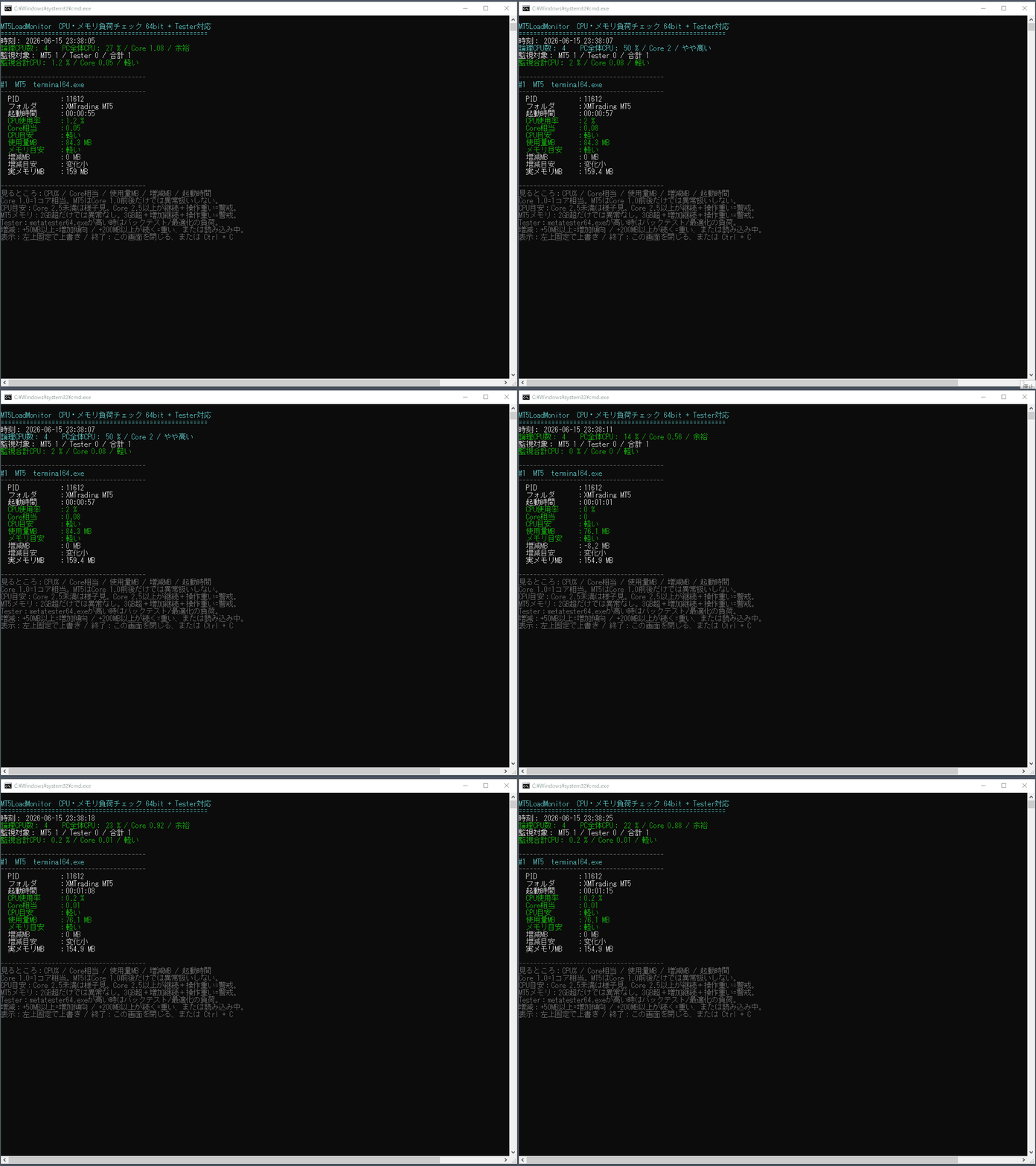
黒い画面が開き、起動中のMT5ごとのCPU使用率やメモリ使用量が表示されます。
バックテストや最適化を行っている場合は、metatester64.exe の負荷も確認できます。
表示される数値を確認し、どのMT5やテスター処理に負荷がかかっているかをチェックします。
────────────────────
【見るポイント】
・PC全体CPUが高い場合
PC全体に負荷がかかっている可能性があります。
・MT5ごとのCPUが高い場合
そのMT5内のEA、インジケーター、チャート数が重い可能性があります。
・Core相当が高い場合
特定の処理がCPUを大きく使っている可能性があります。
・metatester64.exe のCPUが高い場合
バックテストや最適化処理によってPCに負荷がかかっています。
・メモリ使用量が大きい場合
チャート数、インジケーター、EA、ヒストリーデータ、長時間起動などの影響が考えられます。
・メモリが増え続ける場合
長時間運用で重くなる可能性があるため注意が必要です。
・PC全体CPUやメモリに余裕がある場合
MT5の追加起動やチャート数の増加を検討する目安になります。
────────────────────
【このような方におすすめ】
・MT5が重いと感じる方
・MT5がフリーズしやすい方
・EAを複数稼働している方
・インジケーターを複数使用している方
・チャートを多く開いている方
・バックテストや最適化時の負荷を確認したい方
・複数のMT5を安定して運用したい方
・どのMT5が重いのか確認したい方
・PCにあとどれくらい余裕があるか知りたい方
────────────────────
【注意事項】
本ツールは、Windows環境で動作する補助ソフトです。
MT5のチャートにセットするインジケーターではありません。
また、売買サイン、EA、自動売買ツールでもありません。
取引の勝率向上や利益を保証するものではなく、MT5およびPCの動作負荷を確認するための補助ツールです。
PC環境やMT5の起動数、使用しているEA・インジケーター・チャート数、バックテスト・最適化の状況によって表示される負荷は変わります。
────────────────────
【開発者TAKIの自己紹介・検証ツール一覧】
私が実際に検証作業の中で使用してきた補助ツールや、開発のきっかけについて投資ナビにまとめています。
Arrow_Navigator、SignalWinRateChecker、RepaintChecker、LoadMonitorなど、検証作業を効率化するためのツールについても紹介しています。
よろしければ、こちらもご覧ください。
投資ナビ記事はこちら:
https://www.gogojungle.co.jp/finance/navi/articles/118878?via=navi_latest
●Payment





For those using GogoJungle for the first time Easy 3 steps to use the product!
At GogoJungle, we provide services to enrich your investment life for our members. In addition, product purchases are limited to members. Why not register as a member now and make use of GogoJungle!
