

MT4LoadMonitor|MT4 CPU・メモリ負荷チェッカー

Product outline
Community(0)
MT4LoadMonitor|MT4 CPU・メモリ負荷チェッカー Indicators/E-books
MT4LoadMonitor|MT4 CPU・メモリ負荷チェッカー
MT4の重さを、数字で見える化。
Reviews:
Category:
How to provide:
Indicator
Sales from:
06/15/2026
Last Updated:
06/15/2026
Version:
01
Available company:

Japan

Follow 0 Followers 3
Seller TAKI
Seller's last login time: 6/21/2026 17:52:45
Read more seller information

MT4LoadMonitor
MT4 CPU・メモリ負荷チェッカー

────────────────────

【はじめに】

本ツールは、Windowsで動作するMT4負荷チェック用ソフトです。

MT4のチャートに入れて使用するインジケーターではありません。
また、売買サインツールやEAでもありません。

MT4およびPCのCPU使用率・メモリ使用量を確認するための、動作負荷チェック用の補助ツールです。

────────────────────

MT4LoadMonitorは、MT4の動作負荷を確認するためのCPU・メモリ負荷チェックツールです。

MT4を複数起動している時、チャートを多く開いている時、インジケーターやEAを稼働している時に、

「どのMT4が重いのか」
「PC全体にどれくらい負荷がかかっているのか」
「メモリが増え続けていないか」
「あとどれくらいPCに余裕があるのか」

を数値で確認できます。

────────────────────

【このようなお悩みはありませんか?】

・MT4の動きが遅い
・MT4がたまにフリーズする
・チャートの切り替えが重い
・複数のMT4を起動すると不安定になる
・EAやインジケーターを入れると重くなる
・どのMT4が負荷の原因なのかわからない
・PCにあとどれくらい余裕があるのか知りたい
・MT4を増やしても大丈夫か確認したい
・長時間運用しているとだんだん重くなる気がする

MT4LoadMonitorを使うことで、感覚ではなくCPU使用率やメモリ使用量を見ながら、MT4やPCの負荷状況を確認できます。

────────────────────

【確認できる主な内容】

・PC全体のCPU使用率
・MT4ごとのCPU使用率
・MT4ごとのメモリ使用量
・メモリの増減量
・起動時間
・端末ごとの負荷目安

────────────────────

【MT4版について】

MT4LoadMonitorは、MT4本体である terminal.exe を監視します。

複数のMT4を起動している場合でも、どのMT4に負荷がかかっているかを確認できます。

EAやインジケーターを複数稼働している環境、複数通貨を監視している環境、チャート数が多い環境で、MT4の重さを確認するために役立ちます。

────────────────────

【使い方】

  1. ダウンロードしたファイルを解凍します。

  2. フォルダ内にある以下の2つのファイルを、同じ場所に置いた状態で使用してください。

・MT4LoadMonitor.bat
・MT4LoadMonitor.ps1

  1. MT4を起動した状態で、MT4LoadMonitor.bat をダブルクリックします。

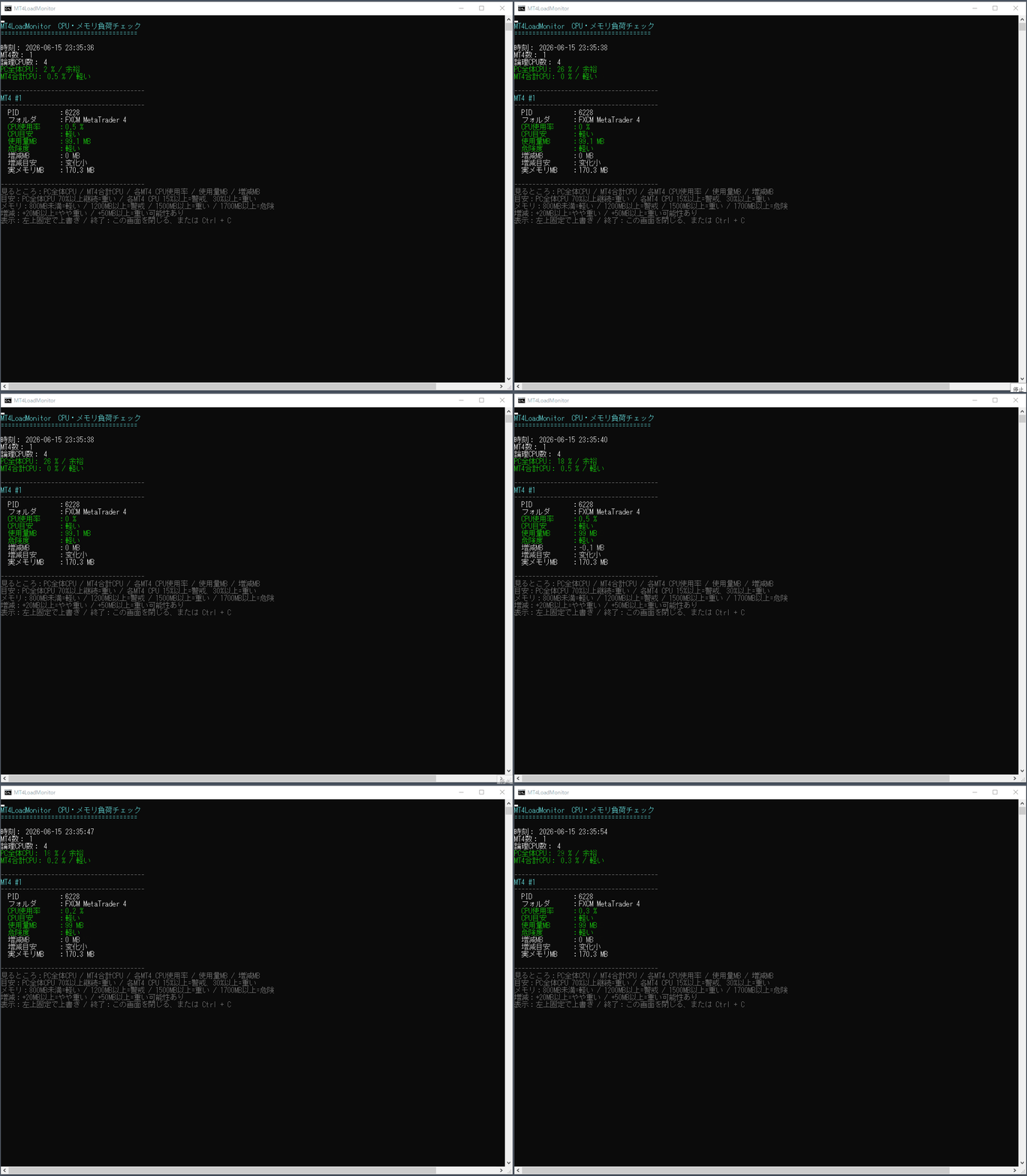
  2. 黒い画面が開き、起動中のMT4ごとのCPU使用率やメモリ使用量が表示されます。

  3. 表示される数値を確認し、どのMT4に負荷がかかっているかをチェックします。

────────────────────

【見るポイント】

・PC全体CPUが高い場合
 PC全体に負荷がかかっている可能性があります。

・MT4ごとのCPUが高い場合
 そのMT4内のEA、インジケーター、チャート数が重い可能性があります。

・メモリ使用量が大きい場合
 チャート数、インジケーター、EA、長時間起動などの影響が考えられます。

・メモリが増え続ける場合
 長時間運用で重くなる可能性があるため注意が必要です。

・PC全体CPUやメモリに余裕がある場合
 MT4の追加起動やチャート数の増加を検討する目安になります。

────────────────────

【このような方におすすめ】

・MT4が重いと感じる方
・MT4がフリーズしやすい方
・EAを複数稼働している方
・インジケーターを複数使用している方
・チャートを多く開いている方
・複数のMT4を安定して運用したい方
・どのMT4が重いのか確認したい方
・PCにあとどれくらい余裕があるか知りたい方

────────────────────

【注意事項】

本ツールは、Windows環境で動作する補助ソフトです。

MT4のチャートにセットするインジケーターではありません。
また、売買サイン、EA、自動売買ツールでもありません。

取引の勝率向上や利益を保証するものではなく、MT4およびPCの動作負荷を確認するための補助ツールです。

PC環境やMT4の起動数、使用しているEA・インジケーター・チャート数によって表示される負荷は変わります。

────────────────────

【開発者TAKIの自己紹介・検証ツール一覧】

私が実際に検証作業の中で使用してきた補助ツールや、開発のきっかけについて投資ナビにまとめています。

Arrow_Navigator、SignalWinRateChecker、RepaintChecker、LoadMonitorなど、検証作業を効率化するためのツールについても紹介しています。

よろしければ、こちらもご覧ください。

投資ナビ記事はこちら:
https://www.gogojungle.co.jp/finance/navi/articles/118878?via=navi_latest

¥1,980 (taxed)
Provider/Distributor:
Sales site:
GogoJungle

Payment

Mastercard Visa JCB Bank FamilyMart D2 D1
Product outline
Community(0)
Best Seller Ranking
Recommended Products (Campaigns)

For those using GogoJungle for the first time Easy 3 steps to use the product!

At GogoJungle, we provide services to enrich your investment life for our members. In addition, product purchases are limited to members. Why not register as a member now and make use of GogoJungle!

01
Enter user information and register as a member
02
Follow the instructions to make a purchase
03
Download from My Page
■ Important Matters and Risk Warnings Regarding Investment Products 【Financial Instruments Business Operator】
GogoJungle Inc.
Registration: Director-General of the Kanto Local Finance Bureau (Financial Instruments Business) No. 1960
【Member Association】
Japan Investment Advisers Association
【Fees and Expenses】
The use of software, e-books, investment advisory services, etc., provided on our platform involves purchase prices determined for each product.
Additionally, when conducting actual financial instrument transactions (such as FX or CFD trading), costs such as transaction fees and spreads (the difference between the sell and buy price) may be incurred through the connected brokerage firms.
【Margin and Risk of Loss】
Transactions such as FX (Foreign Exchange Margin Trading) and CFD (Contract for Difference) allow for trading in amounts exceeding the deposited margin.
Therefore, due to sudden fluctuations in target indices (currency, commodity prices, etc.), there is a risk of incurring losses that exceed the deposited margin (loss exceeding principal).
Furthermore, financial instrument transactions involve risks such as price fluctuations, which may result in losses falling below or exceeding the initial investment principal.
【Nature of Services and Trading Entity】
The Company operates a platform (marketplace) providing investment software and information; we do not engage in the buying, selling, mediation, brokerage, or agency of financial instruments on behalf of customers.
The services and information provided are intended as reference for investment decisions and do not guarantee future profits or specific results.
While some services include investment advice, they do not constitute a mandate or solicitation to trade specific financial instruments.
Final investment decisions and the execution of trades must be made at the customer’s own risk and discretion.
