





1. システム仕様書(開発・ロジック詳細)
本仕様書は、Donchian_Channel_with_MTF_Dash_Arrow.mq4
の内部処理およびテクニカルロジックについて定義します。
1.1 基本情報
- プログラム名: Donchian_Channel_with_MTF_Dash_Arrow.mq4
- バージョン: 1.00
- 実行環境: MetaTrader 4 (MQL4 Strictモード準拠)
- 表示領域: メインチャートウィンドウ (indicator_chart_window)
1.2 インジケーターバッファ仕様
計5つのバッファを使用して、ラインとシグナルを描画します。
|
バッファ番号 |
用途 |
デフォルト色 |
スタイル / 設定 |
|
0 |
上限ライン (Upper Band) |
DodgerBlue |
実線 (STYLE_SOLID) |
|
1 |
下限ライン (Lower Band) |
Tomato |
実線 (STYLE_SOLID) |
|
2 |
中心ライン (Middle Band) |
Silver |
点線 (STYLE_DOT) |
|
3 |
買いシグナル (Buy Signal) |
Lime |
上向き矢印 (文字コード:
233) |
|
4 |
売りシグナル (Sell Signal) |
Magenta |
下向き矢印 (文字コード:
234) |
1.3 パラメーター仕様
- InpSymbol: ダッシュボードで監視する対象通貨ペアを指定します。空欄の場合は現在のチャートの通貨ペアが自動設定されます。
- InpSuffix: ブローカー特有のサフィックス(例: -pro など)を指定します。
- InpCorner: ダッシュボードの表示位置を4隅(左上、右上、左下、右下)から選択します。デフォルトは右下(POS_BOTTOM_RIGHT)です。
- InpPeriod: ドンチャンチャネルの計算基準となる過去のローソク足の本数を指定します。デフォルトは20です。
1.4 計算ロジック詳細
- ライン算出: 指定期間(InpPeriod)における最高値(Upper)、最安値(Lower)、およびその中間値(Middle)を算出します。現在の形成中の足を含めず、過去の確定足(シフト1〜)を参照してラインを描画します。
- シグナル判定:
- 買い: 現在のローソク足の高値が上限ラインを上抜け、かつ1本前の高値が上限ライン以下であった場合にブレイクアウトと判定し、安値から10pips(マルチプライヤ考慮)下の位置に矢印を描画します。
- 売り: 現在のローソク足の安値が下限ラインを下抜け、かつ1本前の安値が下限ライン以上であった場合にブレイクアウトと判定し、高値から10pips(マルチプライヤ考慮)上の位置に矢印を描画します。
- Pipsマルチプライヤ: 3桁・5桁表示のブローカーに対応するため、自動的にPoint値を10倍して内部計算を行います。
1.5 MTFダッシュボード処理
- 監視時間足: M15、M30、H1、H4、D1の5つの時間足の状態を常時監視します。
- 状態判定: 各時間足の現在の終値(現在価格)と、過去期間(InpPeriod)のチャネル位置を比較し、以下の4状態に分類します。
- UPPER BREAKOUT! (Lime): 価格が上限ラインより上にある状態。
- LOWER BREAKOUT! (Red): 価格が下限ラインより下にある状態。
- Bullish Zone (Inside)
(MediumSeaGreen): 価格がチャネル内にあり、かつ中心ライン以上にある状態。
- Bearish Zone (Inside) (OrangeRed):
価格がチャネル内にあり、かつ中心ラインより下にある状態。
- Master Bias判定: 5つの時間足すべてが強気(UPPER BREAKOUT または Bullish Zone)であれば「ALL BULLISH」とし、すべてが弱気であれば「ALL BEARISH」と判定します。それ以外は「MIXED」となります。
- UI自動調整: チャートの背景色を取得し、背景が白やライトグレーの場合は文字色を黒に、それ以外の場合は白に自動調整します。
- メモリ解放処理: インジケーター削除時(OnDeinit)には、DON_のプレフィックスを持つダッシュボードのテキストオブジェクトを一括削除し、チャートをクリーンな状態に戻します。
2. 取扱説明書(ユーザーマニュアル)
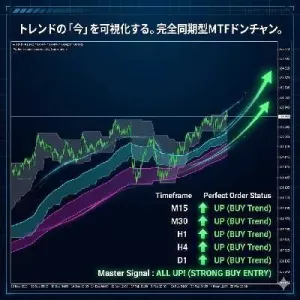
本ツールは、トレンドの発生を捉える「ドンチャンチャネル」と、複数時間足(マルチタイムフレーム)のトレンド方向をひと目で確認できる「MTFダッシュボード」を統合した高機能インジケーターです。
2.1 導入と初期設定
- MT4の「ファイル」メニューから「データフォルダを開く」を選択します。
- MQL4 フォルダ内の Indicators フォルダに、本ファイル(Donchian_Channel_with_MTF_Dash_Arrow.mq4)をコピーします。
- MT4のナビゲーターウィンドウを更新し、チャートに適用します。
2.2 パラメーター設定ガイド
設定画面(パラメーターの入力タブ)で以下の変更が可能です。
- InpSymbol / InpSuffix:
- 通常は空欄のままで、現在表示しているチャートの通貨ペアが自動適用されます。
- 特殊な口座(例: USDJPY-pro など)で別通貨ペアを監視したい場合のみ入力してください。
- InpCorner (表示位置):
- ダッシュボードがチャート上のローソク足と被る場合、左上・右上・左下・右下の4箇所から好きな位置に変更できます。
- InpPeriod (ドンチャン設定):
- 計算期間です。デフォルトの「20」は、一般的なトレンドフォロー手法で最もよく使われる設定値です。長めのトレンドを見たい場合は「40」や「50」に変更してください。
2.3 チャート上の表示解説
メインチャートのラインと矢印
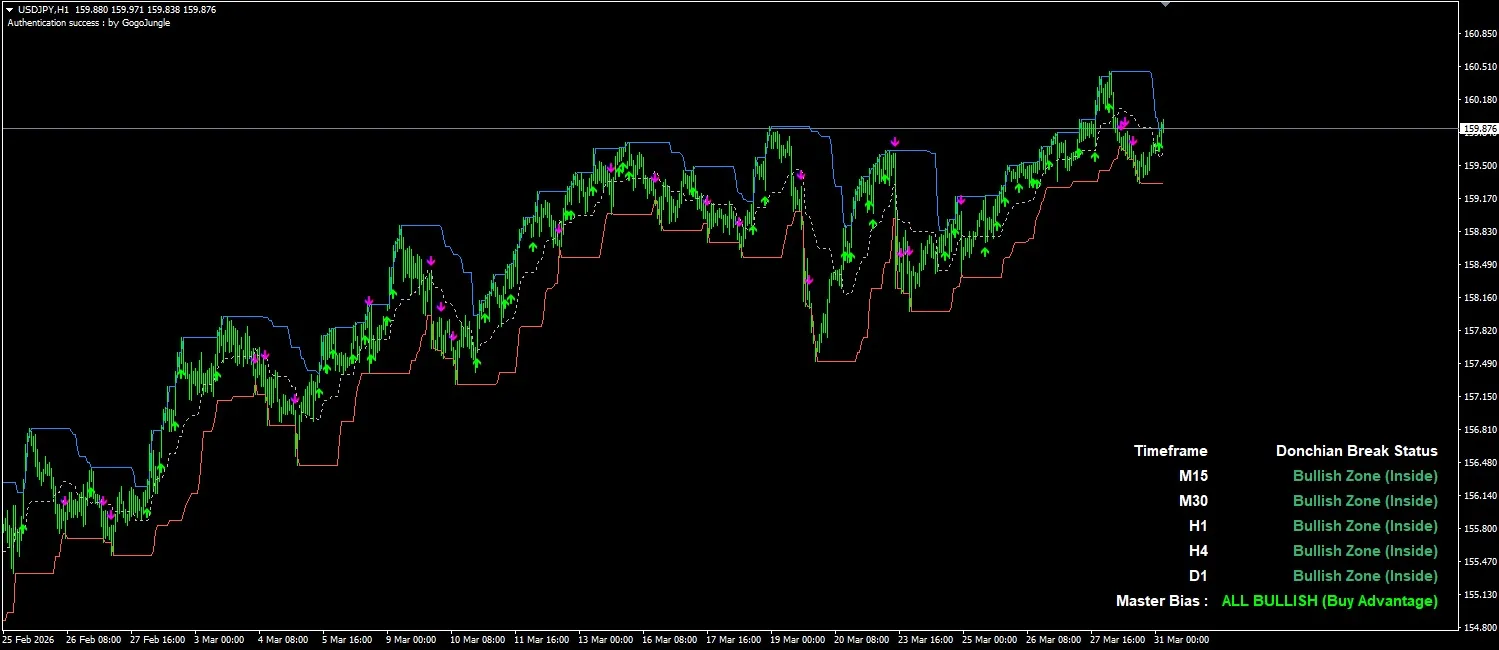
- 青い実線 (Upper Band): 指定期間における「最高値」のラインです。ここを上に抜けると上昇トレンド発生の兆しです。
- 赤い実線 (Lower Band): 指定期間における「最安値」のラインです。ここを下に抜けると下降トレンド発生の兆しです。
- 銀の点線 (Middle Band): トレンドの強弱を分ける中心線です。
- ライム色の上向き矢印: 高値を更新し、買いのブレイクアウトが発生したサインです。
- マゼンタ色の下向き矢印: 安値を更新し、売りのブレイクアウトが発生したサインです。
MTFダッシュボードの見方
画面の端に表示されるテキストパネルは、現在から上位足(15分足〜日足)までのトレンド状況を実況します。
- Timeframe & Status:
- UPPER BREAKOUT! (黄緑): その時間足で強い上昇トレンドが発生中です。
- LOWER BREAKOUT! (赤): その時間足で強い下降トレンドが発生中です。
- Bullish Zone (緑) / Bearish Zone (オレンジ): ブレイクアウトはしていませんが、それぞれ買い優勢・売り優勢のエリアに価格が存在しています。
2.4 実践的なトレード手順(推奨事項)
- 環境認識 (ダッシュボードの確認)
- まずは一番下の
Master Bias を確認します。
- ここが
MIXED (グレー) の時は、各時間足の方向がバラバラ(レンジ相場)であるため、無駄なトレードを控えます。
- ALL BULLISH (ライム色) または ALL BEARISH (赤色) が点灯している時は、全時間足の方向が一致している「勝率が高い状態」です。
- エントリータイミング (矢印の確認)
- Master Biasが ALL BULLISH の時に、チャート上に 上向き矢印(買いシグナル) が出たらエントリーを検討します。
- 逆に、Master Biasが ALL BEARISH の時に、下向き矢印(売りシグナル) が出たらエントリーを検討します。
- 注意点
- ダッシュボードの文字色はチャートの背景色(白系・黒系)に合わせて自動で読みやすい色に変化しますので、設定変更は不要です。
For those using GogoJungle for the first timeEasy 3 steps to use the product!
At GogoJungle, we provide services to enrich your investment life for our members. In addition, product purchases are limited to members. Why not register as a member now and make use of GogoJungle!
