


Guide to Victory Trial Edition 仕様書
1. 概要
プログラム名: Guide_to_Victory_Trial_EA
バージョン: 5.81 (Trial)
プラットフォーム: MetaTrader 4 (MQL4)
種別: エキスパートアドバイザ (EA) / トライアル版
作成日: 2026/02/24
2. トライアル版の制限事項(セキュリティ・稼働条件)
本プログラムは製品版のお試し用として、以下の稼働制限がプログラム内部にハードコーディングされています。
口座制限: デモ口座(Demo)のみ稼働。リアル口座に適用した場合はアラートを表示し、自動的にEAをチャートから削除します。(外為ファイネスト等の特殊なデモサーバー名にも対応済)
有効期限: 2026年3月31日 23:59:59 まで稼働可能。期限を過ぎた場合は自動で停止します。
3. 機能制限(フルバージョンとの違い)
ユーザーに製品版のスケール感を伝えるため、UIオブジェクト自体はフルバージョンと同じ数を配置していますが、以下の機能制限を設けています。
通貨ペア:
USDJPY、EURUSDの2通貨ペアのみ選択可能。(3番目以降の通貨ペアボタンはグレーアウトされ、クリックすると制限アラートが表示されます)時間足:
H1(1時間足)のみ計算および表示可能。(他の時間足セルには「Trial」と表示され、クリックすると制限アラートが表示されます)トレードモード:
ManualとSemiAutoのみ利用可能。(Autoモードは無効化)資金管理: 固定ロット(デフォルト0.01)のみ。
MM_Risk(複利機能)は無効化。通知機能: プッシュ通知のみ利用可能。(メール送信機能はオミット)
4. トレードロジック(Trial適用範囲内)
多数決ロジック: 10種類のインジケータを使用し、7つ以上が同方向を示した際にシグナルと判定します(H1のみで判定)。
ピラミッド機能: 最大3ポジションまでの増し玉設定(Pyramid(3))が利用可能です。
サフィックス自動検知: OANDA等、通貨ペア名の末尾に特殊文字(-a, .oj5kなど)が付く口座でも、自動で検知し内部で適用します。
5. パラメータ仕様(Trial版固有)
| カテゴリ | パラメータ名 | 初期値 | 説明 |
| 言語設定 | Inp_Language | LANG_ENG | アラートメッセージの言語(文字化け防止用。英語/日本語) |
| 初期モード | Inp_Init_Manual | true | 起動時のManualモード選択 |
| Inp_Init_Semi | false | 起動時のSemi-Autoモード選択 | |
| 基本設定 | Inp_MagicNum | 8888 | マジックナンバー |
| Inp_Lots | 0.01 | 固定ロット数 | |
| 通知・音 | Inp_Use_Push | false | スマホMT4へのプッシュ通知(Trueで有効) |
Guide to Victory トライアル版 取扱説明書
この度は「Guide to Victory (Trial Edition)」をご試用いただき、誠にありがとうございます。
本システムは、10種類のインジケータによる「多数決ロジック」を搭載した、裁量&半自動トレード支援ダッシュボードです。
※本製品はトライアル版のため、デモ口座専用・2026年3月31日までの期間限定でご利用いただけます。
1. 導入方法
MT4の「ファイル」→「データフォルダを開く」をクリックし、
MQL4フォルダ内のExpertsフォルダに本EAファイル(.ex4)を保存します。MT4を再起動(またはナビゲーターを更新)します。
デモ口座の任意のチャートに本EAをドラッグ&ドロップします。
設定画面の「全般」タブで「自動売買を許可する」にチェックを入れます。
VPS等の環境で日本語アラートが文字化けする場合は、パラメータ入力タブの一番上にある
Inp_LanguageをEnglishのままご利用ください(日本語環境が正常な場合はJapaneseに変更可能です)。
2. トライアル版の画面と機能制限について
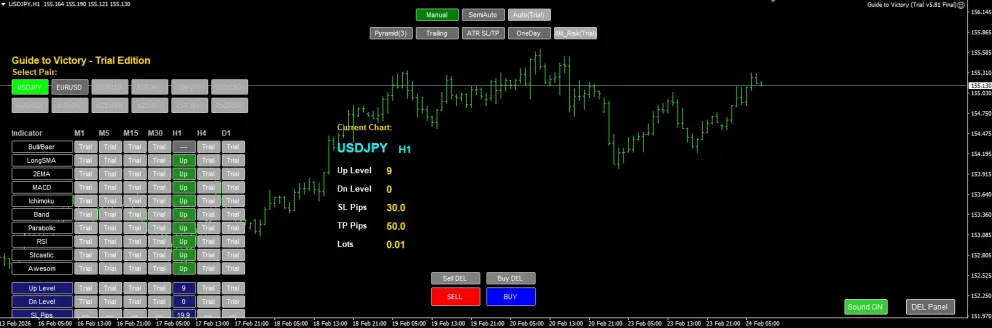
チャート画面には製品版と同等のフルダッシュボードが表示されますが、トライアル版では以下の機能を実際にお試しいただけます。
監視通貨ペア: USDJPY および EURUSD の2種類をお試しいただけます。
(※グレーアウトされている通貨ペアは製品版で解放されます)
監視時間足: H1(1時間足) での多数決ロジックを体験いただけます。
(※表の「Trial」となっている時間足は製品版で解放されます)
3. 操作パネルの使い方
トレードモードの切り替え
Manual (緑): ご自身のタイミングで、ダッシュボード下部の「SELL」「BUY」ボタンを押してエントリーします。
SemiAuto (紫): インジケータの多数決(10個中7個以上)が揃った時だけ、注文ボタンに色が付き押せるようになります。無駄なエントリーを防ぐ強力な補助機能です。
(※Autoモード、およびMM_Risk機能は製品版でのみご利用いただけます)
トレード補助機能 (ON/OFFスイッチ)
オレンジ色に点灯している時が「有効(ON)」です。
Pyramid(3): トレンド発生時、利益方向に進んだ際に自動で「増し玉」を行います(最大3ポジションまで)。
Trailing: トレーリングストップを稼働させ、利益を確保しながら追従します。
ATR SL/TP: 相場のボラティリティ(値幅)に合わせて、損切り・利食い幅を自動で最適化します。
OneDay: (※製品版にて詳細設定可能な1日1回決済等の機能です)
Sound ON/Mute: パネル操作時や注文時のクリック音を切り替えます。
4. エントリーと決済
画面下部の SELL / BUY ボタンをクリックすると、設定されたロット(初期値0.01)で注文が入ります。
すでに持っているポジションを全決済したい場合は、Sell DEL または Buy DEL ボタンをクリックしてください。現在表示中の通貨ペアのポジションのみをスパッと一括決済します。
5. 注意事項・免責事項
本EAはリアル口座では稼働いたしません。必ずデモ口座にて操作感や優位性をお確かめください。
OANDA等の特殊な通貨ペア名(USDJPY-aなど)の口座でも、自動検知して稼働するよう設計されています。
本プログラムはトレードを支援するツールであり、利益を保証するものではありません。本ツールを使用したことによるデモトレード上の不都合等について、開発者は責任を負いかねます。
ぜひ、Guide to Victoryがもたらす「多数決ロジックの精度」と「洗練されたコックピット操作」をご体験ください!気に入っていただけましたら、全機能が解放された製品版もご検討いただければ幸いです。
For those using GogoJungle for the first timeEasy 3 steps to use the product!
At GogoJungle, we provide services to enrich your investment life for our members. In addition, product purchases are limited to members. Why not register as a member now and make use of GogoJungle!
