Flat Manual Trader - ロット自動計算&トレーリング決済支援ツール

Product outline
Community(0)
Flat Manual Trader - ロット自動計算&トレーリング決済支援ツール Indicators/E-books
Flat Manual Trader - ロット自動計算&トレーリング決済支援ツール
ロット自動計算が特長の MT5 用裁量トレードツール。リスク%と SL 距離から適正ロットを自動計算。SL ラインのドラッグ調整、ATR トレーリング、遅延トレーリング、部分決済、分割損切りに対応。
Sales Result 3 items
Reviews ★ 5.0 (2)
How to provide:
Indicator
Sales from:
02/18/2026
Last Updated:
07/31/2026
Version:
1.38
Available company:

Follow 0 ❘ Followers 3
Seller kotoha
Seller's last login time: 11/5/2026 16:58:13
Read more seller information
¥9,800 (taxed)
Already 3 users using!
Provider/Distributor:
Sales site:
GogoJungle

●Payment

Mastercard Visa JCB Bank FamilyMart D2 D1

MT5用 裁量トレード管理ツール(EA)

エントリーは自分で。
ロット計算と決済管理は、ツールに任せる。

Flat Manual Trader は、裁量トレードの「エントリー後の管理」を支援するツールです。一番の特長はロットの自動計算。SL幅が変わっても、リスクに合わせた適正ロットをその場で計算し直します。

一番の特長 ロット自動計算SLライン ドラッグ調整ATR トレーリング部分決済・分割損切りスマホ手動ポジション管理
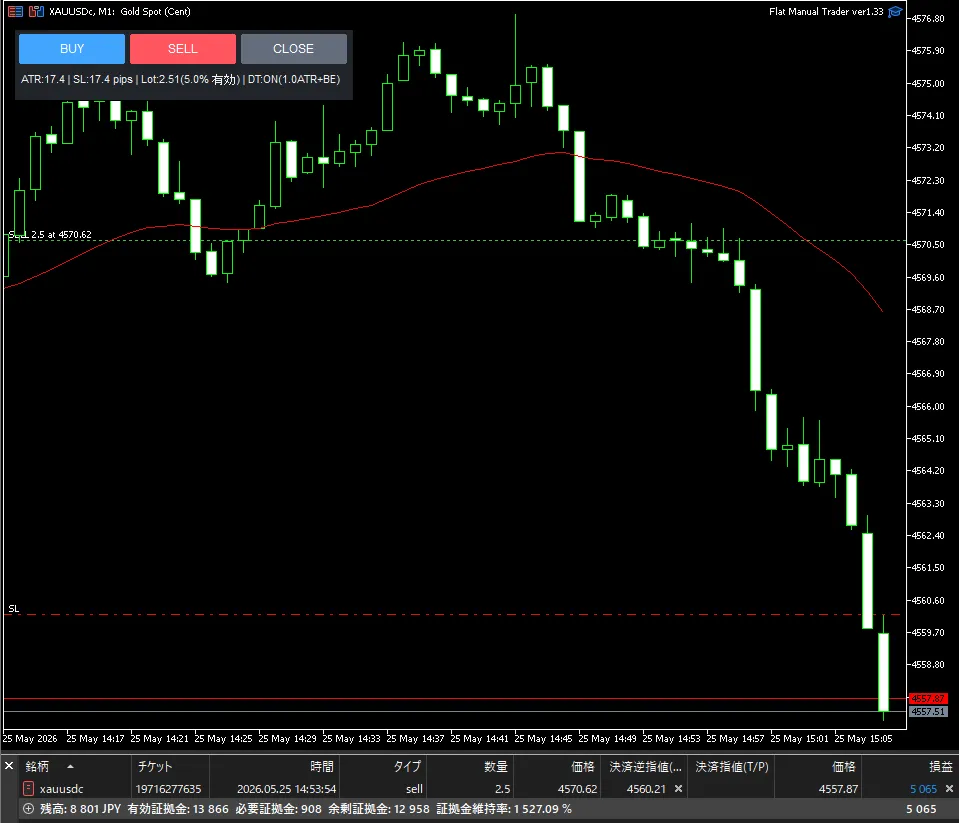
チャート上の操作パネル。BUY / SELL / CLOSE の3ボタンと、SL・TP・トレーリングのライン表示

【無料体験版(Demo)があります】購入前に試したい方へ、製品版の全機能をデモ口座でそのまま試せる無料体験版をご用意しています(デモ口座専用・リアル口座では起動しません)。無料体験版(MT5・デモ口座専用)はこちら

01 こんな手間や不安を、毎回のトレードから無くすために

ロット計算が面倒
SL幅が変わるたびに適正ロットを計算し直すのが手間で、つい固定ロットや感覚で入ってしまう。
銘柄ごとに計算が違う
ゴールドや株価指数など、銘柄ごとに値動きの単位が違い、計算を間違えやすい。
決済がルール通りにいかない
トレーリングや部分決済を決めていても、相場を見ていると手動ではブレてしまう。

02 一番の特長:ロットの自動計算

口座残高(または有効証拠金)に対するリスク%、もしくは固定金額と、SL距離から、適正ロットを自動で計算します。リスク1%に設定すれば、SLに到達したときの損失は常に資金の1%に揃います。

資金
残高/有効証拠金
× リスク
% または固定金額
÷ SL距離
ATR×倍率/固定PIPS
→ 自動計算
適正ロット

SLラインをドラッグすれば、その場で再計算

エントリー前の準備画面(PREP)では、SLラインをマウスでドラッグして位置を調整でき、ロットはその場で再計算されます。納得してから GO ENTRY で発注する2段階方式です。計算には MT5 の取引計算機能(OrderCalcProfit)を使う方式を採用し、銘柄ごとの仕様差を自動で吸収します。FX通貨ペアのほか、ゴールド・株価指数などのCFD銘柄にも対応します。
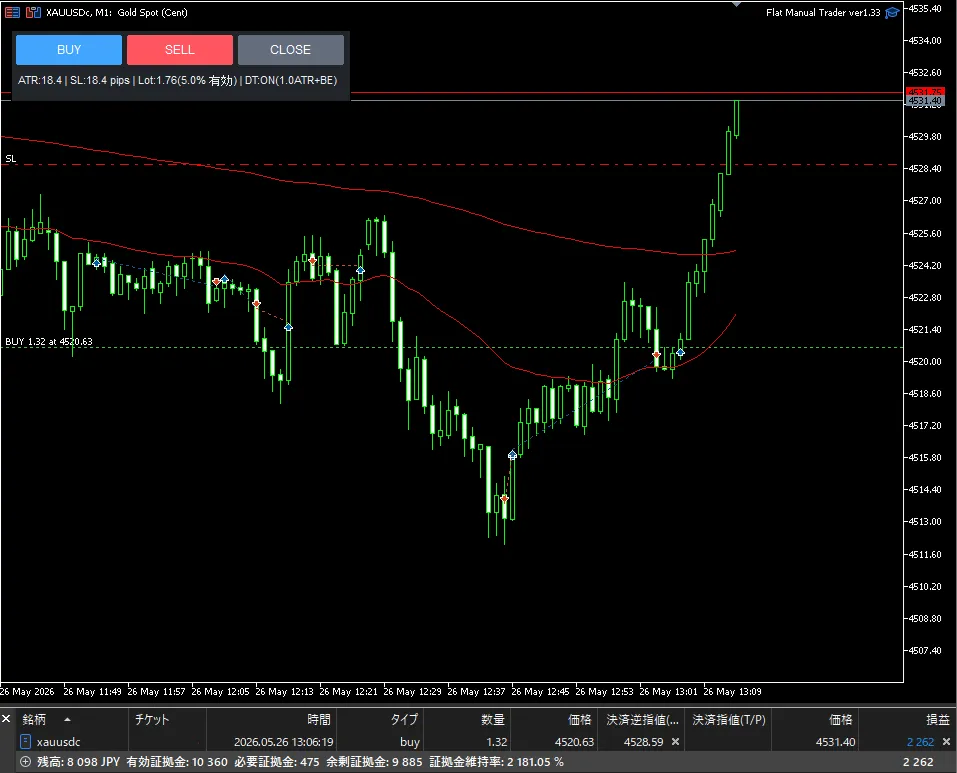
準備画面:SL / TP / トレーリング開始ラインを見ながら、発注前に位置を調整できます

03 エントリー後は、管理をルール通りに自動化

トレーリング
・ATRトレーリング:距離・ステップともATR連動
・遅延トレーリング:ATR/PIPS/R/指定価格に到達してから開始。到達時の建値移動も可能
部分決済・分割損切り
・部分決済(利確側):遅延開始連動/RR到達/指定価格、25・50・75%、決済後の建値移動に対応
・分割損切り:含み損がSL距離の一定割合に達したら、一部を先に決済
過剰取引の防止
・同時ポジション数制限
・日次損失制限:到達時は新規エントリーをブロック
スマホ・状態の引き継ぎ
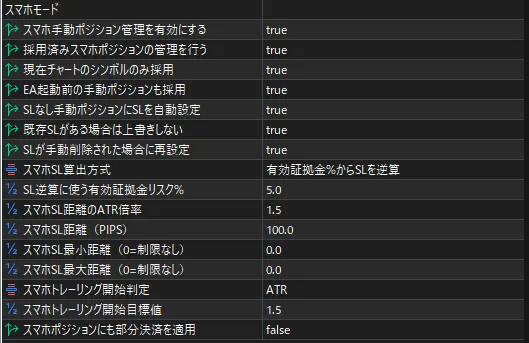
・スマホモード:スマホMT5から手動で入れたポジション(Magic=0)をPC側で採用し、SL自動設定・トレーリング・部分決済の管理対象にできます
・状態の自動保存:時間足の変更やMT5の再起動後も、部分決済済み等の状態を引き継ぎ、誤った再実行を防ぎます

04 使い方(3ステップ)

1 準備(PREP)
パネルで BUY / SELL を押すと、SL・TP・目標ラインがチャートに表示されます。
2 調整
必要ならSLラインをドラッグして位置を調整。ロットは自動で再計算されます。
3 発注(GO ENTRY)
発注後の管理は、設定したルールで自動実行されます。

05 画面イメージ

パラメーター設定:使う機能だけをON/OFFで選べます
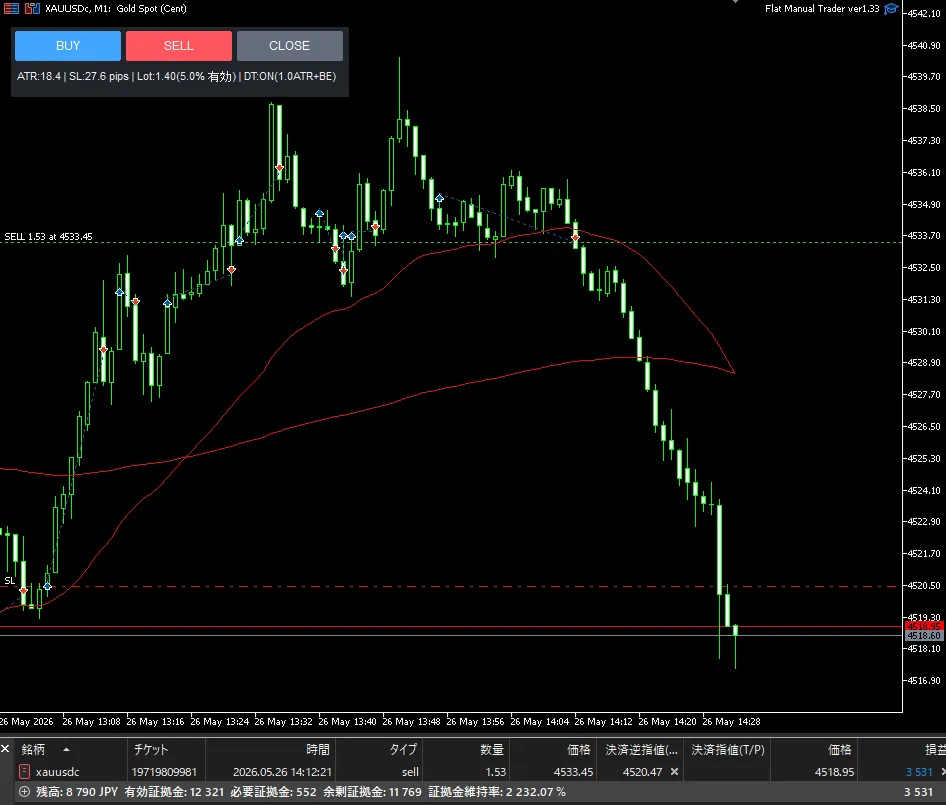
管理中のチャート:ラインとパネルで状態を確認できます

06 ご購入者様の声

★★★★★
「FXは入り口よりも出口が全てだと思っており、この決済機能は本当にすごく、もう手放せません」
GogoJungleレビューより
★★★★★
「リスク管理の徹底と、エントリーポイントへの集中のため導入しました。要望に対して数十分でアップデート対応していただけた姿勢も素晴らしいです」
GogoJungleレビューより

※レビュー全文はGogoJungleのレビュー欄でご確認いただけます。

07 対応環境・ご注意

対応環境MetaTrader 5 専用(MT4版は別商品「Flat Manual Trader for MT4」です)
対応銘柄FX通貨ペア、ゴールド・株価指数などのCFD銘柄
種別売買判断を代行しない、裁量トレードの管理支援ツール(EA)です
・本ツールは売買判断を代行するものではなく、利益を保証するものでもありません。
・ご利用環境・銘柄設定・スプレッド・約定条件により、動作結果が異なる場合があります。
・実運用の前に、デモ環境などで十分に動作確認を行ってください。

08 アップデート情報(最新版)

ver1.38(2026/07/31)最大同時ポジション制限の判定を強化

・最大同時ポジション制限について、注文準備時だけでなく注文実行直前にも再判定するよう修正しました。
・準備画面の表示中に別経路でポジション数が増えた場合でも、設定上限を超える注文を防止します。
・通常パネル注文および外部シグナル注文を、共通の最終発注判定で保護しました。
・注文結果のサーバー応答を確認し、失敗時はExpertsログに詳細を記録するよう改善しました。

¥9,800 (taxed)
Already 3 users using!
Provider/Distributor:
Sales site:
GogoJungle

●Payment

Mastercard Visa JCB Bank FamilyMart D2 D1
Product outline
Community(0)
Best Seller Ranking

For those using GogoJungle for the first time Easy 3 steps to use the product!

At GogoJungle, we provide services to enrich your investment life for our members. In addition, product purchases are limited to members. Why not register as a member now and make use of GogoJungle!

01
Enter user information and register as a member
02
Follow the instructions to make a purchase
03
Download from My Page
■ Important Matters and Risk Warnings Regarding Investment Products 【Financial Instruments Business Operator】
GogoJungle Inc.
Registration: Director-General of the Kanto Local Finance Bureau (Financial Instruments Business) No. 1960
【Member Association】
Investment Trusts Association, Japan
【Fees and Expenses】
The use of software, e-books, investment advisory services, etc., provided on our platform involves purchase prices determined for each product.
Additionally, when conducting actual financial instrument transactions (such as FX or CFD trading), costs such as transaction fees and spreads (the difference between the sell and buy price) may be incurred through the connected brokerage firms.
【Margin and Risk of Loss】
Transactions such as FX (Foreign Exchange Margin Trading) and CFD (Contract for Difference) allow for trading in amounts exceeding the deposited margin.
Therefore, due to sudden fluctuations in target indices (currency, commodity prices, etc.), there is a risk of incurring losses that exceed the deposited margin (loss exceeding principal).
Furthermore, financial instrument transactions involve risks such as price fluctuations, which may result in losses falling below or exceeding the initial investment principal.
【Nature of Services and Trading Entity】
The Company operates a platform (marketplace) providing investment software and information; we do not engage in the buying, selling, mediation, brokerage, or agency of financial instruments on behalf of customers.
The services and information provided are intended as reference for investment decisions and do not guarantee future profits or specific results.
While some services include investment advice, they do not constitute a mandate or solicitation to trade specific financial instruments.
Final investment decisions and the execution of trades must be made at the customer’s own risk and discretion.