


Guide to Victory v5.80 EA 仕様書
1. 概要
プログラム名: Guide_to_Victory_v5.80_EA
プラットフォーム: MetaTrader 4 (MQL4)
種別: エキスパートアドバイザ (EA) / ダッシュボード型トレード支援ツール
バージョン: 5.80
作成日: 2026/02/14
2. 機能概要
本プログラムは、12通貨ペア・7つの時間足における10種類のテクニカル指標をリアルタイムで監視し、そのトレンド判定結果をダッシュボードに表示する多機能EAです。
「多数決ロジック」を採用し、裁量トレードの補助(Semi-Auto)から完全自動売買(Auto)まで対応します。
3. トレードロジック
3.1 エントリー条件(多数決判定)
10種類のインジケータのうち、現在の時間足で 7つ以上 が同じ方向(UpまたはDn)を示した際にシグナルと判定します。
対象インジケータ:
Bull/Bear (ローソク足プライスアクション)
LongSMA (200SMAとの位置関係)
2EMA (短期・長期EMAクロス)
MACD (メイン・シグナルクロス)
Ichimoku (転換線・基準線クロス)
Bollinger Bands (ミドルラインとの位置関係)
Parabolic SAR
RSI (期間14, レベル50判定)
Stochastic (メイン・シグナルクロス)
Awesome Oscillator (0ラインクロス)
3.2 動作モード
Manual: ユーザー判断でボタンを押してエントリー。
Semi-Auto: 判定条件(7つ以上一致)を満たした時のみ、注文ボタンが有効化(色付き)され、押下可能になる。
Auto: 判定条件を満たし、かつポジションがない(またはピラミッド条件合致)場合、即座に自動エントリーする。
3.3 ピラミッド(増し玉)機能
発動条件:
Pyramiding = Trueかつ、保有ポジション数がMax Positions未満であること。ロジック: 最後のポジションから、利益方向に指定Pips(
Pyramid Dist)動いた場合に追加エントリーを行う。
3.4 資金管理 (Money Management)
MM Risk = False: 固定ロット(
Lots)を使用。MM Risk = True: 余剰証拠金に対し、指定したリスク率(
MM Percent)とSL幅に基づきロットを自動計算。
3.5 決済・安全機能
SL/TP: 固定Pips、またはATRに基づいた変動幅で設定可能。
安全装置: 通貨ペアや時間足を切り替えた際、誤発注を防ぐためにAutoモードを強制的にManualへリセットする。
4. パラメータ仕様(初期値)
| カテゴリ | パラメータ名 | 初期値 | 説明 |
| 初期モード | Inp_Init_Manual | true | 起動時のManualモード選択 |
| Inp_Init_Semi | false | 起動時のSemi-Autoモード選択 | |
| Inp_Init_Auto | false | 起動時のAutoモード選択 | |
| 基本設定 | Inp_MagicNum | 8888 | マジックナンバー |
| Inp_Slippage | 3 | 許容スリッページ (pips) | |
| ロット管理 | Inp_Lots | 0.01 | 固定ロット数 |
| Inp_Limit_Lots | 1.0 | 最大ロット制限 | |
| Inp_Use_MM | false | 資金管理機能の使用 | |
| Inp_MM_Percent | 0.1 | リスク許容率 (%) | |
| 決済設定 | Inp_SL_Pips | 30 | 損切り幅 (pips) |
| Inp_TP_Pips | 50 | 利食い幅 (pips) | |
| Inp_Use_ATR_SLTP | false | ATRによるSL/TP計算の使用 | |
| Inp_Use_Trailing | false | トレーリングストップの使用 | |
| ピラミッド | Inp_Use_Pyramid | false | 増し玉機能の使用 |
| Inp_Pyramid_Dist | 20 | 追加エントリー間隔 (pips) | |
| Inp_Max_Positions | 3 | 最大ポジション数 | |
| 通知・音 | Inp_Sound_Enable | true | 操作音・通知音 |
| Inp_Use_Mail | false | メール送信機能 | |
| Inp_Use_Push | false | プッシュ通知機能 |
Guide to Victory v5.80 取扱説明書
1. 導入方法
インストール:
Guide_to_Victory_v5.80_EA.ex4ファイルを、MT4のデータフォルダ内のMQL4 > Expertsフォルダに保存します。再起動: MT4を再起動するか、ナビゲーターウィンドウで右クリックして「更新」を押します。
チャート適用: 任意のチャートを開き、EAをドラッグ&ドロップします。
設定: 「全般」タブで「自動売買を許可する」にチェックを入れ、「OK」を押します。
稼働確認: チャート右上のニコちゃんマークが笑顔になっていることを確認してください。
2. 画面の見方と操作
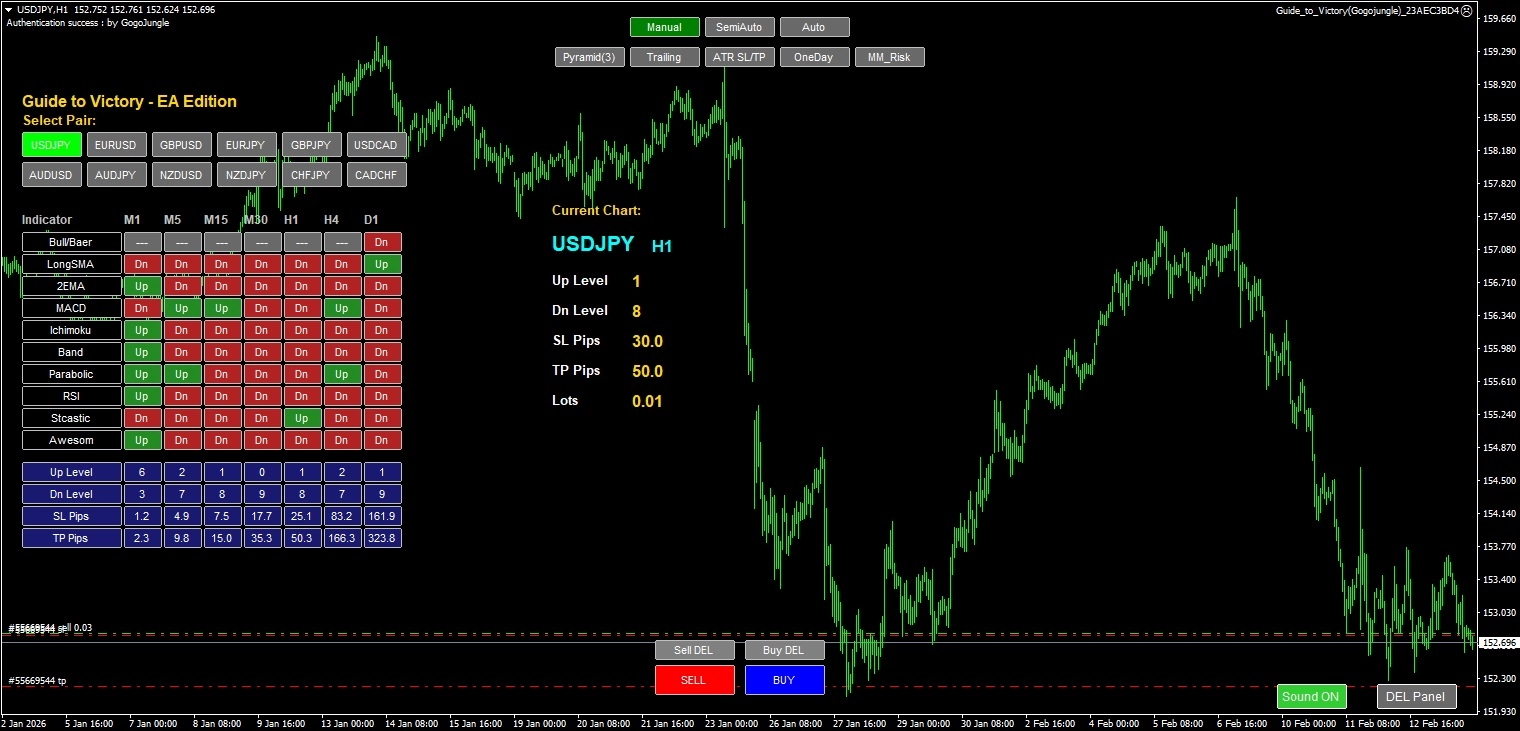
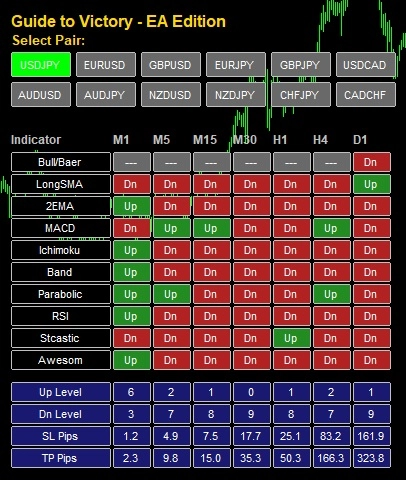
2.1 メインパネル (左側)
通貨ペアボタン (12個): クリックすると、チャートの通貨ペアが即座に切り替わります。
インジケータ表:
縦軸:10種類のインジケータ
横軸:7つの時間足 (M1~D1)
セル:条件を満たすと
Up(緑) またはDn(赤) が表示されます。セルをクリックすると、その時間足にチャートが切り替わります。
2.2 操作パネル (画面下部・上部)
Manual / SemiAuto / Auto: トレードモードを切り替えます。
Manual (緑): 自分の判断でいつでも注文できます。
SemiAuto (紫): ロジック条件(表のUp/Dnが7個以上)が揃った時だけ、注文ボタンが押せるようになります。
Auto (赤): 条件が揃うと勝手に注文します。※取り扱い注意
SELL / BUY ボタン: 注文を実行します。Semi/Autoモードでは条件不成立時はグレーアウトします。
Sell DEL / Buy DEL: 現在の通貨ペアのポジションを一括決済します。
機能スイッチ:
Pyramid(x): ピラミッド機能のON/OFF。Trailing: トレーリングストップのON/OFF。ATR SL/TP: SL/TPをATRベースで自動計算するかどうか。Sound ON/Mute: 操作音のON/OFF。DEL/Show Panel: 画面上のパネルを表示/非表示にします。
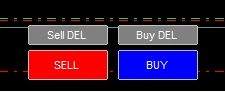

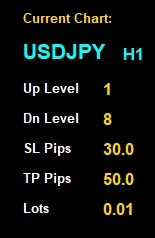
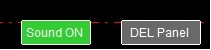
2.3 情報ダッシュボード (右側)
現在のチャート(通貨ペア・時間足)に関する情報を表示します。
Up Level / Dn Level: 現在、いくつのインジケータがサインを出しているか(最大10)。
SL Pips / TP Pips: 現在の設定に基づいた損切り・利食い幅。
Lots: 次のエントリーで発注されるロット数。
3. 自動売買 (Autoモード) の注意点
安全機能: Autoモードのまま通貨ペアや時間足を切り替えると、意図しないエントリーを防ぐため、自動的にManualモードに戻ります。 Autoで稼働させたい場合は、切り替え後に再度Autoボタンを押してください。
ピラミッド: Autoモードで
PyramidがONの場合、利益が出ると自動で追加エントリーを行います。資金管理に十分ご注意ください。
4. よくある質問 (FAQ)
Q. バックテストで動きません。
A. このEAは複数の通貨ペアのデータを同時に必要とします。MT4のヒストリーセンターから、使用する12通貨ペアすべての1分足データをダウンロードしてから、ビジュアルモードでテストしてください。
Q. メールが届きません。
A. MT4本体の「ツール」→「オプション」→「E-メール」設定が正しく行われているか確認してください。Gmail等の場合、アプリパスワードが必要です。
1. プッシュ通知 (Push Notification) 【推奨】
スマホの「MetaTrader 4」アプリに、LINEのような通知が届きます。 設定が簡単で、届くのが早く、最もおすすめの方法です。
設定手順
スマホ側: MT4アプリを開き、[設定] > [チャットとメッセージ](またはメッセージ)の画面下部にある 「MetaQuotes ID(8桁の英数字)」 をメモします。
PC側: MT4上部メニュー [ツール] > [オプション] をクリック。
[通知] タブを開く。
「プッシュ通知機能を有効にする」 にチェックを入れる。
「MetaQuotes ID」 欄に、スマホで確認したIDを入力する。
[テスト] ボタンを押す。
→ スマホに通知が届けば成功です。
2. メール送信 (E-Mail)
PCのメールアドレスや携帯メール宛に、通常のEメールを送ります。 設定が少し複雑ですが、記録を残したい場合に便利です。
設定手順 (Gmailの場合の例)
※Gmailを使用する場合、Googleアカウントで「アプリパスワード」の生成が必要です(通常のログインパスワードでは送信できません)。
PC側: MT4上部メニュー [ツール] > [オプション] をクリック。
[E-メール] タブを開く。
「有効にする」 にチェックを入れる。
各項目を入力:
SMTPサーバー:
smtp.gmail.com:587SMTPログインID: あなたのGmailアドレス
SMTPパスワード: Googleのアプリパスワード (16桁)
発信元: あなたのGmailアドレス
送信先: 送りたい先のメールアドレス(携帯メールなど)
[テスト] ボタンを押す。
→ 送信先にメールが届けば成功です。
3. EA側での有効化
MT4側の設定ができたら、Guide to Victory EAのパラメータ設定でスイッチをONにします。
Inp_Use_Push: true にすると、プッシュ通知が飛びます。Inp_Use_Mail: true にすると、Eメールが送信されます。
使い分けのおすすめ:
普段のトレード確認: プッシュ通知(気づきやすいため)
約定履歴の保存: Eメール(後で検索しやすいため)
まずは設定が簡単な**「プッシュ通知」**から試されることをお勧めします。
5. 免責事項
本プログラムはトレードを支援するツールであり、利益を保証するものではありません。
本ツールを使用したことによる損失について、開発者は一切の責任を負いません。必ずデモ口座で十分に動作を確認し、リスクを理解した上でご使用ください。
●お支払い方法





GogoJungleを初めてご利用する方へ 商品のご利用まではかんたん3ステップ!
GogoJungleでは、会員様向けに、あなたの投資生活を豊かにするサービスをご用意しております。また、商品をご購入いただけるのは、会員様のみとなっております。今すぐ会員登録をして、GogoJungleを活用してみませんか!
