

ScenarioDrawer|チャートにシナリオを描く裁量補助インジケーター|矢印ライン×3色切替×自動保存【MT4】

Product outline
Community(0)
ScenarioDrawer|チャートにシナリオを描く裁量補助インジケーター|矢印ライン×3色切替×自動保存【MT4】 Indicators/E-books
ScenarioDrawer|チャートにシナリオを描く裁量補助インジケーター|矢印ライン×3色切替×自動保存【MT4】
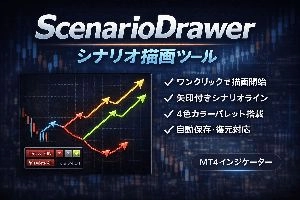
頭の中のシナリオを、チャートに描き出す。裁量トレーダーのための"思考の可視化"ツール。
Sales Result:
0本
Reviews:
Category:
How to provide:
Indicator
Sales from:
02/11/2026
Last Updated:
-
Version:
-
Available company:
Payment method:

Japan

フォロー 0 フォロワー 2
SellerNu6666
Seller's last login time:3/25/2026 09:34:08
Read more seller information

◆ 一言でいうと

「自分の相場シナリオを、矢印付きの折れ線で素早くチャートに描けるツール」 です。

裁量トレーダーが頭の中に描く「こう動いたらこうエントリーする」「ここで反転したらこう逃げる」——そのシナリオの"道筋"を、クリックだけでチャート上に可視化できます。


◆ こんな悩みはありませんか?

  • 📌 MT4標準のトレンドラインを1本1本引くのが面倒
  • 📌 シナリオを描いても見返すと「どっち方向?」と矢印がなくて分かりにくい
  • 📌 複数シナリオを色分けして描きたいが管理が煩雑
  • 📌 描いたラインがチャート切替やMT4再起動で消えてしまう

ScenarioDrawer はこれらすべてを解決します。


◆ 主な機能・特長

機能説明
ワンクリック連続描画描画モードONでチャートをクリックするだけ。始点→中継点→中継点…と連続してラインが繋がります。右クリック or ダブルクリックで確定。
自動矢印ヘッド各セグメントの終点に矢印が自動表示。シナリオの"方向感"が一目瞭然です。
4色カラーパレットパネル上のカラーボタンで瞬時に色切替。上昇シナリオは緑、下降は赤、など自由に使い分け可能。色はパラメータでカスタマイズOK。
カラー選択で自動描画ON色を選ぶだけで描画モードが自動ONになる便利機能(秒数設定可)。余計な操作ゼロ。
キーボードショートカットデフォルト「D」キーで描画ON/OFF切替。ESCキーで即キャンセル。
コンパクトUI パネル折りたたみ可能なダークテーマパネル。Draw/Delete/カラーボタンを集約。表示・非表示やサイズをパラメータで細かく調整。
自動保存・自動復元描いたシナリオラインはファイルに自動保存。MT4再起動・チャート切替後も復元されます。
グループ一括削除1つのセグメントを削除すると、同シナリオの連続ライン全体が自動削除。ゴミが残りません。
Delete Allボタンワンクリックで全シナリオを一括クリア。
確定方法を選択可能右クリック確定 or 左ダブルクリック確定をパラメータで選択。お好みの操作感に。
プレビューライン描画中はマウス追従のドットラインで着地点をリアルタイムプレビュー。
ドラッグ移動対応確定後のラインはドラッグで位置調整可能。矢印も自動追従。

◆ 活用シーン

🟢 裁量トレーダーのシナリオプランニング 「高値ブレイクしたらロング→ここで利確」「サポート割れたらショート→ここまで」——複数の値動きシナリオを色分けして事前に描いておき、実際の値動きと照合しながらトレード判断。

🟢 トレード日誌・振り返り エントリー前に描いたシナリオと実際の動きを比較。自分の相場観の精度を客観的にチェック。

🟢 SNS・ブログでの相場分析共有 矢印付きの見やすいシナリオ図をスクリーンショットで共有。フォロワーに伝わりやすい。

🟢 トレード塾・勉強会 講師が描くシナリオ図として、シンプルかつ直感的。受講生にもすぐ使える。


◆ パラメータ一覧(一部抜粋)

パラメータ内容初期値
ライン色デフォルトのライン色DodgerBlue
ライン太さ1〜5で指定2
線種実線・点線など実線
描画モード切替キーキーボードショートカットD
カラー1〜4パレットの4色LightGray / Red / Lime / DodgerBlue
ライン確定方法右クリック or 左ダブルクリック右クリック
矢印サイズ矢印ヘッドのピクセルサイズ12
パネル位置 / サイズX・Y座標、余白、ボタンサイズ等カスタマイズ可
各要素の表示/非表示Draw/Delete/カラー用途に応じて

※全パラメータはインストール後にプロパティ画面で確認・変更いただけます。


◆ 動作環境

  • プラットフォーム: MetaTrader 4(MT4)
  • 種別: インジケーター(チャートウィンドウ表示)
  • 対応通貨ペア: 全通貨ペア・全銘柄
  • 対応時間足: 全時間足
  • 口座制限: なし(デモ・リアル両対応)

◆ インストール方法

  1. ダウンロードした .ex4 ファイルを MT4 の MQL4/Indicators フォルダに配置
  2. MT4を再起動、またはナビゲーターを更新
  3. チャートにドラッグ&ドロップ
  4. パラメータを好みに設定して「OK」

◆ よくある質問

Q. EA(自動売買)と一緒に使えますか? A. はい。本ツールはインジケーター(描画補助)ですので、EAとの併用に問題ありません。

Q. チャートを閉じたら描いたラインは消えますか? A. いいえ。自動保存機能により、同じ通貨ペア・チャートIDで再表示すると復元されます。

Q. インジケーターを削除するとラインも消えますか? A. はい。チャートからインジケーターを除去すると、そのチャート上の全シナリオラインと保存ファイルが自動削除されます。

Q. 描画中に間違えた場合は? A. ESCキーで描画中のシナリオを丸ごとキャンセルできます。確定後のラインはグループ単位で削除可能です。


◆ 免責事項

本製品は裁量トレードの補助ツール(描画ツール)です。売買シグナルの提供や利益の保証を行うものではありません。投資判断はご自身の責任でお願いいたします。


◆ 検索キーワード

MT4 シナリオ描画 裁量トレード ツール チャート ライン描画 矢印ライン MT4 シナリオプランニング FX MT4 インジケーター 描画 トレンドライン 連続描画 相場分析 ライン MT4 ドローイングツール FX シナリオ 可視化


¥3,000(Tax included)
?About 1-Click Order
Product outline
Community(0)
Best Seller Ranking
Recommended Products (Campaigns)

For those using GogoJungle for the first timeEasy 3 steps to use the product!

At GogoJungle, we provide services to enrich your investment life for our members. In addition, product purchases are limited to members. Why not register as a member now and make use of GogoJungle!

01
Enter user information and register as a member
02
Follow the instructions to make a purchase
03
Download from My Page
■ Important Matters and Risk Warnings Regarding Investment Products 【Financial Instruments Business Operator】
GogoJungle Inc.
Registration: Director-General of the Kanto Local Finance Bureau (Financial Instruments Business) No. 1960
【Member Association】
Japan Investment Advisers Association
【Fees and Expenses】
The use of software, e-books, investment advisory services, etc., provided on our platform involves purchase prices determined for each product.
Additionally, when conducting actual financial instrument transactions (such as FX or CFD trading), costs such as transaction fees and spreads (the difference between the sell and buy price) may be incurred through the connected brokerage firms.
【Margin and Risk of Loss】
Transactions such as FX (Foreign Exchange Margin Trading) and CFD (Contract for Difference) allow for trading in amounts exceeding the deposited margin.
Therefore, due to sudden fluctuations in target indices (currency, commodity prices, etc.), there is a risk of incurring losses that exceed the deposited margin (loss exceeding principal).
Furthermore, financial instrument transactions involve risks such as price fluctuations, which may result in losses falling below or exceeding the initial investment principal.
【Nature of Services and Trading Entity】
The Company operates a platform (marketplace) providing investment software and information; we do not engage in the buying, selling, mediation, brokerage, or agency of financial instruments on behalf of customers.
The services and information provided are intended as reference for investment decisions and do not guarantee future profits or specific results.
While some services include investment advice, they do not constitute a mandate or solicitation to trade specific financial instruments.
Final investment decisions and the execution of trades must be made at the customer’s own risk and discretion.
GogoJungle Inc.
Registration: Director-General of the Kanto Local Finance Bureau (Financial Instruments Business) No. 1960
Member Association: Japan Investment Advisers Association
GogoJungle Inc.
Registration: Director-General of the Kanto Local Finance Bureau (Financial Instruments Business) No. 1960
Member Association: Japan Investment Advisers Association
Financial Services AgencyJapan Investment Advisers AssociationFinancial Instruments Mediation Assistance CenterSecurities and Exchange Surveillance Commission

Copyright © 2026 GogoJungle Inc. All Rights Reserved.