
MTFトレンドSHOW トレンドは上?or下? トレンドを賢くみる!

Product outline
Community(0)
MTFトレンドSHOW トレンドは上?or下? トレンドを賢くみる! Indicators/E-books
MTFトレンドSHOW トレンドは上?or下? トレンドを賢くみる!
どの時間足で取引していても、トレンド方向を迷わせないインジケーター。
Sales Result:
0本
Reviews:
Category:
How to provide:
Indicator
Sales from:
01/15/2026
Last Updated:
-
Version:
-
Available company:

Japan

フォロー 0 フォロワー 3
Sellermickey
Seller's last login time:1/20/2026 07:03:53
Read more seller information

相場の方向が分からず、毎回エントリーに迷っていませんか?


「今は上なのか、下なのか」――その判断に時間をかけている間に、チャンスはあっという間に過ぎていきます。


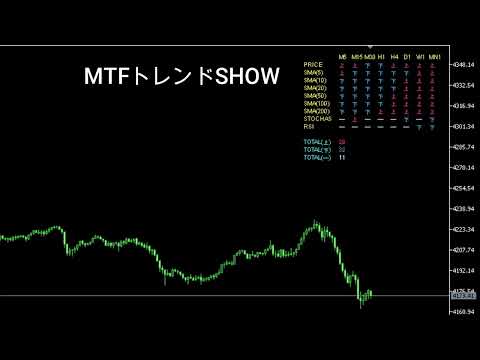
本インジケーターは、複数時間足の価格動向・移動平均線・RSI・ストキャスティクスを一括で可視化し、相場の流れを一目で把握できるよう設計されています。
もう、いくつものチャートを切り替える必要はありません。
売り・買い・様子見を瞬時に判定し、迷いのないトレードを実現。
感覚に頼る時代は終わり、根拠ある判断が“当たり前”になる環境を、あなたのチャートに!!


★固定ロジック★


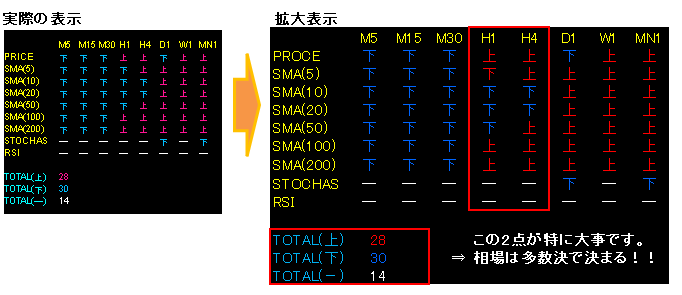
【 PRICE(現行足が陽線か陰線か)】

  • その時間足の “今の足” が陽線なら『上』、陰線なら『下』、同値なら『ー』


  • 【移動平均線】

    ・移動平均線のSMA期間5/10/20/50/100/200にて終値がMAより上か下かを判別して表に『上』『下』を表示

    ・5分・15分・30分・1時間・4時間・日足・週足・月足で表示


    【STOCHASTICS】※逆張り判定

  •  80超え:買われ過ぎ ⇒ 売り『下』扱い

     20未満:売られ過ぎ ⇒ 買い『上』扱い

    それ以外: ー と表示

    ※トレンド発生時は、サインがトレンド方向とは逆のサインが点灯します。
  • 【RSI】※逆張り判定
  •  70越え:買われ過ぎ ⇒ 売り『下』扱い

     30未満:売られ過ぎ ⇒ 買い『上』扱い

    それ以外: ー と表示

  • ※トレンド発生時は、サインがトレンド方向とは逆のサインが点灯します。


  • ★サインの挙動確認★


  • 【MT5にインジケーターを設定する手順】

    ① インジケーターファイルを準備

      配布された

         .ex5 ファイルをPCに保存します。


    ② MT5のデータフォルダを開く

    1. MT5を起動

    2. 上部メニュー
      [ファイル]→[データフォルダを開く] をクリック

    3. フォルダが開いたら
      MQL5 → Indicators を開く

    ③ インジケーターファイルを入れる

    • 先ほどの .ex5 ファイルを
      Indicators フォルダ にコピー&貼り付け

    ④ MT5を再起動 or 更新

           方法はどちらかでOK

    • MT5を再起動する

    • ナビゲーターで右クリック → 更新

    ⑤ チャートに適用

    1. MT5左側の ナビゲーター を開く

    2. インディケータ → カスタム を展開

    3. 追加したインジケーターを
      チャートへ ドラッグ&ドロップ

    ⑥ 設定を確認してOK

    Free
    Product outline
    Community(0)
    Best Seller Ranking
    Recommended Products (Campaigns)

    For those using GogoJungle for the first timeEasy 3 steps to use the product!

    At GogoJungle, we provide services to enrich your investment life for our members. In addition, product purchases are normally limited to members. Why not register as a member now and make use of GogoJungle!

    01
    Enter user information and register as a member
    02
    Follow the instructions to make a purchase
    03
    Download from My Page
    GogoJungle Corporation
    Registration Number for Financial Instruments Business: No. 1960 - Kanto Finance Bureau (Gold Trading)
    A member of General Incorporated Association and Japan Investment Advisers Association
    GogoJungle Corporation
    Registration Number for Financial Instruments Business:
    No. 1960 - Kanto Finance Bureau (Gold Trading)
    A member of General Incorporated Association
    Japan Investment Advisers Association
    Financial Services AgencyJapan Investment Advisers AssociationFinancial Instruments Mediation Assistance CenterSecurities and Exchange Surveillance Commission

    Copyright © 2026 GogoJungle Inc. All Rights Reserved.