ภาพรวมสินค้า
คอมมูนิตี้(0)
無料商品 ギフト用 テスト
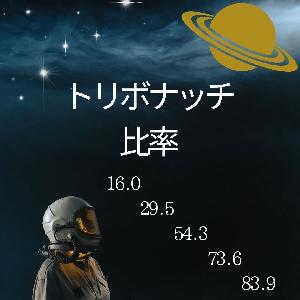
テスト・・・・・・・・・フィボナッチの拡張版、トリボナッチ比率を使用したインジケーターをプレゼントします(使用可能期間は10月31日まで)
รีวิว:
หมวดหมู่:
วิธีการเสนอ:
Indicator
วันที่เริ่มขาย:
17/10/2025
วันที่อัพเดท:
-
เวอร์ชั่น:
-
บริบริษัทที่ใช้งานได้:

ฟรี
เหลือ 222 ชิ้น
(0 คนกำลังใช้งาน)
ผู้ให้บริการ/ผู้จัดจำหน่าย:
เว็บไซต์ขายสินค้า:
GogoJungle
●วิธีชำระเงิน





<p></p><p></p><p></p><h2 style="font-family: "\\30E1イリオ", Meiryo, "MS Pゴシック", "MS UI Gothic", Arial, sans-serif; font-weight: bold; margin: 0px; font-size: 30px; max-width: 100%;"><font color="#085294">トリボナッチ比率サインツールについて</font></h2><h2 style="margin: 0px; max-width: 100%;"><p style="font-family: "\\30E1イリオ", Meiryo, "MS Pゴシック", "MS UI Gothic", Arial, sans-serif; font-size: 14px; font-weight: 400; color: rgb(51, 51, 51);"> </p><p style="font-family: "\\30E1イリオ", Meiryo, "MS Pゴシック", "MS UI Gothic", Arial, sans-serif; font-size: 14px; font-weight: 400; color: rgb(51, 51, 51);"><img src="https://www.gogojungle.co.jp/img/products/49577/outlines/1" id="1708751972410"><span style="font-size: 18px;"><br></span></p><p style="font-family: "\\30E1イリオ", Meiryo, "MS Pゴシック", "MS UI Gothic", Arial, sans-serif; font-size: 14px; font-weight: 400; color: rgb(51, 51, 51);"><br></p><p style="text-align: center; font-family: "\\30E1イリオ", Meiryo, "MS Pゴシック", "MS UI Gothic", Arial, sans-serif;"><span style="font-size: 18px;"><b style=""><font color="#085294">インジケーターは</font><font color="#ff0000">R7.10.31</font><font color="#085294">まで</font><font color="#ff0000">無料</font><font color="#085294">で使用できるギフト版です</font><font color="#ff0000">R7.11.1以降シグナルは出なくなります</font></b></span></p><p style="text-align: center; font-family: "\\30E1イリオ", Meiryo, "MS Pゴシック", "MS UI Gothic", Arial, sans-serif;"><span style="color: rgb(8, 82, 148); font-size: 18px; font-weight: 700; font-family: inherit;">キャンペーン期間の都合上</span></p><p style="text-align: center; font-family: "\\30E1イリオ", Meiryo, "MS Pゴシック", "MS UI Gothic", Arial, sans-serif;"><b style="font-size: 18px;"><font color="#ff0000">バックテスト可能開始期間はR7.10.1以降です</font></b></p><p style="font-family: "\\30E1イリオ", Meiryo, "MS Pゴシック", "MS UI Gothic", Arial, sans-serif; font-size: 14px; font-weight: 400; color: rgb(51, 51, 51);"><font color="#085294"><span style="font-size: 18px;"><span style="font-weight: 700;"><br></span></span></font></p><p style="font-family: "\\30E1イリオ", Meiryo, "MS Pゴシック", "MS UI Gothic", Arial, sans-serif; font-size: 14px; font-weight: 400; color: rgb(51, 51, 51);"><font color="#085294"><span style="font-size: 18px;"><span style="font-weight: 700;">「トリボナッチ比率」はすでに</span><span style="font-weight: 700;">好成績の既存EAロジックを基に独自拡張した裁量支援インジケーターです。</span></span></font></p><p style="font-family: "\\30E1イリオ", Meiryo, "MS Pゴシック", "MS UI Gothic", Arial, sans-serif; font-size: 14px; font-weight: 400; color: rgb(51, 51, 51);"><span style="font-size: 18px; letter-spacing: -1px;"><span style="font-weight: 700;"><font color="#085294">本インジケーターは</font></span></span><font color="#085294"><span style="font-size: 18px; letter-spacing: -1px;"><span style="font-weight: 700;">チャート上にトリボナッチ・リトレースメントを自動描画し、主要ライン到達&複合条件を満たしたときにサインを表示します。</span></span></font></p><p style="font-family: "\\30E1イリオ", Meiryo, "MS Pゴシック", "MS UI Gothic", Arial, sans-serif; font-size: 14px; font-weight: 400; color: rgb(51, 51, 51);"><span style="font-size: 18px; letter-spacing: -1px;"><span style="font-weight: 700;"><font color="#085294">ご利用にあたっては「商品ページの説明」、ページ下部の「よくある質問」をお読みいただき、</font><font color="#ff0000">必ずストラテジーテスター(ビジュアルモード)で動作を確認の上、ご使用願います。</font></span></span></p><p style="text-align: center; font-family: "\\30E1イリオ", Meiryo, "MS Pゴシック", "MS UI Gothic", Arial, sans-serif; font-size: 14px; font-weight: 400; color: rgb(51, 51, 51);"><span style="color: rgb(156, 0, 255); font-size: 24px; font-weight: 700;">実際のエントリーの様子</span></p><p style="font-family: "\\30E1イリオ", Meiryo, "MS Pゴシック", "MS UI Gothic", Arial, sans-serif; font-size: 14px; font-weight: 400; color: rgb(51, 51, 51);"><img src="https://www.gogojungle.co.jp/img/products/49577/outlines/11" id="1708832837060"><span style="color: rgb(156, 0, 255); font-size: 24px; font-weight: 700;"><br></span><font color="#085294"><span style="font-size: 18px; font-weight: 700; letter-spacing: -1px;"><br></span></font></p><p style="font-family: "\\30E1イリオ", Meiryo, "MS Pゴシック", "MS UI Gothic", Arial, sans-serif; font-size: 14px; font-weight: 400; color: rgb(51, 51, 51);"></p><div style="text-align: center;"><span style="font-size: 24px; color: rgb(0, 0, 255); font-weight: 700;">トリボナッチリトレースメントについて</span></div><span style="font-size: 18px;">
トリボナッチ比率とは、フィボナッチ比率を拡張した比率です。</span><p></p><p style="font-family: "\\30E1イリオ", Meiryo, "MS Pゴシック", "MS UI Gothic", Arial, sans-serif; font-size: 14px; font-weight: 400; color: rgb(51, 51, 51);"><span style="font-size: 18px;">
推奨タイムフレーム:15分足</span></p><p style="font-family: "\\30E1イリオ", Meiryo, "MS Pゴシック", "MS UI Gothic", Arial, sans-serif; font-size: 14px; font-weight: 400; color: rgb(51, 51, 51);"><span style="font-size: 18px;">独自比率:</span><span style="font-size: 18px;">(</span><span style="font-weight: 700; font-size: 18px;"><font color="#085294">①16.0%②29.5%③54.3%④73.6%⑤83.9%</font></span><span style="font-size: 18px;">)</span></p><p style="font-family: "\\30E1イリオ", Meiryo, "MS Pゴシック", "MS UI Gothic", Arial, sans-serif; font-size: 14px; font-weight: 400; color: rgb(51, 51, 51);"><span style="font-size: 18px;">用途:押し目&戻り狙いの判断補助</span></p><p style="font-family: "\\30E1イリオ", Meiryo, "MS Pゴシック", "MS UI Gothic", Arial, sans-serif; font-size: 14px; font-weight: 400; color: rgb(51, 51, 51);"><span style="font-size: 18px;">対応:通貨ペアと時間足の制限なし(主要ペア × 15分足を推奨) </span></p><p style="font-family: "\\30E1イリオ", Meiryo, "MS Pゴシック", "MS UI Gothic", Arial, sans-serif; font-size: 14px; font-weight: 400; color: rgb(51, 51, 51);"><span style="font-size: 18px;">履歴仕様:本インジは起動・再起動・時間足や通貨変更などの初期化時に、チャート上のサインラベルをすべて削除します(設計仕様)。</span></p><p style="font-family: "\\30E1イリオ", Meiryo, "MS Pゴシック", "MS UI Gothic", Arial, sans-serif; font-size: 14px; font-weight: 400; color: rgb(51, 51, 51);"><span style="font-size: 18px;">過去の表示確認はストラテジーテスター(ビジュアルモード)をご利用ください。</span></p><p style="font-family: "\\30E1イリオ", Meiryo, "MS Pゴシック", "MS UI Gothic", Arial, sans-serif; font-size: 14px; font-weight: 400; color: rgb(51, 51, 51);"><span style="font-size: 18px;"><br></span></p><p style="text-align: center; font-family: "\\30E1イリオ", Meiryo, "MS Pゴシック", "MS UI Gothic", Arial, sans-serif; font-size: 14px; font-weight: 400; color: rgb(51, 51, 51);"><span style="color: rgb(156, 0, 255); font-size: 24px; font-weight: 700;">主な特徴</span></p><p style="font-family: "\\30E1イリオ", Meiryo, "MS Pゴシック", "MS UI Gothic", Arial, sans-serif; font-size: 14px; font-weight: 400; color: rgb(51, 51, 51);"><span style="font-size: 18px;">独自トリボナッチ比率の可視化:5本の主要ライン</span><span style="font-size: 18px;">(</span><span style="font-weight: 700; font-size: 18px;"><font color="#085294">①16.0%②29.5%③54.3%④73.6%⑤83.9%</font></span><span style="font-size: 18px;">)</span><span style="font-size: 18px;">を自動描画。階層色分けで視認性を確保します。</span></p><p style="font-family: "\\30E1イリオ", Meiryo, "MS Pゴシック", "MS UI Gothic", Arial, sans-serif; font-size: 14px; font-weight: 400; color: rgb(51, 51, 51);"><span style="font-size: 18px;">複合ロジックでサイン発生:ラインタッチだけでエントリーせず、複数条件合致でサインを表示します。</span></p><p style="font-family: "\\30E1イリオ", Meiryo, "MS Pゴシック", "MS UI Gothic", Arial, sans-serif; font-size: 14px; font-weight: 400; color: rgb(51, 51, 51);"><span style="font-size: 18px;">・下降トレンド</span></p><p style="font-family: "\\30E1イリオ", Meiryo, "MS Pゴシック", "MS UI Gothic", Arial, sans-serif; font-size: 14px; font-weight: 400; color: rgb(51, 51, 51);"><img src="https://www.gogojungle.co.jp/img/products/49577/outlines/2" id="1708752372133"><br></p><p style="font-family: "\\30E1イリオ", Meiryo, "MS Pゴシック", "MS UI Gothic", Arial, sans-serif; font-size: 14px; font-weight: 400; color: rgb(51, 51, 51);"></p><p style="font-family: "\\30E1イリオ", Meiryo, "MS Pゴシック", "MS UI Gothic", Arial, sans-serif; font-size: 14px; font-weight: 400; color: rgb(51, 51, 51);"><span style="font-size: 18px;">・上昇トレンド</span></p><p style="font-family: "\\30E1イリオ", Meiryo, "MS Pゴシック", "MS UI Gothic", Arial, sans-serif; font-size: 14px; font-weight: 400; color: rgb(51, 51, 51);"><img src="https://www.gogojungle.co.jp/img/products/49577/outlines/3" id="1708752608195"><br></p><p style="font-family: "\\30E1イリオ", Meiryo, "MS Pゴシック", "MS UI Gothic", Arial, sans-serif; font-size: 14px; font-weight: 400; color: rgb(51, 51, 51);"></p><p style="font-family: "\\30E1イリオ", Meiryo, "MS Pゴシック", "MS UI Gothic", Arial, sans-serif; font-size: 14px; font-weight: 400; color: rgb(51, 51, 51);"><span style="font-size: 18px;">トリボナッチ</span><span style="font-size: 18px;">リトレースメントは設定された参照バー数内での最安値、最高値を基準に自動で</span><span style="font-size: 18px;">トリボナッチ</span><span style="font-size: 18px;">リトレースメントを描画します。</span></p><p style="text-align: center; font-family: "\\30E1イリオ", Meiryo, "MS Pゴシック", "MS UI Gothic", Arial, sans-serif; font-size: 14px; font-weight: 400; color: rgb(51, 51, 51);"><span style="font-size: 24px;"><font color="#0000ff"><span style="font-weight: 700;">ZigZagについて</span></font></span></p><p style="font-family: "\\30E1イリオ", Meiryo, "MS Pゴシック", "MS UI Gothic", Arial, sans-serif; font-size: 14px; font-weight: 400; color: rgb(51, 51, 51);"><span style="font-size: 18px;">「トリボナッチ比率」はZigZagを自動で描画させます。</span></p><p style="font-family: "\\30E1イリオ", Meiryo, "MS Pゴシック", "MS UI Gothic", Arial, sans-serif; font-size: 14px; font-weight: 400; color: rgb(51, 51, 51);"><span style="font-size: 18px;">ZigZag × トリボナッチ比率で「波」を俯瞰:</span><span style="font-size: 18px;">下降と上昇の流れ、押し目・戻り候補を直感的に把握できます。</span></p><p style="font-family: "\\30E1イリオ", Meiryo, "MS Pゴシック", "MS UI Gothic", Arial, sans-serif; font-size: 14px; font-weight: 400; color: rgb(51, 51, 51);"><span style="font-size: 18px;">
</span></p><p style="font-family: "\\30E1イリオ", Meiryo, "MS Pゴシック", "MS UI Gothic", Arial, sans-serif; font-size: 14px; font-weight: 400; color: rgb(51, 51, 51);"><span style="font-size: 24px;"><span style="font-weight: 700; color: rgb(0, 0, 255);">トリボナッチゾーン、ストキャスティクスについて</span></span></p><p style="font-family: "\\30E1イリオ", Meiryo, "MS Pゴシック", "MS UI Gothic", Arial, sans-serif; font-size: 14px; font-weight: 400; color: rgb(51, 51, 51);"><img src="https://www.gogojungle.co.jp/img/products/49577/outlines/10" id="1708767190226"><span style="font-size: 24px;"><font color="#000000"><span style="font-size: 18px;"><br></span></font></span></p><p style="font-family: "\\30E1イリオ", Meiryo, "MS Pゴシック", "MS UI Gothic", Arial, sans-serif; font-size: 14px; font-weight: 400; color: rgb(51, 51, 51);"><font color="#000000"><span style="font-size: 18px;">サブウィンドウに</span></font><span style="color: rgb(0, 0, 0); font-size: 18px;">補助インジ(任意)</span><span style="font-size: 18px; color: rgb(0, 0, 0);">「Histogram(Tribonacci_Ratio).ex4」を追加することで、ストキャスティクスをより分かりやすく可視化することができます。</span></p><p style="font-family: "\\30E1イリオ", Meiryo, "MS Pゴシック", "MS UI Gothic", Arial, sans-serif; font-size: 14px; font-weight: 400; color: rgb(51, 51, 51);"><font color="#000000"><span style="font-size: 18px;">下限(0-30%)ゾーンの場合:水色のヒストグラム
上限(70-100%)ゾーンの場合:赤色のヒストグラム</span></font></p><p style="font-family: "\\30E1イリオ", Meiryo, "MS Pゴシック", "MS UI Gothic", Arial, sans-serif; font-size: 14px; font-weight: 400; color: rgb(51, 51, 51);"><span style="font-size: 24px;"><font color="#000000"><span style="font-size: 18px;">トリボナッチ</span></font></span><span style="font-size: 18px;">0%から50%ラインの乖離が指定pips以上を超えると、藍色のヒストグラムが表示されます。</span></p><p style="font-family: "\\30E1イリオ", Meiryo, "MS Pゴシック", "MS UI Gothic", Arial, sans-serif; font-size: 14px; font-weight: 400; color: rgb(51, 51, 51);"><span style="font-size: 18px;"><br></span></p><div style="text-align: center;"><span style="color: rgb(156, 0, 255); font-size: 24px; font-weight: 700;">動作の仕組み</span></div><p></p><p style="font-family: "\\30E1イリオ", Meiryo, "MS Pゴシック", "MS UI Gothic", Arial, sans-serif; font-size: 14px; font-weight: 400; color: rgb(51, 51, 51);"><font color="#0000ff"><span style="font-weight: 700;"><span style="font-size: 24px;">(1)基準の自動検出</span></span></font></p><p style="font-family: "\\30E1イリオ", Meiryo, "MS Pゴシック", "MS UI Gothic", Arial, sans-serif; font-size: 14px; font-weight: 400; color: rgb(51, 51, 51);"><span style="font-size: 18px;">設定した参照バー数内の最高値/最安値を基準に主要5ラインを生成。</span></p><p style="font-family: "\\30E1イリオ", Meiryo, "MS Pゴシック", "MS UI Gothic", Arial, sans-serif; font-size: 14px; font-weight: 400; color: rgb(51, 51, 51);"><font color="#0000ff"><span style="font-size: 24px;"><span style="font-weight: 700;">(2)信頼度の簡易評価</span></span></font></p><p style="font-family: "\\30E1イリオ", Meiryo, "MS Pゴシック", "MS UI Gothic", Arial, sans-serif; font-size: 14px; font-weight: 400; color: rgb(51, 51, 51);"><span style="font-size: 18px;">設定した参照バー数内での最高値、最安値を基準に</span><span style="font-size: 18px;">トリボナッチ</span><span style="font-size: 18px;">ラインが自動で形成されます。</span><span style="font-size: 18px;">0%から50%の距離</span><span style="font-size: 18px;">(pips)が設定閾値以上のとき、ラインの信頼性が高いと判断(未達ならエントリー回避)します。</span></p><p style="font-family: "\\30E1イリオ", Meiryo, "MS Pゴシック", "MS UI Gothic", Arial, sans-serif; font-size: 14px; font-weight: 400; color: rgb(51, 51, 51);"><span style="color: rgb(215, 24, 40); font-size: 19.5px; font-weight: 700; letter-spacing: -1px;">(1)</span><b style="font-size: 19.5px; letter-spacing: -1px; color: rgb(215, 24, 40); font-family: inherit;">Tribonacchi_Ratio(gift)</b><span style="font-weight: 700; font-size: 19.5px; letter-spacing: -1px; color: rgb(215, 24, 40);">.ex4 </span></p><p style="font-family: "\\30E1イリオ", Meiryo, "MS Pゴシック", "MS UI Gothic", Arial, sans-serif; font-size: 14px; font-weight: 400; color: rgb(51, 51, 51);"><img src="https://www.gogojungle.co.jp/img/products/49577/outlines/14" id="1758749861083"></p><p style="font-family: "\\30E1イリオ", Meiryo, "MS Pゴシック", "MS UI Gothic", Arial, sans-serif; font-size: 14px; font-weight: 400; color: rgb(51, 51, 51);"><img src="https://www.gogojungle.co.jp/img/products/48465/outlines/80" id="1708739217363"><span style="color: rgb(215, 24, 40); font-size: 19.5px; font-weight: 700; letter-spacing: -1px;"><br></span></p><p style="font-family: "\\30E1イリオ", Meiryo, "MS Pゴシック", "MS UI Gothic", Arial, sans-serif; font-size: 14px; font-weight: 400; color: rgb(51, 51, 51);"><span style="color: rgb(215, 24, 40); font-size: 19.5px; font-weight: 700; letter-spacing: -1px;">(2)</span><b style="font-size: 19.5px; letter-spacing: -1px; color: rgb(215, 24, 40); font-family: inherit;">Histogram(Tribonacchi_Ratio_gift)</b><span style="color: rgb(215, 24, 40); font-size: 19.5px; font-weight: 700; letter-spacing: -1px;">.ex4</span></p><p style="font-family: "\\30E1イリオ", Meiryo, "MS Pゴシック", "MS UI Gothic", Arial, sans-serif; font-size: 14px; font-weight: 400; color: rgb(51, 51, 51);"><img src="/img/products/69797/outlines/1" id="1760009790949"><span style="color: rgb(215, 24, 40); font-size: 19.5px; font-weight: 700; letter-spacing: -1px;"><br></span></p><p style="font-family: "\\30E1イリオ", Meiryo, "MS Pゴシック", "MS UI Gothic", Arial, sans-serif; font-size: 14px; font-weight: 400; color: rgb(51, 51, 51);"></p><span style="font-family: "\\30E1イリオ", Meiryo, "MS Pゴシック", "MS UI Gothic", Arial, sans-serif; font-size: 24px; font-weight: 400; color: rgb(51, 51, 51);"><span style="font-weight: 700;"><font color="#0000ff">(3)チャート上でのサイン表示</font></span></span><span style="font-family: "\\30E1イリオ", Meiryo, "MS Pゴシック", "MS UI Gothic", Arial, sans-serif; font-size: 14px; font-weight: 400; color: rgb(51, 51, 51);">
</span><p style="font-family: "\\30E1イリオ", Meiryo, "MS Pゴシック", "MS UI Gothic", Arial, sans-serif; font-size: 14px; font-weight: 400; color: rgb(51, 51, 51);"></p><p style="font-family: "\\30E1イリオ", Meiryo, "MS Pゴシック", "MS UI Gothic", Arial, sans-serif; font-size: 14px; font-weight: 400; color: rgb(51, 51, 51);"><img src="https://www.gogojungle.co.jp/img/products/48465/outlines/5" id="1703542967857">
</p><span style="font-family: "\\30E1イリオ", Meiryo, "MS Pゴシック", "MS UI Gothic", Arial, sans-serif; font-size: 14px; font-weight: 400; color: rgb(51, 51, 51);"> </span><p style="font-family: "\\30E1イリオ", Meiryo, "MS Pゴシック", "MS UI Gothic", Arial, sans-serif; font-size: 14px; font-weight: 400; color: rgb(51, 51, 51);"><span style="font-size: 18px;">主要ライン到達後に複合条件が成立した場合のみ、矢印でサインを表示。利確サイン=「〇」、損切サイン=「×」。
上向きの矢印が表示されたら買いエントリー。</span></p><p style="font-family: "\\30E1イリオ", Meiryo, "MS Pゴシック", "MS UI Gothic", Arial, sans-serif; font-size: 14px; font-weight: 400; color: rgb(51, 51, 51);"><img src="https://www.gogojungle.co.jp/img/products/49577/outlines/5" id="1708766677330"><br></p><p style="font-family: "\\30E1イリオ", Meiryo, "MS Pゴシック", "MS UI Gothic", Arial, sans-serif; font-size: 14px; font-weight: 400; color: rgb(51, 51, 51);"><span style="font-size: 18px;">上昇トレンドでの実際の表示例です。
押し目を的確に捉えてエントリーしているのがわかります。
下向きの矢印が表示されたら売りエントリー。</span></p><p style="font-family: "\\30E1イリオ", Meiryo, "MS Pゴシック", "MS UI Gothic", Arial, sans-serif; font-size: 14px; font-weight: 400; color: rgb(51, 51, 51);"><img src="https://www.gogojungle.co.jp/img/products/49577/outlines/6" id="1708766693687"><span style="font-size: 18px;"><br></span></p><p style="font-family: "\\30E1イリオ", Meiryo, "MS Pゴシック", "MS UI Gothic", Arial, sans-serif; font-size: 14px; font-weight: 400; color: rgb(51, 51, 51);"></p><p style="font-family: "\\30E1イリオ", Meiryo, "MS Pゴシック", "MS UI Gothic", Arial, sans-serif; font-size: 14px; font-weight: 400; color: rgb(51, 51, 51);"><span style="font-size: 18px;">下降トレンドでの実際の表示例です。</span></p><p style="font-family: "\\30E1イリオ", Meiryo, "MS Pゴシック", "MS UI Gothic", Arial, sans-serif; font-size: 14px; font-weight: 400; color: rgb(51, 51, 51);"><span style="font-size: 18px;">トリボナッチラインで価格が反応しているのが分かります。
トレード回数も比較的多く、コツコツ稼いでくれます。</span></p><p style="font-family: "\\30E1イリオ", Meiryo, "MS Pゴシック", "MS UI Gothic", Arial, sans-serif; font-size: 14px; font-weight: 400; color: rgb(51, 51, 51);"><span style="color: rgb(0, 0, 255); font-size: 24px; font-weight: 700;">(4)</span><font color="#0000ff"><span style="font-size: 24px;"><span style="font-weight: 700;">リスク目安(例)</span></span></font></p><p style="font-family: "\\30E1イリオ", Meiryo, "MS Pゴシック", "MS UI Gothic", Arial, sans-serif; font-size: 14px; font-weight: 400; color: rgb(51, 51, 51);"><span style="font-size: 18px;">利確 15〜30 pips、損切り 約 30 pips(相場状況に応じ調整)。</span></p><p style="font-family: "\\30E1イリオ", Meiryo, "MS Pゴシック", "MS UI Gothic", Arial, sans-serif; font-size: 14px; font-weight: 400; color: rgb(51, 51, 51);"><span style="font-size: 18px;">※同一バー内で複数の比率サインが同時に表示される場合があります。これは複数比率条件が同時成立した結果であり、同一比率での二重サインや注文処理は行いません。</span><font color="#0000ff"><span style="font-weight: 700; font-size: 24px;"><br></span></font><span style="font-size: 18px;"><br></span></p><p style="font-family: "\\30E1イリオ", Meiryo, "MS Pゴシック", "MS UI Gothic", Arial, sans-serif; font-size: 14px; font-weight: 400; color: rgb(51, 51, 51);"><span style="font-weight: 700; font-size: 24px;"><font color="#0000ff">(5)画面左下に最新のパラメータを自動表示</font></span></p><p style="font-family: "\\30E1イリオ", Meiryo, "MS Pゴシック", "MS UI Gothic", Arial, sans-serif; font-size: 14px; font-weight: 400; color: rgb(51, 51, 51);"><img src="https://www.gogojungle.co.jp/img/products/49577/outlines/7" id="1708766715059"><span style="font-weight: 700; font-size: 24px;"><font color="#0000ff"><br></font></span></p><p style="font-family: "\\30E1イリオ", Meiryo, "MS Pゴシック", "MS UI Gothic", Arial, sans-serif; font-size: 14px; font-weight: 400; color: rgb(51, 51, 51);"><span style="font-size: 18px;">画面左下には(1)現在の通貨ペア(2)参照バー数(3)現在の乖離pips(4)設定している乖離pipsがリアルタイムで更新表示されます。</span></p><p style="font-family: "\\30E1イリオ", Meiryo, "MS Pゴシック", "MS UI Gothic", Arial, sans-serif; font-size: 14px; font-weight: 400; color: rgb(51, 51, 51);"><span style="font-size: 18px;">(3)現在の乖離pipsが(4)設定している乖離pipsを超えている時は、文字が黄金色に変化します!!!</span></p><p style="text-align: center; font-family: "\\30E1イリオ", Meiryo, "MS Pゴシック", "MS UI Gothic", Arial, sans-serif; font-size: 14px; font-weight: 400; color: rgb(51, 51, 51);"><span style="color: rgb(156, 0, 255); font-size: 24px; font-weight: 700;">おすすめの使い方</span></p><p style="font-family: "\\30E1イリオ", Meiryo, "MS Pゴシック", "MS UI Gothic", Arial, sans-serif; font-size: 14px; font-weight: 400; color: rgb(51, 51, 51);"><span style="color: rgb(0, 0, 255); font-size: 24px; font-weight: 700;">(1)</span><font color="#0000ff"><span style="font-size: 24px;"><span style="font-weight: 700;">ビジュアルモードで挙動確認</span></span></font></p><p style="font-family: "\\30E1イリオ", Meiryo, "MS Pゴシック", "MS UI Gothic", Arial, sans-serif; font-size: 14px; font-weight: 400; color: rgb(51, 51, 51);"><span style="font-size: 18px;">まずはストラテジーテスター(ビジュアル)で表示とタイミングを確認。</span></p><p style="font-family: "\\30E1イリオ", Meiryo, "MS Pゴシック", "MS UI Gothic", Arial, sans-serif; font-size: 14px; font-weight: 400; color: rgb(51, 51, 51);"><span style="color: rgb(0, 0, 255); font-size: 24px; font-weight: 700;">(2)</span><font color="#0000ff"><span style="font-size: 24px;"><span style="font-weight: 700;">15分足で運用開始</span></span></font></p><p style="font-family: "\\30E1イリオ", Meiryo, "MS Pゴシック", "MS UI Gothic", Arial, sans-serif; font-size: 14px; font-weight: 400; color: rgb(51, 51, 51);"><span style="font-size: 18px;">通貨は主要ペア(USDJPY / EURUSD / EURJPY / GBPUSD / GBPJPY)から始めるのが無難です。</span></p><p style="font-family: "\\30E1イリオ", Meiryo, "MS Pゴシック", "MS UI Gothic", Arial, sans-serif; font-size: 14px; font-weight: 400; color: rgb(51, 51, 51);"><span style="font-size: 18px;">推奨初期パラメータ(例)</span></p><p style="font-family: "\\30E1イリオ", Meiryo, "MS Pゴシック", "MS UI Gothic", Arial, sans-serif; font-size: 14px; font-weight: 400; color: rgb(51, 51, 51);"><span style="font-size: 18px;">参照バー数:120</span></p><p style="font-family: "\\30E1イリオ", Meiryo, "MS Pゴシック", "MS UI Gothic", Arial, sans-serif; font-size: 14px; font-weight: 400; color: rgb(51, 51, 51);"><span style="font-size: 18px;">0%~50% 乖離閾値値:60</span><span style="font-size: 18px;">pips</span></p><p style="font-family: "\\30E1イリオ", Meiryo, "MS Pゴシック", "MS UI Gothic", Arial, sans-serif; font-size: 14px; font-weight: 400; color: rgb(51, 51, 51);"><span style="font-size: 18px;">利確/損切り:15.0 pips/30.0 pips</span></p><p style="font-family: "\\30E1イリオ", Meiryo, "MS Pゴシック", "MS UI Gothic", Arial, sans-serif; font-size: 14px; font-weight: 400; color: rgb(51, 51, 51);"><span style="color: rgb(0, 0, 255); font-size: 24px; font-weight: 700;">(3)エントリーポイント(任意)</span><span style="font-size: 18px;"></span></p><p style="font-family: "\\30E1イリオ", Meiryo, "MS Pゴシック", "MS UI Gothic", Arial, sans-serif; font-size: 14px; font-weight: 400; color: rgb(51, 51, 51);"><span style="font-size: 18px;">エントリーポイント表示(比率ラベル):false(必要時 true)</span></p><p style="text-align: center; font-family: "\\30E1イリオ", Meiryo, "MS Pゴシック", "MS UI Gothic", Arial, sans-serif; font-size: 14px; font-weight: 400; color: rgb(51, 51, 51);"><span style="color: rgb(156, 0, 255); font-size: 24px; font-weight: 700;">既存EAの進化版インジケーター</span></p><p style="font-family: "\\30E1イリオ", Meiryo, "MS Pゴシック", "MS UI Gothic", Arial, sans-serif; font-size: 14px; font-weight: 400; color: rgb(51, 51, 51);"><span style="font-size: 18px;">「トリボナッチ比率」は成績を出している既存EAを、裁量トレードにも適用できるインジケーターです。</span></p><p style="font-family: "\\30E1イリオ", Meiryo, "MS Pゴシック", "MS UI Gothic", Arial, sans-serif; font-size: 14px; font-weight: 400; color: rgb(51, 51, 51);"><span style="font-size: 18px;">既存EAからの進化と相違</span></p><p style="font-family: "\\30E1イリオ", Meiryo, "MS Pゴシック", "MS UI Gothic", Arial, sans-serif; font-size: 14px; font-weight: 400; color: rgb(51, 51, 51);"><span style="font-size: 18px;">インジ化により、裁量トレードでもロジックを活用可能。EAよりパラメータ自由度が高く、多通貨・多時間足展開に適します。(※後述しますがインジと完全一致はしません)</span></p><p style="font-family: "\\30E1イリオ", Meiryo, "MS Pゴシック", "MS UI Gothic", Arial, sans-serif; font-size: 14px; font-weight: 400; color: rgb(51, 51, 51);"><span style="font-size: 18px;">
EAと一致しない主な理由</span></p><p style="font-family: "\\30E1イリオ", Meiryo, "MS Pゴシック", "MS UI Gothic", Arial, sans-serif; font-size: 14px; font-weight: 400; color: rgb(51, 51, 51);"><span style="font-size: 18px;">・データの粒度(バックテストの履歴データと実ティックの乖離)</span></p><p style="font-family: "\\30E1イリオ", Meiryo, "MS Pゴシック", "MS UI Gothic", Arial, sans-serif; font-size: 14px; font-weight: 400; color: rgb(51, 51, 51);"><span style="font-size: 18px;">・評価タイミング(EAは未確定バーを参照しうる一方、本インジのサインは確定足ベースで安定表示)</span></p><p style="font-family: "\\30E1イリオ", Meiryo, "MS Pゴシック", "MS UI Gothic", Arial, sans-serif; font-size: 14px; font-weight: 400; color: rgb(51, 51, 51);"><span style="font-size: 18px;">・処理順序の差(内部更新順の違いにより、点灯/非点灯がズレる場合あり)</span></p><p style=""><span style="color: rgb(51, 51, 51); font-family: inherit; font-size: 18px; font-weight: 700;"></span></p><div style="text-align: center;"><span style="font-size: 18px; color: rgb(51, 51, 51); font-family: inherit;"> </span><span style="color: rgb(51, 51, 51); font-size: 18px; font-weight: 700; font-family: inherit;">EURUSD M15(2010–2025)</span></div><p style="color: rgb(51, 51, 51); font-size: 14px;"></p><p style="color: rgb(51, 51, 51); font-size: 14px; text-align: center;"><span style="font-size: 18px;">期待利得 </span><span data-start="578" data-end="586" style="font-weight: 700;"><span style="font-size: 18px;">1.29</span></span><span style="font-size: 18px;">/勝率 </span><span data-start="590" data-end="598" style="font-weight: 700;"><span style="font-size: 18px;">約81%</span></span><span style="font-size: 18px;">/最大DD </span><span data-start="604" data-end="613" style="font-weight: 700;"><span style="font-size: 18px;">3.48%</span></span></p><p style="color: rgb(51, 51, 51); font-size: 14px; text-align: center;"><span data-start="604" data-end="613" style="font-weight: 700;"><span style="font-size: 18px;"><br></span></span><img src="https://www.gogojungle.co.jp/img/products/23397/outlines/17" id="1760337413908"><span style="font-size: 18px; font-weight: 700;"><br></span></p><p style="color: rgb(51, 51, 51); font-size: 14px; text-align: center;"><span style="font-size: 18px; font-weight: 700;"><br></span></p><p style="color: rgb(51, 51, 51); font-size: 14px; text-align: center;"><span style="font-size: 18px; font-weight: 700;">USDJPY M15(2010–2025)</span></p><p style="color: rgb(51, 51, 51); font-size: 14px; text-align: center;"><span style="font-size: 18px;">期待利得 </span><span data-start="649" data-end="657" style="font-weight: 700;"><span style="font-size: 18px;">1.24</span></span><span style="font-size: 18px;">/勝率 </span><span data-start="661" data-end="672" style="font-weight: 700;"><span style="font-size: 18px;">約81%</span></span><span style="font-size: 18px;">/最大DD </span><span data-start="678" data-end="687" style="font-weight: 700;"><span style="font-size: 18px;">約3.00%</span></span></p><p style="color: rgb(51, 51, 51); font-size: 14px; text-align: center;"><span data-start="678" data-end="687"><span style="font-size: 18px;"><span style="font-weight: 700;"><br></span></span></span></p><div><span style="font-weight: 700;"><img src="https://www.gogojungle.co.jp/img/products/23397/outlines/18" id="1760337505024" style="font-size: 14px;"></span><span style="font-size: 18px;">※ブローカー・スプレッド・ヒストリにより変動。実運用前に各自検証ください。</span></div><div><span style="font-size: 18px;"><br></span></div><p style="font-family: "\\30E1イリオ", Meiryo, "MS Pゴシック", "MS UI Gothic", Arial, sans-serif; font-size: 14px; font-weight: 400; color: rgb(51, 51, 51);"><span style="color: rgb(215, 24, 40); font-size: 19.5px; font-weight: 700; letter-spacing: -1px;">EAには裁量権はありません!! しかし!! 当インジケーターであれば自由に設定変更、カスタマイズができます!!!</span></p><p style="text-align: center; font-family: "\\30E1イリオ", Meiryo, "MS Pゴシック", "MS UI Gothic", Arial, sans-serif; font-size: 14px; font-weight: 400; color: rgb(51, 51, 51);"><span style="color: rgb(156, 0, 255); font-size: 24px; font-weight: 700;">取引例:デイトレード</span></p><p style="font-family: "\\30E1イリオ", Meiryo, "MS Pゴシック", "MS UI Gothic", Arial, sans-serif; font-size: 14px; font-weight: 400; color: rgb(51, 51, 51);"><span style="font-size: 18px;">当インジケーターはパラメータを変更することで、<span style="font-weight: 700;">①スキャルピングトレード②デイトレード③スイングトレード</span>など、ご自身のライフスタイルに合わせて、取引スタイルを自由に変更できます。</span></p><p style="font-family: "\\30E1イリオ", Meiryo, "MS Pゴシック", "MS UI Gothic", Arial, sans-serif; font-size: 14px; font-weight: 400; color: rgb(51, 51, 51);"><img src="https://www.gogojungle.co.jp/img/products/49577/outlines/8" id="1708766757747"><span style="font-size: 18px;"><br></span><br></p><p style="font-family: "\\30E1イリオ", Meiryo, "MS Pゴシック", "MS UI Gothic", Arial, sans-serif; font-size: 14px; font-weight: 400; color: rgb(51, 51, 51);"><span style="font-size: 18px;">利益確定をデフォルト値から大きくすることで、デイトレードに近い取引ができます。<span style="font-weight: 700;"><font color="#ff0000">時間はかかりますが、その分のリターン(獲得pips)は大きくなります。</font></span></span></p><p style="text-align: center; font-family: "\\30E1イリオ", Meiryo, "MS Pゴシック", "MS UI Gothic", Arial, sans-serif; font-size: 14px; font-weight: 400; color: rgb(51, 51, 51);"><span style="color: rgb(156, 0, 255); font-size: 24px; font-weight: 700;">通貨ペア・時間足は自由に選べます。</span></p><p style="font-family: "\\30E1イリオ", Meiryo, "MS Pゴシック", "MS UI Gothic", Arial, sans-serif; font-size: 14px; font-weight: 400; color: rgb(51, 51, 51);"><img src="https://www.gogojungle.co.jp/img/products/49577/outlines/12" id="1708832863681"><span style="font-size: 18px;"><br></span></p><p style="font-family: "\\30E1イリオ", Meiryo, "MS Pゴシック", "MS UI Gothic", Arial, sans-serif; font-size: 14px; font-weight: 400; color: rgb(51, 51, 51);"><span style="font-size: 18px;">多くのインジケーターやシステムトレードは、1つの通貨ペア、時間足でしか利用できないことが多いですが、</span><br></p><p style="font-family: "\\30E1イリオ", Meiryo, "MS Pゴシック", "MS UI Gothic", Arial, sans-serif; font-size: 14px; font-weight: 400; color: rgb(51, 51, 51);"><span style="font-size: 18px;">「トリボナッチ比率」は通貨ペア・時間足の制限はなく、カスタマイズの自由度も高いので、様々な通貨ペア・時間足で検証可能です。<br></span></p><p style="font-family: "\\30E1イリオ", Meiryo, "MS Pゴシック", "MS UI Gothic", Arial, sans-serif; font-size: 14px; font-weight: 400; color: rgb(51, 51, 51);"><span style="font-size: 18px;">チャート分析することで、オリジナルインジケーターが作成できます!!!</span></p><p style="text-align: center; font-family: "\\30E1イリオ", Meiryo, "MS Pゴシック", "MS UI Gothic", Arial, sans-serif; font-size: 14px; font-weight: 400; color: rgb(51, 51, 51);"><span style="color: rgb(156, 0, 255); font-size: 24px; font-weight: 700;">トリボナッチ比率はこんな人におすすめです!!!</span></p><p style="font-family: "\\30E1イリオ", Meiryo, "MS Pゴシック", "MS UI Gothic", Arial, sans-serif; font-size: 14px; font-weight: 400; color: rgb(51, 51, 51);"><img src="https://www.gogojungle.co.jp/img/products/48465/outlines/10" id="1703543456906"><span style="font-size: 18px;"><br></span></p><p style="font-family: "\\30E1イリオ", Meiryo, "MS Pゴシック", "MS UI Gothic", Arial, sans-serif; font-size: 14px; font-weight: 400; color: rgb(51, 51, 51);"><span style="font-size: 18px;">・トリボナッチとZigZagを使い大局的に相場を把握したい</span><span style="font-size: 18px;">
・サインツールを使ったことがない初心者の方
・裁量トレードの補助シグナルとして使用したい<br></span></p><p style="text-align: center; font-family: "\\30E1イリオ", Meiryo, "MS Pゴシック", "MS UI Gothic", Arial, sans-serif; font-size: 14px; font-weight: 400; color: rgb(51, 51, 51);"><span style="color: rgb(156, 0, 255); font-size: 24px; font-weight: 700;">よくある質問</span><span style="font-size: 18px;"><br></span></p><p style="font-family: "\\30E1イリオ", Meiryo, "MS Pゴシック", "MS UI Gothic", Arial, sans-serif; font-size: 14px; font-weight: 400; color: rgb(51, 51, 51);"><img src="https://www.gogojungle.co.jp/img/products/48465/outlines/11" id="1703543700409"><span style="font-size: 18px;"><br></span></p><p style="font-family: "\\30E1イリオ", Meiryo, "MS Pゴシック", "MS UI Gothic", Arial, sans-serif; font-size: 14px; font-weight: 400; color: rgb(51, 51, 51);"><span style="font-size: 18px;">Q.1 正常に稼働していますか?
A.1 左上に “Authentication Success” が表示されていれば認証完了です。自動売買とDLL使用許可をONにしてください。
Q.2 過去のサイン(矢印)が表示されません。
A.2 設計仕様です。初期化時にサイン&ラベルを全消去します。過去の表示はビジュアルモードでご確認ください。</span></p><p style="font-family: "\\30E1イリオ", Meiryo, "MS Pゴシック", "MS UI Gothic", Arial, sans-serif; font-size: 14px; font-weight: 400; color: rgb(51, 51, 51);"><span style="font-size: 18px;"><br></span><span style="font-size: 18px;">
Q.3 チャートを閉じる、再起動・時間足変更でサインや〇×が消えます。
A.3 正常動作です。初期化ごとに全消去されます。再度の条件成立をお待ちください。</span></p><p style="font-family: "\\30E1イリオ", Meiryo, "MS Pゴシック", "MS UI Gothic", Arial, sans-serif; font-size: 14px; font-weight: 400; color: rgb(51, 51, 51);"><span style="font-size: 18px;"><br></span></p></h2><h2 style="font-family: "\\30E1イリオ", Meiryo, "MS Pゴシック", "MS UI Gothic", Arial, sans-serif; margin: 0px; font-size: 30px; max-width: 100%;"><span style="font-size: 18px;"></span><span style="font-size: 18px; color: rgb(51, 51, 51);">Q.4 </span><span style="font-size: 18px; color: rgb(51, 51, 51);">バックテスト(以下BT)</span><span style="color: rgb(51, 51, 51); font-size: 18px;">とリアルタイム</span><span style="font-size: 18px; color: rgb(51, 51, 51);">(以下RT)</span><span style="color: rgb(51, 51, 51); font-size: 18px;">でサインが異なります。(後述で詳しく記載)</span></h2><h2 style="font-family: "\\30E1イリオ", Meiryo, "MS Pゴシック", "MS UI Gothic", Arial, sans-serif; margin: 0px; font-size: 30px; max-width: 100%;"><span style="font-weight: bold; font-size: 24px;"><br></span></h2><h2 style="font-family: "\\30E1イリオ", Meiryo, "MS Pゴシック", "MS UI Gothic", Arial, sans-serif; font-weight: bold; margin: 0px; font-size: 30px; max-width: 100%;"><p style="margin-bottom: 10px; color: rgb(51, 51, 51); font-weight: 400; max-width: 100%; font-size: 13px;"><span style="max-width: 100%; font-size: 18px;">A.4-1 </span><span style="font-size: 18px;">評価タイミングの違い</span></p><p style="margin-bottom: 10px; color: rgb(51, 51, 51); font-weight: 400; max-width: 100%; font-size: 13px;"><span style="font-size: 18px;">BT=過去データを一括再計算。</span></p><p style="margin-bottom: 10px; color: rgb(51, 51, 51); font-weight: 400; max-width: 100%; font-size: 13px;"><span style="font-size: 18px;">RT=価格の更新や足の確定ごと。</span></p><p style="margin-bottom: 10px; color: rgb(51, 51, 51); font-size: 14px; font-weight: 400; max-width: 100%;"><span style="max-width: 100%;"><span style="font-size: 18px;">
A.4-2 バー内の出来事の順序は完全再現できない</span></span></p><p style="margin-bottom: 10px; color: rgb(51, 51, 51); font-size: 14px; font-weight: 400; max-width: 100%;"><span style="max-width: 100%;"><span style="font-size: 18px;">同一バーで上→下か下→上かで結果が分かれる場合あり。
A.4-3 </span></span><span style="font-size: 18px;">価格レーン(Bid/Ask)やスプレッドの扱い違いで、到達判定が入れ替わることがある。</span></p><p style="margin-bottom: 10px; color: rgb(51, 51, 51); font-weight: 400; max-width: 100%; font-size: 13px;"><span style="max-width: 100%; font-size: 18px;">
※上記は仕組み上の特性であり、インジケーターの不具合ではありません。本インジは確定足ベースで「安定した表示」を優先しています。</span></p><p style="color: rgb(51, 51, 51); font-size: 14px; font-weight: 400;"><span style="font-size: 18px;"><br></span><span style="font-size: 18px;">Q.5 矢印(エントリー)と〇×(イグジット)の対応は?</span><span style="font-size: 18px;"> </span></p><p style="color: rgb(51, 51, 51); font-size: 14px; font-weight: 400;"><span style="font-size: 18px;">A.5 オブジェクトをダブルクリック → 右クリック → プロパティの「名前」で確認します。</span></p><p style="color: rgb(51, 51, 51); font-size: 14px; font-weight: 400;"><span style="font-size: 18px;">買い:UpArrow_比率</span></p><p style="color: rgb(51, 51, 51); font-size: 14px; font-weight: 400;"><span style="font-size: 18px;">売り:DownArrow_比率</span></p><p style="color: rgb(51, 51, 51); font-size: 14px; font-weight: 400;"><span style="font-size: 18px;">買いイグジット:Buy_RikakuSign_比率 または Buy_SongiriSign_比率</span></p><p style="color: rgb(51, 51, 51); font-size: 14px; font-weight: 400;"><span style="font-size: 18px;">売りイグジット:Sell_RikakuSign_比率 または Sell_SongiriSign_比率
Q.6 サインが出ません。
</span></p><p style="color: rgb(51, 51, 51); font-size: 14px; font-weight: 400;"><span style="font-size: 18px;">A.6 主な原因と対処</span></p><p style="color: rgb(51, 51, 51); font-size: 14px; font-weight: 400;"><span style="font-size: 18px;">・乖離 pips 未達(0%~50%の距離が設定値未満 → 乖離 pips を下げる/参照バー数を増やす)</span></p><p style="color: rgb(51, 51, 51); font-size: 14px; font-weight: 400;"><span style="font-size: 18px;">・複合条件未成立(ラインタッチのみでは入らない → 条件一致まで待機)</span></p><p style="color: rgb(51, 51, 51); font-size: 14px; font-weight: 400;"><span style="font-size: 18px;">
Q.7 同じバーにサインが重なります。
</span></p><p style="color: rgb(51, 51, 51); font-size: 14px; font-weight: 400;"><span style="font-size: 18px;">A.7 複数比率が同時成立すると同一バーで複数サインが表示されます。これは表示仕様であり、インジ自体は発注しません。</span></p><p style="color: rgb(51, 51, 51); font-size: 14px; font-weight: 400;"><span style="font-size: 18px;">確認の補助ツールとして、インジケーターのパラメーターに「エントリーポイント」を搭載しております。
デフォルトは[false]なので、[true]にしていただくと、矢印(エントリー)の下に比率が表示されます。</span></p><p style="color: rgb(51, 51, 51); font-size: 14px; font-weight: 400;"><span style="font-size: 18px;"><br></span></p></h2><h2 style="text-align: center; font-family: "\\30E1イリオ", Meiryo, "MS Pゴシック", "MS UI Gothic", Arial, sans-serif; font-weight: bold; margin: 0px; font-size: 30px; max-width: 100%;"><span style="font-size: 24px;"></span><span style="font-family: inherit; font-size: 24px; color: rgb(156, 0, 255);">(補足)バックテストとリアルタイムで表示が異なる理由</span></h2><h2 style="font-family: "\\30E1イリオ", Meiryo, "MS Pゴシック", "MS UI Gothic", Arial, sans-serif; margin: 0px; max-width: 100%;"><span style="font-size: 18px; color: rgb(51, 51, 51); font-family: inherit;"><br></span></h2><h2 style="font-family: "\\30E1イリオ", Meiryo, "MS Pゴシック", "MS UI Gothic", Arial, sans-serif; margin: 0px; max-width: 100%;"><span style="font-size: 24px; font-family: inherit;"><span style="font-weight: 700;"><font color="#ff0000">エントリー(矢印)が違う理由</font></span></span></h2><h2 style="font-family: "\\30E1イリオ", Meiryo, "MS Pゴシック", "MS UI Gothic", Arial, sans-serif; margin: 0px; max-width: 100%;"><font color="#333333"><span style="font-size: 18px;">
・バックテスト(以下BT)</span></font></h2><h2 style="font-family: "\\30E1イリオ", Meiryo, "MS Pゴシック", "MS UI Gothic", Arial, sans-serif; margin: 0px; max-width: 100%;"><font color="#333333"><span style="font-size: 18px;">→ 確定済みの過去バー列をまとめて再計算(連続バーを一気に評価)
・リアルタイム(以下RT)</span></font></h2><h2 style="font-family: "\\30E1イリオ", Meiryo, "MS Pゴシック", "MS UI Gothic", Arial, sans-serif; margin: 0px; max-width: 100%;"><font color="#333333"><span style="font-size: 18px;">→ ティックごと/足確定ごとに順番に評価</span></font></h2><h2 style="font-family: "\\30E1イリオ", Meiryo, "MS Pゴシック", "MS UI Gothic", Arial, sans-serif; margin: 0px; max-width: 100%;"><span style="font-size: 18px;"><font color="#333333">この違いにより、確定直前に一瞬だけ条件が揃っても、確定足ベース設計だと採用されないことがある。
データの細かさ(疑似ティック vs 実ティック)差で、</font></span><span style="color: rgb(51, 51, 51); font-size: 18px;">トリボナッチ比率にタッチしてからの乖離位置</span><span style="color: rgb(51, 51, 51); font-size: 18px; font-family: inherit;">(以下境界</span><span style="color: rgb(51, 51, 51); font-family: inherit; font-size: 18px;">)ギリギリの場面は成立または不成立が入れ替わりやすい。</span></h2><h2 style="font-family: "\\30E1イリオ", Meiryo, "MS Pゴシック", "MS UI Gothic", Arial, sans-serif; margin: 0px; max-width: 100%;"><span style="font-size: 18px;"><font color="#333333">
</font><font color="#ff0000"><span style="font-weight: 700;"><span style="font-size: 24px;">イグジット(◯/✕)が違う理由</span></span></font><font color="#333333">
・バー内の先後</font></span></h2><h2 style="font-family: "\\30E1イリオ", Meiryo, "MS Pゴシック", "MS UI Gothic", Arial, sans-serif; margin: 0px; max-width: 100%;"><span style="font-size: 18px;"><font color="#333333">同一バー内で先に上に触れたか、下に触れたかをBTは完全再現できない場合がある。
・Bid/Ask & スプレッド</font></span></h2><h2 style="font-family: "\\30E1イリオ", Meiryo, "MS Pゴシック", "MS UI Gothic", Arial, sans-serif; margin: 0px; max-width: 100%;"><span style="font-size: 18px;"><font color="#333333">RTは実際のBid/Askで判定、BTは固定や簡略化。到達条件がその差で変わる。
</font></span></h2><h2 style="font-family: "\\30E1イリオ", Meiryo, "MS Pゴシック", "MS UI Gothic", Arial, sans-serif; margin: 0px; max-width: 100%;"><span style="color: rgb(51, 51, 51); font-size: 18px;"><br></span></h2><h2 style="font-family: "\\30E1イリオ", Meiryo, "MS Pゴシック", "MS UI Gothic", Arial, sans-serif; margin: 0px; max-width: 100%;"><span style="color: rgb(51, 51, 51); font-size: 18px;">Q.1 </span><span style="font-size: 18px;"><font color="#000000">どちらの方が矢印出やすい?</font></span></h2><h2 style="font-family: "\\30E1イリオ", Meiryo, "MS Pゴシック", "MS UI Gothic", Arial, sans-serif; margin: 0px; max-width: 100%;"><span style="color: rgb(51, 51, 51); font-size: 18px; font-family: inherit;">A.1 境界付近に限ればBTの方が出やすい傾向があります。明確成立のケースは概ね一致します。</span></h2><h2 style="font-family: "\\30E1イリオ", Meiryo, "MS Pゴシック", "MS UI Gothic", Arial, sans-serif; margin: 0px; max-width: 100%;"><span style="font-size: 18px;"><font color="#333333">
Q.2 ◯✕が逆転したのは不具合?
A.2 仕様上の特性です。バー内の先後とBid/Ask(スプレッド)扱いの差で入れ替わることがあります。
</font></span></h2><h2 style="font-family: "\\30E1イリオ", Meiryo, "MS Pゴシック", "MS UI Gothic", Arial, sans-serif; margin: 0px; max-width: 100%;"><span style="font-size: 18px;"><font color="#333333"><br></font></span></h2><h2 style="font-family: "\\30E1イリオ", Meiryo, "MS Pゴシック", "MS UI Gothic", Arial, sans-serif; margin: 0px; max-width: 100%;"><span style="font-size: 18px;"><font color="#333333">※本インジは確定足ベースで表示します。バックテストは一括再計算・疑似ティックのため、特に境界付近ではエントリー有無や◯✕が入れ替わる場合があります。不具合ではなく仕様上の特性です。
</font></span></h2><h2 style="font-family: "\\30E1イリオ", Meiryo, "MS Pゴシック", "MS UI Gothic", Arial, sans-serif; font-weight: bold; margin: 0px; font-size: 30px; max-width: 100%;"><div style="color: rgb(51, 51, 51); font-size: 14px; font-weight: 400;"><br></div><p style="color: rgb(51, 51, 51); font-size: 14px; font-weight: 400;"></p><p style="text-align: center; color: rgb(51, 51, 51); font-size: 14px; font-weight: 400;"><span style="color: rgb(156, 0, 255); font-size: 24px; font-weight: 700;">免責事項</span></p><p style="color: rgb(51, 51, 51); font-size: 14px; font-weight: 400;"><span style="font-size: 18px;">FX取引には元本割れを含む高いリスクを伴います。</span>
<span style="font-size: 18px;">「トリボナッチ比率(ギフト用)」は過去の値動きに基づいて分析を行い、
実際に相場で利益を出すために設計されていますが、
将来における利益を100%保証するものではありません。
不具合やバグに関しては、できる限りチェックしていますが、
誤動作による予期せぬ損失に対する補償は致しかねますので、
予めご了承ください。</span></p><p style="color: rgb(51, 51, 51); font-size: 14px; font-weight: 400;"><span style="font-size: 18px;">投資は自己責任においてお願い致します</span></p><p style="color: rgb(51, 51, 51); font-size: 14px; font-weight: 400;"><img src="https://www.gogojungle.co.jp/img/products/49577/outlines/9" id="1708766869085"></p></h2>
ฟรี
เหลือ 222 ชิ้น
(0 คนกำลังใช้งาน)
ผู้ให้บริการ/ผู้จัดจำหน่าย:
เว็บไซต์ขายสินค้า:
GogoJungle
●วิธีชำระเงิน
ภาพรวมสินค้า
คอมมูนิตี้(0)
อันดับสินค้ายอดนิยมนับจากยอด
สินค้าแนะนำ (แคมเปญ)
สำหรับผู้ที่ใช้บริการ GogoJungle ครั้งแรก การใช้งานสินค้าง่ายๆ แค่ 3 ขั้นตอน!
GogoJungle นำเสนอบริการที่จะช่วยยกระดับชีวิตการลงทุนของคุณ จำเป็นต้องลงทะเบียนเป็นสมาชิกเพื่อซื้อผลิตภัณฑ์ หากต้องการใช้ GogoJungle โปรดลงทะเบียนตอนนี้!
01
กรอกข้อมูลผู้ใช้และลงทะเบียน
02
ซื้อตามขั้นตอนที่แนะนำ
03
ดาวน์โหลดจากหน้า My Page
