
商品概要
コミュニティ(0)

遅行スパンと雲をサブウィンドウに表示するMT4用インジケーター
遅行スパンと雲を時間軸別にサブウィンドウに表示できるMT4用インジケーター


【お願い】
本ソフトウェアに関するご質問・ご要望は、コミュニティへの投稿でお願い致します。
本ソフトウェアのインストールやMT4の設定に関する疑問については、ページ最下部の「よくある質問」をご覧になり、それでも問題が解決しないときは、よくある質問ページ最下部の「お問い合わせ」から質問してください。
チャートウィンドウに雲と遅行スパンを表示するとき、マルチタイムで複数の雲を表示すると、雲同士が重なって訳がわからなくなります。そこで、遅行スパンと雲を時間軸別にサブウィンドウに表示するMT4用インジケーターを作成しました。 本インジケーターは遅行スパンと雲を、サブウィンドウに数値化して表示します。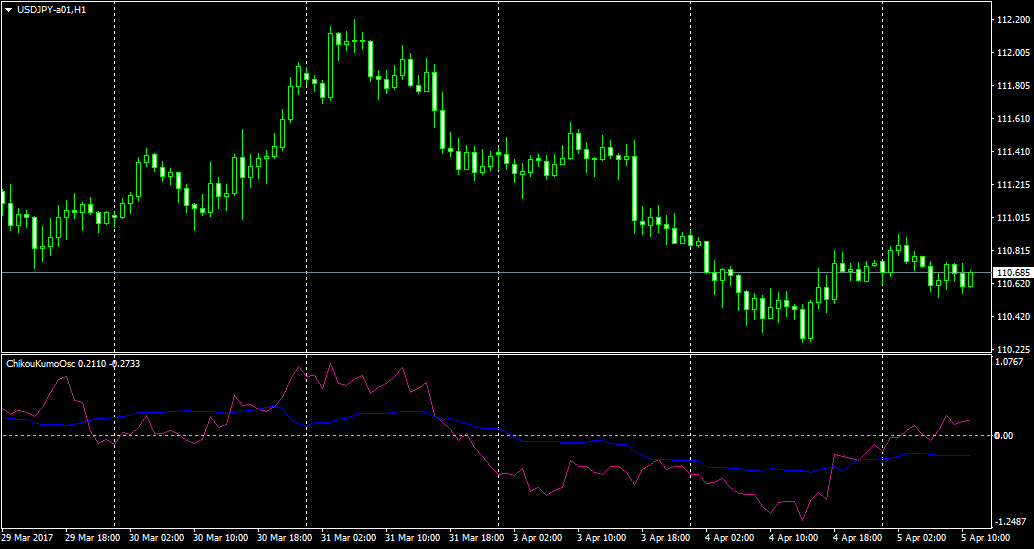 遅行スパン(紫色ライン)の値は、「現在の値-26本前の終値」です。遅行スパンが陽転しているとプラス、陰転しているとマイナスの値になります。
雲(青色ライン)の値は、「先行スパン1-先行スパン2」です。雲が陽転しているとプラス、陰転しているとマイナスの値になります。
上記チャートでは、現在、遅行スパン陽転中、雲陰転中であることが分かります。
設定項目を示します。
遅行スパン(紫色ライン)の値は、「現在の値-26本前の終値」です。遅行スパンが陽転しているとプラス、陰転しているとマイナスの値になります。
雲(青色ライン)の値は、「先行スパン1-先行スパン2」です。雲が陽転しているとプラス、陰転しているとマイナスの値になります。
上記チャートでは、現在、遅行スパン陽転中、雲陰転中であることが分かります。
設定項目を示します。
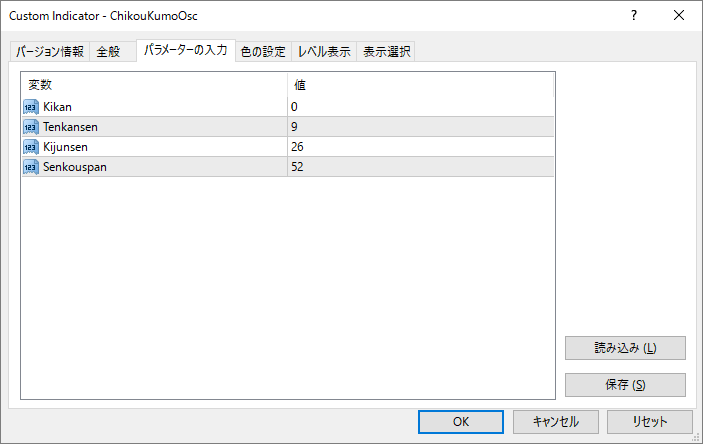 Kikanに分単位で時間軸を指定します。日足なら1440となります。なお、0を指定すると選択中の時間軸となります。その他の設定項目は一目均衡表と同じです。
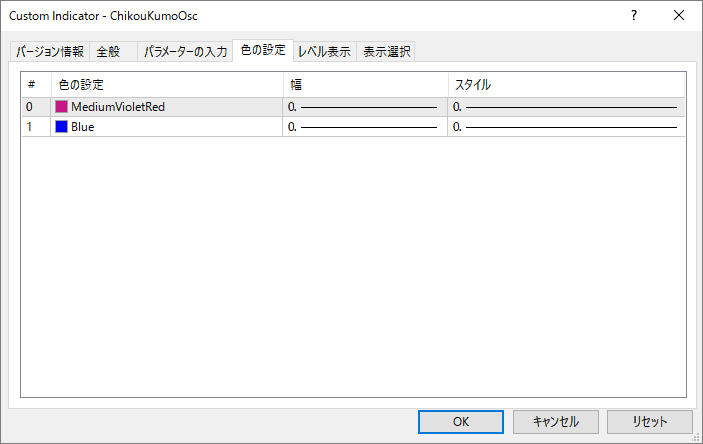 上から順に、遅行スパン・雲の表示属性を設定できます。
なお、本インジケーターのみでは雲とロウソク足の位置関係が分かりませんので、先行スパン2の期間の半値線を引いておく必要があります。
上から順に、遅行スパン・雲の表示属性を設定できます。
なお、本インジケーターのみでは雲とロウソク足の位置関係が分かりませんので、先行スパン2の期間の半値線を引いておく必要があります。
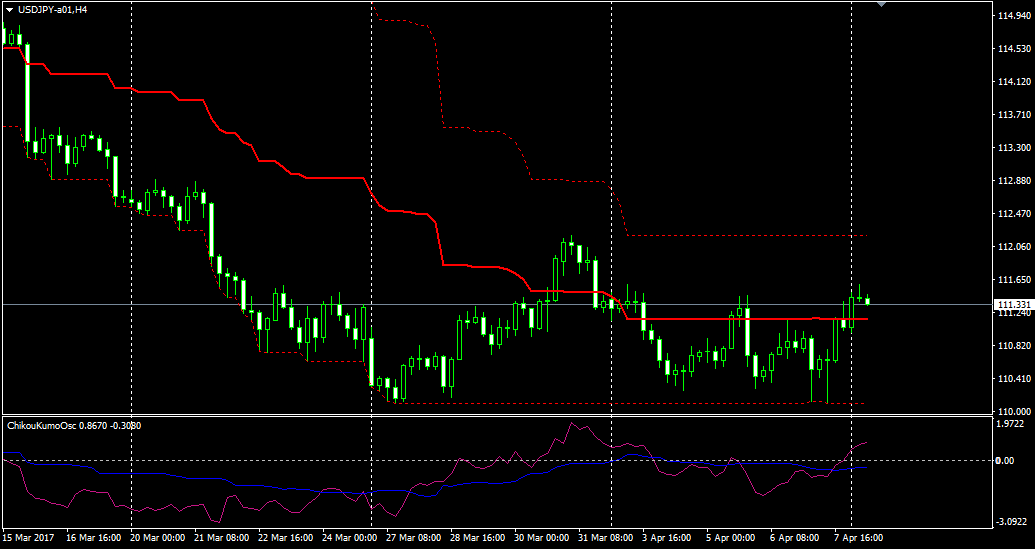 上のチャートではHLバンドを使って、半値線を描いています。
また、マルチタイムで本インジケーターとHLバンドを組み合わせた「マルチタイム半値チャート」もありますので、一度ご覧ください。
上のチャートではHLバンドを使って、半値線を描いています。
また、マルチタイムで本インジケーターとHLバンドを組み合わせた「マルチタイム半値チャート」もありますので、一度ご覧ください。
チャートウィンドウに雲と遅行スパンを表示するとき、マルチタイムで複数の雲を表示すると、雲同士が重なって訳がわからなくなります。そこで、遅行スパンと雲を時間軸別にサブウィンドウに表示するMT4用インジケーターを作成しました。 本インジケーターは遅行スパンと雲を、サブウィンドウに数値化して表示します。
遅行スパン(紫色ライン)の値は、「現在の値-26本前の終値」です。遅行スパンが陽転しているとプラス、陰転しているとマイナスの値になります。
雲(青色ライン)の値は、「先行スパン1-先行スパン2」です。雲が陽転しているとプラス、陰転しているとマイナスの値になります。
上記チャートでは、現在、遅行スパン陽転中、雲陰転中であることが分かります。
設定項目を示します。
Kikanに分単位で時間軸を指定します。日足なら1440となります。なお、0を指定すると選択中の時間軸となります。その他の設定項目は一目均衡表と同じです。
上から順に、遅行スパン・雲の表示属性を設定できます。
なお、本インジケーターのみでは雲とロウソク足の位置関係が分かりませんので、先行スパン2の期間の半値線を引いておく必要があります。
上のチャートではHLバンドを使って、半値線を描いています。
また、マルチタイムで本インジケーターとHLバンドを組み合わせた「マルチタイム半値チャート」もありますので、一度ご覧ください。¥4,000 (税込)
すでに 14 人が利用中!
提供元 / 販売元:
販売サイト:
GogoJungle
●お支払い方法





商品概要
コミュニティ(0)
人気商品ランキング
GogoJungleを初めてご利用する方へ 商品のご利用まではかんたん3ステップ!
GogoJungleでは、会員様向けに、あなたの投資生活を豊かにするサービスをご用意しております。また、商品をご購入いただけるのは、会員様のみとなっております。今すぐ会員登録をして、GogoJungleを活用してみませんか!
01
ユーザー情報を入力し会員登録
02
案内に従い購入
03
マイページからダウンロード
