Product outline
Community(0)
CCI_Arrow(MT5) Indicators/E-books
CCI_Arrow(MT5)
"シンプルで強力!CCIで確実な売買シグナルをキャッチ!"
Sales Result:
1本
Reviews:
Category:
How to provide:
Indicator
Sales from:
03/27/2025
Last Updated:
03/27/2025
Version:
1
Web Authentication:
Enable
Available company:
Payment method:
Seller複素数
Seller's last login time:4/6/2026 20:35:05
Read more seller information
¥500 coupon applicable.
The coupon expires today.
×
¥9,800(taxed)
?About 1-Click Order
Provider/Distributor
Sales site
GogoJungle

CCI_Arrow(MT5) インジケータ仕様書・取扱説明書

1.概要

CCI_Arrow(MT5)は、CCICommodity Channel Index)を基に売買サインを表示するMT4インジケータです。 特定のCCI値を基準として、買い・売りのエントリーおよびエグジットポイントを矢印で表示します。

2.仕様

  • 対応プラットフォーム: MetaTrader 5 (MT5)
  • 使用インジケータ: CCI (Commodity Channel Index)
  • サインの条件:
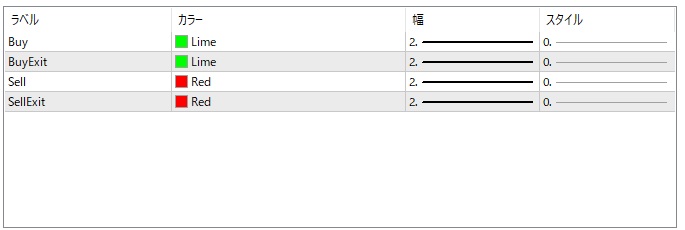
    • CCI > 100:買い(BUY)シグナル表示 Lime
    • CCI < -100:売り(SELL)シグナル表示 Red 下
    • CCI100を下回るとBUYエグジット Lime 
    • CCI-100を上回るとSELLエグジット Red 
  • 表示:
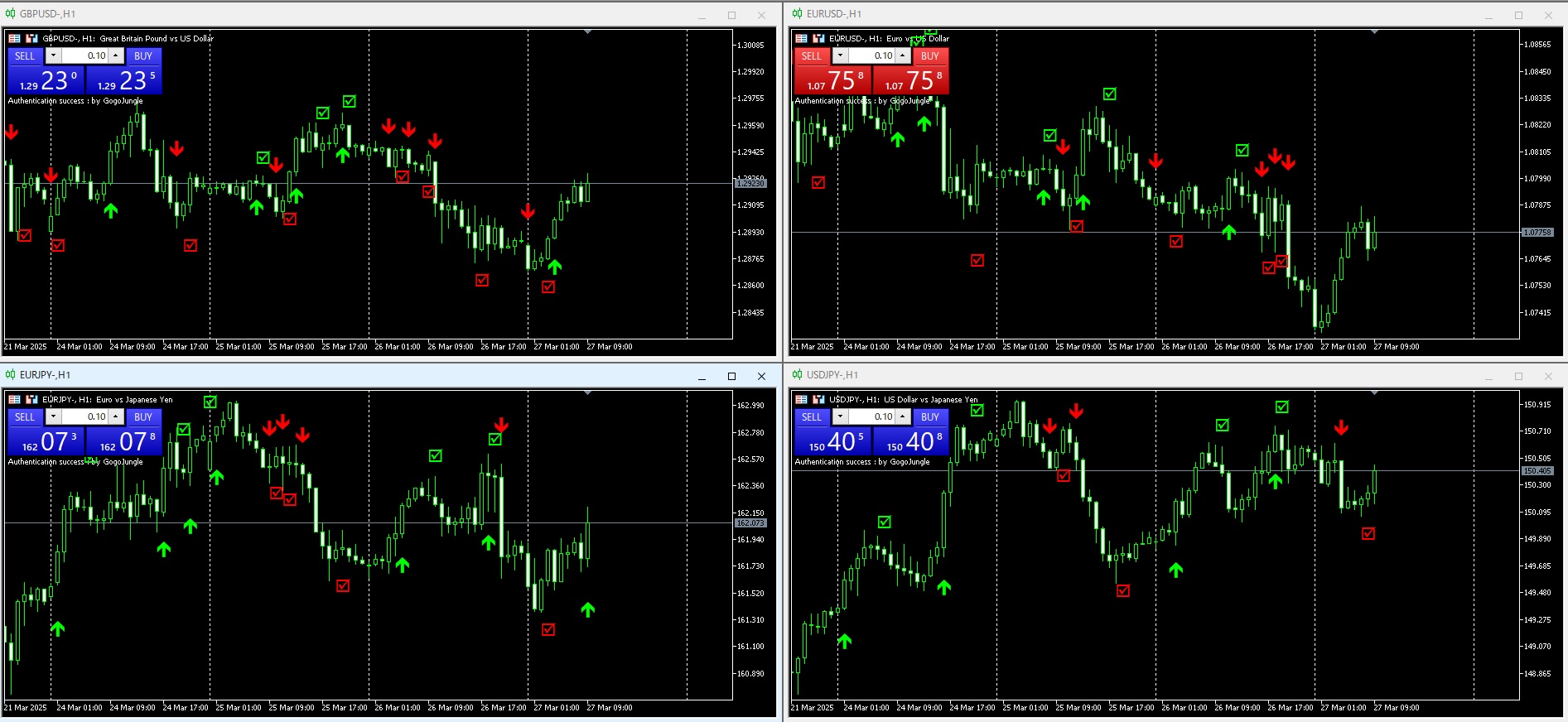
    • 買いシグナル時に上向き矢印 Lime
    • 売りシグナル時に下向き矢印 Red 下
    • 買いエグジットポイントで印を表示 
    • 売りエグジットポイントで印を表示 

3.インストール方法

  1. CCI_Arrow.mq4MetaTrader 4Indicatorsフォルダにコピーします。
    • フォルダのパス例: C:\Program Files\MetaTrader 4\MQL4\Indicators
  2. MT4を再起動し、ナビゲーターウィンドウから「CCI_Arrow」をチャートに適用します。

4.パラメータ設定

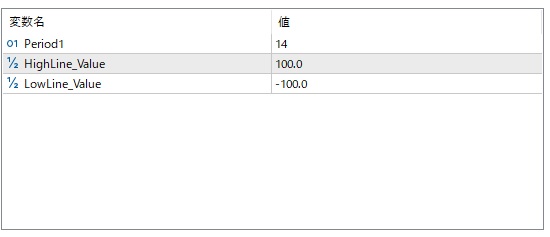
  • CCI_PeriodCCIの計算期間(デフォルト値:14
  • ArrowColorBuy:買い矢印の色(デフォルト:青)
  • ArrowColorSell:売り矢印の色(デフォルト:赤)
  • ArrowSize:矢印の大きさ


5.使用方法

  1. MT4のナビゲーターから「CCI_Arrow」を選択し、チャートにドラッグ&ドロップします。
  2. パラメータを調整し、好みの設定に変更できます。
  3. チャート上でCCIが閾値を超えたときに売買シグナルが矢印で表示されます。


6.注意事項


強いトレンドが発生している場合、逆張りのシグナルは機能しにくいことがあります。


他のインジケータやプライスアクションと併用することで精度を向上させることができます。


過去のデータでバックテストを行い、相場に適したパラメータを設定してください。


¥9,800(Tax included)
?About 1-Click Order
Product outline
Community(0)
Best Seller Ranking
Recommended Products (Campaigns)

For those using GogoJungle for the first timeEasy 3 steps to use the product!

At GogoJungle, we provide services to enrich your investment life for our members. In addition, product purchases are limited to members. Why not register as a member now and make use of GogoJungle!

01
Enter user information and register as a member
02
Follow the instructions to make a purchase
03
Download from My Page
■ Important Matters and Risk Warnings Regarding Investment Products 【Financial Instruments Business Operator】
GogoJungle Inc.
Registration: Director-General of the Kanto Local Finance Bureau (Financial Instruments Business) No. 1960
【Member Association】
Japan Investment Advisers Association
【Fees and Expenses】
The use of software, e-books, investment advisory services, etc., provided on our platform involves purchase prices determined for each product.
Additionally, when conducting actual financial instrument transactions (such as FX or CFD trading), costs such as transaction fees and spreads (the difference between the sell and buy price) may be incurred through the connected brokerage firms.
【Margin and Risk of Loss】
Transactions such as FX (Foreign Exchange Margin Trading) and CFD (Contract for Difference) allow for trading in amounts exceeding the deposited margin.
Therefore, due to sudden fluctuations in target indices (currency, commodity prices, etc.), there is a risk of incurring losses that exceed the deposited margin (loss exceeding principal).
Furthermore, financial instrument transactions involve risks such as price fluctuations, which may result in losses falling below or exceeding the initial investment principal.
【Nature of Services and Trading Entity】
The Company operates a platform (marketplace) providing investment software and information; we do not engage in the buying, selling, mediation, brokerage, or agency of financial instruments on behalf of customers.
The services and information provided are intended as reference for investment decisions and do not guarantee future profits or specific results.
While some services include investment advice, they do not constitute a mandate or solicitation to trade specific financial instruments.
Final investment decisions and the execution of trades must be made at the customer’s own risk and discretion.