
Product outline
Community(0)
Smart Order Indicators/E-books
Smart Order
たった1行でロット計算 or リスク計算ができ、シンプルながらロット入力による微調整もできるEA
Sales Result:
4本
Reviews:
Category:
How to provide:
Indicator
Sales from:
02/20/2023
Last Updated:
03/21/2025
Version:
3.13
Available company:
Payment method:
Sellertms
Seller's last login time:3/28/2026 02:17:22
Read more seller information

Smart Order 開発から1年

 ✖ボタンが小さい ✖ムダな機能が多い ✖フリーズしやすい・・・


無駄を削ぎ落としてリニューアル
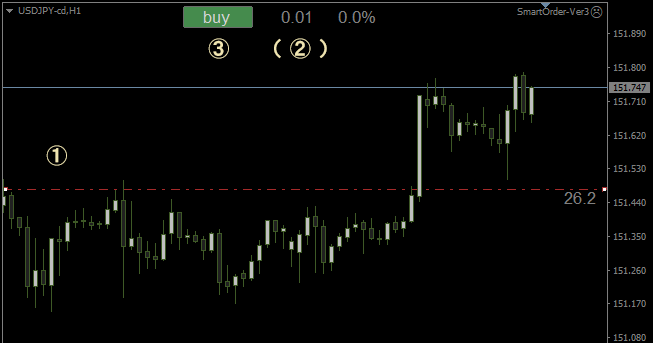


基本操作

 ① S/L(ストップロス)ラインを表示(ショートカットキー or ボタン)

   希望の損切り位置に移動

(② リスク%に応じてロットを調整 ) *リスク計算モードの場合

 ③ エントリー実行


実際の注文の様子
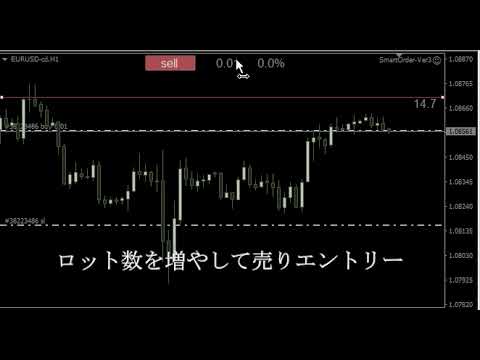
 

 ロットは「いつものロット」で

  リスクが低すぎれば増やし、

  高すぎれば減らすことができます。


 又、ロットはいつでも変更できるので、慌てたり桁間違いなども防げます

 *ロット入力は「リスク計算モード」でのみ行えます

 *リスク固定でロットの入力が不要な「ロット計算モード」もあります。


動画では、S/Lラインをショートカットキーで表示/非表示していますが、

ボタンでの切り替えも可能です。
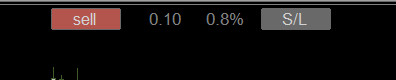
 

 [ sell / buy ](実際のエントリー)もショートカットキーに対応しました


T/P(利益確定ライン)は、

 必要時、ポジションラインを利益方向にドラッグすることで設定できるので削除


決済も、ターミナルの[x]からすぐ出来るので削除しスッキリさせました。

その他の機能  ・S/Lラインに 現在価格・売値/買値までのPIPS を表示できる
 ・S/Lラインがマウス位置から表示されるようになりました
  (マウスをS/Lラインまで移動させる手間がありません)
 ・時間足の変更に対応
  (多くのEAは、セットされた状態で時間足を変更するとチャートが固まってしまいます)
 ・操作ボタンをサブウィンドウに表示できるようになりました


!特定の取り引き商品(CFDなど)では、
  ・取引単位やスプレッドなどが極端に大きい/小さい
  ・ティックバリューが円に変換されず、USDやEURで提示される物がある
   そのため算出されるリスク値が実損益とかけ離れた値になる事があります。
  上記の状態に対応するため、
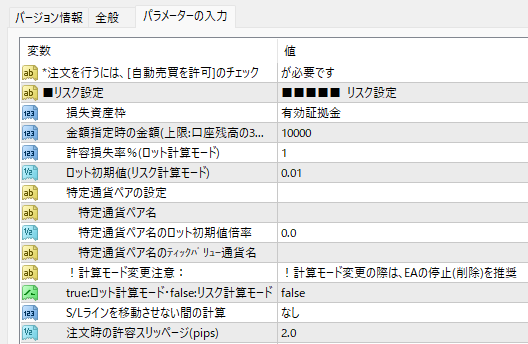
  ・特定シンボル(通貨ペア)でのロット初期値やティックバリューを設定できるパラメーター
  ・注文時のスリッページを指定できるパラメーター
   を追加しました。

  例> 1ティックバリュー = 0.01USDの場合、
     「特定通貨ペア名のティックバリュー通貨名」に USD と入力
    > (口座通貨がJPYの場合)USDJPY のレートを自動で取得し、
     正しいロット数・リスク%が計算されます。
  *ティックバリュー:1ティック当たりの金額
  *取引商品のティックバリューについて詳細は各証券会社にお問い合わせ下さい


パラメーター詳細


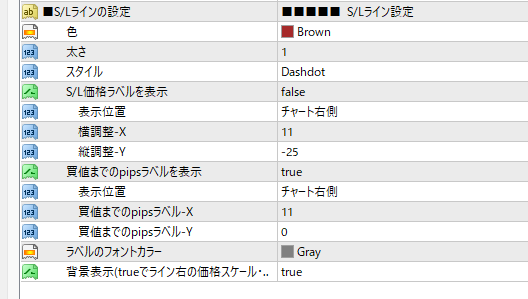
  損失資産枠 : 金額指定・口座残高・余剰証拠金・有効証拠金

  S/Lラインを移動させない間の計算 :  なし・1秒ごと・ティックごと

  2024/06/01 「入力されたロット数をエントリー後も保持する」オプションを追加しました
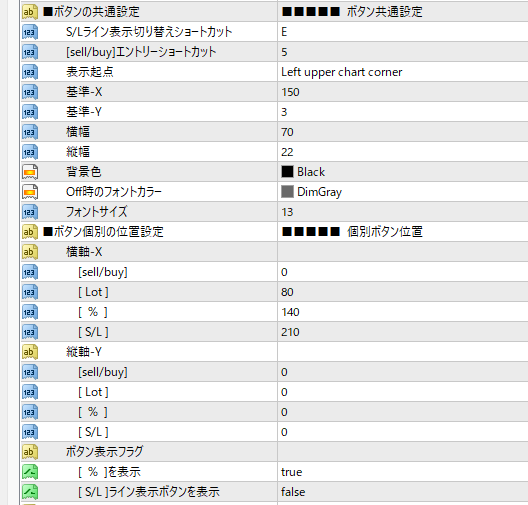


  リスク計算モードでは、リスク割合い [ % ]ボタンを非表示に設定しても表示されます


ご使用上の注意


 当ツールはEAになります。

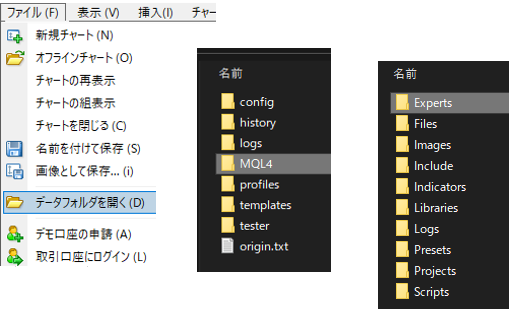
 データフォルダの [MQL4] - [Experts] フォルダに .ex4 ファイルをコピー後、

 MT4 - ナビゲーターの [エキスパートアドバイザ] から選択してご利用下さい。


 注文を行うには、事前に「自動売買の許可」にチェックを入れて下さい。

 許可されている場合                  許可されていない場合
 
 方法1:MT4 - [ツール(T)] - [オプション(O)] - [エキスパートアドバイザ] から
 方法2:MT4 - EA設定時の全般タブ - [自動売買] から


!リスク計算には、資産通貨と決済通貨の気配値表示が必要です。
 口座資金が日本円の場合、USDJPYの気配値を非表示にするとリスク計算が行われません。
 *気配値リスト内に該当通貨ペアがあれば、気配値リスト自体は非表示でも計算されます。


■更新履歴

2025.03.22 操作ボタンの表示位置にサブウィンドウを指定できるパラメーターを追加

2025.02.02 ラベルやボタン毎に横幅を指定できるパラメーターを追加

2025.01.21 ストップロスの略字を[S/L]から[SL]へ変更

2024/06/01 入力されたロット数をエントリー後も保持するオプションを追加しました

2024.05.04 S/Lライン移動時、リスクが計算されない事がある不具合を修正

2024.04.13 S/Lラインがマウス位置から始まる機能を追加

2024.04.13 ロット初期値とティックバリューをチャート読み込み時にも確認できる様修正

2024.04.13 特定シンボルのティックバリューの通貨を指定すると、

      口座通貨のレートに自動変換する機能を追加

2024.04.13 特定シンボル(通貨ペア)を設定できる数を1通貨に限定

2024.04.13 特定シンボル(通貨ペア)を空白にした場合、設定処理に入らない様修正

2024.04.06 ロットに例外値が入力されると初期値に戻る様に修正

2024.04.06 特定通貨ペアのロット初期値・ティックバリューを設定できるパラメーターを追加

2024.04.04 ロット計算及び入力値をロットステップ(最小取引単位)に則った値に修正

2024.04.04 注文時の許容スリッページを設定できるパラメーターを追加

2024.04.02 EA設定時に、他インジケーターのオブジェクトが削除されるエラーを修正

2024.04.02 エントリー時の操作 [sell/buy] にショートカットキーを割り当て

2024.04.02 バージョン3をリリース

2023.04.09 利益額の計算に BID,ASK,spread が正しく反映されていないエラーを修正

2023.04.07 決済通貨がアカウント通貨の際、利益額が極端に小さくなるエラーを修正

2023.04.06 指値エントリー時のセット注文が無効になるエラーを修正

2023.03.12 認証なしで利用できるように変更

2023.03.03 ロット分割リストの項目数を~20等分まで指定できるように変更

2023.02.21 商品登録・許容損失額を下げ過ぎると0割が発生するエラーを修正

¥1,000(Tax included)
?About 1-Click Order
Product outline
Community(0)
Best Seller Ranking
Recommended Products (Campaigns)

For those using GogoJungle for the first timeEasy 3 steps to use the product!

At GogoJungle, we provide services to enrich your investment life for our members. In addition, product purchases are limited to members. Why not register as a member now and make use of GogoJungle!

01
Enter user information and register as a member
02
Follow the instructions to make a purchase
03
Download from My Page
■ Important Matters and Risk Warnings Regarding Investment Products 【Financial Instruments Business Operator】
GogoJungle Inc.
Registration: Director-General of the Kanto Local Finance Bureau (Financial Instruments Business) No. 1960
【Member Association】
Japan Investment Advisers Association
【Fees and Expenses】
The use of software, e-books, investment advisory services, etc., provided on our platform involves purchase prices determined for each product.
Additionally, when conducting actual financial instrument transactions (such as FX or CFD trading), costs such as transaction fees and spreads (the difference between the sell and buy price) may be incurred through the connected brokerage firms.
【Margin and Risk of Loss】
Transactions such as FX (Foreign Exchange Margin Trading) and CFD (Contract for Difference) allow for trading in amounts exceeding the deposited margin.
Therefore, due to sudden fluctuations in target indices (currency, commodity prices, etc.), there is a risk of incurring losses that exceed the deposited margin (loss exceeding principal).
Furthermore, financial instrument transactions involve risks such as price fluctuations, which may result in losses falling below or exceeding the initial investment principal.
【Nature of Services and Trading Entity】
The Company operates a platform (marketplace) providing investment software and information; we do not engage in the buying, selling, mediation, brokerage, or agency of financial instruments on behalf of customers.
The services and information provided are intended as reference for investment decisions and do not guarantee future profits or specific results.
While some services include investment advice, they do not constitute a mandate or solicitation to trade specific financial instruments.
Final investment decisions and the execution of trades must be made at the customer’s own risk and discretion.
GogoJungle Inc.
Registration: Director-General of the Kanto Local Finance Bureau (Financial Instruments Business) No. 1960
Member Association: Japan Investment Advisers Association
GogoJungle Inc.
Registration: Director-General of the Kanto Local Finance Bureau (Financial Instruments Business) No. 1960
Member Association: Japan Investment Advisers Association
Financial Services AgencyJapan Investment Advisers AssociationFinancial Instruments Mediation Assistance CenterSecurities and Exchange Surveillance Commission

Copyright © 2026 GogoJungle Inc. All Rights Reserved.